
7 Twitter API Use Cases With No X Developer Account (2026)
The current public X pricing page lists pay-per-use and Enterprise access. Here are 7 Twitter data use cases you can ship without an X developer account.

TL;DR: The current public X pricing page lists prepaid pay-per-use and custom Enterprise access, with standard Post reads at $0.005 and a 3-million monthly Post-read cap for pay-per-use access. Third-party managed APIs offer a separate pay-per-call path for public data without an X developer account. This article covers 7 production-ready use cases you can build using that approach, with benchmarks, cited research, and cost estimates.
Why Developers Are Routing Around the X Developer Portal in 2026
The official X developer access stack has changed repeatedly. Historical Free, Basic, and Pro plans appear in older documentation and archives, but historical terms should not be presented as the current public offer without a dated primary source.
That stack is gone.
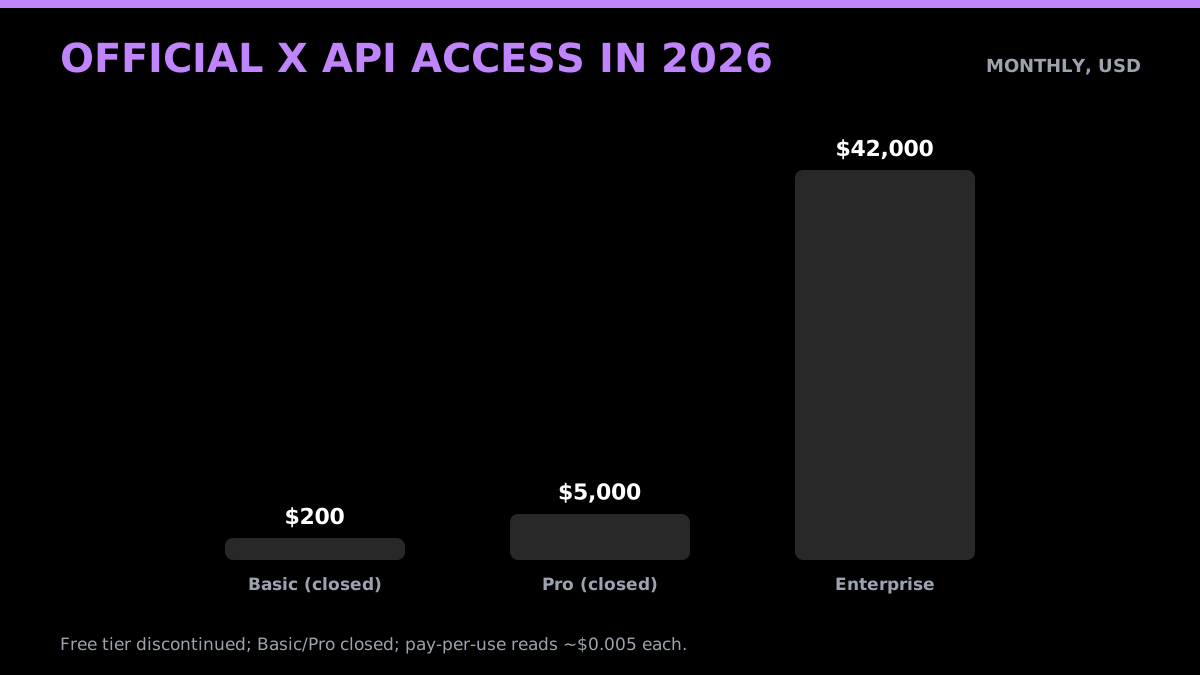
The current official pricing page lists prepaid pay-per-use and custom Enterprise access. It prices a standard Post read at $0.005 and a standard Post create request at $0.015, and lists a 3-million monthly Post-read cap for pay-per-use access. It does not list general public Free, Basic, or Pro plans, publish a $42,000 Enterprise floor, or state a date when every account changed. The current getting-access documentation describes account and app creation with credentials generated at app creation, and publishes no review requirement or timeline; older X developer community threads describing week-long waits reflect earlier processes. Confirm endpoint availability and account-specific limits in the X Developer Console.
Does anyone have experience with the new Twitter API? from r/learnprogramming
For developers building brand monitoring tools, sentiment analysis pipelines, lead generation systems, or academic research corpora, that wall is a real problem. The data they need, meaning publicly posted tweets, has not changed. The mechanism for accessing it through official channels has become significantly more expensive and slower to start.
The alternative that has matured alongside these restrictions is the third-party managed Twitter API. These are services that maintain their own data collection infrastructure, expose a clean REST interface, and charge per call rather than per month. GetXAPI, for example, charges $0.001 per call with no approval queue. Credits do not expire. There is no monthly minimum.
The tradeoff is scope. Third-party APIs are strictly read-only and limited to publicly available data. You cannot post tweets, access direct messages, or retrieve private account content. For the seven use cases below, that limitation is irrelevant: all of them work entirely on public tweet data.
This article walks through each use case with real production context, cost estimates, and citations to published research where available.
What "No Developer Account Needed" Actually Means (and What It Doesn't)
Before the use cases, a quick scope check.
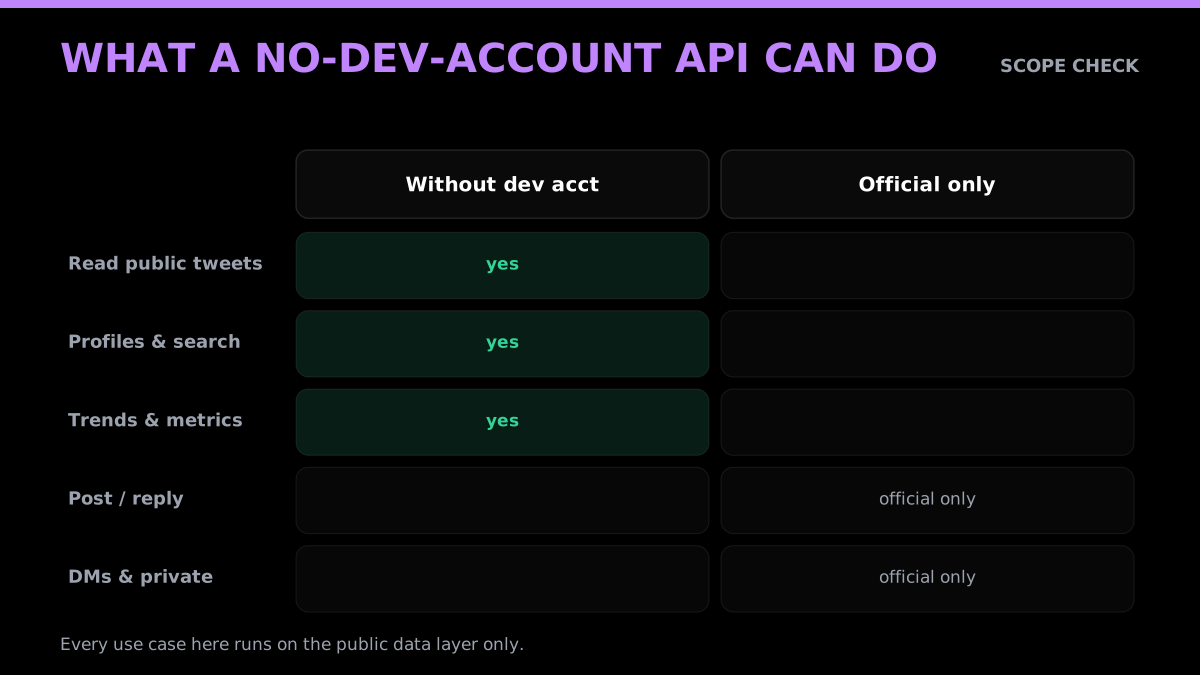
When we say "no developer account needed," we mean: you do not need to sign up at the X Developer Console, create an app, agree to X's developer terms of service, or provision an official API key. You sign up with a third-party API provider, get credentials immediately, and start making calls.
What you can access: public tweets, public user profiles, public search results, trending hashtags, and public engagement metrics.
What you cannot access: private accounts, direct messages, protected tweet streams, real-time streaming at the Firehose level, or any account-level write actions. If your use case requires posting on behalf of a user, processing DMs, or accessing non-public data, you need an official X developer account.
For the vast majority of analytics, monitoring, research, and enrichment pipelines, the public data layer is entirely sufficient.
What CAN you actually do with the Free tier of Twitter's API now? from r/learnprogramming
1. Sentiment Analysis at Scale
Twitter carries 500 million posts per day, equaling approximately 350,000 per minute and over 100 billion impressions daily. That volume represents one of the largest continuous streams of raw public opinion on the internet. For developers building consumer opinion monitoring tools, financial signal extractors, or NLP research pipelines, the sentiment analysis use case is the most fundamental starting point.
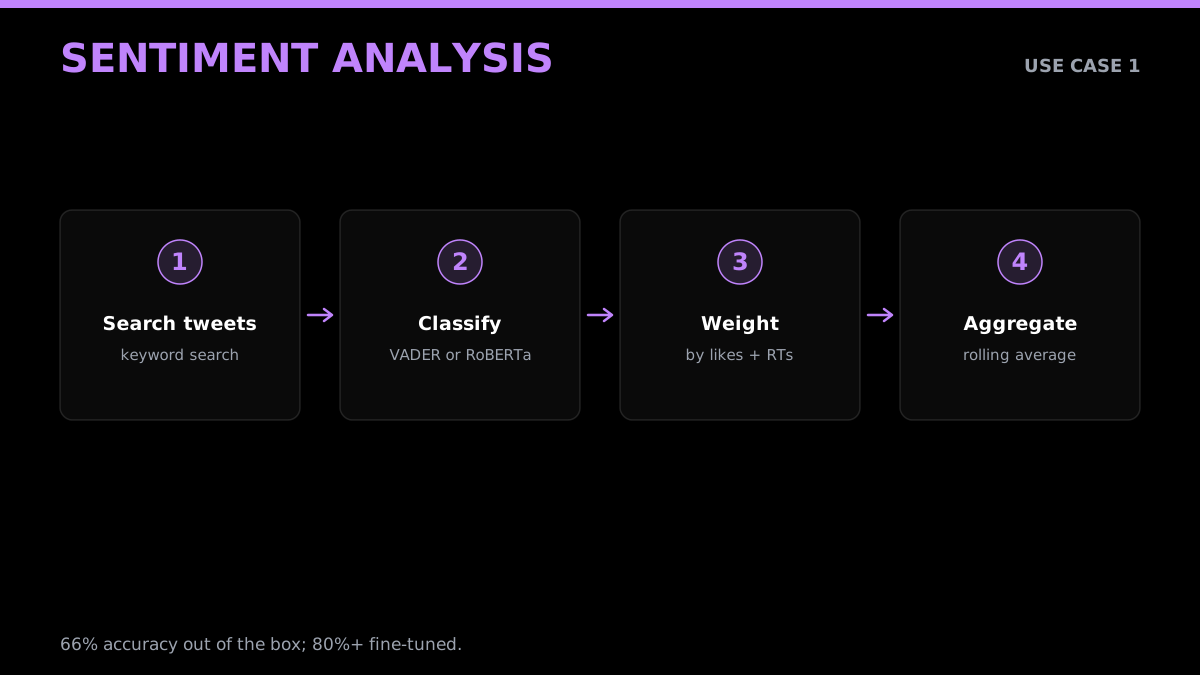
The good news is you do not need expensive infrastructure to get useful results. A 2025 Apify tutorial built a working tweet sentiment classifier using approximately 1,700 tweets fetched via Apify's Twitter URL Scraper, no official API key anywhere in the pipeline. A support vector machine with TF-IDF features achieved 66.57% accuracy out of the box. Fine-tuning a RoBERTa model on the same dataset pushed accuracy past 70%, and production sentiment analysis studies on Twitter data using state-of-the-art models hit the 80-87% range. A larger worked example, classifying 10,000 tweets with Jev and the X API, reports the real cost per thousand.
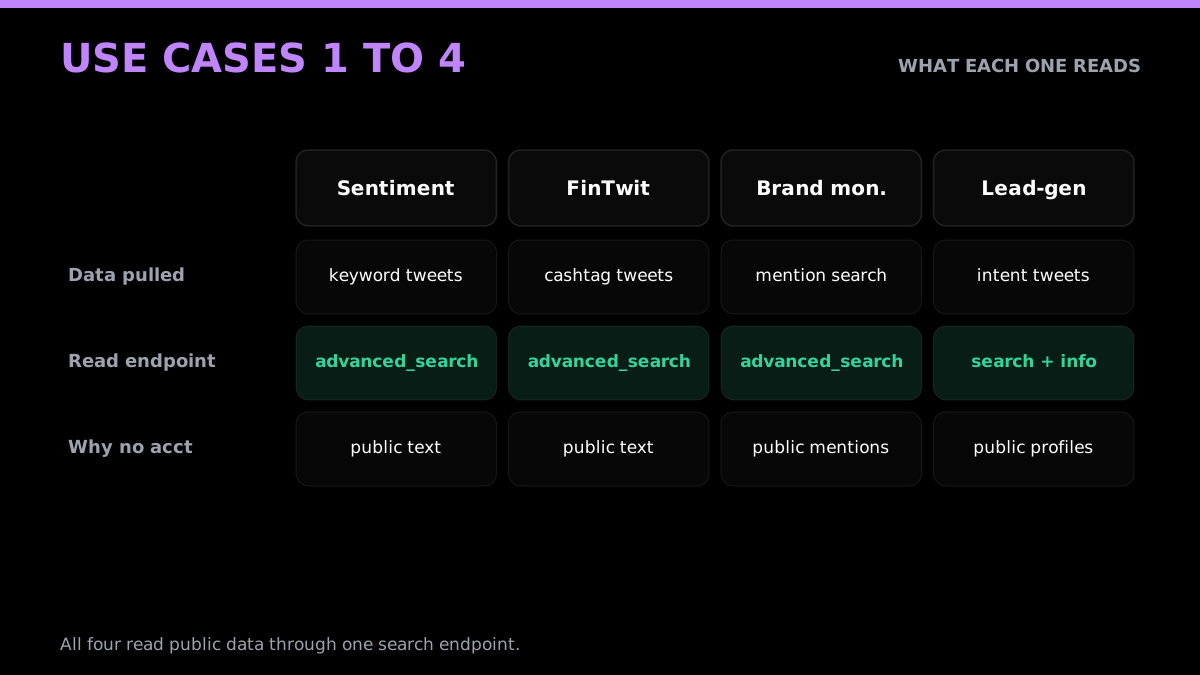
The practical implementation path: pull tweets matching a keyword or product name via a third-party search API, pass the text through a pre-trained sentiment model (VADER for quick-and-dirty, fine-tuned RoBERTa for production), aggregate sentiment scores over time, and surface a dashboard or alert system. The entire data collection step, meaning the part that used to require a developer account, is replaced by a per-call API that returns structured JSON with text, timestamp, author metadata, and engagement counts.
Cost for a typical brand monitoring setup pulling 10,000 tweets per day: roughly $10 at third-party API rates, versus $50 at official X pay-per-use rates for the same volume. For a sentiment analysis research project running a one-time collection of 100,000 tweets, the difference is roughly $5 versus $500.
A few practical implementation notes for production systems. VADER works well for general consumer opinion but struggles with sarcasm, irony, and domain-specific vocabulary. For product feedback specifically, fine-tuning on a domain-specific training set improves accuracy significantly. The tweet metadata returned by third-party APIs includes retweet counts and like counts, which you can use as a confidence weighting layer: a sentiment-negative tweet with 500 retweets deserves more weight in an aggregate score than one with zero engagement. For time-series aggregation, daily rolling averages smooth out the noise better than hourly windows for most consumer brand monitoring purposes.
import requests

HEADERS = {"Authorization": "Bearer YOUR_API_KEY"}

def fetch_tweets(keyword):
    r = requests.get(
        "https://api.getxapi.com/twitter/tweet/advanced_search",
        headers=HEADERS,
        params={"q": keyword, "product": "Latest"},
        timeout=20,
    )
    r.raise_for_status()
    return r.json().get("tweets", [])

tweets = fetch_tweets("$AAPL")  # classify each tweet["text"] with VADER or RoBERTa downstream
2. Financial Market Signal Extraction from FinTwit
The intersection of Twitter data and financial markets has a decade of academic research behind it. A June 2024 peer-reviewed study published in PMC used a fine-tuned RoBERTa model on FinTwit posts combined with an LSTM price predictor and found a Pearson correlation of r=0.43 between tweet sentiment and Tesla's stock price. During high-activity windows, that correlation rose to r=0.55. Earlier studies have put DJIA direction prediction accuracy at 87.6% using Twitter sentiment as the primary signal.
The FinTwit community, meaning retail traders, analysts, and institutional commentators posting on X under financial hashtags like $TSLA, $AAPL, or $SPY, generates a continuous stream of opinion data that moves faster than most official news feeds. A developer building a quantitative signal extraction pipeline needs three things: a search API that can filter by cashtag or keyword in real time, a sentiment classifier calibrated for financial language, and a time-series store to correlate sentiment shifts with price data.
All three components are available without an X developer account. Third-party APIs let you query cashtag searches, returning structured tweet data with timestamps accurate to the second. Dedicated FinTwit analytics services like adanos.org provide pre-computed bullish/bearish ratios and buzz scores via REST endpoints, no official API key required.
The realistic production caveat: tweet-based financial signals work best as one input among several, not as a standalone trading system. The correlations are real but noisy. The research above used months of historical data to establish baseline patterns; a two-week sprint will not replicate institutional-grade results. But for retail quant tools, earnings sentiment trackers, and watchlist monitoring systems, the public tweet layer is more than sufficient.
Implementation shape for a minimal FinTwit signal pipeline: query a cashtag (e.g., "$TSLA" or "$AAPL") via third-party search API every minute, classify each tweet as bullish, bearish, or neutral using a pre-trained financial sentiment model, maintain a rolling ratio over the past 100 tweets, and emit a signal when the bullish-to-bearish ratio crosses a threshold. Combine with a price feed via a market data API. The Twitter data collection step is the cheapest part of this stack, and none of it requires an X developer account.
def fintwit_ratio(cashtag, classify):
    tweets = fetch_tweets(f"{cashtag} -filter:retweets lang:en")
    bull = sum(1 for t in tweets if classify(t["text"]) == "bullish")
    bear = sum(1 for t in tweets if classify(t["text"]) == "bearish")
    return bull / max(bear, 1)  # > 1 = net bullish
Start building with GetXAPI
$0.05 per 1,000 tweets. $0.10 free credits. No credit card required.
3. Brand Monitoring and Untagged Mention Detection
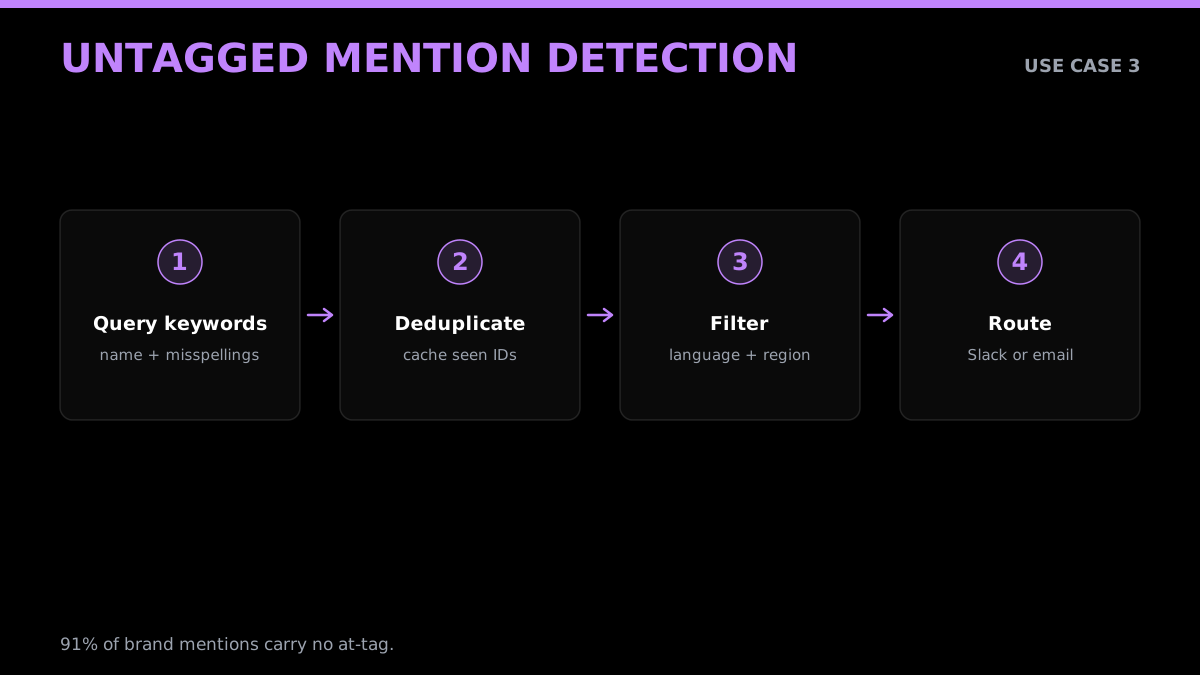
This is the use case where the gap between official X notifications and third-party API coverage is most concrete. Twitter's native notification system fires only when someone tags your handle directly, meaning @YourBrand appears in the tweet. Research from Octolens shows that 91% of brand conversation on social platforms carries no handle tag at all. People mention product names, describe experiences, and post complaints without typing an @ symbol.
A Brandwatch study of 67 leading retailers made the problem quantitative: brands responded to untagged complaints only 1.9% of the time, versus 64.6% for direct @-tagged questions. That 62-percentage-point gap is not a strategy failure. It is an infrastructure failure. Native notifications do not surface what they cannot see.
The fix is a keyword search API that runs continuous queries against the full public tweet index using product names, common misspellings, and product-adjacent terms. A third-party Twitter search API lets you build this without a developer account: query every five minutes for "YourProduct" OR "your product" OR "common misspelling", filter by language and region, deduplicate against a local cache, and route new matches to Slack or email via webhook.
Production cost for monitoring 5 product keywords, pulling matches every 5 minutes: roughly $1.35 per month at standard per-tweet pricing, assuming 100 tweet matches per query cycle. Compare that to commercial brand monitoring SaaS tools that charge $200 to $500 per month for the same keywords. The developer path is an order of magnitude cheaper and gives you direct access to the raw data for downstream processing.
One implementation detail that matters for this use case: deduplication. The same tweet can appear across multiple query cycles if it stays in the recent results window. Maintaining a local cache of seen tweet IDs (Redis works well here) and filtering before any downstream action prevents double-alerting. Most third-party APIs return a unique tweet ID in each response, making deduplication straightforward. Also note that X's public search uses the same operator syntax regardless of which API you call through: boolean operators (AND, OR, NOT), phrase search, language filters, and geolocation filters all work identically through managed APIs as they do through the official endpoint.
seen = set()

def new_mentions(query):
    fresh = []
    for t in fetch_tweets(query):
        if t["id"] not in seen:
            seen.add(t["id"])
            fresh.append(t)
    return fresh  # only tweets not alerted before
4. B2B Lead Generation from Purchase-Intent Tweets
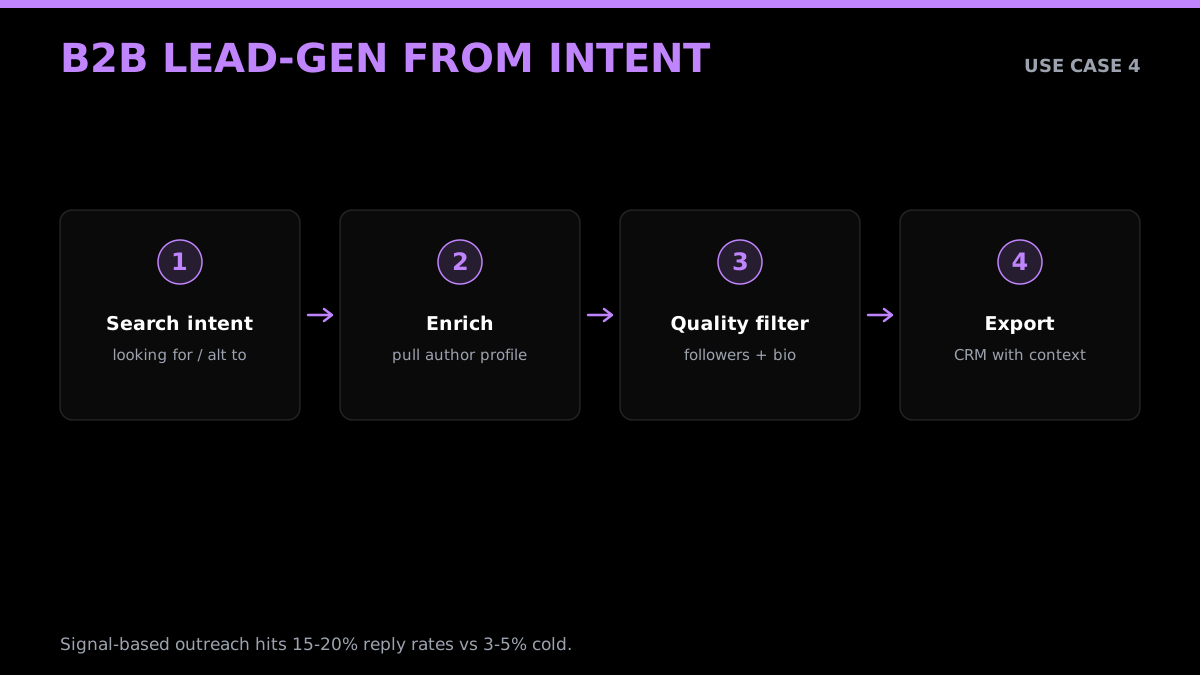
This use case is narrower than general social listening but has unusually concrete conversion metrics behind it. The premise: developers and buyers publicly post purchase-intent signals on Twitter. Tweets like "looking for an alternative to [tool]", "anyone have recommendations for [category]", or "our team just got burned by [vendor], what do you use?" are explicit buying signals from real people.
27% of Americans earning $100K or more use X, the highest income concentration of any major social network. That skews the FinTwit and B2B SaaS signal pool toward buyers with budget.
The conversion data is the compelling part. Autobound's B2B practitioner analysis found that signal-based outreach referencing a prospect's specific tweet achieves 15 to 20% reply rates, compared to 3 to 5% for standard cold email. That is a 3x to 5x improvement in reply rate from a single contextual detail. As one practitioner quoted in the analysis puts it: "A VP complaining about their CRM at 10pm is venting, and that raw signal is more honest than any intent data vendor can provide."
Social sellers using Twitter-based signal enrichment generate 45% more pipeline opportunities than those using standard outbound alone, per the same source.
The technical implementation: build a keyword search pipeline that runs queries for competitor pain-point phrases and category-level searches on a configurable interval. Filter results by account age, follower count, and engagement history to distinguish real buyers from noise. Export to your CRM or outreach tool with the triggering tweet attached as context for the first message.
Third-party Twitter search APIs handle the data collection layer entirely without a developer account. You supply the keywords and the poll interval; the API returns structured JSON you can process immediately.
There is a practical enrichment step worth building in: pull the author's profile data alongside the triggering tweet. A tweet saying "looking for a [product category] alternative" from an account with 15 followers and no profile picture is noise. The same tweet from a verified account with a complete bio listing a job title and company is signal. Third-party user profile endpoints return follower counts, verification status, bio text, and engagement history, which you can use as a minimum quality filter before routing leads to your CRM. This keeps the lead list from filling with bot accounts and low-signal noise.
def fetch_profile(username):
    r = requests.get(
        "https://api.getxapi.com/twitter/user/info",
        headers=HEADERS,
        params={"userName": username},
        timeout=20,
    )
    r.raise_for_status()
    return r.json().get("user", {})

def is_real_lead(profile):
    return profile.get("followers_count", 0) > 50 and bool(profile.get("description"))
5. Competitor Monitoring and Campaign Intelligence
Monitoring competitor Twitter accounts and hashtag performance used to require either a paid social listening SaaS subscription or an official X Pro API plan. Both have become significantly more expensive or less accessible in 2026.
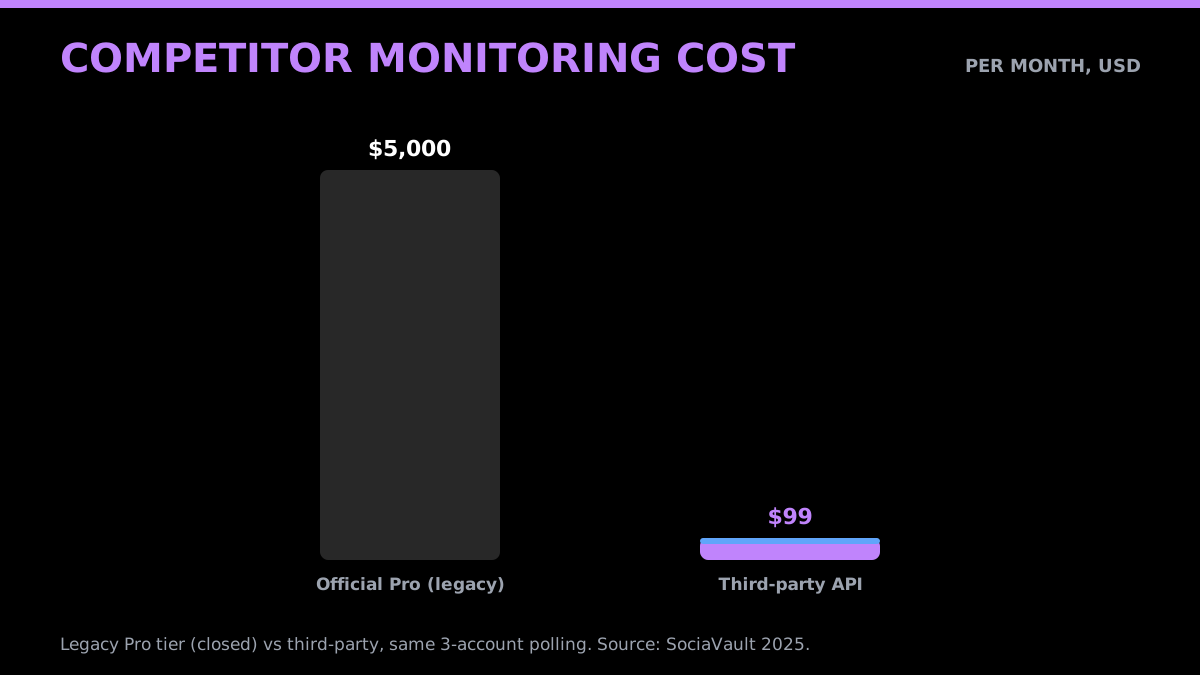
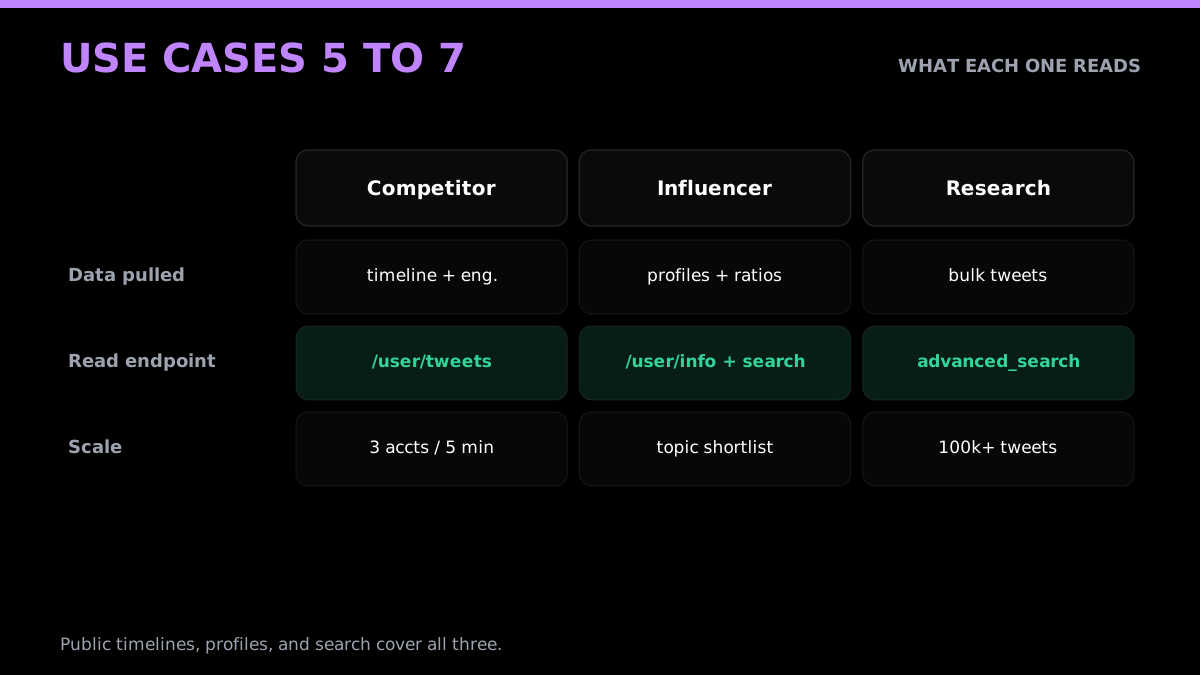
The alternative is direct polling of public competitor timelines via a third-party Twitter API. Public accounts expose their full post history, engagement metrics, and hashtag usage through the same endpoints that power search. A developer can build a pipeline that checks three competitor accounts every 5 minutes, parses engagement rates by post type, flags posts that spike above their historical average, and routes alerts to a Slack channel.
A third-party case study describes a developer monitoring three high-profile competitor accounts every 5 minutes and comparing a historical $5,000 X Pro subscription with a $99 third-party plan. Treat that as a provider-published historical comparison, not evidence of X's current public plan availability.
The capability set available without a developer account: full timeline retrieval with engagement metrics, hashtag performance tracking, mention volume over time, and post frequency analysis. What you lose is access to private account data (irrelevant for competitor monitoring) and streaming-level latency (a 5-minute poll is fast enough for campaign intelligence).
For trend detection, third-party APIs expose trending hashtag data including tweet counts, velocity, and hourly history. Developers building content timing tools can monitor hashtag growth rates and trigger content creation or scheduling when a relevant conversation is accelerating, rather than after it peaks.
The competitor monitoring use case also extends naturally to campaign intelligence. When a competitor runs a product launch or promotion on Twitter, their organic tweet volume spikes, engagement metrics shift, and specific hashtags start appearing in their posts. A pipeline that tracks these signals can surface competitive moves in near real-time, often within minutes of a competitor going live, rather than waiting for a marketing debrief or press release. The data required for this analysis is entirely public and accessible through standard search and user timeline endpoints without any developer account.
6. Influencer Discovery and Audience Quality Scoring
Influencer marketing infrastructure has a data quality problem. Follower counts are routinely inflated by bot accounts. Engagement rates are artificially boosted by engagement pods. Audience demographics are self-reported and unverified. The official X API does not directly solve any of these problems. The signals for detecting them are all in the public data layer.
Third-party Twitter APIs that expose user profile metadata, follower counts, follower-to-following ratios, posting frequency, and engagement history give developers the raw material to build quality-scoring systems. Some providers add pre-computed authenticity scores and bot probability fields to their user profile responses.
Influencer Marketing Hub's 2025 report found that micro-influencers with 10,000 to 50,000 followers achieve 60% higher engagement rates than mega-influencers with 1 million or more followers. For brands focused on conversion rather than reach, the micro tier is the higher-value target. Building a discovery tool that surfaces accounts matching a topic keyword with follower counts in the 10K-50K range and engagement rates above a threshold is a straightforward data pipeline problem.
Top Twitter data API providers in 2026 offer user search endpoints that return follower counts, engagement history, and account metadata in structured JSON. A developer can run a topic keyword search, filter on follower count range, compute an engagement rate from recent tweet data, and produce a ranked shortlist of influencer candidates, no X developer account at any point in that pipeline.
The audience quality scoring step, meaning bot detection, requires account age, posting frequency patterns, and follower-to-following ratio analysis. All of those fields are in the public profile metadata returned by third-party APIs.
A minimal bot-probability scoring function using only public profile metadata might look like this: accounts created within the past 90 days score higher risk; follower-to-following ratios below 0.1 (following 10x more people than follow back) score higher risk; accounts with zero profile photos or bio text score higher risk; accounts with engagement rates statistically inconsistent with their follower counts (either far too high or far too low) score higher risk. Sum and weight these signals to produce a composite score. This is not as accurate as dedicated bot-detection services, but it catches the obvious cases and is available from public data alone. No developer account required.
def bot_score(p):
    score = 0
    ratio = p.get("following_count", 0) / max(p.get("followers_count", 1), 1)
    if ratio > 10:
        score += 2
    if not p.get("description"):
        score += 1
    if not p.get("profile_image_url"):
        score += 1
    return score  # higher score = more bot-like
7. AI Training Data and Academic Research Corpus Collection
Large language model fine-tuning, classification model training, and academic social science research all require structured text datasets at scale. Twitter's public post history is one of the most-used sources for NLP training data, particularly for tasks involving informal language, opinion expression, slang, and real-time discourse patterns.
The official Academic Research API track that offered elevated access to qualified researchers was discontinued. Current official Enterprise access is custom priced and requires direct discussion with X, so there is no public monthly floor to use in a research budget without a quote.
Third-party APIs provide the same public tweet data at dramatically lower cost. A May 2025 Medium tutorial documented building a 50,000-tweet training dataset for LLM sentiment fine-tuning using Label Studio and Apify's scraper. No official API key appeared anywhere in the pipeline. Total data collection cost for 100,000 tweets at third-party rates: roughly $5. At official X pay-per-use rates, the same collection would cost approximately $500.
For throughput, Apify's Tweet Scraper V2 extracts 30 to 80 tweets per second, enabling a 1 million-tweet corpus collection to complete in hours rather than days.
Academic dataset precedents confirm the approach. A November 2024 arXiv paper captured 22 million publicly available X posts from May to July 2024 covering 2024 U.S. Presidential Election discourse using targeted keyword scraping without an official Academic Research API. The X-CYBER-SENT-2025-v1 dataset contains 503,456 tweets from August 2024 through March 2025 on cybersecurity topics, collected via public data methods. Large-scale misinformation research has analyzed approximately 2 million tweets across 123 fact-checked stories using public tweet datasets.
For bot and coordinated inauthentic behavior detection specifically, researchers at arXiv (2024) studied state-sponsored influence campaigns spanning 200 million or more tweets across 19 campaigns from 2018 to 2022 using public data. The public metadata layer, including account age, posting frequency, follower ratios, and engagement patterns, is sufficient to train anomaly detection classifiers without any private data access.
For academic research teams transitioning away from the discontinued Academic Research API, the practical path is: identify an existing public dataset (Kaggle, SNAP, Zenodo, or Archive.org) matching your topic and time range, then supplement with targeted keyword collection via a third-party API for the specific time window your research requires. Many research questions can be answered with datasets that already exist in the public domain, with no collection phase required. For fresh collection, third-party APIs with historical depth beyond 7 days are the closest equivalent to what the Academic Research API provided.
The cheapest Twitter API. Try it free.
$0.05 per 1,000 tweets. $0.10 free credits. No credit card required.
Real-Time Alerting, Webhook Architecture, and Event Tracking
Two use cases benefit most from low-latency data delivery: crisis detection and live event tracking. Both deserve a dedicated section because the technical architecture differs from simple polling.
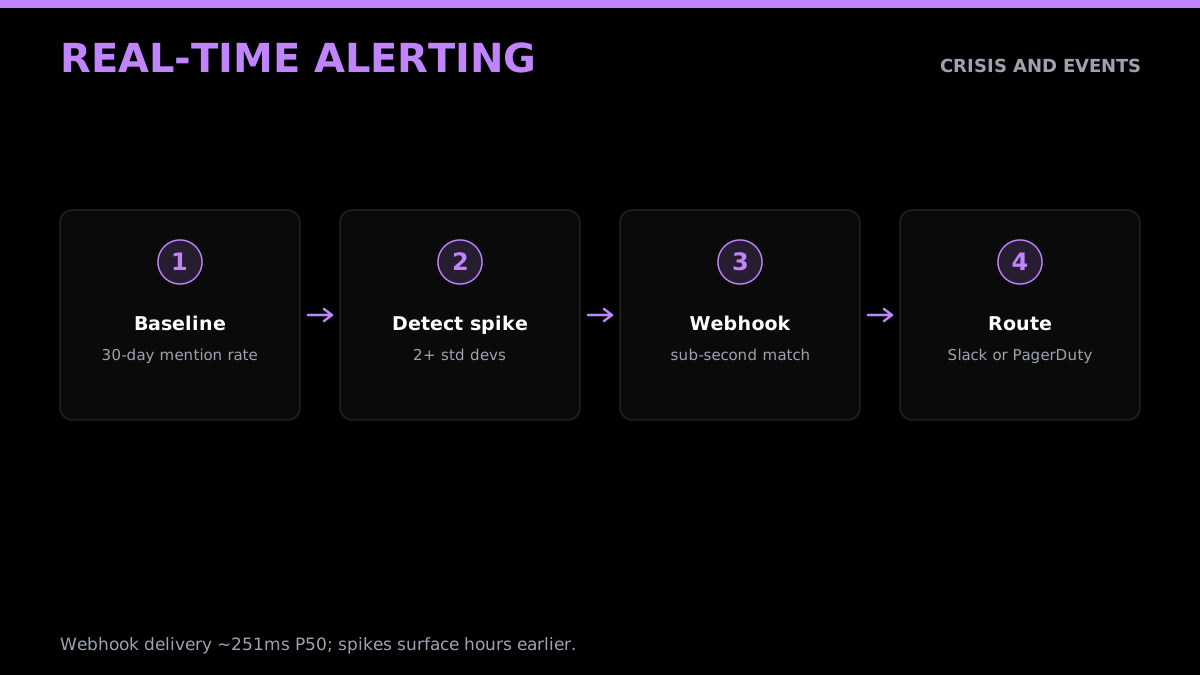
For crisis detection, the relevant metric is how quickly a spike in negative mentions surfaces to whoever needs to respond. Multiple social listening vendors cite a 4-hour earlier detection window for organizations using AI-powered monitoring versus manual checks. The mechanism is volume anomaly detection: measure the baseline mention rate for your brand keywords over a rolling 30-day window, then alert when the current-hour rate exceeds two or three standard deviations from baseline.
Third-party Twitter APIs that support webhooks deliver tweet matches with median latency around 251ms (P50) and 327ms (P90) from post time, per published stream performance benchmarks. That is sub-second delivery on a webhook trigger. For a polling setup checking every 5 minutes, the cost of a brand monitoring alert system is approximately $1.35 per month at standard per-tweet pricing.
import statistics

def is_spike(current_hour_count, baseline_hourly_counts):
    mu = statistics.mean(baseline_hourly_counts)
    sigma = statistics.pstdev(baseline_hourly_counts) or 1
    return (current_hour_count - mu) / sigma >= 2  # 2+ std devs above baseline
https://www.youtube.com/watch?v=jpV1B2N4IxY
For live event and conference tracking, the requirements are slightly different. Event hashtag dashboards need to aggregate reach estimates, impression counts, unique authors, and engagement over the duration of an event. Tweet Binder and similar tools have built entire businesses on this use case using public tweet search. A developer can build a custom event dashboard, returning structured JSON with tweet metadata, author info, and engagement metrics, integrable with Power BI, Tableau, or Looker Studio using third-party search APIs at configurable polling intervals ranging from 6 seconds to 24 hours.
The customer support triage variant of real-time alerting is also worth naming. Sprout Social's 2025 index found that 73% of social media users say they will buy from a competitor if a brand does not respond on social. Combined with the 91% untagged mention rate, the math is clear: most brand mentions that signal purchase decisions or defection risk are invisible to native notifications. A keyword-based webhook alert pipeline that routes tweets matching product name plus sentiment indicators to a Zendesk queue or Slack channel costs under $5 per month to operate and catches support signals that standard CRM tooling will never see.
What to Actually Compare When Choosing a Third-Party Twitter API
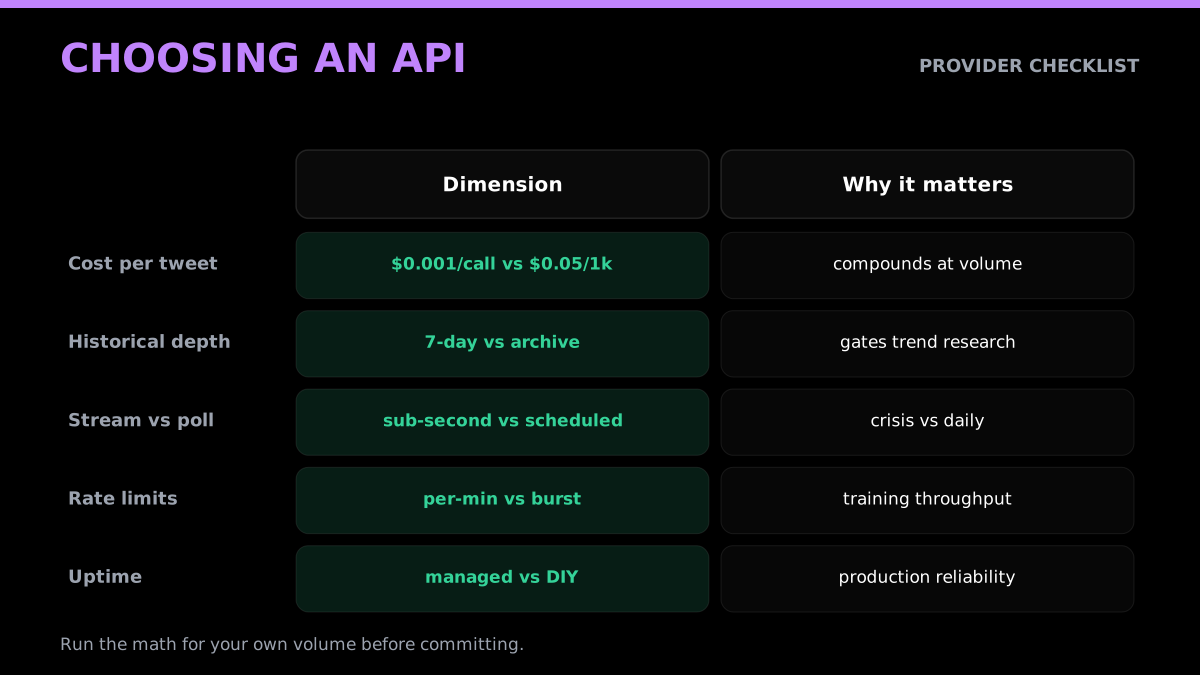
The use cases above all share a common infrastructure layer: a third-party API returning structured tweet JSON. The providers in this space differ on several dimensions that matter for production use.
Cost per tweet. The baseline range is $0.05 to $0.15 per 1,000 tweets for most providers. GetXAPI charges $0.001 per call. At high volume (1 million tweets per month), these differences compound significantly. Run the math for your expected query volume before committing.
Historical depth. Some providers index only the trailing 7 days (matching the official X pay-per-use window). Others maintain 30-day or full-archive search. If your use case requires trend analysis over time or retrospective research, historical depth is the first filter.
Streaming vs. polling. Real-time webhook delivery (sub-second) requires providers that maintain persistent stream connections. Polling setups check on a schedule you configure. For crisis detection and live events, streaming latency matters. For daily competitive intelligence pulls, a 5-minute polling interval is sufficient.
Rate limits and burst capacity. Academic and AI training data collection scenarios require high-throughput bursts. Check whether the provider caps per-minute rates or supports on-demand burst scheduling.
Data freshness. For financial signal extraction, a 10-second lag between post time and API availability can matter. For brand monitoring, a 1-minute lag is irrelevant. Know your latency requirement before evaluating providers.
ToS posture. Third-party Twitter data providers operate under varying legal and contractual frameworks. Some explicitly prohibit commercial use of collected data; others allow it with attribution requirements. Review the provider's terms before building a production system.
Reliability and uptime SLAs. Production monitoring systems need consistent availability. One developer's report on testing all four official and unofficial Twitter access approaches noted that DIY scraping showed a 40% failure rate in load tests. Managed APIs offload the maintenance burden of staying ahead of X's bot detection changes.
A note on DIY scraping as a fifth option: it is technically possible to run your own scraping infrastructure using tools like Playwright or Puppeteer to simulate browser sessions. The same developer who tested all approaches across 60+ hours of experimentation summarized the DIY scraping path with: "You'll hate your life." The failure rates, maintenance burden of rotating guest account pools, and constant cat-and-mouse with bot detection make it an appropriate choice only for short-term research projects where a managed API is not an option.
For production systems at any meaningful scale, managed APIs win on reliability, cost predictability, and time to first successful API call.
Putting It Together: A Practical Stack for 2026
Across the use cases above, the common thread is that the official X Developer Portal is no longer the gating dependency it once was for applications built on public Twitter data. The data is the same. The access path has changed.
A minimal production stack for any of the use cases in this article looks like this:
- A third-party Twitter data API (no X developer account required, credentials in minutes)
- A processing layer appropriate to the use case: a sentiment model, a keyword filter, a deduplication cache, or a bot-scoring function
- A delivery mechanism: a database, a webhook to Slack or PagerDuty, a CRM export, or a visualization tool
The first component is the piece that the X Developer Portal changes have disrupted. The second and third components are standard engineering problems with well-documented solutions.
For developers who have been sitting on a Twitter data use case because the developer-portal setup and pricing felt like blockers: those blockers are infrastructure artifacts, not data access problems. The public tweet layer is accessible today through pay-per-call APIs at a fraction of official pricing, with no developer-portal setup.
The seven use cases in this article cover the most common read-only applications on public Twitter data. The implementation details vary, but the infrastructure requirement is the same: a reliable API that returns structured tweet JSON on demand. The developer account question is now largely a question of which API provider, not whether the data is accessible at all.
Related reading
Go deeper on the building blocks behind these use cases:
- Start here: the complete Twitter API tutorial and the Python Twitter API tutorial.
- On cost and access: is the Twitter API free, the Twitter API cost breakdown, X API v2 vs GetXAPI, and the current 2026 X API pricing guide.
- On the read calls each use case uses: how to scrape tweets, scrape tweet history, the advanced search operators reference, the trends API guide, and exporting followers.
- For the specific use cases above: sentiment analysis in Python, bot detection, and the rate limit guide.
- Getting set up: how to get a Twitter API key and the best Twitter API for scraping.
Start building without the developer-account wait
Every use case above runs on public tweet data through a single bearer token, no X developer account, no OAuth, no monthly minimum, at $0.001 per call. See the pricing page for the rate card, model your own volume on the cost calculator, and sign up to get a key and ship your first pipeline today.
All pricing referenced reflects publicly documented rates as of June 2026. Cost estimates assume average query return sizes and standard per-tweet pricing from managed API providers. Verify current pricing with each provider before building production billing assumptions.
Frequently Asked Questions
No. Third-party managed Twitter APIs provide access to public tweet data, user profiles, search results, and trend data without requiring an X Developer Portal account. You get API keys immediately after signing up, with no approval queue.
Accessing publicly available tweet data through managed third-party APIs operates in a different category from raw scraping. The legal landscape varies by jurisdiction and use case. Academic research, brand monitoring, and sentiment analysis on public posts have well-established precedent. The 2022 HiQ v. LinkedIn Ninth Circuit decision established that accessing publicly available data does not violate the Computer Fraud and Abuse Act. Consult your own legal counsel for your specific use case.
No. Third-party managed APIs are read-only by design and limited to publicly available data. You cannot post tweets, send direct messages, or access private account data through these APIs. For write access, you need an official X developer account. The use cases in this article are all read-only: monitoring, analysis, research, and lead enrichment.
Real-time webhook-based third-party APIs deliver tweet matches with a median latency of around 251ms (P50) and 327ms (P90) from post time, based on published stream performance benchmarks from TwitterAPI.io. Polling-based setups typically check every 5 to 60 seconds, configurable per your use case.
The current public X pricing page lists prepaid pay-per-use and custom Enterprise access. It does not list general public Free, Basic, or Pro plans. Standard Post reads cost $0.005 and standard Post create requests cost $0.015. The page does not publish a complete legacy-tier migration history.
Third-party managed APIs typically charge $0.05 to $0.15 per 1,000 tweets, with credits that never expire. GetXAPI charges $0.001 per call. The official X pay-per-use model charges $0.005 per post read, making it 5-50x more expensive per tweet at equivalent volume, with developer account and app setup required and a hard 3M monthly read cap.
X Enterprise is negotiated official API access for workloads that need custom limits or capabilities. The current official pricing page labels Enterprise pricing as custom and directs customers to contact sales; it does not publish a $42,000 monthly floor.
Check out similar blogs
More guides on the Twitter/X API, scraping, and pricing.

Cheapest Twitter API 2026: 8 Providers Ranked by Real Per-1,000-Tweet Cost
We pulled real pricing pages, ran the math at three volume tiers, and ranked every major Twitter API provider by what you actually pay per 1,000 tweets, including hidden costs most comparison posts skip.

How the X Algorithm Works: Ranking Weights From the Code
How the X (Twitter) algorithm ranks the For You feed, with every weight quoted from X's open-source code, what changed on October 27, and which viral claims are wrong.

How to Get a Twitter (X) RSS Feed Now That Nitter Is Down
X has no built-in RSS feed and the Nitter instances we tested are down. The options that still work, a tested script that builds your own feed, and an n8n setup.

How to See Comments on X (Twitter), Including Hidden Replies
How to see comments on X (Twitter): open the post, sort the replies, find hidden replies and quote posts, and read comments without an account. Checked on X.

How Many People Use X (Twitter)? User Statistics
How many people use X: about 550 million monthly users across X and Grok, 64.7 million in the EU, 21% of US adults. Every figure sourced, plus our own sample.

Classify 10,000 Tweets with Jev and the X API: Real Costs
We pulled 10,000 live tweets and classified every one with Jev, TypeSafe's new decision model. Real cost, latency, agreement rates, failure cases and the full script.

How to Search Tweets by Hashtag with the X API
Tested X API hashtag queries: how the # operator differs from a plain keyword, combining hashtags, Top versus Latest, filters that work, and cursor pagination.

X (Twitter) API Object Reference: Tweet and User Fields
Every field on the X API v2 Post and User objects, plus Media, Poll and Place: type, what it holds, the auth it needs, nested keys and enum values.
Featured in
Where GetXAPI's data and pricing get cited.

The hidden line item in your AI side project: X data
Indie Hackers post on the often-overlooked cost of X data for AI side projects, citing GetXAPI as the usage-based way to pull live Twitter data without a five-figure X developer contract.

How Companies Are Learning to Read Market Mood in Real Time
Editorial feature on Big News Network examining how companies read market mood from X in real time, citing GetXAPI as the usage-based Twitter API that prices live social listening by the call instead of a five-figure annual contract.

How Companies Are Learning to Read Market Mood in Real Time
Syndicated feature on Business Newswire on how companies read market mood from X in real time, citing GetXAPI as the usage-based Twitter API that prices live social listening by the call.

Working with Twitter/X Data: A Practical Skill for IT Students and Professionals in 2026
Guide on SIIT (Scholars International Institute of Technology) on collecting live Twitter/X data as a practical developer skill, citing GetXAPI as the per-call Twitter data API that makes it affordable without an X developer account.

Adding Twitter/X Data to Your App in 2026: A Developer's Integration Guide
Developer integration guide on Programming Insider covering how to add live Twitter/X data to an app in 2026, comparing the official X API v2 with a key-based REST approach and citing GetXAPI as the low-cost per-call option with no developer-account approval.

6 Twitter/X Scraping Solutions for Every Budget
Roundup on TechBullion of the leading Twitter/X scraping solutions, ranking GetXAPI first as the cheapest option at $0.001 per call (about $0.05 per 1,000 tweets) with clean JSON output and no monthly minimum.

The Data Bill Behind Every Social Analytics Tool
Editorial piece on SpeakRJ examining the underlying data costs behind social analytics tools, citing GetXAPI as the usage-based way to source live X data by the call.

What Is AI Sentiment Analysis, and What Does Each Layer Cost?
Explainer in AI Journal breaking sentiment analysis into its data, model and reporting layers and what each costs to run, citing GetXAPI for pulling public X posts on pay-per-call pricing.

Why Enterprise AI Agents Still Cannot Read Social Data
Analysis piece in The Silicon Review on why enterprise agents reach internal systems easily but struggle with public social data, citing GetXAPI's MCP server and data-as-a-service model as one route to close the gap.