
Twitter API 403 Forbidden and 401 Unauthorized: Every Cause and Fix
Why the X API returns 403 Forbidden or 401 Unauthorized, how to tell the two apart, and a fix for each cause. Covers tier gating, app permissions, OAuth, and X error codes.

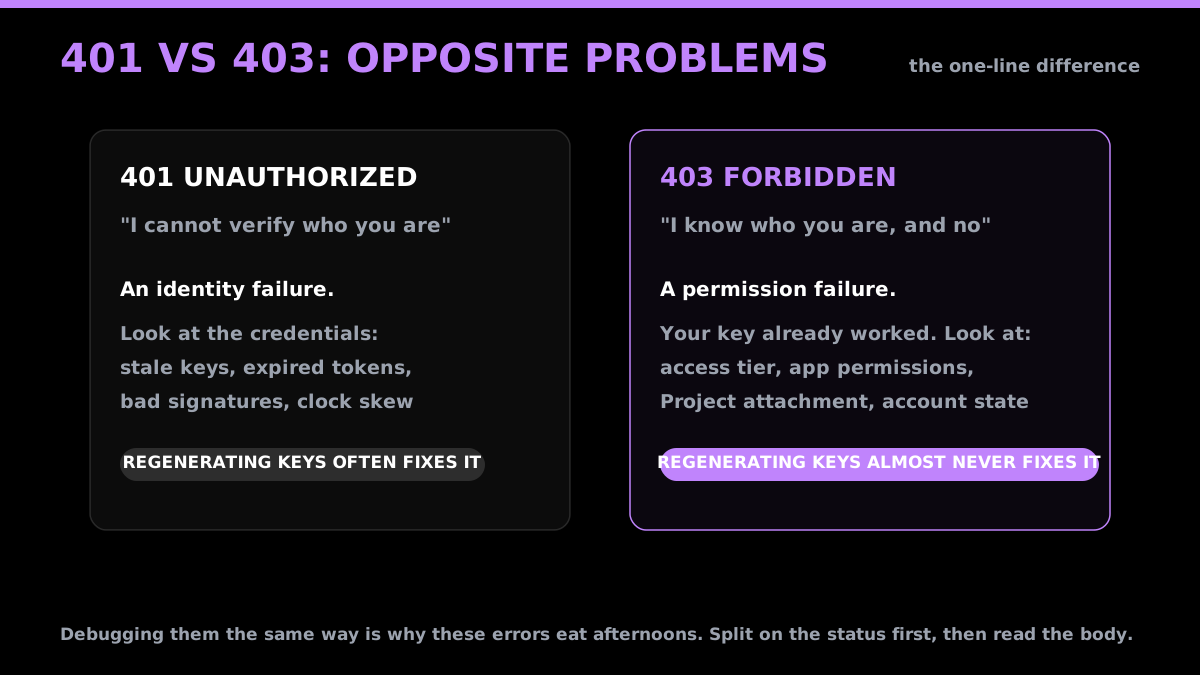
A 403 and a 401 look similar in a log line and mean opposite things. One says X does not know who you are. The other says X knows exactly who you are and is refusing anyway. Debugging them the same way is why these two errors eat entire afternoons.
This is the full list of causes for each, with the fix, and how to tell them apart in one step.
The one-line difference
| What X is saying | Where to look | |
|---|---|---|
| 401 Unauthorized | "I cannot verify who you are" | The credentials themselves |
| 403 Forbidden | "I know who you are, and no" | Your tier, permissions, or account state |
The practical consequence: regenerating your keys fixes many 401s and almost never fixes a 403. If you are reaching for the regenerate button on a 403, stop. The 403 already proves your key worked.
Read the body, not the status
Both errors carry the real reason in the response body, and the status code alone is not enough to act on. X returns a detail or errors array explaining the refusal, and it is far more specific than the HTTP code:
{
  "title": "Unsupported Authentication",
  "detail": "Authenticating with OAuth 2.0 Application-Only is forbidden for this endpoint.",
  "status": 403
}
That message names the exact problem. Logging only 403 throws it away. Log the body.
X documents the full status and error-code list in error troubleshooting guide, and the per-endpoint access rules in the X API documentation. Every code cited below is from those references, checked on July 29, 2026.
Start building with GetXAPI
$0.05 per 1,000 tweets. $0.10 free credits. No credit card required.
Every cause of 403 Forbidden
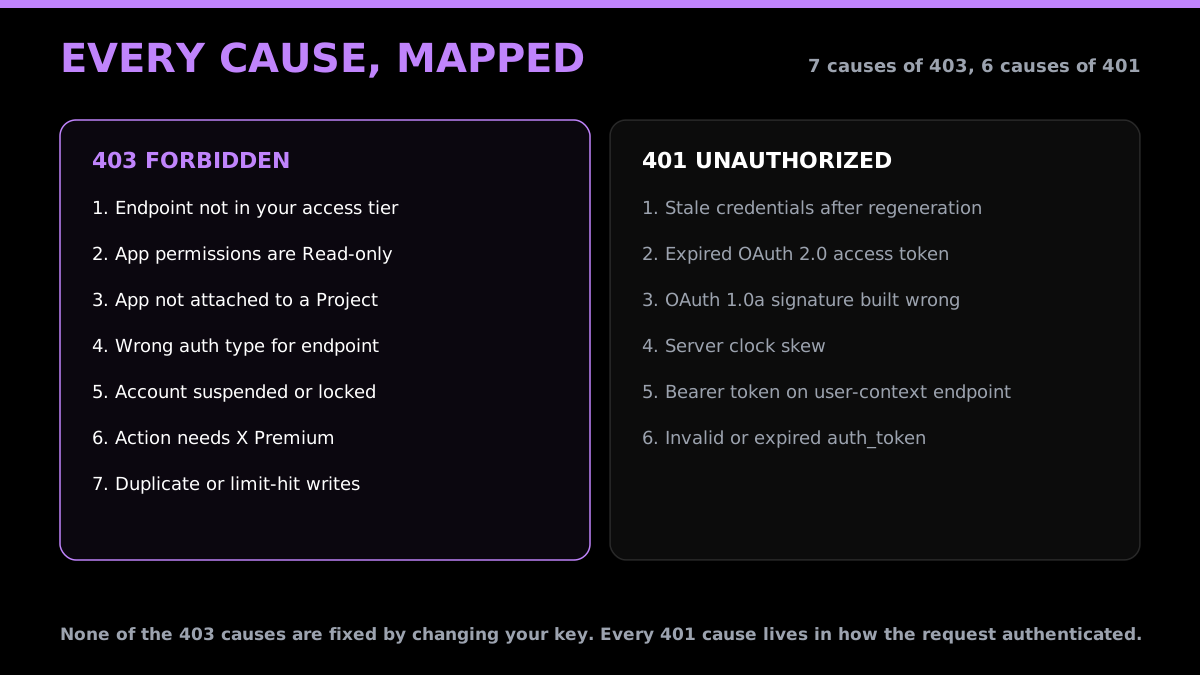
A 403 always means your credentials were accepted and the action was refused anyway. There are seven distinct causes, and none of them are fixed by changing your key.
1. The endpoint is not in your access tier
The most common cause since 2023, and the one that appears out of nowhere. Tier entitlements have been cut repeatedly, so an endpoint that worked under your tier may simply no longer be included.
Fix: confirm the endpoint is still in your current tier. If it is not, the only remedies on the official platform are upgrading or changing approach.
2. App permissions are Read-only and you are writing
Reading and writing are separate entitlements. An app defaulted to Read returns 403 on every write no matter how valid the credentials are.
Fix: set the app to Read and Write in the developer portal, then regenerate the access token and secret. This second step is the one people miss. Tokens minted under the old permission level keep the old scope forever, so the change does nothing until the token is reissued.
3. The app is not attached to a Project
v2 endpoints require the app to sit inside a Project. A standalone app authenticates fine and then 403s on every v2 call.
Fix: attach the app to a Project in the developer portal.
4. Wrong authentication type for the endpoint
Some endpoints require user context (OAuth 1.0a or OAuth 2.0 with PKCE) and reject app-only bearer tokens. This produces the Unsupported Authentication message shown above.
Fix: switch to user-context auth for that endpoint. Anything acting on behalf of a specific account needs it.
5. Account suspended, locked, or restricted
If the authenticating account or the target account is suspended, the action is refused regardless of credentials.
Fix: check the account state. Codes 64 (your account is suspended) and 63 (target account suspended) identify this precisely. Code 326 means temporarily locked, which you clear at x.com/account/access before retrying.
6. The action needs X Premium
Some actions are Premium-gated. Code 433 covers both a reply-gated tweet and an action requiring Premium.
Fix: use a Premium account, or drop the action.
7. Duplicate or limit-hit writes
A repeated tweet returns code 187. A daily ceiling on DM requests returns 502, carried inside an HTTP 429. Code 344 looks similar but is not a daily account ceiling: it is posting throttled at the network or IP level. These are refusals rather than auth failures.
Fix: for 187, change the content. For 502, wait out the 24-hour window. For 344, retry shortly or post from a clean dedicated IP, since switching accounts does not help when the throttle is on the egress address.
Every cause of 401 Unauthorized
A 401 always means X could not verify the credentials at all. Six causes, and every one of them lives in how the request was authenticated rather than what it asked for.
1. Stale credentials after a regeneration
Regenerating keys invalidates the old pair instantly. Any cached copy in an env file, a CI secret, or a running process keeps failing until it is replaced everywhere.
Fix: update every location, then restart the process. A running server holds the old value in memory.
2. Expired OAuth 2.0 access token
OAuth 2.0 access tokens are short-lived. If you never implemented refresh, everything works for a couple of hours after each manual authorisation and then 401s.
Fix: implement the refresh flow, and refresh before expiry rather than after a failure.
3. OAuth 1.0a signature built wrong
The most fiddly source of 401s. The signature base string must include every request parameter, percent-encoded, sorted, with the exact HTTP method and full URL. One extra query parameter left out of the base string invalidates the whole signature.
Fix: use a maintained OAuth library rather than hand-rolling it. If you must debug it, print the base string and compare it character by character against the request you actually sent.
4. Server clock skew
OAuth 1.0a signatures carry a timestamp and X rejects requests too far outside its own clock. A container with a drifting clock produces 401s that look random.
Fix: run NTP. This is worth checking early because it is invisible in application logs.
5. Bearer token sent to a user-context endpoint
Sending app-only credentials where user context is required can surface as 401 rather than 403 depending on the endpoint.
Fix: match the auth type to the endpoint.
6. Invalid or expired auth_token
Error code 32, could not authenticate you, means the token is dead.
Fix: re-mint it.
X error codes worth branching on
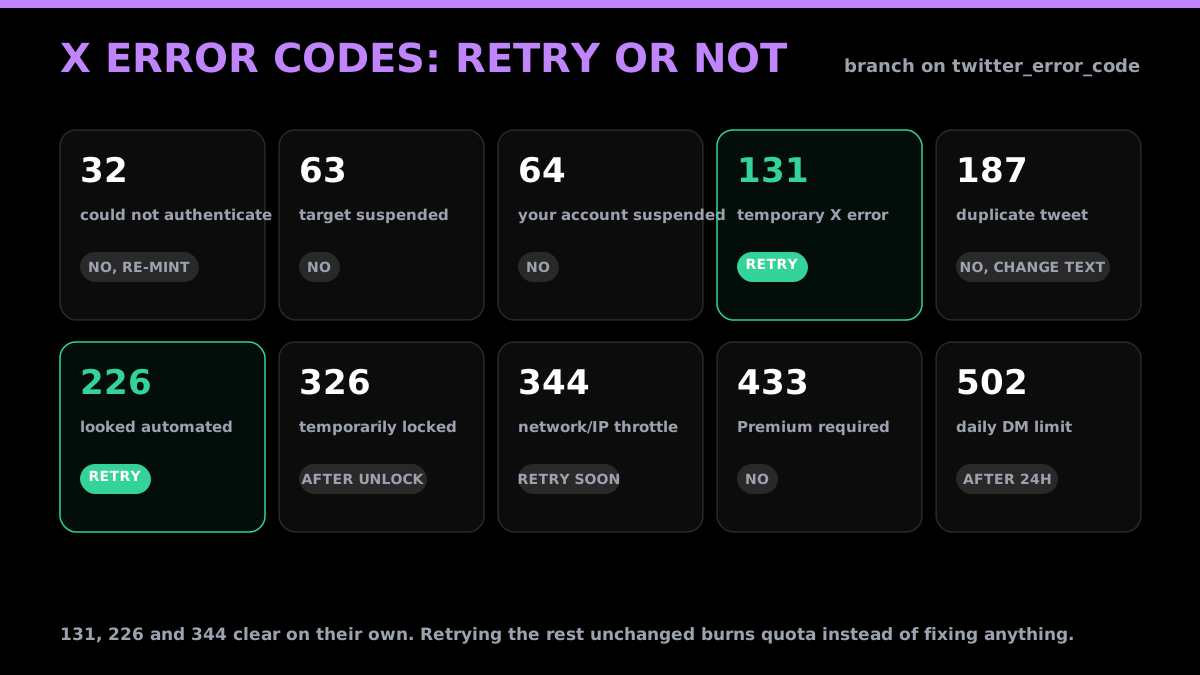
The HTTP status tells you the category. X's own numeric code tells you what actually happened, and it is what your retry logic should branch on:
| Code | Meaning | Retry helps? |
|---|---|---|
32 |
Could not authenticate you | No, re-mint the token |
63 |
Target account suspended | No |
64 |
Your account is suspended | No, use another account |
131 |
Temporary X internal error | Yes |
187 |
Duplicate tweet | No, change the text or wait |
226 |
Request looked automated | Yes |
326 |
Account temporarily locked | After unlocking |
344 |
Posting throttled at the network or IP level, not the account | Yes, shortly, or from a clean dedicated IP |
433 |
Reply restricted or Premium required | No |
502 |
Daily DM request limit reached | After 24 hours |
Source for the code meanings and retry guidance: the GetXAPI error reference, which passes X's own twitter_error_code straight through, cross-checked against X's error troubleshooting guide.
The distinction that matters for a retry loop: 131, 226 and 344 clear on their own and are worth retrying with backoff, though 344 is a network or IP throttle, so retry from a clean dedicated address rather than a different account. The rest of that table needs something to change first, whether that is the content, the target's state, your access level or your credentials, so retrying them unchanged only spends quota.
The cheapest Twitter API. Try it free.
$0.05 per 1,000 tweets. $0.10 free credits. No credit card required.
A diagnostic order that actually converges
- Log the response body. The
detailfield usually names the cause outright. - Split on the status. 401 sends you to the credentials. 403 sends you to tier, permissions and account state. Do not cross the streams.
- On a 403, check permissions before anything else, and remember to reissue the token after changing them.
- On a 401, check for a stale credential before touching the signing code. It is far more often a cached key than broken OAuth.
- Branch on
twitter_error_code, not the HTTP status, so your retry logic distinguishes a transient131from a duplicate-text187, which needs the content or timing to change.
Removing the whole class of problem
Most of the causes above are artefacts of the official developer platform rather than anything about the data. Tier gating, app permissions, Project attachment, OAuth signing and token refresh are all platform mechanics, and every one is a way to get a 403 or 401 while your request itself was fine.
GetXAPI authenticates with a single bearer token. There are no access tiers, no app permission settings, no Project to attach to, no OAuth signature to build and no token to refresh:
curl -H "Authorization: Bearer YOUR_API_KEY" \
  "https://api.getxapi.com/twitter/user/info?userName=elonmusk"
That removes causes 1 through 4 of the 403 list and 1 through 5 of the 401 list, because none of those mechanisms exist. What remains is the genuinely X-side category: a suspended account, a locked account, a duplicate tweet. Those still occur, and GetXAPI passes X's own code through as twitter_error_code so you can branch on the real reason. The full mapping is in the error reference.
If your 403 is a tier problem, no amount of debugging will fix it, because the request was never the issue. That is the case worth recognising early.
Related reading
- X webhooks and the CRC check, for 401 and 403 responses that show up while registering or validating a webhook
- Every X API error code and its fix, the full reference table if your error is not a 401 or 403
- Twitter API rate limits, for the 429 side of the same problem
- How to get a Twitter API key, if you are still choosing an auth path
- Post tweets via API with authentication, for the write flow end to end
Frequently Asked Questions
403 means X recognised who you are but refused the action. Your credentials were accepted, so this is never a bad-key problem. The usual causes are an access tier that does not include the endpoint, app permissions set to Read when you are trying to write, an app not attached to a Project, a suspended or locked account, or an action that requires X Premium. Read the JSON body rather than the status code, because X puts the actual reason in a detail or errors field.
401 is an identity failure and 403 is a permission failure. On a 401 X does not know who you are, so re-check the credentials themselves. On a 403 X knows exactly who you are and is refusing anyway, so the credentials are fine and the problem is your access tier, app permissions, or account state. Regenerating keys fixes many 401s and almost never fixes a 403.
Your app has Read permissions but not Write. Reading and writing are separate entitlements in the X developer portal. Change the app permissions to Read and Write, then regenerate the access token and secret, because tokens issued under the old permission level keep the old scope. This is the single most common 403 on write endpoints and it does not resolve until the token is reissued.
Error 32 means the auth_token is invalid or expired, so re-mint it. It usually surfaces alongside a 401. If you are calling through GetXAPI, the underlying X code is passed through as twitter_error_code so you can branch on the specific reason rather than the HTTP status alone.
401 means X could not verify who you are. The credentials were missing, malformed, expired, or signed incorrectly. Common causes are a regenerated key still cached in your environment, an expired OAuth 2.0 access token that was never refreshed, an OAuth 1.0a signature built over the wrong base string, server clock skew of more than a few minutes, or sending a bearer token to an endpoint that requires user context.
Almost always an access change on X's side rather than yours. Tier entitlements have been repeatedly reduced since 2023, and endpoints that were included in a tier have moved out of it. The other frequent trigger is app permissions silently reverting to Read-only, or an app becoming detached from a Project. Check the app's permission setting and its Project attachment first, then confirm the endpoint is still included in your current tier.
No. A wrong or expired key produces 401, not 403. A 403 proves the key was accepted. Regenerating credentials in response to a 403 is the most common wasted debugging step, because it changes nothing about the tier, permission, or account state that actually caused the refusal.
You can remove the whole class of tier and permission errors by not using the official developer platform for read access. GetXAPI authenticates with a single bearer token, has no access tiers, no app permission settings, no Project attachment and no OAuth signing, so 403s from tier gating and permission mismatches cannot occur. Account-state errors such as a suspended target account still apply, because those come from X itself, and they are passed through with X's own error code.
Check out similar blogs
More guides on the Twitter/X API, scraping, and pricing.

Post Tweets via API With Authentication in 2026 (No Developer Account)
Post tweets, threads, and media through an API without an X developer account. The auth_token model, working Python and Node code, rate-limit safety, and per-call costs.

The Best Twitter (X) API Alternatives in 2026, Compared
The best Twitter / X API alternatives in 2026, ranked and compared: managed pay-per-call APIs, web-data marketplaces, and open-source libraries, with real per-1,000-tweet costs.

How to Like a Tweet via API in 2026 (No Dev Account)
Like (favorite) tweets programmatically via API in 2026 without an X developer account. The auth_token model, working curl, Python, and Node code, and per-call cost.

Twitter API Tutorial 2026: The Complete Developer Guide
A current 2026 Twitter API tutorial covering authentication, endpoints, code, rate limits, verified official prices, and a third-party public-data path.

How to Build a Twitter Bot in 2026: The Complete Guide
Build a Twitter bot in 2026 with no-code or Python. Working Tweepy and requests code, auth explained, and the cheap API path at $0.05 per 1,000 reads.

How to Get Notified When Someone Tweets on X (2026 Guide)
Get notified when someone tweets, in real time. Webhooks push every new post to your server, Slack, or a Discord bot. Keyword alerts, code, scale math, and costs.

Twitter API Benchmark: Latency and Reliability, 600 Calls
A first-party Twitter/X API benchmark: 600 live calls across six read endpoints, per-endpoint p50 and p95 latency, a 100% success rate, and the script to reproduce it.

How to Detect X (Twitter) Bots: A Practical, Data-Backed Method
A practitioner method for Twitter bot detection: the real signals (views-to-likes ratio, account age, posting cadence, follower pattern, amplification), runnable API code to pull each one, and a scoring rubric you own.
Featured in
Where GetXAPI's data and pricing get cited.

The hidden line item in your AI side project: X data
Indie Hackers post on the often-overlooked cost of X data for AI side projects, citing GetXAPI as the usage-based way to pull live Twitter data without a five-figure X developer contract.

How Companies Are Learning to Read Market Mood in Real Time
Editorial feature on Big News Network examining how companies read market mood from X in real time, citing GetXAPI as the usage-based Twitter API that prices live social listening by the call instead of a five-figure annual contract.

How Companies Are Learning to Read Market Mood in Real Time
Syndicated feature on Business Newswire on how companies read market mood from X in real time, citing GetXAPI as the usage-based Twitter API that prices live social listening by the call.

Working with Twitter/X Data: A Practical Skill for IT Students and Professionals in 2026
Guide on SIIT (Scholars International Institute of Technology) on collecting live Twitter/X data as a practical developer skill, citing GetXAPI as the per-call Twitter data API that makes it affordable without an X developer account.

Adding Twitter/X Data to Your App in 2026: A Developer's Integration Guide
Developer integration guide on Programming Insider covering how to add live Twitter/X data to an app in 2026, comparing the official X API v2 with a key-based REST approach and citing GetXAPI as the low-cost per-call option with no developer-account approval.

6 Twitter/X Scraping Solutions for Every Budget
Roundup on TechBullion of the leading Twitter/X scraping solutions, ranking GetXAPI first as the cheapest option at $0.001 per call (about $0.05 per 1,000 tweets) with clean JSON output and no monthly minimum.

The Data Bill Behind Every Social Analytics Tool
Editorial piece on SpeakRJ examining the underlying data costs behind social analytics tools, citing GetXAPI as the usage-based way to source live X data by the call.

What Is AI Sentiment Analysis, and What Does Each Layer Cost?
Explainer in AI Journal breaking sentiment analysis into its data, model and reporting layers and what each costs to run, citing GetXAPI for pulling public X posts on pay-per-call pricing.

Why Enterprise AI Agents Still Cannot Read Social Data
Analysis piece in The Silicon Review on why enterprise agents reach internal systems easily but struggle with public social data, citing GetXAPI's MCP server and data-as-a-service model as one route to close the gap.