How to Get Notified When Someone Tweets on X (2026 Guide)
Get notified when someone tweets, in real time. Webhooks push every new post to your server, Slack, or a Discord bot. Keyword alerts, code, scale math, and costs.

Monitoring a Twitter (X) account with an API means polling for three signals and acting on the changes: new tweets from the account, new mentions of the account, and edits to the account's profile. In 2026 the official X API makes that harder than it should be, real-time streaming is gated to legacy and Enterprise tiers, and reads are billed per request at about $0.005 each, so most monitoring is built on a polling loop against a read API. This guide shows the exact polling patterns, working code against a pay-per-call endpoint, how to wire alerts, how to batch many accounts without the bill exploding, and what it all costs.
TL;DR: To monitor an X account, use a webhook for supported real-time events or poll a read API and diff against the last state. The current official table bills standard Post reads at $0.005, while filtered-stream availability must be confirmed in the current endpoint docs or an Enterprise agreement. GetXAPI polling uses a bearer token at $0.001 per standard call, and Monitoring plans provide webhook delivery for supported events.
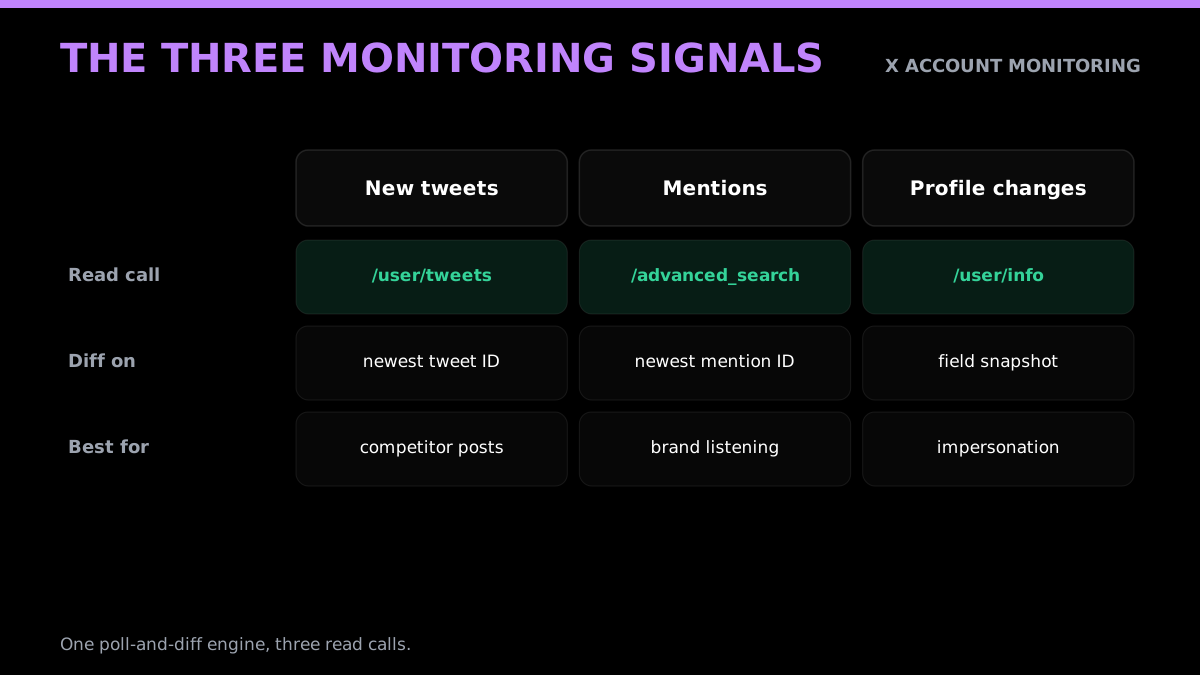
What "monitoring a Twitter account" actually means
Account monitoring is not one task, it is three, and most tools quietly do only the first. The first signal is new tweets: the account posts something and you want to know within seconds. The second is mentions: someone else posts about the account, tags the handle, or replies, and you want that in your inbox even though it never touches the account's own timeline. The third is profile changes: the bio, display name, follower count, profile picture, or pinned tweet changes, which matters for brand-impersonation alerts, competitive intelligence, and tracking when a watched account pivots.
Each signal maps to a different read call and a different diffing strategy, but they share one engine: poll on an interval, compare against the last state you stored, and act only on what is new. Get that loop right once and you can monitor one account or a thousand with the same code. The rest of this guide builds that loop for each signal, then makes it cheap and production-safe.
It helps to know which signal your use case actually needs, because most people over-build. Brand monitoring is mostly the mentions signal: you care what other people say about a handle or a product name, not what the brand posts. Competitive intelligence is mostly the new-tweets and profile signals: you watch what a rival ships and when they change positioning. Lead generation is the mentions signal with a keyword query: you watch for posts that express intent ("looking for an X tool", "anyone recommend") rather than a specific handle. Alerting and compliance are usually new tweets from a small, fixed list of accounts where latency matters most. Map your job to one or two signals before you write a line of code, and you avoid paying to poll data you will never read.
The reason this matters financially is that each signal has a different natural polling cadence. New tweets from a breaking-news account might justify a 10-second loop; a competitor's bio changes maybe once a quarter and can be checked hourly. Tuning the interval per signal is the single biggest lever on what a monitor costs, and it is a lever the all-in-one SaaS tools never expose because they bill a flat subscription regardless.
Where account monitoring actually pays off
Before the code, it is worth grounding the why, because the architecture you build should follow the outcome you need. Four use cases drive almost all serious account monitoring, and each leans on a different mix of the three signals.
Brand and reputation monitoring is the mentions signal at its core. You watch for posts that name a company, product, or executive, route the angry ones to support and the positive ones to marketing, and catch a brewing issue while it is still ten posts instead of ten thousand. The value is response time, and response time is exactly what a tight poll loop buys you.
Competitive intelligence leans on new tweets plus profile changes. You watch a rival's account for launches, pricing posts, and positioning shifts, and you watch the profile for the quieter signals: a new bio, a changed pinned tweet, a sudden follower spike that hints at a campaign. None of that shows up in a dashboard you do not build, and all of it is a poll-and-diff away.
Lead generation is the mentions signal pointed at intent rather than a handle. Instead of a brand name you query for buying signals, phrases like "looking for", "anyone recommend", or "alternative to", scoped to your category, and you get a feed of people raising their hand in public. The query is the product here, and the advanced search endpoint is what makes it programmable.
Alerting and compliance is new tweets from a small, fixed, high-stakes list where latency and reliability matter more than scale. A regulator account, a status account, a key executive: you want the alert in seconds and you want to know the moment the monitor itself goes dark. This is where the production-hardening section later in this guide earns its place.
Why monitoring is hard on the official X API in 2026
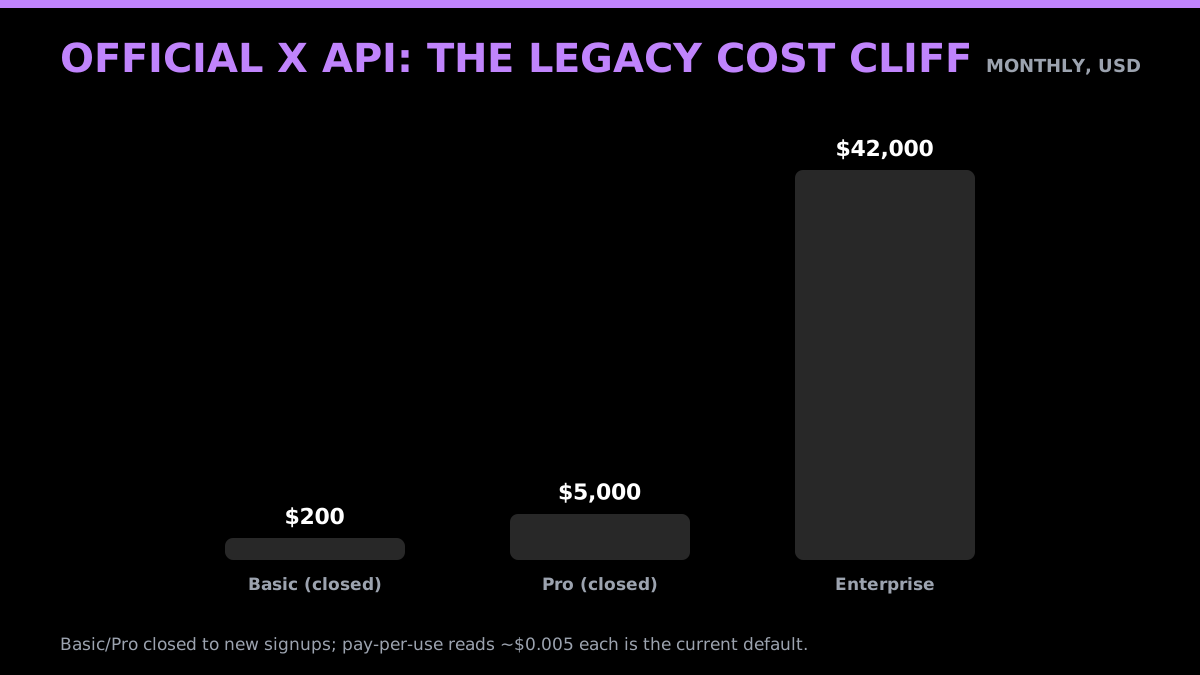
The honest reason many developers consider a third-party read API is cost and access. The current public X pricing table bills standard Post reads at $0.005 each, while filtered-stream availability and limits should be confirmed on the current endpoint documentation or in an Enterprise agreement. The public pricing page does not establish that pay-per-use began in February 2026.
That pricing is not a rumor, it is the daily complaint of people who build on the platform. The sentiment is consistent across the developer crowd: the API is too expensive to build anything real on, and the cost pushes people toward workarounds.
The rate limits compound the cost problem. The user-timeline endpoint allows 10,000 app-level requests per 15 minutes, recent search allows 450, and the filtered stream allows a single concurrent connection on pay-per-use (docs.x.com rate limits). Those are workable numbers for polling, but only if you are not also paying $0.005 per read on top. The practical result is that monitoring at any real volume on the official API runs into either a closed streaming tier or a per-read bill that grows with every account you add.
X API access and pricing have changed repeatedly, which has made long-running monitoring tools harder to budget. Historical plan prices belong in a dated history sourced to primary announcements or archives. For current planning, use the official pay-per-use table and check account-specific terms in the Developer Console; an archived official page already showed pay-per-use on January 22, 2026, so a blanket February launch claim is unsafe.
The recurring theme in these threads is not that developers refuse to pay, it is that the pricing is structured so that the only options are "too limited to use" or "too expensive to justify", with nothing in between for a normal monitoring workload. That gap is the entire reason per-call read APIs exist.
Webhooks vs polling: how to get notified when someone tweets
There are two ways to find out that an account posted. Something pushes the tweet to you, or you keep asking. Since July 2026 GetXAPI does the pushing, so the choice is no longer polling by default.
With real-time monitoring you register the accounts you care about and a destination URL, and every new tweet arrives at your server as a signed HTTPS POST within roughly 15 seconds on the standard tier or 2 seconds on fast. No cron job, no last-seen-ID table, no scheduler to babysit. Monitoring endpoints are not billed per call; your plan sets how many accounts you can watch at once.
| Approach | Latency | What you maintain | When to use it |
|---|---|---|---|
| Webhooks | 2s to 15s | One HTTPS endpoint | You want to know the moment a specific account posts |
| Polling a read endpoint | Your interval plus drift | Cron, last-seen ID, backoff, dedupe | You need history, or keyword sweeps across all of X |
| Official X filtered stream | Near real time | A held-open connection, reconnect and gap recovery | You are already on an enterprise contract |
| RSS bridges and tracker tools | Minutes | Scraping fragility, and the tweets live in someone else's dashboard | You want a feed to read, not data to build on |
Polling has not stopped being useful. It is still the right tool for pulling the past rather than the present, and for keyword searches that are not tied to a fixed list of accounts. What it should no longer be is your answer to "tell me when this account tweets", because that job now has a push-based answer.
The rest of this guide covers both. If you want the push path, the webhook delivery contract has the payload shape and signature verification in Node, Python, Go and PHP. If you want the poll path, keep reading.
The polling tradeoff, when you still need it
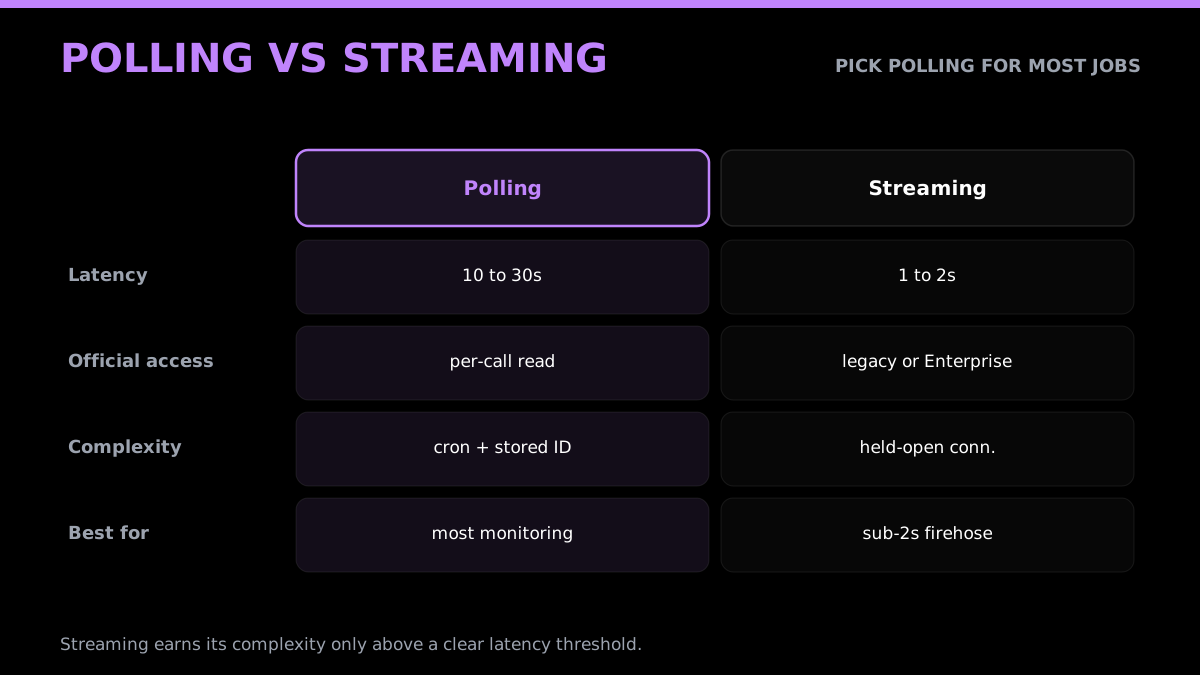
The tradeoff is latency for simplicity. A poll loop running every 10 to 30 seconds detects a new tweet within that window plus the API response time, which for monitoring is almost always acceptable. Webhooks cut that to seconds without a held-open connection, and on the official X API the streaming equivalent is gated to legacy or Enterprise access. A poll loop is a cron job and a stored ID. When you can hit a read endpoint cheaply, polling is not a compromise for history and keyword work, it is the right architecture. For new posts from a known account, prefer the webhook.
The request-volume math makes the interval decision concrete. Polling a single query once per second is about 2,592,000 requests a month; every 5 seconds is 518,400; every 10 seconds is 259,200; every 30 seconds is 86,400. Those numbers are per query, not per account, which is the key insight for scaling: if one query can match many accounts, the cost stays flat as the watchlist grows. Pick the slowest interval your use case tolerates, because halving the frequency halves the bill with no code change. Most monitoring jobs are perfectly served at 30 seconds, and many profile-change jobs at an hour.
Streaming only earns its complexity above a clear threshold: when you need sub-two-second alerts on a firehose of keywords, and you have the engineering time to handle reconnects and gap recovery. Below that, the held-open connection is a liability, not a feature, because every restart, deploy, or network blip risks a silent gap in coverage that a stateless poll loop simply does not have. The official streaming API has its own quirks too, it delivers over HTTP chunked transfer with a keep-alive every 20 seconds rather than WebSockets, and P99 delivery latency runs around 6 to 7 seconds (data365 streaming overview).
Signal 1: monitor an account for new tweets
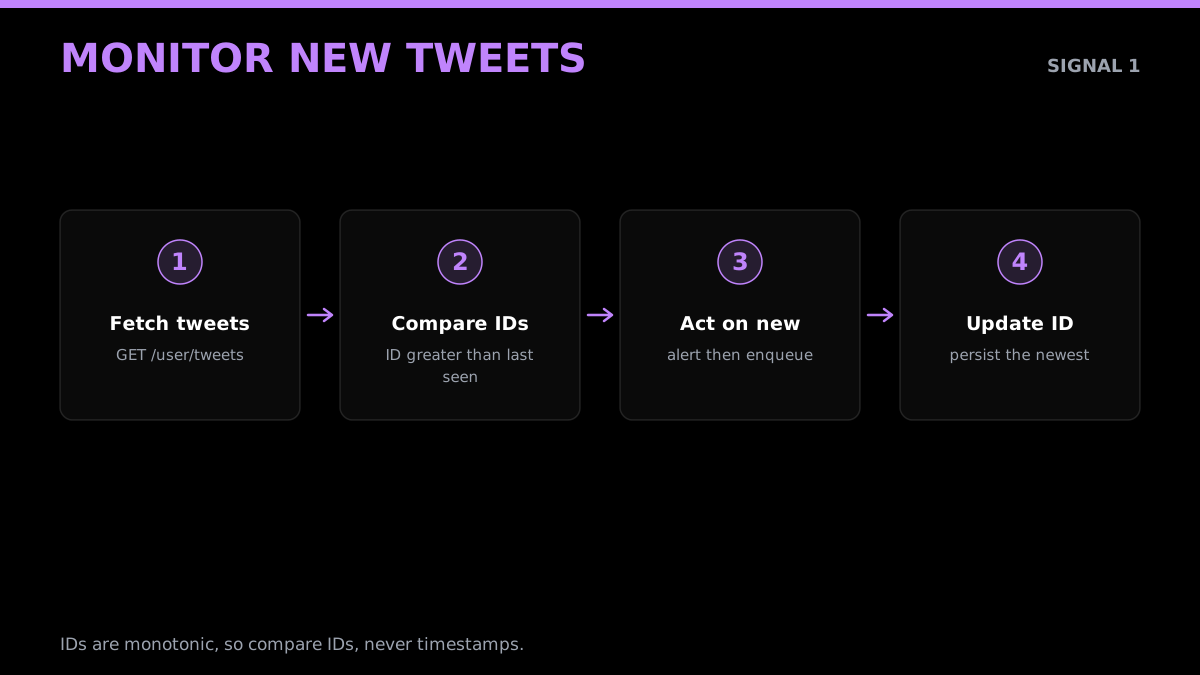
The core pattern is the last-seen-ID loop. Pull the account's recent tweets, find the newest tweet ID, store it, and on every subsequent poll treat any tweet with a larger ID as new. IDs are monotonic on X, so comparing IDs is more reliable than comparing timestamps, which can collide or arrive out of order.
With GetXAPI this is a single authenticated GET. The base URL is https://api.getxapi.com, you authenticate with a bearer token, and reading the user timeline costs $0.001 per call.
import requests

API = "https://api.getxapi.com"
HEADERS = {"Authorization": "Bearer YOUR_API_KEY"}

def fetch_recent_tweets(username):
    r = requests.get(
        f"{API}/twitter/user/tweets",
        headers=HEADERS,
        params={"userName": username},
        timeout=20,
    )
    r.raise_for_status()
    return r.json().get("tweets", [])

def check_for_new_tweets(username, last_seen_id):
    tweets = fetch_recent_tweets(username)
    fresh = [t for t in tweets if int(t["id"]) > int(last_seen_id or 0)]
    if fresh:
        new_last = max(int(t["id"]) for t in fresh)
        return fresh, str(new_last)
    return [], last_seen_id
You run check_for_new_tweets on an interval, persist the returned ID, and hand the fresh list to whatever does the alerting. On the first run, store the newest ID without alerting so you do not fire on the backlog. After that, every new post for the account flows through fresh exactly once.
A few edge cases decide whether this loop is trustworthy. Retweets and replies come back in the timeline too, so decide early whether a retweet by the account counts as a monitored event; for most brand and competitor monitors you keep original posts and replies but drop pure retweets, which you can filter on a flag in each tweet object. Pinned tweets can resurface at the top of a timeline without being new, which is exactly why you compare IDs rather than position. And a burst of posts between two polls is handled for free by the loop, because you select every tweet with an ID above your stored value, not just the single newest one.
Each tweet object you get back carries the fields a monitor needs without extra calls: the tweet ID and text, the author handle and display name, the created-at timestamp, and the public engagement counts (likes, retweets, replies, views). That means your alert can include not just "they posted" but "they posted, and it is already at 2,000 likes", which is often the more useful signal. Because the payload is the same public shape the platform exposes, you can store exactly the fields you need and nothing you do not, which keeps both your storage and your privacy footprint small.
The community has converged on exactly this no-credentials, poll-a-read-API approach. A widely shared workflow walked through monitoring X without OAuth by pointing at a server-side read API instead of wiring up a developer account.
Built a Twitter/X monitoring workflow, no OAuth, no developer account from r/n8n
Start building with GetXAPI
$0.05 per 1,000 tweets. $0.10 free credits. No credit card required.
Signal 2: monitor mentions of an account
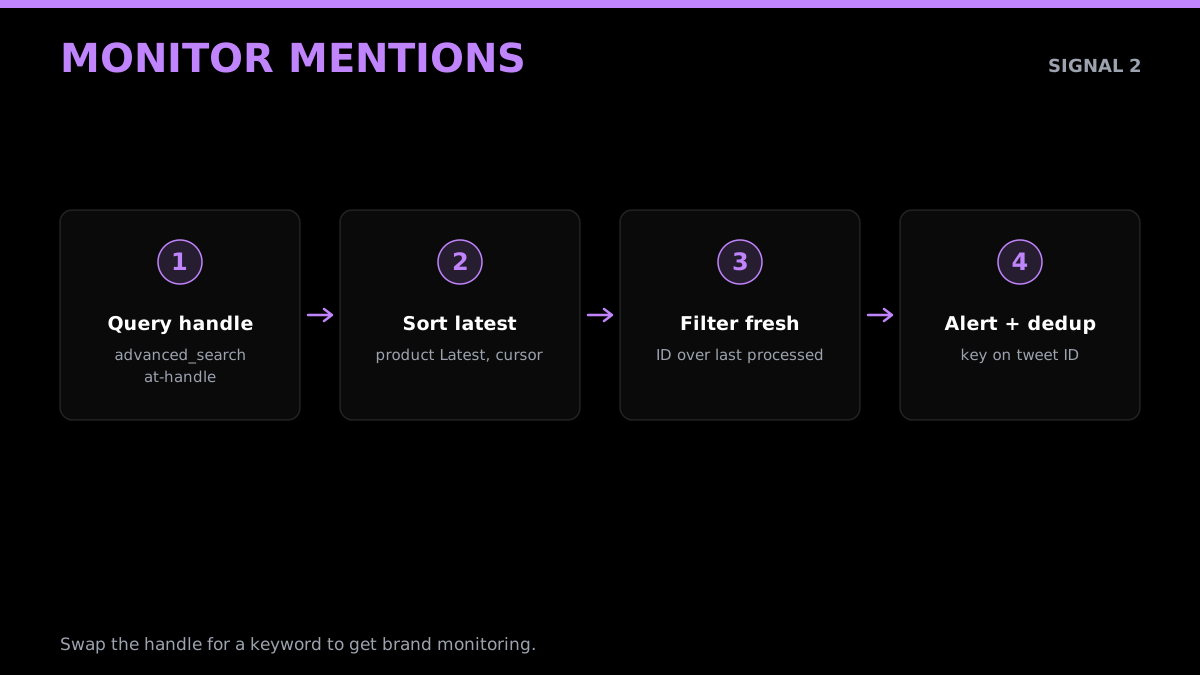
Mentions never appear on the account's own timeline, so you cannot catch them by polling user tweets. You catch them with search. Query the advanced search endpoint for posts that tag the handle, sort by latest, and track the newest processed ID the same way you did for tweets.
def fetch_mentions(handle):
    r = requests.get(
        f"{API}/twitter/tweet/advanced_search",
        headers=HEADERS,
        params={"q": f"@{handle} OR to:{handle}", "product": "Latest"},
        timeout=20,
    )
    r.raise_for_status()
    return r.json().get("tweets", [])

def check_for_new_mentions(handle, last_seen_id):
    mentions = fetch_mentions(handle)
    fresh = [m for m in mentions if int(m["id"]) > int(last_seen_id or 0)]
    new_id = max([int(m["id"]) for m in fresh], default=int(last_seen_id or 0))
    return fresh, str(new_id)
The q parameter takes standard X search operators, so you are not limited to mentions. Swap in a brand keyword, a cashtag, a competitor handle, or a phrase and the same loop becomes brand monitoring or competitive intelligence. The product value of Latest keeps results in reverse-chronological order, which is what you want for an alerting pipeline.
Two refinements make the mention loop production-grade. First, deduplicate across overlapping queries: if you monitor both @handle and a brand keyword, the same post can match both, so key your "already alerted" set on the tweet ID rather than on the query that found it. Second, scope the query to cut noise before it reaches you. Operators like -filter:retweets to drop retweets, lang:en to limit language, or -from:handle to exclude the account's own replies to itself keep the fresh list focused on genuine outside mentions. The cleaner the query, the fewer false alerts your team learns to ignore, and an alert stream people ignore is the same as no monitor at all.
Signal 3: detect profile changes
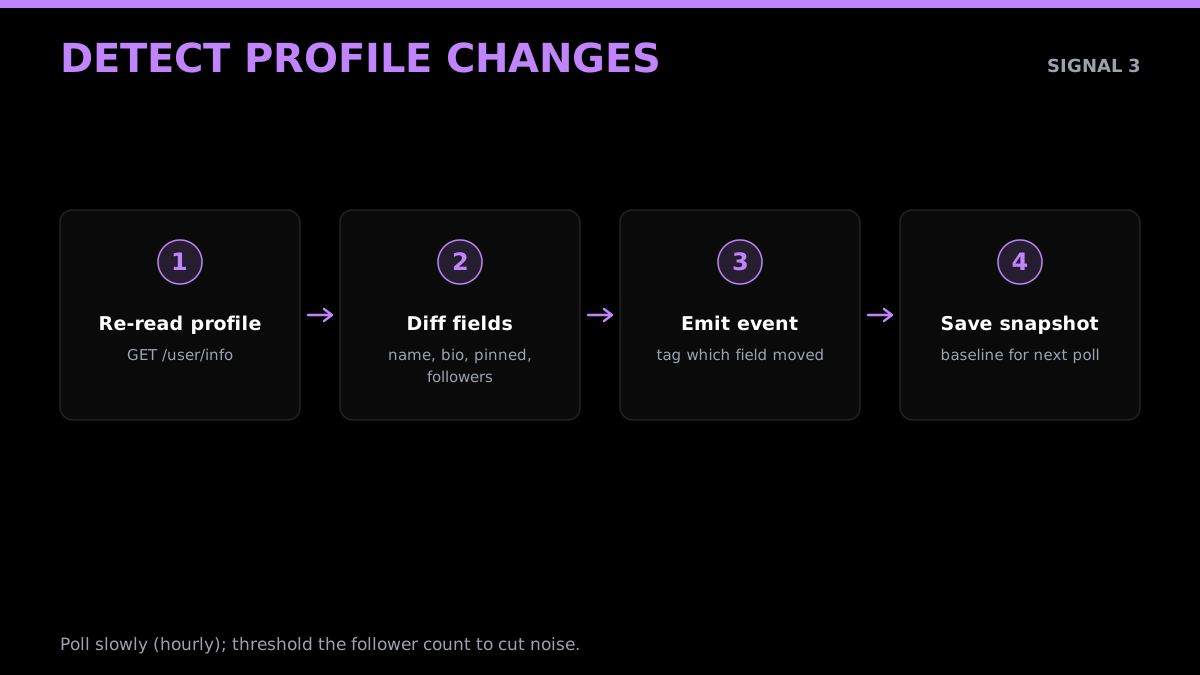
Profile monitoring is a re-read and a diff. Pull the user object on an interval, compare the fields you care about against the last snapshot you stored, and emit an event for anything that changed. This is the signal behind impersonation alerts, "a watched account changed its bio" notifications, and tracking when a competitor swaps its pinned tweet.
def fetch_profile(username):
    r = requests.get(
        f"{API}/twitter/user/info",
        headers=HEADERS,
        params={"userName": username},
        timeout=20,
    )
    r.raise_for_status()
    return r.json().get("user", {})

WATCH_FIELDS = ["name", "description", "profile_image_url", "followers_count", "pinned_tweet_id"]

def diff_profile(username, previous):
    current = fetch_profile(username)
    changes = {f: (previous.get(f), current.get(f))
               for f in WATCH_FIELDS
               if previous.get(f) != current.get(f)}
    return changes, current
Store the returned current snapshot after each poll so the next run has a baseline. Because profile fields change far less often than tweets, you can poll this signal on a slower interval (every few minutes or hourly) to keep the call volume and the cost low.
Each field you watch carries a different meaning, which is why a raw diff is more useful than it looks. A display-name or username change on a watched account is an impersonation and brand-safety signal, the kind you want to catch within the hour. A bio change on a competitor often precedes a launch or a pivot, since teams update positioning copy before they announce. A pinned-tweet change is the cheapest possible read on "what does this account most want you to see right now". And a sharp move in follower count flags either a viral moment or a bought-follower campaign worth a closer look. Tag each change event with which field moved so downstream consumers can route an impersonation alert differently from a routine bio tweak.
One caution on the follower-count field specifically: it drifts constantly by small amounts, so alerting on every change is noise. Apply a threshold, a percentage move or an absolute delta, so you only surface meaningful jumps and not the normal churn of a single follow and unfollow between polls.
Monitor many accounts without the bill exploding
Polling each account individually is fine for a handful of handles and ruinous for a hundred. Watching 50 accounts every 10 seconds is 50 times your single-account call volume, which is millions of calls a month. The fix is to stop polling per account and start matching many accounts in one call.
The advanced search endpoint accepts boolean operators, so a single query like from:alice OR from:bob OR from:carol returns new tweets from several accounts at once, and one call covers the whole group instead of one call per handle. You still run the last-seen-ID loop, you just run it over a batched query. For very large lists you split accounts into a few search queries sized to the result window and poll those. The cost then scales with the number of queries and your interval, not with the raw account count.
The savings are not marginal, they are an order of magnitude. Polling 50 accounts individually every 10 seconds is 50 separate calls per cycle, roughly 432,000 calls a day. Folding those same 50 handles into a handful of batched from: queries collapses that to a few thousand calls a day for the same coverage. At $0.001 per call the individual approach is around $430 a day and the batched approach is single-digit dollars, for identical results. The only reason to ever poll per account is when you need each account on a different cadence; otherwise, batch.
There is a ceiling to how many from: clauses one query handles cleanly before the result window truncates, so the real pattern for large watchlists is to shard: group accounts into queries of a sane size, stagger their poll offsets so you are not firing them all in the same second, and run each shard through the same last-seen-ID loop with its own stored cursor. That keeps any single query inside the result window while the whole system still covers hundreds or thousands of handles.
def build_batched_queries(handles, per_query=10):
    # group handles into OR queries so one call covers many accounts
    for i in range(0, len(handles), per_query):
        chunk = handles[i:i + per_query]
        yield " OR ".join(f"from:{h}" for h in chunk)

def poll_batch(query, last_seen_id):
    r = requests.get(
        f"{API}/twitter/tweet/advanced_search",
        headers=HEADERS,
        params={"q": query, "product": "Latest"},
        timeout=20,
    )
    r.raise_for_status()
    tweets = r.json().get("tweets", [])
    fresh = [t for t in tweets if int(t["id"]) > int(last_seen_id or 0)]
    new_id = max([int(t["id"]) for t in fresh], default=int(last_seen_id or 0))
    return fresh, str(new_id)
This is corroborated by practitioners who have done the migration off official-API streaming to a polled, batched read at a fraction of the cost (Sorsa real-time monitoring guide).
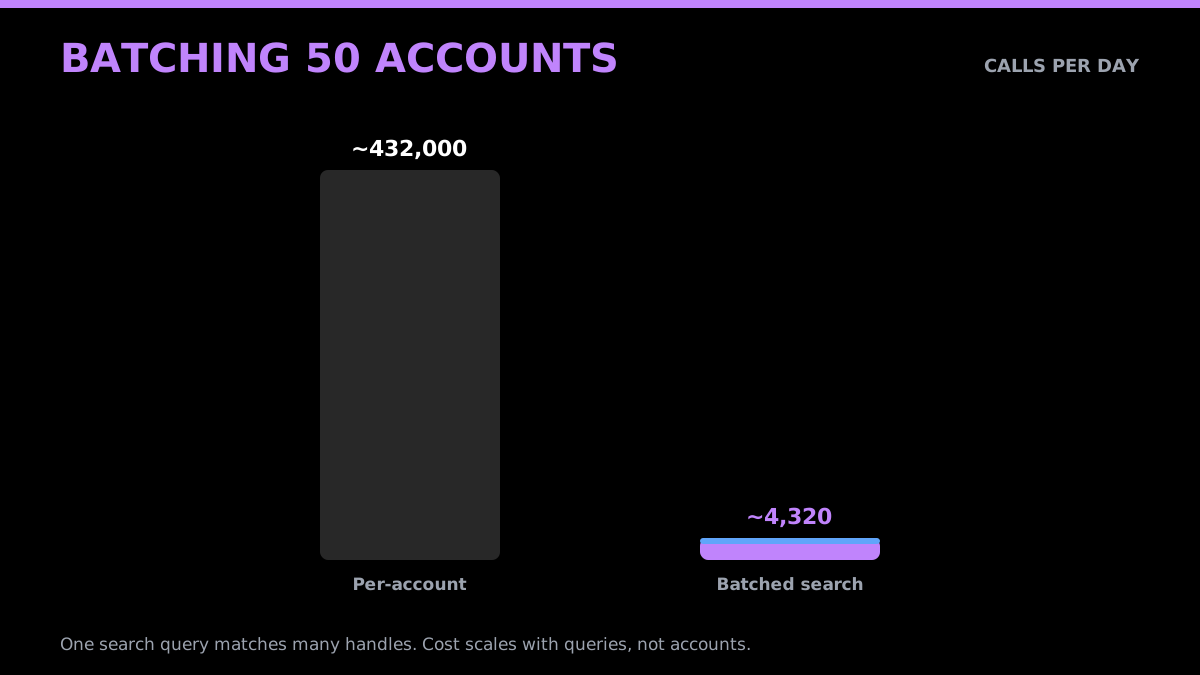
This batching difference is exactly why developers building real monitoring products move off per-account official-API reads. The cost of doing it the naive way on the official tiers is what pushes teams to a per-call alternative in the first place.
A Twitter API that watches a user's posts from r/learnprogramming
Wire the alerts: Slack, Discord, or any webhook
A monitor is only useful if it tells someone. Once the loop produces a fresh list, push each item to wherever your team lives. A Slack or Discord incoming webhook is a single POST, and any custom endpoint works the same way.
def alert(webhook_url, tweet, handle):
    text = f"New from @{handle}: {tweet['text']}\nhttps://x.com/{handle}/status/{tweet['id']}"
    requests.post(webhook_url, json={"text": text}, timeout=10)

def run_once(handle, state, webhook_url):
    fresh, state["last_id"] = check_for_new_tweets(handle, state.get("last_id"))
    for t in fresh:
        alert(webhook_url, t, handle)
    return state
Build a Twitter to Discord bot without a server loop
Discord is the most common destination, and it is the shortest path from "account posted" to "channel sees it". Create an incoming webhook in Discord (Channel Settings, Integrations, Webhooks, New Webhook, Copy URL), then hand that URL straight to a monitor:
curl -X POST https://api.getxapi.com/twitter/monitor/add \
  -H "Authorization: Bearer YOUR_API_KEY" \
  -H "Content-Type: application/json" \
  -d '{ "userName": "elonmusk", "webhook_url": "https://your-server.com/hooks/getxapi" }'
Point the monitor at your own small endpoint rather than at Discord directly, because you need to verify the signature and reshape the payload into a Discord embed:
import hmac, hashlib, os, re, time, requests
from flask import Flask, request, abort

app = Flask(__name__)
SECRET = os.environ["GETXAPI_WEBHOOK_SECRET"]
DISCORD = os.environ["DISCORD_WEBHOOK_URL"]

@app.post("/hooks/getxapi")
def handle():
    raw = request.get_data()
    if not verify(raw, request.headers.get("X-GetXAPI-Signature", "")):
        abort(401)
    body = request.get_json()
    if body.get("type") != "tweet":       # test payloads have no tweet field
        return "", 200

    t = body["tweet"]
    a = t["author"]
    requests.post(DISCORD, json={"embeds": [{
        "author": {"name": f"{a['name']} (@{a['userName']})"},
        "description": t["text"][:4000],
        "url": f"https://x.com/{a['userName']}/status/{t['id']}",
        "timestamp": t["createdAt"],
    }]}, timeout=10)
    return "", 200                        # ack fast, Discord call is cheap enough inline

def verify(raw: bytes, header: str) -> bool:
    m = re.match(r"t=(\d+),v1=([a-f0-9]+)", header)
    if not m:
        return False
    t, sig = m.group(1), m.group(2)
    if abs(time.time() - int(t)) > 300:
        return False
    expected = hmac.new(SECRET.encode(), f"{t}.".encode() + raw, hashlib.sha256).hexdigest()
    return hmac.compare_digest(sig, expected)
Three things people get wrong here. Verify against the raw bytes, because parsing and re-serializing the JSON changes the signature. Branch on type, because a test delivery has no tweet field and will throw if you assume one. And dedupe on delivery_id, because delivery is at-least-once and Discord will happily post the same tweet twice.
The same shape works for Slack (swap embeds for blocks), Telegram, or any internal endpoint. If you would rather not run any code at all, an incoming Discord webhook URL can be used as the monitor destination directly, at the cost of losing signature verification and getting raw JSON in the channel instead of a formatted embed.
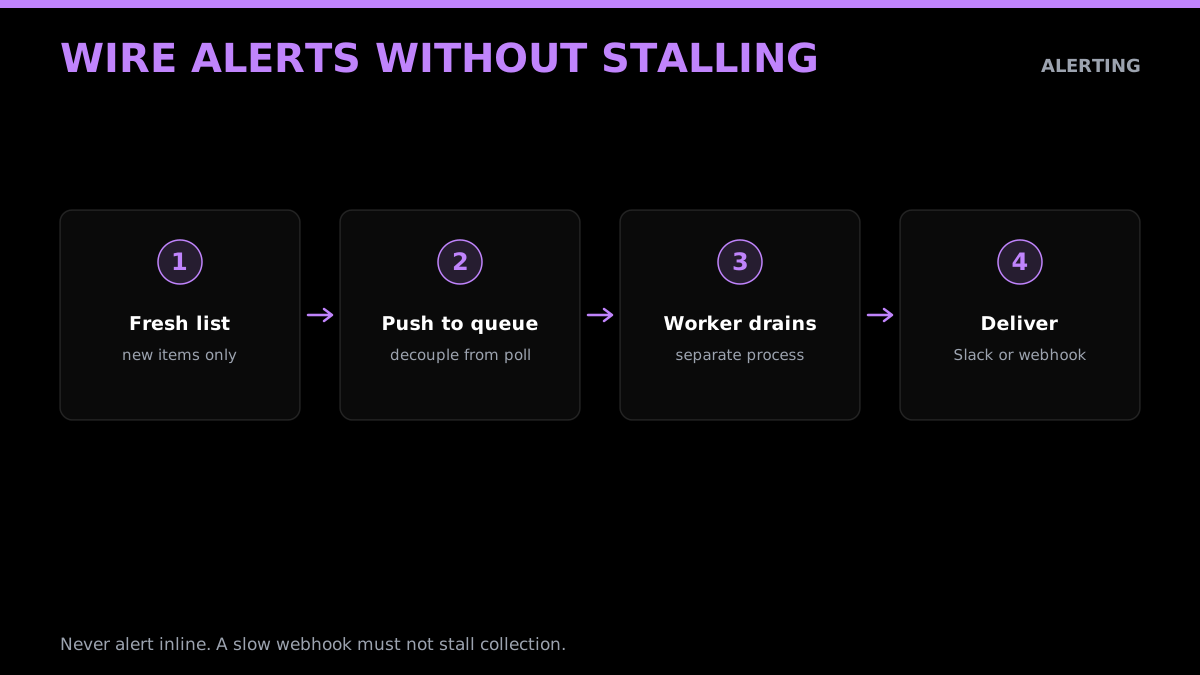
Keep the alerting decoupled from the polling. If you alert inline and the webhook is slow or down, your poll loop stalls and you miss data. In production, push fresh items onto a queue and let a separate worker drain it to Slack, so a notification outage never breaks data collection.
For a visual walkthrough of standing up real-time account tracking end to end, this tutorial covers the same build pattern:
https://www.youtube.com/watch?v=7Bajh0od6hA
Twitter alerts for keywords, not just accounts
Account monitoring answers "did this person post". Keyword monitoring answers "did anyone say this", which is the job behind most brand and lead workflows. That one runs on advanced search rather than webhooks, because the matching set is not a fixed list of accounts.
The difference between a keyword alert that works and one you mute in a week is query design. Give each query exactly one job. A single query trying to catch brand mentions, competitor complaints and buying intent at once produces noise you stop reading.
| What you want to catch | Query | Why it works |
|---|---|---|
| Untagged brand mentions | "getxapi" OR "get xapi" -from:getxapi |
People discuss products without tagging the account |
| Buying-intent questions | ("twitter api" OR "x api") (recommend OR alternative OR "looking for") -filter:links |
Catches the moment someone is choosing |
| Competitor frustration | ("competitor name") (expensive OR "too costly" OR switching) |
The highest-conversion mention there is |
| Support and bugs | "yourbrand" (broken OR down OR error OR "not working") |
Reach people before they churn |
| Amplification | url:yourdomain.com -from:youraccount |
Find people already sharing you |
Two operators do most of the work. -filter:links strips the automated reposting that floods any brand query, and -from:youraccount stops you alerting on yourself, which is the single most common reason a new alert feels broken.
Poll keyword queries on an interval the way the sections above describe, and remember the volume math is per query, not per account. One well-written query that matches fifty accounts costs the same as one that matches none, which is why keyword monitoring scales more cheaply than adding fifty individual monitors.
Route the results to the same place as your account alerts. A mention only matters if it lands where someone will act on it, which in practice means the Slack or Discord channel the team already has open, not a dashboard nobody opens.
The cheapest Twitter API. Try it free.
$0.05 per 1,000 tweets. $0.10 free credits. No credit card required.
Production hardening: the five things that break monitors
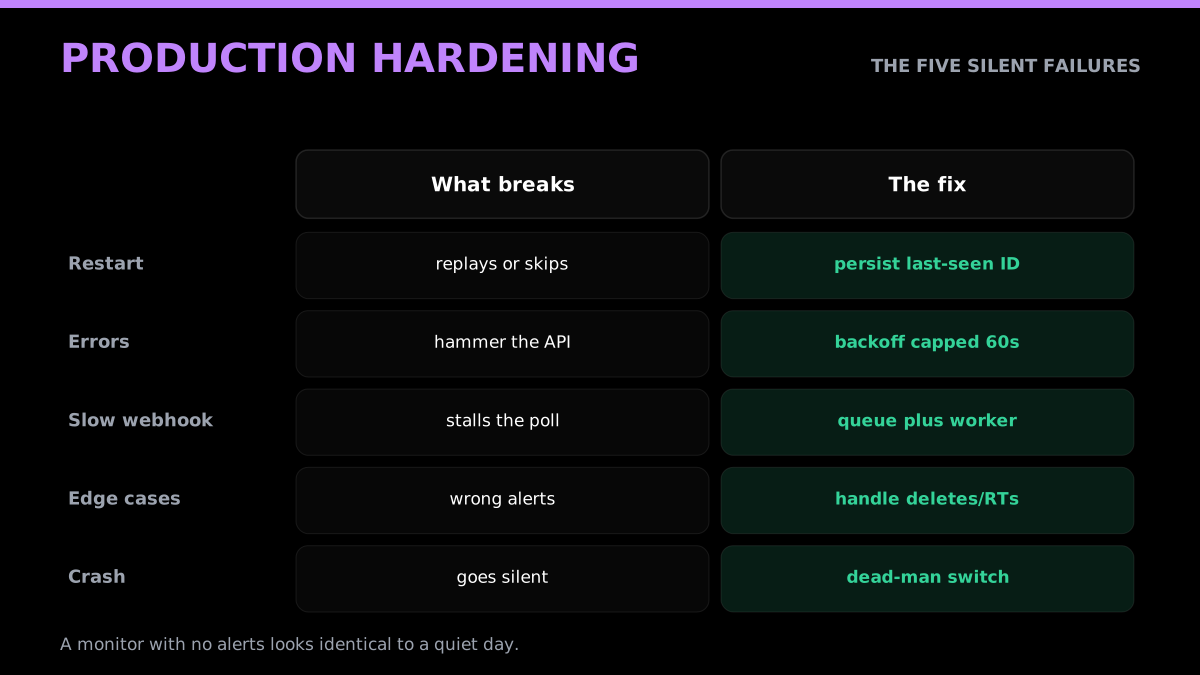
Monitoring pipelines fail quietly, and a silent monitor is worse than no monitor because you trust it. Five fixes turn a weekend script into something you can leave running.
First, persist the last-seen ID to durable storage, not memory, so a restart does not replay or skip. Second, add exponential backoff with a cap so a transient error does not hammer the API or get you throttled, start at one second and cap around sixty. Third, decouple polling from processing with a queue so a slow downstream never stalls collection. Fourth, handle the edge cases: deleted tweets, protected accounts, pinned-tweet reordering, and retweets that you may or may not want to treat as new. Fifth, alert on the absence of success, log every cycle and page yourself if no poll has succeeded in N minutes, because in an alerting pipeline the absence of alerts looks identical to "nothing happened."
The first two fixes are a few lines of code, and they are the two that save you at 3am:
import time, json, os

def load_state(path):
    return json.load(open(path)) if os.path.exists(path) else {}

def save_state(path, state):
    json.dump(state, open(path, "w"))

def poll_with_backoff(fn, *args, max_wait=60):
    delay = 1
    while True:
        try:
            return fn(*args)
        except requests.HTTPError as e:
            if delay > max_wait:
                raise
            time.sleep(delay)
            delay = min(delay * 2, max_wait)  # 1, 2, 4, 8 ... capped
Wrapping every poll in poll_with_backoff and persisting state with save_state after each successful cycle turns a fragile script into something you can leave running for months. Independent rate-limit guidance converges on the same backoff-and-cache pattern (Moldstud rate-limit guide).
Common monitoring mistakes that cause silent failures
A few mistakes show up in almost every first monitor, and each one fails in a way that looks like success until you check. The most common is comparing timestamps instead of IDs. Timestamps can tie, arrive with second-level granularity, or be affected by edits, so a timestamp comparison either double-alerts or skips posts at the boundary. Tweet IDs are monotonic, so comparing IDs is exact. Always track the newest ID, never the newest time.
The second is no first-run guard. If you start the loop with an empty last-seen ID and treat everything as new, your first poll fires an alert for every recent tweet at once. Seed the stored ID on the first run without alerting, then start emitting from the next cycle.
The third is alerting inline with polling. When the notification call is in the same loop as the fetch, a slow or failing webhook stalls collection, and you lose data during the exact incident you most wanted to catch. Decouple them with a queue.
The fourth is ignoring deletions and edits. A tweet you alerted on can be deleted seconds later, and on a compliance or moderation monitor that matters. If your use case needs it, re-check flagged items and emit a follow-up event when they disappear.
The fifth, and the one that quietly defeats the whole exercise, is no dead-man's switch. A monitor that crashes stops alerting, and an alerting pipeline with no alerts is indistinguishable from a quiet day. Log every successful cycle and page yourself when none has landed in a defined window, so a dead monitor announces itself instead of pretending everything is fine.
What monitoring costs in 2026
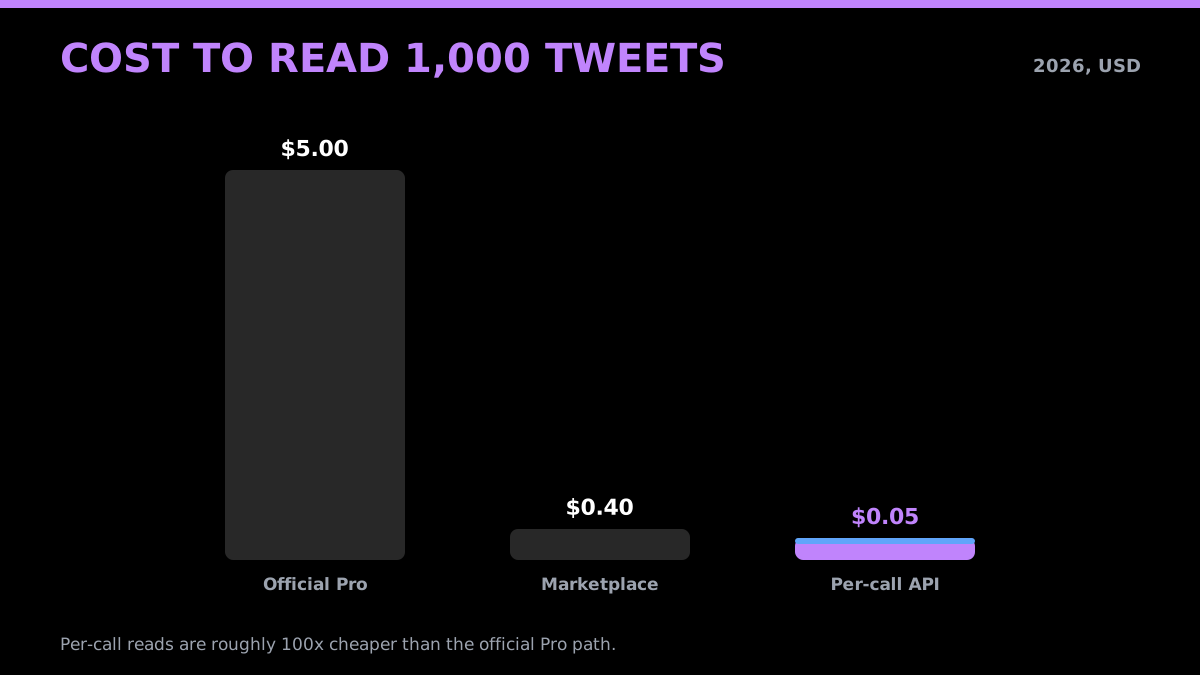
Cost is where the architecture decision gets made for you. On the official X API, the streaming path to monitoring is gated to legacy or Enterprise access, and pay-per-use reads run about $0.005 each (blotato X API pricing). Reading a million tweets at that per-read rate is roughly $5,000; the same volume on a per-call API at $0.001 per call is a fraction of it. Because one GetXAPI call returns a page of tweets, a per-call read works out to roughly $0.05 per 1,000 tweets versus about $5.00 per 1,000 on the official Pro path.
For a concrete monitor, a batched search every 30 seconds is about 86,400 calls per 30-day month, or about $86.40 at $0.001 per standard call. For the official route, verify filtered-stream availability, endpoint limits, and billing in the current X documentation and Developer Console rather than relying on a historical tier claim.
Work a fuller example. Say you monitor three signals: new tweets from 30 competitor accounts batched into three search queries polled every 30 seconds, mentions of your brand on one query polled every 30 seconds, and profile changes on those 30 accounts checked hourly. The four polling queries run about 86,400 calls each a month, so roughly 345,600 calls; the hourly profile checks add 30 accounts times 720 hours, about 21,600 calls. That is around 367,000 calls a month, or about $367 at $0.001 per call. The official path to the same freshness on streaming is gated to legacy or Enterprise access, out of reach for a new developer. The per-call model is not marginally cheaper here, it is more than an order of magnitude cheaper, and it has no minimum if your usage is smaller.
The reason the per-call number stays sane while the official number does not is the absence of a floor. Pay-per-use on the official API still carries the $0.005 per-read charge and the streaming tier behind a five-figure wall, so the bill grows with both volume and access level. A per-call read API charges only for the calls you make, so the same architecture that costs $86 at one query costs $86, not a five-figure monthly commitment, and scales linearly from there.
What real-time monitoring costs
Webhook monitoring is a flat monthly subscription, separate from per-call credits. Deliveries and retries are never billed, and your API credits are untouched.
| Plan | Price | Accounts | Per account | Fast 2s tier |
|---|---|---|---|---|
| Starter | $19/mo | 6 | $3.17 | Standard 15s only |
| Growth | $59/mo | 20 | $2.95 | Yes |
| Professional | $119/mo | 50 | $2.38 | Yes |
| Enterprise | $249/mo | 150 | $1.66 | Yes |
Paying by card is an auto-renewing subscription you can cancel anytime. Paying by crypto buys a 30-day pass at the same price with bonus slots (8, 24, 55 and 160 respectively), renewed manually, and renewing early extends your end date rather than resetting it. Above 150 accounts, the tier is custom.
Now compare that with polling the same workload. Watching 20 accounts on a 15-second interval is roughly 115,000 calls a day, whether or not anybody tweeted, which at $0.001 per call is about $115 a day. The $59 per month Growth plan covers the same 20 accounts, pushes faster than a 15-second poll, and removes the cron, the state table and the dedupe logic. That is the entire argument for push over poll: you stop paying for the times nothing happened.
One caveat worth knowing. If a subscription lapses your monitors are suspended rather than deleted, read access continues, and everything revives when you renew and resume.
Start monitoring
Monitoring an X account in 2026 splits cleanly in two. To know the moment a specific account posts, use a webhook and let the tweet come to you. To pull history, or to sweep keywords across all of X rather than a fixed list of handles, poll a cheap read endpoint on an interval. The old advice, that polling is the only realistic option because streaming is enterprise-gated, stopped being true when push became available on a $19 plan.
Set up monitors in the monitoring console or through the nine API endpoints, and read the delivery contract before you write your handler, because signature verification against the raw body is the one step people get wrong. For the polling side, GetXAPI reads cost $0.001 per call with a single bearer token, no developer account and no monthly minimum. See pricing for both rate cards, the cost calculator to model your own interval and account count, and the search operators reference to turn the mention loop into full brand monitoring. When you are ready, sign up and have your first tweet delivered in minutes.
Related reading
Build on the monitoring loops above with these guides:
- X (Twitter) webhooks: setup, the CRC check and limits, if you are implementing X's own webhook path rather than polling.
- The full Twitter API tutorial and the Python Twitter API tutorial cover the basics each loop assumes.
- How to scrape tweets and scrape tweet history go deeper on pulling tweet data at volume.
- For reads at scale, see the trends API guide, exporting followers, and sending DMs via API.
- On rate limits and reliability, read the rate limit guide and GetXAPI best practices.
- On cost and choice: the Twitter API cost breakdown, is the Twitter API free, X API v2 vs GetXAPI, and the current 2026 X API pricing guide.
- Adjacent builds: sentiment analysis in Python, bot detection, and the best residential proxies for scraping.
- Getting set up: how to get a Twitter API key and the best Twitter API for scraping.
Frequently Asked Questions
Yes, and as of July 2026 you no longer have to poll for it. GetXAPI real-time monitoring pushes every new tweet to your server as a signed webhook within about 15 seconds on the standard tier or 2 seconds on the fast tier, on a flat monthly plan from $19 that does not consume API credits. Polling a read endpoint on an interval still works and remains the right approach for pulling history and for keyword searches not tied to a fixed list of accounts. On the official X API the push equivalent is the filtered stream, which means running and maintaining a persistent streaming connection yourself.
Webhooks push: you register an account and a destination URL, and new tweets arrive at your endpoint within seconds with no scheduler on your side. Polling pulls: you call a read endpoint on an interval and compare against the last tweet ID you saw. Webhooks are the better fit for watching a known list of accounts because latency is lower and there is no state to maintain. Polling is still better for history and for keyword sweeps across all of X, where the matching set is not a fixed list of accounts.
Call the user-tweets endpoint for the handle, read the newest tweet ID, and store it. On each poll, fetch again and treat any tweet with an ID greater than your stored value as new. Process those, then update the stored ID. This last-seen-ID pattern avoids duplicate alerts and is more reliable than comparing timestamps, because IDs are monotonic. With GetXAPI it is a single GET to /twitter/user/tweets?userName=HANDLE with a bearer token.
Use the advanced search endpoint with an operator that targets the handle, for example a query like 'to:handle' or '@handle', sorted by latest, and page through results with the cursor. Track the newest tweet ID you have processed so you only alert on fresh mentions. This is how brand-monitoring and support-alerting pipelines catch posts that tag an account without that account having to authenticate.
There is no hard cap when you batch correctly. Polling each account individually scales linearly and gets expensive, so for large lists you switch from per-account timeline polling to search queries that match many accounts in one call, or to a list-based read. The practical limit is your budget and your acceptable latency, not an account ceiling. Watching 10 accounts is trivial; watching 1,000 is a batching and cost-modeling exercise, not a different API.
Register the account with a real-time monitoring webhook and every new tweet is pushed to your server as a signed HTTPS POST, typically within 15 seconds on the standard tier or 2 seconds on the fast tier. You do not poll and you do not keep a last-seen-ID table. Before webhooks existed the only option was a poll loop on a read endpoint, which is still the right approach for pulling history or for keyword searches that are not tied to a fixed list of accounts.
Create an incoming webhook in Discord under Channel Settings, Integrations, Webhooks, then add a monitor pointing at a small endpoint of your own. That endpoint verifies the HMAC signature on the delivery, reshapes the tweet into a Discord embed, and posts it to the Discord webhook URL. Verify against the raw request bytes rather than re-serialized JSON, branch on the payload type because test deliveries contain no tweet field, and dedupe on delivery_id because delivery is at-least-once.
The current official pay-per-use table bills standard Post reads at $0.005 each, or $5 per 1,000 billable resources. Filtered-stream availability and limits should be confirmed in the current endpoint documentation or an Enterprise agreement. On GetXAPI, standard polling calls cost $0.001 and a batched search can cover multiple accounts.
Not with a per-call API. The official X API requires a developer account, app approval, and OAuth for many actions. A per-call read API like GetXAPI uses a single bearer token against REST endpoints, so there is no developer-account queue and no OAuth dance for reading public data. You authenticate, call the endpoint, and parse JSON.
Reading public posts for monitoring is a standard, widely used pattern, and a per-call read API returns the same public fields the platform exposes. You are responsible for how you store and use the data, including retention and privacy obligations for your jurisdiction and users. Monitor public accounts and public conversations, respect deletion, and do not try to access protected or private content.
Check out similar blogs
More guides on the Twitter/X API, scraping, and pricing.

X API Pricing in 2026: Current Rates and Verified Facts
A source-checked guide to the current X API price table: $0.005 standard Post reads, $0.015 standard Post creates, $0.20 URL posts, owned reads, caps, and what the page does not establish.

Twitter API 403 Forbidden and 401 Unauthorized: Every Cause and Fix
Why the X API returns 403 Forbidden or 401 Unauthorized, how to tell the two apart, and a fix for each cause. Covers tier gating, app permissions, OAuth, and X error codes.

The Best Twitter (X) API Alternatives in 2026, Compared
The best Twitter / X API alternatives in 2026, ranked and compared: managed pay-per-call APIs, web-data marketplaces, and open-source libraries, with real per-1,000-tweet costs.

How to Like a Tweet via API in 2026 (No Dev Account)
Like (favorite) tweets programmatically via API in 2026 without an X developer account. The auth_token model, working curl, Python, and Node code, and per-call cost.

Post Tweets via API With Authentication in 2026 (No Developer Account)
Post tweets, threads, and media through an API without an X developer account. The auth_token model, working Python and Node code, rate-limit safety, and per-call costs.

Twitter API Performance Benchmark 2026: Latency, Reliability, Throughput
A real Twitter/X API performance benchmark: measured per-endpoint latency (p50/p95), 100% reliability across 44 calls, and throughput math, with how it compares to the official API.

How to Detect X (Twitter) Bots: A Practical, Data-Backed Method
A practitioner method for Twitter bot detection: the real signals (views-to-likes ratio, account age, posting cadence, follower pattern, amplification), runnable API code to pull each one, and a scoring rubric you own.

Scrape Full Tweet History of Any Account in 2026 (Beyond the 3,200 Limit)
Why the X timeline stops at 3,200 tweets and how to pull an account's full history with date-window search, cursor pagination, and dedup. Live-tested code in Python and curl.
Featured in
Where GetXAPI's data and pricing get cited.

The hidden line item in your AI side project: X data
Indie Hackers post on the often-overlooked cost of X data for AI side projects, citing GetXAPI as the usage-based way to pull live Twitter data without a five-figure X developer contract.

How Companies Are Learning to Read Market Mood in Real Time
Editorial feature on Big News Network examining how companies read market mood from X in real time, citing GetXAPI as the usage-based Twitter API that prices live social listening by the call instead of a five-figure annual contract.

How Companies Are Learning to Read Market Mood in Real Time
Syndicated feature on Business Newswire on how companies read market mood from X in real time, citing GetXAPI as the usage-based Twitter API that prices live social listening by the call.

Working with Twitter/X Data: A Practical Skill for IT Students and Professionals in 2026
Guide on SIIT (Scholars International Institute of Technology) on collecting live Twitter/X data as a practical developer skill, citing GetXAPI as the per-call Twitter data API that makes it affordable without an X developer account.

Adding Twitter/X Data to Your App in 2026: A Developer's Integration Guide
Developer integration guide on Programming Insider covering how to add live Twitter/X data to an app in 2026, comparing the official X API v2 with a key-based REST approach and citing GetXAPI as the low-cost per-call option with no developer-account approval.

6 Twitter/X Scraping Solutions for Every Budget
Roundup on TechBullion of the leading Twitter/X scraping solutions, ranking GetXAPI first as the cheapest option at $0.001 per call (about $0.05 per 1,000 tweets) with clean JSON output and no monthly minimum.

The Data Bill Behind Every Social Analytics Tool
Editorial piece on SpeakRJ examining the underlying data costs behind social analytics tools, citing GetXAPI as the usage-based way to source live X data by the call.

What Is AI Sentiment Analysis, and What Does Each Layer Cost?
Explainer in AI Journal breaking sentiment analysis into its data, model and reporting layers and what each costs to run, citing GetXAPI for pulling public X posts on pay-per-call pricing.

Why Enterprise AI Agents Still Cannot Read Social Data
Analysis piece in The Silicon Review on why enterprise agents reach internal systems easily but struggle with public social data, citing GetXAPI's MCP server and data-as-a-service model as one route to close the gap.