How to Handle Twitter API 429 Errors with Retry and Backoff
A developer playbook for Twitter/X API 429 responses: reading x-rate-limit headers, retry-with-backoff patterns, per-endpoint queues, and how to avoid getting throttled at scale. For the full per-endpoint limit reference, see the rate limits page.

The X API (still searched for as the Twitter API) does not give you one rate limit. It enforces a separate limit for every endpoint, counted inside a time window that is usually 15 minutes or 24 hours, and the moment you cross one the API stops answering and returns a 429 Too Many Requests. Most developers meet this the hard way: a script that worked at ten requests falls over at four hundred, and the error body is terse. This guide is the handling playbook: exactly what a 429 looks like on the wire, how to read the headers that carry the live numbers, the retry-with-backoff code that respects the reset timestamp, and the one thing the pay-per-use rollout did not change. For the current per-endpoint numbers themselves, the rate-limit reference keeps the table.
TL;DR: X enforces rate limits per endpoint, usually on a 15-minute or 24-hour window, and each endpoint splits its budget by auth method, since a Bearer (app) token and a user OAuth token draw from separate buckets. Do not model the window yourself: when one is exhausted you get a 429 with an
x-rate-limit-resetheader naming the Unix timestamp to wait for, and reading that header then backing off with jitter is the fix. Pay-per-use changed billing, not the windows, so the limits still apply. If you are read-heavy and tired of managing windows, a per-call API like GetXAPI has no endpoint-specific window caps at all.
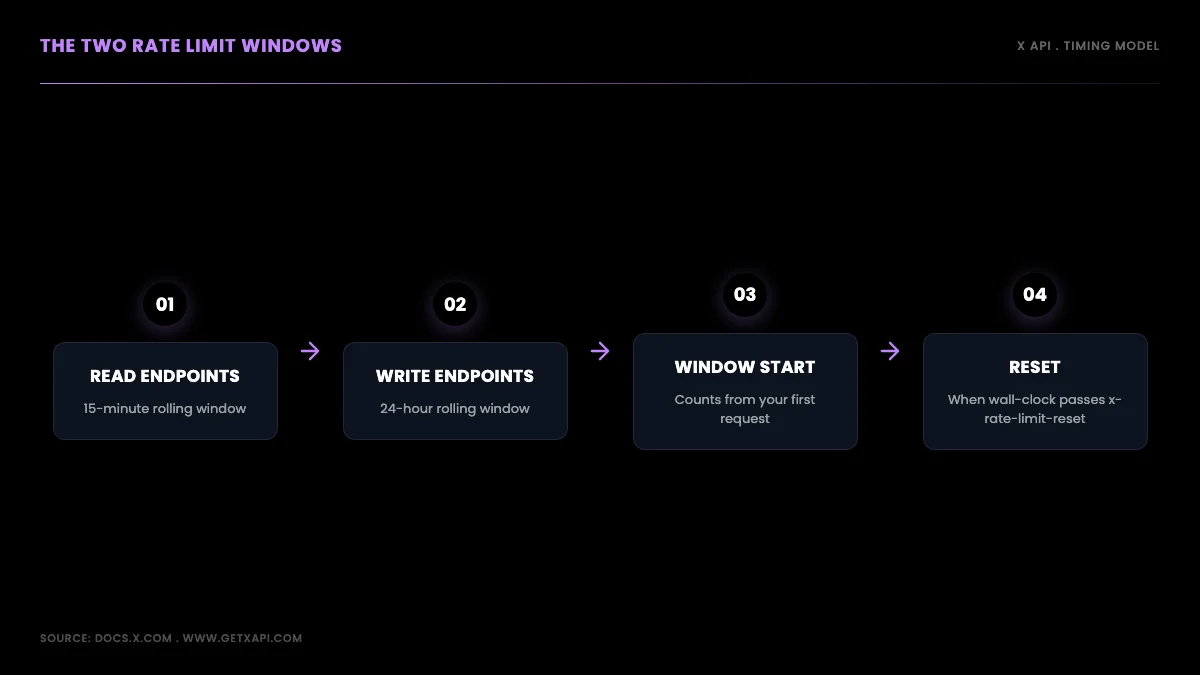
Trust the reset header the server sends, not a window you compute
If you only take one idea from this guide, take this: trust the reset timestamp the server sends, never a window you compute yourself. That single habit prevents most "why did I get rate limited early" confusion, and it is where we start.
How X API Rate-Limit Windows Work
Rate limits on the X API are enforced per endpoint, and X documents the windows as typically 15 minutes or 24 hours depending on the endpoint. In broad terms, read endpoints (searching recent posts, looking up a tweet, reading a profile or timeline, fetching DM events) sit on shorter windows, while post creation is metered over a longer daily period. But the window length and reset behavior vary per endpoint, so the safe rule is not to assume a fixed length or a fixed starting point.
What you can rely on is the response: every metered call returns an x-rate-limit-reset header with the exact Unix timestamp when the window refills. Compute your wait from that header rather than from the clock or from an assumed window start. Whether a given endpoint's window began at your first request or on some other boundary does not matter to correct code, because the header already encodes the truth.
# Do not model the window's length or its starting point.
# The server sends the reset time on every response, so use it:
#
#   wait_seconds = max(x_rate_limit_reset - time.time(), 1)
#
# Trust the header, never a computed clock boundary.
That is the whole timing concept. The rest of this guide is about reading the headers that carry the live numbers, and reacting to them well.
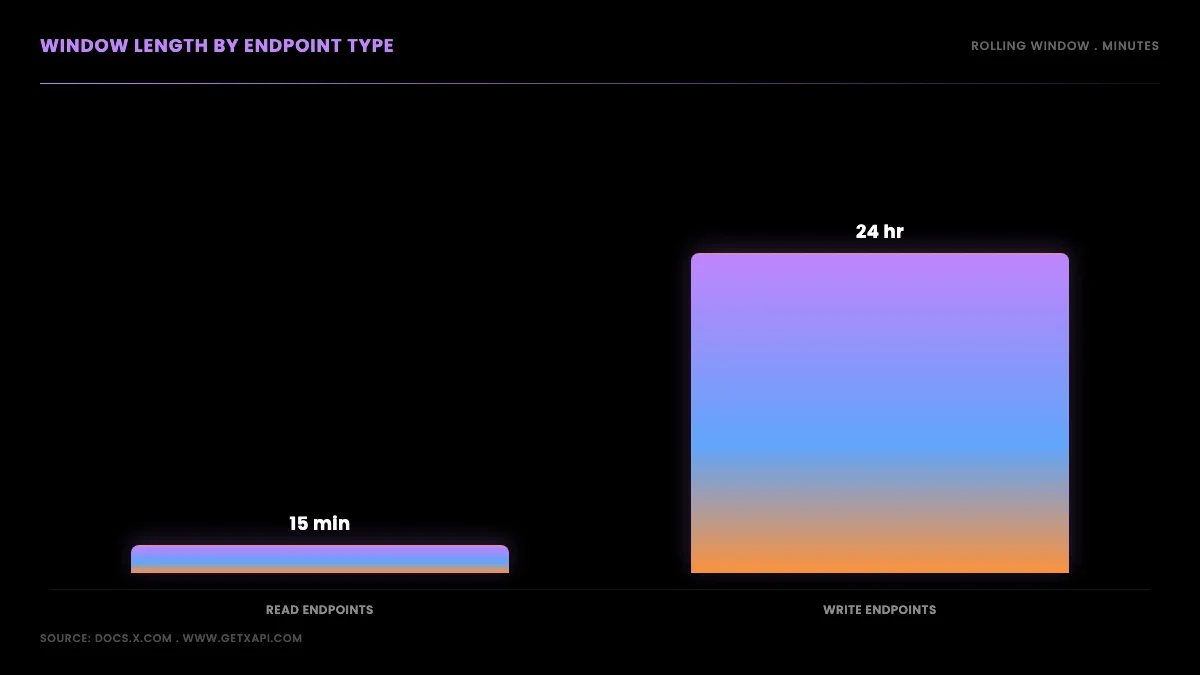
Trust the reset header, not a computed window
Where the Current Per-Endpoint Numbers Live
This guide deliberately does not carry a per-endpoint limit table. The current published numbers, per-app versus per-user windows, the 1-request-per-second cap on full-archive search, and the monthly Post-read cap all live on the current per-endpoint rate-limit reference, which is verified against X's rate-limit documentation and updated when X changes them. Two planning facts worth carrying into the code below: batched lookups are far more generous than search on most credentials, and the live x-rate-limit-limit header on your own responses always beats any published table, because it reflects your actual credentials.
Rate Limiting Explained: ever tried to hit an API too many times and got blocked with "429 Too Many Requests"?
@shreyassihasane view on X
What a 429 Too Many Requests Response Looks Like
When you exhaust an endpoint's budget, the API returns HTTP status 429 Too Many Requests. The body is terse, so the useful information lives in the response headers, and learning to read them turns a mysterious failure into a precise wait time.
Three headers govern every metered call. x-rate-limit-limit is the cap for the endpoint in the current window, which is the same number you saw in the table above but read live from the server. x-rate-limit-remaining counts down toward zero with each request and reads 0 on the response that triggers the 429. x-rate-limit-reset is a Unix epoch timestamp marking the exact second the window resets, and it is the single most useful value on the entire response. Some 429 responses also include a Retry-After header expressed in seconds, but it is not present on every endpoint, so your code should prefer the reset timestamp and treat Retry-After as a fallback. The full set of header names is documented on the X API rate limits reference and matches the standard 429 Too Many Requests definition in the HTTP spec.
A 429 is not the only error you can get, and confusing it with its neighbors wastes time. A 403 Forbidden means the request is not permitted as sent, for reasons X documents as missing endpoint access, an OAuth scope your token lacks, or a protected or private resource; retrying the unchanged request will not help, but fixing the underlying access or scope can. A 401 means your credentials are wrong or expired. A 503 means the server is overloaded, which you should retry with backoff but which has nothing to do with your rate budget. Only the 429 is a true rate-limit signal, and only the 429 is fixed by waiting for the reset.
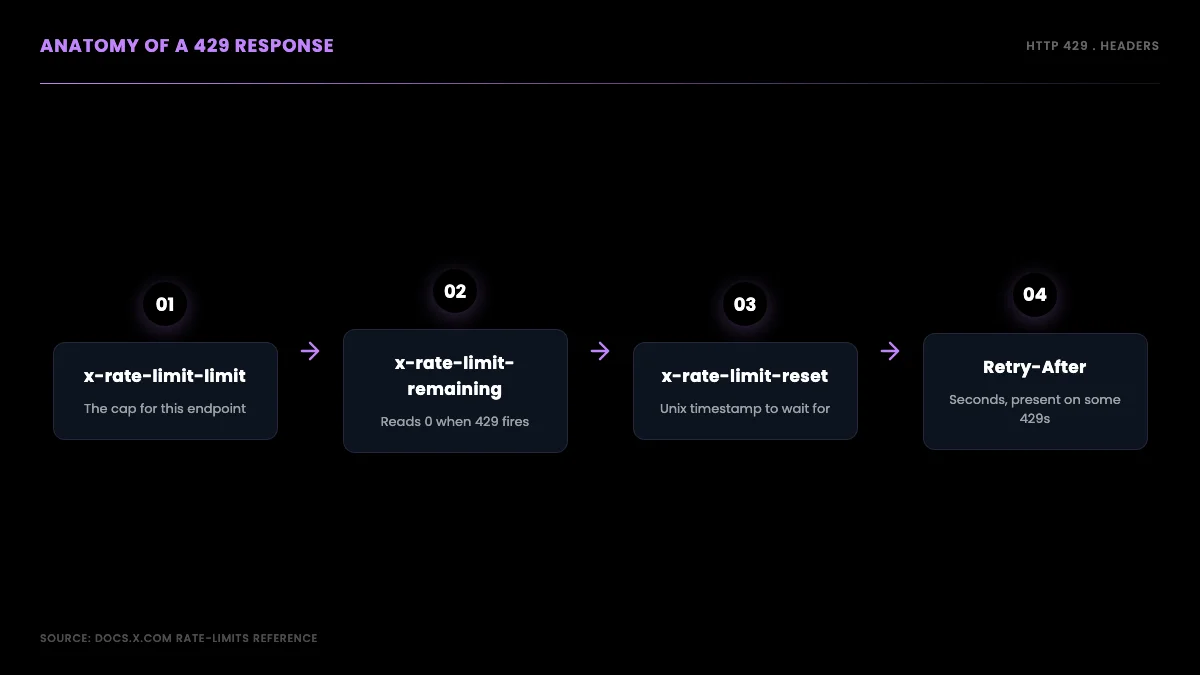
The headers that turn a 429 into a precise wait time
Here is the smallest useful piece of code: a function that turns a 429 response into the number of seconds to wait, preferring the reset timestamp and falling back to Retry-After.
import time
import requests


def get_wait_seconds(response):
    if "x-rate-limit-reset" in response.headers:
        reset_ts = int(response.headers["x-rate-limit-reset"])
        return max(reset_ts - time.time(), 1)
    if "Retry-After" in response.headers:
        return float(response.headers["Retry-After"])
    return 60  # safe fallback when no header is present


resp = requests.get(ENDPOINT, headers=AUTH_HEADERS)
if resp.status_code == 429:
    wait = get_wait_seconds(resp)
    print(f"Rate limited. Waiting {wait:.0f}s until reset.")
    time.sleep(wait)
That max(..., 1) guard matters: clock skew between your machine and X's servers can make the reset look like it already passed, and you never want to sleep a negative number. Floor the wait at one second and move on.
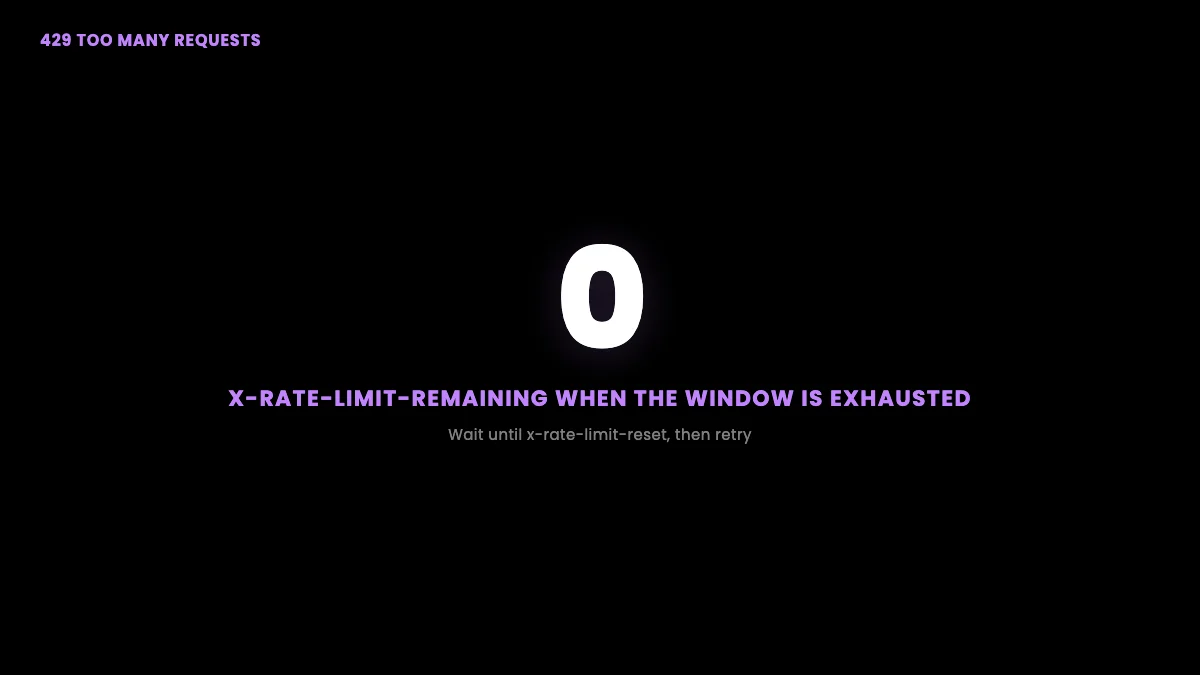
429 recovers by waiting; 403 and 401 need a fix before you retry
Start building with GetXAPI
$0.05 per 1,000 tweets. $0.10 free credits. No credit card required.
Twitter API 429 vs 403 vs 503: Which Errors to Retry
The retry code in the next section hinges on one decision your client makes on every failed response: should I wait and try again, or does this request need a fix before it can succeed? Get that decision wrong and you either burn your retry budget on requests that will keep failing unchanged, or you give up on requests that would have worked after a short wait. Four status codes cover almost everything the X API throws at a read loop, and they split cleanly into retry-as-is and fix-then-retry.
A 429 is the only true rate-limit signal, and it is always worth retrying after the wait computed from x-rate-limit-reset. A 503 Service Unavailable means the server is briefly overloaded and has nothing to do with your budget, so retry it with plain exponential backoff and no reference to the rate-limit headers. Those two are recoverable by an automatic retry. On the other side, a 403 Forbidden means the request is not permitted as sent (missing endpoint access, an OAuth scope your token lacks, or a protected resource), a 401 Unauthorized means your credentials are wrong or expired, and a 400 Bad Request means your query is malformed. None of those should be retried unchanged, because the same request will fail the same way; fix the request, credentials, scopes, or access first, then retry.
The trap that catches developers is treating a 403 like a 429. The two look superficially similar (both are the API saying no) but they mean different things: a 429 says "not right now" and a 403 says "not as sent." A loop that blindly retries a 403 will spin through its entire retry budget, add load, and still fail, while a loop that retries a 429 recovers cleanly. The next section encodes exactly this split into the retry decorator: 429 and 503 get automatic backoff, everything else raises so you can correct it.
How to Retry a 429: Exponential Backoff With Jitter
Knowing how long to wait is half the job. The other half is retrying without making the problem worse, which is where exponential backoff and jitter come in. Backoff means each retry waits longer than the last; jitter means each retry waits a slightly random amount so that many workers do not all retry at the same instant.
The reason jitter is not optional is the thundering-herd problem. Picture a hundred worker processes that all share a Bearer token and all hit the search ceiling at the same moment. Without jitter, all hundred read the same reset timestamp, all sleep the same duration, and all retry in the same millisecond, which exhausts the freshly reset window instantly and triggers a fresh round of 429s. A small random offset spreads those retries across a few seconds and lets the window drain in order. This is standard distributed-systems hygiene, and it is the difference between a backoff loop that recovers and one that oscillates.
The pattern has four rules. Prefer x-rate-limit-reset over any computed delay, because the server knows the truth and your math is a guess. Cap the computed delay so a high attempt count cannot sleep for an absurd duration. Add jitter proportional to the wait. And do not automatically retry an unchanged 400, 401, or 403: the same request will fail the same way, so raise immediately and correct the request, credentials, scopes, or access before trying again.
Here is the full retry decorator in Python, the version you would actually drop into a production read loop:
import time
import random
import requests


def request_with_retry(url, headers, max_retries=5, base_delay=5):
    for attempt in range(max_retries):
        resp = requests.get(url, headers=headers)
        if resp.status_code == 200:
            return resp
        if resp.status_code == 429:
            if "x-rate-limit-reset" in resp.headers:
                wait = max(int(resp.headers["x-rate-limit-reset"]) - time.time(), 1)
            else:
                wait = min(base_delay * (2 ** attempt), 900)
            jitter = random.uniform(0, wait * 0.1)
            print(f"429 on attempt {attempt + 1}. Waiting {wait + jitter:.1f}s.")
            time.sleep(wait + jitter)
        elif resp.status_code in (502, 503):
            wait = min(base_delay * (2 ** attempt), 60) + random.uniform(0, 2)
            time.sleep(wait)
        else:
            resp.raise_for_status()  # 400, 401, 403: do not retry
    raise RuntimeError(f"Max retries exceeded for {url}")
The same logic in Node.js, for a JavaScript stack, follows the identical four rules:
const axios = require("axios");

async function requestWithRetry(url, headers, maxRetries = 5, baseDelay = 5000) {
  for (let attempt = 0; attempt < maxRetries; attempt++) {
    try {
      const resp = await axios.get(url, { headers });
      return resp.data;
    } catch (err) {
      const status = err.response?.status;
      if (status === 429) {
        const reset = err.response.headers["x-rate-limit-reset"];
        const waitMs = reset
          ? Math.max(parseInt(reset) * 1000 - Date.now(), 1000)
          : Math.min(baseDelay * Math.pow(2, attempt), 900000);
        const jitter = Math.random() * waitMs * 0.1;
        await new Promise((r) => setTimeout(r, waitMs + jitter));
      } else if ([502, 503].includes(status)) {
        await new Promise((r) => setTimeout(r, baseDelay * Math.pow(2, attempt)));
      } else {
        throw err;
      }
    }
  }
  throw new Error(`Max retries exceeded for ${url}`);
}
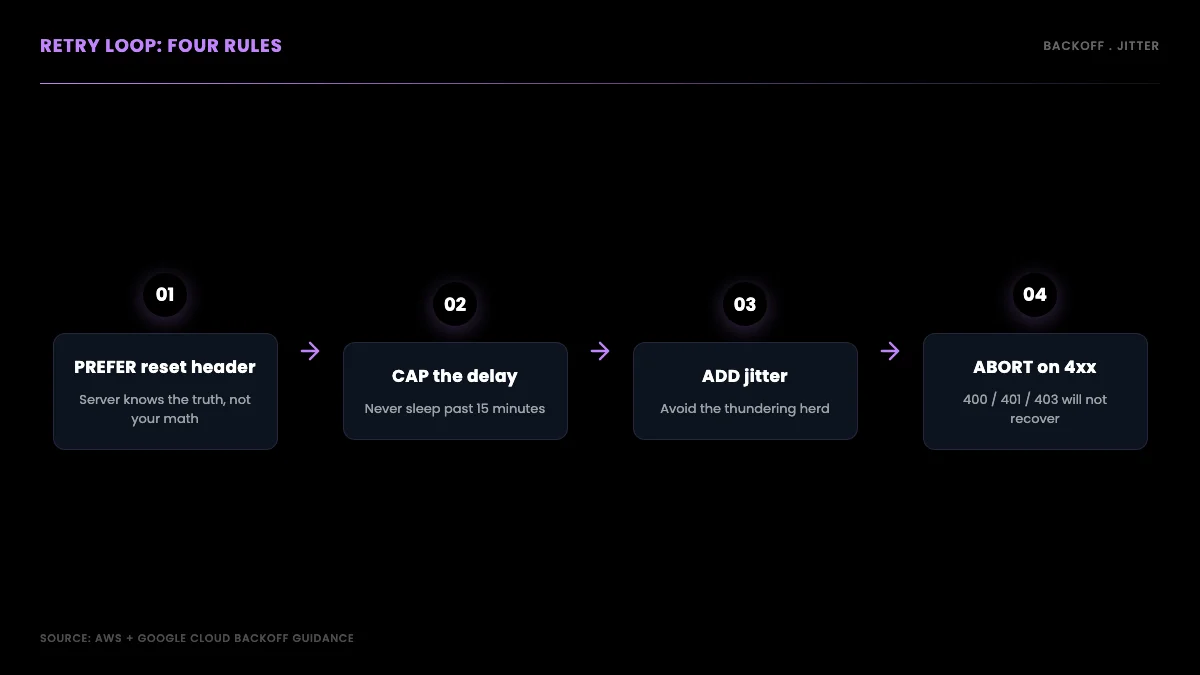
The four rules of a well-behaved retry loop
Both versions convert the reset timestamp to a wait, cap the fallback delay so a high attempt count cannot sleep for an absurd duration, add proportional jitter, and refuse to retry structural errors. The community Tweepy library wraps a version of this for you if you build against the official API in Python, and the production scraping best practices guide shows how to wire the same pattern into a long-running pipeline. For the request syntax that feeds these loops, the Python Twitter API tutorial is the companion walkthrough.
the r/learnpython thread on getting error 429 too many requests from the Twitter API from r/learnpython
Reading x-rate-limit-remaining Before You Hit Zero
Retrying after a 429 is reactive. The better pattern is proactive: read x-rate-limit-remaining on every response, not just on failures, and slow down before you hit zero. A 429 costs you a full window of dead time; a proactive throttle costs you a few milliseconds of sleep spread across many requests and never triggers the error at all.
The idea is simple. Every successful response carries the remaining count and the reset timestamp. If the remaining count drops below a threshold you choose, spread your remaining requests evenly across the time left in the window instead of firing them as fast as the network allows. You trade a little throughput now for never paying the full window penalty later.
Here is a throttle wrapper that does exactly that. It checks the remaining budget on each response and, when it dips below a floor, sleeps long enough to pace the rest of the window:
import time
import requests


def safe_request(url, headers, min_remaining=50, slow_down_factor=2):
    resp = requests.get(url, headers=headers)
    remaining = int(resp.headers.get("x-rate-limit-remaining", 9999))
    reset_ts = int(resp.headers.get("x-rate-limit-reset", time.time() + 900))

    if remaining < min_remaining and resp.status_code == 200:
        window_seconds_left = max(reset_ts - time.time(), 1)
        sleep_per_request = window_seconds_left / max(remaining, 1)
        time.sleep(sleep_per_request * slow_down_factor)

    return resp
The defaults are conservative on purpose. A floor of 50 remaining requests gives you margin to absorb a burst, and a slow-down factor of 2 doubles the spacing so you are unlikely to graze the limit even under jitter. Tune the floor up for high-concurrency workloads where several workers share a bucket, and down for single-threaded scripts where you have the whole budget to yourself. For real-time monitoring jobs that must keep reading, pair this throttle with a request queue so that work backs up gracefully instead of failing. The Twitter trends API guide covers a polling pattern that benefits directly from this kind of pacing.
The backoff-with-jitter pattern from the previous section is not a Twitter-specific invention. It is the standard cloud guidance for any rate-limited API, documented in the AWS architecture guidance on exponential backoff and jitter and the Google Cloud retry strategy reference. Following the same pattern X expects keeps your client well-behaved across every API you call, not just this one.
How to Check Your Current Rate Limit Status
The authoritative budget for your credentials is the x-rate-limit-limit header on a real response, so the reliable check is a normal GET whose headers you inspect. Make the smallest valid request the endpoint supports (for search, one result) and read the headers off that response.
# Read rate-limit headers off a minimal GET (use the method the endpoint supports)
curl -sD - -o /dev/null \
  "https://api.x.com/2/tweets/search/recent?query=test&max_results=10" \
  -H "Authorization: Bearer $X_BEARER_TOKEN" \
  | grep -i "x-rate-limit\|x-access-level"
The response carries the three rate-limit headers covered earlier. If reads return 403, inspect the response body and your Developer Console access rather than assuming a current public tier from an older article. If reads succeed, the x-rate-limit-limit header is your authoritative per-window budget because it reflects your credentials. (Avoid assuming an endpoint supports HEAD; not all X API routes do, so read the headers off the GET you were going to make anyway.) The header semantics follow standard HTTP rate-limit guidance, and the retry behavior is governed by the 429 status definition in RFC 6585.
The cheapest Twitter API. Try it free.
$0.05 per 1,000 tweets. $0.10 free credits. No credit card required.
App-Level vs User-Level Rate Limits: Bearer Token vs OAuth 1.0a
One of the deepest sources of rate-limit confusion is that the same endpoint has two different limits depending on how you authenticate. A Bearer token and a user OAuth token draw from completely separate buckets, and understanding the distinction can multiply your effective throughput.
A Bearer token is app-level authentication. There is one bucket per app token, and every call made with that token counts against the same shared budget. If your service uses a single Bearer token to serve a thousand users, all thousand users share one 450-request search window. A user OAuth token is per-user authentication. Each authenticated user's token has its own independent bucket and its own independent window. The same thousand users, each authenticated with their own OAuth token, each get their own 300-request search window.
The practical consequence is large. The numbers per call are lower on OAuth (300 search requests versus 450 on Bearer), but the buckets are independent, so total capacity scales with your user count instead of being capped by a single app bucket. For a high-volume multi-user app, OAuth user tokens are the way to multiply effective throughput; for a single-tenant backend job, the Bearer token's higher per-bucket ceiling is simpler and enough. The same bucket logic governs endpoint-specific reads like follower lists, covered in the export Twitter followers guide, and the long-form read endpoints in the Twitter Article API tutorial.
| Auth type | Search limit per 15 min | Bucket scope |
|---|---|---|
| Bearer token (app) | 450 req | Shared across every call using this app token |
| OAuth 1.0a (user) | 300 req | Per authenticated user token, independent windows |
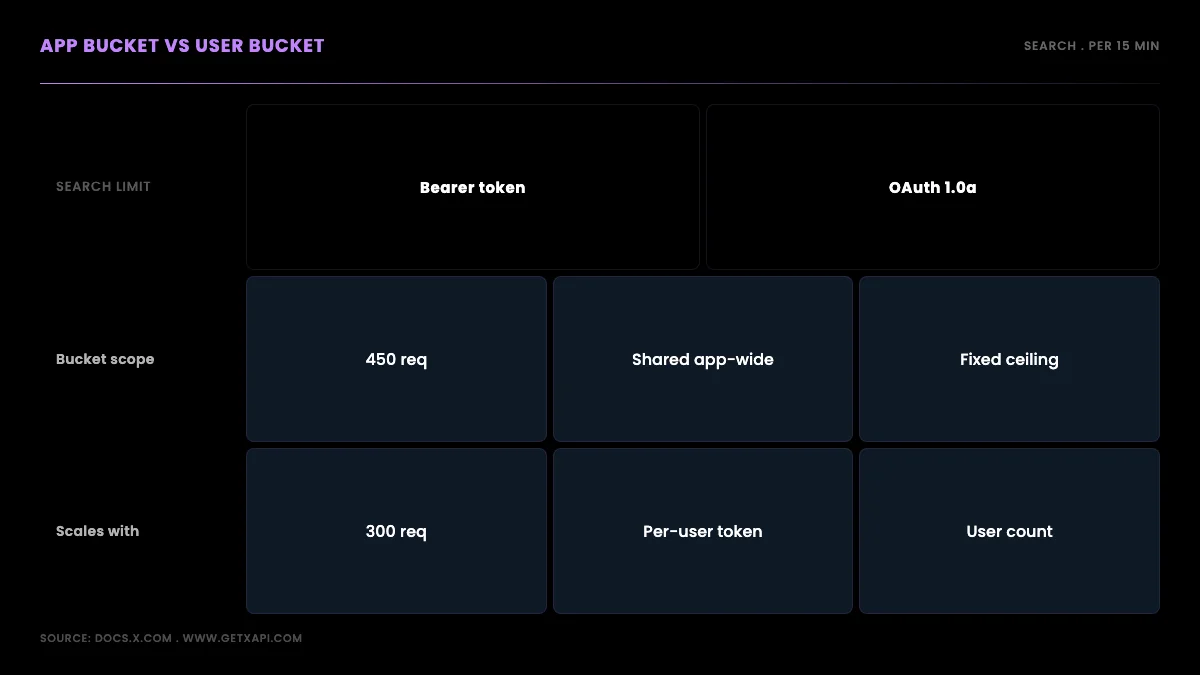
Why OAuth multiplies throughput for multi-user apps
This is also the answer to the most common Reddit question in this space: "why does my search 429 after 300 requests when the docs say 450?" The answer is almost always that the code is using user OAuth (the 300 bucket) while reading the Bearer-token number from the docs (the 450 bucket). Match the limit you plan against to the auth method you actually use. The auth flows themselves are covered in the how to get a Twitter API key walkthrough and on the Twitter API key page, and the bucket distinction shows up again in the Twitter API v2 vs GetXAPI comparison.
Getting "rate limit exceeded" on X API. Does anyone know what's the issue?
@devfaizanali view on X
Does the Pay-Per-Use Model Remove Rate Limits?
No. This is the single most common misconception about the 2026 X API, and it costs developers real money when they build on the assumption that paying per call buys unlimited speed. Pay-per-use changed how you are billed, not how fast you can send requests.
Under the pay-per-use model you prepay credits and each call deducts its per-operation price. That is a billing change. The 15-minute and 24-hour rate-limit windows still apply on top of it, exactly as they did under the legacy subscription tiers. A search endpoint is still 450 requests per 15 minutes on a Bearer token whether you are on pay-per-use or grandfathered into an old plan. You will still get a 429 when a window is exhausted, and you will still need the retry-with-backoff code from earlier in this guide.
What pay-per-use does add is a second, separate kind of limit: a calendar-month read ceiling. Where a 429 is a timing limit you recover from by waiting minutes, the monthly cap is a hard ceiling you do not recover from until the next billing period. The two limits fail differently. Hit a window cap and you get a 429 with a reset timestamp. Approach the monthly cap and your account is pushed toward Enterprise pricing instead. This means a pay-per-use integration has to handle both: backoff for the per-window 429s, and spend monitoring for the monthly ceiling. The pay-per-use pricing model page and the Twitter API cost breakdown lay out where each limit bites, and the cost calculator models the spend curve before you write a line of code.
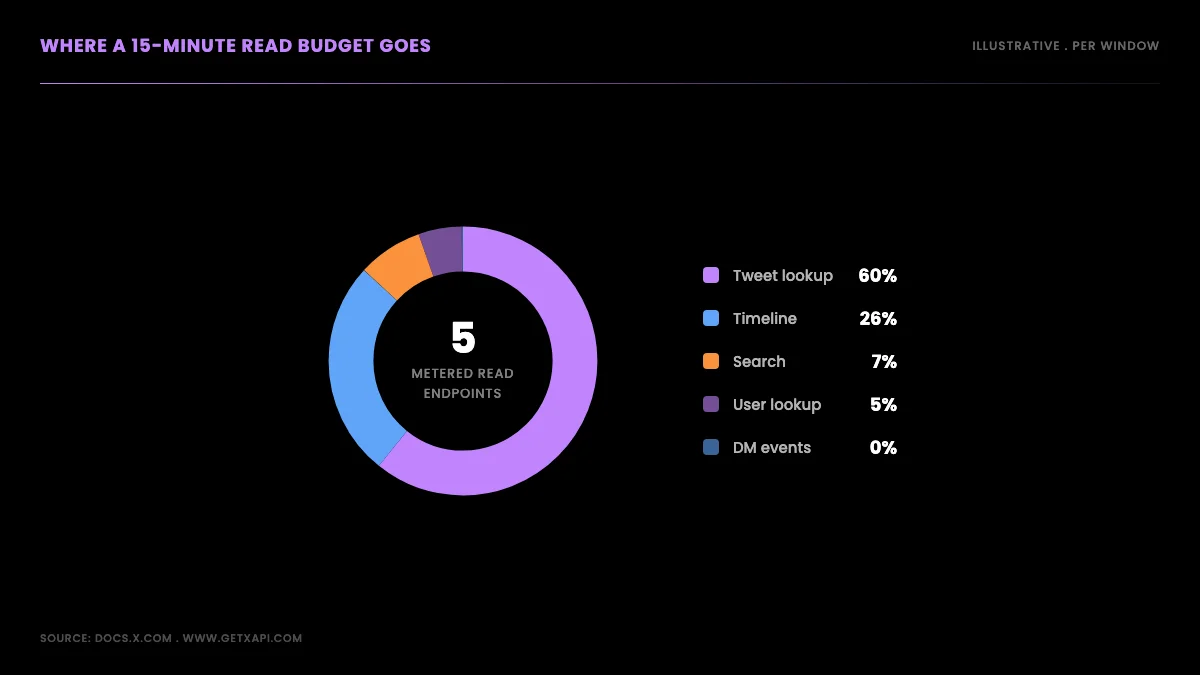
What pay-per-use changed, and what it did not
The takeaway is blunt: pay-per-use is not a rate-limit escape hatch. If anything it adds a limit. The only way to genuinely remove the per-window problem is to leave the official API's window model entirely, which is the last section of this guide.
the r/datasets thread on pulling Twitter/X data at scale without getting rate limited from r/datasets
How to Avoid 429s Entirely: Per-Call APIs With No Window Caps
Everything above is how you live inside the official window model gracefully. There is one way to step outside it: a third-party read API that bills per call and enforces no endpoint-specific rate-limit windows. For read-heavy work, this removes the window-exhaustion 429 rather than managing it.
GetXAPI is built this way. It charges per call and does not impose 15-minute or 24-hour window caps, so there is no x-rate-limit-remaining to track and no window exhaustion to back off from. What remains is general service throttling: sustained concurrency can still return a 429, and the Retry-After header tells you how long to wait. That changes the shape of your code rather than removing error handling from it. The elaborate per-endpoint queueing and reset-timestamp scaffolding from the earlier sections shrinks to a simple request plus one retry with backoff covering both transient network errors and throttling. You are no longer pacing against per-endpoint timing gates, because there are none, but you are not free of 429s entirely.
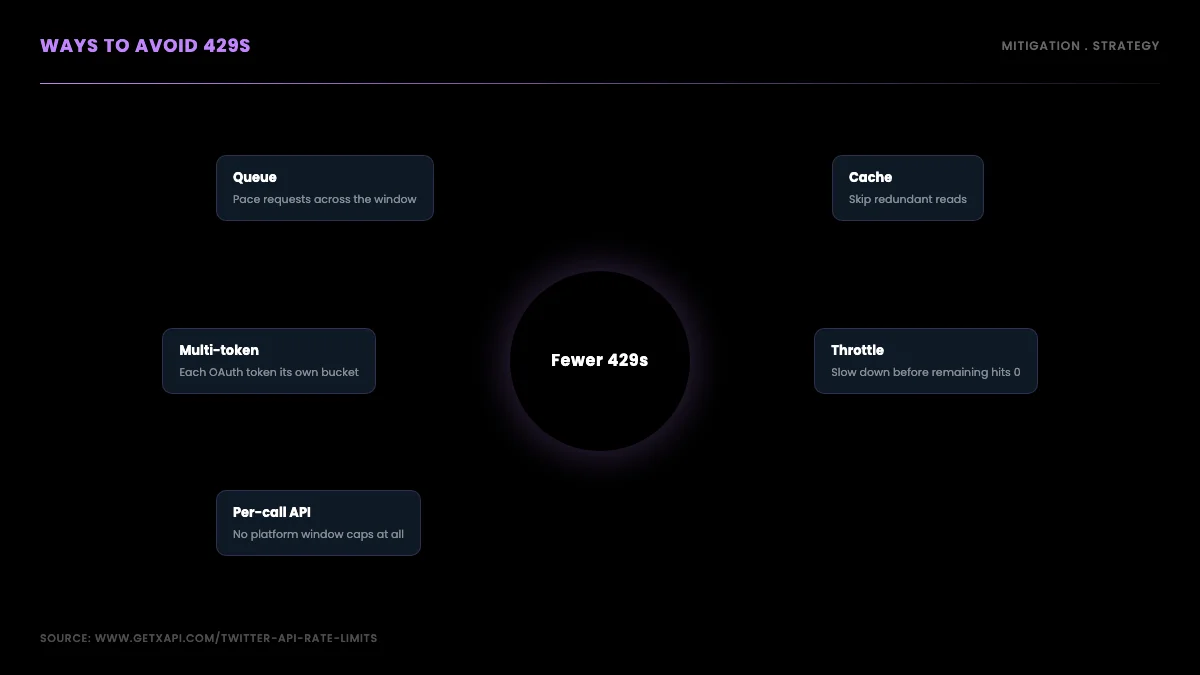
Ways to soften or sidestep the window problem
This matters most for three workload shapes. Read-heavy pipelines, like sentiment analysis over thousands of tweets, where the official 450-per-window search ceiling forces constant pacing. Real-time monitoring, where request cadence is bursty and unpredictable and a 429 mid-burst loses data. And research tasks, where you pull a large dataset once and the window math turns a five-minute job into an hour of sleeping. The trade-off is the billing model: per-call pricing versus a subscription, which the pricing page and the cost calculator let you compare against your expected volume.
Here is the same recent-search read that costs you window management on the official API, made against a per-call API with no per-endpoint window to manage. This request was executed live against the GetXAPI search endpoint before publishing:
import os
import requests

API_KEY = os.environ["GETXAPI_KEY"]

resp = requests.get(
    "https://api.getxapi.com/twitter/tweet/advanced_search",
    params={"q": "twitter api rate limit", "queryType": "Latest"},
    headers={"Authorization": f"Bearer {API_KEY}"},
)
resp.raise_for_status()
payload = resp.json()

print("matched tweets:", payload["tweet_count"])
for t in payload["tweets"][:5]:
    print(t["createdAt"], "@" + t["author"]["userName"], t["text"][:70])
# No x-rate-limit headers to parse and no per-endpoint window to track.
# Keep a small backoff: general service throttling can still return a 429.
There are no x-rate-limit-* headers on that response to inspect and no per-endpoint window to wait on. You would still wrap a long-running job in a small retry with backoff, both for transient 5xx network errors and because general service throttling can return a 429 under sustained concurrency, but the per-window 429 problem and its reset-timestamp choreography are gone. For the migration path off subscription and marketplace providers, see the GetXAPI vs twitterapi.io comparison and the migrating from twitterapi.io guide, and for an end-to-end read pipeline the Twitter sentiment analysis tutorial shows the pattern in context.
If you want the conceptual grounding on why platforms throttle at all, this explainer covers the system-design reasoning behind rate limiting and throttling:
https://www.youtube.com/watch?v=9CIjoWPwAhU
Summary
Twitter API rate limits come down to a small set of rules worth keeping in front of you. Limits are enforced per endpoint on windows that are usually 15 minutes or 24 hours, and each endpoint splits its budget between a shared Bearer (app) bucket and per-user OAuth buckets, which is why the same call can show two different limits. Do not model the window length or its start; read x-rate-limit-reset on every response and trust it. A 429 is a recoverable timing error: wait until that timestamp, then retry with backoff and jitter so you never start a thundering herd. Pay-per-use changed billing, not the windows, and even added a monthly read ceiling, so the limits are still there.
The practical decision is about your workload. If you write more than you read, the official windows rarely bite and the standard retry code is enough. If you read heavily, real-time, or in unpredictable bursts, managing the window becomes a constant tax, and a per-call API with no window caps removes the problem instead of mitigating it. For the current per-endpoint numbers see the Twitter/X API rate-limit reference, model your read and write volume with the cost calculator, and see per-call rates on the pricing page.
Frequently Asked Questions
A 429 Too Many Requests response means the request budget for that endpoint is exhausted in the current window. Recover by reading the x-rate-limit-reset header (a Unix timestamp), sleeping until that moment, and retrying with exponential backoff and jitter. Do not automatically retry an unchanged 400, 401, or 403, since waiting alone does not fix them; correct the request, credentials, scopes, or access problem first, then retry. The current per-endpoint numbers themselves live on the rate-limit reference page; this guide covers the handling code.
X documents rate-limit windows as typically 15 minutes or 24 hours, but the exact length and reset behavior vary by endpoint and are not something your code should model. Read the x-rate-limit-reset header on each response and wait until that timestamp instead of inferring a reset from the clock. The current per-endpoint window values are listed on the rate-limit reference page.
Read the x-rate-limit-reset header, which is a Unix timestamp, and convert it to a wait duration with reset_time minus time.time(). Sleep that many seconds before retrying. If a Retry-After header is present instead, use that value directly since it is already expressed in seconds. Cap your retries at three to five attempts, use exponential backoff with random jitter to avoid a thundering herd when multiple workers hit the limit at once, and do not automatically retry an unchanged 400, 401, or 403 because waiting does not fix them; correct the request, credentials, scopes, or access first. The full retry decorator pattern is in the backoff section of this guide.
On the official X API, no. Per-endpoint windows are enforced at the platform level and apply to every account. You can soften the impact with request queueing, response caching to avoid redundant calls, parallelizing across multiple user OAuth tokens so each gets its own bucket, and reading x-rate-limit-remaining to slow down before you hit zero. Third-party read APIs take a different approach: providers like GetXAPI bill per call with no endpoint-specific window caps, so there is no 429 from window exhaustion to manage (general service throttling can still return 429 under sustained concurrency, so keep a backoff path). You still add retries for transient network errors, but the per-window rate-limit problem goes away for read-heavy workloads.
A 429 Too Many Requests response means you have exhausted the rate limit for that endpoint in the current window. The response carries three headers that tell you exactly what happened: x-rate-limit-remaining (which is 0 at this point), x-rate-limit-reset (a Unix timestamp marking when the window resets), and x-rate-limit-limit (the cap for that endpoint). You must wait until the time in x-rate-limit-reset before a retry will succeed. A 429 is recoverable by waiting, unlike a 403, which means the request is forbidden for a reason waiting will not change (missing endpoint access, an OAuth scope your token lacks, or a protected or private resource) and must be corrected before you retry.
It depends on the endpoint, authentication method, and the access attached to your account. Published examples include hundreds of recent-search requests per 15-minute window and higher lookup limits, but the live x-rate-limit-limit header is the safest source for your credentials. Pay-per-use access also has a separate two-million monthly Post-read cap, which is not the same as a per-window 429 limit.
Yes. Moving to the pay-per-use billing model does not remove per-endpoint rate limit windows. The 15-minute and 24-hour windows still apply on the official X API whether you are billed per resource consumed or held a legacy subscription. Pay-per-use changed how you are charged, not how fast you can send requests. On top of the per-window caps, pay-per-use adds a calendar-month read ceiling, so you can hit a limit two different ways: a 429 when a window is exhausted, and a hard stop when the monthly read cap is reached.
Check out similar blogs
More guides on the Twitter/X API, scraping, and pricing.

The Best Twitter (X) API Alternatives in 2026, Compared
The best Twitter / X API alternatives in 2026, ranked and compared: managed pay-per-call APIs, web-data marketplaces, and open-source libraries, with real per-1,000-tweet costs.

How to Like a Tweet via API in 2026 (No Dev Account)
Like (favorite) tweets programmatically via API in 2026 without an X developer account. The auth_token model, working curl, Python, and Node code, and per-call cost.

Post Tweets via API With Authentication in 2026 (No Developer Account)
Post tweets, threads, and media through an API without an X developer account. The auth_token model, working Python and Node code, rate-limit safety, and per-call costs.

How to Detect X (Twitter) Bots: A Practical, Data-Backed Method
A practitioner method for Twitter bot detection: the real signals (views-to-likes ratio, account age, posting cadence, follower pattern, amplification), runnable API code to pull each one, and a scoring rubric you own.

Twitter API Cost per 1,000 Tweets: Workload Examples
How to calculate your real Twitter API cost: per-1,000-tweet math, 10K to 1M read workloads, mixed read/write/DM examples, pagination and dedup assumptions, and reusable formulas.

Twitter API Tutorial 2026: The Complete Developer Guide
A current 2026 Twitter API tutorial covering authentication, endpoints, code, rate limits, verified official prices, and a third-party public-data path.

RapidAPI Twitter Alternative: Direct API vs Marketplace
Picking a RapidAPI Twitter alternative? Compare marketplace listings against the official X API and GetXAPI on price, uptime, billing, and migration.

Twitter API 403 Forbidden and 401 Unauthorized: Every Cause and Fix
Why the X API returns 403 Forbidden or 401 Unauthorized, how to tell the two apart, and a fix for each cause. Covers tier gating, app permissions, OAuth, and X error codes.
Featured in
Where GetXAPI's data and pricing get cited.

The hidden line item in your AI side project: X data
Indie Hackers post on the often-overlooked cost of X data for AI side projects, citing GetXAPI as the usage-based way to pull live Twitter data without a five-figure X developer contract.

How Companies Are Learning to Read Market Mood in Real Time
Editorial feature on Big News Network examining how companies read market mood from X in real time, citing GetXAPI as the usage-based Twitter API that prices live social listening by the call instead of a five-figure annual contract.

How Companies Are Learning to Read Market Mood in Real Time
Syndicated feature on Business Newswire on how companies read market mood from X in real time, citing GetXAPI as the usage-based Twitter API that prices live social listening by the call.

Working with Twitter/X Data: A Practical Skill for IT Students and Professionals in 2026
Guide on SIIT (Scholars International Institute of Technology) on collecting live Twitter/X data as a practical developer skill, citing GetXAPI as the per-call Twitter data API that makes it affordable without an X developer account.

Adding Twitter/X Data to Your App in 2026: A Developer's Integration Guide
Developer integration guide on Programming Insider covering how to add live Twitter/X data to an app in 2026, comparing the official X API v2 with a key-based REST approach and citing GetXAPI as the low-cost per-call option with no developer-account approval.

6 Twitter/X Scraping Solutions for Every Budget
Roundup on TechBullion of the leading Twitter/X scraping solutions, ranking GetXAPI first as the cheapest option at $0.001 per call (about $0.05 per 1,000 tweets) with clean JSON output and no monthly minimum.

The Data Bill Behind Every Social Analytics Tool
Editorial piece on SpeakRJ examining the underlying data costs behind social analytics tools, citing GetXAPI as the usage-based way to source live X data by the call.

What Is AI Sentiment Analysis, and What Does Each Layer Cost?
Explainer in AI Journal breaking sentiment analysis into its data, model and reporting layers and what each costs to run, citing GetXAPI for pulling public X posts on pay-per-call pricing.

Why Enterprise AI Agents Still Cannot Read Social Data
Analysis piece in The Silicon Review on why enterprise agents reach internal systems easily but struggle with public social data, citing GetXAPI's MCP server and data-as-a-service model as one route to close the gap.