Twitter API Tutorial 2026: The Complete Developer Guide
A current 2026 Twitter API tutorial covering authentication, endpoints, code, rate limits, verified official prices, and a third-party public-data path.

Many older Twitter API tutorials describe historical access tiers or prices. The current public page lists prepaid pay-per-use and custom Enterprise access, so code examples and cost models should be checked against the current endpoint documentation and Developer Console.
If you Googled "twitter api tutorial" and landed here, you probably read an older guide first, opened the X Developer Console, and realized the screens or prices did not match.
The Twitter API, now officially the X API, lets developers read Posts, search, look up users, and create content programmatically using Bearer or OAuth credentials. The official prices in this guide were verified against the current public table on August 4, 2026.
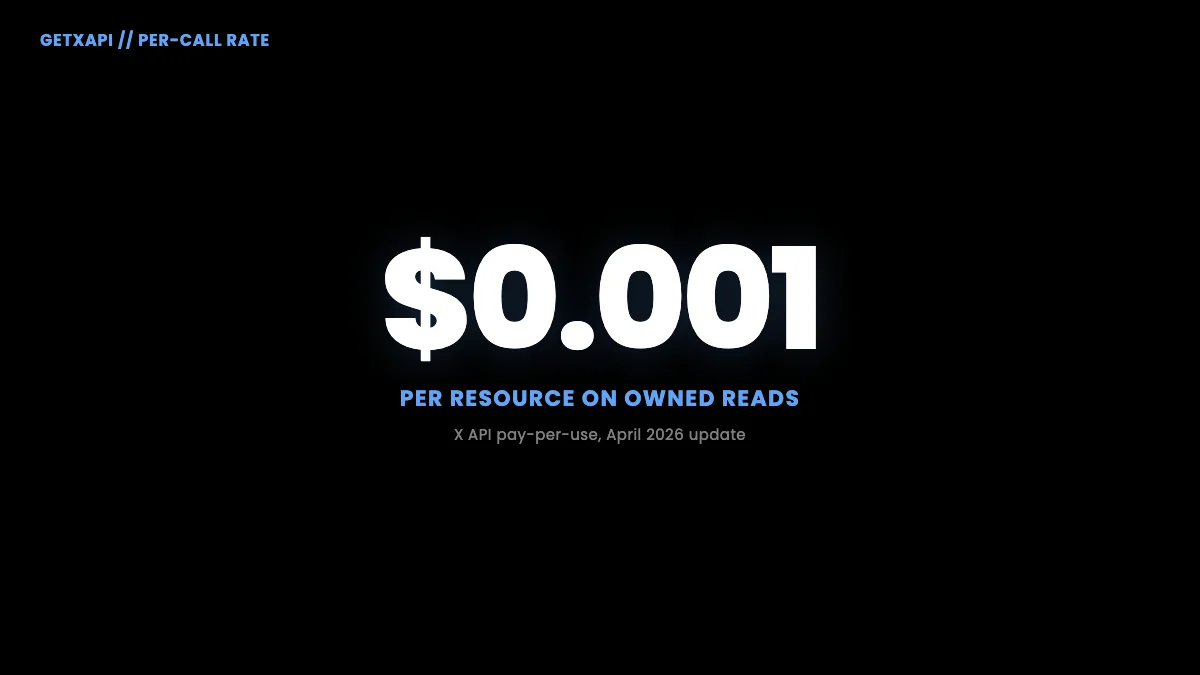
TL;DR: The current official table lists $0.005 per standard Post read, $0.010 per User read, $0.015 per standard Post create request, $0.015 per DM interaction create request, and $0.200 per Post create request containing a URL. The public pricing page does not list a general Free tier. GetXAPI standard calls cost $0.001 and typically return about 20 tweets.
What Is the Twitter API (and What Changed in 2026)
The Twitter API is the official REST and streaming interface that X exposes to developers. Access, endpoint availability, and billing depend on current documentation and the terms attached to the developer account.
The platform itself dates back to 2006, six months after Twitter launched. The API has gone through four major eras:
- 2006 to 2023. Free public API. Anyone with an email could create a developer app, get a key, and make calls. Rate limits were the only constraint. This era is what most online tutorials still describe.
- Historical subscription period. Older official pages and announcements described Free, Basic, and Pro access. Any price or quota from that period needs a dated primary source.
- Current public offer. The pricing page lists prepaid pay-per-use and custom Enterprise access. Standard Post reads cost $0.005, standard Post create requests cost $0.015, and DM interaction create requests cost $0.015. Pay-per-use has a 3-million monthly Post-read cap. Pay-per-use is the current public pricing model. If a tutorial mentions Basic, Pro, or a Free quota, treat it as historical unless it matches the access shown for your account and cites the relevant period. The current pricing table does not publish a complete legacy migration history.
Official X API v2 capabilities
The current API surface (v2) covers four broad capabilities:
- Read. Search recent posts, get tweets by ID, fetch a user's timeline, look up user profiles, fetch followers and following lists, retrieve poll and Space metadata.
- Write. Create posts (with or without media), delete posts, like and unlike, retweet and unretweet, reply, quote, send DMs, follow and unfollow.
- Stream. Filtered stream of real-time tweets matching query rules, sampled stream of public tweets at low volume, volume stream at high-tier access only.
- Compliance. Batch compliance jobs to detect deleted, suspended, or geo-restricted content for data warehouses that need to stay aligned with X's state.
The Articles endpoints (long-form posts published as X Articles) are a separate API surface. The official X API v2 now documents draft creation (POST /2/articles/draft) and publishing (POST /2/articles/:id/publish); GetXAPI covers a broader Article lifecycle with 7 endpoints (create, get, list, update, publish, unpublish, delete). See the Twitter Article API tutorial for the full breakdown.
Where the official API hits limits
There are three places the official API stops being the obvious choice:
- Cost at scale. At $0.005 per read, 1 million tweets is $5,000. 10 million tweets is $50,000. The 3M-read ceiling forces Enterprise pricing for anything above.
- Setup friction. Developer account creation, terms acceptance, app and project creation, payment method setup, and OAuth credential generation before the first call.
- Schema verbosity. v2's normalized response shape requires reading the
data,includes, andexpansionsblocks separately to assemble a single complete object. Convenient for large queries, verbose for small ones.
When any of those three constraints bind, developers reach for a direct third-party API.
When to use a direct API
A direct API like GetXAPI reverse-engineers and stabilizes the same data X exposes through its API and clients, presents it through a single REST surface, and prices it per call. Setup time is under 5 minutes (signup, copy key, make a call). Pricing is $0.05 per 1,000 tweets read, roughly 100x cheaper than the official rate. There is no endpoint-specific rate-limit window, you pay per call, and general service throttling still applies at very high concurrency.
The tradeoff: a direct API is not the source of truth (X is). For most read-heavy use cases (sentiment dashboards, social listening, lead generation, AI agent training) that tradeoff is acceptable. For write-heavy use cases that need to act on behalf of a user (posting on the user's behalf, sending DMs to mutuals) the official API with OAuth 1.0a or PKCE remains the right path, and GetXAPI also supports those write actions through a Bearer header without the OAuth dance.
Twitter API Access Tiers and Pricing in 2026
The current public X API pricing model is prepaid pay per use, with custom Enterprise access for negotiated workloads. The page does not list a general public Free tier or an official $0.10 trial.
Here is a current rate-card summary, verified August 4, 2026:
| Operation | Per-call price | Notes |
|---|---|---|
| Read a post by ID | $0.005 | Each tweet object, including expansions, counts as one read |
| Look up a User resource | $0.010 | Billed per User resource |
| Search recent posts | $0.005 per result | A query returning 100 results is 100 reads |
| Create a standard Post | $0.015 | Per request |
| Create a Post with a URL | $0.200 | Per request |
| Create a DM interaction | $0.015 | Per request |
| Create a User interaction | $0.015 | Per request |
| Trends | $0.010 | Per request |
The public pay-per-use table lists a 3-million monthly Post-read cap. Enterprise access is custom priced and negotiated through X, with no fixed public monthly floor on the current page.
For monthly forecasting at common volumes:
| Monthly volume | Official X API cost | GetXAPI cost | Savings |
|---|---|---|---|
| 5,000 reads | $25 | $5.50 | 78% |
| 50,000 reads | $250 | $55 | 78% |
| 500,000 reads | $2,500 | $550 | 78% |
| 3,000,000 reads (cap) | $15,000 | $3,300 | 78% |
| 5,000,000 reads | Custom Enterprise quote required | $5,500 | Depends on quote |
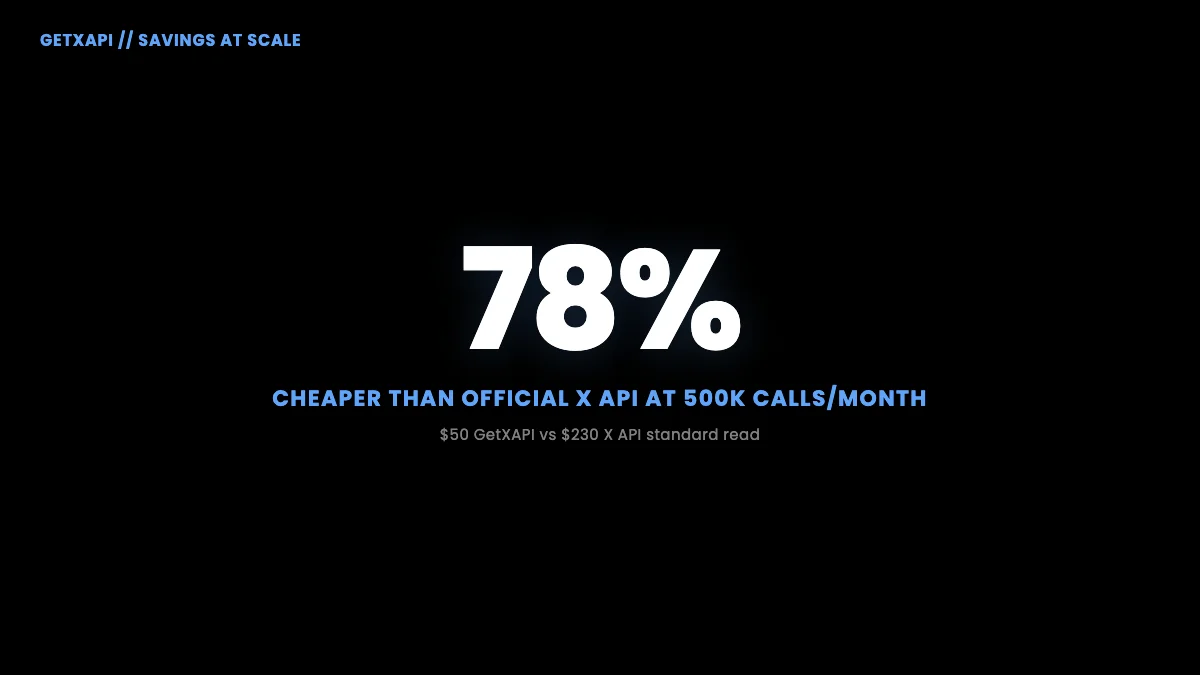
Source for GetXAPI numbers: pricing page. For a deeper breakdown of how these per-call rates compound at different team sizes and use case volumes, see the Twitter API cost guide. The Twitter API cost calculator shows the side-by-side estimate for any combination of read, write, and DM volume in seconds.
the r/webdev discussion calling Twitter API pricing a joke (241 upvotes, 131 comments) from r/webdev
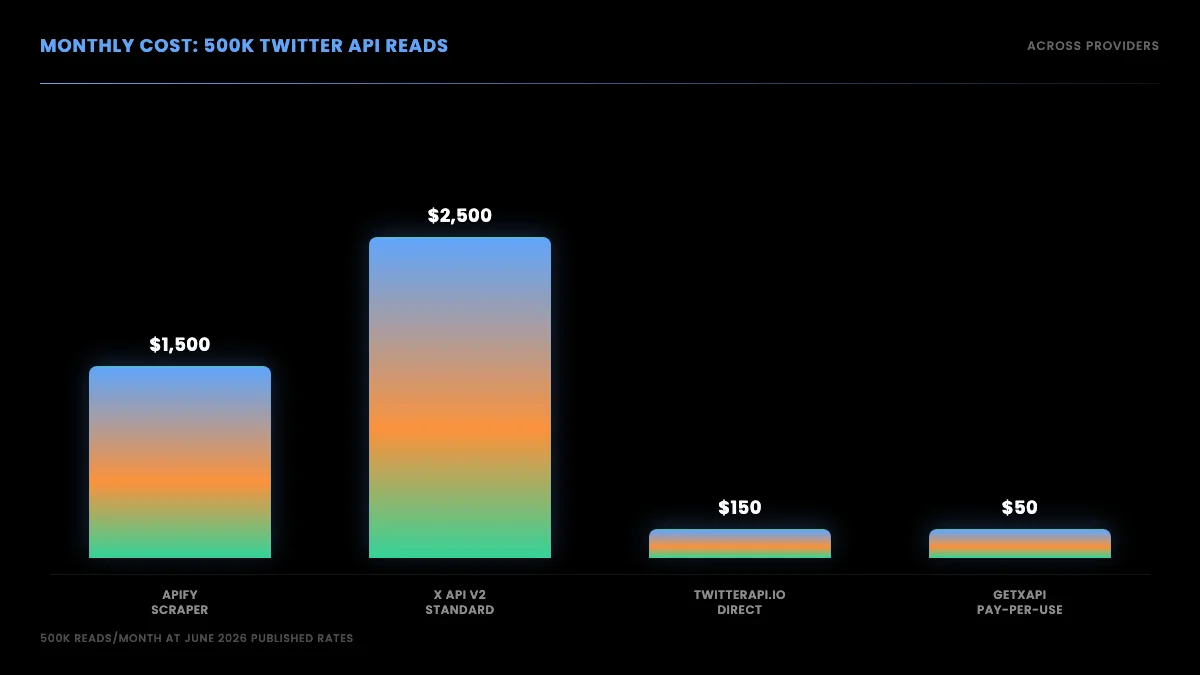
Monthly cost scenarios, official X API versus GetXAPI
Is the Twitter API Free in 2026?
The current public X pricing page does not list a general public Free tier. It lists prepaid pay-per-use and custom Enterprise access. Check the Developer Console for account-specific or legacy terms.
Historical Free, Basic, and Pro access appears in older documentation, but current comparisons should use the public pay-per-use table. The current page does not establish one universal retirement or migration date for all accounts.
Two free-adjacent paths still exist:
- Academic Research product. X has historically offered a separate Academic Research track for verified researchers at accredited institutions. The current public documentation does not list it as a self-serve product, so confirm availability and terms with X directly before budgeting around it.
- Third-party API free credits. Providers like GetXAPI give $0.10 in credits on signup with no credit card, enough for ~2,000 tweets through the read endpoints. Useful for evaluating the API before committing.
For developers who specifically search "twitter api for free" or "twitter api without developer account," the third-party path is the only one that ships working code in under 5 minutes without payment setup. The official path requires a payment method on file and prepaid credits before any call works.
How to Get Your Twitter API Key (Step-by-Step)
The credential you need to call the X API is called a Bearer Token (for app-only read access) or a combination of consumer key, consumer secret, access token, and access secret (for user-context actions). All of them are generated through the X Developer Console at console.x.com (the URL changed from developer.twitter.com in early 2026).
The high-level steps:
- Sign in at
console.x.comwith the X account you want to own the developer application. - Create an App. Name it, set the auth type (OAuth 2.0 PKCE recommended for new apps).
- Visit the App's "Keys and Tokens" tab. Generate:
- Bearer Token (app-only read)
- API Key and API Key Secret (OAuth 1.0a consumer credentials)
- Access Token and Access Token Secret (OAuth 1.0a user-context, optional)
- OAuth 2.0 Client ID and Client Secret (PKCE flow, if selected at App creation)
- Add a payment method under Billing. Credit balance must be > $0 for calls to succeed.
- Copy the Bearer Token into your environment variables.
For the full walkthrough including the console screens, payment method gotchas, and the 30-second alternative path, see the dedicated how to get a Twitter API key tutorial.
First Twitter API call, request sequence
If you want to skip the console entirely, the third-party path is:
- Sign up at the Twitter API key page with email only.
- Copy the Bearer token from the dashboard.
- Make calls against
https://api.getxapi.comwithAuthorization: Bearer YOUR_KEY.
No app, no payment method required for the trial credit.
Start building with GetXAPI
$0.05 per 1,000 tweets. $0.10 free credits. No credit card required.
Twitter API Authentication: OAuth 1.0a vs OAuth 2.0 vs Bearer Token
The official X API uses three auth flows: Bearer token for app-level read access with no user context, OAuth 2.0 PKCE for user-delegated apps where users sign in with their X account, and OAuth 1.0a for legacy write actions and older integrations. Bearer token is the simplest and covers all read endpoints. OAuth is only required when your app acts on behalf of a signed-in user.
Three auth flows exist on the official X API. The choice depends on whether your code acts on behalf of a user or on behalf of an app.
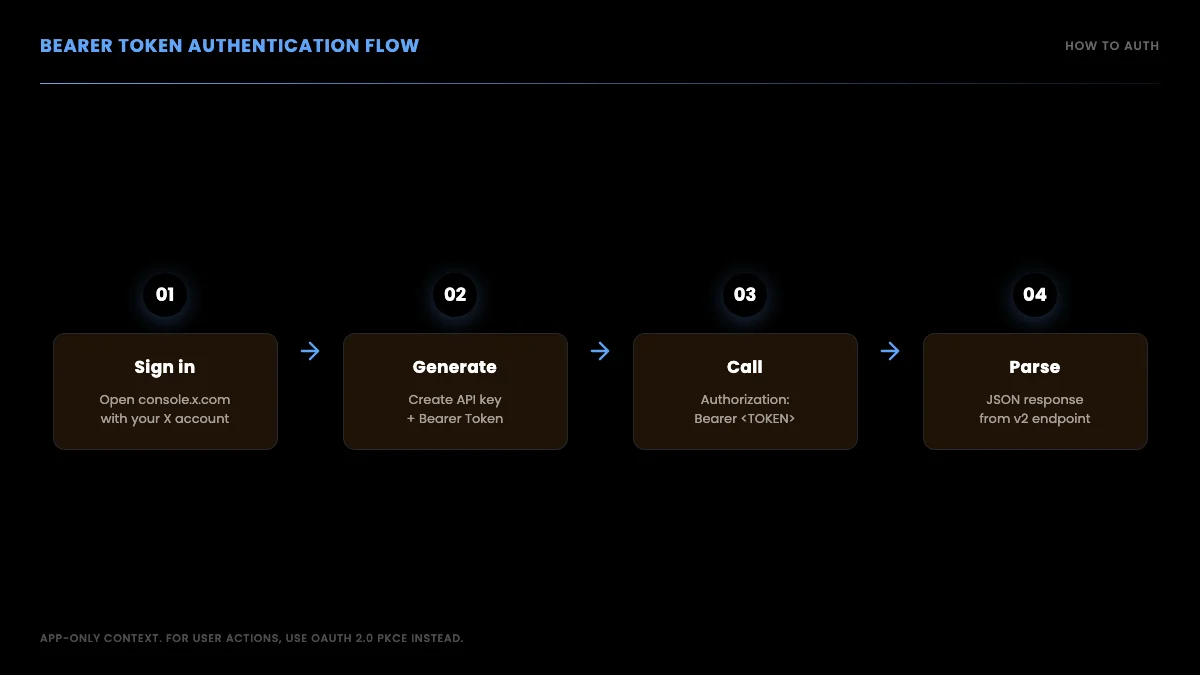
Choosing the right Twitter API auth method
| Auth method | Use when | Header pattern | Use case examples |
|---|---|---|---|
| Bearer Token (OAuth 2.0 App-Only) | Read public data only | Authorization: Bearer ABC... |
Search, user lookup, public timeline reads |
| OAuth 1.0a | Act on behalf of one user, simple flow | Authorization: OAuth oauth_consumer_key=..., oauth_token=..., oauth_signature=... |
Legacy posting, DM access for a single account |
| OAuth 2.0 PKCE | Modern multi-user write, scoped permissions | Authorization: Bearer USER_ACCESS_TOKEN (obtained via PKCE flow) |
New apps with user-delegated write access, refresh tokens, scope control |
The simplest is Bearer Token. You generate it once in the Developer Console, store it as X_BEARER_TOKEN, and send it as a header on every request. It can read public data. It cannot post, like, retweet, or DM on behalf of a user.
OAuth 1.0a is what every Twitter app used before 2021. It is still supported and still required for some endpoints (DM access, some legacy v1.1 calls). The signature generation is fiddly but every library handles it.
OAuth 2.0 PKCE is the modern flow. The user lands on your page, clicks "Connect with X," gets redirected to X's authorization server, approves the scopes your app requested, and gets redirected back to your app with an authorization code. Your backend exchanges the code for an access token (and a refresh token). You store the access token, refresh it when it expires, and call the API with Authorization: Bearer USER_ACCESS_TOKEN. The scope model lets users grant limited permissions (e.g. read-only, no DM access). The PKCE mechanism itself is defined in RFC 7636 and the X-specific implementation is documented at docs.x.com OAuth 2.0 Authorization Code with PKCE.
For most reading workflows, Bearer Token is enough. For posting on behalf of users at scale, OAuth 2.0 PKCE is the right choice.
Third-party direct APIs collapse all three into a single Bearer header. With GetXAPI, the same Authorization: Bearer YOUR_KEY works for read endpoints, write endpoints, and DM endpoints. You do not run the OAuth flow at all on the read endpoints; on the write endpoints that require user context (like posting as a specific user) the provider handles the user-session layer through cookie auth (auth_token) instead of OAuth.
How to Make Your First Twitter API Request
The first call most developers want to make is a recent-search query: "give me the latest 10 tweets matching some keyword." Here is the same call written four ways: official API in curl, official API in Python with requests, official API in Node.js with fetch, and the third-party path.
Official API: curl
curl -X GET "https://api.x.com/2/tweets/search/recent?query=machine+learning&max_results=10&tweet.fields=created_at,public_metrics,author_id" \
  -H "Authorization: Bearer $X_BEARER_TOKEN"
The response is a JSON object with a data array of tweet objects and a meta object with the result count and a next_token for pagination.
Official API: Python (requests)
import os
import requests

BEARER = os.environ["X_BEARER_TOKEN"]

resp = requests.get(
    "https://api.x.com/2/tweets/search/recent",
    params={
        "query": "machine learning",
        "max_results": 10,
        "tweet.fields": "created_at,public_metrics,author_id",
    },
    headers={"Authorization": f"Bearer {BEARER}"},
)
resp.raise_for_status()
tweets = resp.json()["data"]

for t in tweets:
    print(t["created_at"], t["text"][:80])
Official API: Node.js (fetch)
const BEARER = process.env.X_BEARER_TOKEN;

const params = new URLSearchParams({
  query: "machine learning",
  max_results: "10",
  "tweet.fields": "created_at,public_metrics,author_id",
});

const res = await fetch(
  `https://api.x.com/2/tweets/search/recent?${params}`,
  { headers: { Authorization: `Bearer ${BEARER}` } }
);

if (!res.ok) throw new Error(`HTTP ${res.status}`);
const { data: tweets } = await res.json();
for (const t of tweets) console.log(t.created_at, t.text.slice(0, 80));
Third-party: GetXAPI
import os
import requests

API_KEY = os.environ["GETXAPI_KEY"]

resp = requests.get(
    "https://api.getxapi.com/twitter/tweet/advanced_search",
    params={"query": "machine learning", "queryType": "Latest"},
    headers={"Authorization": f"Bearer {API_KEY}"},
)
resp.raise_for_status()
tweets = resp.json()["data"]

for t in tweets[:10]:
    print(t["createdAt"], t["text"][:80])
Same query, simpler auth, response already denormalized. The full Python Twitter API tutorial covers search, user lookups, followers, posting, DMs, and pagination across all four methods.
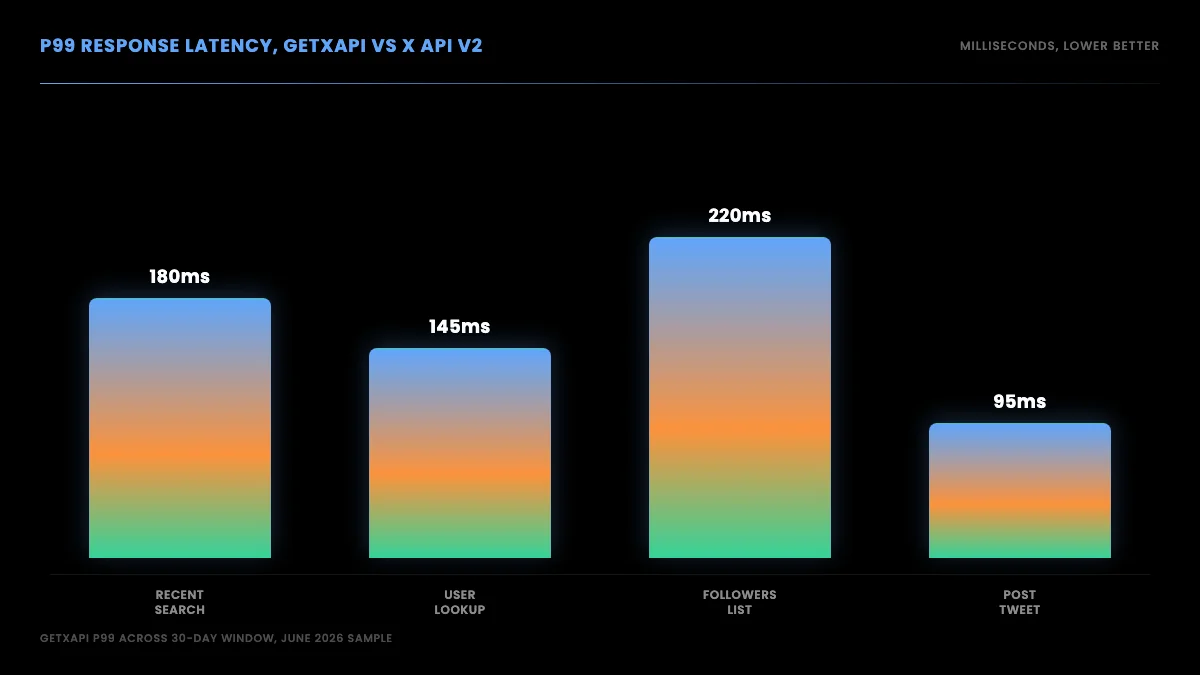
Same call in Python, Node.js, and curl
What you get back
A successful response to recent search looks like this (truncated for readability):
{
  "data": [
    {
      "id": "1797234567890123456",
      "text": "Just shipped a new ML inference endpoint, 30ms p99",
      "created_at": "2026-06-04T14:23:01.000Z",
      "author_id": "1234567890",
      "public_metrics": {
        "retweet_count": 12,
        "reply_count": 4,
        "like_count": 87,
        "quote_count": 2
      }
    }
  ],
  "meta": {
    "newest_id": "1797234567890123456",
    "oldest_id": "1797234567890100000",
    "result_count": 10,
    "next_token": "b26v89c19zqg8o3fpdwgupj0eovv9qwxgwlzr5h0qu521"
  }
}
The meta.next_token is the pagination cursor. To fetch the next page, repeat the request with pagination_token=b26v89c19zqg8o3fpdwgupj0eovv9qwxgwlzr5h0qu521. Loop until next_token is absent.
Twitter API Rate Limits in 2026
Rate limits on the official X API are per-endpoint, per-auth-type, and per-15-minute window. Hitting a limit returns a 429 status code with three response headers that tell you what happened:
x-rate-limit-limit, the total budget for the windowx-rate-limit-remaining, how much is left in the current windowx-rate-limit-reset, the Unix timestamp when the window resets
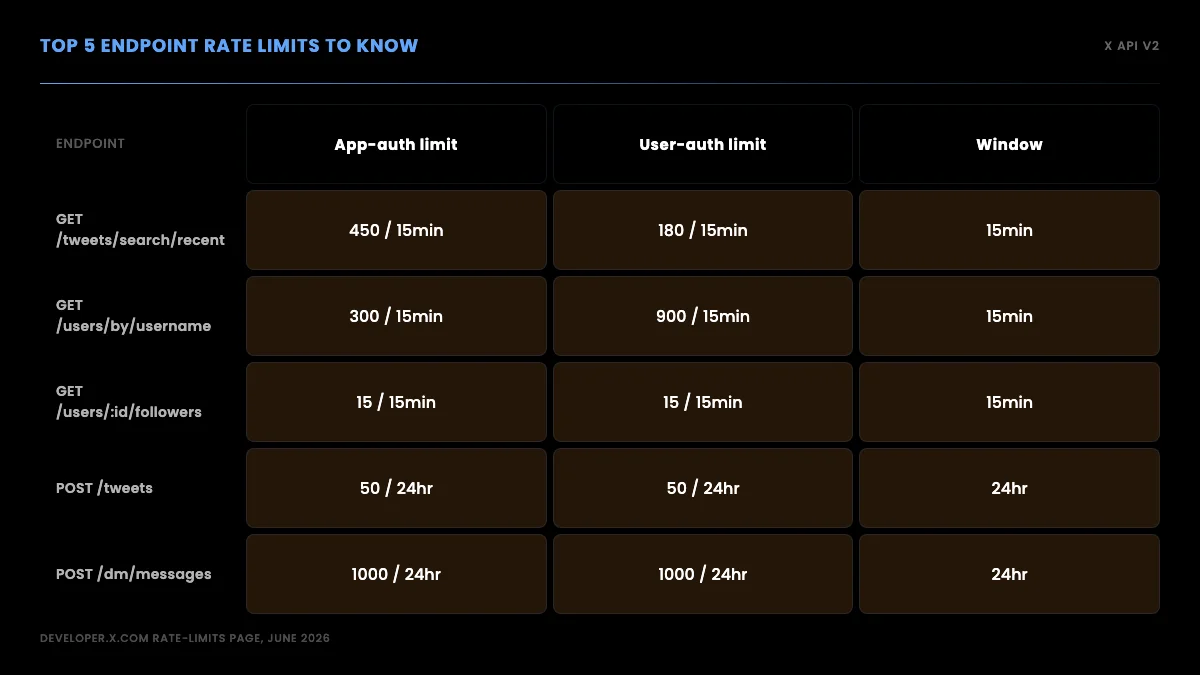
Rate limits per endpoint, 15-minute windows
The headline rate limits on the most-used v2 endpoints (verified August 16, 2026 against the X API rate limits reference):
| Endpoint | App-only auth | User auth | Window |
|---|---|---|---|
GET /2/tweets/search/recent |
450 req | 300 req | 15 min |
GET /2/users/:id |
300 req | 900 req | 15 min |
GET /2/users/:id/tweets |
10,000 req | 900 req | 15 min |
POST /2/tweets |
10,000 req | 100 req | 24 hrs app / 15 min user |
POST /2/dm_conversations/:id/messages |
1,440 req / 24 hrs | 15/15min + 1,440/24hrs | per cell |
GET /2/tweets/sample/stream |
50 req | n/a | 15 min |
For the full per-endpoint table, see the Twitter API rate limits reference.
Production patterns for staying inside the windows:
- Read the headers. Log
x-rate-limit-remainingon every response. Alert when it drops below 10% of the limit. - Exponential backoff on 429. Start at 1 second, double on each retry up to 60 seconds, then surface the error.
- Cache aggressively. A user profile changes rarely. Cache profile responses for at least 5 minutes. A tweet object is immutable once created. Cache forever (except for
public_metrics, which change). - Spread the window. If you have 450 search calls in 15 minutes, do not fire all 450 in the first 30 seconds. Pace them.
- Use the right auth type. App-only (Bearer) and user-auth have separate buckets on most endpoints. If you can use both, you double the effective limit.
Direct APIs handle rate limiting differently. GetXAPI has no endpoint-specific quota or per-endpoint window, so the practical constraint is your credit balance and concurrency, with general service throttling still applying. The provider absorbs the upstream rate-limit complexity and presents a flat per-call cost.
Twitter API v1.1 vs v2: Key Differences
If you read a Twitter API tutorial published before 2022, it most likely describes v1.1. Most v1.1 endpoints are deprecated or removed for new apps in 2026. The current standard is v2.
The key differences:
v1.1 versus v2 JSON response, same tweet
Response shape. v1.1 returned a flat tweet object with all fields at the top level. v2 returns a normalized object with data, includes, and meta blocks. Expanded fields (author user object, attached media, referenced tweets) live in includes and are joined by ID.
// v1.1 response shape (flat)
{
  "id_str": "...",
  "text": "...",
  "user": { ... full user object inline ... },
  "entities": { "urls": [...], "media": [...] }
}

// v2 response shape (normalized)
{
  "data": [{ "id": "...", "text": "...", "author_id": "..." }],
  "includes": {
    "users": [{ "id": "...", "username": "...", "name": "..." }],
    "media": [...]
  },
  "meta": { "result_count": 1 }
}
Field naming. v1.1 used snake_case with id_str for tweet IDs (because JavaScript truncates 64-bit ints). v2 uses snake_case for some fields, has dropped the _str suffix on most ID fields, and returns IDs as strings by default.
Conversation threading. v2 added conversation_id to every tweet, making thread reconstruction a single field lookup. v1.1 required walking in_reply_to_status_id recursively, expensive at scale.
Auth flows. v1.1 required OAuth 1.0a for every call. v2 added OAuth 2.0 PKCE and the App-Only Bearer Token as first-class options.
Streaming. v2 introduced the filtered stream with rule-based query syntax (rule.add({ value: "from:elonmusk" })), replacing v1.1's static track parameter.
Deprecation. As of 2026, most v1.1 endpoints return 410 Gone for new apps. Exceptions: media upload endpoints (still on v1.1) and some legacy DM endpoints. New code should target v2.
If you are migrating from v1.1 code in 2026, the path is: rewrite each call to the v2 equivalent, update the JSON parsing to walk data/includes, and handle the new conversation_id field where threading matters.
Python, Node.js, and curl: Three Languages Side By Side
The official X API is HTTP. Any language that can make HTTP calls works. Three languages cover the vast majority of integrations: Python, Node.js, and curl. Here is the same operation (get the 20 most recent posts from a user by username) in all three.
Python
import os, requests

BEARER = os.environ["X_BEARER_TOKEN"]
USERNAME = "elonmusk"

# Step 1: get user ID from username
u = requests.get(
    f"https://api.x.com/2/users/by/username/{USERNAME}",
    headers={"Authorization": f"Bearer {BEARER}"},
).json()["data"]
user_id = u["id"]

# Step 2: get recent posts
posts = requests.get(
    f"https://api.x.com/2/users/{user_id}/tweets",
    params={"max_results": 20, "tweet.fields": "created_at,public_metrics"},
    headers={"Authorization": f"Bearer {BEARER}"},
).json()["data"]

for p in posts:
    print(p["created_at"], p["text"][:80])
For Tweepy, XDK, and the third-party path, see the dedicated Python Twitter API tutorial.
Node.js
const BEARER = process.env.X_BEARER_TOKEN;
const USERNAME = "elonmusk";

// Step 1: get user ID
const userRes = await fetch(
  `https://api.x.com/2/users/by/username/${USERNAME}`,
  { headers: { Authorization: `Bearer ${BEARER}` } }
);
const { data: user } = await userRes.json();

// Step 2: get recent posts
const params = new URLSearchParams({
  max_results: "20",
  "tweet.fields": "created_at,public_metrics",
});
const postsRes = await fetch(
  `https://api.x.com/2/users/${user.id}/tweets?${params}`,
  { headers: { Authorization: `Bearer ${BEARER}` } }
);
const { data: posts } = await postsRes.json();

for (const p of posts) console.log(p.created_at, p.text.slice(0, 80));
curl
USERNAME="elonmusk"

USER_ID=$(curl -s -H "Authorization: Bearer $X_BEARER_TOKEN" \
  "https://api.x.com/2/users/by/username/$USERNAME" \
  | jq -r '.data.id')

curl -s -H "Authorization: Bearer $X_BEARER_TOKEN" \
  "https://api.x.com/2/users/$USER_ID/tweets?max_results=20&tweet.fields=created_at,public_metrics" \
  | jq '.data[] | {created_at, text: .text[:80]}'
The same operation through GetXAPI
import os, requests

API_KEY = os.environ["GETXAPI_KEY"]
USERNAME = "elonmusk"

# Single call, no two-step user-ID lookup
resp = requests.get(
    "https://api.getxapi.com/twitter/user/last_tweets",
    params={"userName": USERNAME, "limit": 20},
    headers={"Authorization": f"Bearer {API_KEY}"},
)
posts = resp.json()["data"]

for p in posts:
    print(p["createdAt"], p["text"][:80])
One call instead of two. The username-to-ID lookup is implicit. Same data, half the round trips.
Watch a worked example
For developers who learn faster from video than from docs:
The cheapest Twitter API. Try it free.
$0.05 per 1,000 tweets. $0.10 free credits. No credit card required.
Use Cases: What Developers Actually Build with the Twitter API
The six most common Twitter API use cases are social listening and sentiment analysis (read-heavy, 10K to 500K mentions per month), lead generation (search for intent signals, enrich profiles, export to CRM), content automation and scheduling (write-heavy, requires OAuth), AI agent training and inference (the highest volume, often exceeding 1 million reads per month), academic research (historical pulls at high volumes), and long-form Article publishing (write-heavy; the official v2 API covers draft creation and publishing, GetXAPI covers the full lifecycle).
The PAA data shows developers reach for the Twitter API for six recurring use cases. Each one has a different read/write profile and a different cost shape.
- Social listening and sentiment analysis. Read-heavy. Search for brand mentions, classify sentiment, dashboard the trend over time. Volume scales with the brand's mention rate, typically 10K to 500K mentions per month.
- Lead generation. Read-heavy. Search for prospect-fit signals (job changes, fundraising announcements, complaint posts about a competitor), enrich with profile data, export to a CRM. Volume scales with target audience size.
- Content automation and scheduling. Write-heavy. Schedule posts, cross-post from a CMS, auto-reply to mentions, automate quote-tweets. Requires user-context auth (OAuth 1.0a or 2.0 PKCE).
- AI agent training and inference. Read-heavy. Pull tweet corpora for fine-tuning, feed real-time tweets into an LLM-based decisioning loop, build agentic workflows that monitor and react to X activity. Volume is the highest of any use case, often >1M reads per month.
- Academic research. Read-only. Historical tweet pulls for studies in linguistics, political science, public health. Historically served by X's Academic Research track (availability should be confirmed with X directly) or a third-party data vendor.
- Article and long-form distribution. Write-heavy. Programmatic creation, editing, and publishing of X Articles from an existing content pipeline. The official v2 API covers draft creation and publishing; see the Twitter Article API tutorial for the 7-endpoint surface that covers the rest of the lifecycle (update, list, unpublish, delete).
For each use case, the right API choice depends on read/write mix and monthly volume. The matrix below summarizes:
Official versus direct API, decision matrix
| Use case | Read/write | Monthly volume | Best fit |
|---|---|---|---|
| Social listening (single brand) | Read | 50K to 500K | Direct API ($2.50 to $25/mo) or official ($250 to $2,500/mo) |
| Social listening (agency, multi-brand) | Read | 1M to 10M | Direct API ($50 to $500/mo); official forces Enterprise |
| Lead generation | Read | 10K to 100K | Direct API ($0.50 to $5/mo); official viable |
| Content scheduling (single account) | Write | 100 to 1K posts | Official (OAuth 1.0a fine) |
| Content scheduling (SaaS multi-tenant) | Write | 10K to 100K posts | OAuth 2.0 PKCE on official; direct API for read-side |
| AI agent inference | Read+write | 100K to 5M | Direct API for cost; OAuth 2.0 PKCE on write |
| Academic research | Read | 1M to 10M | Academic Research track (confirm availability with X) or third-party |
| Article publishing | Write | 10 to 1K articles | Official v2 (draft + publish) or direct API for the full lifecycle |
Common Errors and Production Patterns
Three error classes cover most of the 4xx responses in production: 401 Unauthorized from a missing or expired Bearer token, 403 Forbidden from a free-tier account calling a read endpoint or a non-Premium account calling a Premium-gated endpoint, and 429 Too Many Requests from exceeding the per-endpoint rate limit window. Each has a specific fix, and none should require retrying until the root cause is resolved.
Three error classes account for most of the 4xx responses developers see in production.
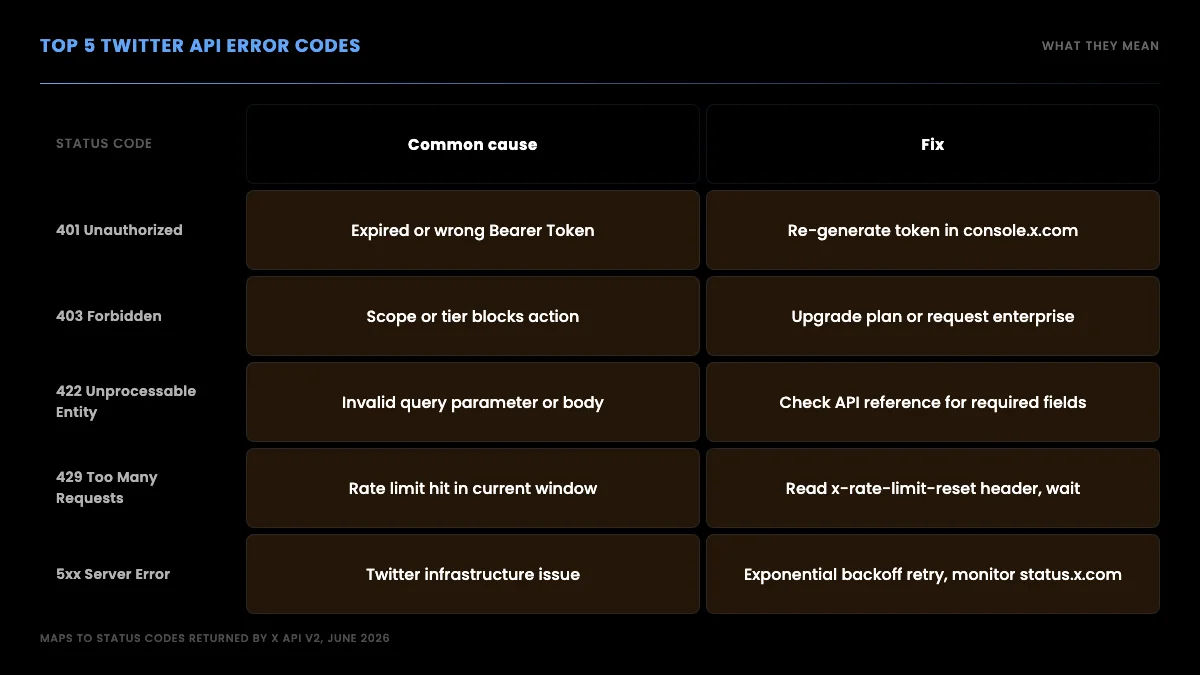
Common Twitter API error codes and what they mean
401 Unauthorized
Most common cause: missing or malformed Authorization header. Less common: revoked Bearer Token after a security event on the developer account. Fix: regenerate the Bearer Token in the developer console and update your environment variable.
A second cause: using OAuth 1.0a signature with a clock skew over 5 minutes. The signature includes a timestamp. Fix: sync your server clock with NTP.
403 Forbidden
Most common cause: the auth credential is valid but does not have the scope needed for the endpoint. Posting requires user-context auth, not Bearer. Reading DMs requires dm.read scope on OAuth 2.0 PKCE.
A second cause: the user account associated with the OAuth token is suspended, restricted, or the action would violate X's automation policy (e.g. liking 100 tweets in a minute).
429 Too Many Requests
Rate limit hit. Read x-rate-limit-reset header for the Unix timestamp when the window resets. Implement exponential backoff or sleep until reset.
Production pattern:
import time, requests

def call_with_retry(url, headers, params=None, max_retries=5):
    for attempt in range(max_retries):
        r = requests.get(url, headers=headers, params=params)
        if r.status_code == 429:
            reset = int(r.headers.get("x-rate-limit-reset", time.time() + 60))
            wait = max(reset - int(time.time()), 1)
            time.sleep(min(wait, 60))
            continue
        r.raise_for_status()
        return r.json()
    raise RuntimeError("max retries exhausted")
Cost runaway
A class of issue that is not a status code but shows up on the invoice. Common pattern: a bug in a polling loop fires the same call every 100ms instead of every 60 seconds, burning $50 in credits over a weekend. Mitigation: hard daily spend caps in the developer console, dashboard alerts when daily spend crosses a threshold, and budget circuit-breakers in code that halt calls when monthly spend exceeds a limit.
The Twitter API cost calculator lets you plug in your expected daily call volume and see the monthly cost projection in seconds. Use it before launching a new pipeline, not after the first invoice.
Pagination
For endpoints that return more than max_results, walk the next_token cursor:
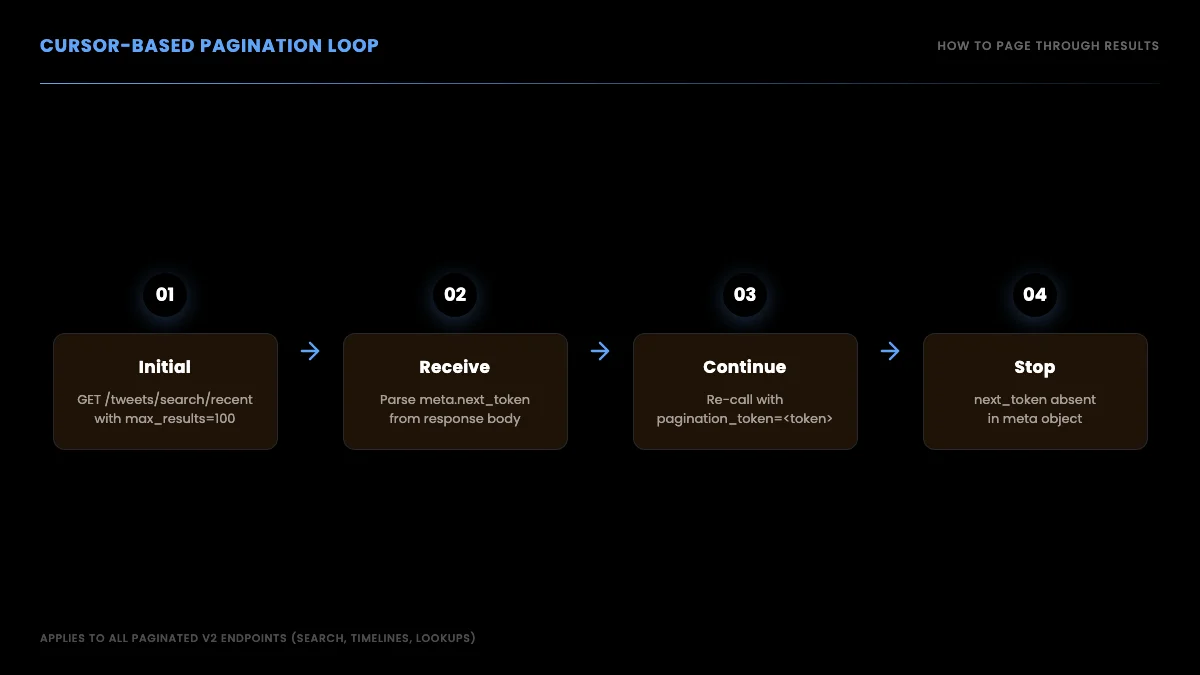
Pagination with next_token, request-response cycle
def paginate_search(query, headers, max_pages=10):
    url = "https://api.x.com/2/tweets/search/recent"
    params = {"query": query, "max_results": 100}
    all_tweets = []
    for _ in range(max_pages):
        r = requests.get(url, params=params, headers=headers)
        r.raise_for_status()
        body = r.json()
        all_tweets.extend(body.get("data", []))
        next_token = body.get("meta", {}).get("next_token")
        if not next_token:
            break
        params["pagination_token"] = next_token
    return all_tweets
Twitter API Alternatives: When Official Becomes Too Expensive
The pay-per-use model can fit low-volume official workloads, while the 3-million monthly Post-read cap sends larger negotiated workloads to custom Enterprise access. Compare an actual Enterprise quote rather than assuming a fixed floor.
When the math stops working, the alternatives fall into three buckets:
- Direct third-party APIs. Providers (GetXAPI, OpenTweet, others) maintain their own access pipeline to X data and expose a stable REST surface. Pricing is per-call, typically 10x to 100x cheaper than official. Trade-off: not the source of truth.
- Marketplace listings. RapidAPI lists dozens of Twitter-flavored APIs from independent publishers.
the r/developersIndia thread on giving up on Apify and RapidAPI due to Twitter API cost (220 upvotes) from r/developersIndiaOnboarding is fast (one signup, one billing account). Reliability is publisher-dependent. See the [RapidAPI Twitter alternative](/blogs/rapidapi-twitter-alternative) comparison for the full reliability/cost breakdown. 3. **Self-built scrapers.** Run your own Puppeteer or Playwright fleet against the X web frontend.
the r/automation thread on choosing a reliable Twitter/X scraping API from r/automationCost is infrastructure plus engineering time. Risk is constant maintenance against X's frontend changes and rate limiting on the IPs.
For most production workloads above 50K reads per month, the direct-API path has the best cost/reliability tradeoff. The pricing page shows GetXAPI's per-call rates side by side with the official rates.
Endpoint coverage
The other comparison axis is endpoint coverage. The official X API v2 has dozens of endpoints across tweets, users, lists, spaces, DMs, and compliance. A direct API needs to cover at least the major read endpoints to be usable.
GetXAPI's current endpoint coverage (as of June 2026):
| Resource | Read endpoints | Write endpoints |
|---|---|---|
| Tweets | search (recent + advanced), get by ID, get by user, replies, quotes, retweeters | create, delete |
| Users | profile, followers, following, last tweets, mentions | follow, unfollow |
| DMs | inbox, conversation | send |
| Media | upload, get | upload |
| Spaces | get by ID, audio | n/a |
| Articles | get, list | create, edit, publish, delete |
| Lists | get, members | create, add member, remove member |
That is 73 endpoints across the resource families. For developers who need all of read + write + Articles, the direct API covers the widest Article surface; the official v2 API documents draft creation and publishing.
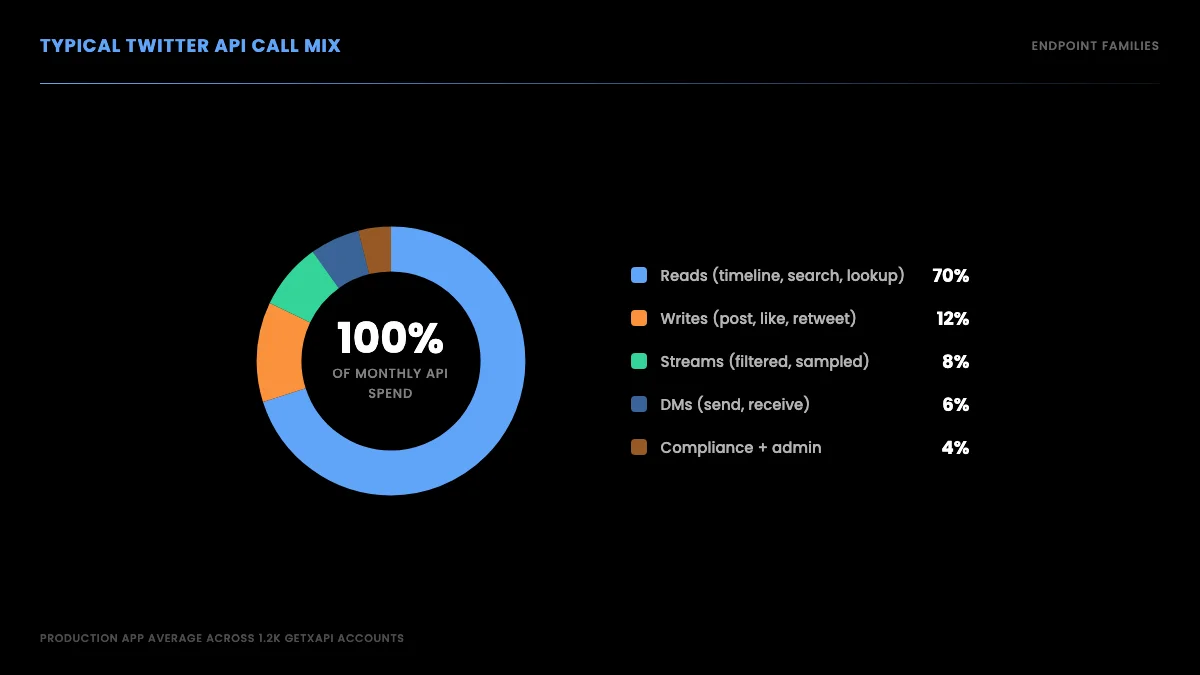
Twitter API v2 endpoint map by resource family
Where to Go Next
This guide covered the full foundation: what the API is, how pricing changed in 2026, how to get a key, the three auth methods, making your first request, rate limits, v1.1 vs v2 differences, Python and Node examples, the six main use cases, common errors, and when third-party providers make sense. The links below go deeper on each specific path.
You have the foundation now. To go deeper on specific paths:
- For the API key walkthrough, including the developer console screens, read the how to get a Twitter API key tutorial.
- For Python-specific code with working examples for Tweepy, XDK, plain
requests, and the third-party path side-by-side, read the Python Twitter API tutorial. - For programmatic Article publishing, a 7-endpoint surface that goes beyond the official v2 draft-and-publish pair, read the Twitter Article API tutorial.
- For per-endpoint rate-limit numbers and the production playbook for staying inside the windows, read the Twitter API rate limits reference.
- For monthly cost projections at your specific call volume, plug your numbers into the Twitter API cost calculator.
- For the side-by-side comparison of marketplace listings vs direct APIs vs the official API, read the RapidAPI Twitter alternative breakdown.
Watch this Twitter API setup walkthrough on YouTube
Get Your API Key in 30 Seconds
The fastest path from this guide to working code is the third-party direct API. Sign up at getxapi.com, get $0.10 in credits with no credit card, copy your Bearer token, and make your first call:
import requests

resp = requests.get(
    "https://api.getxapi.com/twitter/user/info",
    params={"userName": "elonmusk"},
    headers={"Authorization": "Bearer YOUR_KEY"},
)
print(resp.json()["data"]["name"], "followers:", resp.json()["data"]["followers"])
Under a minute from signup to first JSON response. For pricing across read, write, and DM operations, see the pricing page.
Frequently Asked Questions
The current public X pricing page does not list a general public Free tier. It lists prepaid pay-per-use and custom Enterprise access: $0.005 per standard Post read, $0.010 per User read, $0.015 per standard Post create request, $0.015 per DM interaction create request, and $0.200 per Post create request containing a URL. GetXAPI gives $0.10 in signup credits with no card.
Three auth methods exist on the official X API. Bearer Token (OAuth 2.0 App-Only) is the simplest, app-level credential for public read endpoints like search and user lookup. OAuth 1.0a (consumer key plus access token) is needed for user-context actions like posting tweets, sending DMs, or following on behalf of a user. OAuth 2.0 PKCE is the modern user-auth flow for new apps that need user-level write access with scoped permissions and refresh tokens. Third-party APIs like GetXAPI collapse all three into a single Bearer header so you do not run through the developer console at all.
Not the official one. The official X API requires a developer account, an app, and OAuth credentials before any call works. Third-party APIs do not. With a provider like GetXAPI you sign up with email, copy a Bearer token from the dashboard, and make REST calls against api.getxapi.com using a single Authorization header. No app, no developer-portal walkthrough. The tradeoff is that you read Twitter data through the provider rather than directly from X.
At the official standard price of $0.005 per Post read, 1 million billable Posts cost $5,000. The public pay-per-use table caps Post reads at 3 million per month and lists Enterprise pricing as custom. GetXAPI's typical standard-call estimate is $0.05 per 1,000 tweets, or about $50 per million when calls return about 20 results.
Twitter API v2 is the current standard, launched in 2021 and now the only actively maintained version. v2 uses normalized JSON with a top-level data block and an includes block for expansions, supports conversation threading via conversation_id, includes poll objects natively, and has a cleaner OAuth 2.0 PKCE flow. v1.1 endpoints are deprecated for most use cases and should not be used in new code. If you are reading a 2022 tutorial that talks about v1.1 statuses/show.json, treat it as historical.
Rate limits vary by endpoint and access tier under pay-per-use. The recent search endpoint allows 450 requests per 15-minute window with app-only auth and 300 per 15 minutes with user auth. Hitting a limit returns a 429 status code with a x-rate-limit-reset header showing when the window resets. Best practice is to read the x-rate-limit-remaining header on every response, implement exponential backoff (1s, 2s, 4s, 8s) on 429s, and cache responses where possible. See the Twitter API rate limits reference for the full per-endpoint table.
Three main options for the official API. (1) Tweepy is the most popular community library, supports v2, OAuth 1.0a and 2.0, and stays actively maintained. (2) XDK (pip install xdk) is X's own Python SDK, newer and thinner than Tweepy, fewer abstractions, fewer rough edges. (3) Plain requests with a Bearer Token is the most flexible, no library to wedge into your dependency tree. For third-party APIs the pattern is always plain requests with one Authorization header. The Python Twitter API tutorial walks through all four paths with working code.
Check out similar blogs
More guides on the Twitter/X API, scraping, and pricing.

Twitter Article API in 2026: Create, Publish, and Distribute Long-Form Notes
Complete 2026 tutorial for the Twitter Article API. All 7 endpoints, working Python and Node.js code, the Premium gate explained, draft vs published state machine.

The Best Twitter (X) API Alternatives in 2026, Compared
The best Twitter / X API alternatives in 2026, ranked and compared: managed pay-per-call APIs, web-data marketplaces, and open-source libraries, with real per-1,000-tweet costs.

How to Like a Tweet via API in 2026 (No Dev Account)
Like (favorite) tweets programmatically via API in 2026 without an X developer account. The auth_token model, working curl, Python, and Node code, and per-call cost.

How to Build a Twitter Bot in 2026: The Complete Guide
Build a Twitter bot in 2026 with no-code or Python. Working Tweepy and requests code, auth explained, and the cheap API path at $0.05 per 1,000 reads.

Post Tweets via API With Authentication in 2026 (No Developer Account)
Post tweets, threads, and media through an API without an X developer account. The auth_token model, working Python and Node code, rate-limit safety, and per-call costs.

How to Scrape Twitter/X in 2026: Tweets, Profiles & Followers
How to scrape Twitter/X in 2026 without getting blocked: tweets, profiles, followers and media via a read API, the legal line on public data, and runnable scripts.

Twitter Trends API: Pull Trending Topics by Location in 2026
A 2026 Twitter trends API guide: pull top trends by country or city from GetXAPI's dedicated endpoint, plus how to build custom trends from search. Runnable code.

How to Use the Twitter API with Python, 2026 Tutorial
Step-by-step Python tutorial for the Twitter API in 2026. Working code for search, users, DMs, pagination, retries, plus a tweepy migration guide.
Featured in
Where GetXAPI's data and pricing get cited.

The hidden line item in your AI side project: X data
Indie Hackers post on the often-overlooked cost of X data for AI side projects, citing GetXAPI as the usage-based way to pull live Twitter data without a five-figure X developer contract.

How Companies Are Learning to Read Market Mood in Real Time
Editorial feature on Big News Network examining how companies read market mood from X in real time, citing GetXAPI as the usage-based Twitter API that prices live social listening by the call instead of a five-figure annual contract.

How Companies Are Learning to Read Market Mood in Real Time
Syndicated feature on Business Newswire on how companies read market mood from X in real time, citing GetXAPI as the usage-based Twitter API that prices live social listening by the call.

Working with Twitter/X Data: A Practical Skill for IT Students and Professionals in 2026
Guide on SIIT (Scholars International Institute of Technology) on collecting live Twitter/X data as a practical developer skill, citing GetXAPI as the per-call Twitter data API that makes it affordable without an X developer account.

Adding Twitter/X Data to Your App in 2026: A Developer's Integration Guide
Developer integration guide on Programming Insider covering how to add live Twitter/X data to an app in 2026, comparing the official X API v2 with a key-based REST approach and citing GetXAPI as the low-cost per-call option with no developer-account approval.

6 Twitter/X Scraping Solutions for Every Budget
Roundup on TechBullion of the leading Twitter/X scraping solutions, ranking GetXAPI first as the cheapest option at $0.001 per call (about $0.05 per 1,000 tweets) with clean JSON output and no monthly minimum.

The Data Bill Behind Every Social Analytics Tool
Editorial piece on SpeakRJ examining the underlying data costs behind social analytics tools, citing GetXAPI as the usage-based way to source live X data by the call.

What Is AI Sentiment Analysis, and What Does Each Layer Cost?
Explainer in AI Journal breaking sentiment analysis into its data, model and reporting layers and what each costs to run, citing GetXAPI for pulling public X posts on pay-per-call pricing.

Why Enterprise AI Agents Still Cannot Read Social Data
Analysis piece in The Silicon Review on why enterprise agents reach internal systems easily but struggle with public social data, citing GetXAPI's MCP server and data-as-a-service model as one route to close the gap.