Twitter Article API in 2026: Create, Publish, and Distribute Long-Form Notes
Complete 2026 tutorial for the Twitter Article API. All 7 endpoints, working Python and Node.js code, the Premium gate explained, draft vs published state machine.

You have a content pipeline. Blog posts, newsletters, research threads. You want them on X as long-form Articles without manual posting. X expanded Articles to all Premium tiers in early 2026, and developer demand for programmatic Article management jumped overnight.
The official X API v2 now documents two Article endpoints, draft creation (POST /2/articles/draft) and publishing (POST /2/articles/:id/publish), after a long-open devcommunity.x.com request thread. Update, unpublish, delete, get, and list are still not in the public docs, so full-lifecycle Article automation still needs a broader surface.
GetXAPI shipped 7 Article endpoints on 2026-05-17, covering the full Article lifecycle. This tutorial walks through every endpoint with working Python and Node.js code, the Premium gate in plain terms, and a production-ready happy-path script you can run today.
TLDR: POST to
/twitter/article/createwith a markdown body. Add"publish": trueif you have X Premium and want to go live in one call. Done. Read on for the full lifecycle, error handling, and the state machine that governs draft vs published behavior.
The 7 Twitter Article API Endpoints at a Glance
The Article API has seven endpoints covering the full lifecycle: GET to fetch by ID, POST to create a draft, POST to update fields, POST to list drafts and published articles, POST to publish to the public feed (Premium-gated), POST to revert to draft, and POST to permanently delete. All endpoints except publish are available without X Premium.
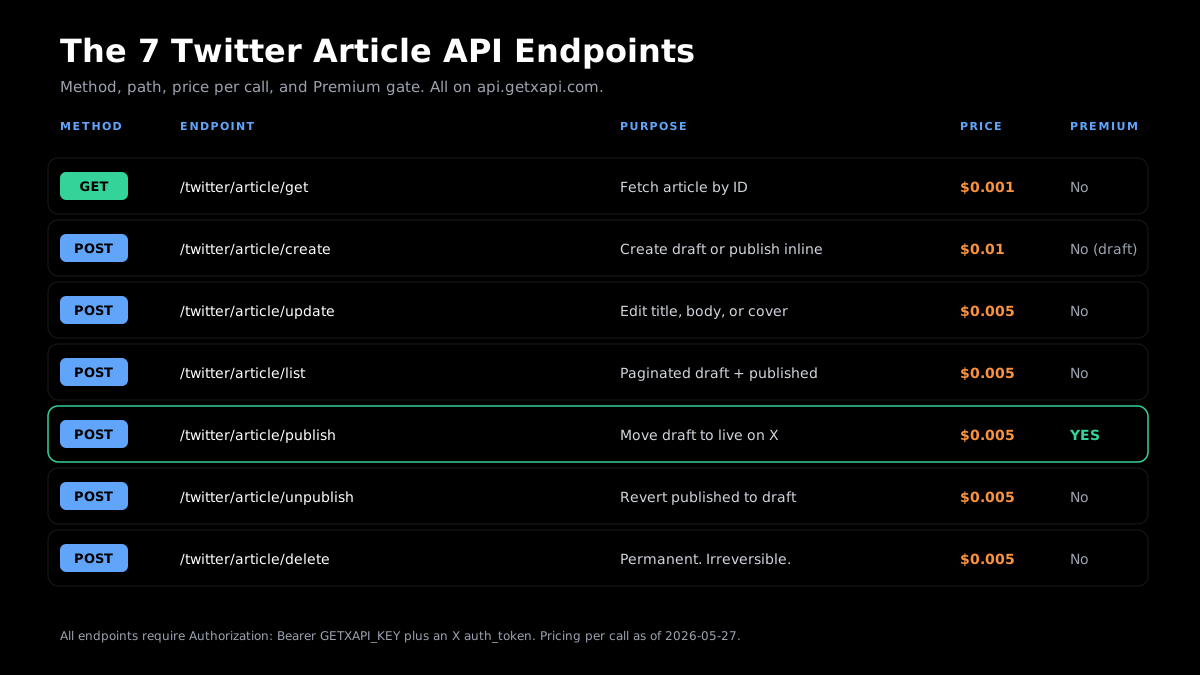 All 7 Article endpoints shipped 2026-05-17. Price per call as of 2026-05-27.
| Method | Endpoint | Purpose | Price | Requires X Premium | Requires auth_token |
|---|---|---|---|---|---|
| GET | /twitter/article/get |
Fetch article by ID | $0.001 | No | Yes (for drafts; public articles may work without) |
| POST | /twitter/article/create |
Create draft (or publish inline) | $0.01 | No (draft only). Yes for "publish": true |
Yes |
| POST | /twitter/article/update |
Edit title, body, or cover image | $0.005 | No (draft edits). Verify for published edits | Yes |
| POST | /twitter/article/list |
List drafts and published articles (paginated) | $0.005 | No | Yes |
| POST | /twitter/article/publish |
Move draft to published (Premium-gated) | $0.005 | Yes | Yes |
| POST | /twitter/article/unpublish |
Revert published article to draft | $0.005 | No | Yes |
| POST | /twitter/article/delete |
Permanently delete article (irreversible) | $0.005 | No | Yes |
Base URL for all calls: https://api.getxapi.com
Authentication: every call requires two credentials in the request:
Authorization: Bearer YOUR_GETXAPI_KEYheader (your GetXAPI API key from the dashboard)auth_tokenfield in the request body or params (your X session token, tied to the account managing the articles)
For how to get your API key in under two minutes, see the how to get a Twitter API key guide.
Quickstart: Twitter Article API in Python and Node.js in 60 Seconds
Get your free API key at getxapi.com/signup. No developer account, no OAuth approval queue, and no X Premium required to create and list drafts. Paste the snippet below, set your GETXAPI_KEY and LOGIN_COOKIES environment variables, run it, and your first Article draft is live in seconds.
curl round-trip (create + list + confirm)
# 1. Create a draft article
curl -X POST https://api.getxapi.com/twitter/article/create \
  -H "Authorization: Bearer $GETXAPI_KEY" \
  -H "Content-Type: application/json" \
  -d '{
    "auth_token": "YOUR_X_AUTH_TOKEN",
    "title": "My First API Article",
    "body": "## Introduction\n\nThis article was created programmatically via GetXAPI.\n\nThe Twitter Article API makes long-form content automation possible."
  }'

# 2. List your articles to confirm it exists
curl -X POST https://api.getxapi.com/twitter/article/list \
  -H "Authorization: Bearer $GETXAPI_KEY" \
  -H "Content-Type: application/json" \
  -d '{"auth_token": "YOUR_X_AUTH_TOKEN"}'
Python round-trip
import os
import requests

GETXAPI_KEY = os.environ["GETXAPI_KEY"]
AUTH_TOKEN = os.environ["X_AUTH_TOKEN"]
HEADERS = {"Authorization": f"Bearer {GETXAPI_KEY}"}
BASE = "https://api.getxapi.com"

# Create a draft article
resp = requests.post(
    f"{BASE}/twitter/article/create",
    json={
        "auth_token": AUTH_TOKEN,
        "title": "My First API Article",
        "body": "## Introduction\n\nCreated via GetXAPI Python client.",
    },
    headers=HEADERS,
)
resp.raise_for_status()
article = resp.json()
print("Created article ID:", article.get("id"))

# List to confirm
list_resp = requests.post(
    f"{BASE}/twitter/article/list",
    json={"auth_token": AUTH_TOKEN},
    headers=HEADERS,
)
articles = list_resp.json().get("articles", [])
print(f"Account has {len(articles)} article(s)")
Node.js round-trip
const BASE = "https://api.getxapi.com";
const HEADERS = {
  "Authorization": `Bearer ${process.env.GETXAPI_KEY}`,
  "Content-Type": "application/json",
};
const AUTH_TOKEN = process.env.X_AUTH_TOKEN;

// Create draft
const createResp = await fetch(`${BASE}/twitter/article/create`, {
  method: "POST",
  headers: HEADERS,
  body: JSON.stringify({
    auth_token: AUTH_TOKEN,
    title: "My First API Article",
    body: "## Introduction\n\nCreated via GetXAPI Node.js client.",
  }),
});
const article = await createResp.json();
console.log("Created article ID:", article.id);

// List to confirm
const listResp = await fetch(`${BASE}/twitter/article/list`, {
  method: "POST",
  headers: HEADERS,
  body: JSON.stringify({ auth_token: AUTH_TOKEN }),
});
const { articles } = await listResp.json();
console.log(`Account has ${articles.length} article(s)`);
Get started free: Sign up at getxapi.com/signup for $0.10 in free credits. No credit card. First 10 article create calls on us.
Endpoint 1: GET /twitter/article/get (Fetch Article by ID)
Use this to fetch a single article by its ID. Works for your own drafts and published articles. For public published articles belonging to other accounts, an auth_token may not be required, but passing one is safe and recommended for consistency.
Request parameters:
| Parameter | Type | Required | Description |
|---|---|---|---|
id |
string | Yes | Article ID (returned by create, list, or publish) |
auth_token |
string | Recommended | X session token for your account |
Response fields:
| Field | Type | Description |
|---|---|---|
id |
string | Article ID |
title |
string | Article title |
body |
string | Article body as markdown (may be rich-text blocks for published variant; verify in your usage) |
status |
string | "draft" or "published" |
cover_image_url |
string | Cover image URL (if set) |
author |
object | Author profile (id, username, name) |
created_at |
string | ISO 8601 creation timestamp |
updated_at |
string | ISO 8601 last-updated timestamp |
Python
def get_article(article_id: str) -> dict:
    resp = requests.get(
        f"{BASE}/twitter/article/get",
        params={"id": article_id, "auth_token": AUTH_TOKEN},
        headers=HEADERS,
    )
    resp.raise_for_status()
    return resp.json()

article = get_article("1234567890")
print(f"Title: {article['title']}")
print(f"Status: {article['status']}")
print(f"Body preview: {article['body'][:200]}")
Node.js
async function getArticle(articleId) {
  const params = new URLSearchParams({
    id: articleId,
    auth_token: AUTH_TOKEN,
  });
  const resp = await fetch(`${BASE}/twitter/article/get?${params}`, {
    headers: HEADERS,
  });
  return resp.json();
}

const article = await getArticle("1234567890");
console.log("Title:", article.title);
console.log("Status:", article.status);
Use cases: read own drafts before publishing, mirror published articles into a CMS, check status before calling publish or delete.
Endpoint 2: POST /twitter/article/create (Draft or One-Call Publish)
The create endpoint does two jobs. Without "publish": true it creates a draft. With "publish": true (Premium accounts only) it creates and publishes in one call. This shortcut is the most asked-about feature and is documented nowhere else.
Request body:
| Field | Type | Required | Description |
|---|---|---|---|
auth_token |
string | Yes | X session token |
title |
string | Yes | Article title |
body |
string | Yes | Markdown body (up to 25,000 characters for Premium accounts) |
cover_image_url |
string | No | URL of cover image (format: URL string; base64 may also be accepted; verify in docs) |
publish |
boolean | No | true to publish immediately. Requires X Premium subscription on the account. |
Character limits (as of 2026-05-27, per Publer docs): up to 25,000 characters for X Premium accounts. Standard title length follows normal X character constraints.
Python (draft only)
def create_article_draft(title: str, body: str, cover_url: str = None) -> dict:
    payload = {
        "auth_token": AUTH_TOKEN,
        "title": title,
        "body": body,
    }
    if cover_url:
        payload["cover_image_url"] = cover_url
    resp = requests.post(
        f"{BASE}/twitter/article/create",
        json=payload,
        headers=HEADERS,
    )
    resp.raise_for_status()
    return resp.json()

draft = create_article_draft(
    title="The Complete Guide to X Articles in 2026",
    body="## Why X Articles Matter\n\nLong-form content on X reaches a different audience than threads...",
)
print("Draft ID:", draft.get("id"))
Python (one-call publish, Premium accounts)
def create_and_publish(title: str, body: str) -> dict:
    resp = requests.post(
        f"{BASE}/twitter/article/create",
        json={
            "auth_token": AUTH_TOKEN,
            "title": title,
            "body": body,
            "publish": True,  # requires X Premium subscription
        },
        headers=HEADERS,
    )
    resp.raise_for_status()
    return resp.json()

result = create_and_publish(
    title="2026 State of Developer Tools",
    body="## Overview\n\nThis is the complete analysis...",
)
print("Published article ID:", result.get("id"))
print("Status:", result.get("status"))  # expected: "published"
Node.js (one-call publish)
async function createAndPublish(title, body) {
  const resp = await fetch(`${BASE}/twitter/article/create`, {
    method: "POST",
    headers: HEADERS,
    body: JSON.stringify({
      auth_token: AUTH_TOKEN,
      title,
      body,
      publish: true,
    }),
  });
  return resp.json();
}

const result = await createAndPublish(
  "2026 State of Developer Tools",
  "## Overview\n\nThis is the complete analysis..."
);
console.log("Status:", result.status); // "published" if Premium
Note on pricing: a create call with
"publish": truecharges the create rate ($0.01). If you call create then publish as two separate calls, you pay $0.01 + $0.005 = $0.015 per article. The one-call shortcut is both cheaper and simpler for Premium accounts.
Endpoint 3: POST /twitter/article/update (Partial Updates)
The update endpoint changes any subset of fields on an existing article without affecting fields you omit from the request body. Pass articleId plus only the fields you want to change: title, content, coverMediaId, contentType, or publishedTweetId. The operation is idempotent and safe to retry with identical fields.
Update any subset of fields on an existing article. Fields not included in the request body are preserved as-is. This is safe to retry with the same fields.
Request body:
| Field | Type | Required | Description |
|---|---|---|---|
auth_token |
string | Yes | X session token |
id |
string | Yes | Article ID to update |
title |
string | No | New title (omit to keep current) |
body |
string | No | New markdown body (omit to keep current) |
cover_image_url |
string | No | New cover image URL (omit to keep current) |
Assumption (verify in your usage): update on a published article is likely allowed, but the recommended safe pattern is unpublish, update, then republish. This avoids any potential state inconsistency during the update window.
Python
def update_article(article_id: str, **fields) -> dict:
    payload = {"auth_token": AUTH_TOKEN, "id": article_id, **fields}
    resp = requests.post(
        f"{BASE}/twitter/article/update",
        json=payload,
        headers=HEADERS,
    )
    resp.raise_for_status()
    return resp.json()

# Update title only
updated = update_article("1234567890", title="Updated Title: 2026 Edition")
print("Updated:", updated.get("id"))

# Update body and cover
updated = update_article(
    "1234567890",
    body="## Revised Content\n\nThis replaces the original body.",
    cover_image_url="https://example.com/new-cover.jpg",
)
Node.js
async function updateArticle(articleId, fields) {
  const resp = await fetch(`${BASE}/twitter/article/update`, {
    method: "POST",
    headers: HEADERS,
    body: JSON.stringify({
      auth_token: AUTH_TOKEN,
      id: articleId,
      ...fields,
    }),
  });
  return resp.json();
}

await updateArticle("1234567890", {
  title: "Updated Title: 2026 Edition",
  body: "## Revised Content\n\nThis replaces the original body.",
});
Start building with GetXAPI
$0.05 per 1,000 tweets. $0.10 free credits. No credit card required.
Endpoint 4: POST /twitter/article/list (Paginated Draft and Published Listing)
Returns all articles for the authenticated account, paginated by cursor. As of 2026-05-27, server-side status filtering is not documented. The pattern below fetches all pages and filters by status client-side.
Request body:
| Field | Type | Required | Description |
|---|---|---|---|
auth_token |
string | Yes | X session token |
cursor |
string | No | Pagination cursor from previous response |
limit |
integer | No | Results per page (default: 20) |
Python (full pagination loop)
def list_all_articles(status_filter: str = None) -> list[dict]:
    """Fetch all articles, optionally filtered by status ('draft' or 'published')."""
    articles = []
    cursor = None

    while True:
        payload = {"auth_token": AUTH_TOKEN}
        if cursor:
            payload["cursor"] = cursor

        resp = requests.post(
            f"{BASE}/twitter/article/list",
            json=payload,
            headers=HEADERS,
        )
        resp.raise_for_status()
        data = resp.json()

        page = data.get("articles", [])
        articles.extend(page)

        if not data.get("has_more"):
            break
        cursor = data.get("next_cursor")

    # Client-side status filter (server-side filter not documented as of 2026-05-27)
    if status_filter:
        articles = [a for a in articles if a.get("status") == status_filter]

    return articles

drafts = list_all_articles(status_filter="draft")
published = list_all_articles(status_filter="published")
print(f"Drafts: {len(drafts)} | Published: {len(published)}")
Node.js (pagination)
async function listAllArticles(statusFilter = null) {
  const articles = [];
  let cursor = null;

  while (true) {
    const body = { auth_token: AUTH_TOKEN };
    if (cursor) body.cursor = cursor;

    const resp = await fetch(`${BASE}/twitter/article/list`, {
      method: "POST",
      headers: HEADERS,
      body: JSON.stringify(body),
    });
    const data = await resp.json();

    articles.push(...(data.articles || []));
    if (!data.has_more) break;
    cursor = data.next_cursor;
  }

  return statusFilter
    ? articles.filter((a) => a.status === statusFilter)
    : articles;
}

const drafts = await listAllArticles("draft");
console.log(`Drafts: ${drafts.length}`);
Endpoint 5: POST /twitter/article/publish (Premium-Gated)
Moves a draft to published and makes it live on X. Requires X Premium on the account tied to auth_token. X enforces this gate (not GetXAPI): publishing touches the public feed, create/update/list/get do not.
Request body:
| Field | Type | Required | Description |
|---|---|---|---|
auth_token |
string | Yes | X session token for a Premium account |
id |
string | Yes | Article ID to publish |
403 response when account is not Premium:
{
  "error": "forbidden",
  "message": "Publishing articles requires an X Premium subscription on this account.",
  "code": 403
}
Python
def publish_article(article_id: str) -> dict:
    resp = requests.post(
        f"{BASE}/twitter/article/publish",
        json={"auth_token": AUTH_TOKEN, "id": article_id},
        headers=HEADERS,
    )
    if resp.status_code == 403:
        raise PermissionError(
            "Publishing requires X Premium. "
            "Account is not Premium or auth_token is for a non-Premium account."
        )
    resp.raise_for_status()
    return resp.json()

try:
    result = publish_article("1234567890")
    print("Published. Status:", result.get("status"))
except PermissionError as e:
    print("Premium required:", e)
Node.js
async function publishArticle(articleId) {
  const resp = await fetch(`${BASE}/twitter/article/publish`, {
    method: "POST",
    headers: HEADERS,
    body: JSON.stringify({ auth_token: AUTH_TOKEN, id: articleId }),
  });
  if (resp.status === 403) {
    throw new Error("Publishing requires X Premium on this account.");
  }
  return resp.json();
}

try {
  const result = await publishArticle("1234567890");
  console.log("Published. Status:", result.status);
} catch (err) {
  console.error(err.message);
}
Endpoint 6: POST /twitter/article/unpublish (Revert to Draft)
Moves a published article back to draft. Removes it from the public X feed, preserves all content, keeps the ID. Not a delete. Calling unpublish on an already-draft article returns a no-op. Safe to retry.
Request body:
| Field | Type | Required | Description |
|---|---|---|---|
auth_token |
string | Yes | X session token |
id |
string | Yes | Article ID to unpublish |
Python
def unpublish_article(article_id: str) -> dict:
    resp = requests.post(
        f"{BASE}/twitter/article/unpublish",
        json={"auth_token": AUTH_TOKEN, "id": article_id},
        headers=HEADERS,
    )
    resp.raise_for_status()
    result = resp.json()
    print(f"Article {article_id} status: {result.get('status')}")  # "draft"
    return result
Node.js
async function unpublishArticle(articleId) {
  const resp = await fetch(`${BASE}/twitter/article/unpublish`, {
    method: "POST",
    headers: HEADERS,
    body: JSON.stringify({ auth_token: AUTH_TOKEN, id: articleId }),
  });
  const result = await resp.json();
  console.log("Status after unpublish:", result.status); // "draft"
  return result;
}
Endpoint 7: POST /twitter/article/delete (Permanent Delete)
Delete is destructive and irreversible. The article is gone from both your draft list and the public feed. There is no trash or recovery. Build a confirmation step into any production workflow that calls this endpoint.
Retry safety: calling delete on an already-deleted article returns a 404. Treat 404 as semantically successful (idempotent intent satisfied) in retry logic.
Request body:
| Field | Type | Required | Description |
|---|---|---|---|
auth_token |
string | Yes | X session token |
id |
string | Yes | Article ID to delete permanently |
Python
def delete_article(article_id: str, confirm: bool = False) -> dict:
    if not confirm:
        raise ValueError(
            f"Pass confirm=True to permanently delete article {article_id}. "
            "This action cannot be undone."
        )
    resp = requests.post(
        f"{BASE}/twitter/article/delete",
        json={"auth_token": AUTH_TOKEN, "id": article_id},
        headers=HEADERS,
    )
    if resp.status_code == 404:
        print(f"Article {article_id} already deleted (404 treated as success).")
        return {"status": "already_deleted"}
    resp.raise_for_status()
    return resp.json()

# Explicit confirm required in code to prevent accidents
delete_article("1234567890", confirm=True)
Node.js
async function deleteArticle(articleId, { confirm = false } = {}) {
  if (!confirm) {
    throw new Error(
      `Pass confirm: true to permanently delete article ${articleId}. Cannot be undone.`
    );
  }
  const resp = await fetch(`${BASE}/twitter/article/delete`, {
    method: "POST",
    headers: HEADERS,
    body: JSON.stringify({ auth_token: AUTH_TOKEN, id: articleId }),
  });
  if (resp.status === 404) {
    return { status: "already_deleted" };
  }
  return resp.json();
}

await deleteArticle("1234567890", { confirm: true });
The Premium Gate Explained
X Premium is required for exactly one operation in the Article API: publishing an article to the public feed via the POST /twitter/article/publish endpoint. All other endpoints, create, update, list, unpublish, delete, and fetch by ID, work without Premium. The gate exists because article publication is tied to the Premium posting feature on X's platform, not a restriction on the GetXAPI side.
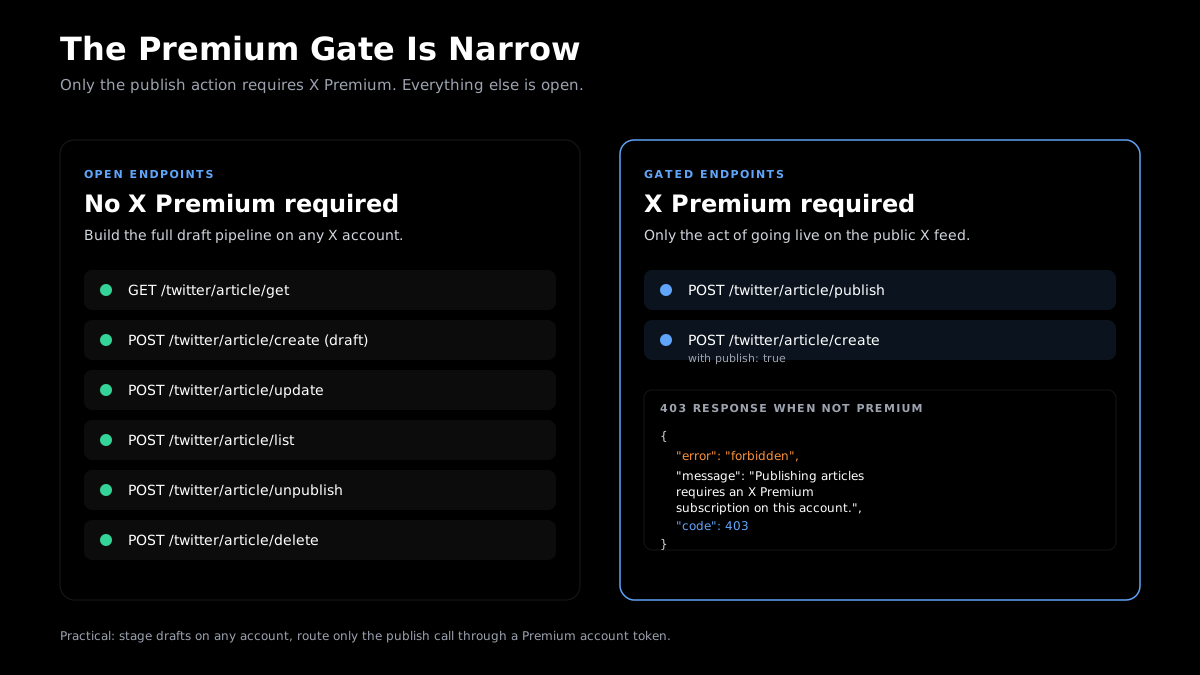 The gate is narrow: only the publish action requires Premium. Every other endpoint is open.
The Premium gate is the single most misunderstood part of the Article API. Here is the full per-endpoint picture:
| Endpoint | Requires X Premium |
|---|---|
GET /twitter/article/get |
No |
POST /twitter/article/create (draft) |
No |
POST /twitter/article/create with publish: true |
Yes |
POST /twitter/article/update |
No (draft edits; verify for published) |
POST /twitter/article/list |
No |
POST /twitter/article/publish |
Yes |
POST /twitter/article/unpublish |
No |
POST /twitter/article/delete |
No |
The design implication: you can build a complete draft management system, a CMS sync pipeline, a content review workflow, and an Article archive without any X Premium requirement. Only the final "go live" step needs Premium. This matters for multi-account tools: you can stage and manage articles on non-Premium accounts, then route only the publish call through a Premium account token.
Start without Premium: Get your free API key, build your draft workflow, and upgrade only when you are ready to publish. The first 10 create calls are covered by your $0.10 signup credit.
The cheapest Twitter API. Try it free.
$0.05 per 1,000 tweets. $0.10 free credits. No credit card required.
Draft vs Published: The Article State Machine
An Article moves through three states: draft (created but not public), published (live on the X feed, requires Premium), and deleted (permanent, not recoverable). The create endpoint always starts in draft state. Publish and unpublish toggle between draft and published. Delete is a one-way terminal transition.
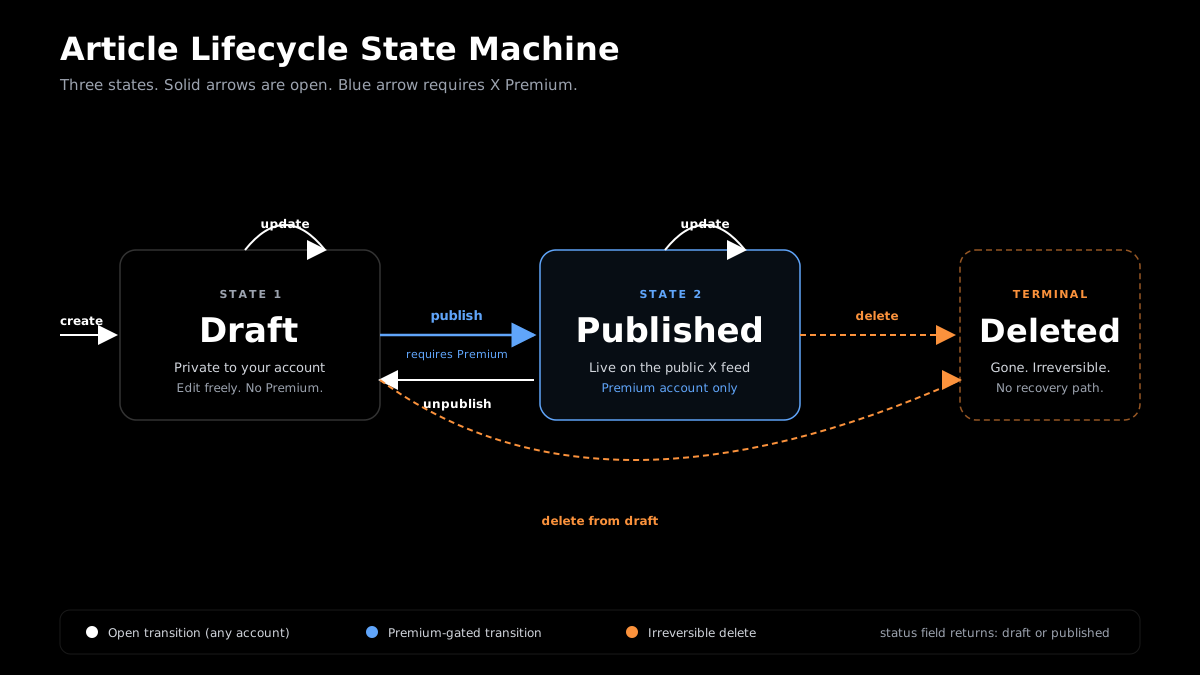 State machine for the full Article lifecycle. Solid arrows are free. Dashed arrows require Premium.
The Article lifecycle has three states: draft, published, and deleted (terminal). Here is every valid transition:
[create]      --> Draft
Draft         --[update]--> Draft         (anytime, no Premium)
Draft         --[publish]--> Published    (requires X Premium)
Published     --[update]--> Published     (verify allowed; safe pattern: unpublish first)
Published     --[unpublish]--> Draft      (no Premium required)
Draft         --[delete]--> (gone)        (irreversible)
Published     --[delete]--> (gone)        (irreversible)
Retry safety per transition:
| Transition | Retry behavior |
|---|---|
| create | Each call creates a NEW draft. Not safe to blind-retry on network error. Check list first. |
| update | Same fields safe to retry. Fields omitted are preserved, not cleared. |
| publish | Safe to retry. Already-published article is a no-op. |
| unpublish | Safe to retry. Already-draft article is a no-op. |
| delete | Returns 404 on second call. Treat 404 as semantically successful. |
The status field in every get and list response returns "draft" or "published". Check it before publish or unpublish to avoid redundant calls.
Full Python Workflow for the Twitter Article API
The complete Python workflow for the Article API runs four calls: create a draft with title and markdown content, update the draft to attach a cover image, publish to make it live on the X feed (Premium required), and list articles to confirm the published status. The full code below handles auth, error checking, and pagination in one script.
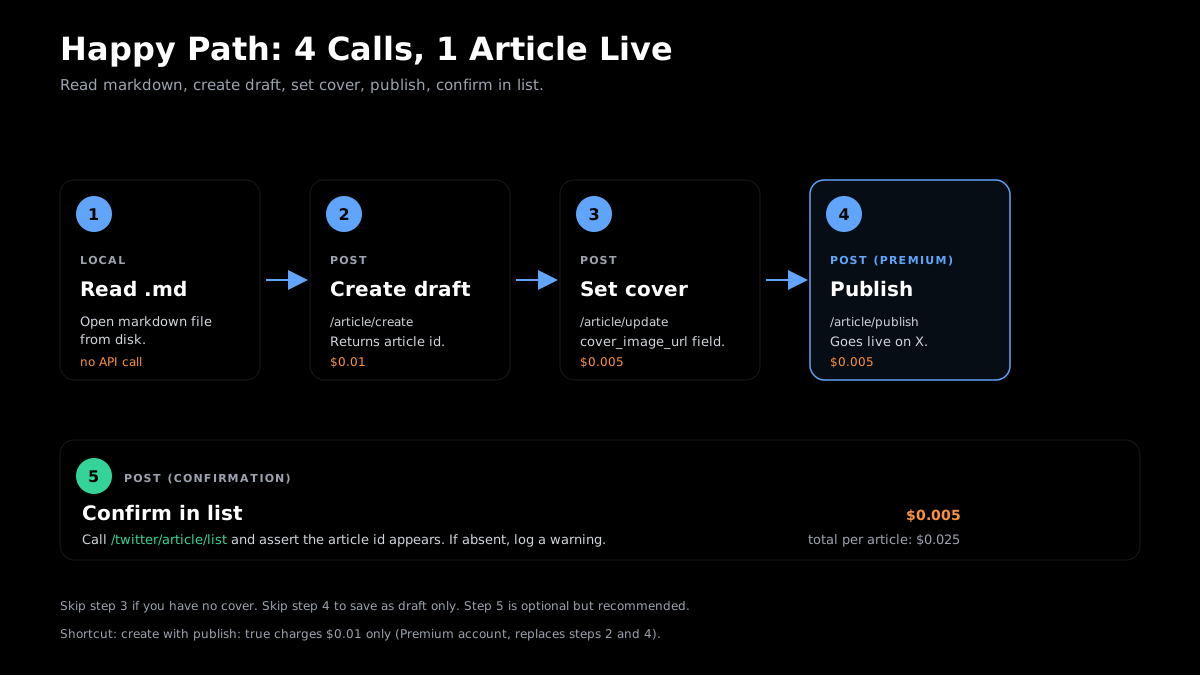 Complete happy-path flow: four calls, one article live on X.
This is the production-ready script. It reads a markdown file from disk, creates a draft, adds a cover image, publishes (Premium required), and lists to confirm. Handles errors at each step.
import os
import sys
import time
import requests

# --- Configuration ---
GETXAPI_KEY = os.environ["GETXAPI_KEY"]
AUTH_TOKEN = os.environ["X_AUTH_TOKEN"]
BASE = "https://api.getxapi.com"
HEADERS = {
    "Authorization": f"Bearer {GETXAPI_KEY}",
    "Content-Type": "application/json",
}


def api_post(path: str, payload: dict) -> dict:
    """POST with basic retry on 5xx."""
    url = f"{BASE}{path}"
    for attempt in range(3):
        resp = requests.post(url, json=payload, headers=HEADERS, timeout=20)
        if resp.status_code >= 500:
            time.sleep(2 ** attempt)
            continue
        if resp.status_code == 403:
            raise PermissionError(f"403 on {path}: {resp.json().get('message', 'Forbidden')}")
        resp.raise_for_status()
        return resp.json()
    raise RuntimeError(f"Failed after 3 attempts: {path}")


def api_get(path: str, params: dict) -> dict:
    url = f"{BASE}{path}"
    resp = requests.get(url, params=params, headers=HEADERS, timeout=20)
    resp.raise_for_status()
    return resp.json()


def run_article_workflow(
    md_file: str,
    title: str,
    cover_image_url: str = None,
    publish: bool = False,
) -> str:
    """
    Full Article workflow:
    1. Read markdown from file
    2. Create draft
    3. Update cover image (if provided)
    4. Publish (if publish=True and account is Premium)
    5. List to confirm
    Returns the article ID.
    """
    # 1. Read markdown body
    with open(md_file, "r", encoding="utf-8") as f:
        body = f.read()
    print(f"[1/4] Read {len(body)} chars from {md_file}")

    # 2. Create draft
    create_payload = {"auth_token": AUTH_TOKEN, "title": title, "body": body}
    draft = api_post("/twitter/article/create", create_payload)
    article_id = draft.get("id")
    print(f"[2/4] Draft created: {article_id}")

    # 3. Update cover image (separate call to keep create simple)
    if cover_image_url:
        api_post(
            "/twitter/article/update",
            {"auth_token": AUTH_TOKEN, "id": article_id, "cover_image_url": cover_image_url},
        )
        print(f"[3/4] Cover image set: {cover_image_url}")
    else:
        print("[3/4] No cover image provided, skipping.")

    # 4. Publish (requires X Premium on AUTH_TOKEN account)
    if publish:
        try:
            result = api_post(
                "/twitter/article/publish",
                {"auth_token": AUTH_TOKEN, "id": article_id},
            )
            print(f"[4/4] Published. Status: {result.get('status')}")
        except PermissionError as exc:
            print(f"[4/4] Publish skipped: {exc}")
            print("       Article saved as draft. Upgrade to X Premium to publish.")
    else:
        print("[4/4] Publish=False. Article saved as draft.")

    # 5. List to confirm
    list_data = api_post("/twitter/article/list", {"auth_token": AUTH_TOKEN})
    all_ids = [a.get("id") for a in list_data.get("articles", [])]
    if article_id in all_ids:
        print(f"Confirmed: article {article_id} appears in account list.")
    else:
        print(f"Warning: article {article_id} not found in list response.")

    return article_id


if __name__ == "__main__":
    if len(sys.argv) < 3:
        print("Usage: python article_workflow.py <markdown_file> <title> [cover_url]")
        sys.exit(1)

    article_id = run_article_workflow(
        md_file=sys.argv[1],
        title=sys.argv[2],
        cover_image_url=sys.argv[3] if len(sys.argv) > 3 else None,
        publish=os.environ.get("PUBLISH_LIVE", "false").lower() == "true",
    )
    print(f"\nDone. Article ID: {article_id}")
Run it:
# Draft only
python article_workflow.py my-article.md "The 2026 Developer Tools Guide"

# Draft with cover
python article_workflow.py my-article.md "The 2026 Developer Tools Guide" https://cdn.example.com/cover.jpg

# Publish live (Premium required)
PUBLISH_LIVE=true python article_workflow.py my-article.md "The 2026 Developer Tools Guide"
Scheduled Publishing Workflow
The X Article API has no native scheduled-publish parameter, so the standard pattern is to create the draft immediately, store the returned article ID, and run a scheduler (APScheduler, cron, or a cloud function) to call the publish endpoint at the target time. This covers newsletter syndication, content campaign batching, and time-zone-targeted releases across multiple accounts.
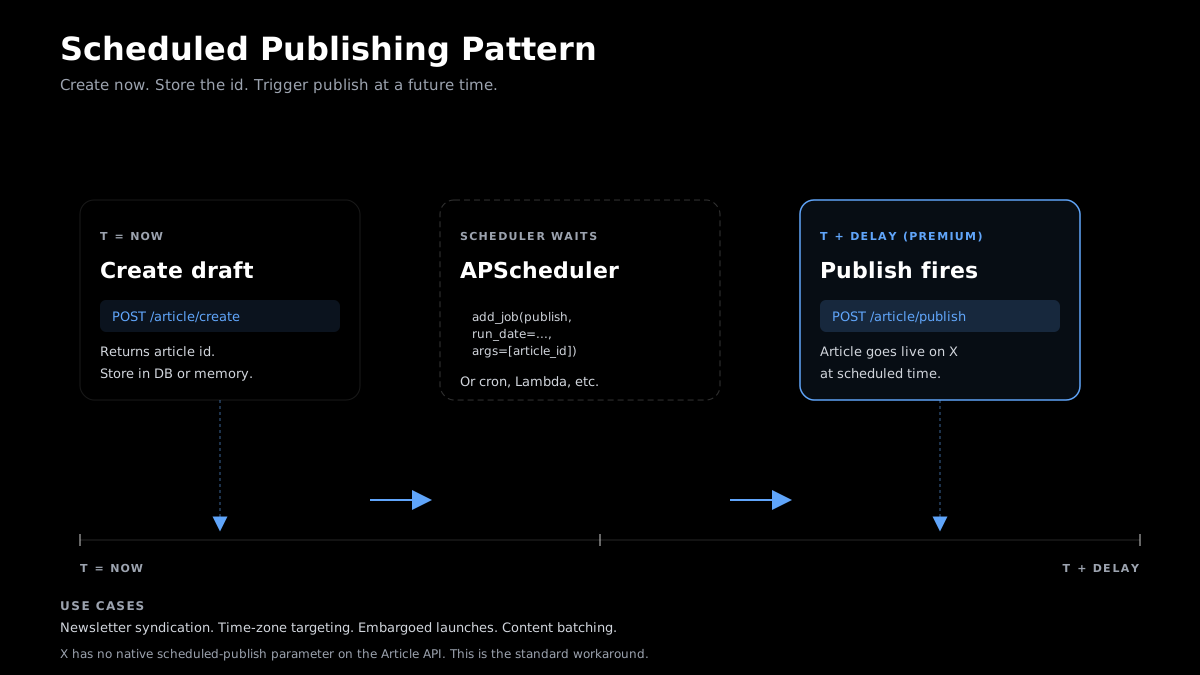 APScheduler pattern for time-zone-targeted article releases.
X does not offer a native scheduled-publish parameter in the Article API. The standard workaround: create the draft now, store the article ID, and run a scheduler to call publish at the right time. This covers newsletter syndication, content campaign batching, and time-zone-targeted releases.
This uses APScheduler (pip install apscheduler):
import os
import requests
from datetime import datetime, timezone
from apscheduler.schedulers.blocking import BlockingScheduler

GETXAPI_KEY = os.environ["GETXAPI_KEY"]
AUTH_TOKEN = os.environ["X_AUTH_TOKEN"]
HEADERS = {"Authorization": f"Bearer {GETXAPI_KEY}"}
BASE = "https://api.getxapi.com"


def create_draft(title: str, body: str) -> str:
    resp = requests.post(
        f"{BASE}/twitter/article/create",
        json={"auth_token": AUTH_TOKEN, "title": title, "body": body},
        headers=HEADERS,
    )
    resp.raise_for_status()
    return resp.json()["id"]


def publish_at_time(article_id: str) -> None:
    resp = requests.post(
        f"{BASE}/twitter/article/publish",
        json={"auth_token": AUTH_TOKEN, "id": article_id},
        headers=HEADERS,
    )
    if resp.status_code == 403:
        print("Publish failed: account is not X Premium.")
        return
    resp.raise_for_status()
    print(f"Published article {article_id} at {datetime.now(timezone.utc).isoformat()}")


# 1. Create the draft immediately
article_id = create_draft(
    title="Weekly Industry Roundup: May 2026",
    body="## This Week in Tech\n\nHere are the five stories that mattered most...",
)
print(f"Draft saved. ID: {article_id}")

# 2. Schedule publish for a specific UTC time
scheduler = BlockingScheduler()
scheduler.add_job(
    publish_at_time,
    "date",
    run_date=datetime(2026, 5, 28, 9, 0, 0, tzinfo=timezone.utc),
    args=[article_id],
)
print("Scheduler running. Article will publish at 09:00 UTC on 2026-05-28.")
scheduler.start()
For production, swap BlockingScheduler for BackgroundScheduler and run it inside your server process. Or store the article_id in a database and use a cron job to call publish at the right time. Key use cases: newsletter syndication, content campaign batching, and time-zone targeting. For more on distributing Twitter content programmatically, see the Twitter followers export API guide.
Multi-Account Management and Pricing
GetXAPI's Article endpoints cost $0.001 for get, $0.01 for create, and $0.005 each for publish, update, list, unpublish, and delete. Multi-account management routes each call with a different auth_token value, one session token per X account. The official X API documents draft-create and publish endpoints only.
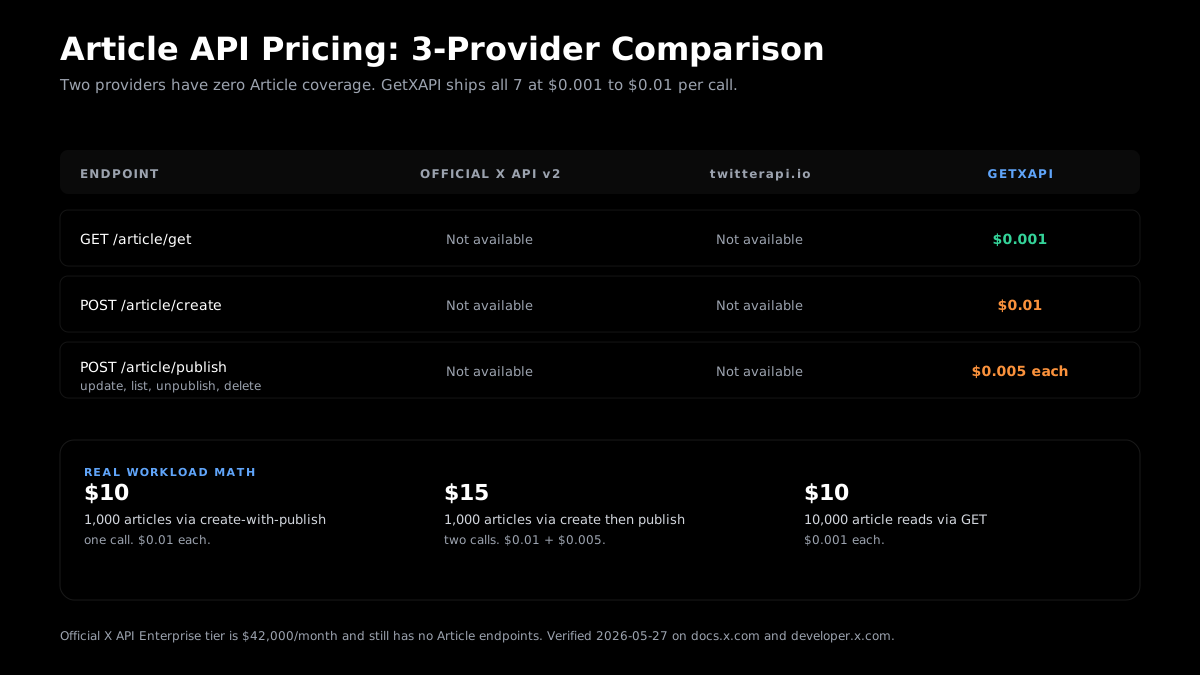 As of 2026-08-16. The official X API documents Article draft-create and publish endpoints; update, unpublish, delete, get, and list are not in its public docs.
Multi-account routing
Each API call carries an auth_token bound to one X account. To manage articles across multiple accounts, store one auth_token per account and route per-call:
import os

# Store auth tokens per account
ACCOUNTS = {
    "brand_main": os.environ["X_AUTH_TOKEN_BRAND"],
    "brand_eu": os.environ["X_AUTH_TOKEN_BRAND_EU"],
    "founder": os.environ["X_AUTH_TOKEN_FOUNDER"],
}


def publish_to_account(account_key: str, article_id: str) -> dict:
    auth = ACCOUNTS[account_key]
    resp = requests.post(
        f"{BASE}/twitter/article/publish",
        json={"auth_token": auth, "id": article_id},
        headers=HEADERS,
    )
    resp.raise_for_status()
    return resp.json()


# Publish the same article to multiple accounts
for account in ["brand_main", "brand_eu"]:
    result = publish_to_account(account, "1234567890")
    print(f"{account}: {result.get('status')}")
Note: auth_token is account-specific. An article created under brand_main can only be published, updated, or deleted by a call that includes brand_main's auth token.
Pricing comparison (as of 2026-08-16)
| Endpoint | Official X API v2 | twitterapi.io | GetXAPI |
|---|---|---|---|
| GET article | Not available | Not available | $0.001 |
| POST create | Draft create (/2/articles/draft) |
Not available | $0.01 |
| POST publish | Available (/2/articles/:id/publish) |
Not available | $0.005 |
| POST update / list / unpublish / delete | Not documented | Not available | $0.005 each |
The official X API documents draft-create and publish endpoints; the rest of the Article lifecycle is not in its public docs. twitterapi.io has no Article endpoints as of 2026-05-27.
Real workload math:
- 1,000 articles via create-with-publish (one call): 1,000 x $0.01 = $10/month
- 1,000 articles via create then separate publish: $15/month
- 10,000 article reads (GET): $10/month
For the full Twitter API pricing breakdown, see the pricing page, and for worked monthly budgets the Twitter API workload cost examples. For an independent comparison of third-party providers, see the best Twitter API for scraping guide.
Error Handling, Pagination, and Rate Limits
Article API errors follow standard HTTP semantics: 401 for bad or missing auth, 403 for a non-Premium account attempting to publish, 404 for an article ID that does not exist, and 429 for transient rate limiting. Pagination on the list endpoint uses cursor and has_more the same way as all other GetXAPI endpoints.
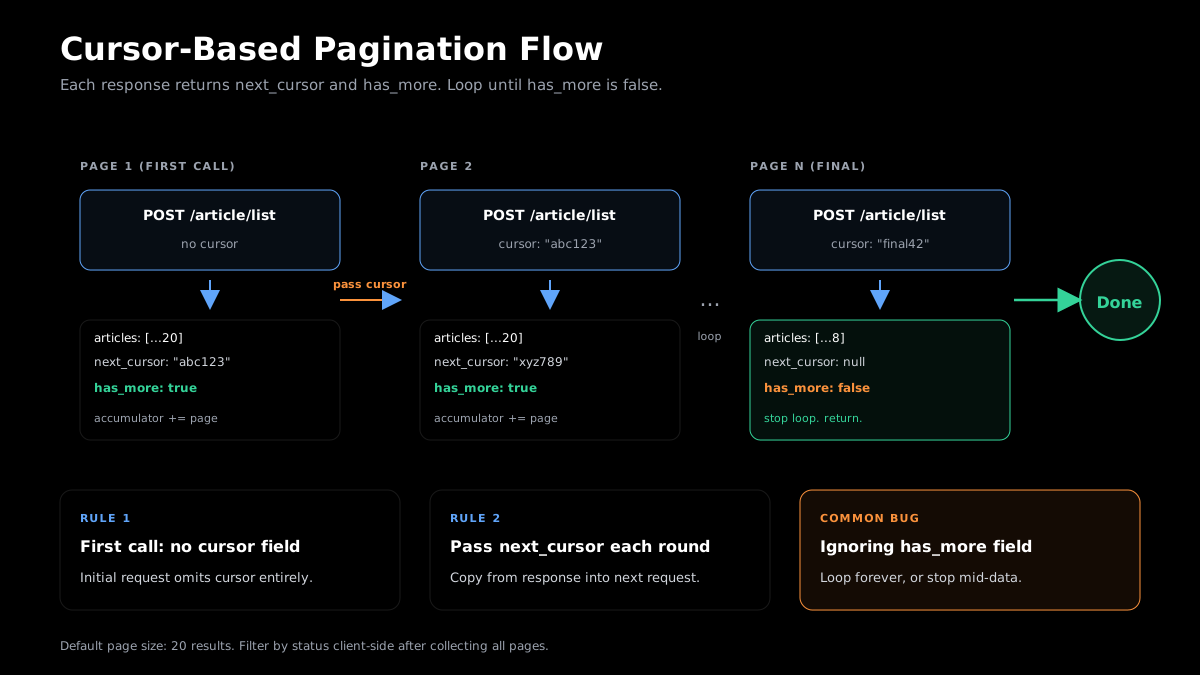 Cursor-based pagination. Each page returns
 next_cursor and has_more.
Common errors
| HTTP Status | Error | Cause | Fix |
|---|---|---|---|
| 401 | Unauthorized | Invalid GETXAPI_KEY | Check your API key in the dashboard |
| 401 | Invalid auth_token | X session token expired or malformed | Re-authenticate via /twitter/user_login or refresh from browser cookies |
| 403 | Premium required | Account tied to auth_token is not X Premium | Upgrade the X account or use a Premium account's token |
| 404 | Article not found | ID does not exist, or belongs to a different account | Verify ID via /twitter/article/list |
| 429 | Rate limited | Upstream X rate limit surfaced through GetXAPI | Retry with exponential backoff (see snippet below) |
| 500+ | Server error | Transient upstream error | Retry up to 3 times with exponential backoff |
Retry with exponential backoff
import time
import requests

def post_with_backoff(path: str, payload: dict, max_retries: int = 3) -> dict:
    url = f"{BASE}{path}"
    delay = 1.0
    for attempt in range(max_retries):
        resp = requests.post(url, json=payload, headers=HEADERS, timeout=20)
        if resp.status_code == 429:
            wait = float(resp.headers.get("Retry-After", delay * 2))
            print(f"Rate limited. Waiting {wait}s before retry.")
            time.sleep(wait)
            continue
        if resp.status_code >= 500:
            time.sleep(delay)
            delay *= 2
            continue
        if resp.status_code == 403:
            raise PermissionError(resp.json().get("message", "Forbidden"))
        resp.raise_for_status()
        return resp.json()
    raise RuntimeError(f"Exhausted {max_retries} retries on {path}")
Rate limit context
GetXAPI has no endpoint-specific quota, though general service throttling still applies. Upstream X may surface 429 responses during heavy write bursts. Read operations (list, get) are unlikely to hit limits at normal volumes. Bulk write operations (100+ creates/hour) should include 1 to 2 second delays between calls.
See the GetXAPI best practices guide for production patterns. For data pipelines combining Article reads with tweet-level signals, see the Twitter sentiment analysis Python guide.
Migrating from the Legacy /twitter/tweet/article Endpoint
The legacy GET /twitter/tweet/article endpoint was retired on 2026-05-17 when the new Article API launched. Any code calling the old path receives a 404 or deprecation error. The migration is a path change from /twitter/tweet/article to /twitter/article/get, with tweet_id renamed to id as the only parameter change.
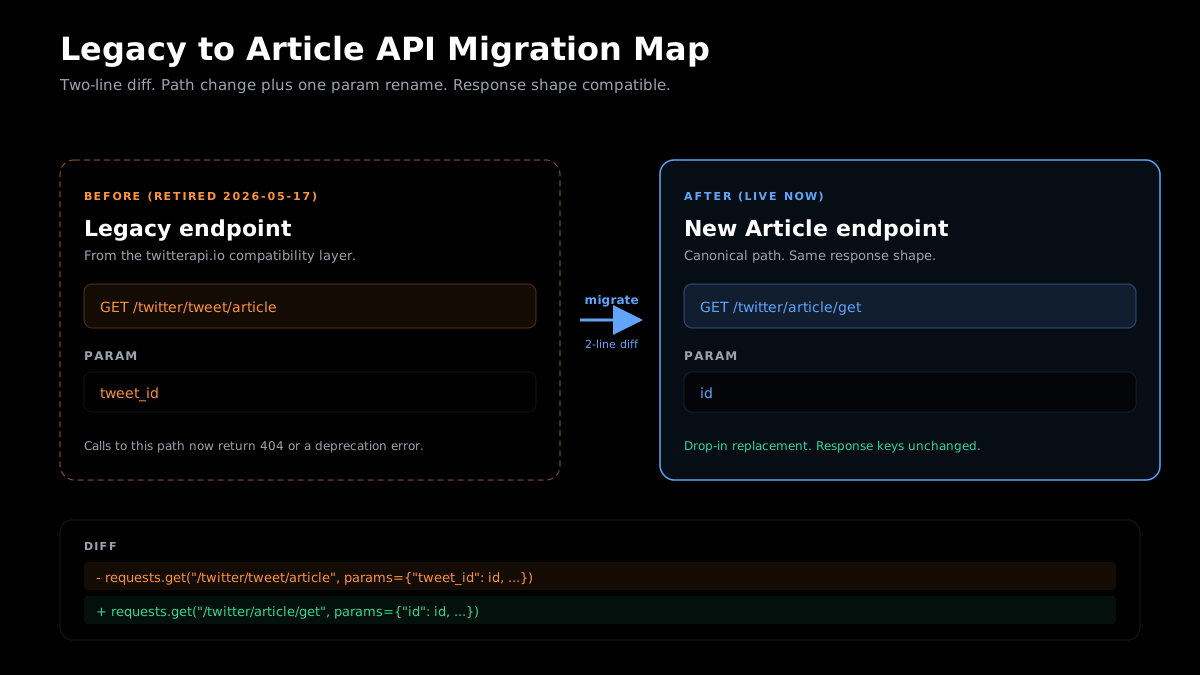 Legacy endpoint retired 2026-05-17. One-line path and param change required.
The legacy GET /twitter/tweet/article endpoint (from the twitterapi.io compatibility layer) was retired on 2026-05-17 when the new Article endpoints launched. If your code calls the legacy path, you will receive a 404 or deprecation error.
Migration table:
| Legacy | New | Change required |
|---|---|---|
GET /twitter/tweet/article |
GET /twitter/article/get |
Path change + param rename |
Param: tweet_id |
Param: id |
Rename tweet_id to id |
Before (legacy):
# Legacy pattern (retired 2026-05-17)
resp = requests.get(
    "https://api.getxapi.com/twitter/tweet/article",
    params={"tweet_id": "1234567890", "auth_token": AUTH_TOKEN},
    headers=HEADERS,
)
After (new endpoint):
# New pattern (live as of 2026-05-17)
resp = requests.get(
    "https://api.getxapi.com/twitter/article/get",
    params={"id": "1234567890", "auth_token": AUTH_TOKEN},
    headers=HEADERS,
)
Node.js migration:
// Before
const params = new URLSearchParams({ tweet_id: "1234567890", auth_token: AUTH_TOKEN });
const resp = await fetch(`${BASE}/twitter/tweet/article?${params}`, { headers: HEADERS });

// After
const params = new URLSearchParams({ id: "1234567890", auth_token: AUTH_TOKEN });
const resp = await fetch(`${BASE}/twitter/article/get?${params}`, { headers: HEADERS });
Two-line diff: update the path string, rename tweet_id to id. Response shape is compatible. For migrating all endpoints from twitterapi.io, see the full migration guide.
Reliability and support: GetXAPI has maintained 99.9% uptime across all endpoints since launch. Article endpoints launched 2026-05-17 and are under active maintenance with a public changelog you can subscribe to for release notifications. Support is available via Discord and email for integration questions.
What to build next: CMS webhook on post publish triggers Article create. Newsletter send triggers Article publish. Draft review gates hold articles until approved. Full Article history mirrors into your database for search. For more patterns, see the complete Python Twitter API tutorial, the Twitter DM API guide, and the Twitter API v2 vs GetXAPI comparison.
Start using the Twitter Article API in 60 seconds. Sign up free at getxapi.com/signup.
Frequently Asked Questions
The X Article API manages long-form Articles on X (up to 25,000 characters, markdown-formatted, with cover images). Tweet endpoints handle short-form posts (280 characters) and have broader official X API v2 coverage. Official X API v2 documents Article draft creation and publishing. Its public documentation does not list endpoints for getting, listing, updating, unpublishing, or deleting Articles; GetXAPI covers all 7 lifecycle operations. Create, edit, and list work without X Premium. Publishing to the public feed requires it.
A draft article is stored privately in your account. It is not visible to anyone else on X. A published article is live on the public X feed, linked from your profile, and accessible via the article URL. You move between states using the publish and unpublish endpoints. The `status` field in every get and list response tells you the current state: `"draft"` or `"published"`. Deleting either state is permanent and cannot be reversed.
Unpublish moves a published article back to draft status. The article disappears from the public X feed, but all content (title, body, cover image) is preserved under the same article ID. You can republish later without losing any work. Delete is permanent: the article is removed from both the public feed and your draft list, and the ID is no longer valid. There is no recovery from delete. Use unpublish when you want to retract temporarily or edit before republishing. Use delete only when the article is no longer needed at all.
Yes. GetXAPI replaces the official OAuth 2.0 flow with two credentials: a GetXAPI API key (from your GetXAPI dashboard, no developer account required) and an `auth_token` (an X session token from your browser cookies or the `/twitter/user_login` endpoint). No OAuth callback URL. No token-refresh logic. No developer account application. Sign up at getxapi.com/signup and you have an API key in under a minute.
X Premium accounts support up to 25,000 characters in the article body. The body accepts markdown formatting (headers, bold, italic, links, code blocks, lists). Cover images are set via a URL string in the `cover_image_url` field. Article title length follows standard X constraints. These limits apply regardless of whether you create through the web UI or the API. For non-Premium accounts, the publish step is blocked entirely, so the practical character limit question is only relevant for Premium users.
The official X API v2 documents Article draft-create and publish endpoints; the rest of the lifecycle (update, unpublish, delete, get, list) is not in its public docs. GetXAPI defaults to pay-per-call with no subscription required, and optional subscription plans are also available for a lower effective per-call rate. The only X-side requirement is that the account tied to `auth_token` must have X Premium for the publish step. Every new GetXAPI account gets $0.10 in free credits to test all 7 endpoints before committing.
For most operations, no. Creating a draft, updating a draft, listing your articles, getting an article by ID, unpublishing, and deleting all work without X Premium. The single operation that requires X Premium is publishing: both `POST /twitter/article/publish` and `POST /twitter/article/create` with `"publish": true` will return a 403 if the account tied to the `auth_token` is not an X Premium subscriber. You can build a full draft management pipeline and only upgrade when you are ready to go live.
Yes. Pass `"publish": true` in the body of `POST /twitter/article/create`. This creates the article and publishes it immediately in one call at the create rate ($0.01). The account tied to your `auth_token` must have an active X Premium subscription, or the call returns a 403 error. Without `"publish": true`, the call creates a draft only (no Premium required). The one-call shortcut is also slightly cheaper than calling create and then publish separately ($0.01 vs $0.015 total for two-call flow).
The public X API v2 documentation lists endpoints for creating a draft Article and publishing an Article. It does not list public endpoints for getting, listing, updating, unpublishing, or deleting Articles, so confirm current availability and pricing with X. GetXAPI charges $0.001 per GET, $0.01 per CREATE, and $0.005 per PUBLISH/UPDATE/LIST/UNPUBLISH/DELETE call. For a workload of 1,000 published articles per month via the one-call create-and-publish shortcut, total cost is $10. For the full pricing comparison across all endpoint types, see the Twitter API pricing page. For an independent comparison of third-party providers on the scraping side, see the best Twitter API for scraping guide.
Call `POST /twitter/article/list` with your `auth_token`. The endpoint returns paginated results with `has_more` and `next_cursor` fields. Loop over pages until `has_more` is false. Each article object includes an `id`, `title`, `status` (`"draft"` or `"published"`), and timestamps. Server-side status filtering is not documented as of 2026-05-27, so filter by `status` on the client side after fetching all pages. The pagination loop in the Endpoint 4 section above shows the full pattern in Python and Node.js.
Yes. Set up a webhook in your CMS that fires on post publish, calls your Article workflow script with the post body as markdown, and calls `POST /twitter/article/create`. For WordPress, the `publish_post` hook triggers the workflow. Webflow, Ghost, and Contentful all support outgoing webhooks that connect to the same script. The [scheduled publishing workflow](#scheduled-publishing-workflow) section shows how to decouple CMS publish time from X Article publish time.
Delete is permanent. The article ID is gone from your account and the public feed. A second delete returns 404 (treat as idempotent success). Unpublish is reversible: it moves the article to draft, preserves all content under the same ID, and removes it from the public feed. A second unpublish on an already-draft article is a no-op. Use unpublish as the default retraction. Reserve delete only when the article should not exist in any form.
Check out similar blogs
More guides on the Twitter/X API, scraping, and pricing.

Twitter API Tutorial 2026: The Complete Developer Guide
A current 2026 Twitter API tutorial covering authentication, endpoints, code, rate limits, verified official prices, and a third-party public-data path.

How to Scrape Twitter/X in 2026: Tweets, Profiles & Followers
How to scrape Twitter/X in 2026 without getting blocked: tweets, profiles, followers and media via a read API, the legal line on public data, and runnable scripts.

Twitter Trends API: Pull Trending Topics by Location in 2026
A 2026 Twitter trends API guide: pull top trends by country or city from GetXAPI's dedicated endpoint, plus how to build custom trends from search. Runnable code.

How to Use the Twitter API with Python, 2026 Tutorial
Step-by-step Python tutorial for the Twitter API in 2026. Working code for search, users, DMs, pagination, retries, plus a tweepy migration guide.

Scrape Full Tweet History of Any Account in 2026 (Beyond the 3,200 Limit)
Why the X timeline stops at 3,200 tweets and how to pull an account's full history with date-window search, cursor pagination, and dedup. Live-tested code in Python and curl.

Twitter API 403 Forbidden and 401 Unauthorized: Every Cause and Fix
Why the X API returns 403 Forbidden or 401 Unauthorized, how to tell the two apart, and a fix for each cause. Covers tier gating, app permissions, OAuth, and X error codes.

The Best Twitter (X) API Alternatives in 2026, Compared
The best Twitter / X API alternatives in 2026, ranked and compared: managed pay-per-call APIs, web-data marketplaces, and open-source libraries, with real per-1,000-tweet costs.

How to Like a Tweet via API in 2026 (No Dev Account)
Like (favorite) tweets programmatically via API in 2026 without an X developer account. The auth_token model, working curl, Python, and Node code, and per-call cost.
Featured in
Where GetXAPI's data and pricing get cited.

The hidden line item in your AI side project: X data
Indie Hackers post on the often-overlooked cost of X data for AI side projects, citing GetXAPI as the usage-based way to pull live Twitter data without a five-figure X developer contract.

How Companies Are Learning to Read Market Mood in Real Time
Editorial feature on Big News Network examining how companies read market mood from X in real time, citing GetXAPI as the usage-based Twitter API that prices live social listening by the call instead of a five-figure annual contract.

How Companies Are Learning to Read Market Mood in Real Time
Syndicated feature on Business Newswire on how companies read market mood from X in real time, citing GetXAPI as the usage-based Twitter API that prices live social listening by the call.

Working with Twitter/X Data: A Practical Skill for IT Students and Professionals in 2026
Guide on SIIT (Scholars International Institute of Technology) on collecting live Twitter/X data as a practical developer skill, citing GetXAPI as the per-call Twitter data API that makes it affordable without an X developer account.

Adding Twitter/X Data to Your App in 2026: A Developer's Integration Guide
Developer integration guide on Programming Insider covering how to add live Twitter/X data to an app in 2026, comparing the official X API v2 with a key-based REST approach and citing GetXAPI as the low-cost per-call option with no developer-account approval.

6 Twitter/X Scraping Solutions for Every Budget
Roundup on TechBullion of the leading Twitter/X scraping solutions, ranking GetXAPI first as the cheapest option at $0.001 per call (about $0.05 per 1,000 tweets) with clean JSON output and no monthly minimum.

The Data Bill Behind Every Social Analytics Tool
Editorial piece on SpeakRJ examining the underlying data costs behind social analytics tools, citing GetXAPI as the usage-based way to source live X data by the call.

What Is AI Sentiment Analysis, and What Does Each Layer Cost?
Explainer in AI Journal breaking sentiment analysis into its data, model and reporting layers and what each costs to run, citing GetXAPI for pulling public X posts on pay-per-call pricing.

Why Enterprise AI Agents Still Cannot Read Social Data
Analysis piece in The Silicon Review on why enterprise agents reach internal systems easily but struggle with public social data, citing GetXAPI's MCP server and data-as-a-service model as one route to close the gap.