Scrape Full Tweet History of Any Account in 2026 (Beyond the 3,200 Limit)
Why the X timeline stops at 3,200 tweets and how to pull an account's full history with date-window search, cursor pagination, and dedup. Live-tested code in Python and curl.

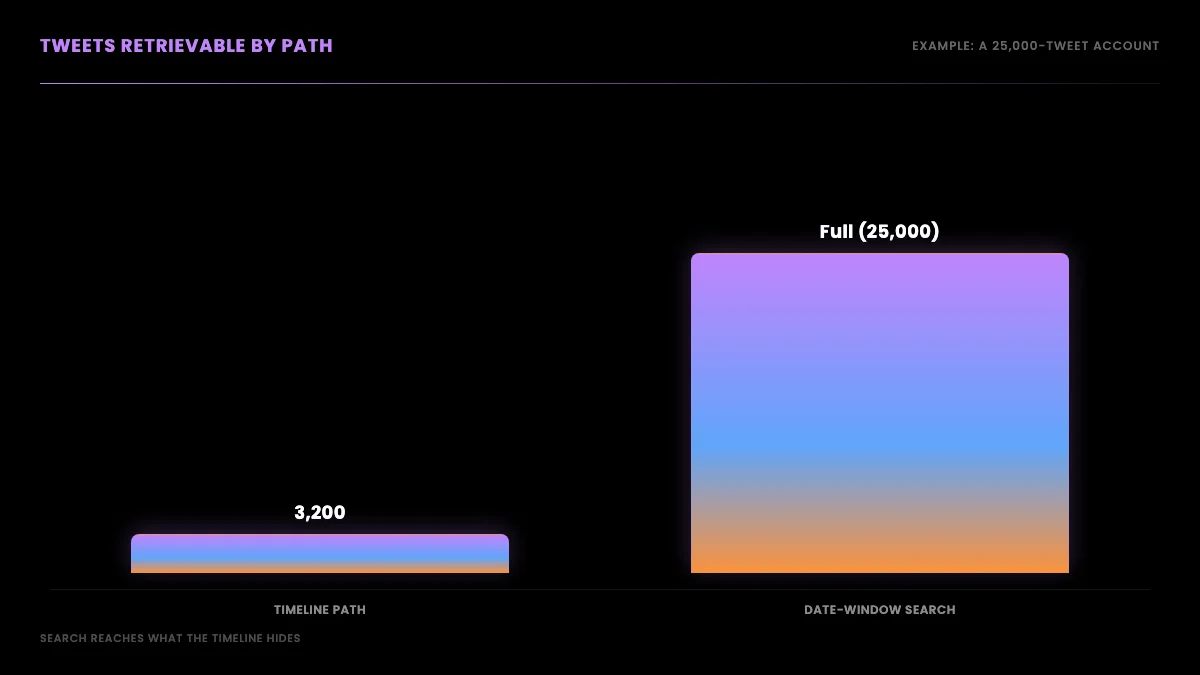
Scraping the full tweet history of any public X account requires two retrieval paths: the user timeline for the most recent 3,200 tweets, and date-window search for everything older. The X timeline endpoint caps at 3,200 tweets by design, not by rate limit, so paging harder does not get you past it. To pull a complete archive, you slice the account's lifespan into contiguous date ranges, query each window with from:username since:DATE until:DATE, paginate inside each window with a cursor, and deduplicate results on tweet id.
TL;DR: The X timeline serves only an account's most recent 3,200 tweets, and no amount of paging gets you past that wall, because it is a timeline-serving limit, not a rate limit. To pull the full history of any public account, stop paging the timeline and switch to date-window search: query
from:username since:DATE until:DATEacross contiguous windows spanning the account's lifespan, paginate inside each window with a cursor, and deduplicate on tweet id. The timeline path gives you the recent 3,200 fast; the search path gives you everything else. Every code sample below was run live against the API before publishing.
If you have ever tried to collect a complete record of an account's tweets, you have probably met the same wall everyone meets: you page down the timeline, the tweets keep coming, and then they just stop. You did nothing wrong and you were not rate-limited. You hit the 3,200-tweet timeline ceiling, a hard limit on how far back the timeline endpoint will serve, and it has been there for years. For a casual scroll that is fine. For a researcher building a dataset, a data engineer backfilling a monitoring system, or an archivist preserving an account's record, it is the difference between a partial sample and the real thing.
This guide is about getting past that wall. It explains why the 3,200 limit exists and why it cannot be paged around, then walks through the technique that actually works: slicing an account's lifespan into date windows and pulling each one through search, which is not bound by the timeline cap. There is runnable Python and curl for every step, all of it executed against the live API before this was published, so you are copying patterns that work rather than patterns that looked right in an editor. If you are new to the read path, our guide to how to scrape tweets covers the basics and the best ways to read tweet data compares the approaches; this post goes deep on the one problem they leave open, the full archive.
Why can you only see 3,200 tweets?
The 3,200 number is a timeline-serving limit, not a rate limit, and the distinction is the whole reason the usual fix does not work. A rate limit slows you down: wait out the window and you can continue. The timeline cap does not slow you down, it stops you. X serves an account's most recent 3,200 tweets through the timeline and refuses to go further, regardless of how many calls you make or how carefully you paginate. The official X timeline documentation has described this ceiling on the user timeline for years. So the moment your goal is the full history rather than the recent slice, paging the timeline harder is not a strategy, it is a dead end.
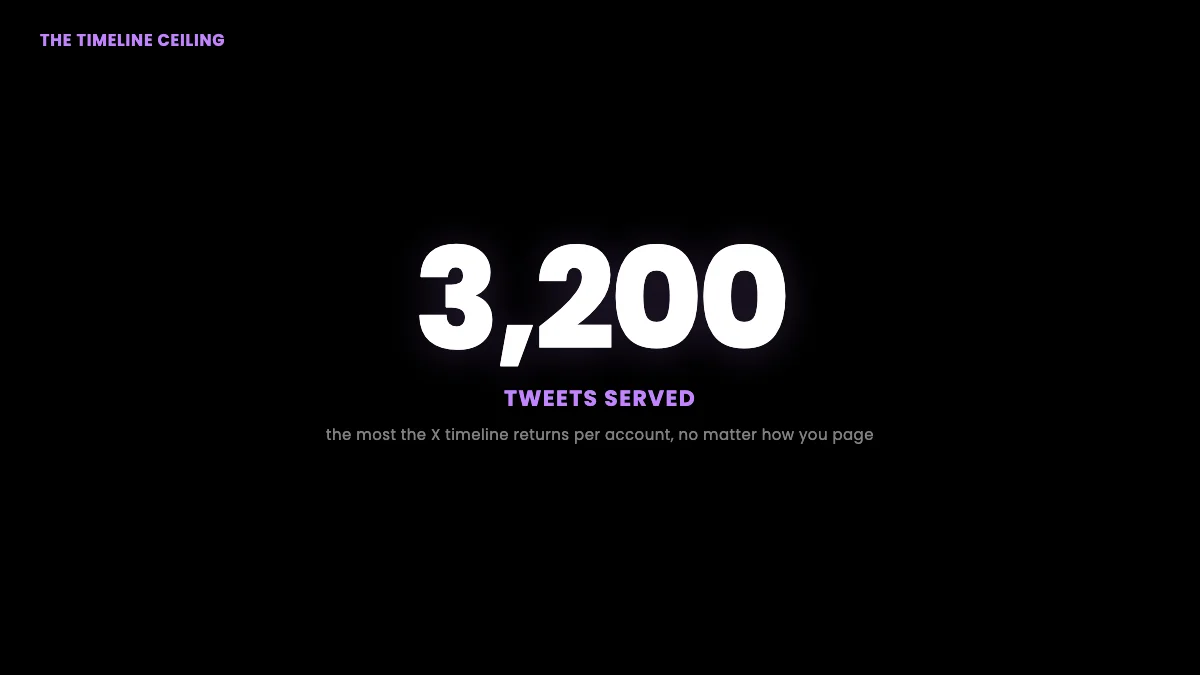
The reason the limit exists at all is architectural. Serving a timeline means keeping a recent slice of every account's tweets in fast storage that can be assembled into a feed on demand, and capping that slice at 3,200 keeps the cost of that storage bounded across hundreds of millions of accounts. Older tweets are not deleted; they move out of the fast-serving window and into systems optimized for lookup by id or by search query rather than for reverse-chronological paging. That is why the data is still retrievable through search even though the timeline will not page to it: the tweets live in a different store with a different access pattern. The history of the platform makes the point concrete. The Library of Congress archived public tweets from 2010 to 2017 precisely because the full record was understood to be a primary historical source worth preserving, and the broader history of the platform is studded with moments researchers needed to reconstruct after the fact. None of that work would be possible if older tweets ceased to exist at the 3,200 mark. They persist; they are simply not on the timeline.
This is not obscure developer trivia. Ordinary users run into it constantly and are confused by it, because nothing in the interface explains why their own older posts have vanished from view. One user on r/Twitter put the question plainly:
how to go back further in my tweets from r/Twitter
The instinct in that thread, that deleting recent tweets might let older ones reappear, is wrong, but it captures the right intuition: the timeline is a fixed-size window onto a much larger history, and the older tweets are still there, just not reachable through the timeline. The fix is not to manipulate the window. It is to use a different door.
The two retrieval paths: timeline versus search
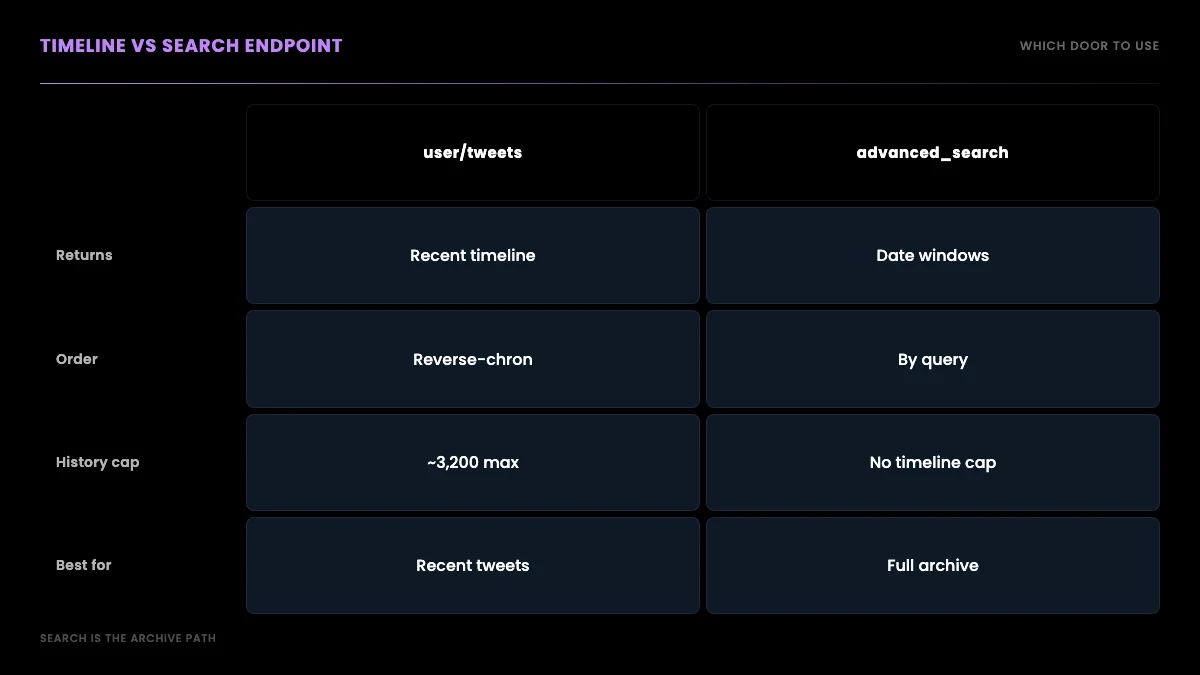
There are two ways to read an account's tweets, and they have completely different limits, which is the key insight this entire guide rests on. The timeline path returns an account's tweets in reverse-chronological order and is fast and simple, but it bottoms out at the most recent 3,200. The search path returns tweets matching a query, including from:username plus a date range, and it is not bound by the timeline's 3,200-tweet window. Most people only ever use the timeline path because it is the obvious one, hit the cap, and conclude the older tweets are gone. They are not gone. They are reachable through search.
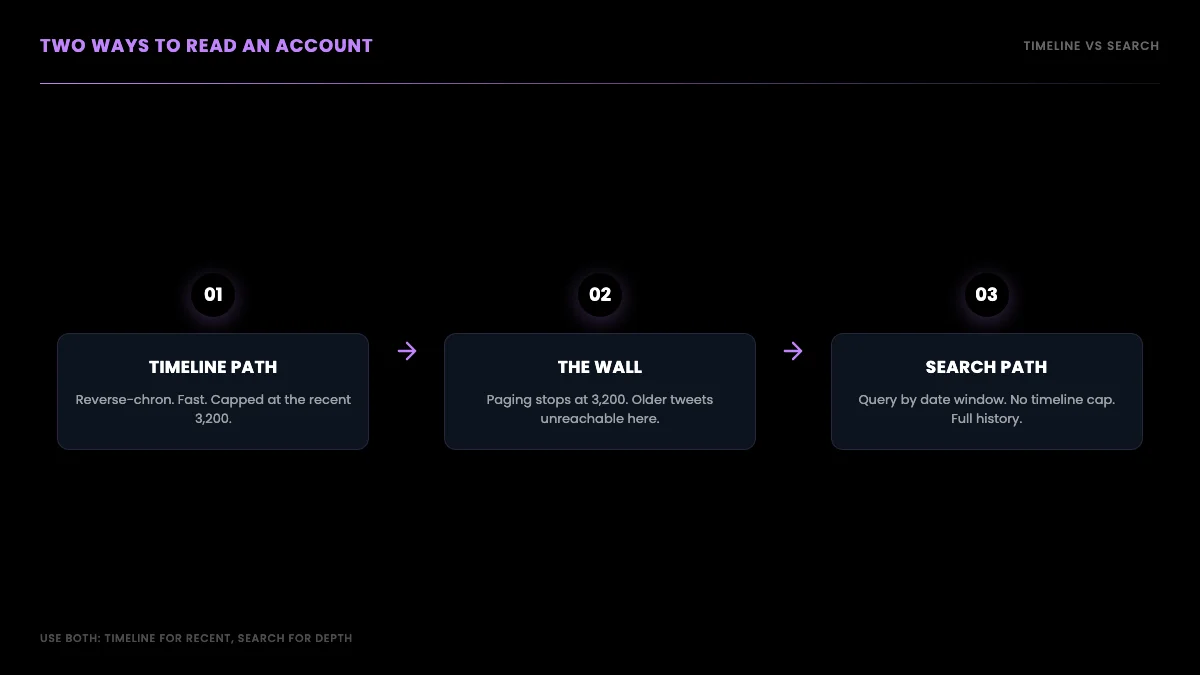
The practical consequence is that a complete history pull uses both paths for what each does best. You use the timeline to grab the recent 3,200 quickly in a handful of paged calls, and you use date-window search to reach everything older. Knowing which endpoint answers which question is most of the battle, so it is worth seeing the two side by side before writing any code.
A developer on X summarized the situation in one tweet that doubles as the spoiler for this whole guide:
Did you know you can only scroll back through a timeline for 3,200 tweets? To see anything further back you have to use the search function.
@TheHoogie on X
That is exactly right, and the rest of this guide turns "use the search function" into a working algorithm.
Path 1: pull the recent timeline with cursor pagination
Start with the easy half. To collect an account's most recent tweets up to the 3,200 ceiling, call the user timeline endpoint and page through it with a cursor. Each response carries a tweets array, a has_more flag, and a next_cursor value; you feed the cursor back into the next request and stop when has_more is false or you have collected enough. This is the standard pagination loop and it is the right tool for recent data because it is fast and returns tweets in order. It just cannot cross the 3,200 line, so treat it as the recent-history collector, not the full-history one.
Here is the timeline loop, run live against the API before publishing:
import requests

API_KEY = "YOUR_API_KEY"
BASE = "https://api.getxapi.com"


def fetch_recent(username, max_pages=2):
    """Page the user timeline. Fast for recent tweets, capped at ~3,200."""
    tweets, cursor, pages = [], None, 0
    while pages < max_pages:
        params = {"userName": username, "count": 20}
        if cursor:
            params["cursor"] = cursor
        r = requests.get(
            f"{BASE}/twitter/user/tweets",
            params=params,
            headers={"Authorization": f"Bearer {API_KEY}"},
        )
        data = r.json()
        tweets.extend(data.get("tweets", []))
        if not data.get("has_more"):
            break
        cursor, pages = data.get("next_cursor"), pages + 1
    return tweets


recent = fetch_recent("nasa", max_pages=2)
print(f"Pulled {len(recent)} recent tweets from the timeline")
If you raise max_pages, the loop keeps walking the timeline until either has_more goes false or you reach roughly the 3,200-tweet wall, whichever comes first. For an account that posts less than 3,200 times total, the timeline alone is the entire history and you are done. For anyone more prolific, the timeline is only the recent layer, and the next section is where the real work happens. The same cursor pattern shows up across the read API; our Python Twitter API tutorial and the GetXAPI best practices guide cover it in more depth, and the rate limits guide explains the pacing.
Path 2: walk the full archive with date-window search
This is the technique that gets you past 3,200. Instead of asking the timeline for an account's recent tweets, you ask search for an account's tweets inside a specific date range, using a query of the form from:username since:YYYY-MM-DD until:YYYY-MM-DD. Search does not serve from the capped timeline window, so a date range from years ago returns tweets from years ago. Slice the account's whole lifespan into contiguous date windows, query each window, page through it with the same cursor loop, and you have walked the complete public archive that the timeline refused to show you.
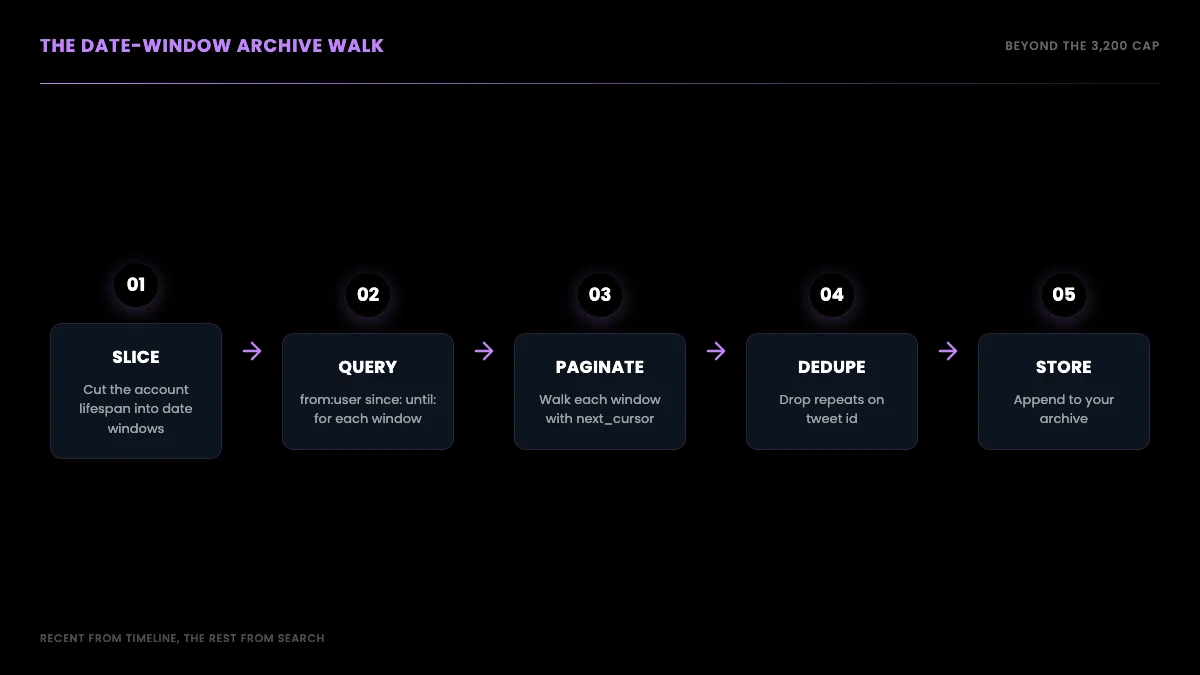
The function for a single window is the same cursor loop as before, pointed at the search endpoint with a from: plus date-range query. This block was run live before publishing:
import requests

API_KEY = "YOUR_API_KEY"
BASE = "https://api.getxapi.com"


def fetch_window(username, since, until, max_pages=3):
    """Pull one account's tweets inside a date window. Not capped at 3,200."""
    collected, cursor, pages = [], None, 0
    while pages < max_pages:
        query = f"from:{username} since:{since} until:{until}"
        params = {"q": query, "queryType": "Latest"}
        if cursor:
            params["cursor"] = cursor
        r = requests.get(
            f"{BASE}/twitter/tweet/advanced_search",
            params=params,
            headers={"Authorization": f"Bearer {API_KEY}"},
        )
        data = r.json()
        collected.extend(data.get("tweets", []))
        if not data.get("has_more"):
            break
        cursor, pages = data.get("next_cursor"), pages + 1
    return collected


# A window from years ago still returns tweets, unlike the timeline
window = fetch_window("nasa", "2024-01-01", "2024-07-01")
print(f"Window 2024-H1 returned {len(window)} tweets")
The thing to notice is that the date range is historical and the call still returns tweets, which is the exact behavior the timeline cannot give you. The same request as a one-line curl looks like this, also verified live:
curl -s -G "https://api.getxapi.com/twitter/tweet/advanced_search" \
  --data-urlencode "q=from:nasa since:2024-01-01 until:2024-07-01" \
  --data-urlencode "queryType=Latest" \
  -H "Authorization: Bearer YOUR_API_KEY"
Note the parameter is q, not query. The from: operator is the part that makes this an archive walk rather than a keyword search; a bare keyword with a very old date range often returns nothing, but from:account inside a window reliably returns that account's tweets for the period. For the full set of operators you can combine here, including language, replies, and media filters, see the Twitter advanced search operators reference. Compared to the timeline path, the difference in reach is the entire point of this guide.
Start building with GetXAPI
$0.05 per 1,000 tweets. $0.10 free credits. No credit card required.
Generating the date windows
The walk is only as good as the windows you feed it, so the next piece is generating a clean, contiguous list of date ranges from the account's first tweet to today. Pull the account's creation date once from the user info endpoint, then step month by month (or week by week for a prolific account) to build the window list. There is no overlap to design in deliberately; you make the windows adjacent and let dedup handle the boundaries later. Getting the start date right matters because guessing too recent a start silently drops the oldest tweets, the exact ones the timeline already hid.
First, read the account's creation date. This block was run live before publishing:
import requests

API_KEY = "YOUR_API_KEY"
r = requests.get(
    "https://api.getxapi.com/twitter/user/info",
    params={"userName": "nasa"},
    headers={"Authorization": f"Bearer {API_KEY}"},
)
data = r.json().get("data", {})
print("Account created:", data.get("createdAt"))
With a start date in hand, building the windows is plain date arithmetic and needs no API at all. The one library worth pulling in is python-dateutil, whose relativedelta steps by calendar months correctly without the off-by-a-few-days errors you get from adding fixed 30-day deltas. Calendar-correct stepping matters more than it looks: over a multi-year account, naive 30-day windows drift, eventually misaligning with the months you are reasoning about and making the per-window counts harder to sanity-check later.
from datetime import date
from dateutil.relativedelta import relativedelta


def month_windows(start, end):
    """Contiguous month windows from start to end as (since, until) pairs."""
    windows, cur = [], start
    while cur < end:
        nxt = cur + relativedelta(months=1)
        windows.append((cur.isoformat(), min(nxt, end).isoformat()))
        cur = nxt
    return windows


wins = month_windows(date(2024, 1, 1), date(2024, 7, 1))
print(wins[0], "->", wins[-1], f"({len(wins)} windows)")
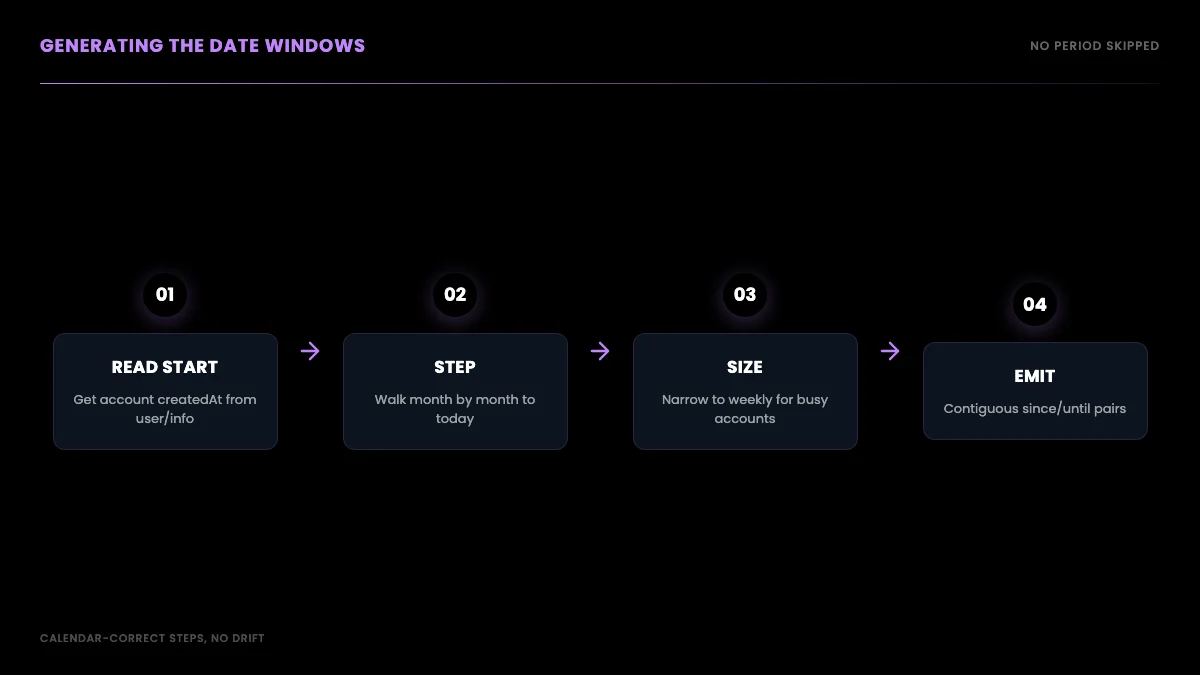
For an account that posts dozens of times a day, a month can hold more tweets than a single window pulls cleanly, so drop to weekly windows for those. For a quiet account, monthly or even yearly windows are fine. The sizing rule is simple: if a window comes back full with more pages still available, it was too wide for that period and you should narrow it. Choosing per-account volume is the difference between a complete pull and a quietly truncated one.
Deduplicating across window boundaries
Because adjacent windows can return the same tweet at a boundary, and because a re-run of a window can overlap a previous pull, you must deduplicate on the tweet id before you store anything. This is not optional bookkeeping; without it your archive double-counts, which corrupts any volume or frequency analysis you run later. The dedup itself is trivial, a set of seen ids, but doing it as you merge each window keeps memory flat even for very large archives. Treat the tweet id as the single source of truth for identity, never the text or the timestamp, because retweets and edits can collide on those.
This is a pure in-memory step with no API call:
def merge_unique(existing, new_batch, seen):
    """Append only tweets whose id has not been seen, in place."""
    for tweet in new_batch:
        tid = tweet.get("id")
        if tid and tid not in seen:
            seen.add(tid)
            existing.append(tweet)
    return existing


archive, seen = [], set()
# for since, until in wins:
#     merge_unique(archive, fetch_window("nasa", since, until), seen)
Run that merge after each window pull and the boundary duplicates disappear without a second pass. With recent tweets coming from the timeline path and historical tweets coming from the window walk, the same dedup set cleanly stitches both halves into one archive, so a tweet that appears in both the recent timeline and the newest date window is stored exactly once.
Pacing and resuming a long backfill
A full-history pull is not a single request, it is hundreds of them, so two operational concerns show up that a quick snippet never surfaces: pacing and resumption. Pacing means not firing every window back to back as fast as the loop allows. Even on a read API where the provider runs the access infrastructure, a steady cadence is kinder to everyone and makes a transient hiccup easy to absorb with a short backoff rather than a crash. A simple pattern is to sleep briefly between windows and to retry a failed window once or twice with a growing delay before moving on, which the requests library makes straightforward with its session and timeout handling. The point is that a backfill is a marathon, and treating it like one keeps it boring, which is what you want from infrastructure.
Resumption matters because a pull of a very active account can run for a while, and you do not want a dropped connection at window three hundred to mean starting over. The fix is to checkpoint as you go. Because the windows are deterministic and ordered, you only need to record which window you last completed; on restart, you skip every window up to and including that one and continue. If you are appending to storage as you pull, rather than holding the whole archive in memory until the end, a restart simply continues writing where it left off. This is the difference between a backfill you can run unattended and one you have to babysit. Designing for resumption from the start costs a few lines and saves the entire run when something inevitably blinks.
Verifying the archive is complete
Collecting tweets is only half the job; the other half is knowing whether what you collected is actually complete, because a quietly truncated archive is worse than an obviously empty one. The first check is per-window counts: log how many tweets each window returned, and a window that comes back unexpectedly empty in the middle of an account's active period is a signal to investigate rather than a result to trust. A run of zeros across months when the account was clearly posting usually means a window was sized wrong or a request failed silently and got skipped. The second check is continuity: sort your collected tweets by timestamp and look for gaps that do not match the account's known quiet periods. Real accounts have natural lulls, but a sharp cliff followed by a resumption often marks a window that needs re-pulling.
These habits come straight from the research-archiving world, where the integrity of a tweet dataset determines whether any analysis built on it holds up. Projects like Documenting the Now exist specifically because collecting social media data responsibly and completely is its own discipline, not an afterthought. You do not need their full apparatus for a single-account pull, but the core lesson transfers: treat the archive as something to validate, not just something to accumulate. A few counting and continuity checks at the end of a run catch the silent holes that would otherwise surface only when an analysis returns a strange result and you have no idea why.
Where this breaks: the honest caveats
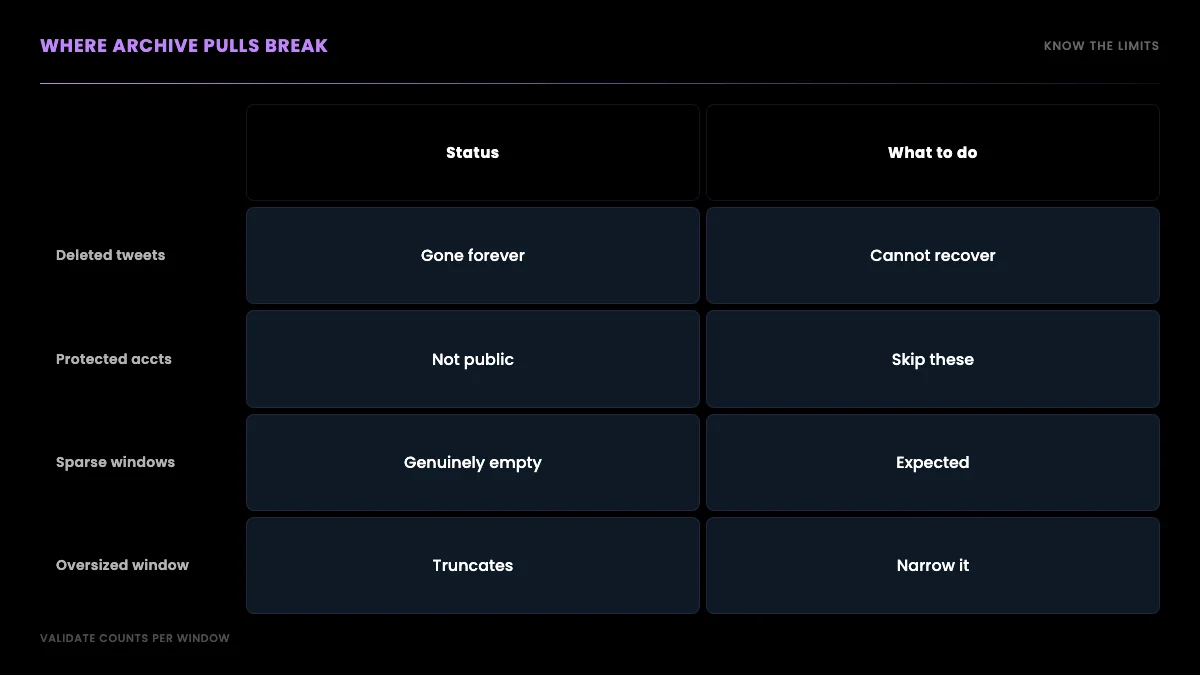
No archive method is perfect, and pretending otherwise sets you up to ship a dataset with silent holes, so here is what actually limits a date-window walk. Deleted tweets never come back, because they no longer exist anywhere to be retrieved. Protected accounts return nothing, because their tweets are not public. Very old or very low-volume windows can come back sparse or empty, not because the method failed but because there genuinely were few tweets in that period. And an oversized window on a prolific account can hit a page count before it has served the whole period, which is why window sizing matters. None of these is a bug in your code; they are properties of what public tweet data is.
The other realistic limit is emotional rather than technical: people expect their own full history to be one click away, and it is not. A game developer on r/Twitter described losing visual access to years of build-in-public posts after the platform changes, an archive of real work that simply stopped being visible:
All Tweets from before last September are hidden from r/Twitter
The good news for that exact case is that the tweets were not deleted, only hidden from the timeline, which means a date-window walk over that period can recover them. The method does not conjure data that is gone; it recovers data that was merely unreachable, which is most of what people actually lose.
The cheapest Twitter API. Try it free.
$0.05 per 1,000 tweets. $0.10 free credits. No credit card required.
Storing a tweet archive
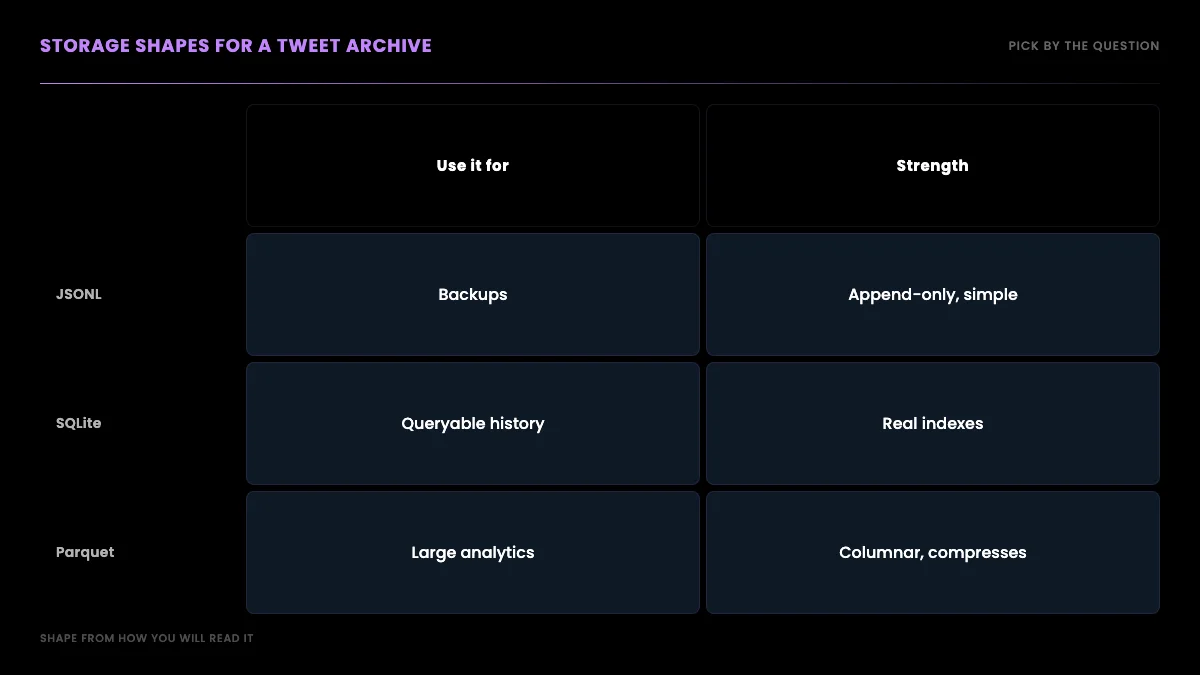
Once tweets are flowing in, you need somewhere to put them that supports the questions you will ask later, and the right shape depends on the job. For a simple backup or a feed into another tool, append each tweet as one JSON object per line to a JSONL file, which streams cheaply and never needs the whole archive in memory. For querying by date, author, or engagement, load into SQLite with an index on id and created_at. For analytics over millions of tweets, a columnar format like Parquet pays off. Pick the shape from how you will read it, not from how you collected it, because re-shaping a large archive after the fact is the expensive part.
The JSONL append pattern is the simplest and the one most pipelines start with. It is a pure file operation with no API call:
import json


def append_jsonl(path, tweets):
    """Append tweets to a JSONL archive, one object per line."""
    with open(path, "a", encoding="utf-8") as fh:
        for tweet in tweets:
            fh.write(json.dumps(tweet, ensure_ascii=False) + "\n")
For querying, the Python standard library sqlite3 module gives you a zero-dependency store with real indexes, which is usually the right next step once a JSONL file gets unwieldy. SQLite handles archives of a few million rows comfortably on a laptop, and a unique index on the tweet id turns your dedup logic into a database constraint, so a re-run that re-pulls an overlapping window cannot create duplicates even if your in-memory set was lost. That belt-and-suspenders pairing, a seen-set during the run plus a unique index at rest, is what makes a long backfill safe to interrupt and resume.
When the archive grows past what a single SQLite file wants to hold, or when the work is analytical rather than transactional, a columnar format is the move. Apache Parquet stores each field in its own column, which means a query that only reads timestamps and engagement counts never has to touch the tweet text, and the compression on repetitive fields like author ids is dramatic. The rule of thumb is the same one that governed the window sizing and the storage choice throughout this guide: pick the shape from the question you will ask. A backup wants JSONL, a queryable history wants SQLite, and a multi-million-tweet analysis wants columnar. If your archive is feeding an analysis rather than a backup, the Twitter sentiment analysis tutorial shows the kind of pipeline a clean historical dataset enables.
The cost of a full history pull
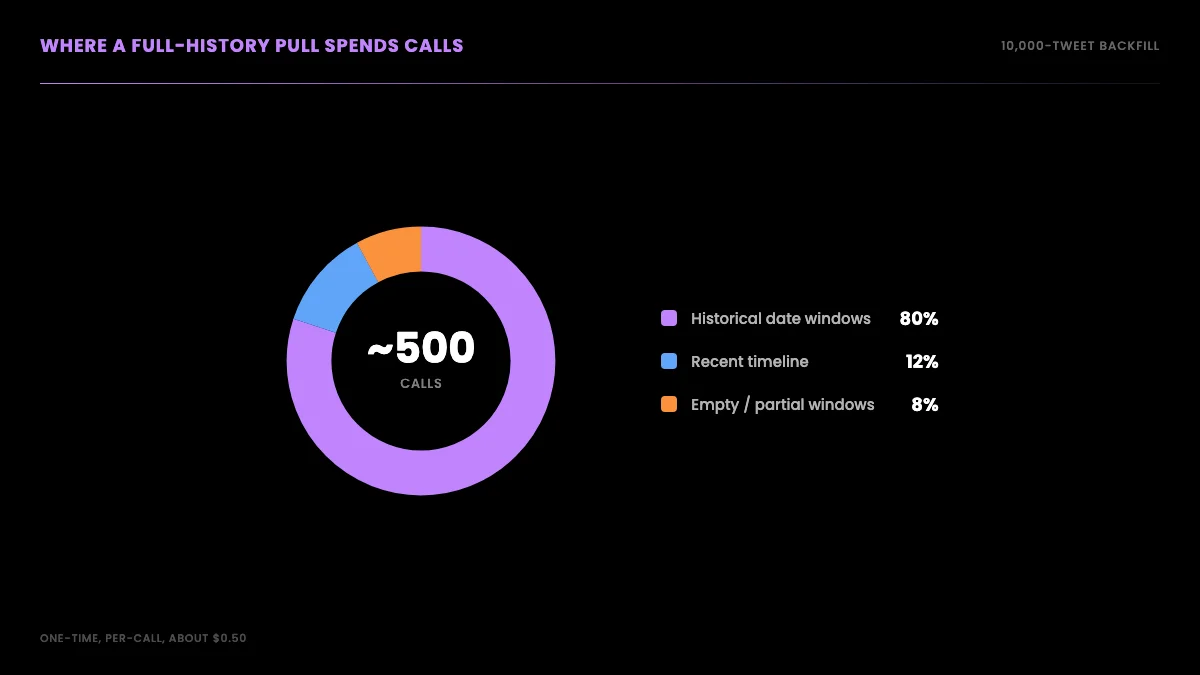
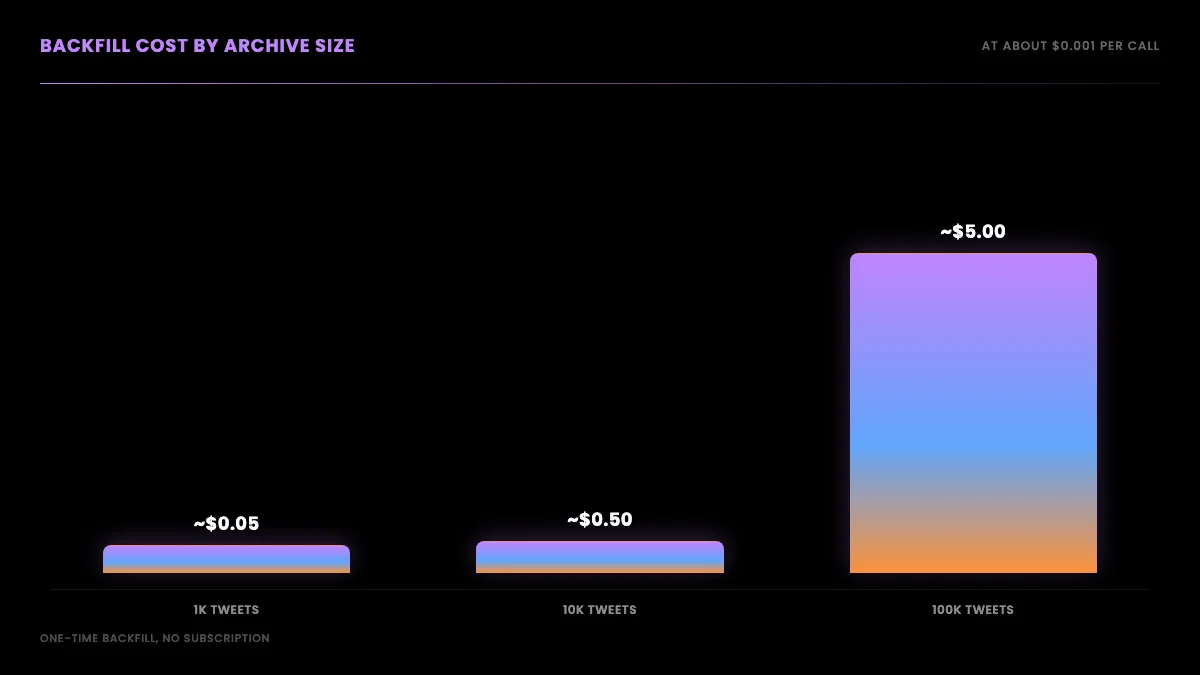
A full archive pull sounds expensive and is not, because it is a one-time backfill priced per call rather than an ongoing subscription. Each search call returns up to about 20 tweets, so an account with 10,000 tweets is roughly 500 calls if every page is full. At the standard per-call rate on the pricing page, about $0.001 per call, that is roughly $0.50 for the entire history, plus a small overhead for the empty or partial windows the walk inevitably hits. There is no monthly tier to clear and no enterprise contract to sign for archive access; you pay for the calls you make to backfill, and a finished archive then costs nothing to keep.
It is worth contrasting that with the alternatives, because the cost shape is what makes the per-call approach practical for archives. Official enterprise archive access is sold on annual contracts priced for organizations, not individuals, which puts a full-history pull out of reach for most researchers and indie builders. A per-call read API turns the same job into pocket change for a one-time backfill.
For the full pricing model across read workloads, our Twitter API cost guide carries the workload-by-workload math, the cost calculator lets you plug in your own volumes, and the guide to current public X API access explains what the official pricing page lists.
Download your archive versus scrape it via API
There is one legitimate alternative worth naming clearly, because it solves a different problem than this guide does. X lets you download your own account's archive as a ZIP through account settings, documented in the official help on downloading your X archive. That is the right tool when you want a personal backup of your own data and nothing more. It does not help with any other account, it is not programmatic, you cannot run it across many accounts, and you cannot trigger it on a schedule. The most-viewed community tutorials on getting tweet history at scale are all about code paths for exactly that reason, like this walkthrough of pulling tweets in Python without the official write API:
https://www.youtube.com/watch?v=PUMMCLrVn8A
The despair that shows up in threads about lost old tweets usually comes from not knowing this split exists. Users who only want their own backup reach for the archive download; developers who need any account's history, in JSON, on a schedule, reach for date-window search. One user captured the frustration that comes before learning the difference:
Why can't we see tweets older than 3,200 tweets ago? I lost my favorite tweet.
@daylightnikki on X
The favorite tweet is almost certainly still there. It is just behind the search door rather than the timeline door, and once you know that, the recovery is a date-window query away.
Putting it together
The complete pipeline is small once the pieces are clear. Read the account creation date, build contiguous date windows from then to now, pull the recent layer from the timeline and every historical window from search, deduplicate on tweet id as you merge, and append to whatever storage shape matches how you will read it later. The recent timeline gives you speed, the date-window walk gives you depth, and dedup stitches them into one clean archive. For broader context on the read API this is built on, the complete Twitter API tutorial ties the endpoints together, how to get an API key covers setup, and if you are moving off the official API, the Twitter API v2 versus this API comparison and the twitterapi.io migration guide walk the switch. For neighboring jobs, exporting an account's followers and pulling trending topics by location use the same paged pattern.
The verdict
The 3,200-tweet limit feels like a locked door, and for the timeline path it is. But it was never a wall around the data, only a window onto the most recent slice of it. The mistake almost everyone makes is to treat the timeline as the only way in, hit the cap, and conclude the rest is gone. The whole shift in this guide is to stop thinking of an account's tweets as one ordered feed and start thinking of them as a dataset you can query by date, which turns an impossible scroll into a routine backfill.
The full history of any public account is still retrievable; you just reach it through date-window search instead of timeline pagination, page each window with a cursor, deduplicate on id, and store the result in a shape that fits your analysis. It is a one-time backfill, priced per call, that costs about fifty cents for a ten-thousand-tweet archive and needs no enterprise contract. The people in those Reddit and X threads who think their old tweets are gone are mostly wrong: the tweets are behind the search door, not deleted. Start with the pricing page, grab a key on the sign up flow, and the Apify scraper comparison shows how the per-call path compares if you are weighing a marketplace actor for the same job.
Frequently Asked Questions
The 3,200 figure is a timeline-serving limit, not a rate limit. X serves an account's most recent 3,200 tweets through the timeline endpoint and stops there, no matter how many calls you make or how patiently you paginate. It has been the documented ceiling for the user timeline for years. To reach tweets older than the most recent 3,200 you cannot page further down the timeline at all. You have to switch to a different retrieval path, search, which is not bound by the timeline window.
You can pull the full public history of any public, non-protected account. Protected (private) accounts are not retrievable because their tweets are not public. Deleted tweets never appear because they no longer exist. Very old or very low-volume windows can return sparse or empty results because there simply were not many tweets in that period. For an active public account, contiguous date-window search reliably returns tweets from across its lifespan, which the recent-only timeline cannot.
No. The official X archive download gives you a ZIP of your own account's data, and only your own. It is the right tool when you want a personal backup. It does not help you collect the history of any other account, it is not programmatic, and you cannot run it across many accounts or trigger it on a schedule. Date-window search through an API works on any public account, returns structured JSON you can process in code, and runs unattended, which is what a research or monitoring pipeline needs.
No. Proxies exist to spread direct-scraping requests across many IP addresses so a target does not rate-limit a single address. When you read through an API, the provider runs that access infrastructure and you call a single authenticated endpoint, so there is no IP pool to rotate, no ban rate to monitor, and no proxy bill. You page through date windows with a bearer token. The only thing that scales is your call count, which is metered per call rather than per IP plus bandwidth.
Use search instead of the timeline. A query of the form from:username since:2022-01-01 until:2022-02-01 returns that account's tweets inside that date window, and search is not capped at the 3,200 most recent tweets. By slicing the account's lifespan into contiguous date windows and querying each one, you can walk the full public archive, then deduplicate the results on tweet id. The timeline gives you speed for recent tweets; date-window search gives you depth for the full history.
It depends on how many tweets the account has posted. Each search call returns up to about 20 tweets per page, so a 10,000-tweet history is roughly 500 calls if every page is full. At per-call pricing of $0.001, that is about $0.50 for the whole archive, plus a small overhead for empty or partial windows. The cost scales with the size of the account's history, not with a monthly subscription tier, so a one-time backfill is cheap and a finished archive needs no ongoing spend.
Match the window to the account's posting volume. A high-volume account that tweets dozens of times a day can fill many pages in a single week, so use one-week or one-month windows and paginate inside each. A low-volume account can use one-year windows because a year may hold only a few hundred tweets. If a window returns a full set with more pages available, it is too wide for that period and you should narrow it. The goal is windows small enough that you page through them cleanly without missing tweets.
Check out similar blogs
More guides on the Twitter/X API, scraping, and pricing.

How to Scrape Twitter/X in 2026: Tweets, Profiles & Followers
How to scrape Twitter/X in 2026 without getting blocked: tweets, profiles, followers and media via a read API, the legal line on public data, and runnable scripts.

Twitter Trends API: Pull Trending Topics by Location in 2026
A 2026 Twitter trends API guide: pull top trends by country or city from GetXAPI's dedicated endpoint, plus how to build custom trends from search. Runnable code.

Twitter API Tutorial 2026: The Complete Developer Guide
A current 2026 Twitter API tutorial covering authentication, endpoints, code, rate limits, verified official prices, and a third-party public-data path.

Twitter Article API in 2026: Create, Publish, and Distribute Long-Form Notes
Complete 2026 tutorial for the Twitter Article API. All 7 endpoints, working Python and Node.js code, the Premium gate explained, draft vs published state machine.

How to Use the Twitter API with Python, 2026 Tutorial
Step-by-step Python tutorial for the Twitter API in 2026. Working code for search, users, DMs, pagination, retries, plus a tweepy migration guide.

Twitter Scraping, Best Practices for Production in 2026
Production-grade Twitter scraping patterns, retry logic, pagination, proxy strategy, rate-limit handling, and cost optimization for any third-party API.

Twitter API 403 Forbidden and 401 Unauthorized: Every Cause and Fix
Why the X API returns 403 Forbidden or 401 Unauthorized, how to tell the two apart, and a fix for each cause. Covers tier gating, app permissions, OAuth, and X error codes.

The Best Twitter (X) API Alternatives in 2026, Compared
The best Twitter / X API alternatives in 2026, ranked and compared: managed pay-per-call APIs, web-data marketplaces, and open-source libraries, with real per-1,000-tweet costs.
Featured in
Where GetXAPI's data and pricing get cited.

The hidden line item in your AI side project: X data
Indie Hackers post on the often-overlooked cost of X data for AI side projects, citing GetXAPI as the usage-based way to pull live Twitter data without a five-figure X developer contract.

How Companies Are Learning to Read Market Mood in Real Time
Editorial feature on Big News Network examining how companies read market mood from X in real time, citing GetXAPI as the usage-based Twitter API that prices live social listening by the call instead of a five-figure annual contract.

How Companies Are Learning to Read Market Mood in Real Time
Syndicated feature on Business Newswire on how companies read market mood from X in real time, citing GetXAPI as the usage-based Twitter API that prices live social listening by the call.

Working with Twitter/X Data: A Practical Skill for IT Students and Professionals in 2026
Guide on SIIT (Scholars International Institute of Technology) on collecting live Twitter/X data as a practical developer skill, citing GetXAPI as the per-call Twitter data API that makes it affordable without an X developer account.

Adding Twitter/X Data to Your App in 2026: A Developer's Integration Guide
Developer integration guide on Programming Insider covering how to add live Twitter/X data to an app in 2026, comparing the official X API v2 with a key-based REST approach and citing GetXAPI as the low-cost per-call option with no developer-account approval.

6 Twitter/X Scraping Solutions for Every Budget
Roundup on TechBullion of the leading Twitter/X scraping solutions, ranking GetXAPI first as the cheapest option at $0.001 per call (about $0.05 per 1,000 tweets) with clean JSON output and no monthly minimum.

The Data Bill Behind Every Social Analytics Tool
Editorial piece on SpeakRJ examining the underlying data costs behind social analytics tools, citing GetXAPI as the usage-based way to source live X data by the call.

What Is AI Sentiment Analysis, and What Does Each Layer Cost?
Explainer in AI Journal breaking sentiment analysis into its data, model and reporting layers and what each costs to run, citing GetXAPI for pulling public X posts on pay-per-call pricing.

Why Enterprise AI Agents Still Cannot Read Social Data
Analysis piece in The Silicon Review on why enterprise agents reach internal systems easily but struggle with public social data, citing GetXAPI's MCP server and data-as-a-service model as one route to close the gap.