Twitter Scraping, Best Practices for Production in 2026
Production-grade Twitter scraping patterns, retry logic, pagination, proxy strategy, rate-limit handling, and cost optimization for any third-party API.

Twitter scraping in 2026 is different from older tutorials. The current official X API table lists standard Post reads at $5 per 1,000 billable resources, while open-source scrapers and browser automation carry maintenance and blocking risk.
This guide covers the production patterns that separate a working Twitter scraper from one that gets rate-limited, blocked, or returns incomplete data. Every pattern applies whether you're using GetXAPI, a self-hosted scraper with rotating proxies, or any other third-party Twitter API, the principles transfer across stacks.
The examples use GetXAPI's $0.001-per-call REST endpoints (the cheapest production-ready Twitter scraping API at $0.05 per 1,000 tweets), but the engineering patterns work with any provider.
Is Twitter Scraping Legal in 2026?
Scraping publicly accessible Twitter/X data is generally not a federal crime in the United States, the Ninth Circuit's 2022 ruling in hiQ Labs v. LinkedIn established that scraping public web data does not violate the Computer Fraud and Abuse Act (CFAA). That precedent is broadly applied to other public-web scraping cases.
That said, "not a CFAA violation" is not the same as "no operational friction":
| Activity | Precedent | Practical reality |
|---|---|---|
| Reading public profiles, tweets, search results | Generally permitted under hiQ Labs precedent | IP blocks within hours, residential proxy costs add up |
| Behind-login content (timelines, DMs, bookmarks) | Requires authentication, different access pattern | Account-suspension exposure, browser-session fragility |
| Re-syndicating collected data | Varies by jurisdiction | Personal-data handling triggers PDPL/GDPR/CCPA review |
| Collecting for ML/AI training datasets | Currently litigated case-by-case | New territory, consult counsel for production work |
The simplest way to avoid building scraping infrastructure is to use a third-party Twitter data API (like GetXAPI) that runs the infrastructure layer for you. You only deal with the API provider's developer terms.
The rest of this guide focuses on the technical patterns that make Twitter scraping reliable. For legal questions about your specific use case, consult a lawyer.
1. Twitter Scraping Retry Logic with Exponential Backoff
This is rule #1 for any API integration, not just GetXAPI. Network blips, upstream hiccups, and rate limits happen. If you don't retry, you lose data. If you retry too aggressively, you make things worse.
Which errors to retry
| Status Code | Meaning | Retry? |
|---|---|---|
200 |
Success | No (you're done) |
400 |
Bad request (invalid params) | No, fix your request |
401 |
Invalid API key or auth_token | No, fix your credentials |
404 |
User/tweet doesn't exist | No, it's gone |
429 |
Rate limit exceeded | Yes, wait and retry |
502 |
Bad gateway (upstream issue) | Yes, wait and retry |
503 |
Service temporarily unavailable | Yes, wait and retry |

Why jitter matters
Without jitter, if 100 clients hit a rate limit at the same time, they all retry at exactly the same moment, creating a "thundering herd" that makes the problem worse. Adding a random 0-1 second delay spreads the retries out.
Don't retry everything
This is a common mistake. Retrying a 401 (bad API key) 3 times just wastes 3 API calls. Retrying a 404 (deleted tweet) won't bring it back. Only retry transient errors: 429, 502, 503, and network timeouts.
2. Proxy Strategy for Twitter Scraping (Write Endpoints)
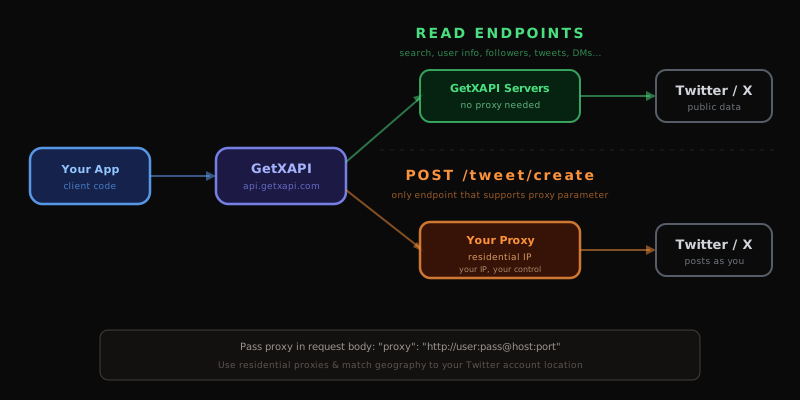
Write endpoints like Create Tweet and DM Send execute actions on Twitter using your auth_token. By default, these requests originate from GetXAPI's servers, which means Twitter sees GetXAPI's IP, not yours.
For higher reliability and to avoid detection patterns, pass your own proxy so the request appears to come from your IP or a residential proxy.
Which endpoint supports proxy
Currently only POST /twitter/tweet/create supports the proxy parameter. Pass your residential proxy URL in the request body so the tweet is posted from your IP instead of GetXAPI's servers.
Proxy best practices
- Use residential proxies, datacenter IPs get flagged faster
- Rotate proxies if you're posting from multiple accounts
- Match geography, if your Twitter account is based in the US, use a US proxy
- Test before scaling, verify your proxy works with a single tweet before running bulk operations
- Never share proxies across accounts that shouldn't be linked
When you don't need a proxy
Read endpoints (search, user info, followers, etc.) don't need proxies. They fetch public data and don't write to any account. Save your proxy budget for write operations only.
3. Pagination Patterns for Twitter Scrapers
Most GetXAPI endpoints return roughly 20 results per call and use cursor-based pagination: each response includes a next_cursor string and a has_more boolean, and you pass next_cursor back as the cursor parameter on the next call. Stopping when has_more is false is the only correct termination condition; hardcoding a page count will silently truncate results on variable-size datasets.

Which endpoints support pagination
| Endpoint | Results per Page | Cursor Field |
|---|---|---|
tweet/advanced_search |
~20 tweets | next_cursor |
tweet/replies |
~20 replies | next_cursor |
user/search |
~20 users | next_cursor |
user/followers |
up to 200 | next_cursor |
user/followers_v2 |
~70 | next_cursor |
user/following |
up to 200 | next_cursor |
user/following_v2 |
~70 | next_cursor |
user/verified_followers |
~20 | next_cursor |
user/media |
~20 posts | next_cursor |
user/tweets |
~20 tweets | next_cursor |
user/tweets_and_replies |
~20 tweets | next_cursor |
user/likes |
~20 tweets | next_cursor |
user/home_timeline |
~20 tweets | next_cursor |
user/bookmark_search |
~20 tweets | next_cursor |
user/followers_you_know |
~20 | next_cursor |
list/members |
~20 members | next_cursor |
dm/list |
~50 messages | next_cursor |
Advanced Search pagination
Pass cursor=<next_cursor> from the previous response to fetch the next page. Verified clean across consecutive pages (no duplicate tweet IDs, monotonically descending by snowflake ID), so you can rely on cursor pagination for deep pulls without the duplicate-results issue that affected this endpoint earlier in 2026.
For very deep pulls (50+ pages on a high-volume query), it can still be cheaper and more parallelizable to split the query into date-range chunks using since: and until: operators instead of relying on a single deep cursor chain:
q=AI lang:en since:2026-01-01 until:2026-01-07q=AI lang:en since:2026-01-07 until:2026-01-14q=AI lang:en since:2026-01-14 until:2026-01-21- ...and so on
Each chunk gets its own fresh cursor chain. This is also useful when you want to parallelize across workers, different chunks can be fetched concurrently from different processes.
If results are changing by the minute or second (e.g., trending topics, breaking news), add time precision to since: and until::
q=from:elonmusk since:2026-01-01_12:00:00_UTC until:2026-01-01_18:00:00_UTC
This gives you hourly or even minute-level control over which tweets you fetch.

For a full reference of all Advanced Search operators (from:, to:, min_faves:, filter:, lang:, etc.), see twitter-advanced-search on GitHub.
Pagination mistakes to avoid
- Don't ignore
has_more, always check it. If you just checknext_cursor, you might make one extra unnecessary call. - Don't hardcode page counts, use
has_moreas the stop condition, but set amaxPagessafety limit. - Add a delay between pages if you're paginating aggressively (e.g., 200ms between calls) to avoid hitting rate limits.
- Store cursors if your job might crash mid-pagination, you can resume from where you left off instead of starting over.
4. Choose the Right Endpoint for Each Twitter Scraping Task
GetXAPI has 73 endpoints and several pairs look similar but serve different purposes. Using the wrong endpoint costs the same but returns incomplete data: user/info gives basic profile fields while user/about adds creation date and username history; user/followers returns 200 per page for bulk export while user/followers_v2 returns 70 per page but includes richer DM-eligibility signals.
User Info vs User About
user/info |
user/about |
|
|---|---|---|
| Basic profile | Yes | Yes |
| Extended metadata | No | Yes (creation date, location, username history) |
| Cost | $0.001 | $0.001 |
Rule of thumb: Use user/info for quick lookups (name, bio, follower count). Use user/about when you need full account history.
Start building with GetXAPI
$0.05 per 1,000 tweets. $0.10 free credits. No credit card required.
5. Auth Tokens for Twitter Scraping (Write & Private Endpoints)
A subset of GetXAPI endpoints require an auth_token, a Twitter session token tied to a specific logged-in account. This is separate from your GetXAPI API key. Write endpoints (DM send, tweet create, follow, like) and private-data endpoints (home timeline, bookmarks) all need it. You get the token either by extracting the auth_token cookie from a logged-in browser session or by calling POST /twitter/user_login with your credentials.

Which endpoints need auth_token
| Endpoint | Needs auth_token | Why |
|---|---|---|
tweet/create |
Yes | Posts as a specific user |
tweet/favorite |
Yes | Likes as a specific user |
tweet/retweet |
Yes | Retweets as a specific user |
dm/send |
Yes | Sends DM from a specific user |
dm/list |
Yes | Reads a specific user's DMs |
user/home_timeline |
Yes | User's personalized timeline |
user/bookmark_search |
Yes | User's private bookmarks |
user/likes |
Yes | User's liked tweets |
user/followers_you_know |
Yes | Mutual followers context |
DM endpoints require a Twitter passcode
Before you can use dm/list or dm/send, you need to set a DM passcode on your Twitter/X account first. This is a Twitter security requirement, DM endpoints access private conversations, so Twitter requires an additional verification step.
How to set it up:
- Go to Twitter/X Settings → Privacy and Safety → Direct Messages
- Set your DM passcode there
Without a passcode set on Twitter, DM endpoints will return an error. This applies to both dm/list (reading DMs) and dm/send (sending DMs).
Token handling best practices
- Never log auth tokens, treat them like passwords
- Store tokens in environment variables, not in code
- Tokens expire, if you get a 401, re-authenticate
- One token per account, don't share tokens across different Twitter accounts
- GetXAPI never stores your tokens, they're used in-flight and discarded
6. Cost Optimization for Twitter Scraping
Every API call costs $0.001 and returns roughly 20 tweets. The six most impactful cost-reduction practices are: caching tweet IDs and user profiles to avoid re-fetching, using user/followers v1 (200/page) instead of v2 (70/page) for bulk exports, narrowing searches with operators like min_faves:100 so fewer low-signal tweets consume page slots, stopping pagination once you have what you need, batching multi-account jobs to share pagination state, and never calling tweet/detail for tweets already returned by advanced_search.
-
Don't re-fetch data you already have. Cache tweet IDs and user profiles locally. Check your cache before making an API call.
-
Use
tweet/detailsparingly. If you already got tweet data fromadvanced_search, don't calltweet/detailfor the same tweet. -
Use v1 followers for bulk, v2 for DM outreach. v1 returns 200/page vs v2's 70/page, fewer calls for the same follower list.
-
Use search operators to narrow results.
min_faves:100filters out low-engagement tweets before they consume a page slot. -
Paginate with a purpose. If you only need the first 100 tweets, set
maxPages = 5. Don't paginate to the end unless you need everything. -
Batch your work. Instead of checking one user at a time, design your pipeline to process users in batches with shared pagination state.
Cost math at scale
| Volume | API Calls | Cost | What You Get |
|---|---|---|---|
| 1K tweets | 50 calls | $0.05 | Quick analysis |
| 10K tweets | 500 calls | $0.50 | Small dataset |
| 100K tweets | 5,000 calls | $5.00 | Research project |
| 1M tweets | 50,000 calls | $50.00 | Full-scale pipeline |
Twitter Scraping in Python
Python with requests against GetXAPI is the recommended stack for Twitter scraping in 2026. It costs $0.001 per call with no OAuth setup, works with any Python HTTP client, and returns all fields inline without field expansion parameters. The alternatives all have material tradeoffs: tweepy adds OAuth complexity only needed for user-delegated flows, snscrape is largely broken after Twitter's 2023-2026 anti-scraping updates, and browser automation hits IP bans within hours.
| Tool | When to use it | Reality check |
|---|---|---|
requests + GetXAPI |
Production scraping at any scale | Single Bearer header, no OAuth, $0.001 per call returning ~20 tweets |
tweepy + Official X API |
When you need OAuth user-delegated flows | Rare for scraping; pay-per-use makes it ~100x more expensive than GetXAPI |
snscrape |
Historical projects only | Largely broken in 2026, most endpoints fail after Twitter's anti-scraping updates |
| Self-hosted browser automation (Selenium / Playwright) | Edge cases not covered by APIs | IP bans within hours, proxy costs often exceed third-party API pricing |
For a complete Python tutorial covering search, user profiles, followers, replies, DMs, pagination, retries, async patterns with httpx, a tweepy migration guide, and a drop-in SDK class, see How to Use the Twitter API with Python, 2026 Tutorial.
A minimal Twitter scraping loop in Python with retry + pagination:
import os
import time
import requests

API_KEY = os.environ["GETXAPI_KEY"]
HEADERS = {"Authorization": f"Bearer {API_KEY}"}

def scrape_tweets(query: str, max_pages: int = 10) -> list[dict]:
    all_tweets = []
    cursor = None

    for _ in range(max_pages):
        params = {"q": query, "product": "Latest"}
        if cursor:
            params["cursor"] = cursor

        for attempt in range(3):
            r = requests.get(
                "https://api.getxapi.com/twitter/tweet/advanced_search",
                params=params,
                headers=HEADERS,
                timeout=15,
            )
            if r.status_code == 200:
                break
            if r.status_code in (429, 502, 503):
                time.sleep(2 ** attempt)  # exponential backoff
                continue
            r.raise_for_status()

        data = r.json()
        all_tweets.extend(data.get("tweets", []))

        if not data.get("has_more"):
            break
        cursor = data.get("next_cursor")

    return all_tweets

tweets = scrape_tweets("AI min_faves:100 lang:en since:2026-01-01")
print(f"Scraped {len(tweets)} tweets")
That's the entire production loop: pagination + retry + backoff in 30 lines.
Quick Reference Cheat Sheet
Five production rules for Twitter scraping with GetXAPI: retry only on 429, 502, and 503 (never on 400/401/404); use proxies only for write endpoints, not reads; check has_more and next_cursor for pagination rather than hardcoding page counts; store auth tokens in environment variables and rotate on a 401 response; and cache results to avoid re-fetching data you already have.
| Practice | Do | Don't |
|---|---|---|
| Retry logic | Retry 429, 502, 503 with backoff | Retry 400, 401, 404 |
| Proxy | Use for write endpoints (create, DM) | Use for read endpoints |
| Pagination | Check has_more + next_cursor |
Hardcode page counts |
| Auth token | Store in env vars, rotate on 401 | Hardcode in source |
| Cost | Cache results, use search operators | Re-fetch data you already have |
Start Scraping Twitter the Right Way
GetXAPI gives you $0.10 in free credits at signup, that's ~100 API calls (~2,000 tweets) with no credit card. Enough to test every pattern in this guide and build a working scraper before committing.
- Sign up at getxapi.com
- Get your API key from the dashboard
- Read the full API documentation for endpoint-specific parameters and response schemas
For deeper context, see Twitter API v2 vs GetXAPI, the Twitter API cost guide, our Python Twitter API tutorial, and the Twitter advanced search operators guide for query construction patterns that pair with the scraping loop below.
The cheapest Twitter API. Try it free.
$0.05 per 1,000 tweets. $0.10 free credits. No credit card required.
7. Deduplication at Scale
At high volume, the same tweet or user record can appear across multiple paginated responses or parallel workers. Without deduplication, you overcount engagement, inflate user stats, and store redundant rows. The simplest approach is a seen-IDs set in memory or a Redis SET for multi-worker jobs.
import os
import requests

API_KEY = os.environ["GETXAPI_KEY"]
HEADERS = {"Authorization": f"Bearer {API_KEY}"}

def scrape_unique(query: str, max_pages: int = 20) -> list[dict]:
    """Paginate search and deduplicate by tweet ID."""
    seen_ids: set[str] = set()
    unique_tweets: list[dict] = []
    cursor = None

    for _ in range(max_pages):
        params = {"q": query, "product": "Latest"}
        if cursor:
            params["cursor"] = cursor

        r = requests.get(
            "https://api.getxapi.com/twitter/tweet/advanced_search",
            params=params,
            headers=HEADERS,
            timeout=15,
        )
        r.raise_for_status()
        data = r.json()

        for tweet in data.get("tweets", []):
            tid = tweet.get("id")
            if tid and tid not in seen_ids:
                seen_ids.add(tid)
                unique_tweets.append(tweet)

        if not data.get("has_more"):
            break
        cursor = data.get("next_cursor")

    return unique_tweets
For parallel workers, replace seen_ids with a shared Redis SADD / SISMEMBER call so IDs are shared across processes.
8. Caching User Profiles to Save Credits
User profile data changes slowly: follower counts, bios, and verification status shift daily, not by the minute. If you re-fetch a profile on every tweet you encounter, you pay $0.001 per lookup when you could pay once per day.
import time

_profile_cache: dict[str, tuple[dict, float]] = {}
PROFILE_TTL = 3600  # 1 hour

def get_user_cached(username: str) -> dict:
    """Fetch user profile, cached for PROFILE_TTL seconds."""
    entry = _profile_cache.get(username)
    if entry:
        data, fetched_at = entry
        if time.time() - fetched_at < PROFILE_TTL:
            return data

    r = requests.get(
        "https://api.getxapi.com/twitter/user/info",
        params={"userName": username},
        headers=HEADERS,
        timeout=15,
    )
    r.raise_for_status()
    profile = r.json()["data"]
    _profile_cache[username] = (profile, time.time())
    return profile
For production, replace the in-process dict with Redis or Memcached and set the TTL at the cache layer. A team doing influencer enrichment on 100,000 unique authors per day goes from 100,000 user lookups to under 20,000 per day just by adding a 12-hour cache layer, a 5x reduction in credit spend with no change to data freshness requirements.
9. Endpoint Selection Quick Reference
GetXAPI has 73 endpoints and the most common selection mistakes cost credits without returning the right data. The six highest-impact rules: use tweet/advanced_search for keyword searches rather than looping user/tweets across accounts; use user/followers v1 for bulk export (200/page) and user/followers_v2 for DM outreach (richer DM signals); use user/about when you need account creation date or username history rather than the lighter user/info.
| Task | Correct endpoint | Common mistake |
|---|---|---|
| Search tweets by keyword | tweet/advanced_search |
Using user/tweets and looping multiple accounts |
| Get one user's recent tweets | user/tweets |
Running a from:user search query |
| Bulk follower export | user/followers (v1, 200/page) |
Using user/followers_v2 (70/page, costs the same) |
| DM outreach list | user/followers_v2 (DM metadata richer) |
Using v1 and missing DM-eligibility signals |
| Full account history | user/about |
Using user/info (missing creation date, history) |
| Replies to a specific tweet | tweet/replies |
Search conversation_id:ID (less complete) |
For a side-by-side endpoint map against the official X API, see the Twitter API v2 vs GetXAPI comparison.
10. Error Classification and Alerting
Production scrapers should classify errors into three buckets: retryable transient errors, permanent request errors, and account-level errors. Mixing them causes either silent data loss (not retrying when you should) or wasted API budget (retrying when you should not).
import os
import time
import logging
import requests

API_KEY = os.environ["GETXAPI_KEY"]
HEADERS = {"Authorization": f"Bearer {API_KEY}"}

RETRYABLE = {429, 500, 502, 503, 504}
PERMANENT = {400, 401, 403, 404, 422}

logger = logging.getLogger(__name__)


def classified_fetch(url: str, params: dict, max_retries: int = 3) -> dict:
    """
    Classify HTTP errors and retry only transient ones.
    Raises on permanent errors. Returns data on success.
    """
    delay = 1.0
    for attempt in range(max_retries):
        r = requests.get(url, params=params, headers=HEADERS, timeout=15)

        if r.status_code == 200:
            return r.json()

        if r.status_code in PERMANENT:
            logger.error("Permanent error %s on %s: %s", r.status_code, url, r.text[:200])
            r.raise_for_status()  # don't retry

        if r.status_code in RETRYABLE:
            wait = float(r.headers.get("Retry-After", delay))
            logger.warning("Transient %s on attempt %d, retrying in %.1fs", r.status_code, attempt + 1, wait)
            time.sleep(wait)
            delay = min(delay * 2, 60)  # cap at 60s
            continue

        # Unknown status: log and raise
        logger.error("Unexpected status %s: %s", r.status_code, r.text[:200])
        r.raise_for_status()

    raise RuntimeError(f"Exhausted {max_retries} retries for {url}")
This pattern is safe to wrap around any GetXAPI endpoint. The key insight is that 401 (bad API key) and 404 (user/tweet not found) should never be retried, while 429 and 502 almost always resolve on the next attempt. Add alerting on permanent errors to catch key expiry or account suspension before they silently kill your data pipeline.
11. Complete Production Scraper Template
The GetXAPIScraper class below combines every pattern from this guide into one reusable template: exponential-backoff retry on transient errors, cursor-based pagination with has_more termination, tweet-ID deduplication via a seen-IDs set, per-user profile caching with lru_cache, and three-bucket error classification. Drop it into any project as a starting point.
import os
import time
import requests
from functools import lru_cache

class GetXAPIScraper:
    BASE = "https://api.getxapi.com"
    RETRYABLE = {429, 500, 502, 503, 504}

    def __init__(self):
        self.session = requests.Session()
        self.session.headers["Authorization"] = f"Bearer {os.environ['GETXAPI_KEY']}"
        self._seen_tweet_ids: set[str] = set()

    def _get(self, path: str, params: dict, max_retries: int = 3) -> dict:
        delay = 1.0
        for attempt in range(max_retries):
            r = self.session.get(f"{self.BASE}{path}", params=params, timeout=15)
            if r.status_code == 200:
                return r.json()
            if r.status_code in self.RETRYABLE:
                time.sleep(min(delay * 2 ** attempt, 60))
                continue
            r.raise_for_status()
        raise RuntimeError(f"Exhausted retries: {path}")

    def search(self, query: str, max_pages: int = 10) -> list[dict]:
        """Paginate search with deduplication."""
        results, cursor = [], None
        for _ in range(max_pages):
            params = {"q": query, "product": "Latest"}
            if cursor:
                params["cursor"] = cursor
            data = self._get("/twitter/tweet/advanced_search", params)
            for t in data.get("tweets", []):
                if t["id"] not in self._seen_tweet_ids:
                    self._seen_tweet_ids.add(t["id"])
                    results.append(t)
            if not data.get("has_more"):
                break
            cursor = data.get("next_cursor")
        return results

    @lru_cache(maxsize=1000)
    def user(self, username: str) -> dict:
        """Cached user profile lookup."""
        return self._get("/twitter/user/info", {"userName": username})["data"]

# Usage
scraper = GetXAPIScraper()
tweets = scraper.search("AI min_faves:500 lang:en since:2026-01-01", max_pages=5)
author_profile = scraper.user(tweets[0]["author"]["userName"])
print(f"{len(tweets)} unique tweets, author: {author_profile['name']}")
For sentiment analysis on top of this data collection pattern, see the Twitter sentiment analysis guide. For the full operator syntax that goes into the query parameter, see the Twitter search operators reference.
12. Environment Setup and Key Rotation
Production API keys must never be hardcoded in source. Store your GETXAPI_KEY in environment variables or a secrets manager, verify the key works with a lightweight test call before deploying, rotate it on any 401 response or if the key is exposed in logs or version control, and never commit a .env file containing credentials to git.
# Set in shell profile or .env file (never commit .env to git)
export GETXAPI_KEY="your-api-key-here"

# Verify the key works before deploying
python3 -c "
import os, requests
r = requests.get(
    'https://api.getxapi.com/twitter/user/info',
    params={'userName': 'elonmusk'},
    headers={'Authorization': f\"Bearer {os.environ['GETXAPI_KEY']}\"},
    timeout=10
)
print('OK' if r.status_code == 200 else f'ERROR: {r.status_code}')
"
Key rotation checklist:
- Generate a new key from the GetXAPI dashboard
- Deploy the new key to all environments (staging first, then production)
- Verify the new key works in production via a test call
- Revoke the old key from the dashboard
- Update any monitoring alerts that check for
401responses (a spike indicates a key rotation gap)
If you use a secrets manager (AWS Secrets Manager, HashiCorp Vault, GCP Secret Manager), store the key there and inject it at runtime via the secrets manager SDK rather than environment variables. This enables centralized rotation without a redeploy.
For the complete guide to setting up a production Python scraper from scratch, including the SDK wrapper class, async patterns, and tweepy migration guide, see the Python Twitter API tutorial. For advanced search query patterns that feed into the q parameter throughout this guide, see the Twitter search operators reference. For a full breakdown of what each API call costs at your volume, including the owned-read vs standard-read distinction and the real monthly bills at light, medium, heavy, and enterprise volumes, see the Twitter API cost guide. Key rotation should happen quarterly at minimum, or immediately whenever a key is shared outside the team, committed to source control by accident, or exposed in logs. A practical rotation policy: set a calendar reminder for the 1st of every quarter, generate a new key, deploy it to all environments in a rolling window starting with development, verify in production, then revoke the old key. Keep the last two keys active for a 24-hour overlap window during rotation to avoid downtime if a stale key is cached somewhere in your stack. Document each rotation event in your ops runbook with the date, reason, and who completed it. A completed rotation that is not documented creates ambiguity the next time you need to rotate under pressure.
Best-practice patterns verified against live GetXAPI endpoints May 2026. hiQ Labs v. LinkedIn precedent sourced from the Ninth Circuit opinion (2022). Rate-limit and pricing data from the official X API pricing page as of May 2026.
Frequently Asked Questions
Scraping public Twitter/X data is generally not a federal crime in the US under *hiQ Labs v. LinkedIn* precedent (the Ninth Circuit ruled scraping public web data isn't a CFAA violation). The simpler path for most production use cases is a third-party Twitter data API (like GetXAPI) that runs the infrastructure layer for you. For specific legal questions about your use case, consult a lawyer.
Technically yes, browser automation with Puppeteer or Playwright can scrape Twitter's web UI. In practice, it's increasingly unreliable in 2026: Twitter's anti-scraping defenses detect headless browsers, fingerprint requests, and rate-limit by IP within hours. Self-hosted scrapers also incur rotating residential-proxy costs ($5-$15 per GB) that frequently exceed third-party API pricing for the same data volume.
Direct browser scraping hits per-IP rate limits within minutes. The official X API enforces 15-minute and 24-hour windows per endpoint with `429 Too Many Requests` responses. GetXAPI has no endpoint-specific quota for normal-volume workloads, see the Twitter API rate limits comparison for endpoint-by-endpoint detail.
A Twitter API (official or third-party) returns structured JSON via documented HTTP endpoints, the provider handles auth, retries, anti-bot defenses, and rate limits on your behalf. Scraping refers to extracting data directly from the rendered Twitter web UI using browser automation or HTML parsing. APIs are far more reliable; scraping breaks every time Twitter ships a UI change.
For most production workloads, **GetXAPI** is the most cost-effective at $0.05 per 1,000 tweets ($0.001 per call returning ~20 tweets), about 100x cheaper than the official X API standard read rate. Open-source tools like `snscrape` are largely broken in 2026 due to Twitter's anti-scraping updates. Self-hosted browser automation (Selenium, Playwright) hits IP-level rate limits within hours and the rotating-proxy costs often exceed third-party API pricing.
Costs vary by approach: 1,000 official standard Post reads cost $5; GetXAPI's typical standard-call estimate is $0.05 per 1,000 tweets; and third-party marketplace or scraper costs vary by provider and proxy usage. See the Twitter API cost guide for the verified official and GetXAPI calculations.
Largely no. The maintainers paused active development in 2023, and most endpoints (search, user timelines, followers) are unreliable or fully broken after Twitter's tightened anti-scraping defenses. For working Python alternatives, use `requests` against GetXAPI, see our Python Twitter API tutorial for working code.
Check out similar blogs
More guides on the Twitter/X API, scraping, and pricing.

The Best Twitter (X) API Alternatives in 2026, Compared
The best Twitter / X API alternatives in 2026, ranked and compared: managed pay-per-call APIs, web-data marketplaces, and open-source libraries, with real per-1,000-tweet costs.

How to Build a Twitter Bot in 2026: The Complete Guide
Build a Twitter bot in 2026 with no-code or Python. Working Tweepy and requests code, auth explained, and the cheap API path at $0.05 per 1,000 reads.

Scrape Full Tweet History of Any Account in 2026 (Beyond the 3,200 Limit)
Why the X timeline stops at 3,200 tweets and how to pull an account's full history with date-window search, cursor pagination, and dedup. Live-tested code in Python and curl.

Twitter API Tutorial 2026: The Complete Developer Guide
A current 2026 Twitter API tutorial covering authentication, endpoints, code, rate limits, verified official prices, and a third-party public-data path.

Apify Twitter Scraper vs GetXAPI: Cost, Speed and Reliability in 2026
Head-to-head comparison of Apify Twitter Scraper and GetXAPI REST API. Cost per 1,000 tweets, response time benchmarks, rate limits, and when to pick each one.

Best Twitter Scraper 2026: API, Browser & Python Compared
Compare the best Twitter scrapers in 2026, official API, third-party APIs, browser scrapers, and Python libraries. What works, what gets you sued, what each costs.

How to Like a Tweet via API in 2026 (No Dev Account)
Like (favorite) tweets programmatically via API in 2026 without an X developer account. The auth_token model, working curl, Python, and Node code, and per-call cost.

The Best Twitter/X Tools in 2026, by Category
The best Twitter/X tools of 2026 for creators, marketers, and developers, spanning scheduling, analytics, scraping, monitoring, AI writers, and data APIs.
Featured in
Where GetXAPI's data and pricing get cited.

The hidden line item in your AI side project: X data
Indie Hackers post on the often-overlooked cost of X data for AI side projects, citing GetXAPI as the usage-based way to pull live Twitter data without a five-figure X developer contract.

How Companies Are Learning to Read Market Mood in Real Time
Editorial feature on Big News Network examining how companies read market mood from X in real time, citing GetXAPI as the usage-based Twitter API that prices live social listening by the call instead of a five-figure annual contract.

How Companies Are Learning to Read Market Mood in Real Time
Syndicated feature on Business Newswire on how companies read market mood from X in real time, citing GetXAPI as the usage-based Twitter API that prices live social listening by the call.

Working with Twitter/X Data: A Practical Skill for IT Students and Professionals in 2026
Guide on SIIT (Scholars International Institute of Technology) on collecting live Twitter/X data as a practical developer skill, citing GetXAPI as the per-call Twitter data API that makes it affordable without an X developer account.

Adding Twitter/X Data to Your App in 2026: A Developer's Integration Guide
Developer integration guide on Programming Insider covering how to add live Twitter/X data to an app in 2026, comparing the official X API v2 with a key-based REST approach and citing GetXAPI as the low-cost per-call option with no developer-account approval.

6 Twitter/X Scraping Solutions for Every Budget
Roundup on TechBullion of the leading Twitter/X scraping solutions, ranking GetXAPI first as the cheapest option at $0.001 per call (about $0.05 per 1,000 tweets) with clean JSON output and no monthly minimum.

The Data Bill Behind Every Social Analytics Tool
Editorial piece on SpeakRJ examining the underlying data costs behind social analytics tools, citing GetXAPI as the usage-based way to source live X data by the call.

What Is AI Sentiment Analysis, and What Does Each Layer Cost?
Explainer in AI Journal breaking sentiment analysis into its data, model and reporting layers and what each costs to run, citing GetXAPI for pulling public X posts on pay-per-call pricing.

Why Enterprise AI Agents Still Cannot Read Social Data
Analysis piece in The Silicon Review on why enterprise agents reach internal systems easily but struggle with public social data, citing GetXAPI's MCP server and data-as-a-service model as one route to close the gap.