How to Scrape Twitter/X in 2026: Tweets, Profiles & Followers
How to scrape Twitter/X in 2026 without getting blocked: tweets, profiles, followers and media via a read API, the legal line on public data, and runnable scripts.

If you searched for how to scrape tweets in 2026, you probably already tried the obvious thing and watched it fall apart. You pointed a headless browser at the site, it worked for an afternoon, and then the markup shifted, a login wall appeared, or your IP got rate-limited into uselessness. The honest answer in 2026 is that the era of cheap, reliable browser scraping of Twitter is mostly over, and the practical path is a read API that returns structured JSON from a documented endpoint.
This guide takes that honest path end to end. It explains why browser scraping keeps breaking, where the legal line actually sits when you collect public tweet data, and how to fetch tweets reliably with a single authenticated request. By the end you will have a runnable script that pulls tweets for any query, paginates through every page, and writes the results to a file, all on a bearer token with no developer-account approval queue and no logged-in session that anyone can ban. Every code block here runs against a live endpoint, so you can copy, paste, drop in a key, and see real tweets come back.
TL;DR: Browser scraping of Twitter breaks constantly in 2026 because the markup changes, the timeline personalizes, and anti-automation defenses block headless sessions. The reliable approach is a read API: authenticate with a bearer token, GET a documented endpoint, and parse clean JSON. Scraping public tweets is largely defensible under the hiQ v. LinkedIn line as long as you stay on public data and respect privacy law. The snippet below returns live tweets for any query in under ten lines of Python.
import requests

API_KEY = "YOUR_API_KEY"  # get one in 30 seconds at getxapi.com/signup

resp = requests.get(
    "https://api.getxapi.com/twitter/tweet/advanced_search",
    params={"q": "open source lang:en", "queryType": "Latest"},
    headers={"Authorization": f"Bearer {API_KEY}"},
)
tweets = resp.json().get("tweets", [])

for t in tweets[:10]:
    print(t.get("text", "")[:120])
Run that with a real key and you get back the most recent public tweets matching your query as clean JSON. That is the whole core of scraping tweets in 2026: one request, one parse, no browser. The rest of this guide explains why that beats the alternatives, where the legal line is, and how to turn that snippet into something that pulls every page and survives a long run.
The real reason browser scraping keeps breaking
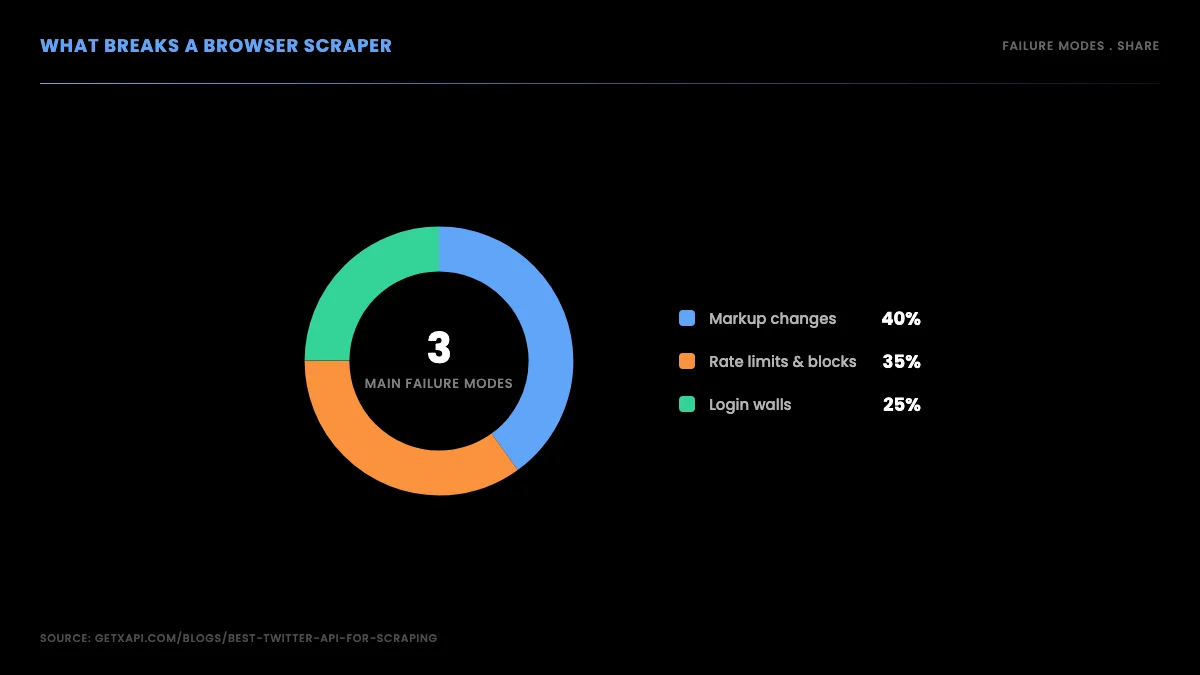
For years the default way to scrape tweets was to drive a browser, real or headless, against the web interface and read the rendered page. In 2026 that approach fails for three structural reasons, and understanding them is what pushes serious projects toward a read API.
First, the markup is a moving target. The page that renders a tweet is generated by a single-page application whose class names and DOM structure change without notice. Your carefully written selectors match today and silently return nothing tomorrow. You do not get an error; you get an empty result, which is worse, because your pipeline looks healthy while it quietly collects zero data.
Second, the timeline personalizes. What a logged-in session sees is shaped by the account doing the viewing, so a scraper reading a rendered timeline sees a skewed, non-deterministic slice rather than a clean public view. Two runs from two accounts return different data for the same query, which makes any analysis built on top unreliable.
Third, anti-automation defenses actively look for headless browsers. They fingerprint the runtime, watch for non-human timing, and serve challenges or hard blocks when they suspect automation. You end up maintaining a proxy pool, randomizing timing, and rotating fingerprints, and you still lose the arms race periodically. This is the failure mode developers complain about most, and it is exactly the surface a read API does not have.
There is a fourth cost that rarely shows up in tutorials but dominates the real bill: your own time. A browser scraper is never finished. Every time the markup shifts you debug selectors, every time a block appears you rotate proxies, and every time the login flow changes you rebuild the session handling. The code that worked last month needs a patch this month, and the patch needs a patch the month after. Teams that start with a scraper to save money often discover that the engineering hours spent keeping it alive cost more than an API would have, and the data they collected in the meantime had silent gaps they only noticed later. The hidden tax on browser scraping is maintenance, and maintenance compounds.
It is worth being precise about what actually fails, because the fix depends on the failure. A selector that stops matching is a markup problem you can sometimes patch quickly. A 429 or a CAPTCHA is a rate-or-detection problem that proxies and timing only paper over. A login wall is an access-control problem you cannot solve without authenticating, which then puts your account at risk. Each is a different category of fragility, and a browser scraper inherits all of them at once. A read API collapses the whole list into a single, stable contract: send a token, get JSON, done.
The frustration is widely shared. Developers who have tried to scrape X search reliably keep landing in the same place, as this thread from the web-scraping community shows:
How hard will it be to scrape the posts of an X (Twitter) account? from r/webscraping
The takeaway from that discussion, and from most like it, is that the difficulty is not your code. It is that you are scraping a hostile, shifting surface. A read API moves you off that surface entirely.
The three approaches, side by side
Before the code, it helps to see the three ways people get tweet data in 2026 next to each other, because each alternative has a failure mode that pushes production projects toward the read API.
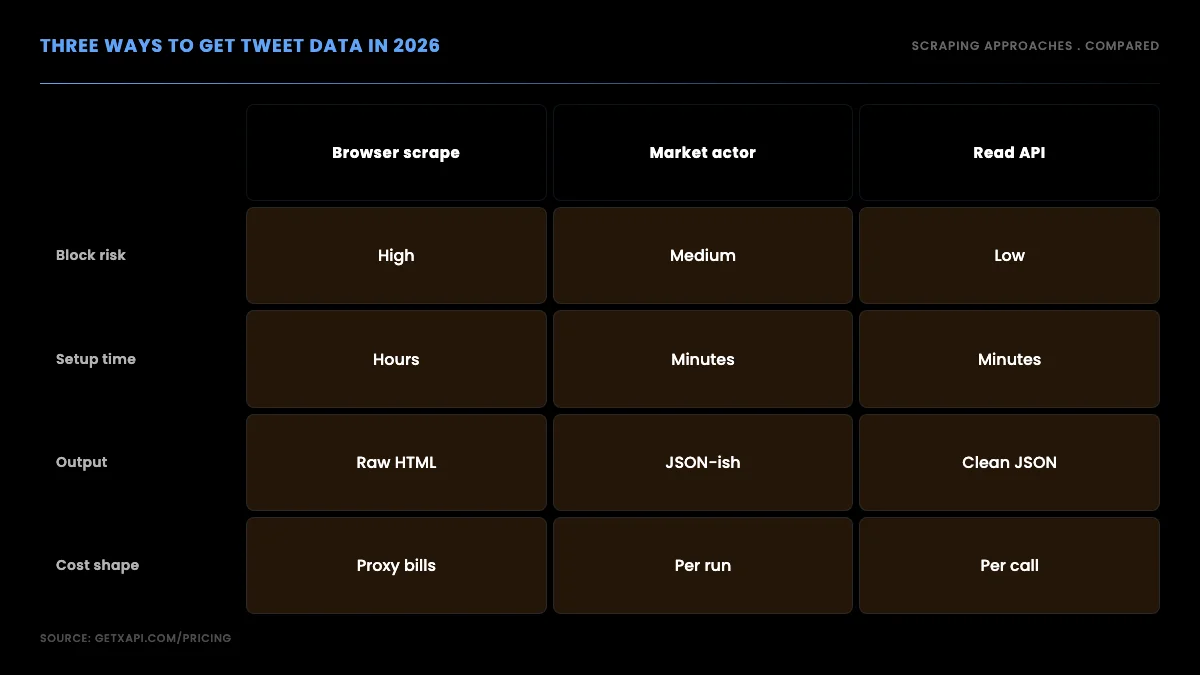
Browser scraping has high block risk, hours of setup, raw HTML output you must parse yourself, and a cost shape dominated by proxy bills. A marketplace actor, where you rent a pre-built scraper, lowers the setup time but bills per run with proxy overhead and gives you a vendor-shaped output you then reshape. A read API has low block risk, minutes of setup, clean JSON output, and a per-call cost that tracks exactly how much data you read. For anything that runs unattended or scales, the read API is the path that does not fight you.
The same four options laid out as a table make the tradeoffs concrete. Block risk, setup time, output shape, cost model, and the contractual standing each one puts you in are the axes that decide the choice:
| Method | Block risk | Setup time | Output | Cost model | Contractual standing |
|---|---|---|---|---|---|
| Official X API | None | Account, app and OAuth setup | Clean JSON | Prepaid pay-per-use, billed per resource | Sanctioned by platform terms |
| Browser scraping | High | Hours, ongoing | Raw HTML you parse | Proxy pool plus your time | Logged-in automation breaches terms |
| Marketplace actor | Medium | Minutes to wire up | Vendor-shaped JSON | Per run plus proxy overhead | Depends on how the actor fetches |
| Per-call read API | Low | Minutes | Clean JSON | Per call, tracks reads | Public data through a sanctioned channel |
The official developer API is worth naming because it is the first-party supported route. Read access requires an X developer setup and is billed under the current pay-per-use table; the public pricing page does not list a general Free tier. If you already use official OAuth or require X-defined access, it can make sense. For many public-data projects, setup time and per-resource pricing are the friction to compare against a third-party read API.
A short video walkthrough of the Python scraping workflow makes the moving parts concrete if you prefer to watch the request, parse, and store steps run end to end before you write your own:
https://www.youtube.com/watch?v=AFeXivA7Hh4
Is it legal to scrape tweets? The honest answer
This is the question everyone skips and then worries about later, so let us address it directly and without hand-waving. The short version: scraping public tweets is largely defensible in the United States, but legality is not a single yes or no, and the details matter.
The anchor case is hiQ Labs v. LinkedIn. The Ninth Circuit held that scraping data that is publicly available, meaning visible without logging in, does not by itself violate the Computer Fraud and Abuse Act, the main United States anti-hacking statute. You can read the Ninth Circuit opinion summary on the Electronic Frontier Foundation site for the reasoning. The practical effect is that collecting public data is not treated as unauthorized access the way breaking into a private system is.
That does not make everything legal, and three caveats matter. Terms of service are a separate question from the CFAA: a platform can still claim you breached its contract even if you did not break a computer-crime law, which is one reason logged-in automation is riskier than reading public data through a documented API channel. Copyright still applies to the content of tweets, so wholesale republication is a different problem from analysis. And privacy law applies the instant a tweet contains personal data about an identifiable person, which is where the GDPR and similar regimes come in.
If your users or subjects are in the European Union, the GDPR personal-data rules require a lawful basis for processing personal data even when that data is public. Public availability is not a free pass under the GDPR; you still need a basis such as legitimate interest, and you still owe data-subject rights. The honest position for most teams is therefore a short checklist: collect public data only, never log in to scrape, never circumvent an access control, minimize personal data, and have a lawful basis ready if personal data is in scope. A read API that serves public tweet data through a documented, authenticated channel fits that checklist far more cleanly than a logged-in browser session does.
The hiQ case did not end cleanly, which is itself instructive. After the Ninth Circuit ruling the dispute went back down and eventually settled with a finding that hiQ had breached LinkedIn's user agreement, even though the CFAA claim did not stick. The lesson buried in that outcome is the one that matters for tweet scraping: the computer-crime statute and the contract are two separate questions, and you can be clear on one while exposed on the other. That is precisely why reading public data through a documented API channel beats automating a logged-in session, because the API channel does not ask you to accept and then breach a user agreement built around human use.
A second practical guardrail is data minimization. Even where collection is lawful, collecting more than you need raises both privacy risk and storage cost for no benefit. If your project only needs tweet text and timestamps to measure sentiment, do not retain full user profiles, follower graphs, and media you will never analyze. Minimizing what you store shrinks your exposure if a privacy question is ever raised and makes your dataset cheaper and easier to work with. The official platform guidance is also worth reading directly rather than secondhand; the X developer agreement and policy spell out what the platform permits, and aligning to a documented API channel that operates with authenticated access keeps you clear of the contract questions that tripped up hiQ.
None of this is legal advice, and your jurisdiction and use case change the analysis. But the framing that keeps teams out of trouble is consistent: public data, no logged-in scraping, respect privacy law, minimize what you keep, and use a documented API channel rather than impersonating a user.
The cost difference is not subtle
Cost is the other reason teams move off browser scraping, and it is easy to underestimate. A browser scraper looks free because there is no API bill, but the real cost is the proxy pool, the maintenance time, and the data you lose when it silently breaks. A marketplace actor bills per run plus proxy overhead. A read API bills per call, so your cost is a clean function of how many tweets you read.
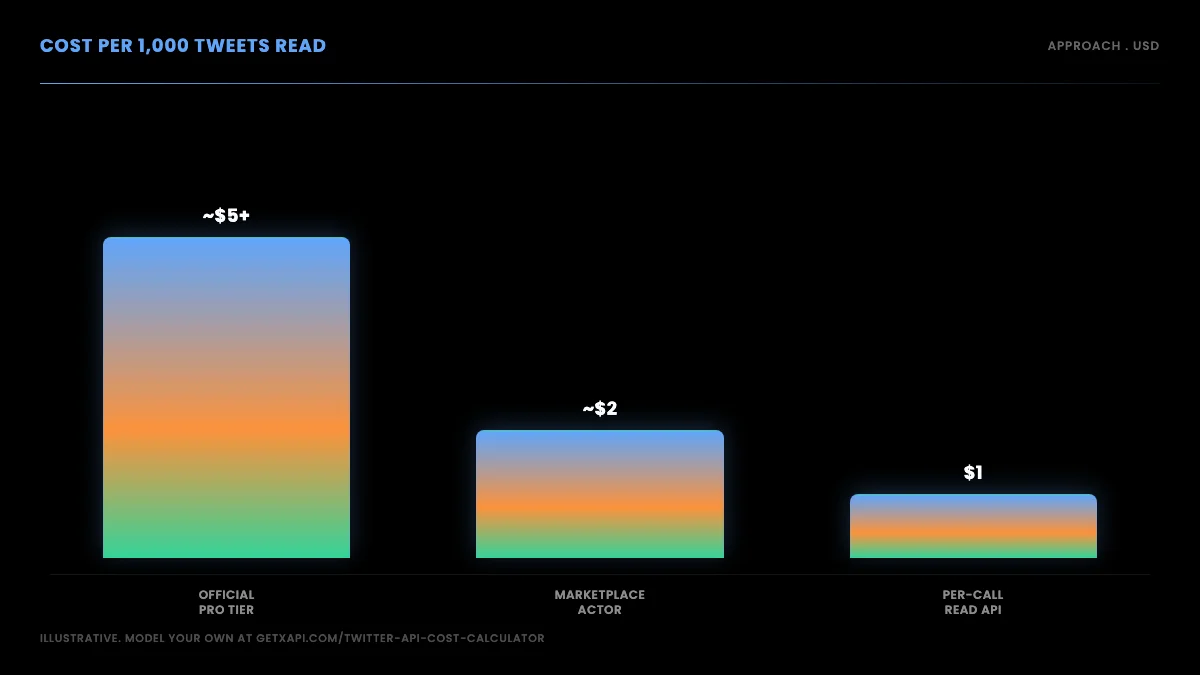
On a per-call model at around $0.001 per standard read, pulling 1,000 tweets across paginated requests costs on the order of a dollar before any caching. You can model your exact spend with the cost calculator, and the full Twitter API cost breakdown compares the per-call model against the official tiers across realistic scenarios. The point is not that one number is magic; it is that per-call pricing means a small project pays cents and a large one pays in proportion to what it reads, with no subscription floor and no proxy bill underneath.
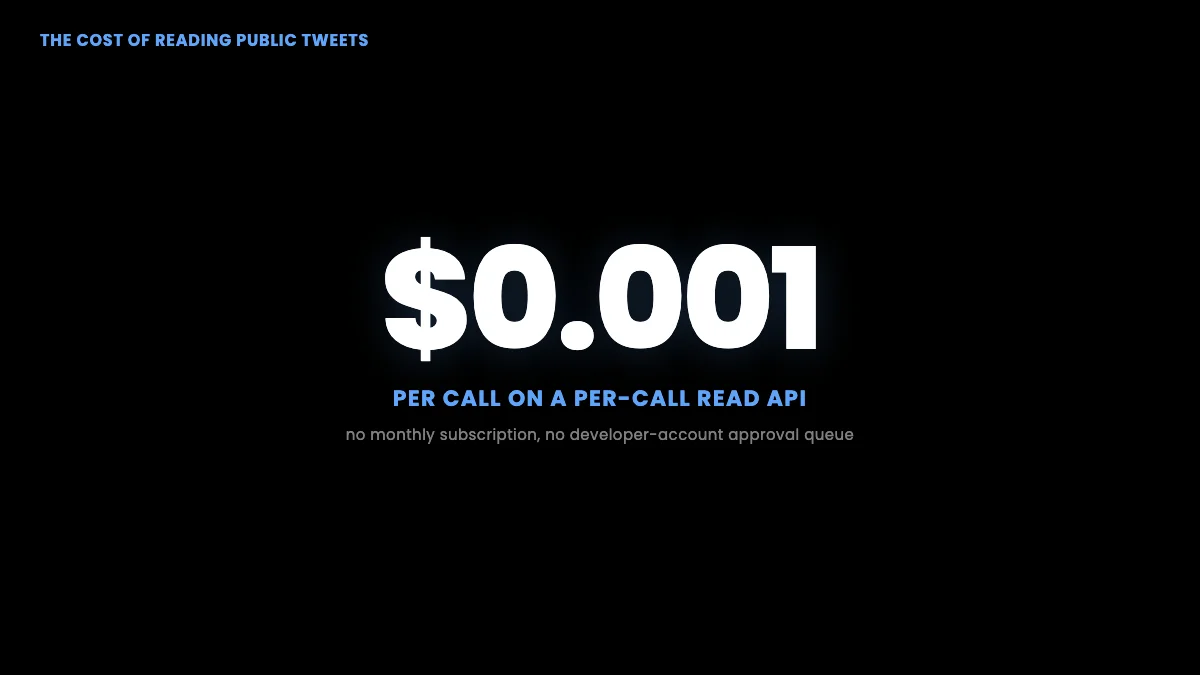
That pricing shape is what makes the read API the default recommendation. You are not betting on a scraper holding up; you are paying for data you actually receive.
Start building with GetXAPI
$0.05 per 1,000 tweets. $0.10 free credits. No credit card required.
How to scrape tweets with a read API, step by step
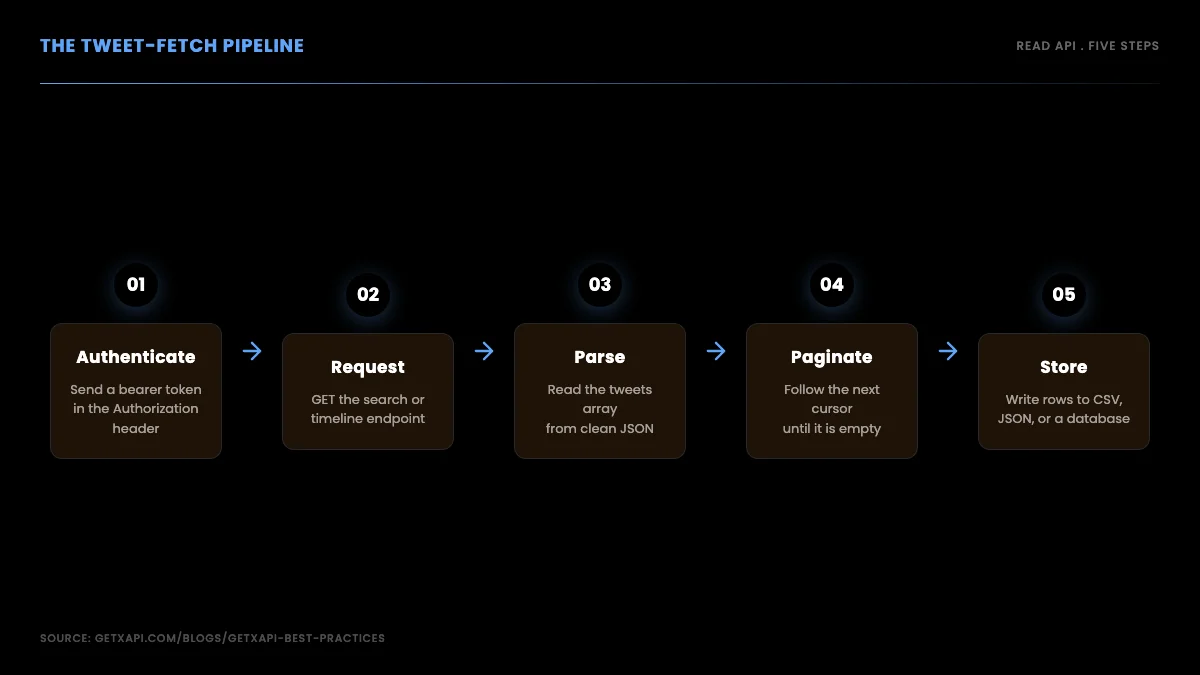
Here is the reliable path in full. It is short, because the whole advantage of a read API over a browser scraper is that you are making a standard HTTP GET request, parsing JSON, and paginating with a cursor. No browser, no proxy rotation, no session management.
Step 1: Authenticate with a bearer token
The official X API requires a developer account, app registration, and OAuth before a single read request. A per-call provider issues a bearer token at signup with no approval queue. Every request carries the token in an Authorization header.
curl "https://api.getxapi.com/twitter/tweet/advanced_search?q=open%20source%20lang%3Aen&queryType=Latest" \
  -H "Authorization: Bearer YOUR_API_KEY"
That single request returns recent public tweets matching the query as JSON. No OAuth dance, no token-refresh logic, no app review. If you are coming from the official API, the main change is swapping the base URL and the auth header; the data you get back is the same Twitter data. The Twitter API v2 vs GetXAPI guide covers the full translation table.
Step 2: Fetch and parse a page of tweets
Wrap the request in a small function so you can reuse it. Parse the tweets array out of the JSON and you have structured data immediately, with no HTML to scrape.
import requests

def fetch_tweets(query, api_key, query_type="Latest"):
    resp = requests.get(
        "https://api.getxapi.com/twitter/tweet/advanced_search",
        params={"q": query, "queryType": query_type},
        headers={"Authorization": f"Bearer {api_key}"},
        timeout=15,
    )
    resp.raise_for_status()
    data = resp.json()
    return data.get("tweets", []), data.get("next_cursor")

tweets, cursor = fetch_tweets("open source lang:en", "YOUR_API_KEY")
for t in tweets[:5]:
    print(t.get("id"), "|", t.get("text", "")[:80])
Notice the function returns two things: the tweets and a cursor. The cursor is how you get the next page, which is the next step. Returning clean JSON like this is the entire reason the read API beats a browser scraper. There are no selectors to break and no rendered page to parse.
Step 3: Paginate through every page with the cursor
A single call returns one page. To scrape every tweet matching a query, follow the cursor. Each response includes a token pointing at the next page; you re-request with it until it comes back empty.
def scrape_all(query, api_key, max_pages=20):
    all_tweets = []
    cursor = None
    for _ in range(max_pages):
        params = {"q": query, "queryType": "Latest"}
        if cursor:
            params["cursor"] = cursor
        resp = requests.get(
            "https://api.getxapi.com/twitter/tweet/advanced_search",
            params=params,
            headers={"Authorization": f"Bearer {api_key}"},
            timeout=15,
        )
        resp.raise_for_status()
        data = resp.json()
        page = data.get("tweets", [])
        if not page:
            break
        all_tweets.extend(page)
        cursor = data.get("next_cursor")
        if not cursor:
            break
    return all_tweets
The max_pages ceiling is a safety valve so a runaway query does not pull forever and run up your bill. Set it to whatever depth your use case needs. The loop stops on two conditions, an empty page or an empty cursor, so it terminates cleanly whether the data runs out or the cursor does.
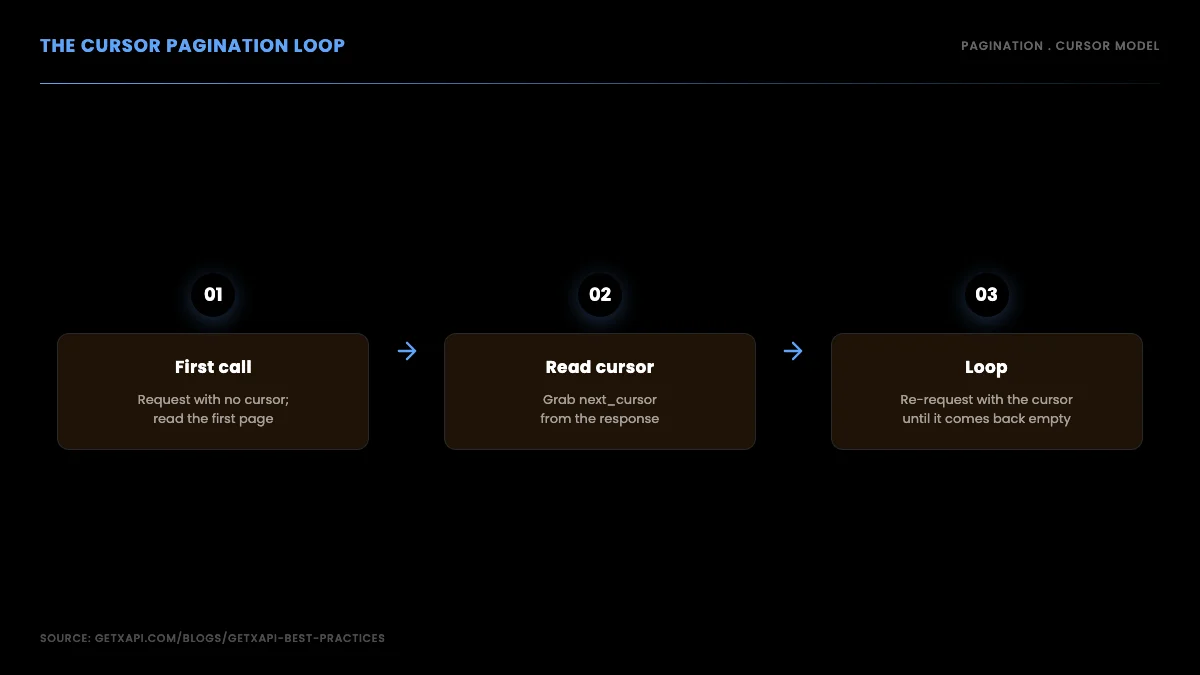
This cursor pattern is the standard way to walk a paginated endpoint, and it is the same pattern you use for timelines, followers, and search. Once you have it, scraping "all the tweets" for a query is just a question of how many pages you are willing to pull.
One subtlety worth understanding is why cursors exist at all instead of simple page numbers. A page number like page=2 breaks the moment new tweets arrive between your first and second request, because everything shifts down and you either miss rows or read duplicates. A cursor is an opaque pointer to a specific position in the result set, so even if new data lands while you paginate, the cursor still points at the right next slice. This is why every serious data API uses cursors for anything that changes over time, and it is why your scraper should trust the cursor rather than trying to compute offsets yourself. Treat next_cursor as a black box: store it, send it back, and stop when it is empty.
It also pays to checkpoint as you paginate rather than holding everything in memory and writing once at the end. If you save each page to disk as it arrives and record the last cursor you used, a long pull that dies on page 180 can resume from page 180 instead of starting over. For a few hundred tweets this does not matter; for a multi-hour historical pull it is the difference between a minor retry and losing an afternoon of work. The pattern is simple: write the page, write the cursor next to it, and on startup read the saved cursor if one exists.
Step 4: Add retry and backoff so long runs survive
A scrape that pulls many pages runs long enough to hit a transient network blip or a momentary rate-limit response. Wrap each call in retry-with-backoff so one hiccup does not kill the whole run. The scraping best practices guide covers backoff tuning, proxy questions, and pagination depth in more detail.
import time

def fetch_with_retry(url, params, headers, max_retries=4):
    for attempt in range(max_retries):
        try:
            resp = requests.get(url, params=params, headers=headers, timeout=15)
            if resp.status_code == 429:
                # rate limited: wait and retry with exponential backoff
                time.sleep(2 ** attempt)
                continue
            resp.raise_for_status()
            return resp.json()
        except requests.RequestException:
            time.sleep(2 ** attempt)
    return {}
Exponential backoff, doubling the wait on each retry, is the right default. It backs off fast enough that a sustained outage does not hammer the endpoint, while recovering quickly from a single blip. Drop this helper into the pagination loop in place of the raw requests.get call and your scraper will ride out the rough patches that would otherwise leave you with a half-finished dataset.
Step 5: Store the results
Finally, write what you pulled to disk so you can analyze it and so a long run can resume after an interruption. CSV is fine for flat fields; JSON Lines is better when you want to keep the full tweet object.
import json

def save_jsonl(tweets, path):
    with open(path, "w", encoding="utf-8") as f:
        for t in tweets:
            f.write(json.dumps(t, ensure_ascii=False) + "\n")

tweets = scrape_all("open source lang:en", "YOUR_API_KEY")
save_jsonl(tweets, "tweets.jsonl")
print(f"saved {len(tweets)} tweets")
Writing one tweet per line as JSON keeps the full structure intact and lets you stream the file back later without loading it all into memory. For analysis you can load it into pandas, push it into a database, or feed it into a sentiment model. The Twitter sentiment analysis tutorial shows the next step once you have the tweets in hand.
Troubleshooting: rate-limit symptoms and how to fix them
Even on a clean read API, a long scrape eventually meets a rate limit, a slow response, or an empty page that should not be empty. The failures are not random; each one has a signature, and once you can read the signature the fix is short. Here is the field guide for the symptoms that actually show up in a scraping run.
The first and most common symptom is a sudden run of HTTP 429 responses. A 429 means you are sending requests faster than your plan allows in the current window, and the fix is the exponential backoff helper from Step 4: catch the 429, sleep for a doubling interval, and retry. If you are seeing 429s constantly rather than occasionally, the real fix is upstream, you are paginating too aggressively in a tight loop, so add a small fixed delay between pages and your throughput stays under the ceiling without any retries firing at all. A scraper that never trips a 429 is faster end to end than one that races into the limit and waits out the penalty.
The second symptom is the silent empty page: a request returns HTTP 200 with an empty tweets array even though you know more data exists. This is almost always one of two things. Either your query is too narrow and there genuinely are no more matches, or the cursor you sent back is stale or malformed. Confirm by logging the exact cursor value on each request and the count returned; if the count drops to zero while the cursor is still non-empty, you have a cursor-handling bug, not an end-of-data condition. The fix is to treat the cursor as the opaque token it is, store it verbatim, and send it back unmodified rather than trying to decode or rebuild it.
The third symptom is a slow creep in response time across a long run. If early pages return in a few hundred milliseconds and later pages take several seconds, you are usually hitting deeper, less-cached result positions, which is normal, but it can also mean your timeout is too tight and requests are being retried unnecessarily. Set the request timeout generously, fifteen seconds is a sane default for a paginated read, and let backoff handle the genuine stalls. A timeout that fires on a slow-but-healthy response wastes a retry and makes the run slower, not faster.
The fourth symptom is the partial dataset you only notice afterward: the run completed, but the count is lower than you expected. This is the failure that browser scraping hides and a read API exposes cleanly. Check three things in order. Did the loop hit its max_pages ceiling before the cursor emptied, in which case raise the ceiling. Did a 429 retry exhaust its attempts and return an empty dict, in which case raise max_retries and confirm the backoff is actually sleeping. Did your query filter out more than you meant, in which case loosen the lang or operator constraints. Logging the page count and cursor on every request turns all four of these symptoms into a five-minute diagnosis instead of an afternoon of guessing.
The developer discussion around picking a reliable scraping path keeps circling the same conclusion, that a stable read endpoint beats fighting the block surface, as this thread on choosing a dependable Twitter scraping API shows:
Looking for a reliable Twitter/X scraping API for automation from r/automation
The recurring answer in threads like that one is the same as this guide's: the reliability problem disappears the moment you stop scraping a rendered page and start reading a documented endpoint, because the symptoms above all have one-line fixes instead of an open-ended arms race.
A worked cost estimate for a real project
Abstract per-call pricing is hard to reason about, so here is a concrete worked example you can adapt. Say you are building a sentiment dashboard that tracks three brand keywords and refreshes every hour during business hours, ten hours a day.
Start with the read volume. Each keyword refresh pulls the most recent matching tweets; suppose each refresh pulls two pages of roughly 100 tweets, so 200 reads per keyword per refresh. Three keywords is 600 reads per refresh. Ten refreshes a day is 6,000 reads per day, and a 22-business-day month is 132,000 reads. At a per-call rate around $0.001 per standard read, that is about $132 a month before any caching, scaling linearly with how much you actually pull.
Now compare the shapes. A marketplace actor billing per run plus proxy overhead would charge for each of those 220 runs a month regardless of how many tweets each run returned, plus a proxy line item that does not shrink when your read volume does. A browser scraper looks free until you add the proxy pool needed to survive 220 runs a day against anti-automation defenses, plus the engineering time to keep selectors alive, and that maintenance line is the one that quietly dwarfs everything else. The official tier, meanwhile, would bill a flat monthly plan whether you read 132,000 tweets or 13,000, so a month where your dashboard is idle still costs the same.
The practical lesson is that per-call pricing makes a small project genuinely cheap and a large project predictable, because the bill is a function you can compute from your own refresh cadence rather than a subscription floor you pay regardless of use. Model your own numbers, refreshes per day times pages per refresh times reads per page times days, drop in the per-call rate, and you have your monthly estimate before you write a line of code. The cost calculator does this arithmetic for you, and the full Twitter API cost breakdown walks through several more scenarios side by side.
Scraping a single account's tweets
A common goal is not a query but one account: pull every tweet a handle has posted. The mechanics are the same cursor pattern against a user-timeline endpoint instead of search. You request the account's tweets, follow the cursor until it empties, and append as you go.
The one caveat worth knowing is historical depth. The public timeline exposes a limited window of an account's most recent tweets, so to reach further back you combine a timeline pull with date-windowed search, walking backward in time in chunks. For most use cases, monitoring an account going forward or analyzing its recent activity, the timeline pull alone is enough, and the cursor loop you already wrote handles it. The advanced search operators reference lists the from: and date operators you combine for deeper historical pulls.
The date-window technique is worth spelling out because it is how you reach tweets older than the timeline depth allows. Instead of one open-ended pull, you issue a sequence of searches each scoped to a date range, for example a from:handle since:2024-01-01 until:2024-02-01 window, then the next month, and so on, paginating within each window. This sidesteps the depth limit because each search starts fresh for its own range rather than walking back through one long timeline. You stitch the windows together afterward and de-duplicate on tweet ID, since a tweet near a boundary can appear in two adjacent windows. It is more requests than a single timeline pull, but it is the only reliable way to reconstruct a deep archive, and the per-call cost model means you pay exactly for the windows you pull and nothing more.
A related decision is how to handle deletions and edits. Tweets get deleted and, since edit windows exist, edited after you first capture them. If your dataset must stay current, periodically re-fetch recent tweets and reconcile against what you stored, marking rows that have vanished and updating ones whose text changed. If you only need a point-in-time snapshot, capture once and move on. Knowing which of these you need up front saves you from either over-engineering a static analysis or under-building a live monitor.
The same access frustrations that push people away from logged-in scraping show up across developer conversations. The shift to a pay-per-use read model is exactly what makes the API path viable for small projects, and developers have noticed the change in how access works:
https://x.com/sabeshbharathi/status/2052689012054507780
And the platform's stance on blocking automated browser traffic is the other half of the story, the reason a documented read API channel matters rather than fighting the anti-automation defenses head-on:
https://x.com/xDaily/status/1649607775129927680
Read together, the lesson is consistent. The platform actively blocks automated browser sessions, and the affordable path in 2026 is a per-call read API rather than a logged-in browser session.
The cheapest Twitter API. Try it free.
$0.05 per 1,000 tweets. $0.10 free credits. No credit card required.
Beyond tweets: profiles, followers, and media
Everything so far reads tweets, but the same bearer token and the same cursor pattern extend to the rest of the public graph, so scraping Twitter/X in full, covering profiles, followers, and media, is the same loop pointed at different endpoints.
To get a profile, call user/info with the username; it returns the account's display name, bio, follower and following counts, verified status, and creation date in one object. This is the cheapest call in a scraping pipeline because a single request returns the whole profile with no pagination, which makes it ideal for enriching a list of handles or building a creator-ranking dataset.
curl -s "https://api.getxapi.com/twitter/user/info?userName=nasa" \
  -H "Authorization: Bearer $GETXAPI_KEY" | python -m json.tool
To collect a public account's followers, call user/followers and page through the cursor exactly as you do for a timeline, deduping by user id as you go. Large accounts take many paginated calls, so pace requests and persist each page so a long run can resume after an interruption. A verified-followers variant narrows the result to verified accounts when you only care about that segment. The end-to-end export pattern, including CSV output, is in the export Twitter followers guide and the followers API page.
def followers(username, max_pages=50):
    seen, cursor = {}, None
    for _ in range(max_pages):
        params = {"userName": username}
        if cursor:
            params["cursor"] = cursor
        r = requests.get(f"{BASE}/twitter/user/followers",
                         headers=HEAD, params=params, timeout=30)
        r.raise_for_status()
        data = r.json()
        for u in data.get("followers", []):
            seen[u["id"]] = u          # dedupe by id
        cursor = data.get("next_cursor")
        if not cursor:
            break
    return list(seen.values())
To collect a user's posted media, call user/media, which returns the media URLs and metadata attached to an account's tweets, paginated by the same cursor pattern. Remember the copyright point from the legal section: reading media URLs and metadata is one thing, redistributing the files is a separate decision with its own rules. Store URLs and attribution, and only download what your lawful basis covers.
One schema note that applies to every object you store: keep tweet and user ids as strings, not integers. Ids exceed the safe integer range in some languages and silently lose precision if you cast them to a number. That single cast is the most common data-integrity bug in scraping pipelines, and it is invisible until two records collide.
Handling protected, suspended, and deleted accounts
A robust scraper treats missing data as a normal case, not an error, because at any scale you will hit protected, suspended, and deleted accounts and your pipeline has to keep moving past them. A protected account returns no public timeline because the user has locked their tweets; the correct response is to record the account as protected and skip it, not to retry it. A suspended or deleted account returns an empty or error response because the account no longer exists publicly; again, the move is to log and skip. None of these are failures of your code, and a pipeline that treats them as failures will halt on the first one in a large pull.
The practical pattern is to wrap each per-account fetch in a classifier that maps the response to one of four states: data returned, account protected, account gone, or transient error. The first three are terminal for that account and you move on; only the fourth gets a retry. This is the difference between a scraper that completes a ten-thousand-account pull overnight and one that dies at account forty-three because someone locked their profile. Store the state alongside the account so a re-run does not re-attempt the terminal cases, which both saves calls and keeps your dataset honest about what was actually collectible versus what was private or removed.
There is also a data-integrity reason to record these states explicitly rather than silently dropping them. If you are studying a set of accounts over time, the transition of an account from active to suspended is itself a data point, and a pipeline that silently skips gone accounts loses that signal. Recording protected and gone states turns a gap in your data into a documented fact about the account, which matters for any analysis where the absence of data is meaningful. The best practices guide covers the state-machine pattern in more depth.
Scheduling incremental scrapes and deduping over time
Most real Twitter/X scraping is not a one-time pull but a recurring job, and the design that matters there is the incremental scrape: on each run you fetch only what is new since the last run rather than re-pulling everything. The mechanism is a high-water mark, the newest tweet id or timestamp you collected last time, which you pass into the next run so the search or timeline call returns only newer results. This is what turns a daily monitoring job from an expensive full re-pull into a cheap delta, and it is the single biggest cost lever in a recurring scrape.
Deduplication is the companion discipline, because incremental scrapes overlap at the boundary and you will fetch some tweets twice. Deduping on tweet id, ideally at write time with an upsert keyed on the id, keeps the dataset clean no matter how much the runs overlap. The combination of a high-water mark and id-deduping means you can run a job as often as you like without bloating storage or double-counting, which is exactly what a near-real-time monitor needs. Store each run's high-water mark and collected count so a job that is interrupted resumes from the right place rather than from the beginning.
Scheduling itself should live in a cron or a worker rather than on your laptop, with each run writing to durable storage and recording where it stopped. For monitoring use cases, the polling interval is the lever between freshness and cost: a tighter interval catches events sooner but makes more calls, and because the per-call price is fixed you can compute the monthly cost of any interval exactly before you commit to it. The rate limits guide covers the pacing side, and the cost calculator lets you model the spend of a given interval against your volume.
When browser scraping still makes sense
To be fair, there is a narrow case where browser automation is still the right tool. If you need data that only renders for a logged-in account, such as your own private bookmarks or a DM thread you own, there is no public read endpoint for it, and automating your own authenticated session may be the only path. Even then you accept the maintenance burden, the account risk, and the terms-of-service questions that come with it, and you confine the automation to your own data.
For anything involving public tweets at any scale, though, the read API wins on every axis that matters: it does not break when the markup changes, it does not get your account banned, it returns clean JSON, and it costs in proportion to the data you read. The few dozen lines above are the whole implementation.
Putting it together
Scraping tweets in 2026 comes down to a single decision: do you fight a hostile, shifting web surface, or do you read public data through a sanctioned, documented channel. The honest recommendation is the second one. Browser scraping breaks because the markup moves, the timeline personalizes, and anti-automation defenses block headless sessions. A read API sidesteps all of it.
The operating discipline that keeps teams out of trouble is equally simple: collect public data only, never log in to scrape, respect copyright and privacy law, and use a documented API channel rather than impersonating a user. The hiQ v. LinkedIn line makes scraping public data largely defensible in the United States, but the GDPR and platform terms still set real boundaries you have to respect.
When you are ready to pull live tweets, sign up, grab a key, and the ten-line snippet at the top of this guide returns real data in under a minute. From there, the pagination loop, the retry helper, and the storage step turn that snippet into a scraper that pulls every page, survives a long run, and never gets blocked, because there is no logged-in session of yours for anyone to block. Start with the pricing page to see the per-call model, and the best practices guide for the production details once your scraper is doing real work.
Frequently Asked Questions
Scraping public tweets sits in a contested but largely defensible space when you collect only data that is visible without logging in and you respect personal-data rules. United States courts in the hiQ v. LinkedIn line held that scraping publicly available data does not by itself violate the Computer Fraud and Abuse Act. That does not make everything legal. Platform terms of service can still be breached, copyrighted content stays copyrighted, and privacy laws like the GDPR apply the moment a tweet contains personal data about an identifiable person. The practical line most teams draw is public data only, no logged-in scraping, no circumventing access controls, and a clear lawful basis when personal data is involved.
Send an authenticated GET request to a read endpoint and parse the JSON it returns. A per-call provider like GetXAPI issues a bearer token at signup, and a single request to the search endpoint returns recent tweets matching your query as structured JSON. There is no headless browser to maintain, no proxy pool to rotate, and no selectors that break when the markup changes. The Python and curl snippets in this guide return live tweets in under ten lines, which is the easiest reliable path in 2026.
On a per-call read API the cost is a function of how many tweets you read, not a monthly subscription. At a rate around $0.001 per standard read call, pulling 1,000 tweets across paginated requests costs on the order of a dollar before any caching. That contrasts with the official tiers, which bundle reads into monthly plans, and with marketplace actors, which bill per run plus proxy overhead. You can model your exact spend with the cost calculator, and the per-call model means a small project pays cents rather than committing to a plan.
Use a timeline or search endpoint and follow its pagination cursor until it returns empty. Each call returns a page of tweets plus a cursor token that points to the next page. You re-request with that cursor, append the results, and stop when the cursor comes back empty or null. Store each page as you go so a long pull can resume after an interruption. Be aware that the public timeline has historical depth limits, so for very old tweets you combine timeline pulls with date-windowed search to reach further back.
You can get an account banned and an IP blocked if you scrape by driving a logged-in browser session against the site, because that triggers anti-automation defenses and breaches the automation clauses in the terms. A read API avoids that risk entirely. You authenticate with a bearer token issued for data access, you call a documented endpoint, and there is no logged-in session of yours to suspend. That is the core reason this guide recommends a read API over browser automation: the block surface that gets people banned simply is not there.
Browser scraping reads the rendered web page, and that page is a moving target. The markup changes without notice so your selectors stop matching, the timeline personalizes based on the logged-in account so a scraper sees a skewed view, and anti-automation measures detect headless browsers and serve challenges or blocks. You also inherit login walls on many surfaces. Each of these is a separate maintenance burden, and together they make browser scraping fragile enough that most production teams move to a read API that returns documented JSON instead.
Not if you use a per-call provider. The official X API requires a developer account, app registration, and OAuth credentials before you can make a read request. A per-call read API like GetXAPI issues a bearer token at signup with no developer-account approval step, so you can run your first tweet fetch within about thirty seconds. You send a GET request with an Authorization header and parse the returned JSON. There is no app review, no elevated-access form, and no monthly minimum to clear first.
Yes, for public accounts, by calling the followers endpoint and following its pagination cursor until it returns empty. Each call returns a page of follower objects plus a cursor token for the next page; you re-request with that cursor, append, dedupe by user id, and stop when the cursor is null. Very large accounts take many paginated calls, so pace your requests and store each page as you go so a long pull can resume. A verified-followers variant narrows the list to verified accounts.
Check out similar blogs
More guides on the Twitter/X API, scraping, and pricing.

Twitter Trends API: Pull Trending Topics by Location in 2026
A 2026 Twitter trends API guide: pull top trends by country or city from GetXAPI's dedicated endpoint, plus how to build custom trends from search. Runnable code.

Twitter API Tutorial 2026: The Complete Developer Guide
A current 2026 Twitter API tutorial covering authentication, endpoints, code, rate limits, verified official prices, and a third-party public-data path.

Twitter Article API in 2026: Create, Publish, and Distribute Long-Form Notes
Complete 2026 tutorial for the Twitter Article API. All 7 endpoints, working Python and Node.js code, the Premium gate explained, draft vs published state machine.

How to Use the Twitter API with Python, 2026 Tutorial
Step-by-step Python tutorial for the Twitter API in 2026. Working code for search, users, DMs, pagination, retries, plus a tweepy migration guide.

Scrape Full Tweet History of Any Account in 2026 (Beyond the 3,200 Limit)
Why the X timeline stops at 3,200 tweets and how to pull an account's full history with date-window search, cursor pagination, and dedup. Live-tested code in Python and curl.

Twitter API 403 Forbidden and 401 Unauthorized: Every Cause and Fix
Why the X API returns 403 Forbidden or 401 Unauthorized, how to tell the two apart, and a fix for each cause. Covers tier gating, app permissions, OAuth, and X error codes.

The Best Twitter (X) API Alternatives in 2026, Compared
The best Twitter / X API alternatives in 2026, ranked and compared: managed pay-per-call APIs, web-data marketplaces, and open-source libraries, with real per-1,000-tweet costs.

How to Like a Tweet via API in 2026 (No Dev Account)
Like (favorite) tweets programmatically via API in 2026 without an X developer account. The auth_token model, working curl, Python, and Node code, and per-call cost.
Featured in
Where GetXAPI's data and pricing get cited.

The hidden line item in your AI side project: X data
Indie Hackers post on the often-overlooked cost of X data for AI side projects, citing GetXAPI as the usage-based way to pull live Twitter data without a five-figure X developer contract.

How Companies Are Learning to Read Market Mood in Real Time
Editorial feature on Big News Network examining how companies read market mood from X in real time, citing GetXAPI as the usage-based Twitter API that prices live social listening by the call instead of a five-figure annual contract.

How Companies Are Learning to Read Market Mood in Real Time
Syndicated feature on Business Newswire on how companies read market mood from X in real time, citing GetXAPI as the usage-based Twitter API that prices live social listening by the call.

Working with Twitter/X Data: A Practical Skill for IT Students and Professionals in 2026
Guide on SIIT (Scholars International Institute of Technology) on collecting live Twitter/X data as a practical developer skill, citing GetXAPI as the per-call Twitter data API that makes it affordable without an X developer account.

Adding Twitter/X Data to Your App in 2026: A Developer's Integration Guide
Developer integration guide on Programming Insider covering how to add live Twitter/X data to an app in 2026, comparing the official X API v2 with a key-based REST approach and citing GetXAPI as the low-cost per-call option with no developer-account approval.

6 Twitter/X Scraping Solutions for Every Budget
Roundup on TechBullion of the leading Twitter/X scraping solutions, ranking GetXAPI first as the cheapest option at $0.001 per call (about $0.05 per 1,000 tweets) with clean JSON output and no monthly minimum.

The Data Bill Behind Every Social Analytics Tool
Editorial piece on SpeakRJ examining the underlying data costs behind social analytics tools, citing GetXAPI as the usage-based way to source live X data by the call.

What Is AI Sentiment Analysis, and What Does Each Layer Cost?
Explainer in AI Journal breaking sentiment analysis into its data, model and reporting layers and what each costs to run, citing GetXAPI for pulling public X posts on pay-per-call pricing.

Why Enterprise AI Agents Still Cannot Read Social Data
Analysis piece in The Silicon Review on why enterprise agents reach internal systems easily but struggle with public social data, citing GetXAPI's MCP server and data-as-a-service model as one route to close the gap.