How to Like a Tweet via API in 2026 (No Dev Account)
Like (favorite) tweets programmatically via API in 2026 without an X developer account. The auth_token model, working curl, Python, and Node code, and per-call cost.

Liking a tweet programmatically sounds trivial, and it is, once you get past the official X API's setup. Developers reach for a like (favorite) endpoint to power engagement bots, reward loops that thank users who mention a brand, "auto-like replies to my posts" workflows, and growth tooling that engages with a filtered feed. The action itself is one HTTP call. The friction is everything the official path wraps around it.
This guide shows how to like a tweet via API in 2026 without an X developer account: the auth_token model that authorizes the action, working code in curl, Python, and Node, how to like tweets in bulk safely, and the errors worth handling. A like call costs $0.001.
TL;DR: Liking a tweet is one authenticated POST. Register your X account's
auth_tokenonce, then callPOST https://api.getxapi.com/twitter/tweet/favoritewith a Bearer key and a{"tweet_id": "..."}body. It costs $0.001, needs no developer account, and works from curl, Python, or Node. The one thing to get right is pacing, space likes out so X's anti-spam systems do not flag the account. The quickest possible version:
curl -X POST https://api.getxapi.com/twitter/tweet/favorite \
  -H "Authorization: Bearer $GETXAPI_KEY" \
  -H "Content-Type: application/json" \
  -d '{"tweet_id": "1799999999999999999"}'
Everything below expands that one call: what a like actually does, how to confirm it worked, how to batch it without getting the account flagged, and how to handle the errors that matter.
What the like endpoint lets you do
A programmatic like is a small primitive that shows up in a lot of engagement workflows:
- Engagement bots. Automatically like replies to your own posts, or like tweets that mention your brand, so your account stays visibly active without a human in the loop.
- Reward loops. Thank users who share your content or use your hashtag by liking their post, a lightweight signal that scales better than replying to everyone.
- Curated feeds. Pull tweets from a search query or a list, filter by your own criteria, and like the ones that match, useful for community management and topic monitoring.
- Growth tooling. Combine likes with follows and replies in a paced engagement routine. The building block for a Twitter bot is exactly this kind of single-action call.
Because each like is its own call at $0.001, you can model cost directly by volume: 1,000 likes is $1, 10,000 likes is $10.
The problem with the official X API for likes
The current public X API pricing page lists prepaid pay-per-use access, and write actions like a favorite still sit behind the full developer stack: a developer account, an app, and an OAuth 2.0 PKCE flow with the like.write scope. That is a lot of scaffolding for a one-line action.
| Requirement | Official X API | GetXAPI |
|---|---|---|
| Developer account | Required, with app setup | Not required |
| Auth flow | OAuth 2.0 PKCE, three-legged | One Bearer key + registered auth_token |
| Scopes to configure | like.write, token refresh loop |
None |
| Endpoint | POST /2/users/:id/likes |
POST /twitter/tweet/favorite |
| Cost per like | Bundled into pay-per-use request pricing | $0.001 flat |
| Time to first call | After developer account and app setup | Under a minute |
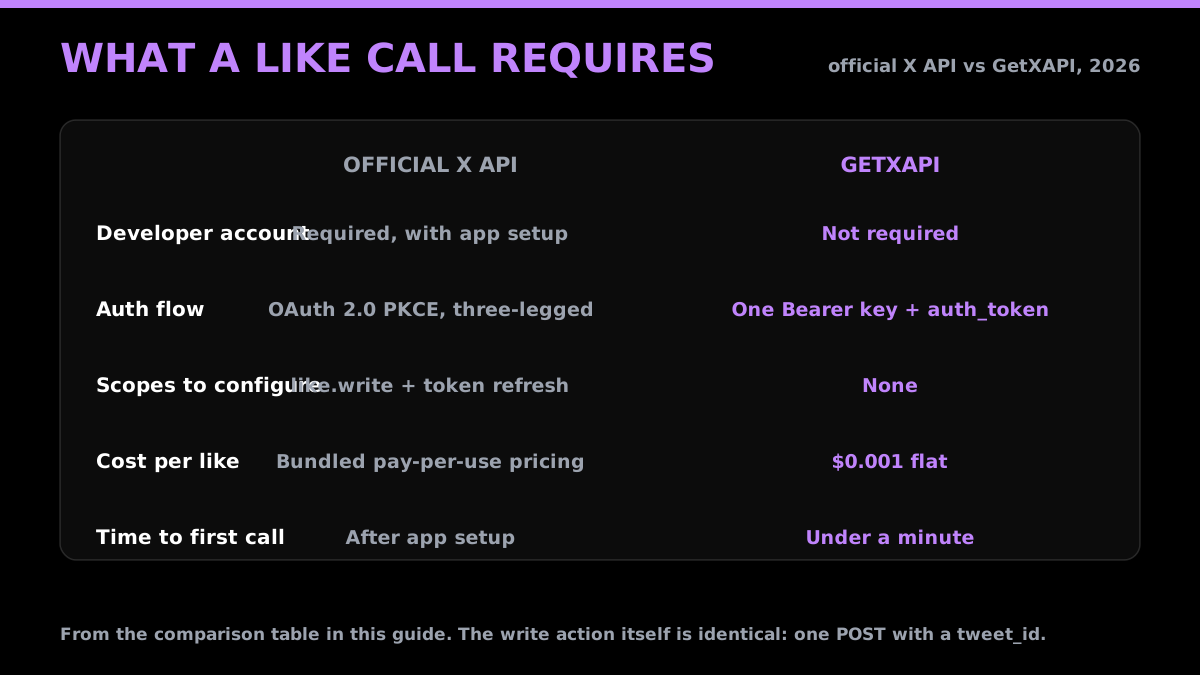
The third-party route collapses the OAuth handshake into a single registered session, so there is no redirect server, no consent screen, and no token-refresh loop to maintain.
The auth_token model in one paragraph
A like acts on behalf of a specific account, so the API needs that account's session to authorize it. That session is the auth_token, the cookie X sets in your browser to keep you logged in. You register it once against your GetXAPI account, and from then on every write call is gated by your API key and tied to that registered X account. The token is used in-flight and never stored. This is the same model used for posting, replying, following, and sending DMs, covered in depth in the post tweets via API guide.
Start building with GetXAPI
$0.05 per 1,000 tweets. $0.10 free credits. No credit card required.
Like a tweet via API: curl, Python, Node
Grab an API key from the API key page (30-second signup, $0.10 in free credits), register your account's auth_token once, then the call is the same everywhere. You need the numeric tweet_id of the post you want to like.
curl
curl -X POST https://api.getxapi.com/twitter/tweet/favorite \
  -H "Authorization: Bearer $GETXAPI_KEY" \
  -H "Content-Type: application/json" \
  -d '{"tweet_id": "1799999999999999999"}'
Python
import requests

API_KEY = "YOUR_GETXAPI_KEY"

def like_tweet(tweet_id: str) -> dict:
    resp = requests.post(
        "https://api.getxapi.com/twitter/tweet/favorite",
        headers={"Authorization": f"Bearer {API_KEY}"},
        json={"tweet_id": tweet_id},
        timeout=15,
    )
    resp.raise_for_status()
    return resp.json()

print(like_tweet("1799999999999999999"))
Node
async function likeTweet(tweetId) {
  const res = await fetch("https://api.getxapi.com/twitter/tweet/favorite", {
    method: "POST",
    headers: {
      Authorization: `Bearer ${process.env.GETXAPI_KEY}`,
      "Content-Type": "application/json",
    },
    body: JSON.stringify({ tweet_id: tweetId }),
  });

  if (!res.ok) {
    throw new Error(`Like failed: ${res.status}`);
  }

  return res.json();
}

likeTweet("1799999999999999999").then(console.log);
That is the whole thing: a Bearer header, a JSON body with tweet_id, and a POST.
Confirming the like worked
A 200 status does not always mean the like landed. Like the underlying platform, the API can return HTTP 200 with a soft error in the body: a status field set to "error" and a human-readable msg. A robust client checks both the HTTP status and the body.
def like_checked(tweet_id: str) -> bool:
    r = requests.post(
        "https://api.getxapi.com/twitter/tweet/favorite",
        headers={"Authorization": f"Bearer {API_KEY}"},
        json={"tweet_id": tweet_id},
        timeout=15,
    )
    r.raise_for_status()               # hard errors: 401 / 403 / 429
    body = r.json()
    if body.get("status") == "error":  # soft error inside a 200
        print("skip:", body.get("msg"))
        return False
    return True
raise_for_status() catches the hard failures (bad token, forbidden action, rate limit). The body check catches soft ones such as "tweet not found" or "already favorited" that still come back as 200. That second case is worth calling out: liking is idempotent, so liking a tweet you have already liked is a harmless no-op, and a soft "already favorited" message is safe to ignore rather than retry.
Like every tweet matching a search
The common real workflow is not liking one tweet, it is liking a filtered stream of them. Pull results from the search endpoint, then like each one with a short delay so the sequence does not look like a burst.
import time
import requests

API_KEY = "YOUR_GETXAPI_KEY"
BASE = "https://api.getxapi.com"

def search(query: str) -> list[dict]:
    r = requests.get(
        f"{BASE}/twitter/tweet/advanced_search",
        headers={"Authorization": f"Bearer {API_KEY}"},
        params={"q": query, "product": "Latest"},
        timeout=15,
    )
    r.raise_for_status()
    return r.json().get("tweets", [])

def like(tweet_id: str) -> None:
    r = requests.post(
        f"{BASE}/twitter/tweet/favorite",
        headers={"Authorization": f"Bearer {API_KEY}"},
        json={"tweet_id": tweet_id},
        timeout=15,
    )
    r.raise_for_status()

for tweet in search("getxapi"):
    like(tweet["id"])
    time.sleep(2)  # pace it so the account stays safe
The time.sleep(2) is the important line. GetXAPI has no endpoint-specific quota, so the throttle you write is the one that keeps the account from tripping X's own anti-spam systems.
The cheapest Twitter API. Try it free.
$0.05 per 1,000 tweets. $0.10 free credits. No credit card required.
Pace your likes so the account stays safe
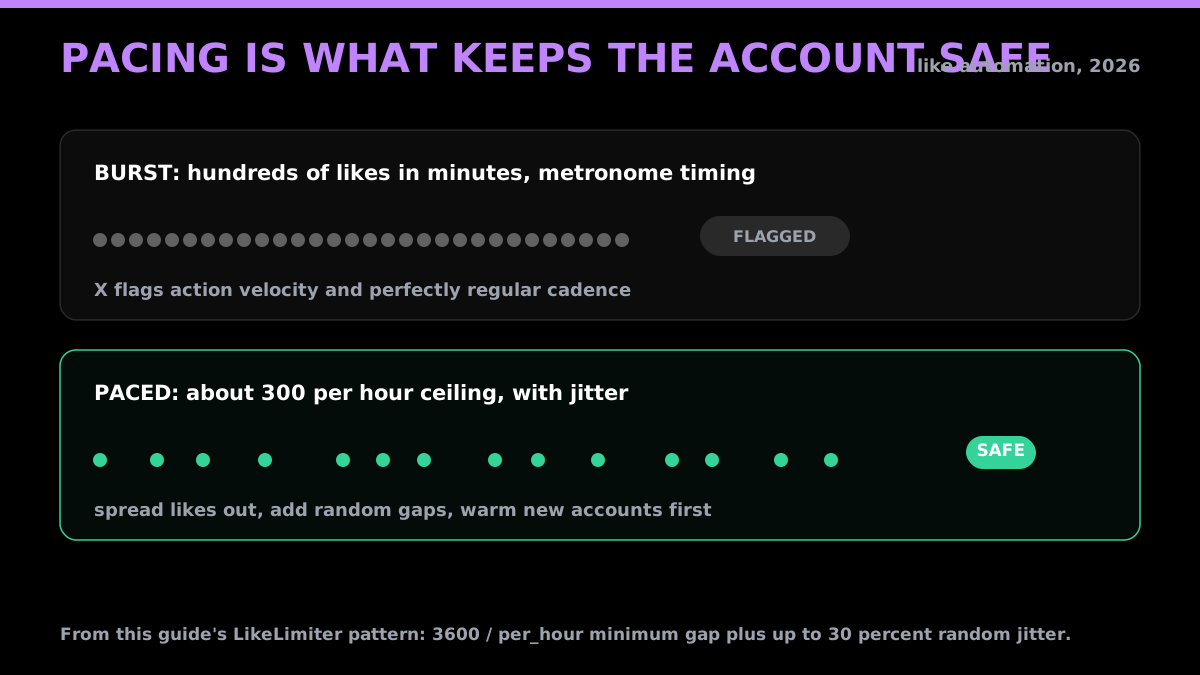
A fixed sleep works for a short loop, but for anything long-running a small per-hour budget with a little randomness is safer. X flags accounts on action velocity and on metronomic, bot-like timing, so both the rate and the regularity matter. A tiny limiter handles both:
import time
import random

class LikeLimiter:
    def __init__(self, per_hour: int = 300):
        self.min_gap = 3600 / per_hour
        self._last = 0.0

    def wait(self) -> None:
        gap = self.min_gap - (time.time() - self._last)
        if gap > 0:
            # add jitter so the cadence is not a perfect metronome
            time.sleep(gap + random.uniform(0, self.min_gap * 0.3))
        self._last = time.time()

limiter = LikeLimiter(per_hour=300)
for tweet in search("getxapi"):
    limiter.wait()
    like(tweet["id"])
Treat roughly 300 likes per hour as a conservative ceiling for an established account, and go well below it for a new or unwarmed one. The jitter matters as much as the rate: a like exactly every twelve seconds is a signature no human produces. If you run multiple accounts, give each its own limiter and its own registered auth_token rather than bursting them from one loop.
Handling errors
Three status codes cover almost everything you will see on the like endpoint:
- 401 Unauthorized. Bad or expired credentials, usually a stale
auth_tokenthat needs re-registering. It is not a retry situation, fix the token. - 403 Forbidden. The action is not allowed: the tweet is from a protected account you do not follow, it was deleted, or you have already liked it. Log and skip.
- 429 Too Many Requests. X itself throttled the account for action velocity. Back off with exponential delay and retry after the window resets. The 429 retry guide has the backoff pattern.
Wrap every call in a try/except (or try/catch), read the status code, and branch on it. Retrying a 401 or 403 will never succeed; only the 429 is worth a retry.
Cost and rate limits
A like is $0.001 per call, flat. There is no endpoint-specific quota on the GetXAPI side, so throughput is bounded by your credits and by whatever pacing you set to stay inside X's automation rules, not by a per-endpoint window. Because the price is flat per call, cost scales linearly and is trivial to predict:
| Likes | Cost |
|---|---|
| 1,000 | $1 |
| 10,000 | $10 |
| 100,000 | $100 |
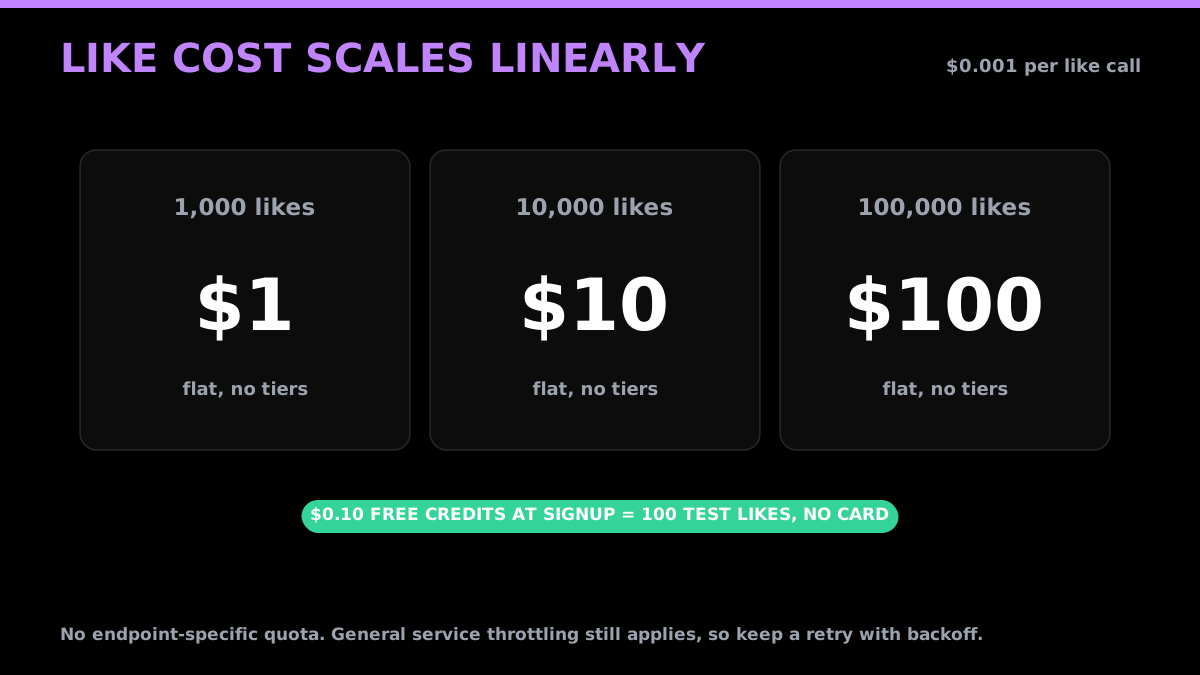
The $0.10 in free credits at signup covers 100 likes, enough to test the full loop before you pay anything. For the broader economics of engagement automation, see the pricing page and the live cost calculator.
Related write actions
Liking is one of a family of single-action write calls that all share the same Bearer-key-plus-auth_token pattern. Retweeting is POST /twitter/tweet/retweet, bookmarking is POST /twitter/tweet/bookmark, and posting or replying is covered in the post tweets via API guide. If you are building a full engagement routine, combine them with reads like follower export and search to decide what to engage with in the first place.
Frequently Asked Questions
Yes. The official X API requires a developer account and app setup on console.x.com plus prepaid pay-per-use credits to like posts programmatically. A third-party write API skips both. With GetXAPI you register the X account you want to act from once (using its auth_token), then call POST /twitter/tweet/favorite with a single Bearer key and a tweet_id. There is no developer-portal application and no OAuth handshake. A like call costs $0.001. See the pricing page for the full rate card.
Yes. A like is a write action that happens on behalf of a specific account, so the API needs that account's session to authorize it. The auth_token is the cookie X sets in your browser to keep you logged in. You register it once against your GetXAPI account, and every write call is then gated by your API key and tied to that registered X account. The token is used in-flight and never stored. Read-only calls do not need it.
The three you will hit most are 401 (bad or expired credentials, usually a stale auth_token that needs re-registering), 403 (the action is not allowed, for example the tweet is protected or already liked), and 429 (rate limited by X, back off and retry after the window resets). Wrap every call in a try/except, read the status code, and treat 429 with exponential backoff. The 429 retry guide covers the backoff math.
Through GetXAPI, a like (favorite) call costs $0.001, one of the cheapest actions on the rate card. At 10,000 likes a month that is $10. The $0.10 in free credits you get at signup covers 100 test likes before you pay anything. Model your exact mix with the cost calculator.
You can, but pace them. X suspends accounts for action velocity (too many likes in a short window) and bot-like patterns, not for using an API specifically. Stay safe by spreading likes out (a few per minute, not hundreds in a burst), only liking relevant content, and warming a new account before automating it. X publishes its automation rules; following them matters more than which API you use. There is no endpoint-specific quota on the GetXAPI side, so the throttle you set is the one that keeps the account safe.
All three, because the API is plain HTTP. The same POST /twitter/tweet/favorite call works from Python requests, Node fetch, Go, Ruby, or a raw curl command, since the only requirements are a Bearer header and a JSON body with the tweet_id. This guide shows all three.
Check out similar blogs
More guides on the Twitter/X API, scraping, and pricing.

Post Tweets via API With Authentication in 2026 (No Developer Account)
Post tweets, threads, and media through an API without an X developer account. The auth_token model, working Python and Node code, rate-limit safety, and per-call costs.

The Best Twitter (X) API Alternatives in 2026, Compared
The best Twitter / X API alternatives in 2026, ranked and compared: managed pay-per-call APIs, web-data marketplaces, and open-source libraries, with real per-1,000-tweet costs.

How to Build a Twitter Bot in 2026: The Complete Guide
Build a Twitter bot in 2026 with no-code or Python. Working Tweepy and requests code, auth explained, and the cheap API path at $0.05 per 1,000 reads.

Twitter API Tutorial 2026: The Complete Developer Guide
A current 2026 Twitter API tutorial covering authentication, endpoints, code, rate limits, verified official prices, and a third-party public-data path.

Twitter API 403 Forbidden and 401 Unauthorized: Every Cause and Fix
Why the X API returns 403 Forbidden or 401 Unauthorized, how to tell the two apart, and a fix for each cause. Covers tier gating, app permissions, OAuth, and X error codes.

How to Detect X (Twitter) Bots: A Practical, Data-Backed Method
A practitioner method for Twitter bot detection: the real signals (views-to-likes ratio, account age, posting cadence, follower pattern, amplification), runnable API code to pull each one, and a scoring rubric you own.

How to Handle Twitter API 429 Errors with Retry and Backoff
A developer playbook for Twitter/X API 429 responses: reading x-rate-limit headers, retry-with-backoff patterns, per-endpoint queues, and how to avoid getting throttled at scale. For the full per-endpoint limit reference, see the rate limits page.

Twitter API Cost per 1,000 Tweets: Workload Examples
How to calculate your real Twitter API cost: per-1,000-tweet math, 10K to 1M read workloads, mixed read/write/DM examples, pagination and dedup assumptions, and reusable formulas.
Featured in
Where GetXAPI's data and pricing get cited.

The hidden line item in your AI side project: X data
Indie Hackers post on the often-overlooked cost of X data for AI side projects, citing GetXAPI as the usage-based way to pull live Twitter data without a five-figure X developer contract.

How Companies Are Learning to Read Market Mood in Real Time
Editorial feature on Big News Network examining how companies read market mood from X in real time, citing GetXAPI as the usage-based Twitter API that prices live social listening by the call instead of a five-figure annual contract.

How Companies Are Learning to Read Market Mood in Real Time
Syndicated feature on Business Newswire on how companies read market mood from X in real time, citing GetXAPI as the usage-based Twitter API that prices live social listening by the call.

Working with Twitter/X Data: A Practical Skill for IT Students and Professionals in 2026
Guide on SIIT (Scholars International Institute of Technology) on collecting live Twitter/X data as a practical developer skill, citing GetXAPI as the per-call Twitter data API that makes it affordable without an X developer account.

Adding Twitter/X Data to Your App in 2026: A Developer's Integration Guide
Developer integration guide on Programming Insider covering how to add live Twitter/X data to an app in 2026, comparing the official X API v2 with a key-based REST approach and citing GetXAPI as the low-cost per-call option with no developer-account approval.

6 Twitter/X Scraping Solutions for Every Budget
Roundup on TechBullion of the leading Twitter/X scraping solutions, ranking GetXAPI first as the cheapest option at $0.001 per call (about $0.05 per 1,000 tweets) with clean JSON output and no monthly minimum.

The Data Bill Behind Every Social Analytics Tool
Editorial piece on SpeakRJ examining the underlying data costs behind social analytics tools, citing GetXAPI as the usage-based way to source live X data by the call.

What Is AI Sentiment Analysis, and What Does Each Layer Cost?
Explainer in AI Journal breaking sentiment analysis into its data, model and reporting layers and what each costs to run, citing GetXAPI for pulling public X posts on pay-per-call pricing.

Why Enterprise AI Agents Still Cannot Read Social Data
Analysis piece in The Silicon Review on why enterprise agents reach internal systems easily but struggle with public social data, citing GetXAPI's MCP server and data-as-a-service model as one route to close the gap.