The Best Twitter/X Tools in 2026, by Category
The best Twitter/X tools of 2026 for creators, marketers, and developers, spanning scheduling, analytics, scraping, monitoring, AI writers, and data APIs.

The Twitter/X tool landscape looks very different in 2026 than it did two years ago. Pricing changes on the official API reshuffled which tools survived, a wave of AI writers arrived, and a new category quietly matured: data APIs that let developers and AI agents read and act on X without an expensive developer contract.
Most "best Twitter tools" lists you will find are either marketer-only (schedulers and analytics, nothing for developers) or stale (still recommending tools that shut down). This guide is different. It is organized by the job you are trying to do, it flags what died, and it treats the data and API layer as a first-class category. Every tool here was live as of July 2026. Pricing is listed as published this year, so confirm each tool's pricing page before you commit.
TL;DR: The best Twitter/X tools in 2026 span eight jobs: scheduling (Typefully, Hypefury), analytics (X native, Followerwonk), monitoring (Brand24, Brandwatch), scraping (Apify, Scweet), growth (Tweet Hunter), AI writing (Postwise), free utilities (thread unrollers, character counters), and the category most lists skip: data APIs. For public-data workloads, a pay-per-call API like GetXAPI costs roughly $0.05 per 1,000 tweets and does not require an X developer account. Below: every category with real pricing, plus the tools that quietly shut down.
What changed for Twitter/X tools in 2026
One shift underpins the whole landscape: the current public X pricing page lists prepaid pay-per-use API access and custom Enterprise access. It does not list general public Free, Basic, or Pro plans. Reading data is billed by resource. The page does not state when the current table became effective or provide a complete migration history for older accounts, so account-specific access should be checked in the X Developer Console. Official current rates are published at docs.x.com.
That reshuffle had two effects. First, tools that depended on cheap official-API access either raised prices or shut down. Second, third-party data APIs that price by the call became the practical way for developers, researchers, and AI agents to read Twitter/X data affordably. Keep that in mind as you build your stack: the "data" question is now as important as the "scheduling" question.
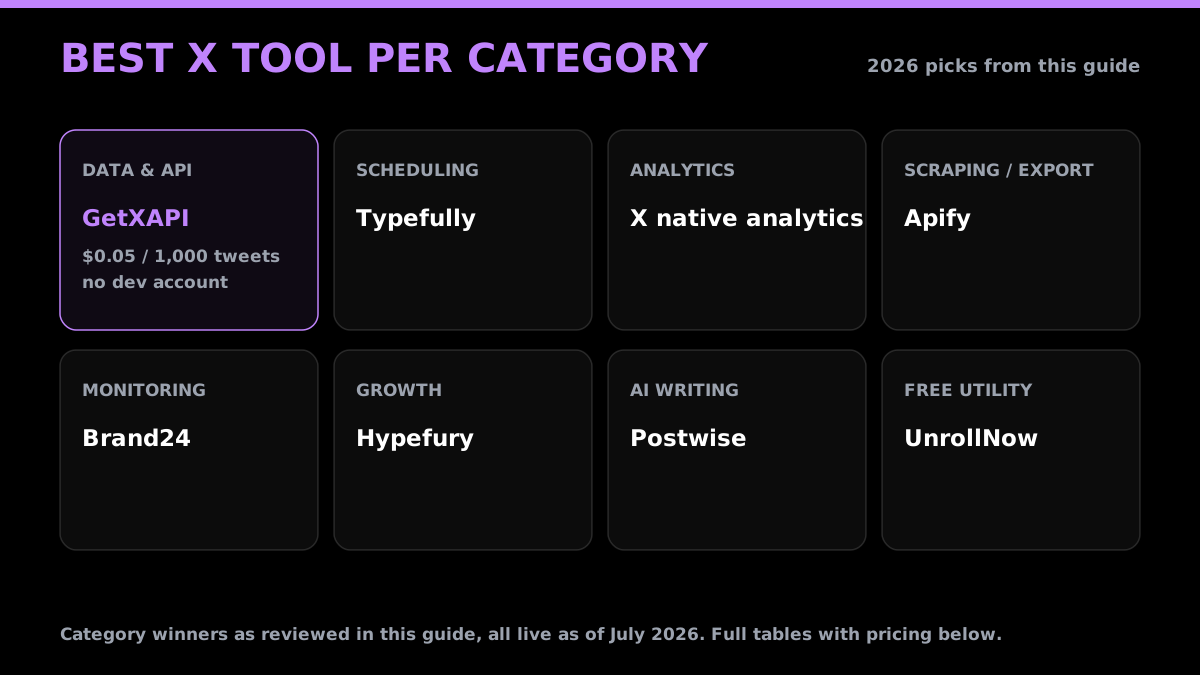
Quick pick: the best Twitter/X tool per category
| Category | Best pick | Why |
|---|---|---|
| Data & API | GetXAPI | Cheapest read + write API, $0.05 / 1,000 tweets, no dev account |
| Scheduling | Typefully | Cleanest thread editor, loved by power users |
| Analytics | X native analytics | Free, first-party, accurate |
| Scraping / export | Apify | Pre-built no-code scrapers, JSON/CSV export |
| Monitoring | Brand24 | Real-time mentions + AI sentiment, mid-market price |
| Growth | Hypefury | Scheduling plus growth automation in one |
| AI writing | Postwise | Voice-matched AI ghostwriter |
| Free utility | UnrollNow | Thread unroller, no login |
Twitter/X data and API tools
This is the category most listicles skip, and it is the one that changed most in 2026. If you are building a product, dashboard, sentiment model, or AI agent, this is your foundation.
| Tool | What it does | Pricing | Best for |
|---|---|---|---|
| GetXAPI | Read + write X data API (search, profiles, followers, timelines, DMs, posting) with an MCP server for AI agents | $0.001 / call (~$0.05 / 1,000 tweets); $0.10 free credit | Cost-sensitive read + write, no dev account |
| twitterapi.io | REST + WebSocket X data API, no OAuth | ~$0.15 / 1,000 tweets, pay-per-call | Real-time streaming needs |
| Official X API | First-party API, authoritative source | Pay-per-use, per-post (docs.x.com) | User-delegated actions, compliance |
| Apify | 20+ pre-built Twitter/X scraper actors | Platform credits, pay-as-you-go | No-code scraping, exports |
| Bright Data | Enterprise scraping + prebuilt X datasets | Enterprise / dataset pricing | Very large, compliance-heavy jobs |
Where GetXAPI fits. GetXAPI is the cheapest way to read and write Twitter/X data programmatically. Most endpoints cost $0.001 per call, and because a single call returns about 20 tweets, that works out to roughly $0.05 per 1,000 tweets. There is no subscription, no X developer account, and no endpoint-specific quota: you sign up with email, copy a bearer token, and call any of its 50+ read and write endpoints. New accounts get $0.10 in free credits (about 2,000 tweets) with no card. For a full provider-by-provider cost breakdown, see our cheapest Twitter API ranking, and to model your own spend use the Twitter API cost calculator.
If you are choosing between the two most-compared options, our GetXAPI vs twitterapi.io breakdown covers the differences. For the scraping-specific angle, see best Twitter API for scraping.
Scheduling and publishing tools
The core creator category: write, queue, and publish threads and posts.
| Tool | What it does | Pricing (2026) |
|---|---|---|
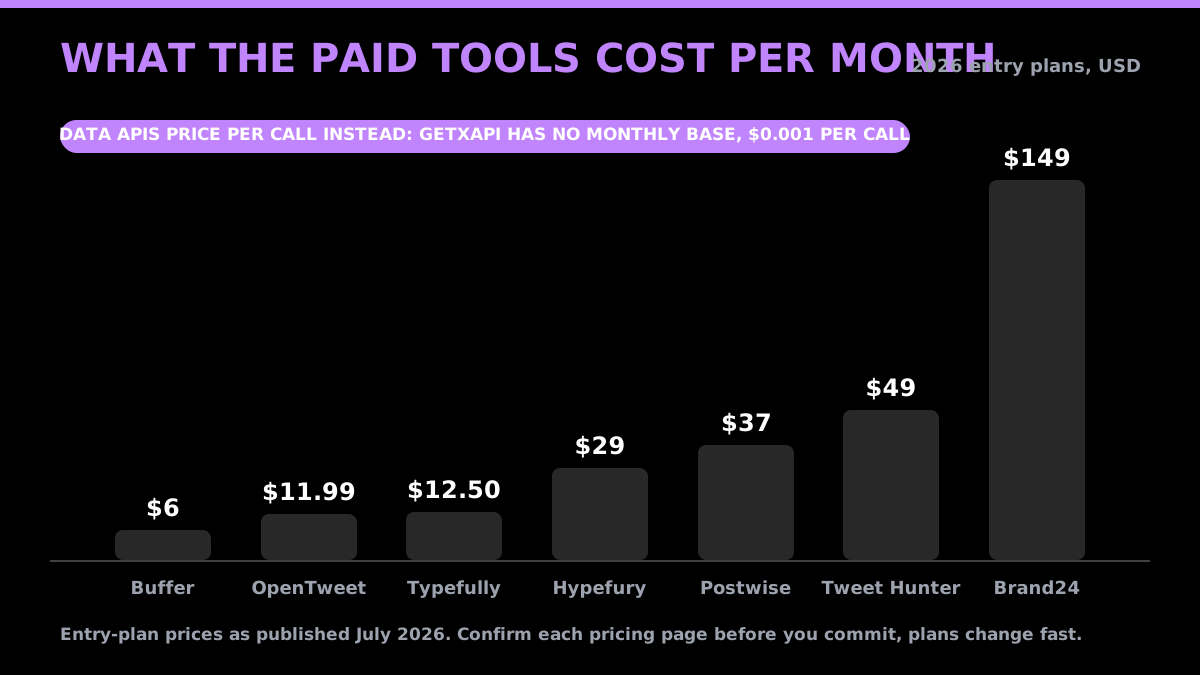
| Typefully | Clean thread editor + scheduling, analytics | Indie ~$12.50/mo, Creator ~$29/mo |
| Hypefury | Scheduling + growth automation (auto-plug, recycling) | Starter ~$29/mo and up |
| Buffer | Simple multi-platform scheduler | Free (3 channels); paid from ~$6/mo per channel |
| OpenTweet | Scheduler with analytics on every plan, agent-queryable | From ~$11.99/mo |
| Publer | Multi-platform scheduling incl. threads | Free + paid tiers |
Typefully is the pick for writers who care about the drafting experience. Hypefury is the pick if you want scheduling and growth automation in one place.
Start building with GetXAPI
$0.05 per 1,000 tweets. $0.10 free credits. No credit card required.
Analytics tools
| Tool | What it does | Pricing (2026) |
|---|---|---|
| X native analytics | First-party dashboard at analytics.x.com | Free with account |
| Followerwonk | Deep follower and audience analysis, competitor compare | Freemium |
| Keyhole | Real-time hashtag and campaign analytics | Paid |
| Audiense | Audience intelligence and segmentation | Freemium to paid |
| X Pro (ex-TweetDeck) | Column-based monitoring | Behind X Premium |
Start with the free native analytics. Add Followerwonk if you need audience or competitor depth. If you need analytics on data X's dashboard does not expose, pull the raw numbers yourself with a data API and build your own view.
Scraping and export tools
| Tool | What it does | Pricing (2026) |
|---|---|---|
| Apify Tweet Scraper V2 | High-volume tweet/profile/search scraping | Pay-as-you-go |
| Scweet | Open-source Python scraper, no API key | Free (open source) |
| Bright Data scrapers | Production scraping above 1M tweets/mo | Enterprise |
| Circleboom | Follower analysis + bulk cleanup and export | Paid |
No-code teams reach for Apify; Python developers who want a free option use Scweet, though open-source scrapers break whenever X changes its frontend. If reliability matters, a maintained pay-per-call API removes that maintenance tax. We cover the trade-off in detail in Apify Twitter Scraper vs GetXAPI.
Monitoring and social listening tools
| Tool | What it does | Pricing (2026) |
|---|---|---|
| Brandwatch | Firehose-level enterprise listening | Enterprise |
| Brand24 | Real-time mentions + AI sentiment + spike alerts | From ~$149/mo |
| Meltwater | Enterprise media and social monitoring | Enterprise |
| Mention | Affordable brand monitoring | Mid-tier |
| Syften | Keyword alerts for indie and SaaS founders | Budget |
Brand24 hits the sweet spot for most teams. Enterprises with compliance needs go to Brandwatch or Meltwater. Budget-conscious founders watching a few keywords can use Syften, or build lightweight monitoring on top of a data API and the cost calculator to keep spend predictable.
Growth and engagement tools
| Tool | What it does | Pricing (2026) |
|---|---|---|
| Tweet Hunter | AI ghostwriter, scheduling, inspiration library | From ~$49/mo |
| Hypefury | Growth automations + scheduling | From ~$29/mo |
| Reply assistants (Witty, Twitply, ReplyBoss) | AI-assisted replies and engagement | Paid |
These tools help you post consistently and engage at scale. Watch automation limits, since aggressive auto-engagement can put an account at risk. If your posts stop showing up in search, a quick shadowban check tells you whether the account has a search ban.
The cheapest Twitter API. Try it free.
$0.05 per 1,000 tweets. $0.10 free credits. No credit card required.
AI and automation tools
The fastest-moving category in 2026. Two things are happening: AI that writes tweets, and AI that reads and acts on X.
| Tool | What it does | Pricing (2026) |
|---|---|---|
| Postwise | Voice-matched AI ghostwriter, multiple variations | From ~$37/mo |
| Grok | X's native AI, built into the platform | X Premium |
| GetXAPI (MCP) | Feeds live X data to AI agents and LLMs via an MCP server | Usage-based |
The bigger 2026 shift is agents that query live X data, not just write posts. GetXAPI ships an MCP server that plugs into Claude, Cursor, and any MCP client, so an AI agent can search tweets, pull profiles, and post on your behalf through one connection. That is the difference between AI that drafts a tweet and AI that can actually read and act on X.
Free Twitter/X utilities
No login, no cost, genuinely useful.
- UnrollNow and OpenTweet Thread Reader: unroll threads into a readable article.
- TwitterShots: unroll a thread to PDF.
- SocialBee and PostWizard: free character counters (PostWizard uses X's own twitter-text library for exact counts).
- CyberTrickz Tweet Splitter: split long text into 280-character posts.
Tools that shut down in 2026 (check before you trust a listicle)
Many older "best Twitter tools" posts still recommend tools that no longer exist. Do not rely on these:
- Tweepi: closed after the 2023 API price increase.
- Black Magic: acquired by Hypefury in 2023, now winding down.
- Original TweetDeck: folded into X Premium as X Pro.
- RiteTag, Daily 140, Twitonomy: dead or dormant.
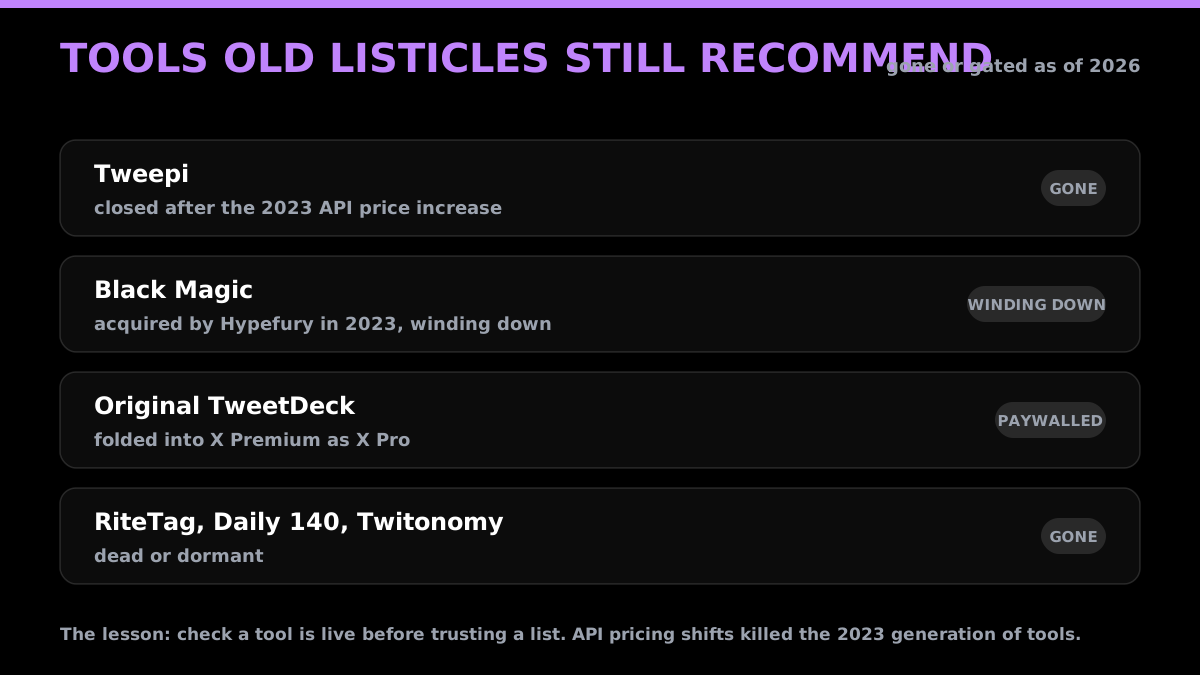
The lesson: freshness matters. A tool that was great in 2023 may be gone in 2026, and the API pricing shift is why. Always confirm a tool is live and priced as advertised before you build on it.
How to build your Twitter/X tool stack
You do not need 20 tools. Most people need three or four:
- A scheduler to write and queue posts (Typefully or Hypefury).
- An analytics view to see what works (X native, plus Followerwonk if you go deeper).
- A monitoring tool if you track a brand or keywords (Brand24).
- A data API if you build anything programmatic, from a dashboard to an AI agent (GetXAPI for the cheapest read + write access).
The one category people forget is the data layer. As soon as you want data X's own dashboard does not show, or you want an AI agent to read and act on X, you need an API, and after the 2026 pricing change the cheapest path is a pay-per-call third-party provider rather than the official API.
Start building on the cheapest Twitter/X data API
If your stack needs live Twitter/X data, GetXAPI is the cheapest way to get it: $0.001 per call (about $0.05 per 1,000 tweets), no subscription, no X developer account, 50+ read and write endpoints, and an MCP server for AI agents. New accounts get $0.10 in free credits with no card, enough to test every endpoint.
Get a free API key and start pulling data in minutes, or read the API docs first. Compare the full field on our Twitter API alternatives page.
Frequently Asked Questions
It depends on the job. For writing and scheduling, Typefully and Hypefury lead. For analytics, X's native dashboard plus Followerwonk. For monitoring, Brand24 and Brandwatch. For pulling Twitter/X data programmatically, GetXAPI is the cheapest option at $0.05 per 1,000 tweets, alongside twitterapi.io, Apify, and the official X API. The right stack is usually one scheduler, one analytics tool, and (for developers) one data API.
It is the authoritative source and the only way to use X's supported user-delegated flows. The current public pricing page lists prepaid pay-per-use and custom Enterprise access, with no general public Free, Basic, or Pro plan listed. Reads are billed by resource. For read-heavy work, compare the official resource-level price with a third-party API's per-result cost.
A pay-per-call third-party API. GetXAPI charges $0.001 per call (about 20 tweets per call, so roughly $0.05 per 1,000 tweets) with no subscription and no X developer account. That is roughly 3x cheaper than twitterapi.io and far below the official X API's per-post read pricing for most read workloads.
X's native analytics is free with any account. Buffer has a free tier for three channels. For utilities, thread unrollers like UnrollNow and character counters from SocialBee or PostWizard are free and need no login. On the data side, GetXAPI gives new accounts $0.10 in free credits (roughly 2,000 tweets) with no credit card required.
Several. Tweepi closed after the 2023 API price hike. Black Magic (acquired by Hypefury in 2023) is winding down. The original standalone TweetDeck moved behind X Premium as X Pro. Legacy tools like RiteTag, Daily 140, and Twitonomy are dead or dormant. Many older listicles still recommend them, so check that a tool is live before you rely on it.
Check out similar blogs
More guides on the Twitter/X API, scraping, and pricing.

The Best Twitter (X) API Alternatives in 2026, Compared
The best Twitter / X API alternatives in 2026, ranked and compared: managed pay-per-call APIs, web-data marketplaces, and open-source libraries, with real per-1,000-tweet costs.

How to Like a Tweet via API in 2026 (No Dev Account)
Like (favorite) tweets programmatically via API in 2026 without an X developer account. The auth_token model, working curl, Python, and Node code, and per-call cost.

How to Build a Twitter Bot in 2026: The Complete Guide
Build a Twitter bot in 2026 with no-code or Python. Working Tweepy and requests code, auth explained, and the cheap API path at $0.05 per 1,000 reads.

Post Tweets via API With Authentication in 2026 (No Developer Account)
Post tweets, threads, and media through an API without an X developer account. The auth_token model, working Python and Node code, rate-limit safety, and per-call costs.

How to Detect X (Twitter) Bots: A Practical, Data-Backed Method
A practitioner method for Twitter bot detection: the real signals (views-to-likes ratio, account age, posting cadence, follower pattern, amplification), runnable API code to pull each one, and a scoring rubric you own.

How to Handle Twitter API 429 Errors with Retry and Backoff
A developer playbook for Twitter/X API 429 responses: reading x-rate-limit headers, retry-with-backoff patterns, per-endpoint queues, and how to avoid getting throttled at scale. For the full per-endpoint limit reference, see the rate limits page.

Twitter API Cost per 1,000 Tweets: Workload Examples
How to calculate your real Twitter API cost: per-1,000-tweet math, 10K to 1M read workloads, mixed read/write/DM examples, pagination and dedup assumptions, and reusable formulas.

Twitter API Tutorial 2026: The Complete Developer Guide
A current 2026 Twitter API tutorial covering authentication, endpoints, code, rate limits, verified official prices, and a third-party public-data path.
Featured in
Where GetXAPI's data and pricing get cited.

The hidden line item in your AI side project: X data
Indie Hackers post on the often-overlooked cost of X data for AI side projects, citing GetXAPI as the usage-based way to pull live Twitter data without a five-figure X developer contract.

How Companies Are Learning to Read Market Mood in Real Time
Editorial feature on Big News Network examining how companies read market mood from X in real time, citing GetXAPI as the usage-based Twitter API that prices live social listening by the call instead of a five-figure annual contract.

How Companies Are Learning to Read Market Mood in Real Time
Syndicated feature on Business Newswire on how companies read market mood from X in real time, citing GetXAPI as the usage-based Twitter API that prices live social listening by the call.

Working with Twitter/X Data: A Practical Skill for IT Students and Professionals in 2026
Guide on SIIT (Scholars International Institute of Technology) on collecting live Twitter/X data as a practical developer skill, citing GetXAPI as the per-call Twitter data API that makes it affordable without an X developer account.

Adding Twitter/X Data to Your App in 2026: A Developer's Integration Guide
Developer integration guide on Programming Insider covering how to add live Twitter/X data to an app in 2026, comparing the official X API v2 with a key-based REST approach and citing GetXAPI as the low-cost per-call option with no developer-account approval.

6 Twitter/X Scraping Solutions for Every Budget
Roundup on TechBullion of the leading Twitter/X scraping solutions, ranking GetXAPI first as the cheapest option at $0.001 per call (about $0.05 per 1,000 tweets) with clean JSON output and no monthly minimum.

The Data Bill Behind Every Social Analytics Tool
Editorial piece on SpeakRJ examining the underlying data costs behind social analytics tools, citing GetXAPI as the usage-based way to source live X data by the call.

What Is AI Sentiment Analysis, and What Does Each Layer Cost?
Explainer in AI Journal breaking sentiment analysis into its data, model and reporting layers and what each costs to run, citing GetXAPI for pulling public X posts on pay-per-call pricing.

Why Enterprise AI Agents Still Cannot Read Social Data
Analysis piece in The Silicon Review on why enterprise agents reach internal systems easily but struggle with public social data, citing GetXAPI's MCP server and data-as-a-service model as one route to close the gap.