Post Tweets via API With Authentication in 2026 (No Developer Account)
Post tweets, threads, and media through an API without an X developer account. The auth_token model, working Python and Node code, rate-limit safety, and per-call costs.

Posting a tweet from your own code used to mean one thing: an X developer account, an app, an OAuth 2.0 flow, and prepaid pay-per-use credits on top. In 2026 that is still the official path, and it is still the slowest part of building anything that writes to X. The faster route is a third-party write API that authorizes posts with a registered session token instead of the full developer-portal handshake. You keep one Bearer key, register the X account you want to post from once, and call a single endpoint to publish.
TL;DR: You can post tweets, threads, and media through an API without an X developer account. A third-party write API like GetXAPI authorizes writes with your registered X
auth_token(the browser session cookie) plus one Bearer key, so there is no developer-portal application, no OAuth handshake, and no subscription. A tweet create call costs $0.002 flat, text or media. The official X API still works but needs a developer account and app, OAuth 2.0 with PKCE, and $0.015 per post ($0.20 if the post contains a URL). The rest of this guide shows the auth model, working Python and Node code for posting, replies, threads, and media, plus rate-limit safety and error handling.
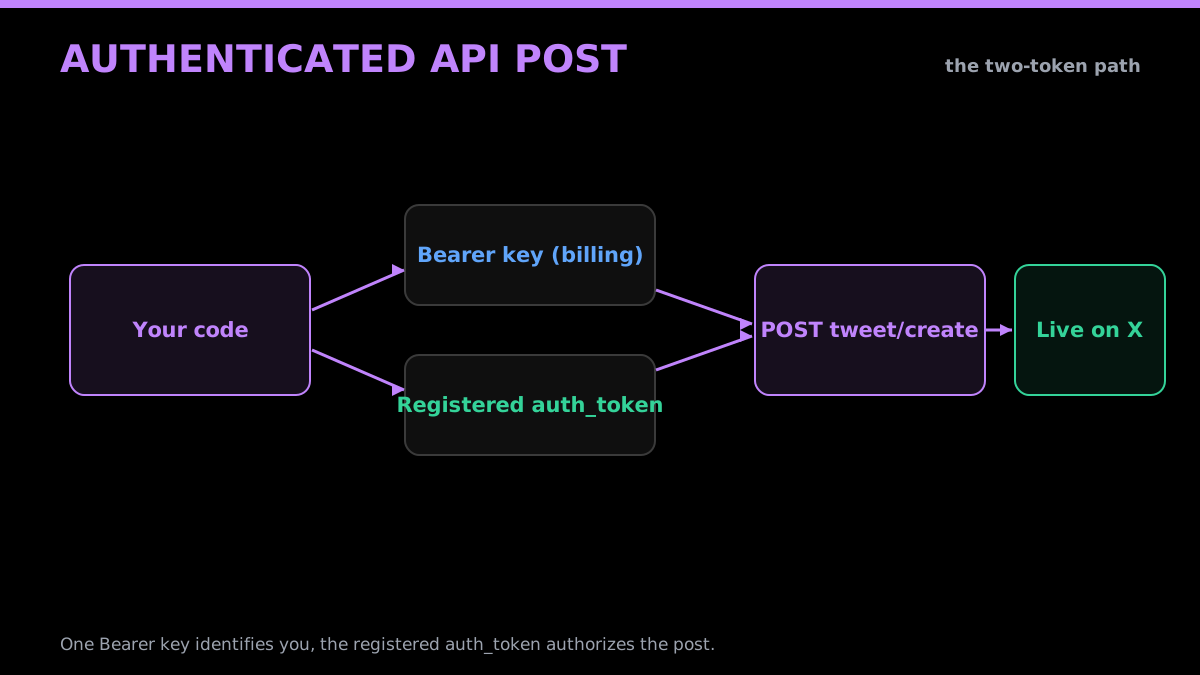
How an authenticated API post reaches X
This is a write-path tutorial. If you only need to read public tweets, the auth model is simpler and you do not need an account session at all, the Python Twitter API tutorial covers that case. Here the goal is publishing: getting your code to put a tweet, a reply, a thread, or a post with an image onto a real timeline, with the authentication that requires and the costs and safety limits that come with it.
How Do You Post a Tweet via API Without a Developer Account?
You post without a developer account by using a write API that authorizes on your behalf with a session token rather than an app-level OAuth grant. The official X API ties writes to a developer app and prepaid pay-per-use credits. A third-party write API instead registers the account you control, using its auth_token, and lets you publish with a single Bearer key. No developer portal, no app, no consent screen.
The distinction matters because "post a tweet via API" splits into two very different jobs. One is the official developer experience: create the developer account and app, build the OAuth flow, pay per write. The other is operational: you already control an X account and you want code to post from it. For the second job, the developer-account requirement is pure overhead, and that is the gap third-party write APIs fill.
Here is the difference in concrete terms across the two paths.
| Step | Official X API | Third-party write API |
|---|---|---|
| Account setup | Developer account and app required | None, you sign up with email |
| App registration | Create an app in the console | None |
| Auth to post | OAuth 2.0 + PKCE, 3-legged | Register auth_token once, then Bearer key |
| Billing | Prepaid pay-per-use credits | Pay per call |
| Cost per post | $0.015 ($0.20 with a URL) | $0.002 flat |
| Time to first post | After account and app setup | Minutes |
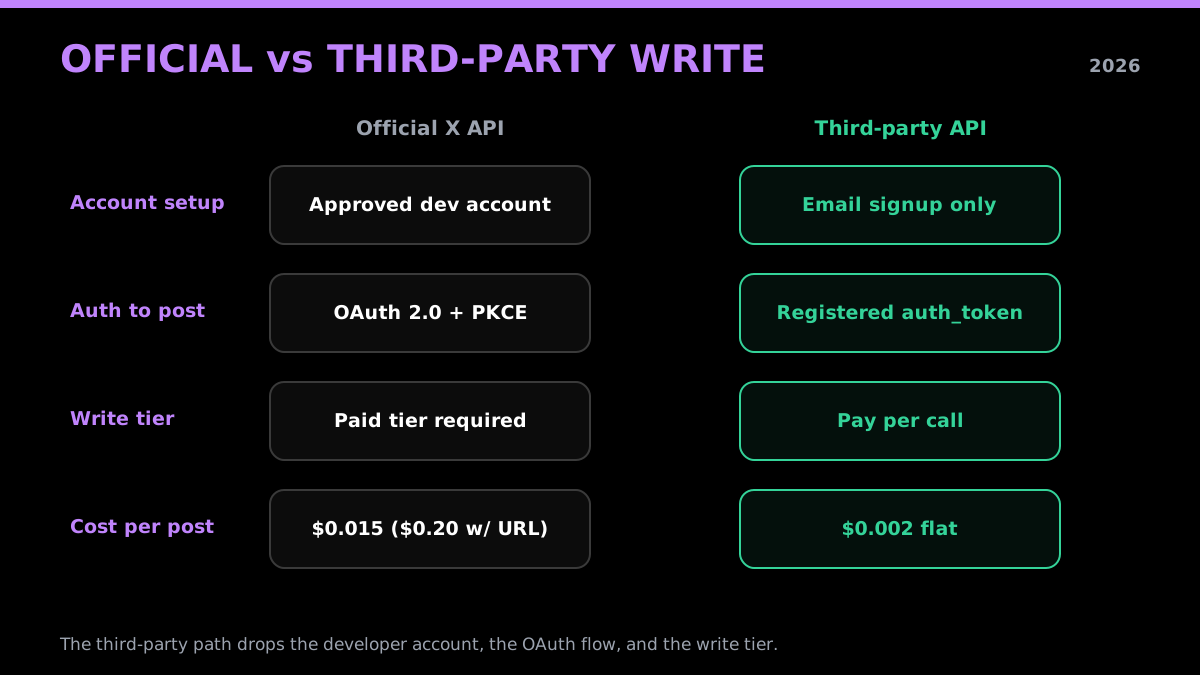
Official write path versus a third-party write API
The current X API pricing page lists prepaid pay-per-use and custom Enterprise access. It does not list a general public Free tier or publish a complete legacy-account migration history. Check the endpoint documentation and Developer Console for the access attached to an official app. The is the Twitter API free guide explains the current public offer, and the how to get a Twitter API key walkthrough covers credential generation.
The Two-Token Auth Model: Your API Key Plus an X auth_token
The write API uses two credentials that do two different jobs. The first is your GetXAPI Bearer key, which identifies and bills your account, the same key you use for reads. The second is the X auth_token of the account you want to post from, which authorizes the write against that specific timeline. The Bearer key says "this is my account, charge me," and the registered auth_token says "post this as @yourhandle."
Reads do not need the second token because public tweet data comes from a shared pool, so a read call only carries your Bearer key. Writes are different: a post, reply, like, or delete acts on one real account, and the platform needs that account's session to accept the action. You register the auth_token once against your GetXAPI account, and from then on every write call is gated by your API key and tied to the registered X account, so the create call body itself only needs the tweet text.
import os
import requests

# Your GetXAPI Bearer key (reads AND billing). Read-only sanity check:
# confirm the key works before you wire up any write calls.
API_KEY = os.environ["GETXAPI_KEY"]

resp = requests.get(
    "https://api.getxapi.com/twitter/user/info",
    params={"userName": "GetXAPI"},
    headers={"Authorization": f"Bearer {API_KEY}"},
)
resp.raise_for_status()
me = resp.json()["data"]
print("key works, sample lookup:", me["userName"], "->", me["id"])
That call is a read, so it only needs the Bearer key, and it is the cleanest way to confirm your credentials before posting. Run it first. If it returns a user object, your key is valid and the only thing left to wire up is the account session that authorizes writes. Your auth_token is used in-flight to execute each write and is never written to disk, the same handling the privacy and data handling page describes for every POST endpoint.
Good API design follows resource-oriented principles with clear, single-responsibility operations: POST /users/{id}/follow + DELETE /users/{id}/follow, separate verbs for separate semantics (create vs. destroy a relationship). Textbook.
@tomilola_ng view on X
The split between your billing key and the account session is what lets one GetXAPI account post from several X accounts: you register each account's auth_token and target whichever one you need. The MCP integration wraps this same model so an agent can post through the registered account with one tool call, and the GetXAPI vs Tweepy comparison lays out how the two-token model differs from Tweepy routing every write through the official API.
Where Does the X auth_token Come From?
The auth_token comes from a logged-in X session, and there are two practical ways to get it. The first is reading it from your browser: when you log in to x.com, the platform sets an auth_token cookie, and you can copy its value from your browser's developer tools. The second is a login endpoint that exchanges a username, password, and (when enabled) a two-factor code for a fresh session token programmatically, which is the better path for automation because it can re-authenticate on its own when a token expires.
Browser extraction is the fastest way to get posting in the first five minutes, and it is fine for a single account you manage by hand. Programmatic login is what you want for anything that runs unattended, because session tokens do not last forever, and a script that can log itself back in survives an expiry without a human copying a cookie at 3 a.m. Whichever you use, you register the resulting token once, and the API holds the session reference, not the raw credentials.
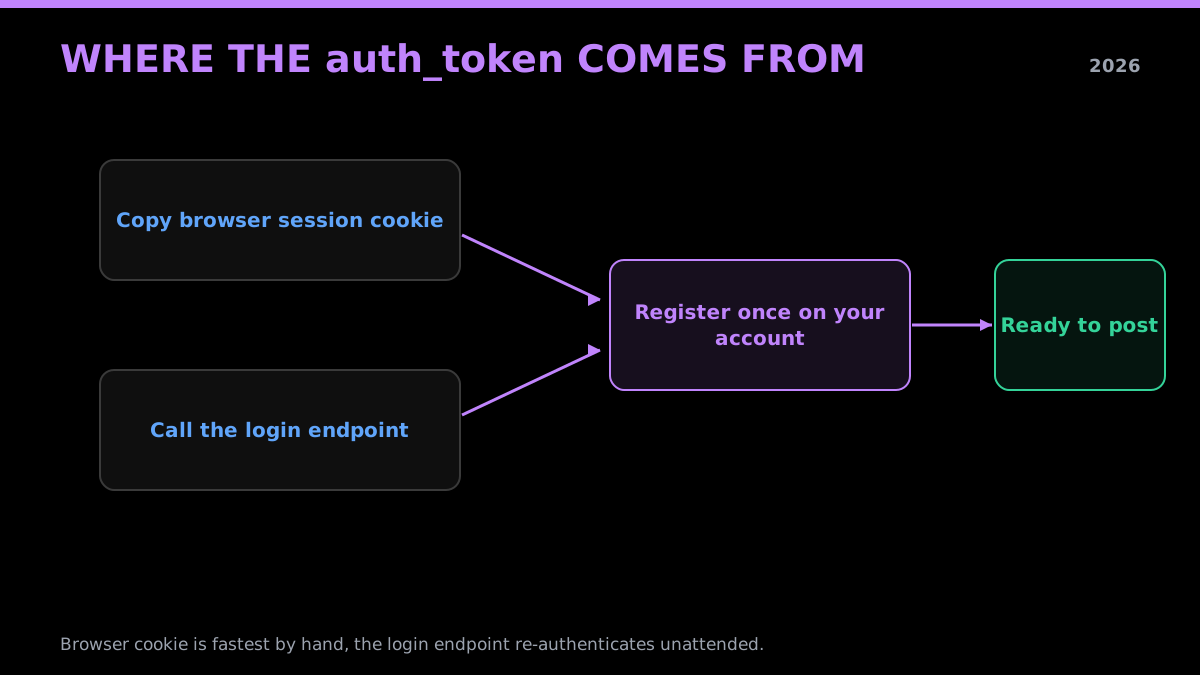
Two paths to a registered auth_token
A few practical notes save time here. Treat the auth_token like a password, because functionally it is one: anyone holding it can act as the account until it is revoked or expires. Log out of stray sessions you do not recognize, since logging out invalidates old tokens. And register the token to the account you actually intend to post from, not your personal main, if you are building a bot, the same way you would create a dedicated DM-sending account rather than wiring automation into a personal profile.
the r/Python thread on a Twitter API wrapper that works without official API keys from r/Python
Posting Your First Tweet (A Working Example)
Once the account session is registered, posting is a single call. You send a POST to the tweet create endpoint with the text you want to publish and your Bearer key in the header, and the API publishes it as the registered account and returns the new tweet's ID. That ID is what you keep if you plan to reply to your own post, build a thread, or delete it later.
Here is the create call in Python. Note the guard: the script only fires the actual post when an X_AUTH_TOKEN is present in the environment, so you can run the file safely while wiring things up without publishing anything by accident. That guard is good practice for any destructive or public-facing call.
import os
import sys
import requests

API_KEY = os.environ["GETXAPI_KEY"]
# The registered account session. Absent here = nothing is posted.
AUTH_TOKEN = os.environ.get("X_AUTH_TOKEN")

def post_tweet(text):
    resp = requests.post(
        "https://api.getxapi.com/twitter/tweet/create",
        json={"text": text, "auth_token": AUTH_TOKEN},
        headers={"Authorization": f"Bearer {API_KEY}"},
        timeout=30,
    )
    resp.raise_for_status()
    return resp.json()["data"]["id"]

if not AUTH_TOKEN:
    print("Set X_AUTH_TOKEN to your registered auth_token to publish. Nothing posted.")
    sys.exit(0)

tweet_id = post_tweet("Shipping a small thing today. Posted from a script.")
print("posted:", tweet_id)
The same call from the terminal with curl, useful for a quick check once your token is set:
curl -s -X POST "https://api.getxapi.com/twitter/tweet/create" \
  -H "Authorization: Bearer $GETXAPI_KEY" \
  -H "Content-Type: application/json" \
  -d "{\"text\": \"Posted from curl.\", \"auth_token\": \"$X_AUTH_TOKEN\"}" \
  | head -c 200 || true
The response carries the new tweet ID and the text echoed back, so you can confirm the post landed without opening the app. Each create call is billed at $0.002 whether the post is one word or the full character limit. If your stack is JavaScript, the same endpoint works from Node with the built-in fetch API, no SDK required.
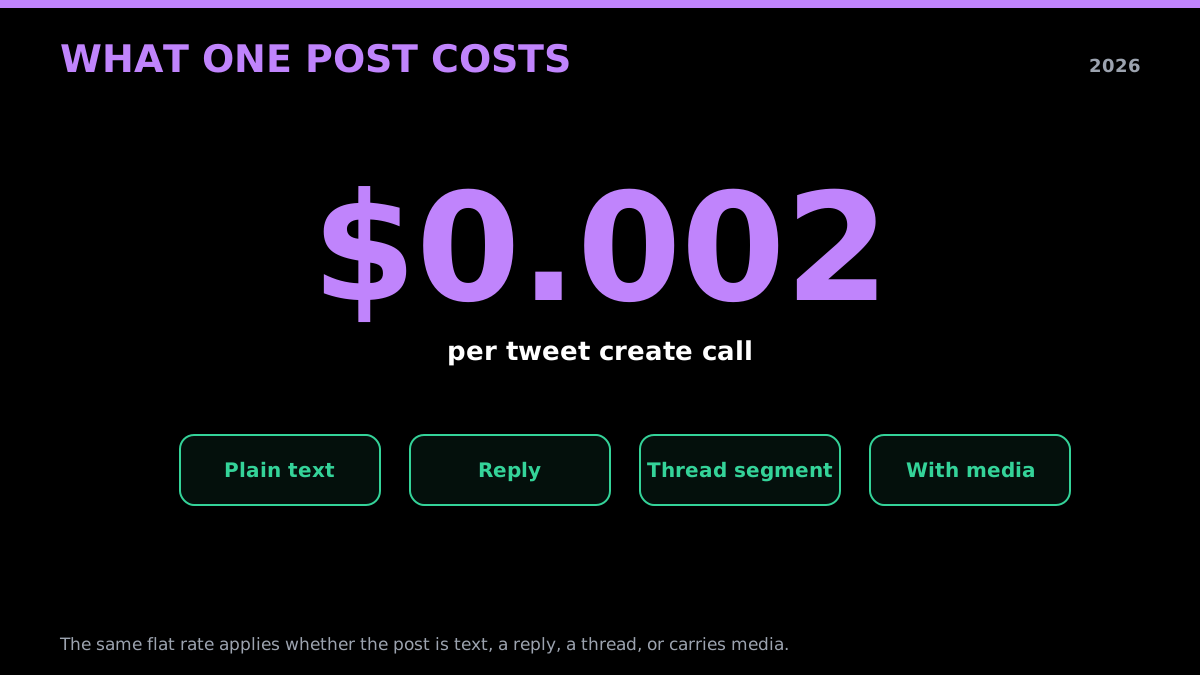
One flat rate for every kind of post
For a clean integration, store the returned tweet ID with whatever record triggered the post, so your system always knows which tweet maps to which event. That mapping is what makes replies, deletes, and engagement tracking possible later. The read side of that loop, pulling the post back with its metrics, is covered in the Python Twitter API tutorial, and the full endpoint set lives in the changelog.
Start building with GetXAPI
$0.05 per 1,000 tweets. $0.10 free credits. No credit card required.
How Do You Post a Thread or a Reply?
A thread is a chain of replies, not a special endpoint. You post the first tweet, capture the returned ID, then post the next tweet with reply_to_tweet_id set to that ID, capture its ID, and continue. A standalone reply to someone else's tweet works the same way: you set reply_to_tweet_id to their tweet's ID. There is no separate thread API, the reply pointer is what stitches the sequence together into a connected chain on the timeline.
The one thing to get right is sequencing. Each segment must reference the immediately previous tweet's ID, so you post strictly in order and thread off the ID you just received, not the root. Put a short, slightly varied delay between segments, both because the second tweet cannot reference an ID that does not exist yet, and because a five-tweet burst posted in one second reads as automation. A second or two between segments is plenty.
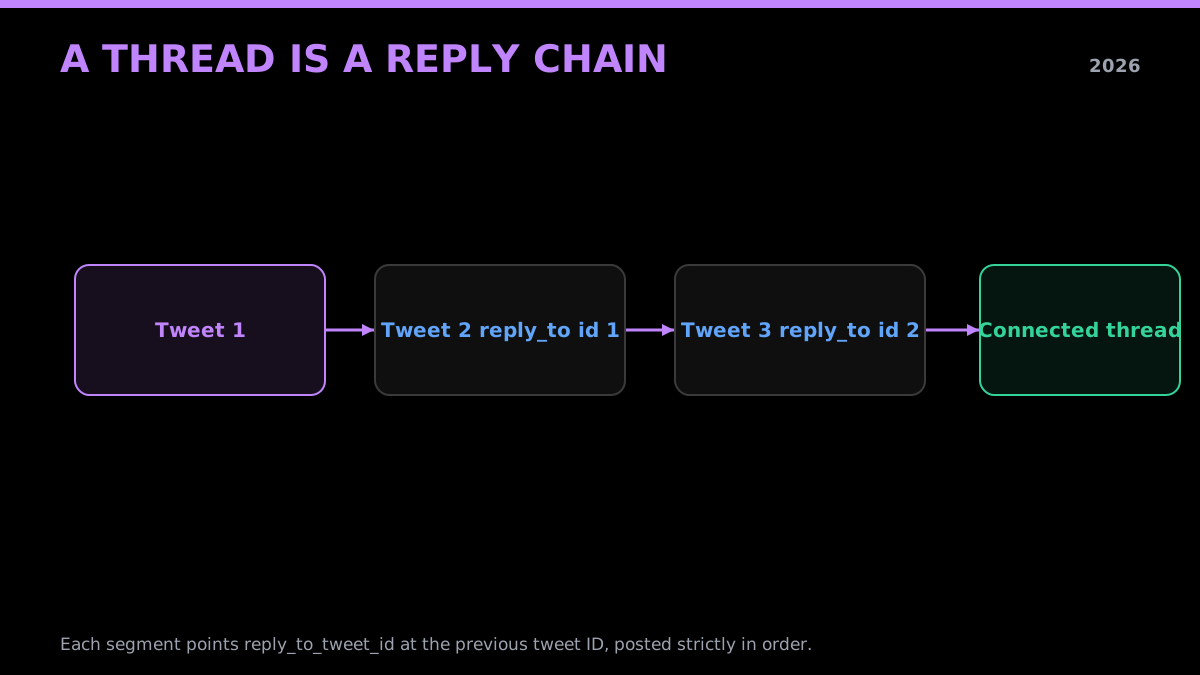
A thread is a reply chain, each segment points at the last
Here is the thread pattern in Node, the stack most posting bots and schedulers run on. The same guard applies, it builds the request but only publishes when a token is present.
const API_KEY = process.env.GETXAPI_KEY;
const AUTH_TOKEN = process.env.X_AUTH_TOKEN;
const BASE = "https://api.getxapi.com/twitter/tweet/create";

async function postSegment(text, replyTo) {
  const body = { text, auth_token: AUTH_TOKEN };
  if (replyTo) body.reply_to_tweet_id = replyTo;
  const res = await fetch(BASE, {
    method: "POST",
    headers: { Authorization: `Bearer ${API_KEY}`, "Content-Type": "application/json" },
    body: JSON.stringify(body),
  });
  if (!res.ok) throw new Error(`HTTP ${res.status}`);
  return (await res.json()).data.id;
}

async function postThread(segments) {
  let lastId = null;
  for (const text of segments) {
    if (!AUTH_TOKEN) { console.log("no token set, would post:", text); continue; }
    lastId = await postSegment(text, lastId);
    await new Promise((r) => setTimeout(r, 1500)); // pace the chain
  }
  return lastId;
}

postThread([
  "A short thread on posting via API. 1/3",
  "Each segment replies to the one before it. 2/3",
  "That reply pointer is the whole trick. 3/3",
]);
Every segment is a separate create call at $0.002, so a three-tweet thread costs $0.006 to publish. Replying to other accounts follows the identical pattern, set reply_to_tweet_id to their tweet and post. If you are building a reply bot that watches for mentions first, the read endpoints that surface those mentions are in the advanced search operators guide, and the polling pattern for watching accounts is in the monitor Twitter accounts walkthrough.
queue tweets and threads in a visual dashboard, post directly via X API if you have credits, compose threads with per-tweet character counts
@CjLogix view on X
Adding Images and Video to an API Post
The create endpoint accepts media three ways, and which one you use depends on where your media already lives. You can pass media_urls, an array of public image or video URLs the API fetches and attaches. You can pass media, base64-encoded bytes uploaded inline with the post. Or you can pass media_ids, IDs of media you uploaded in a prior step and now want to reference. All three sit alongside the same text field, and a media post costs the same $0.002 as a text post.
The right choice is about size and reuse. For a single image already hosted somewhere public, media_urls is the least code. For bytes you hold in memory and do not want to host, base64 media keeps it in one call. For large video, or the same asset reused across many posts, upload once and reference the media_id so each create call stays small and fast instead of shipping the file every time.
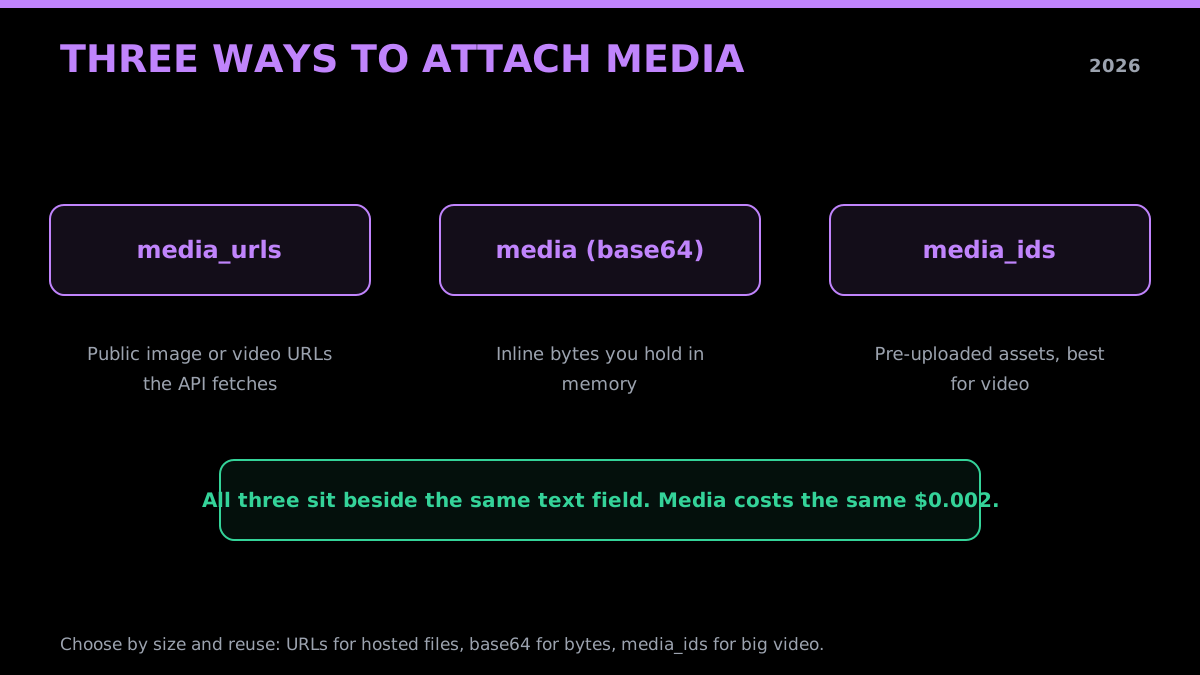
Three ways to attach media to a post
Here is the simplest case, attaching a hosted image by URL:
const res = await fetch("https://api.getxapi.com/twitter/tweet/create", {
  method: "POST",
  headers: { Authorization: `Bearer ${process.env.GETXAPI_KEY}`, "Content-Type": "application/json" },
  body: JSON.stringify({
    text: "Chart of the week.",
    auth_token: process.env.X_AUTH_TOKEN,
    media_urls: ["https://example.com/chart.png"],
  }),
});
const data = await res.json();
console.log("posted with media:", data?.data?.id);
Keep media within X's accepted formats and size limits, oversized or unsupported files return an error rather than a posted tweet. For video especially, the pre-upload-then-reference flow is worth the extra step because it decouples the slow part (transferring the file) from the fast part (publishing), so a transient network hiccup during upload does not cost you a half-posted tweet. The long-form article equivalent of this, publishing X articles rather than tweets, has its own endpoint set covered in the Twitter Article API tutorial.
Posting Into X Communities
A community post is a normal create call with one extra field. You pass community_id, the numeric ID of the community you want to post into, alongside the text, and the API publishes the tweet inside that community instead of to your main timeline. The account whose session you registered must already be a member of the community, otherwise the call returns a 403. Pricing is unchanged at $0.002 per call.
Communities add one wrinkle worth handling in code: moderation. Some communities require a moderator to approve posts before they appear, and for those the API returns HTTP 202 with pending_moderation: true instead of a finished tweet ID. That is not an error, it means the post is queued for review and no tweet ID exists yet. Your code should treat a 202 as "submitted, awaiting approval" rather than retrying, since a retry just queues a duplicate.
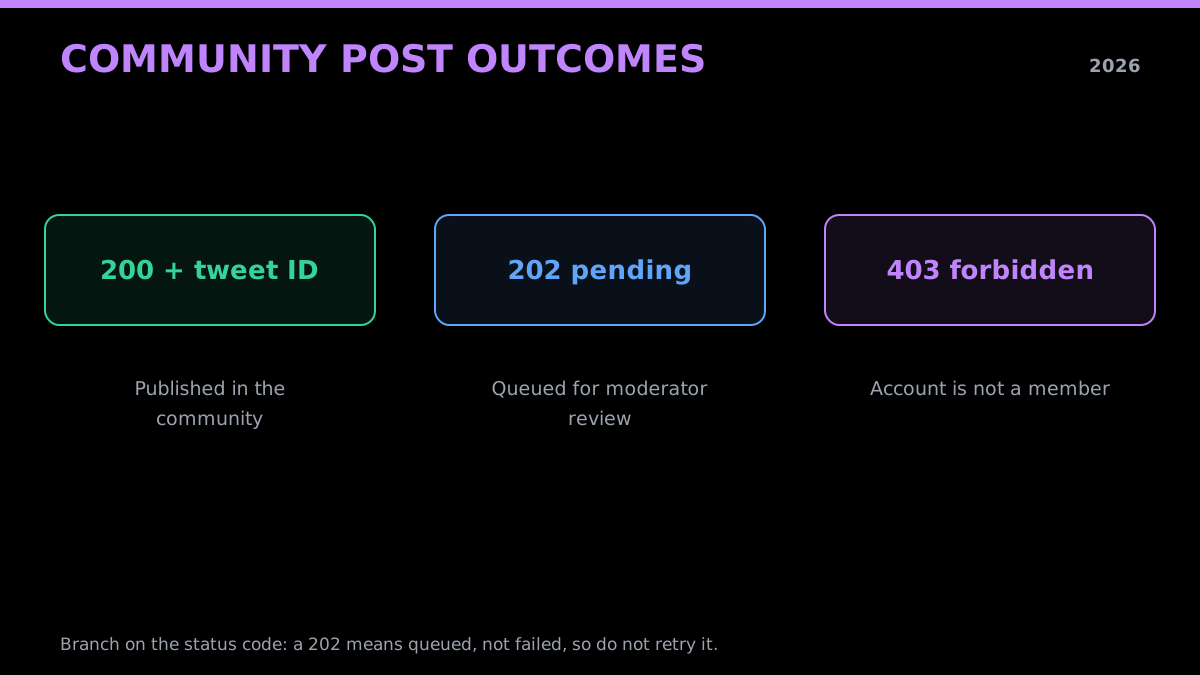
Community posts can land published or pending moderation
The practical rule: branch on the status code. A 200 with a tweet ID means it is live, a 202 with pending_moderation means it is queued, and a 403 means the account is not a member of that community or cannot post there. Both short and long-form (Premium) posts are supported in communities, so the same path handles a quick update and a longer write-up. Both- and long-form publishing depend on the registered account's standing, which is one more reason to post from a dedicated, in-good-standing account rather than a fresh one.
The Official Write Path: OAuth 2.0, PKCE, and Why It Is Slower
The official path authorizes writes with OAuth 2.0 and PKCE, a three-legged flow that exists for good security reasons and adds real setup cost. You register an app in the developer portal, configure a redirect URI, send the user to an X authorization screen, receive an authorization code at your redirect, exchange that code (plus a PKCE verifier) for an access token, and then call the write endpoint with that token. Tokens expire, so you also store a refresh token and rotate it before each expiry.
None of those steps is hard in isolation, but together they are a web server, a consent screen, a token store, and a refresh loop you have to build and keep running before you can post a single tweet. For an app where end users log in with their own X accounts, that is exactly the flow you want, and you should use it. For posting from accounts you already control, it is a lot of moving parts to maintain for an action that is conceptually "publish this text."
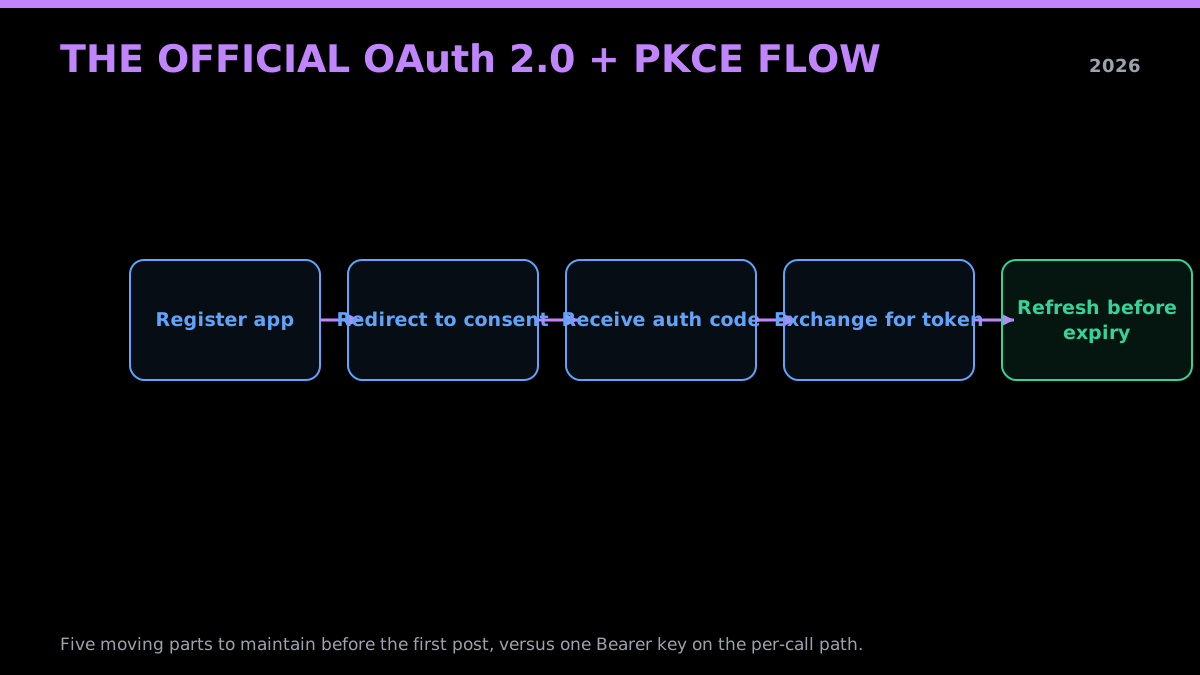
The official OAuth 2.0 PKCE write handshake, step by step
Here is the official create call once you finally hold a user-context access token, for comparison with the single-call third-party version above:
# After the full OAuth 2.0 + PKCE dance yields a user access token:
curl -X POST "https://api.x.com/2/tweets" \
  -H "Authorization: Bearer $X_USER_ACCESS_TOKEN" \
  -H "Content-Type: application/json" \
  -d '{"text": "Hello from the official API"}'
The handshake itself is specified in the OAuth 2.0 framework, with the public-client protection layer defined by PKCE in RFC 7636, and the X-specific authentication steps in the X API authentication docs. If you build against the official API in Python, most teams reach for the community library Tweepy, which wraps the OAuth and refresh details. The tradeoff is the same one the Twitter API v2 vs GetXAPI comparison covers in full: the official flow gives you delegated, per-user auth, and the third-party flow gives you a one-key path for accounts you own.
The cheapest Twitter API. Try it free.
$0.05 per 1,000 tweets. $0.10 free credits. No credit card required.
Rate Limits and Staying Off the Suspension Radar
Posting safely is less about rate-limit numbers and more about not looking like a bot. X suspends or restricts accounts for action velocity (too many writes in a short window), duplicate content (the same text posted repeatedly), and aggressive link posting, none of which is about which API you use. A per-call API removes the platform's per-window request ceiling, but it does not remove the account-level behavior limits, and those are the ones that get accounts suspended.
The patterns that keep an account healthy are concrete. Pace your posts, a handful per hour reads as human, dozens per minute reads as a script. Vary your text instead of firing the identical string under many tweets, since duplicate-content detection is sensitive. Put external links in a reply rather than the main post, because the algorithm distrusts outbound links in the primary body. And warm a new account with normal activity for a while before automating it, since brand-new accounts that immediately start posting at volume are the easiest to flag.
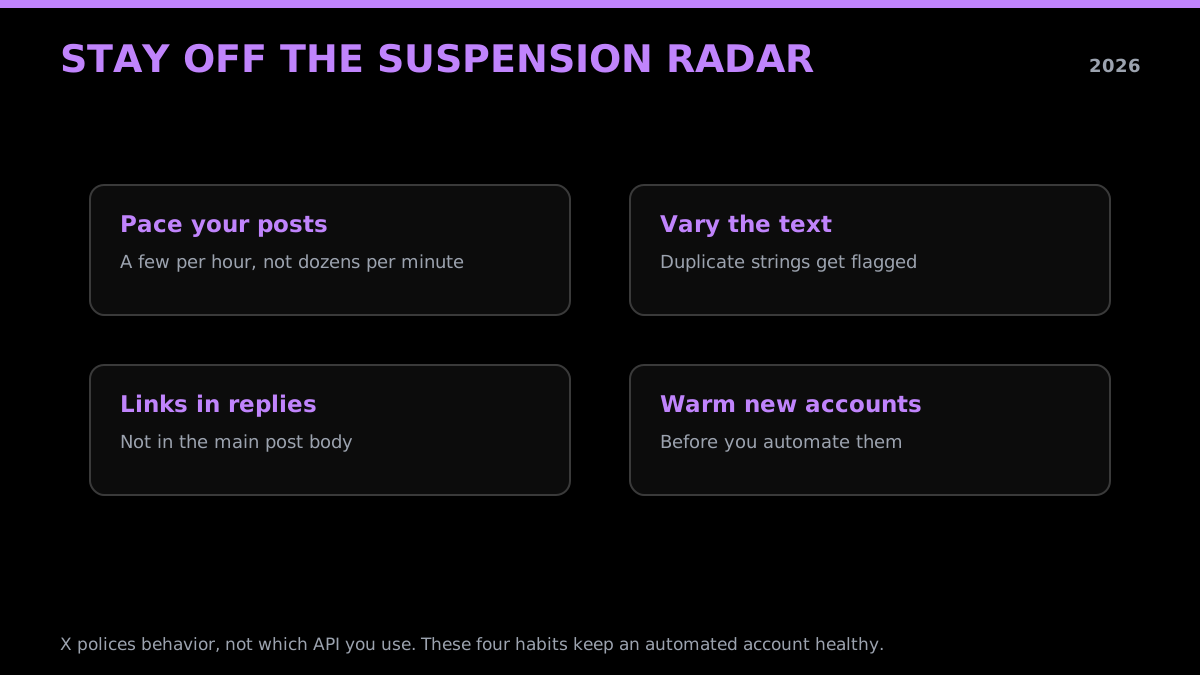
The behaviors that keep an automated account healthy
How I post banger tweets with artificial intelligence // Twitter Bot Tutorial
Fireship walks through building a posting bot on YouTube
https://www.youtube.com/watch?v=V7LEihbOv3Y
X publishes its automation rules, and reading them once is worth more than any rate-limit trick, because they spell out what coordinated and spammy behavior the platform actively polices. The signals the platform uses to flag automated accounts are broken down in the Twitter bot detection guide. On the request side, the per-call model means you are bounded by your credit balance rather than a 15-minute window, but you should still add exponential backoff for transient errors, the same backoff the rate limits guide and the rate limit deep-dive lay out for read traffic. Treat the platform's behavior limits as the real ceiling and you will not hit the suspension radar.
What Does Posting Actually Cost per Call?
A supported tweet create call through GetXAPI costs $0.002. The current official X table lists $0.015 for a standard Post create request and $0.20 for one containing a URL, more than 13 times the standard price. The official page does not establish an April effective date or a prior price.
The gap compounds at volume. A scheduler posting 10,000 plain tweets a month is $20 on a per-call API versus $150 on the official write rate. If those posts carry links, common for newsletters, deal alerts, and content bots, the official side jumps to $2,000 while the per-call side stays at $20, because the per-call rate does not penalize links. These are the numbers that decide whether a posting product is viable at scale.
| Monthly posts | GetXAPI ($0.002) | Official plain ($0.015) | Official with URL ($0.20) |
|---|---|---|---|
| 1,000 | $2 | $15 | $200 |
| 10,000 | $20 | $150 | $2,000 |
| 100,000 | $200 | $1,500 | $20,000 |
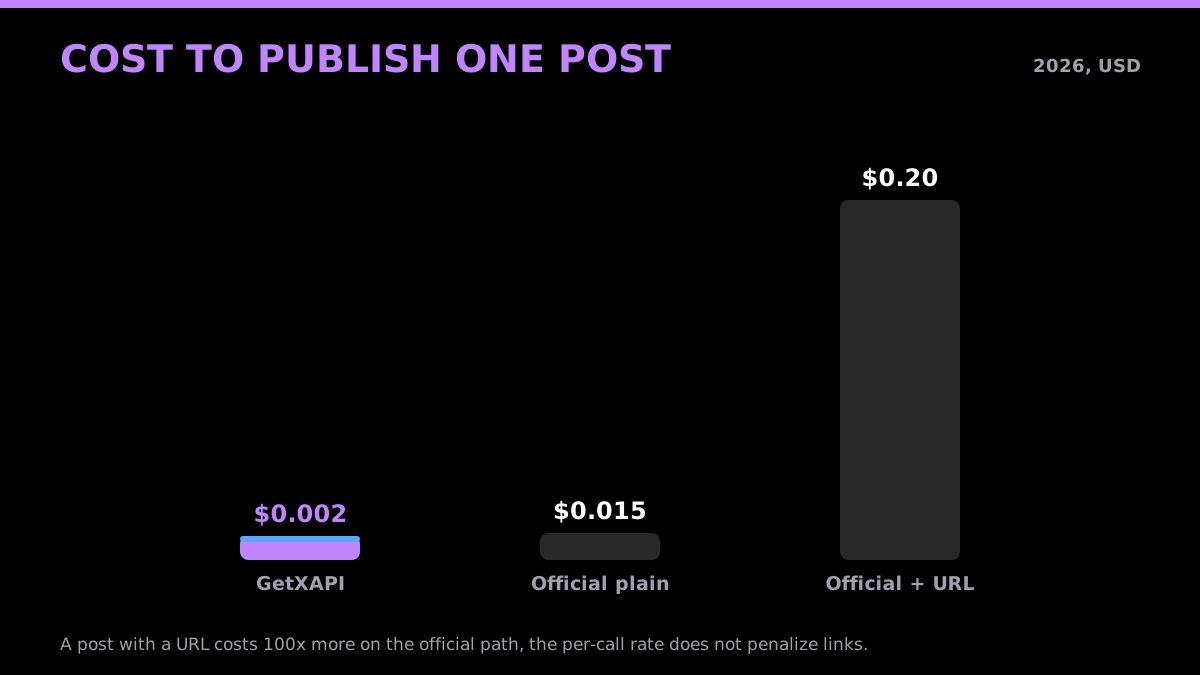
Cost to publish one post, by path
The official rates above were verified on August 4, 2026 against the current X API pricing page. That verification date is not an effective date. Confirm the live table before a large run. The cost calculator, pricing page, and Twitter API cost breakdown model current rates without inventing a change history.
Handling 401, 403, and 429 on Write Endpoints
Three status codes cover almost every write failure, and each points at a specific fix. A 401 means your credentials are bad or expired, on the write path that is almost always a stale auth_token that needs re-registering, since session tokens do not live forever. A 403 means the action is not allowed: deleting a tweet your account does not own, posting to a community you have not joined, or acting from an account that is restricted. A 429 means you are rate limited and should back off and retry after the window resets, not hammer the endpoint.
The fix pattern is the same for all three: wrap every write in a try/except, branch on the status code, and respond to the cause rather than blindly retrying. A 401 should trigger a token refresh, not a retry with the same dead token. A 403 should surface the reason to you, because a retry will fail identically. A 429 is the only one where a retry is correct, and even then it should be an exponential backoff that respects the reset, not an immediate loop.
import os
import time
import requests

def post_with_retry(text, max_tries=4):
    headers = {"Authorization": f"Bearer {os.environ['GETXAPI_KEY']}"}
    body = {"text": text, "auth_token": os.environ.get("X_AUTH_TOKEN", "")}
    for attempt in range(max_tries):
        r = requests.post("https://api.x.com/2/tweets", headers=headers, json=body, timeout=30)
        if r.status_code == 401:
            raise SystemExit("401: credentials invalid or expired. Re-register the auth_token.")
        if r.status_code == 403:
            raise SystemExit("403: action not allowed (ownership, membership, or a restricted account).")
        if r.status_code == 429:
            wait = 2 ** attempt
            print(f"429: rate limited, backing off {wait}s")
            time.sleep(wait)
            continue
        r.raise_for_status()
        return r.json()
    raise SystemExit("gave up after repeated 429s")
The HTTP semantics behind these are worth knowing once: a 403 Forbidden means authenticated but not permitted, and a 429 Too Many Requests means slow down. (The error-handling example above targets the official endpoint and is illustrative; it does not run during publishing.) Reading the status code on every write and mapping it to the right response is the difference between a posting system that self-heals and one that silently drops tweets, and it is the same discipline the scraping best practices guide applies to read pipelines.
Which Posting Path Should You Use in 2026?
The choice comes down to one question: do end users log in with their own X accounts, or do you control the accounts you post from? If users authorize your app to post on their behalf, you want the official OAuth 2.0 path, because delegated per-user consent is exactly what it is built for, and there is no shortcut around real user authorization. If you control the accounts, a per-call write API is faster to ship, cheaper per post, and skips the developer portal entirely.
Most posting work in practice is the second case: schedulers, content bots, alert accounts, and agents posting from accounts the builder owns. For those, the developer account, OAuth flow, and prepaid billing setup are overhead with no payoff, and a registered auth_token plus a Bearer key gets you to a live post in minutes. Match the path to who owns the account, and the decision is straightforward.
an r/n8n builder wiring an automated workflow around the Twitter (X) API from r/n8n
| If you are building | Best posting path |
|---|---|
| An app where users log in with their own X account | Official X API (OAuth 2.0 + PKCE) |
| A scheduler or content bot on accounts you own | Third-party write API ($0.002 per post) |
| A reply or mention bot on your own account | Third-party write API |
| A high-volume link-posting publisher | Third-party write API (no URL penalty) |
| An agent that posts through a tool call | Third-party write API via MCP |
| A regulated app needing per-user audit trails | Official X API |
The pattern is clear: own-account automation belongs on a per-call write API, and per-user delegated posting belongs on the official OAuth path. If your need is the common one, posting from accounts you control without the portal overhead, start with the signup page for a key, register your account's session, and the first post is a single call. To check the math for your volume first, run it through the cost calculator and the pricing page.
Summary
Posting tweets via API in 2026 splits cleanly into two paths. The official one authorizes writes with OAuth 2.0 and PKCE behind a developer account and prepaid pay-per-use credits, at $0.015 per post and $0.20 for a post with a URL. The third-party one authorizes writes with a registered X auth_token plus a single Bearer key, with no developer account, no OAuth handshake, and a flat $0.002 per create call covering text, replies, threads, and media.
For posting from accounts you own, the third-party path is faster to ship and far cheaper at volume, while the official path remains the right choice when end users log in with their own accounts. Either way, the authentication is the real work: get the account session registered, handle 401, 403, and 429 deliberately, pace your posts so you stay off the suspension radar, and the publishing itself is a single call. Start with the pricing page for the per-call rates, grab a key on the signup page, and model your write volume with the cost calculator. If your project also reads public tweets, the best Twitter API for scraping comparison covers the read side of the same stack.
Frequently Asked Questions
Yes. The official X API requires a developer account and app setup on console.x.com plus prepaid pay-per-use credits to post programmatically, but a third-party write API skips both. With GetXAPI you register the X account you want to post from once (using its auth_token, the browser session cookie that keeps you logged in), then call POST /twitter/tweet/create with a single Bearer key. There is no developer-portal application, no OAuth handshake, and no subscription. A tweet create call costs $0.002. See the pricing page for the full per-call rate card.
Through GetXAPI, a tweet create call costs $0.002 for supported create operations. The current official table lists $0.015 for a standard Post create request and $0.20 for one containing a URL. At 10,000 requests that is $20 on GetXAPI versus $150 to $2,000 on the official write path, depending on link content. The official page does not state an April effective date.
Yes. The tweet create endpoint accepts media three ways: media_urls (an array of public image or video URLs the API fetches), media (base64-encoded bytes uploaded inline), or media_ids (IDs of media you uploaded in a previous step). Pass any one of them alongside the text field. Image and video posts cost the same $0.002 per call as text. Large videos are better uploaded first and referenced by media_id so the create call stays fast.
Only on the official path. The official X API uses OAuth 2.0 with PKCE for user-context writes, which means registering an app, configuring a redirect URI, running a three-legged authorization flow, and refreshing tokens before they expire. A third-party write API replaces that whole handshake with one Bearer key plus a registered auth_token, so there is no redirect server, no consent screen, and no token refresh loop to maintain. The two flows are compared in the [official write path](#the-official-write-path-oauth-20-pkce-and-why-it-is-slower) section.
All three, because the API is plain HTTP. The same POST /twitter/tweet/create call works from Python requests, Node fetch, Go, Ruby, or a raw curl command, since the only requirements are a Bearer header and a JSON body. This guide shows Python and Node examples for posting, replying, and attaching media, plus a curl one-liner for a quick terminal test. The broader Python Twitter API tutorial covers the read side in the same style.
The auth_token is the cookie X sets in your browser to keep you logged in. Read endpoints do not need it because public data is fetched from a shared pool, but write actions (post, reply, like, follow, delete) act on a specific account, so the API needs that account's session to authorize them. You register the auth_token once against your GetXAPI account, and every write call is then gated by your API key and tied to that registered X account. Your token is used in-flight and never stored, per the privacy and data handling policy.
Yes. A thread is just a chain of replies. You post the first tweet, read the returned tweet ID, then post the second tweet with reply_to_tweet_id set to that ID, and repeat. Each segment is a separate tweet create call billed at $0.002. There is no special thread endpoint, the reply chain is the thread. Keep a short delay between segments so the sequence does not look like a burst. The working pattern is in the thread section below.
It can if you post like a bot. X suspends accounts for action velocity (too many posts in a short window), duplicate content, and aggressive link posting, not for using an API specifically. Stay safe by pacing posts (a few per hour, not dozens per minute), varying text instead of repeating the same string, putting links in a reply rather than the main post, and warming a new account before automating it. X publishes its automation rules, and following them matters more than which API you use.
The three you will hit most are 401 (bad or expired credentials, usually a stale auth_token that needs re-registering), 403 (the action is not allowed, for example deleting a tweet your account does not own, or posting to a community you have not joined), and 429 (rate limited, back off and retry after the window resets). Wrap every write call in a try/except, read the status code, and treat 429 with exponential backoff rather than an immediate retry. The 429 retry guide covers the backoff math.
Check out similar blogs
More guides on the Twitter/X API, scraping, and pricing.

How to Like a Tweet via API in 2026 (No Dev Account)
Like (favorite) tweets programmatically via API in 2026 without an X developer account. The auth_token model, working curl, Python, and Node code, and per-call cost.

Twitter API 403 Forbidden and 401 Unauthorized: Every Cause and Fix
Why the X API returns 403 Forbidden or 401 Unauthorized, how to tell the two apart, and a fix for each cause. Covers tier gating, app permissions, OAuth, and X error codes.

The Best Twitter (X) API Alternatives in 2026, Compared
The best Twitter / X API alternatives in 2026, ranked and compared: managed pay-per-call APIs, web-data marketplaces, and open-source libraries, with real per-1,000-tweet costs.

How to Build a Twitter Bot in 2026: The Complete Guide
Build a Twitter bot in 2026 with no-code or Python. Working Tweepy and requests code, auth explained, and the cheap API path at $0.05 per 1,000 reads.

Twitter API Tutorial 2026: The Complete Developer Guide
A current 2026 Twitter API tutorial covering authentication, endpoints, code, rate limits, verified official prices, and a third-party public-data path.

How to Detect X (Twitter) Bots: A Practical, Data-Backed Method
A practitioner method for Twitter bot detection: the real signals (views-to-likes ratio, account age, posting cadence, follower pattern, amplification), runnable API code to pull each one, and a scoring rubric you own.

How to Handle Twitter API 429 Errors with Retry and Backoff
A developer playbook for Twitter/X API 429 responses: reading x-rate-limit headers, retry-with-backoff patterns, per-endpoint queues, and how to avoid getting throttled at scale. For the full per-endpoint limit reference, see the rate limits page.

Twitter API Cost per 1,000 Tweets: Workload Examples
How to calculate your real Twitter API cost: per-1,000-tweet math, 10K to 1M read workloads, mixed read/write/DM examples, pagination and dedup assumptions, and reusable formulas.
Featured in
Where GetXAPI's data and pricing get cited.

The hidden line item in your AI side project: X data
Indie Hackers post on the often-overlooked cost of X data for AI side projects, citing GetXAPI as the usage-based way to pull live Twitter data without a five-figure X developer contract.

How Companies Are Learning to Read Market Mood in Real Time
Editorial feature on Big News Network examining how companies read market mood from X in real time, citing GetXAPI as the usage-based Twitter API that prices live social listening by the call instead of a five-figure annual contract.

How Companies Are Learning to Read Market Mood in Real Time
Syndicated feature on Business Newswire on how companies read market mood from X in real time, citing GetXAPI as the usage-based Twitter API that prices live social listening by the call.

Working with Twitter/X Data: A Practical Skill for IT Students and Professionals in 2026
Guide on SIIT (Scholars International Institute of Technology) on collecting live Twitter/X data as a practical developer skill, citing GetXAPI as the per-call Twitter data API that makes it affordable without an X developer account.

Adding Twitter/X Data to Your App in 2026: A Developer's Integration Guide
Developer integration guide on Programming Insider covering how to add live Twitter/X data to an app in 2026, comparing the official X API v2 with a key-based REST approach and citing GetXAPI as the low-cost per-call option with no developer-account approval.

6 Twitter/X Scraping Solutions for Every Budget
Roundup on TechBullion of the leading Twitter/X scraping solutions, ranking GetXAPI first as the cheapest option at $0.001 per call (about $0.05 per 1,000 tweets) with clean JSON output and no monthly minimum.

The Data Bill Behind Every Social Analytics Tool
Editorial piece on SpeakRJ examining the underlying data costs behind social analytics tools, citing GetXAPI as the usage-based way to source live X data by the call.

What Is AI Sentiment Analysis, and What Does Each Layer Cost?
Explainer in AI Journal breaking sentiment analysis into its data, model and reporting layers and what each costs to run, citing GetXAPI for pulling public X posts on pay-per-call pricing.

Why Enterprise AI Agents Still Cannot Read Social Data
Analysis piece in The Silicon Review on why enterprise agents reach internal systems easily but struggle with public social data, citing GetXAPI's MCP server and data-as-a-service model as one route to close the gap.