
The Best Twitter (X) API Alternatives in 2026, Compared
The best Twitter / X API alternatives in 2026, ranked and compared: managed pay-per-call APIs, web-data marketplaces, and open-source libraries, with real per-1,000-tweet costs.

If you are shopping for a Twitter API alternative in 2026, the reason is usually cost or setup. The current official X pricing page lists prepaid pay-per-use access: a standard Post read costs $0.005, a User read costs $0.010, and a Post create request containing a URL costs $0.20. The page does not list general public Free, Basic, or Pro plans or state when every account moved to the current model.
That combination sends most teams looking for something cheaper, faster to set up, or both. This guide ranks and compares the real alternatives across three categories, with honest tradeoffs and normalized per-1,000-tweet costs so you can pick the one that fits your volume and budget. It is a comparison first, not a pitch, though we build GetXAPI so we will be upfront about where it wins and where another option is the better call.
TL;DR: For most teams the best value is a managed pay-per-call API, and the cheapest of those compared here is GetXAPI at $0.001 per call (about $0.05 per 1,000 tweets), with no X developer account and both read and write endpoints. If you want zero API cost and can absorb breakage, open-source libraries like snscrape work. If you need a full web-data platform with proxies across many sources, Bright Data fits. Everything below explains when each one is the right call.
The three types of Twitter API alternative
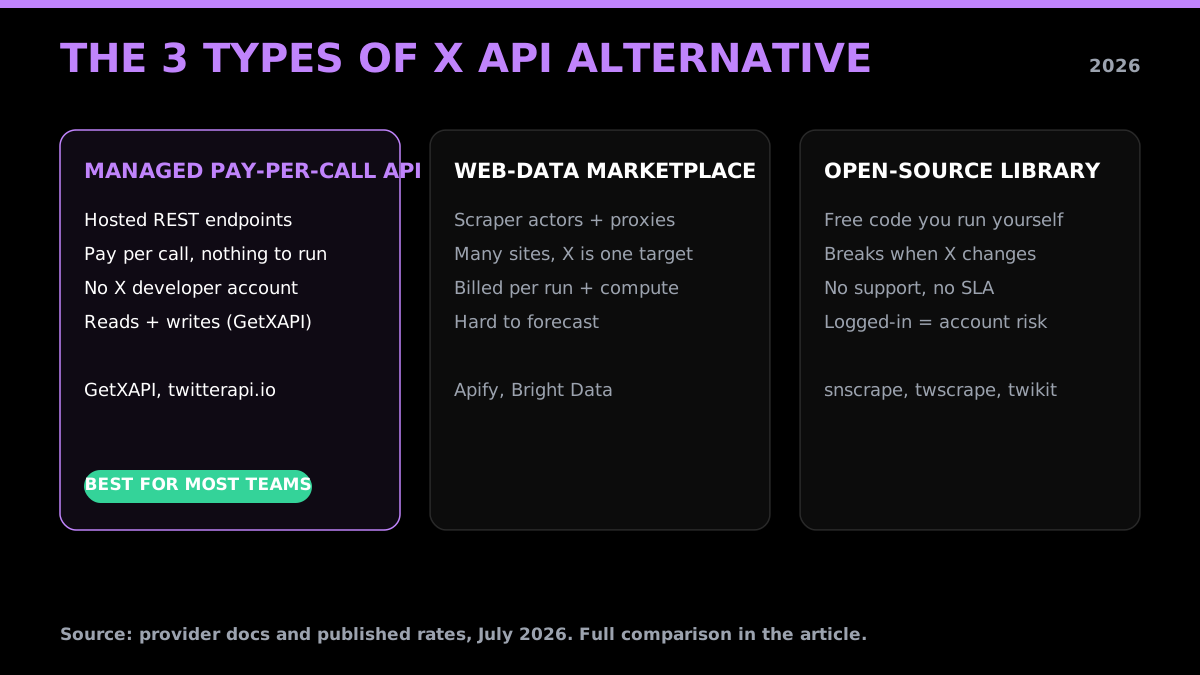
Almost every option falls into one of three buckets, and knowing which you need narrows the field fast.
- Managed pay-per-call APIs. A hosted REST API that returns tweets, profiles, followers, and search results (and sometimes lets you post). You pay per call, there is nothing to run, and you skip the X developer account. Best for most products, dashboards, and data pipelines. GetXAPI, twitterapi.io, and subscription services live here.
- Web-data marketplaces and scrapers. General-purpose platforms that run scraper "actors" or proxy networks across many sites, with Twitter as one target. Powerful and flexible, but billed per run or per compute plus proxy, which is harder to forecast. Apify and Bright Data live here.
- Open-source libraries. Free code you run yourself (snscrape, twscrape, twikit). No API fees, but you own the maintenance, the blocking, and, for the logged-in ones, the account risk. Best for one-off research and hobby projects, risky for anything in production.
The best Twitter (X) API alternatives in 2026
1. GetXAPI, best overall value
GetXAPI is a pay-per-call Twitter/X data API priced at $0.001 per call, which works out to roughly $0.05 per 1,000 tweets since a single call returns about 20 tweets. There is no X developer account, no OAuth app, and no subscription: you sign up, copy a bearer token, and call the endpoint. It covers 73 endpoints across reads (tweets, profiles, followers, search, mentions, lists) and writes (post, reply, like, retweet, follow, DMs), so one key handles both sides. There is no endpoint-specific quota (general service throttling still applies), so throughput scales with your budget rather than a 15-minute window, and $0.10 in free credits at signup (about 2,000 tweets) lets you test with no card. Optional subscription plans lower the effective per-call rate further for steady, high-volume use.
Best for: teams that want the lowest predictable cost, fast setup, and both reads and writes without the official developer stack. Watch for: if you need a proxy network across many non-Twitter sites, a full web-data platform is a better fit.
2. twitterapi.io
A managed pay-per-call API similar in shape to GetXAPI, priced on a credit model that works out to around $0.15 per 1,000 tweets, roughly three times the per-tweet cost. Response shapes are close to GetXAPI's, and it also skips the X developer account. A reasonable option, though on pure read cost it is the pricier of the two. If you are already on it, the migration guide covers the one-line auth swap.
Best for: teams already integrated with it. Watch for: higher per-tweet cost and credit-balance math.
3. Apify
Apify is a web-scraping marketplace where you rent pre-built Twitter "actors." It is flexible and handles many sites beyond Twitter, but it bills per actor run and per compute unit, which gets expensive fast for high-volume tweet reads and adds startup latency to each job. There is a small monthly free allowance.
Best for: occasional scraping across many different sites in one platform. Watch for: per-run billing that is hard to forecast, and 10x-plus higher effective cost than a direct API for pure tweet pulls.
4. Bright Data
Bright Data is an enterprise web-data and proxy platform. It is genuinely powerful, with large proxy pools and dataset products, and it can handle Twitter at serious scale. The tradeoff is cost and complexity: pricing is enterprise-tier, and there is more to configure than a single REST call.
Best for: large enterprises that need proxies and datasets across the whole web, not just Twitter. Watch for: overkill and over-budget for a team that only needs Twitter data.
5. Data365
Data365 is a social-data API that spans several platforms (Twitter, Instagram, Facebook, Reddit, and more) behind one integration. Useful if your product needs multiple networks from a single vendor. For Twitter-only needs, a Twitter-specialized API tends to be cheaper and deeper on X-specific endpoints.
Best for: cross-platform social data from one provider. Watch for: breadth over depth on any single network.
6. RapidAPI (marketplace)
RapidAPI is not a provider itself, it is a marketplace that hosts many third-party Twitter APIs from different vendors. You can find cheap options there, but quality, uptime, and support vary widely by listing, and the marketplace adds its own billing layer on top. See the RapidAPI alternative breakdown for the details.
Best for: browsing many vendors in one place. Watch for: inconsistent quality and the extra marketplace margin.
7. Subscription APIs (TwexAPI, TweetAPI and similar)
A handful of providers sell monthly subscriptions per endpoint or per tier instead of pay-per-call. These can suit a fixed, predictable workload, but they get expensive if your volume is bursty or you only need occasional access, since you pay for the plan whether or not you use it.
Best for: steady, predictable monthly volume on a few endpoints. Watch for: paying for capacity you do not use.
8. Open-source libraries (snscrape, twscrape, twikit)
The free tier of the alternative world. snscrape scrapes public data without login, while twscrape and twikit drive logged-in sessions for more coverage. There are no API fees, which is the whole appeal. The costs are hidden: these libraries break whenever X changes its internals, there is no support or SLA, and the logged-in ones can get your account suspended. Note that Tweepy is not a cost alternative at all, it wraps the official paid X API, so you still pay X.
Best for: one-off research, academic projects, and prototypes where downtime is acceptable. Watch for: production use, where maintenance and account bans quietly cost more than a cheap managed API.
Newer and niche 2026 entrants
The cost squeeze on the official API keeps pulling new alternatives into the market, and the current search results for these queries are full of them. A few worth knowing, depending on your need:
- ScrapingDog offers a Twitter/X scraping API alongside its general web-scraping suite, priced on a credit model. Reasonable if you already use it for other sites and want one vendor.
- Zernio positions on the write side, pitching "post without the $100/mo API fee," aimed at teams that mainly need to publish rather than read at scale.
- XAPIs.dev is a newer pay-per-call entrant advertising around 90% lower cost than the official API, in the same low-cost lane as GetXAPI.
- SociaVault and onAudience market as cheaper data sources, SociaVault leaning on the "X API too expensive" angle and onAudience selling raw-data feeds.
None of these change the core decision: for read-heavy pay-per-call at the lowest predictable cost, with reads and writes behind one key, GetXAPI is still the pick. But if your need is narrow, write-only, or bundled with scraping other sites, one of these may fit. The steady arrival of sub-$100, pay-per-call options is itself the signal: the official API's 2026 pricing has made "Twitter API alternative" a category, not a one-off search.
Twitter API alternatives compared
Costs below are normalized to the unit your bill is actually denominated in: cost per 1,000 tweet reads. A managed API call returns a batch (about 20 tweets), which is why its per-tweet cost is far lower than the per-call price suggests.
| Provider | Type | Cost per 1,000 tweets | X dev account | Reads | Writes |
|---|---|---|---|---|---|
| GetXAPI | Managed pay-per-call | ~$0.05 | No | Yes | Yes |
| twitterapi.io | Managed pay-per-call | ~$0.15 | No | Yes | Limited |
| Official X API | First-party | ~$5.00 (at $0.005/read) | Yes | Yes | Yes |
| Apify | Scraper marketplace | Variable, per run + compute | No | Yes | No |
| Bright Data | Web-data + proxy | Enterprise, per usage | No | Yes | No |
| Data365 | Multi-platform API | Quote-based | No | Yes | Limited |
| Open-source (snscrape etc.) | Self-run library | $0 in fees, high upkeep | No | Yes | Risky |
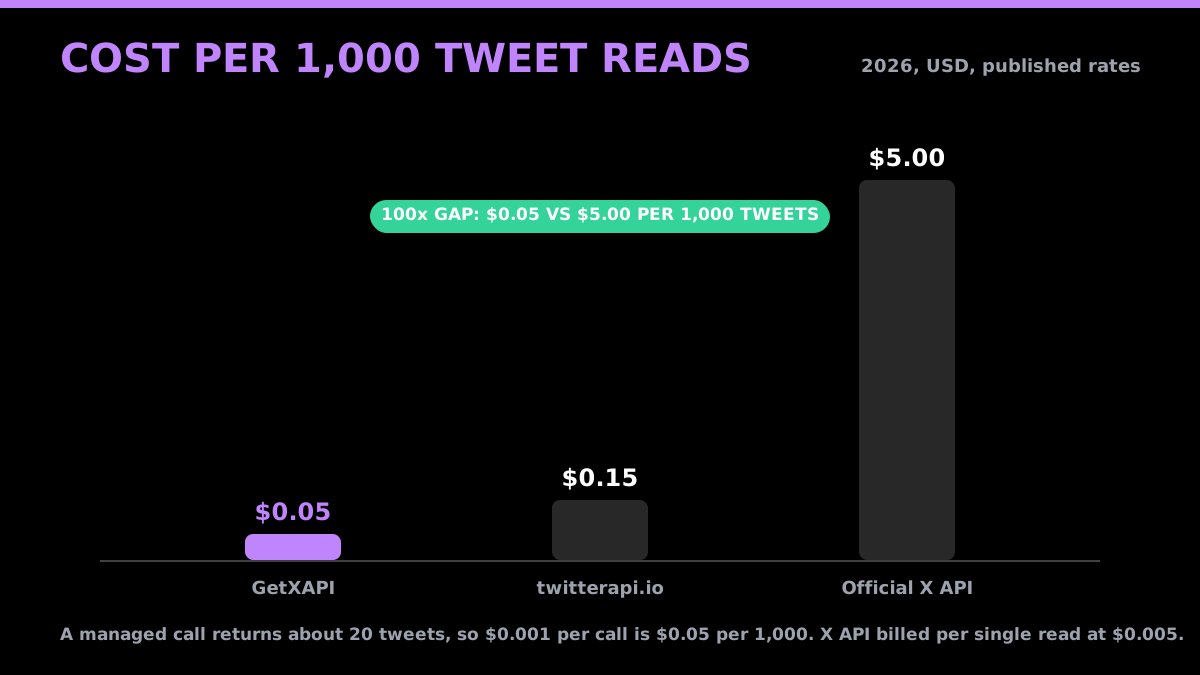
The gap between a batched pay-per-call API ($0.05 per 1,000) and the official per-read rate ($5.00 per 1,000) is the single biggest reason teams switch. Model your exact mix with the cost calculator before you commit.
Start building with GetXAPI
$0.05 per 1,000 tweets. $0.10 free credits. No credit card required.
What Twitter/X data actually costs in 2026
Headline per-1,000-tweet numbers hide half the story, because most real workloads pull profiles and followers too, and those are priced differently. Here is the fuller picture, normalized to the unit each record type is actually billed in.
| Record type | Official X API | GetXAPI | twitterapi.io |
|---|---|---|---|
| 1,000 tweet reads | ~$5.00 (at $0.005 each) | ~$0.05 | ~$0.15 |
| 1,000 profile lookups | ~$10.00 (at $0.010 each) | ~$0.05 | ~$0.18 |
| 1,000 follower records | metered per read | ~$0.005 (200 per call) | varies |
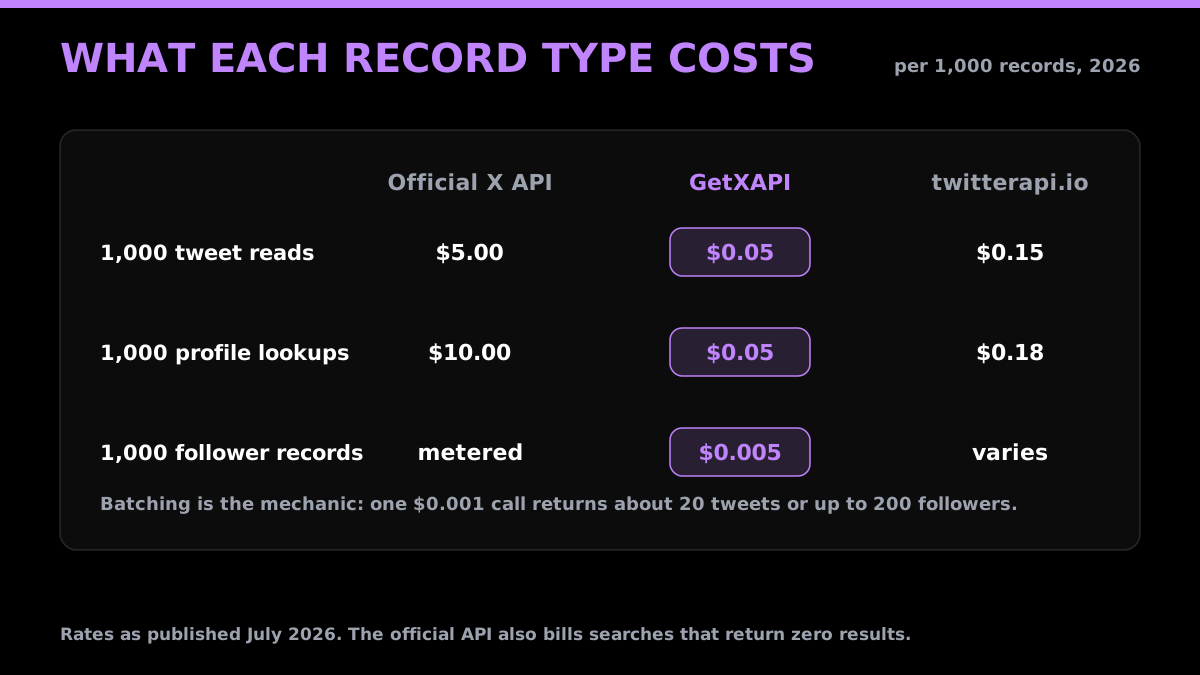
Two mechanics explain the gap. First, batching: a managed API returns a batch of records per call (about 20 tweets, or up to 200 followers), so one $0.001 call covers many records, while the official API bills per single resource. Second, empty-result charges: the official X API charges for searches that return zero results, and consumes a rate-limit slot doing it, which quietly inflates the real cost of exploratory queries. A pay-per-call alternative only charges for the call, and with no time-window rate limit there is no slot to waste. For a model against your own volume, the Twitter API pricing comparison and the cost calculator break it down by request type.
The endpoints most alternatives quietly skip
Cost is easy to compare; coverage is where cheap options fall down. Before committing to any alternative, confirm it actually serves the endpoints your product needs, because many read-only or budget providers skip the harder ones:
- Writes. Posting, replying, liking, retweeting, following, and sending DMs. Most alternatives are read-only. If you need to act on an account and not just read it, check this first. GetXAPI covers writes through the same key.
- Full follower and following pagination. Pulling a large account's entire follower base with stable cursors, not just the first page. Some providers cap this or make it unreliable past a few thousand records.
- DM read and send. Reading an inbox and sending messages needs the account's own session, and it is missing from most alternatives entirely.
- Deep search. Advanced operators, historical results, and cursoring past the first page of a query. Thin providers return only recent, shallow results.
- Lists, mentions, and bookmarks. Secondary endpoints a full pipeline often needs, and the ones budget options tend to drop.
A provider that is cheap per tweet but missing the three endpoints you need is not actually cheaper. It just moves the cost to a second vendor plus the glue code between them.
A worked example: trimming a social-listening bill
Take a common workload: a brand-monitoring pipeline that pulls 500,000 tweets a month from search, enriches them with 50,000 profile lookups, and reads 100,000 follower records to score audiences.
- Official X API: 500,000 tweet reads at $0.005 is $2,500, plus 50,000 profile reads at $0.010 is $500, plus follower reads metered on top. Call it $3,000-plus per month before any writes, and that assumes you never pay for an empty search.
- GetXAPI: the same 500,000 tweets is about 25,000 calls at $0.001, roughly $25. Profiles and followers batch similarly, landing the whole pipeline in the low tens of dollars per month.
- Apify or Bright Data: workable, but per-run or per-compute-plus-proxy billing makes the monthly figure swing with job frequency and harder to forecast.
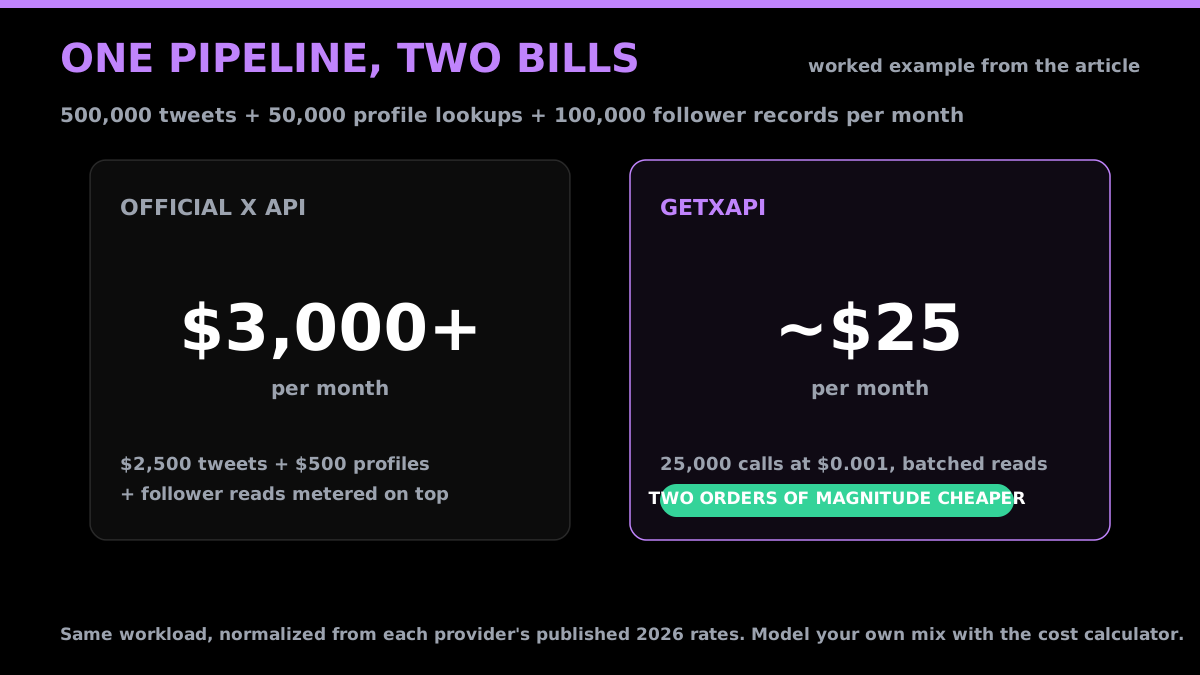
The two-orders-of-magnitude gap between the official API and a batched pay-per-call API is not a rounding error. It is the difference between a line item you notice and one you do not. Model your exact mix before committing, but for read-heavy pipelines the direction is consistent.
Is there a free Twitter API alternative?
Sort of, and it depends on what "free" means to you.
- Open-source libraries have no API fees. This is the closest thing to genuinely free, but you pay in maintenance time, breakage, and, for logged-in scrapers, account-suspension risk. Fine for a weekend project, shaky for anything a business relies on.
- Trial credits are how managed APIs let you evaluate before paying. GetXAPI includes $0.10 in credits at signup (about 2,000 tweets) with no card, so you can run the full workflow first. See the free Twitter API options page for the details.
- The current public X pricing page does not list a general public Free tier, so official read workloads should be budgeted using the listed pay-per-use prices or a custom Enterprise quote. The full picture is in is the Twitter API free.
There is no managed provider offering unlimited free reads. Anyone promising that is either a thin free trial or an open-source scraper in disguise.
How to compare Twitter API providers fairly
Provider marketing makes apples-to-apples comparison hard on purpose. Four checks cut through it:
- Normalize the cost. Convert everything to cost per 1,000 tweets (or per 1,000 profiles). A per-call price hides how many records a call returns; a per-run price hides compute and proxy. Get to the same unit before you compare.
- Check endpoint coverage. Reads are table stakes. Confirm the specific endpoints you need (search, followers, mentions, DMs, writes) actually exist, since many cheap options are read-only or skip the harder endpoints.
- Check auth and setup. A provider that needs an X developer account and OAuth is days of setup; one that issues a bearer token is minutes. Factor that in.
- Check reliability and support. Open-source has neither. A managed API should have documented uptime and a way to reach a human. For a business workflow, that is worth more than shaving a fraction of a cent.
The cheapest Twitter API. Try it free.
$0.05 per 1,000 tweets. $0.10 free credits. No credit card required.
Is using a Twitter API alternative legal?
This is the question most teams ask before switching, and the short version is: reading publicly available data through a reputable API is on solid ground, but the details matter. US courts have generally treated scraping publicly accessible data as permissible, the most-cited case being hiQ Labs v. LinkedIn, where the Ninth Circuit found that automated access to public profiles did not violate the Computer Fraud and Abuse Act. The managed APIs above return that same public data through a documented interface.
Two caveats. First, this is not legal advice, follow each provider's terms and the law in your jurisdiction for your specific use case. Second, open-source libraries that automate a logged-in account are a different risk category: they can violate the platform's automation rules and get the account suspended, which is separate from whether the underlying public data is fair game. If compliance matters, a managed API that pulls public data without driving your own logged-in session is the cleaner path.
How to migrate off the official X API
Moving is usually a smaller job than teams expect. With a managed API the pattern is: swap the base URL, swap the auth header for a single bearer token, and map the response fields (they are close to the official shapes). There is no OAuth handshake, no app registration, and no subscription. Here is a recent-search read on a managed alternative, a plain bearer-token GET with no app to register:
# GetXAPI: one bearer token, no developer account, no OAuth flow
curl "https://api.getxapi.com/twitter/tweet/advanced_search?q=from:openai&product=Latest" \
  -H "Authorization: Bearer YOUR_API_KEY"
import requests

resp = requests.get(
    "https://api.getxapi.com/twitter/tweet/advanced_search",
    params={"q": "from:openai", "product": "Latest"},
    headers={"Authorization": "Bearer YOUR_API_KEY"},
)
print(resp.json()["tweets"][:1])
The endpoint names map closely, so most migrations are a find-and-replace on the base path plus the auth header:
| Official X API | GetXAPI equivalent |
|---|---|
GET /2/tweets/search/recent |
/twitter/tweet/advanced_search |
GET /2/users/by/username/:username |
/twitter/user/info |
GET /2/users/:id/followers |
/twitter/user/followers |
GET /2/users/:id/tweets |
/twitter/user/tweets |
POST /2/tweets |
/twitter/tweet/create |
The twitterapi.io migration guide walks a real switch end to end, and the same steps apply coming from the official API.
Open-source libraries: a closer look
If your budget is zero and you can tolerate breakage, the open-source route is worth understanding properly, because the main tools are not interchangeable:
- snscrape. Scrapes public data without logging in. The safest of the three for account risk, since there is no session to ban, but coverage is limited to what is publicly visible and it breaks whenever X changes its markup.
- twscrape. Drives one or more logged-in accounts for far broader coverage, including search and timelines. The tradeoff is direct: you are automating real accounts, which can get them suspended, and you manage the sessions yourself.
- twikit. A similar logged-in approach with an async-friendly API. Same coverage upside and the same account-risk downside as twscrape.
- Tweepy. Frequently listed as an alternative, but it is not one on cost. Tweepy is a Python wrapper around the official paid X API, so you still need a developer account and you still pay X per call. It is a convenience layer, not a cheaper source.
The honest summary: open-source is genuinely free of API fees and perfect for a one-off research pull or an academic project. For anything a business depends on, the maintenance time, the downtime when X changes its internals, and the suspension risk on logged-in scrapers usually cost more than a cheap managed API would. Those costs just land as engineering hours instead of an invoice.
How we researched this guide
Pricing and positioning here reflect published rates and documented behavior as of July 2026, normalized to a common unit (cost per 1,000 records) so the comparison is like-for-like rather than one marketing number against another. The provider set was cross-checked against live search-result data for these queries (via DataForSEO) so the guide covers the alternatives people actually find today, not a stale list, which is why newer entrants like ScrapingDog, Zernio, and XAPIs.dev are included alongside the established options. Search demand for the cluster is steady rather than spiking (the "alternative" queries are modest but high-intent, and the broader "free" and "scraping" API terms are the larger draw). Where a provider bills per run or per compute instead of per record, we say so rather than inventing a per-tweet figure. GetXAPI is our own product, so treat the ranking as informed but not neutral. The underlying cost mechanics (batching, empty-result charges, endpoint coverage) are verifiable against each provider's own documentation, and we have described the competitors fairly enough that this stays useful even if you pick one of them.
Which alternative should you pick?
Match the tool to the job rather than the loudest marketing:
| Your use case | Best pick | Why |
|---|---|---|
| Lowest predictable cost, reads + writes | GetXAPI | $0.001/call, one key for both, no dev account |
| Read-heavy scraping at scale | GetXAPI, then Apify | pay-per-call scales linearly vs per-run |
| Write-only (post, like, follow, DMs) | GetXAPI | writes through the same key; most rivals are read-only |
| Proxies + datasets across the whole web | Bright Data | enterprise web-data platform |
| Many social networks from one vendor | Data365 | cross-platform coverage |
| Bundled with scraping other sites | ScrapingDog | Twitter is one target in a general suite |
| Zero budget, one-off research | snscrape (open-source) | free, but fragile and unsupported |
| Already on twitterapi.io | migrate if cost matters | ~3x the per-tweet cost of GetXAPI |
The quick heuristic: bullets above are for edge cases; for most products the math points at a managed pay-per-call API, and on price that means GetXAPI. If you want the GetXAPI-specific breakdown against the official API, see the Twitter API alternatives page, or grab a key and test it against your own workload with the $0.10 in free credits.
Frequently Asked Questions
For most developers the best value is a managed pay-per-call API. GetXAPI charges $0.001 per call (about $0.05 per 1,000 tweets pay-as-you-go, lower on subscription plans), with no X developer account and both read and write endpoints. If you need a full web-data platform with proxies and many sources, Bright Data fits; if you want zero cost and can tolerate breakage, open-source libraries like snscrape work. The right pick depends on volume, budget, and whether you need writes.
Yes, with tradeoffs. Open-source libraries may have no API fee but carry maintenance and account risk. Managed APIs often provide test credits: GetXAPI includes $0.10 at signup with no card. The current official X pricing page does not list a general public Free tier.
Managed third-party APIs like GetXAPI do not. You sign up, get a bearer token, and call the endpoint, no developer-portal application, no OAuth app, no subscription. The official X API is the one that requires a developer account and app setup. Open-source libraries do not need a developer account either, but the logged-in ones need a real X session, which carries suspension risk.
It varies. Many alternatives are read-only. GetXAPI supports both reads (tweets, profiles, followers, search) and writes (post, reply, like, retweet, follow, DMs) through the same key, so you do not need to combine a reader with a separate writer. If you only need reads, more options open up; if you need writes, confirm the provider supports them before committing.
A good managed API is production-grade: documented endpoints, stable response shapes, and support, so reliability is comparable to the official API for reads, minus the rate-limit friction. The weak link is open-source scrapers, which break whenever X changes its internals and have no support or SLA. When uptime matters, that is the single biggest reason to pick a managed API over a self-run library, even though the library is free.
Among the providers compared in this article, GetXAPI has the lowest rate at $0.001 per call (roughly $0.05 per 1,000 tweets, lower on subscription plans), versus about $0.15 per 1,000 on twitterapi.io and $0.005 per single post read on the official X API. Open-source scrapers are free of API fees but carry maintenance and account-risk costs that are easy to underestimate.
A managed pay-per-call API is usually the cleanest path at scale because cost scales linearly and there is no infrastructure to run. GetXAPI has no endpoint-specific quota and charges per call, so a million-tweet job is predictable. Web-data marketplaces like Apify and Bright Data also scale but bill per actor run or per compute plus proxy, which is harder to forecast and often more expensive for pure tweet reads.
Reputable managed APIs return publicly available data through a documented REST surface, which is the same public data the platform shows logged-out visitors. Follow each provider's terms and applicable law for your use case. Open-source scrapers that automate a logged-in account operate in a grayer area and can violate the platform's automation rules, which is a separate risk from the data itself.
It depends on the model. Managed pay-per-call APIs like GetXAPI have no endpoint-specific, time-window rate limits: throughput is bounded by your credit balance and by general service throttling rather than a 15-minute quota, so large jobs need a simple retry with backoff instead of the per-endpoint window management the official API forces. Credit-based providers cap you at your balance; web-data marketplaces cap by plan and compute. The official X API is the one with strict per-endpoint 15-minute and 24-hour windows.
Check out similar blogs
More guides on the Twitter/X API, scraping, and pricing.

How to Like a Tweet via API in 2026 (No Dev Account)
Like (favorite) tweets programmatically via API in 2026 without an X developer account. The auth_token model, working curl, Python, and Node code, and per-call cost.

Post Tweets via API With Authentication in 2026 (No Developer Account)
Post tweets, threads, and media through an API without an X developer account. The auth_token model, working Python and Node code, rate-limit safety, and per-call costs.

Twitter API Tutorial 2026: The Complete Developer Guide
A current 2026 Twitter API tutorial covering authentication, endpoints, code, rate limits, verified official prices, and a third-party public-data path.

Twitter API 403 Forbidden and 401 Unauthorized: Every Cause and Fix
Why the X API returns 403 Forbidden or 401 Unauthorized, how to tell the two apart, and a fix for each cause. Covers tier gating, app permissions, OAuth, and X error codes.

How to Build a Twitter Bot in 2026: The Complete Guide
Build a Twitter bot in 2026 with no-code or Python. Working Tweepy and requests code, auth explained, and the cheap API path at $0.05 per 1,000 reads.

How to Detect X (Twitter) Bots: A Practical, Data-Backed Method
A practitioner method for Twitter bot detection: the real signals (views-to-likes ratio, account age, posting cadence, follower pattern, amplification), runnable API code to pull each one, and a scoring rubric you own.

How to Handle Twitter API 429 Errors with Retry and Backoff
A developer playbook for Twitter/X API 429 responses: reading x-rate-limit headers, retry-with-backoff patterns, per-endpoint queues, and how to avoid getting throttled at scale. For the full per-endpoint limit reference, see the rate limits page.

Twitter API Cost per 1,000 Tweets: Workload Examples
How to calculate your real Twitter API cost: per-1,000-tweet math, 10K to 1M read workloads, mixed read/write/DM examples, pagination and dedup assumptions, and reusable formulas.
Featured in
Where GetXAPI's data and pricing get cited.

The hidden line item in your AI side project: X data
Indie Hackers post on the often-overlooked cost of X data for AI side projects, citing GetXAPI as the usage-based way to pull live Twitter data without a five-figure X developer contract.

How Companies Are Learning to Read Market Mood in Real Time
Editorial feature on Big News Network examining how companies read market mood from X in real time, citing GetXAPI as the usage-based Twitter API that prices live social listening by the call instead of a five-figure annual contract.

How Companies Are Learning to Read Market Mood in Real Time
Syndicated feature on Business Newswire on how companies read market mood from X in real time, citing GetXAPI as the usage-based Twitter API that prices live social listening by the call.

Working with Twitter/X Data: A Practical Skill for IT Students and Professionals in 2026
Guide on SIIT (Scholars International Institute of Technology) on collecting live Twitter/X data as a practical developer skill, citing GetXAPI as the per-call Twitter data API that makes it affordable without an X developer account.

Adding Twitter/X Data to Your App in 2026: A Developer's Integration Guide
Developer integration guide on Programming Insider covering how to add live Twitter/X data to an app in 2026, comparing the official X API v2 with a key-based REST approach and citing GetXAPI as the low-cost per-call option with no developer-account approval.

6 Twitter/X Scraping Solutions for Every Budget
Roundup on TechBullion of the leading Twitter/X scraping solutions, ranking GetXAPI first as the cheapest option at $0.001 per call (about $0.05 per 1,000 tweets) with clean JSON output and no monthly minimum.

The Data Bill Behind Every Social Analytics Tool
Editorial piece on SpeakRJ examining the underlying data costs behind social analytics tools, citing GetXAPI as the usage-based way to source live X data by the call.

What Is AI Sentiment Analysis, and What Does Each Layer Cost?
Explainer in AI Journal breaking sentiment analysis into its data, model and reporting layers and what each costs to run, citing GetXAPI for pulling public X posts on pay-per-call pricing.

Why Enterprise AI Agents Still Cannot Read Social Data
Analysis piece in The Silicon Review on why enterprise agents reach internal systems easily but struggle with public social data, citing GetXAPI's MCP server and data-as-a-service model as one route to close the gap.