
How to Build a Twitter Bot in 2026: The Complete Guide
Build a Twitter bot in 2026 with no-code or Python. Working Tweepy and requests code, auth explained, and the cheap API path at $0.05 per 1,000 reads.

Most "how to make a Twitter bot" tutorials were written for older X API access models. They assume a free read API, older developer-console paths, or historical tier limits. The current public pricing page lists prepaid pay-per-use and custom Enterprise access, so older tutorials must be checked against today's endpoint docs and the access shown in your Developer Console.
TL;DR: A Twitter bot is a script that runs the same loop: listen, decide, act, repeat. You can build one with no code (Make.com or Zapier, 20 minutes, simple bots only), with Python (Tweepy or plain
requests, full control), or with Node.js. The hard part in 2026 is not the code, it is the data cost. The official X API charges $0.005 per read, so a read-heavy bot gets expensive fast (1 million reads is $5,000). The cheaper path is a direct API: GetXAPI reads tweets at $0.05 per 1,000, with no monthly floor and no X developer account needed. This guide gives you runnable code for both paths, the auth you actually need, rate-limit handling, where to host the bot 24/7, and how to stay inside the rules.
This is the guide written for the 2026 reality. A Twitter bot (or X bot, since the platform renamed) is a program that interacts with X automatically through its API or a browser: it reads posts, decides what to do based on rules or an AI model, and acts by posting, replying, liking, or following. The four core build paths, the cost math, and the code below are all current as of June 2026.
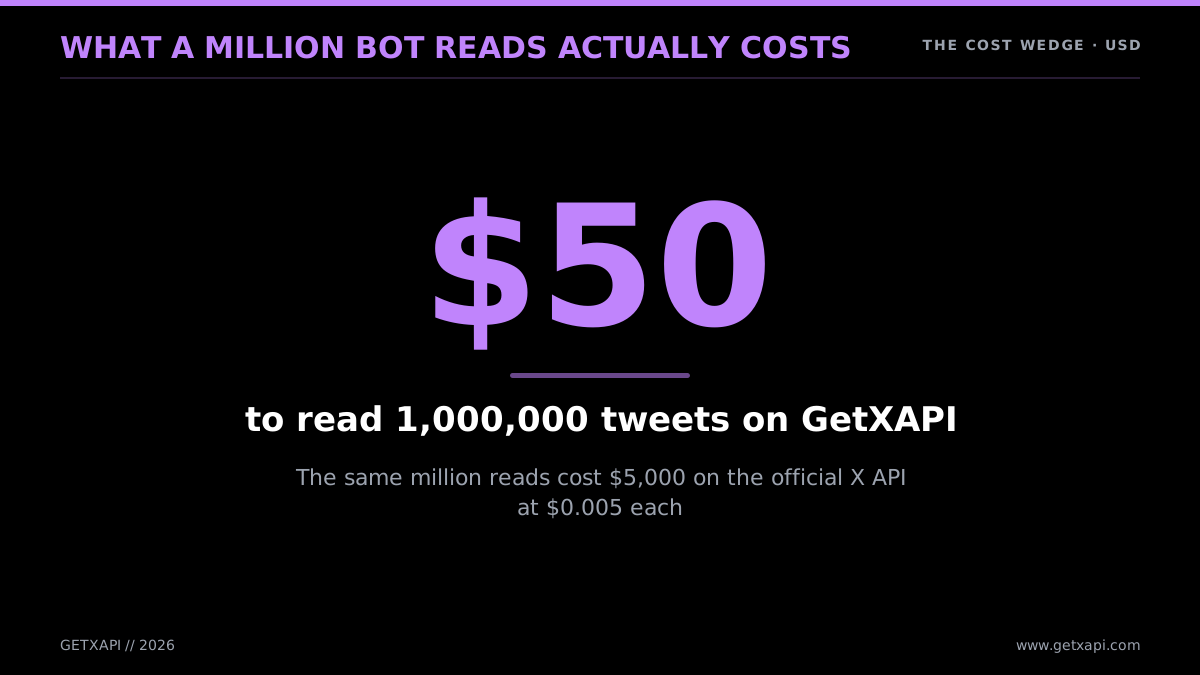
What a million bot reads actually costs
The reason cost dominates this guide is that the single biggest source of pain for bot builders right now is exactly that: the price of getting at the data. The field says so plainly.
To run a bot, you mostly use twitter API, cause it's the easiest way. Twitter paywalled it, so you can not longer use it for free. It's 100% twitter's fault
@FRAMER_FRAMER view on X
What Is a Twitter Bot (and Is It Still Worth Building in 2026)?
A Twitter bot is an automated program that performs actions on X without a human pressing the buttons. It authenticates as an account (its own, or one it has permission to act for), then runs a loop: it reads some signal (a schedule firing, a new mention, a keyword appearing in search), decides what to do based on rules or a model, and acts by posting, replying, liking, following, or sending a DM. That is the whole concept. Everything else is detail. And yes, building one is still worth it in 2026, the only thing that changed is that the data now costs money, so the smart move is to control that cost from day one.
The "is it still worth it" question is real because API economics changed. Older bots often relied on historical free access, while the current public table bills reads and writes by resource or action. A 2026 bot needs a clear purpose that justifies its data cost: customer support, brand monitoring, an AI agent that reads a feed, or a content-distribution workflow.
So the honest answer is that the bar moved up. A bot has to earn its data bill now. That is good news for serious builders, because it cleared out the noise, and because the cost wedge has a clean fix. The expensive part is reading data, and reading data is exactly what a cheap direct API solves. A bot that would cost $5,000 a month in reads on the official API costs $50 on a per-1,000-tweet provider. The build effort is identical. Only the invoice changes.
The use cases that survived the pricing reset are the ones with a business reason to exist. A handful of categories cover most of what gets built today:
- Customer support and acknowledgement. A bot that catches every mention of a brand, replies with "we are on it," and routes the conversation to a human. The reply is automated, the resolution is not. This is read-light (poll mentions) and write-light (one reply each), so it runs cheaply on either API path.
- Brand and competitor monitoring. A bot that watches for any mention of your product, your competitors, or a category keyword, and alerts a team channel when something matters. Read-heavy by nature, which is why teams running this at any scale care about read price.
- Lead and intent detection. A bot that searches for buying signals (people complaining about a competitor, asking for a recommendation, announcing a relevant event) and logs them to a CRM. Read-heavy, and high-value enough to justify the spend if the reads are cheap.
- Content distribution. A bot that posts a publishing pipeline's output: new blog posts, new videos, new releases. Write-heavy, read-light, cheap to run.
- AI agents. The fastest-growing category. A bot that feeds X data into a language model and acts on the output, an autonomous account that reads, reasons, and posts. The highest read volume of any type, and therefore the one most sensitive to data cost.
If your idea fits one of those, it is worth building, and the only real decision is how to keep the data layer cheap. If your idea is a novelty bot that reads heavily for no commercial reason, the 2026 economics will fight you, which is exactly why the toy-bot era ended.
The good news for first-timers is that the build itself is not hard. People asking how difficult it really is tend to over-estimate it, as this beginner thread shows.
a r/learnpython thread asking how hard a Twitter bot actually is to build from r/learnpython
Here is the loop every bot runs, regardless of language or platform:
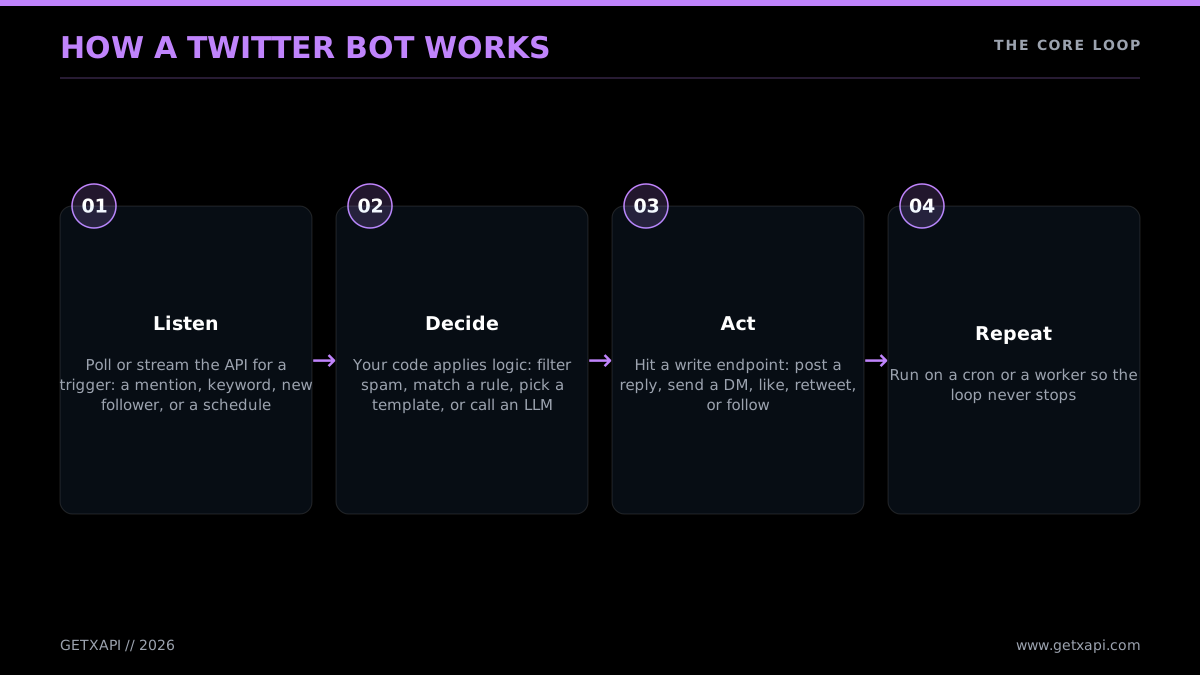
Every bot runs the same core loop
- Listen. A trigger fires. It might be a timer (cron every hour), a new mention of your account, a keyword appearing in search results, a new item in an RSS feed, or a webhook.
- Decide. Your code applies logic. A scheduled bot pulls the next post off a queue. A reply bot checks whether the mention deserves a reply and drafts one. An AI bot sends the input to an LLM and reads the response.
- Act. Your code calls the API to post, reply, like, retweet, follow, or DM.
- Repeat. The script either loops continuously, or exits and gets re-invoked on the next schedule tick.
If you can write those four steps, you can build a bot. The libraries (Tweepy, the X SDK, a direct API client) just make each step shorter. For a full grounding in the underlying interface before you start, the Twitter API tutorial for 2026 walks through every endpoint family the loop above touches.
The reason it helps to think in terms of the loop rather than in terms of a specific tutorial's code is that the loop is what stays constant while everything around it changes. The API endpoints have changed names, the auth has gained a new method, the pricing has flipped from free to subscription to per-call, and the library you pick will go in and out of fashion. None of that touches the loop. A 2015 bot and a 2026 bot both listen, decide, act, and repeat. So when you read an old tutorial (and you will, since most of page one of Google is old), separate the loop logic, which is almost always still valid, from the surrounding details (the API URLs, the pricing assumptions, the auth screens), which are almost always stale. This guide's job is to give you the current details to wrap around that timeless loop.
A useful way to internalize the loop is to notice that the four steps map onto four questions you answer when you design any bot. What wakes it up (the trigger)? What does it look at when it wakes up (the read)? What rule or model decides the action (the logic)? What does it do (the write)? Answer those four and you have specified your bot completely. The code is just those four answers expressed in Python or JavaScript.
A quick note on terminology, because it trips people up. Twitter became X in 2023. The official API is now the "X API." But the search term, the libraries, and most of the public conversation still say "Twitter bot" and "Twitter API," by a wide margin. This guide uses both. When you read "X API" think "the official API run by the company." When you read "Twitter bot" think "the thing you are building."
The 4 Bot Types You Can Build
There are four bot archetypes that cover almost everything people build on X: the scheduled-post bot, the reply/mention bot, the search/monitor bot, and the AI agent bot. They differ in what triggers them, which API calls they lean on, what kind of authentication they need, and how much effort they take to ship. Picking the archetype first saves you from over-building, a scheduled poster needs none of the listening machinery a monitor bot requires.
The four types, from simplest to most involved:
- Scheduled-post bot. Posts content on a timer. A daily quote, an hourly stat, a "new blog post" announcement from an RSS feed. Write-only. No listening loop. This is the easiest bot to ship and the best first project.
- Reply / mention bot. Listens for mentions of an account and responds. Customer support auto-acknowledgement, a "thanks for the follow" responder, a command bot that does something when you @-mention it with a keyword. Needs read (to find mentions) plus write (to reply).
- Search / monitor bot. Watches for keywords, hashtags, or topics across all of X and reacts: alerts you, logs the post to a database, likes it, or replies. Brand monitoring, lead-signal detection, competitor watching. Read-heavy. This is the type where data cost matters most, because monitoring means reading a lot.
- AI agent bot. Reads input (a mention, a feed, a trend), passes it to a language model, and acts on the model's output. An AI reply bot, a thread summarizer, a content generator. Combines read and write with an LLM call in the middle. Highest complexity, highest ceiling.
The grid below maps each type to its main API call, the auth it needs, and rough build effort.
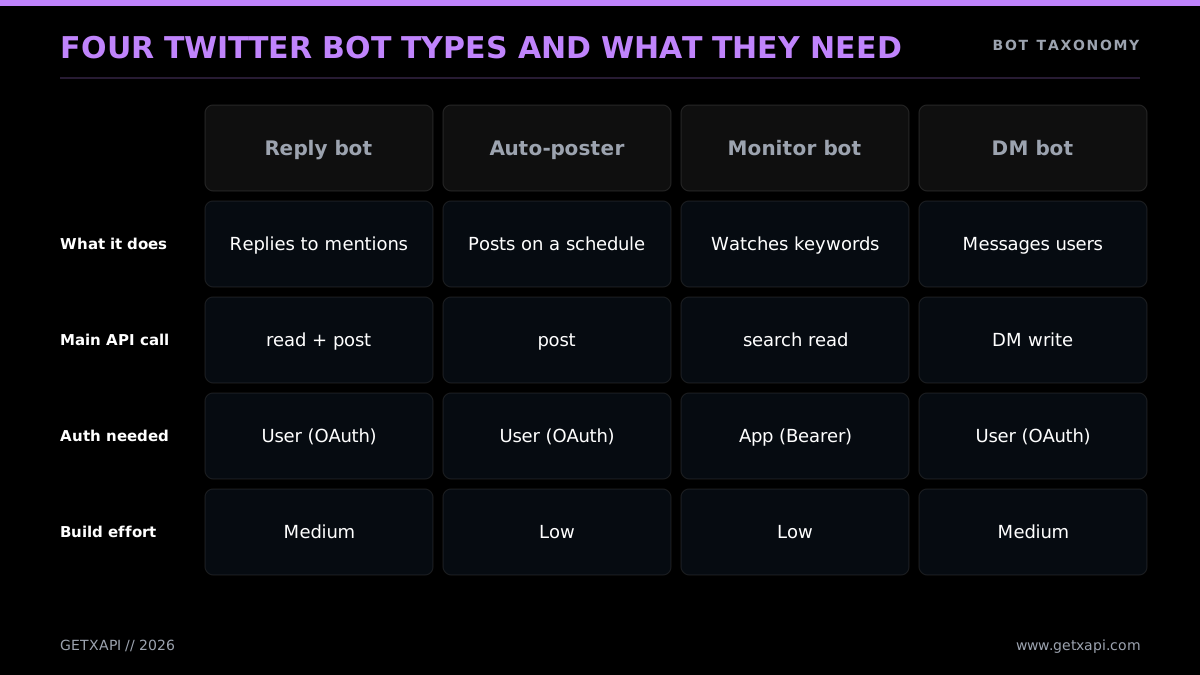
Four bot types and what each one needs
Notice the pattern: effort and cost both climb as you move from posting to monitoring. A scheduled poster makes a handful of write calls a day. A monitor bot can make tens of thousands of read calls a day. That difference is the entire reason this guide keeps coming back to read pricing. If your bot is a monitor or an AI agent, the data layer is your largest recurring cost, and it is the one most worth optimizing before you write a line of code.
One more split worth understanding early: read bots versus write bots. Read actions (search, fetch mentions, look up a profile) can use the simplest authentication, an app-level token. Write actions (post, reply, like, DM) act on behalf of an account and need user-context authentication. A scheduled poster is write-only but acts as one fixed account, so its auth is simple. A monitor bot is read-only, so its auth is also simple. The reply and AI bots do both, which is where auth gets more involved. We cover all of this in the authentication section.
The most-asked question in this category, repeated across the X developer community forum, is some version of the alexallsides thread: a builder wants a bot that listens for mentions and replies in real time, and asks which plan they need. The answer this guide gives is that you need read access (for the mentions) and write access (for the reply), and that the cheapest way to get both is the direct-API path, where one Bearer token covers both. The plan question that dominated 2024 is largely moot in 2026 because the subscription plans are gone; it is now a per-call question, and per-call is exactly where a cheaper provider wins.
To make the four types concrete, here is what each one looks like as a real project, with the API call that does the heavy lifting:
- Scheduled-post bot in practice. You keep a list of posts (in a file, a Google Sheet, or a database), and a single timer fires the script. Each run, the script pops the next item and calls the post-create endpoint. The famous "tweets a fact every hour" accounts are exactly this. The only state it keeps is "which post is next," and the only API call it makes is a write. Because it reads nothing, its data bill is trivial: 24 posts a day is 720 writes a month, about $7 on the official API.
- Reply/mention bot in practice. The script polls the mentions endpoint for posts that tag the bot's handle, filters out the ones it has already answered, and calls the post-create endpoint with a reply. A support team uses this to auto-acknowledge every customer mention within a minute, then route to a human. The read side is light (a mentions poll every couple of minutes), the write side scales with how often people tag you.
- Search/monitor bot in practice. The script runs a search query (a brand name, a hashtag, a competitor handle) on a loop and acts on each new result: log it to a database, fire a Slack alert, like it, or reply. This is the type most likely to surprise you on the invoice, because search reads scale with how much conversation matches your query. A busy keyword can return thousands of results an hour, and every result is a billed read on the official API.
- AI agent bot in practice. The script reads an input (a mention, a trend, a feed), passes the text to a language model with a prompt, and posts the model's output. An AI reply bot answers questions in your niche; a thread summarizer condenses long threads on request; a content bot turns a news item into a take. It is a reply or monitor bot with an LLM call wedged into the "decide" step, so it inherits the read cost of whichever pattern feeds it.
The reason this taxonomy matters is that it tells you, before you write any code, which costs you will face. Posting is cheap. Listening is cheap. Searching at scale is not, on the official API. That single fact should shape your design: tighten your queries, cache what you can, and pick a data source priced for the volume your bot actually reads.
What Changed: The X API Cost Reality in 2026
The single most important thing to understand before building a bot in 2026 is the current per-action cost. The public X pricing page lists $0.005 for a standard Post read, $0.015 for a standard Post create request, $0.20 for a Post create request containing a URL, and $0.015 for a DM interaction create request. It does not list a general public Free tier. The page does not establish a February 2026 switch date or a complete migration history for older plans.
Walk through what that means for a real bot. Say you build a brand-monitor bot that searches for mentions of your product across X. A modestly popular brand might generate 50,000 mentions a month. On the official API at $0.005 per read, that is $250 a month, just for the reads, before you do anything with the data. Scale to an agency monitoring ten brands and you are at half a million reads, $2,500 a month. The numbers compound quickly because monitoring is read-heavy by nature.
There is also a ceiling: the official pay-per-use table caps Post reads at 3 million per month. Enterprise access is custom priced, so a higher-volume bot needs an X quote rather than a budget based on an unofficial fixed floor.
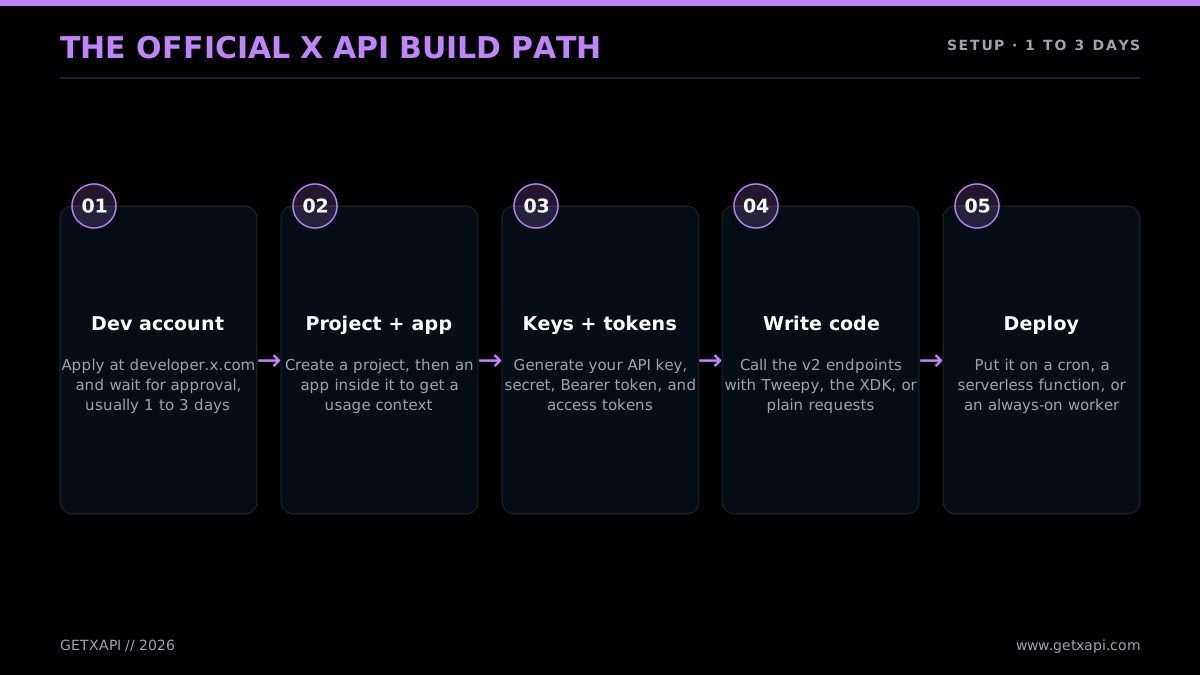
The official build path, start to deploy
There is a setup tax on top of the data cost. The official path requires a developer account, an app, generated keys, and a payment method on file before a single call succeeds. X publishes no completion timeline for that setup. None of that is hard, but it is friction, and it is friction that exists before you have written any bot logic. The dedicated how to get a Twitter API key guide walks the console screens step by step if you go this route.
The cheaper path solves both problems at once. A direct API like GetXAPI maintains its own access to X data and exposes it through a single REST surface. Reads are priced at $0.05 per 1,000 tweets, which is $50 per million versus $5,000 on the official API. There is no 3-million read ceiling on this path; cost scales with usage. And there is no developer account: you sign up with email, copy a Bearer token, and start calling. For a deeper breakdown of how the rates compound, see the Twitter API cost guide and the provider-by-provider cheapest Twitter API ranking.
Here is the read cost laid out as a bar, because the gap is easier to feel than to read in a sentence.
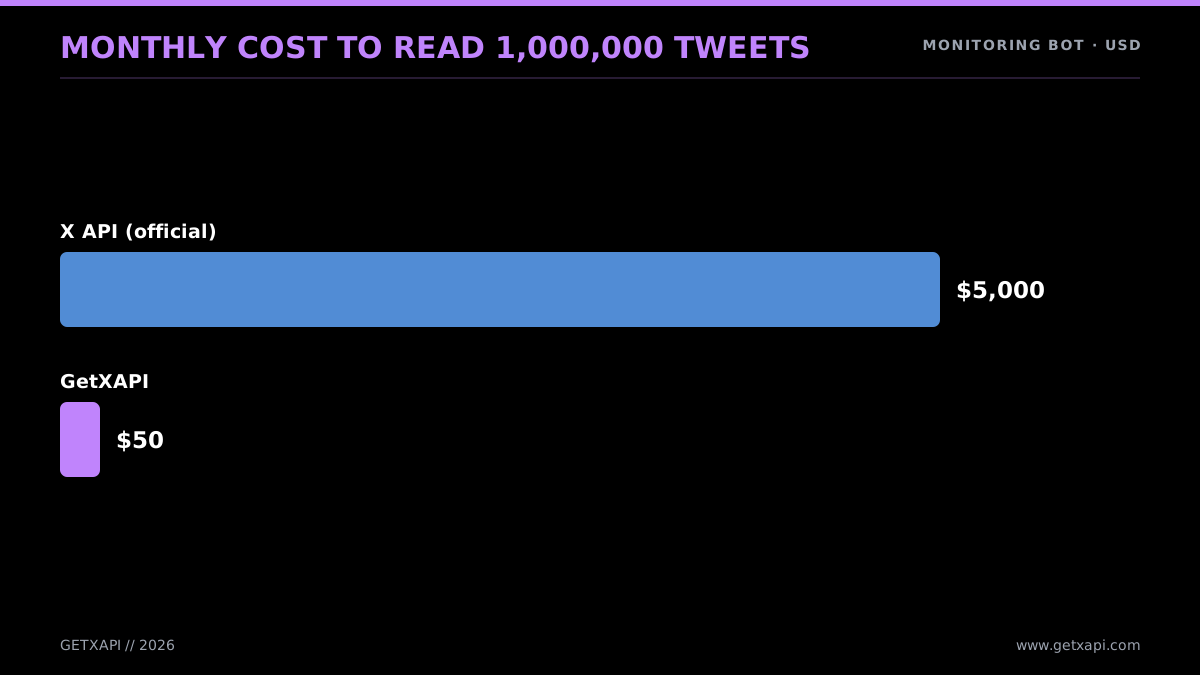
Reading a million tweets a month
The builders hitting this wall are vocal about it. The most common question in beginner programming communities right now is some version of "how do I write a bot without paying for the Basic account."
a r/learnprogramming thread on building a Twitter bot without paying for a Basic account from r/learnprogramming
It is worth understanding why the price moved, because it tells you whether the workaround is stable. X paywalled the API in 2023 partly to stop free-tier abuse (bot farms, scrapers, spam rings) and partly as a revenue line. The official pricing history is laid out in X's own developer platform announcements, and the policy reasoning sits in the broader X automation rules. The relevant point for a bot builder: the high price is a deliberate policy stance, not a temporary glitch, so designing around read cost is a permanent requirement, not a stopgap. A bot built today on the assumption that reads are expensive will still be correct in two years.
The takeaway for your build: decide your read volume first. A bot creating only a few standard Posts has a small official usage bill, while a read-heavy monitor or AI feed can make the data layer dominant. The current public access guide explains what X lists today and how GetXAPI signup credits work.
No-Code vs Python vs Node.js: Pick Your Path
There are three realistic ways to build a Twitter bot in 2026, and the right one depends on how much custom logic your bot needs. No-code tools (Make.com, Zapier) are fastest for simple trigger-action bots and need zero programming. Python is the default for anything with real logic, an AI step, or volume, because it has the most Twitter libraries and the cleanest syntax for the bot loop. Node.js is the strong choice when your stack is already JavaScript. All three end up calling the same API, the difference is how much control and effort each gives you.
The honest framing: no-code is not a toy, but it has a ceiling. It is excellent for "post this RSS feed to X" or "retweet anything with this hashtag." The moment you need branching logic, an LLM call, a database lookup, or high volume, you outgrow it and rewrite in code. So if you suspect your bot will get more complex, starting in Python saves you a migration later.
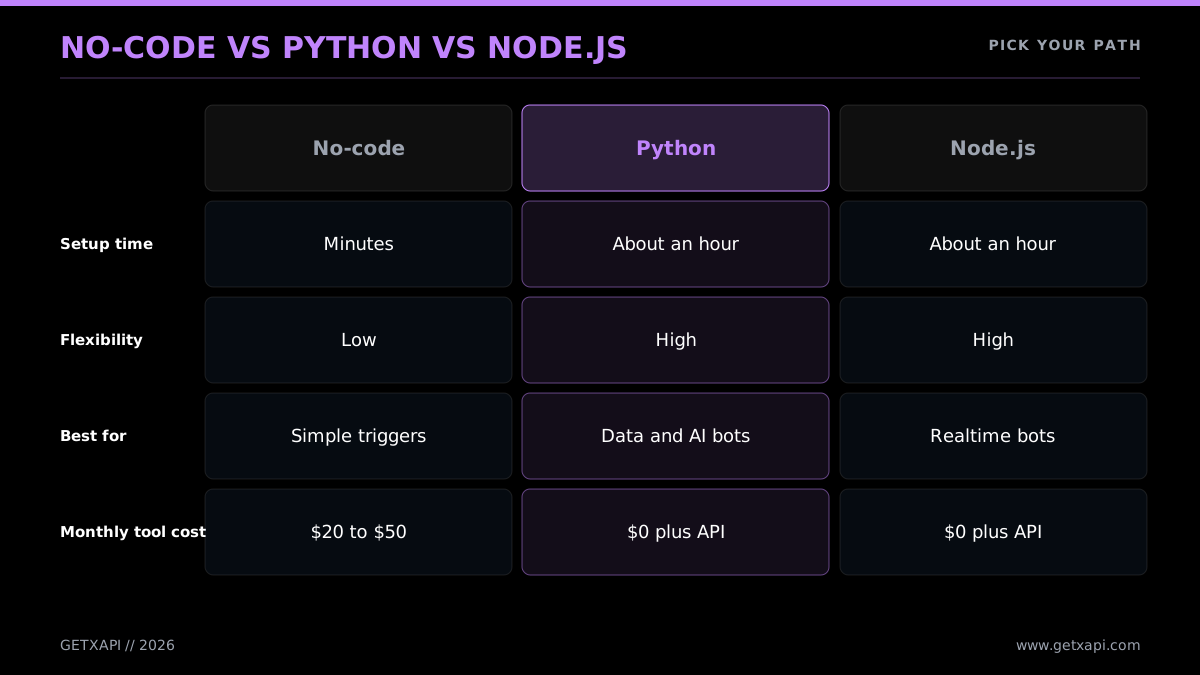
Pick the path that fits your bot
The no-code path
A no-code automation platform connects an X account, listens for a trigger, and fires an action. The setup, in Make.com or Zapier terms:
- Create a scenario (Make) or Zap (Zapier).
- Add a trigger module: a schedule, a new RSS item, a Google Sheet row, a webhook.
- Add an X action module: create a post, reply, retweet.
- Connect your X account via OAuth when prompted.
- Map the trigger data into the post template.
- Turn it on.
That is a working bot in under half an hour with no code. The platform handles the API calls and the OAuth dance for you. The cost is the platform subscription plus whatever the X account's posting incurs. The limitation is that you are boxed into the platform's modules, you cannot drop into custom logic or call an arbitrary API mid-flow without paying for higher tiers and fighting the UI. Both expose the same trigger-action model. Zapier documents its X integration; Make.com retired its built-in X modules in 2025, so X automation there now runs through a third-party X app rather than a native one.
There is a quieter no-code wall worth flagging: these platforms call the official X API under the hood, which means they inherit the official API's cost and access tier. A no-code monitor bot that reads heavily can run up the same data bill a coded one would, except you have less visibility into it. For write-only scheduled bots that read nothing, this is a non-issue. For anything that reads at volume, no-code does not escape the cost problem; it just hides it.
No-code is the right first stop if your bot is genuinely simple, you do not want to manage hosting, and your read volume is near zero. For everything else, code wins, both for control and for the ability to point your reads at a cheaper data source.
A note on AI-assisted building, since the most common 2026 question is whether you even need to write code yourself. You do not have to write it from a blank file. An AI assistant will produce a working Tweepy or requests bot from a plain-language description in seconds, and that is a legitimate way to start. The Medium and community write-ups of "I built a Twitter bot with ChatGPT and no programming experience" are real; the approach works. What the AI cannot do for you is decide your read volume, wire in real credentials safely, handle the rate-limit and error cases the happy-path code skips, and choose where the bot runs. Treat the generated code as a first draft of the loop, then apply the auth, cost, and hosting decisions from this guide on top of it. That division of labor (AI writes the loop, you make the engineering calls) is the honest state of bot-building in 2026.
The Python path
Python is the default language for Twitter bots and has been for a decade. Two reasons it stays on top: the depth of libraries (Tweepy is the most-used Twitter library by a wide margin, and plain requests covers everything else) and the AI tooling (if your bot needs a language model, every major LLM has a first-class Python SDK). The bot loop, listen, decide, act, maps cleanly onto a few dozen lines of Python. The full language-specific walkthrough lives in the Python Twitter API tutorial; the rest of this guide leans Python for the same reasons.
If you prefer to start from working code, Tweepy ships runnable examples in its repository on GitHub (tweepy/tweepy), and searching GitHub for "twitter bot" surfaces hundreds of open-source starters across both Python and Node. Read a couple before you build; many predate the paid API and will mislead you on cost, but the loop structure they show is still correct. The code in this guide is written for the 2026 reality, so use it as the reference and the older repos as inspiration for structure only.
The Node.js path
If your stack is already JavaScript, Node.js is a fine choice. The API is HTTP, so fetch works out of the box, and there are mature community libraries. Node shines for bots that live inside an existing web app or that need to handle webhooks in an event-driven way. The trade-off versus Python is a thinner Twitter-specific library scene and a slightly less mature AI-SDK story, though both are closing.
The contrarian view worth knowing: some builders skip the API entirely and drive a real browser with Selenium or Playwright, automating the X web interface as if a human were clicking. This avoids API costs but trades them for constant maintenance against X's frontend changes and a higher suspension risk.
a r/learnpython thread on building an X bot, including the Selenium-instead-of-API approach from r/learnpython
For most builders the browser-automation route is more fragile than it looks. A direct API gives you the cost relief that pushes people toward Selenium, without the maintenance burden of scraping a live frontend. Plenty of builders try both before they settle, like this one who ran the same bot through Selenium and then through Tweepy.
Today I built a twitter bot! I used Selenium as a webdriver to handle the bot's actions. I also decided to try out Tweepy API to handle the same actions.
@W8pars view on X
The sections below build the bot in Python, and show both the official-API and the direct-API versions of every call.
Start building with GetXAPI
$0.05 per 1,000 tweets. $0.10 free credits. No credit card required.
Step-by-Step: Build a Reply Bot in Python
A reply bot is the best second project (after a scheduled poster) because it exercises the full loop: it reads to find new mentions, decides which ones to answer, and writes a reply. The build is short. In Python you install a library, load your credentials, poll for new mentions on a timer, track which ones you have already handled so you never double-reply, and post a response to each new one. Below is the complete, runnable code in three forms: Tweepy on the official API, plain requests on the official API, and plain requests on the GetXAPI direct API.
Warm-up: the scheduled-post bot in 15 lines
Before the reply bot, here is the simplest possible complete bot, because it is the right first thing to ship and it proves your credentials work. A scheduled poster reads nothing and posts one item per run. Run it on a timer (the hosting section covers GitHub Actions cron) and it tweets on schedule forever.
import os
import json
import tweepy

client = tweepy.Client(
    consumer_key=os.environ["X_API_KEY"],
    consumer_secret=os.environ["X_API_SECRET"],
    access_token=os.environ["X_ACCESS_TOKEN"],
    access_token_secret=os.environ["X_ACCESS_SECRET"],
)

# posts.json is a list of strings; index.txt tracks our place
with open("posts.json") as f:
    posts = json.load(f)

try:
    with open("index.txt") as f:
        i = int(f.read().strip())
except (FileNotFoundError, ValueError):
    i = 0

client.create_tweet(text=posts[i % len(posts)])

with open("index.txt", "w") as f:
    f.write(str((i + 1) % len(posts)))
That is a working bot. It loads a queue of posts, posts the next one, and advances the index so the next run posts a different item. No reading, so the official data cost is the standard $0.015 Post-create request, or $0.20 if the Post contains a URL. It needs user-context credentials because it acts as one fixed account.
Before the code, the design. A reply bot must not reply to the same mention twice. The standard way to prevent that is to remember the ID of the most recent mention you have processed (the since_id) and only fetch mentions newer than it on each poll. Persist that ID to a file or a database so a restart does not re-reply to the whole history.
Setup
Install the library and set your credentials as environment variables. Never hardcode keys in the script.
pip install tweepy requests
export X_BEARER_TOKEN="your_bearer_token"
export X_API_KEY="your_consumer_key"
export X_API_SECRET="your_consumer_secret"
export X_ACCESS_TOKEN="your_access_token"
export X_ACCESS_SECRET="your_access_secret"
A reply bot needs write access, so it needs user-context credentials (the consumer key/secret plus access token/secret), not just the read-only Bearer Token. The authentication section below explains why.
Reply bot: Tweepy (official API)
Tweepy wraps the official X API and handles the OAuth signing for you. This is the most concise official-API version.
import os
import time
import tweepy

# User-context client for posting; app client for reading mentions
client = tweepy.Client(
    bearer_token=os.environ["X_BEARER_TOKEN"],
    consumer_key=os.environ["X_API_KEY"],
    consumer_secret=os.environ["X_API_SECRET"],
    access_token=os.environ["X_ACCESS_TOKEN"],
    access_token_secret=os.environ["X_ACCESS_SECRET"],
)

# Resolve our own user ID once
ME = client.get_me().data.id

SINCE_FILE = "since_id.txt"


def load_since_id():
    try:
        with open(SINCE_FILE) as f:
            return int(f.read().strip())
    except (FileNotFoundError, ValueError):
        return None


def save_since_id(value):
    with open(SINCE_FILE, "w") as f:
        f.write(str(value))


def reply_to_mentions():
    since_id = load_since_id()
    resp = client.get_users_mentions(
        ME,
        since_id=since_id,
        max_results=20,
        tweet_fields=["author_id", "text"],
    )
    mentions = resp.data or []
    # Oldest first so since_id advances correctly
    for mention in reversed(mentions):
        text = f"Thanks for the mention. A human will follow up shortly."
        client.create_tweet(
            text=text,
            in_reply_to_tweet_id=mention.id,
        )
        save_since_id(mention.id)
        print("replied to", mention.id)


if __name__ == "__main__":
    while True:
        try:
            reply_to_mentions()
        except tweepy.TooManyRequests:
            print("rate limited, sleeping 15 min")
            time.sleep(15 * 60)
        except Exception as e:
            print("error:", e)
        time.sleep(120)  # poll every 2 minutes
That is a complete reply bot. It polls every two minutes, fetches mentions newer than the last one it handled, replies to each, and persists the cursor. Tweepy raises TooManyRequests on a 429 so you can back off. The Tweepy library's own docs are at docs.tweepy.org if you want the full client reference.
Reply bot: plain requests (official API)
If you would rather not pull in Tweepy, the same bot with plain requests shows exactly what is happening over HTTP. Posting requires OAuth 1.0a signing, which is verbose by hand, so this version uses the small requests-oauthlib helper for the write call while keeping reads on the Bearer Token.
import os
import time
import requests
from requests_oauthlib import OAuth1

BEARER = os.environ["X_BEARER_TOKEN"]
OAUTH = OAuth1(
    os.environ["X_API_KEY"],
    os.environ["X_API_SECRET"],
    os.environ["X_ACCESS_TOKEN"],
    os.environ["X_ACCESS_SECRET"],
)

# Resolve our own user id
me = requests.get(
    "https://api.x.com/2/users/me",
    headers={"Authorization": f"Bearer {BEARER}"},
).json()["data"]["id"]

since_id = None


def poll_and_reply():
    global since_id
    params = {"max_results": 20, "tweet.fields": "author_id"}
    if since_id:
        params["since_id"] = since_id
    r = requests.get(
        f"https://api.x.com/2/users/{me}/mentions",
        headers={"Authorization": f"Bearer {BEARER}"},
        params=params,
    )
    r.raise_for_status()
    mentions = r.json().get("data", [])
    for m in reversed(mentions):
        requests.post(
            "https://api.x.com/2/tweets",
            auth=OAUTH,  # user-context auth required to post
            json={
                "text": "Thanks for the mention. A human will follow up shortly.",
                "reply": {"in_reply_to_tweet_id": m["id"]},
            },
        )
        since_id = m["id"]
        print("replied to", m["id"])


if __name__ == "__main__":
    while True:
        try:
            poll_and_reply()
        except Exception as e:
            print("error:", e)
        time.sleep(120)
Reads go out with the Bearer Token; the post goes out signed with OAuth 1.0a. That split (app auth for reading, user auth for writing) is the most important thing to internalize about official-API bots.
Reply bot: GetXAPI (direct API)
On the direct-API path, the auth collapses to one Bearer header for both the read and the write. You sign up, copy a token, and call api.getxapi.com. No OAuth signing, no developer console, no two-credential split.
import os
import time
import requests

API_KEY = os.environ["GETXAPI_KEY"]
HEADERS = {"Authorization": f"Bearer {API_KEY}"}
USERNAME = "your_bot_handle"

since_id = None


def poll_and_reply():
    global since_id
    # GetXAPI has no dedicated mentions endpoint: search for replies to our handle
    r = requests.get(
        "https://api.getxapi.com/twitter/tweet/advanced_search",
        headers=HEADERS,
        params={"q": f"to:{USERNAME}", "product": "Latest"},
    )
    r.raise_for_status()
    mentions = r.json().get("tweets", [])
    for m in reversed(mentions):
        if since_id and m["id"] <= since_id:
            continue
        # Reply, same single-header auth
        requests.post(
            "https://api.getxapi.com/twitter/tweet/create",
            headers=HEADERS,
            json={
                "text": "Thanks for the mention. A human will follow up shortly.",
                "reply_to_tweet_id": m["id"],
            },
        )
        since_id = m["id"]
        print("replied to", m["id"])


if __name__ == "__main__":
    while True:
        try:
            poll_and_reply()
        except Exception as e:
            print("error:", e)
        time.sleep(120)
Same loop, same logic, one header instead of two credential sets and an OAuth signer. One thing to note: GetXAPI exposes no dedicated mentions endpoint, so you read replies to your handle with advanced_search and a to: operator, which is the same call the monitor bot below uses. For exact endpoint paths, parameter names, and the write-action conventions, the GetXAPI best practices guide is the reference. The read calls here are billed at $0.05 per 1,000, so a reply bot that polls every two minutes and finds a handful of mentions costs cents a month to run.
From reply bot to monitor bot
A search/monitor bot is the reply bot with a different read call. Instead of fetching your mentions, you search all of X for a keyword and act on matches. Swap the read for a search call and keep the rest of the loop:
import os
import requests

HEADERS = {"Authorization": f"Bearer {os.environ['GETXAPI_KEY']}"}

# Monitor: search instead of fetching mentions (GetXAPI)
r = requests.get(
    "https://api.getxapi.com/twitter/tweet/advanced_search",
    headers=HEADERS,
    params={"q": "your brand name", "product": "Latest"},
)
for tweet in r.json().get("tweets", []):
    # decide: log it, alert, like, or reply
    print(tweet.get("createdAt"), (tweet.get("text") or "")[:80])
Search is where read volume, and therefore cost, climbs. The advanced search operators guide shows how to tighten a query so you read fewer, more relevant tweets, which is the cheapest optimization you can make. For a monitor bot that classifies sentiment on what it finds, see the Twitter sentiment analysis in Python walkthrough.
A monitor bot is rarely the whole product. Builders bolt the same read loop onto competitor analysis, influencer discovery, and lead routing, as in this Python and Tweepy automation project.
a Twitter automation bot called BrandElevator. It's built with Python and Tweepy. it's designed to help with tasks like fetching tweets, analyzing competitors, and identifying influencers.
@GrowthWithLeo view on X
Adding an AI step (the AI agent bot)
The AI agent bot is the same loop with a language model wedged into the "decide" step. The script reads an input, sends it to an LLM, and posts the model's response. Here is an AI reply bot: it finds mentions, asks a model to draft a reply, and posts it. The model call here uses a generic chat-completion shape that any major provider's SDK follows.
import os, time, requests

X_HEADERS = {"Authorization": f"Bearer {os.environ['GETXAPI_KEY']}"}
USERNAME = "your_bot_handle"
seen = set()


def draft_reply(question_text):
    # Pseudocode for any LLM SDK: send a prompt, get text back
    r = requests.post(
        "https://api.your-llm-provider.com/v1/chat/completions",
        headers={"Authorization": f"Bearer {os.environ['LLM_KEY']}"},
        json={
            "model": "your-model",
            "messages": [
                {"role": "system", "content": "Reply helpfully in under 240 characters."},
                {"role": "user", "content": question_text},
            ],
        },
    )
    return r.json()["choices"][0]["message"]["content"][:240]


def run():
    r = requests.get(
        "https://api.getxapi.com/twitter/tweet/advanced_search",
        headers=X_HEADERS, params={"q": f"to:{USERNAME}", "product": "Latest"},
    )
    for m in r.json().get("tweets", []):
        if m["id"] in seen:
            continue
        seen.add(m["id"])
        reply = draft_reply(m["text"])
        requests.post(
            "https://api.getxapi.com/twitter/tweet/create",
            headers=X_HEADERS,
            json={"text": reply, "reply_to_tweet_id": m["id"]},
        )
        print("AI-replied to", m["id"])


if __name__ == "__main__":
    while True:
        run()
        time.sleep(120)
The AI step is the only addition. Everything else (the poll, the dedup, the reply) is identical to the plain reply bot. This is why building up from the simplest bot pays off: each new type adds one piece. An AI agent that monitors a busy feed is also the most expensive type to run, because the LLM costs stack on top of the read costs, which is one more reason to keep reads cheap. A modern assistant can generate the entire scaffold of code like this from a one-sentence prompt, which is what people mean when they ask whether ChatGPT can build a bot. It can write the loop; you supply the credentials, the error handling, and the host.
If you want to watch an AI reply bot built end to end, from the prompt to a deployed account that answers mentions, this walkthrough builds exactly that on top of an LLM.
Watch an end-to-end build of an AI Twitter bot using LLMs
Authentication Explained: Bearer vs OAuth 1.0a vs OAuth 2.0 PKCE
Authentication is the part of bot-building that confuses people most, so here is the clean mental model. The official X API has three auth methods, and which one you need depends on a single question: does your bot act on behalf of a user, or just read public data? Bearer Token (OAuth 2.0 app-only) is for reading public data and is the simplest. OAuth 1.0a is for acting as a single fixed account (posting, DMing) and is what most older bots use. OAuth 2.0 PKCE is the modern flow for apps that act on behalf of many users with scoped permissions. A direct API like GetXAPI collapses all three into one Bearer header.
The decision is almost mechanical once you frame it by action type.
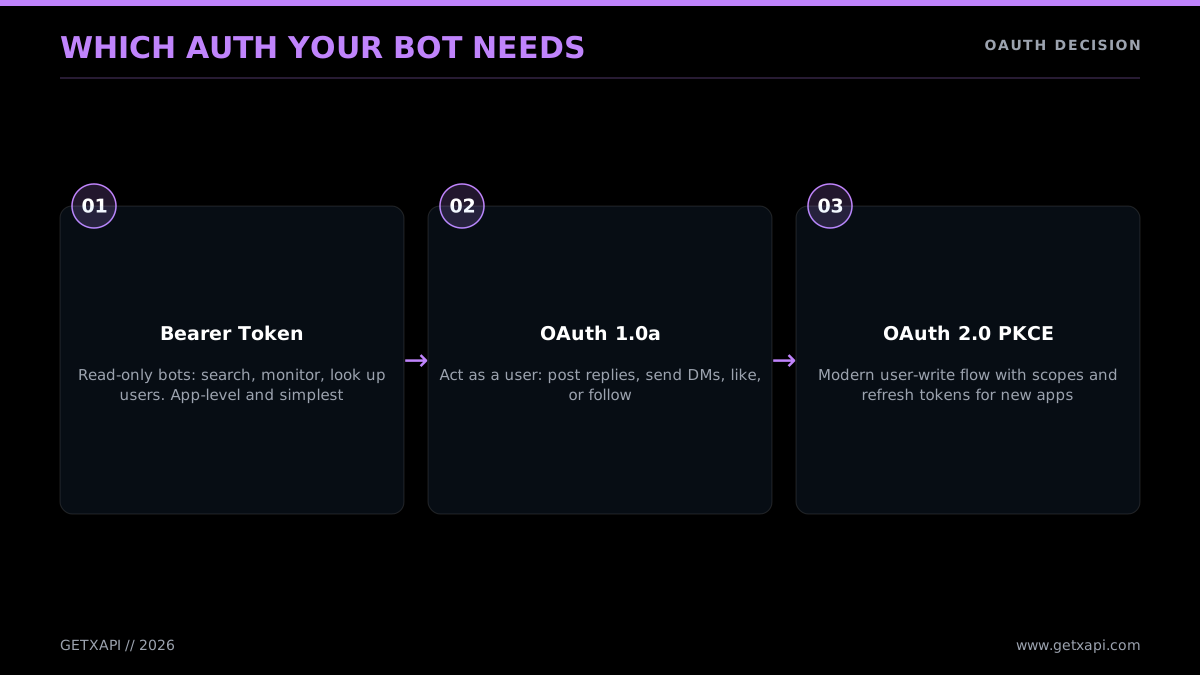
Which auth your bot actually needs
Bearer Token (OAuth 2.0 app-only)
This is the simplest credential. You generate one Bearer Token in the developer console, store it, and send it as a header on every request:
curl "https://api.x.com/2/tweets/search/recent?query=python" \
  -H "Authorization: Bearer $X_BEARER_TOKEN"
A Bearer Token authenticates your app, not a user. It can read public data: search, user lookups, public timelines, mentions of a public account. It cannot post, reply, like, retweet, or DM, because those actions require acting as a user. A monitor bot or a read-only analytics bot needs nothing more than this. It is the right default for any read-only bot.
OAuth 1.0a (user context, single account)
When your bot posts or DMs as one specific account (its own), OAuth 1.0a is the established path. You need four values: the consumer key and secret (identifying your app) and the access token and secret (identifying the account you act as). Every write request is cryptographically signed with all four. The signing is fiddly to do by hand, which is why libraries exist:
from requests_oauthlib import OAuth1
import requests, os

auth = OAuth1(
    os.environ["X_API_KEY"], os.environ["X_API_SECRET"],
    os.environ["X_ACCESS_TOKEN"], os.environ["X_ACCESS_SECRET"],
)
requests.post(
    "https://api.x.com/2/tweets",
    auth=auth,
    json={"text": "Posted by my bot"},
)
This is the auth a scheduled-post bot or a single-account reply bot uses for its write calls. The access token and secret you generate in the console correspond to your own account, so the bot posts as you. Most bot tutorials you have seen use this flow.
OAuth 2.0 PKCE (modern, multi-user write)
If you are building a product where many different users connect their X accounts and your bot acts on each user's behalf (a scheduling SaaS, for example), OAuth 2.0 PKCE is the correct flow. The user clicks "Connect with X," gets redirected to X's authorization server, approves the specific scopes your app asks for (say, post but not read DMs), and your backend exchanges the resulting code for a per-user access token plus a refresh token. You store the access token, refresh it when it expires, and call the API as that user. The PKCE mechanism is the OAuth standard defined in RFC 7636, and X's specific implementation is documented at docs.x.com. Scoped permissions and refresh tokens are the reasons to choose PKCE over OAuth 1.0a for new multi-user apps.
The flow in code has three parts. First, build the authorization URL and send the user to it, keeping the PKCE verifier server-side:
import base64, hashlib, os, secrets, urllib.parse

CLIENT_ID = os.environ["X_CLIENT_ID"]
REDIRECT = "https://yourapp.com/callback"

# PKCE: a random verifier and its SHA-256 challenge
verifier = secrets.token_urlsafe(64)
challenge = base64.urlsafe_b64encode(
    hashlib.sha256(verifier.encode()).digest()
).decode().rstrip("=")

params = urllib.parse.urlencode({
    "response_type": "code",
    "client_id": CLIENT_ID,
    "redirect_uri": REDIRECT,
    "scope": "tweet.read tweet.write users.read offline.access",
    "state": secrets.token_urlsafe(16),
    "code_challenge": challenge,
    "code_challenge_method": "S256",
})
print("Send the user to:", f"https://x.com/i/oauth2/authorize?{params}")
# Store `verifier` keyed by `state` so the callback can retrieve it
Second, in your callback handler, exchange the returned code for tokens:
import requests

tokens = requests.post(
    "https://api.x.com/2/oauth2/token",
    data={
        "grant_type": "authorization_code",
        "code": code_from_callback,
        "redirect_uri": REDIRECT,
        "client_id": CLIENT_ID,
        "code_verifier": verifier,  # the one you stored
    },
).json()
access_token = tokens["access_token"]
refresh_token = tokens["refresh_token"]  # because of offline.access scope
Third, call the API as that user and refresh when the access token expires:
# Post on the user's behalf
requests.post(
    "https://api.x.com/2/tweets",
    headers={"Authorization": f"Bearer {access_token}"},
    json={"text": "Posted via PKCE on the user's behalf"},
)

# When the access token expires, mint a new one
new_tokens = requests.post(
    "https://api.x.com/2/oauth2/token",
    data={
        "grant_type": "refresh_token",
        "refresh_token": refresh_token,
        "client_id": CLIENT_ID,
    },
).json()
That is the entire PKCE dance. It is more moving parts than OAuth 1.0a, but it buys you per-user scopes and refresh tokens, which you need for a multi-tenant product. For a single-account bot, do not reach for this; OAuth 1.0a is simpler and sufficient.
The direct-API shortcut
The reason the auth section is shorter for a GetXAPI bot is that there is nothing to choose. The same Authorization: Bearer YOUR_KEY header works for read endpoints, write endpoints, and DM endpoints. You do not run an OAuth flow for reads, and the provider handles the user-session layer for write actions. For a bot builder who just wants to ship, this removes the single most common source of setup errors. The complete official-API auth reference, including the full PKCE flow with code, is in the Twitter API tutorial.
One safety note that belongs with auth: treat every credential like a password. Never commit keys to git, never paste them in a screenshot, and store them as environment variables or in a secrets manager. A leaked OAuth token lets anyone post as your bot's account.
Building Without an X Developer Account: The GetXAPI Path
You do not need an X developer account to build a Twitter bot. The official API requires one (with an app, generated keys, and a payment method), but a direct API skips all of it. With GetXAPI you sign up with an email address, copy a Bearer token from the dashboard, and immediately call api.getxapi.com with one Authorization header. No console, no app setup, no OAuth setup, no separate developer account. For read-heavy bots this path is also far cheaper, reads are $0.05 per 1,000 tweets with no monthly floor and no 3-million-read ceiling. It is pay-per-call: you only pay for what your bot actually reads or writes.
This matters most for two groups: beginners who hit the developer-account wall and give up, and teams whose bots read enough data that the official per-call price is the dominant cost. Both get a faster, cheaper path here. The recurring beginner question, captured in the Quora thread "What are the steps to creating a free Twitter bot?", really means "how do I build one without the developer-account and payment friction," and the direct-API signup is the cleanest answer to that. The setup is genuinely three steps.
- Sign up at getxapi.com with an email. No credit card required to start.
- Copy your Bearer token from the dashboard.
- Call the API with
Authorization: Bearer YOUR_KEY.
Here is the full first call, a user lookup, in three languages.
Python
import os
import requests

API_KEY = os.environ["GETXAPI_KEY"]

resp = requests.get(
    "https://api.getxapi.com/twitter/user/info",
    params={"userName": "elonmusk"},
    headers={"Authorization": f"Bearer {API_KEY}"},
)
resp.raise_for_status()
user = resp.json()["data"]
print(user["name"], "followers:", user["followers"])
Node.js
const API_KEY = process.env.GETXAPI_KEY;

const res = await fetch(
  "https://api.getxapi.com/twitter/user/info?userName=elonmusk",
  { headers: { Authorization: `Bearer ${API_KEY}` } }
);
if (!res.ok) throw new Error(`HTTP ${res.status}`);
const { data: user } = await res.json();
console.log(user.name, "followers:", user.followers);
curl
curl "https://api.getxapi.com/twitter/user/info?userName=elonmusk" \
  -H "Authorization: Bearer $GETXAPI_KEY"
That is the whole onboarding. Compare it to the official path, where the equivalent first call requires you to have already created an app, generated a Bearer Token, and added a payment method. The dedicated how to get a Twitter API key guide details the official console flow if you need it; this path replaces all of it with an email signup.
A full monitor bot on this path is just the search call in a loop:
import os, time, requests

HEADERS = {"Authorization": f"Bearer {os.environ['GETXAPI_KEY']}"}
seen = set()


def monitor(query):
    r = requests.get(
        "https://api.getxapi.com/twitter/tweet/advanced_search",
        headers=HEADERS,
        params={"q": query, "product": "Latest"},
    )
    r.raise_for_status()
    for t in r.json().get("tweets", []):
        if t["id"] in seen:
            continue
        seen.add(t["id"])
        print("NEW:", t["createdAt"], t["text"][:100])


if __name__ == "__main__":
    while True:
        monitor("your brand name")
        time.sleep(300)  # every 5 minutes
There is one honest trade-off to name. A direct API is not the source of truth; X is. A direct provider maintains its own access to X data and exposes it through a stable REST surface, which is what lets it price reads at a fraction of the official rate. For the overwhelming majority of bot use cases (monitoring, lead detection, AI feeds, analytics, content distribution) reading through a provider is perfectly fine, because you do not need to be the canonical source, you need the data and you need it cheap. The one case where you go official is when your bot must act as a verified first-party app on behalf of users at the platform level, for example a regulated product that legally has to call X directly. For everything else, the direct path is faster to set up and cheaper to run, and you can always keep a thin official integration for the few write actions that genuinely need it while routing all your reads through the cheaper provider. That hybrid (cheap reads from a direct API, official writes where required) is a common and sensible architecture for a serious bot.
For deciding whether the direct path or the official API fits your bot, the side-by-side Twitter API v2 vs GetXAPI comparison breaks down coverage and cost. If you are coming from a marketplace listing, the RapidAPI Twitter alternative and Apify Twitter scraper vs GetXAPI comparisons cover those migrations specifically.
Handling Rate Limits and 429s Without Crashing
Every Twitter bot will eventually hit a rate limit, and a bot that crashes on the first 429 is not production-ready. On the official X API, limits are per-endpoint and usually on a 15-minute window: recent search allows 450 requests per 15 minutes on app-only (Bearer) auth and 300 on user (OAuth) auth, for example. When you exceed a limit you get a 429 status code and an x-rate-limit-reset header telling you, as a Unix timestamp, when the window reopens. The correct response is never to retry immediately. Read the reset header, wait, and use exponential backoff for repeated failures so you do not hammer the API and dig the hole deeper.
The pattern is a four-step loop: make the call, check the response headers, back off if you were limited, then retry.
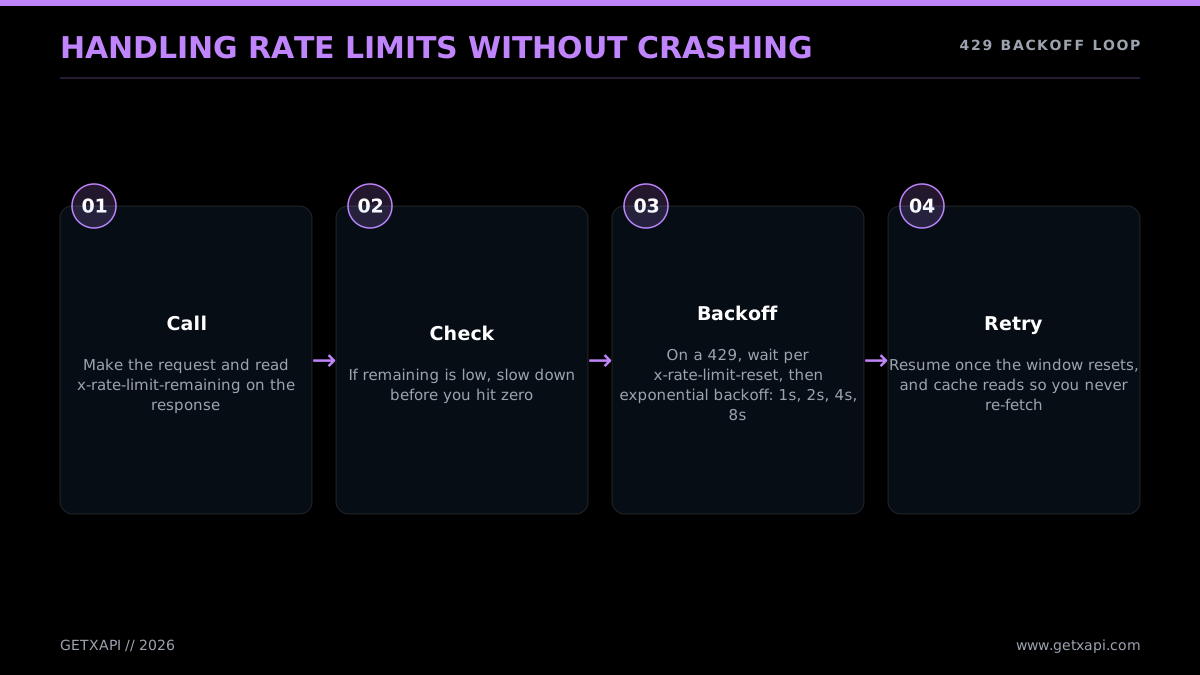
Surviving 429s without crashing
Here is a reusable retry wrapper for the official API. It respects the reset header when present and falls back to exponential backoff otherwise.
import time
import requests


def call_with_retry(url, headers, params=None, max_retries=5):
    backoff = 1
    for attempt in range(max_retries):
        r = requests.get(url, headers=headers, params=params)
        if r.status_code == 429:
            reset = r.headers.get("x-rate-limit-reset")
            if reset:
                wait = max(int(reset) - int(time.time()), 1)
            else:
                wait = backoff
                backoff = min(backoff * 2, 60)  # 1, 2, 4, 8, ... cap 60s
            print(f"429, waiting {wait}s")
            time.sleep(min(wait, 60))
            continue
        r.raise_for_status()
        return r.json()
    raise RuntimeError("max retries exhausted")
Three habits keep a bot well inside the limits rather than constantly bouncing off them:
- Read the headers proactively. On every response, check
x-rate-limit-remaining. When it drops near zero, slow down before you hit the wall instead of waiting for the 429. - Pace your calls. If you have a budget of 450 search calls per 15 minutes, do not fire all 450 in the first 30 seconds. Spread them across the window.
- Cache what does not change. A user's profile changes rarely, cache it for minutes. A tweet's text is immutable once posted, cache it indefinitely. Every cached response is a call you did not spend.
The numbers worth memorizing for a bot, because they shape how fast your loop can run: recent search allows 450 requests per 15-minute window on app-only (Bearer) auth and 300 on user (OAuth) auth. A user-timeline fetch allows far more. Posting is capped at 100 per 15 minutes on user context (and 10,000 per 24 hours at the app level), and DM sends are capped on a 24-hour window rather than a 15-minute one. The practical implication is that a reply bot polling mentions every two minutes uses a tiny fraction of its budget, while a monitor bot firing search calls in a tight loop can exhaust the search window in under a minute. Pace the search loop, not the poll loop. The full per-endpoint limit table is on the Twitter API rate limits reference, and the retry/backoff playbook is in the 429 implementation guide, and X's own numbers are at the official rate limits reference.
The same retry pattern in Node.js, for bots built on a JavaScript stack:
async function callWithRetry(url, headers, maxRetries = 5) {
  let backoff = 1000; // ms
  for (let attempt = 0; attempt < maxRetries; attempt++) {
    const res = await fetch(url, { headers });
    if (res.status === 429) {
      const reset = res.headers.get("x-rate-limit-reset");
      const waitMs = reset
        ? Math.max(Number(reset) * 1000 - Date.now(), 1000)
        : (backoff = Math.min(backoff * 2, 60000));
      console.log(`429, waiting ${Math.round(waitMs / 1000)}s`);
      await new Promise((r) => setTimeout(r, Math.min(waitMs, 60000)));
      continue;
    }
    if (!res.ok) throw new Error(`HTTP ${res.status}`);
    return res.json();
  }
  throw new Error("max retries exhausted");
}
Same logic as the Python version: read the reset header when present, fall back to doubling backoff otherwise, and cap the wait so a single 429 never stalls the bot for more than a minute.
Direct APIs handle this differently, and it simplifies your bot. GetXAPI does not impose a platform-level 15-minute call ceiling, the constraint is your prepaid credit balance, not a per-window bucket. The provider absorbs the upstream rate-limit complexity. You still write sane retry logic for transient network errors, but you are not engineering around X's per-endpoint windows. That removes a whole class of bot bugs.
The cheapest Twitter API. Try it free.
$0.05 per 1,000 tweets. $0.10 free credits. No credit card required.
Where to Host Your Bot 24/7
A bot only works while its code is running, so you need somewhere to host it that stays up. There are three common options, ordered by how much your bot needs to run continuously. GitHub Actions is free and perfect for scheduled bots that run on a timer (it runs your script on a cron and shuts off between runs). Serverless cron (AWS Lambda, Google Cloud Functions, Vercel Cron) suits event-driven bots that wake on a schedule or a webhook. A small VPS (a $5-a-month box on DigitalOcean, Hetzner, or Fly.io) is the right call for a bot that must run a continuous listening loop. Match the host to the bot's loop shape and you avoid both downtime and wasted spend.
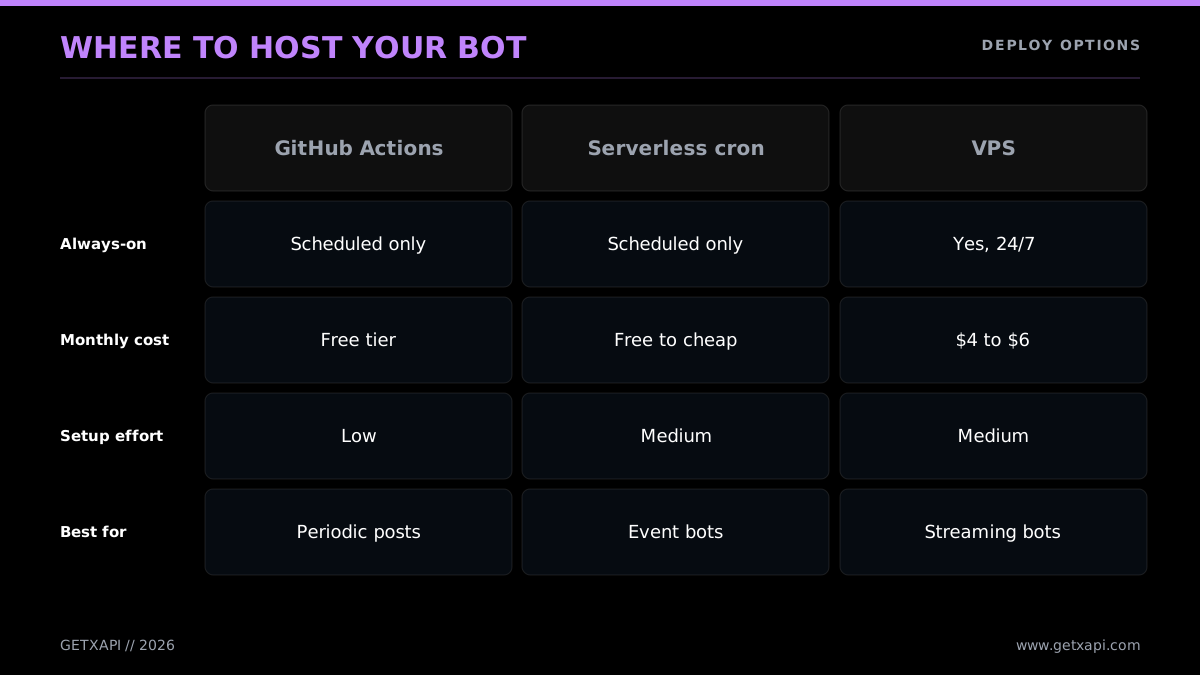
Where to run your bot around the clock
GitHub Actions (free, for scheduled bots)
If your bot runs on a timer (a scheduled poster, a periodic monitor that checks every hour), GitHub Actions is the easiest free host. You commit your script to a repo, add a workflow file with a cron schedule, and store your API keys as encrypted repository secrets. GitHub runs your script on the schedule and charges nothing for public repos within the generous free minutes.
# .github/workflows/bot.yml
name: twitter-bot
on:
  schedule:
    - cron: "0 * * * *"   # every hour
  workflow_dispatch:        # also allow manual runs
jobs:
  run:
    runs-on: ubuntu-latest
    steps:
      - uses: actions/checkout@v4
      - uses: actions/setup-python@v5
        with:
          python-version: "3.12"
      - run: pip install requests
      - run: python bot.py
        env:
          GETXAPI_KEY: ${{ secrets.GETXAPI_KEY }}
Set GETXAPI_KEY (or your X tokens) under the repo's Settings, Secrets and variables, Actions. The cron syntax and the secrets mechanism are documented in the GitHub Actions scheduled-events docs. The one caveat: GitHub's scheduled triggers can be delayed by a few minutes under load, so do not rely on second-level precision.
Serverless cron (Lambda, Cloud Functions, Vercel)
For event-driven bots, especially ones that respond to webhooks, a serverless function is a clean fit. You deploy the bot as a function, trigger it on a schedule or a webhook, and pay only for execution time. This suits a reply bot that wakes when X pushes an event, or a monitor that runs every few minutes. The trade-off is cold-start latency and a per-platform deployment learning curve.
A serverless bot is just your loop body without the while True. The platform supplies the schedule, so each invocation does one pass and exits. An AWS Lambda handler for a monitor bot looks like this:
import os, requests

HEADERS = {"Authorization": f"Bearer {os.environ['GETXAPI_KEY']}"}


def handler(event, context):
    r = requests.get(
        "https://api.getxapi.com/twitter/tweet/advanced_search",
        headers=HEADERS,
        params={"q": "your brand name", "product": "Latest"},
    )
    r.raise_for_status()
    hits = r.json().get("tweets", [])
    # do something durable: write to DynamoDB, push to SQS, send a Slack alert
    return {"statusCode": 200, "count": len(hits)}
You wire an EventBridge schedule (or a Vercel Cron entry) to call handler every few minutes, and store keys as encrypted environment variables. The key design difference from the VPS version: serverless functions are stateless between runs, so any "have I seen this tweet" memory must live in an external store (a database, a key-value cache), not in a Python set. That statelessness is the main thing that trips people moving a loop bot to serverless.
A small VPS (for continuous bots)
If your bot runs an always-on while True loop (a real-time monitor that needs sub-minute reaction time), a small virtual server is the most predictable home. A $5-a-month instance running your script under a process manager keeps it alive across crashes and reboots:
# On the VPS, keep the bot running and restart it if it dies
pip install requests tweepy
nohup python bot.py > bot.log 2>&1 &
# Better: a systemd service or pm2 for auto-restart on reboot
For production, wrap the script in a systemd unit (or pm2 if you are in Node) so it restarts automatically. A VPS gives you full control and predictable cost, at the price of managing a server.
The host you pick should follow the bot type from earlier: scheduled bots go on GitHub Actions, event bots go serverless, continuous monitors go on a VPS. Cost across all three is small (free to a few dollars a month), which is worth remembering when you weigh it against the data layer, where the real spend lives.
A practical decision shortcut: ask how often your bot needs to act. If "once an hour" or "once a day" is fine, use GitHub Actions cron and never run a server. If "within a few minutes of an event" is the bar, serverless on a schedule covers it. Only if you need "within seconds, continuously" should you reach for an always-on VPS, because that is the only option that keeps a process resident and watching. Most bots people think need a server actually run fine on a free cron, and reaching for a VPS first is a common over-build. Start with the cheapest host that meets your latency requirement and move up only when you measure that you need to.
Whichever host you choose, two operational habits save you grief. First, log every action the bot takes to a file or a logging service, so when something goes wrong you can see what the bot did and when. Second, set up an alert (a Slack message, an email) for two events: the bot crashing, and the bot's spend crossing a threshold. A bot you cannot observe is a bot that will surprise you, and the surprises are usually expensive.
Keeping Your Bot Inside the Rules
Automation is allowed on X, but there is a clear line between a helpful bot and one that gets suspended, and staying on the right side of it is mostly common sense plus a few hard rules. The principles X enforces: disclose that the account is automated, do not spam (no repetitive replies, no mass-mentioning), do not fake engagement (no mass-following, mass-liking, or coordinated posting to game the algorithm), do not post identical content across many accounts, and respect rate limits. A bot that posts genuinely useful content, acts on a clear trigger, and paces itself is fine. A bot that blasts unsolicited replies or chases follower counts through bulk actions is what triggers enforcement.
The safety checklist below maps the common practices to what is safe versus what gets you suspended, across the dimensions that matter: posting rate, content, disclosure, auth, and targeting.
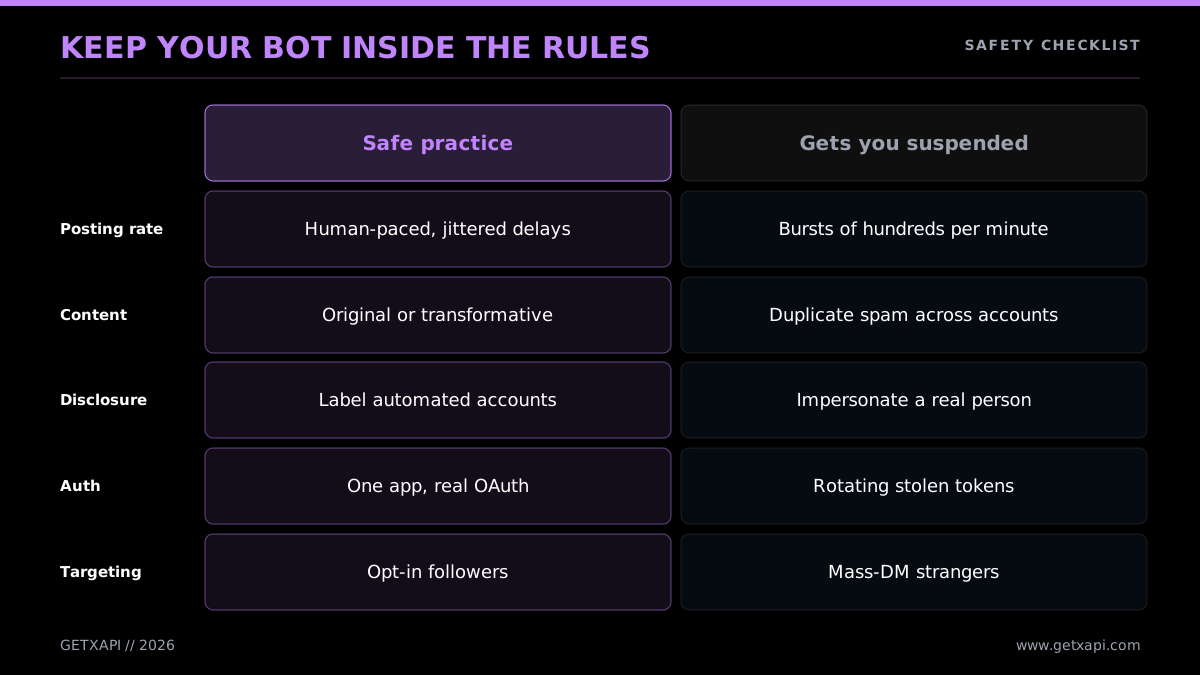
Keep your bot inside the rules
The concrete rules worth building into your bot from the start:
- Disclose automation. Make it obvious the account is a bot, in the bio or the posts. Hidden automation pretending to be human is the fastest route to suspension.
- Throttle aggressively. Do not reply to every mention within milliseconds, do not like hundreds of posts a minute, do not follow and unfollow in cycles. Human-paced behavior is safe behavior. The rate-limit logic from the previous section doubles as safety logic.
- No duplicate content. Posting the same text repeatedly, or the same text across multiple accounts, reads as spam to X's automation detection. Vary your output.
- Do not chase the algorithm. Mass-following to farm follow-backs, engagement pods, and coordinated boosting are explicitly against the rules and are detected well.
- Handle errors quietly. A bot stuck in a retry loop that posts an error message every two seconds will get flagged. Catch errors, back off, and log instead of posting.
Detection is more sophisticated than most builders assume, X uses behavioral signals (timing patterns, action velocity, content similarity) to spot automation that breaks the rules. The full text of what is and is not allowed lives in the X automation and developer policy; read it once before you ship, because the line between allowed and bannable is drawn there, not in any tutorial. The Twitter bot detection guide covers what those signals are in practice, which is useful both for keeping your own bot clean and for understanding how the platform thinks about automation.
A few specific behaviors are worth calling out because builders trip over them without realizing they are over the line:
- Rapid follow-then-unfollow cycles. Following a thousand accounts to farm follow-backs, then unfollowing the ones who did not reciprocate, is one of the most reliably detected patterns. Do not build it.
- Identical replies at scale. Sending the exact same reply text to fifty different mentions in a short window reads as spam even if the intent is benign. Vary the wording, or rate-limit replies to a human pace.
- Coordinated multi-account posting. Running several bot accounts that post the same content on a schedule is platform manipulation. One account, original output, is fine.
- Unsolicited DMs. Sending DMs to people who have not interacted with your account is the fastest route to a suspension and a spam report. Reserve DMs for users who opted in or messaged first.
- Ignoring the 429. A bot that keeps hammering an endpoint after a rate-limit response is not just buggy, it is a signal to X that the account is misbehaving. The backoff logic from the rate-limit section is a compliance feature, not just a stability one.
The defensive posture that keeps a bot safe is simple to state: behave like a fast, helpful human, not like a machine trying to win at scale. Disclose, pace, vary, and respect the limits, and a bot can run for years without trouble.
One legal-adjacent note: if your bot collects or stores data about users, respect the terms you agreed to and applicable privacy rules. A read-only monitor that logs public posts to your own database is normal; reselling scraped personal data is a different matter. Build for the use case you can defend.
Cost: What a Bot Actually Costs to Run
Every price in this section is current as of June 2026: official rates come from the X API docs and pay-per-use announcements, and GetXAPI rates from getxapi.com/pricing. Pricing on both sides has changed more than once since 2023, so treat any older guide's numbers as out of date and re-check the live pages before you budget.
A Twitter bot has two cost lines: hosting and data. Hosting is cheap and predictable (free on GitHub Actions, a few dollars a month on a VPS). Data is the line that varies by orders of magnitude depending on how much your bot reads, and it is where the official-versus-direct-API choice decides your bill. A write-only scheduled poster reads almost nothing and costs cents either way. A read-heavy monitor or AI agent can cost thousands a month on the official API and a fraction of that on a per-1,000-tweet provider. The rule of thumb: if your bot reads at any real volume, the data layer dominates your cost, so optimize it first.
Walk the official-API ladder for a read-heavy bot. At $0.005 per read, the cost climbs steeply as your bot's monitoring scope grows.
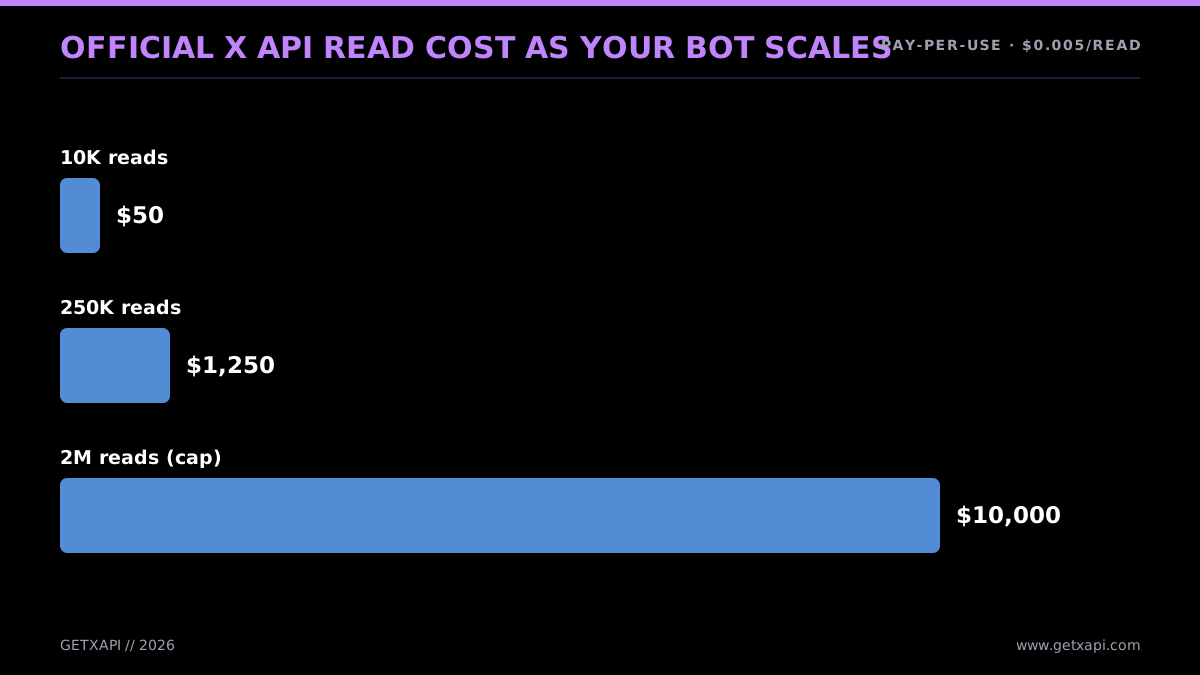
Official read cost as your bot scales
Now the same read volumes on the direct-API path at $0.05 per 1,000 tweets. The shape is the same, the magnitude is not.
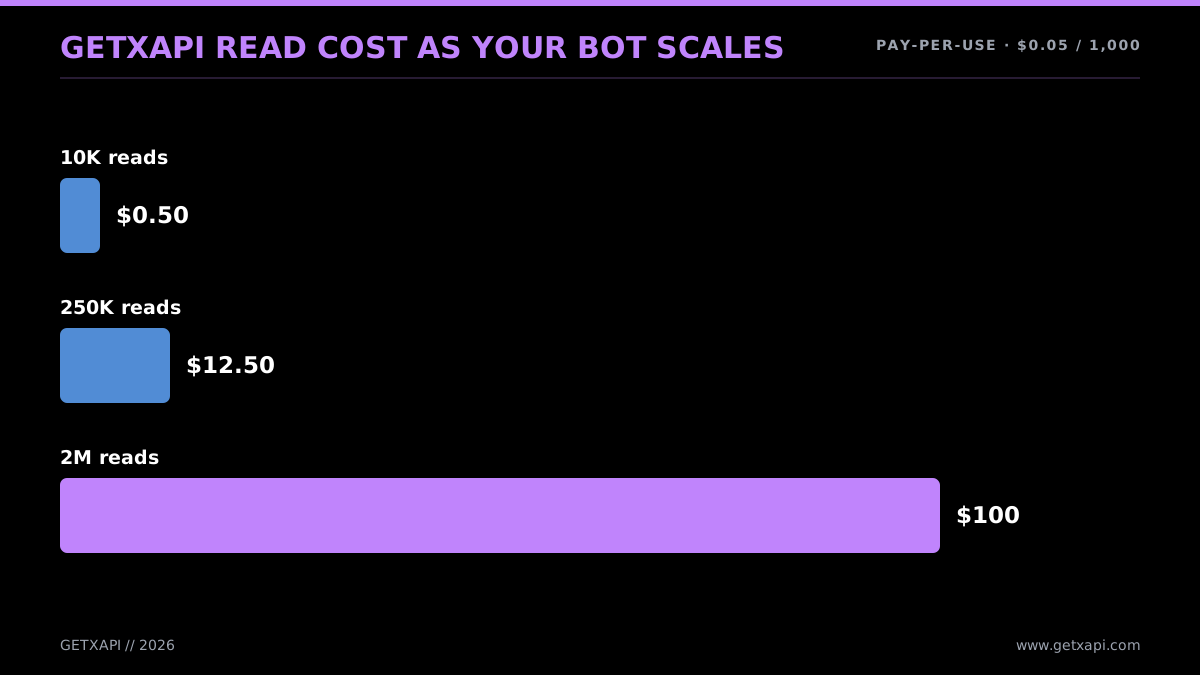
The same volume on GetXAPI
Concrete monthly examples, hosting plus data:
- Scheduled poster (5 standard Posts a day). Hosting can be free on GitHub Actions. About 150 standard Post-create requests cost $2.25 at the current official $0.015 rate; URL Posts cost more. The developer-account setup is a one-time integration task.
- Reply bot (polls mentions, low volume). Hosting: free or a few dollars. Data: a few thousand reads a month plus a few hundred replies. On the official API maybe $20 to $50. On GetXAPI the reads drop to cents, so the bill is dominated by the writes.
- Brand monitor (50,000 reads a month). Hosting: a few dollars on a VPS. Data: $250 on the official API at $0.005 per read, versus about $2.50 on GetXAPI at $0.05 per 1,000. The data layer is 100x cheaper on the direct path.
- AI agent (1,000,000 reads a month). Hosting: small. Data: $5,000 on the official API, and you are a third of the way to the 3-million ceiling that forces Enterprise pricing. On GetXAPI, $50, with no ceiling. This is the case where the choice is not close.
The pattern is consistent: hosting is a rounding error, and the data layer is where the decision gets made. For posting-heavy bots, the official API's per-write price is small and either path works. For reading-heavy bots, a per-1,000-tweet API is 10x to 100x cheaper and removes the 3-million ceiling entirely. The full cost math, with provider-by-provider comparison, is in the Twitter API cost benchmark, and the cheapest Twitter API ranking lists where the real per-1,000-tweet cost lands across eight providers.
The one cost mistake every new bot builder makes
There is a failure mode that does not show up as an error code but shows up on the invoice: the runaway loop. A bug in your polling interval (firing every 100 milliseconds instead of every 60 seconds), a retry loop with no backoff, or a search query so broad it returns thousands of results per call can quietly burn through hundreds of dollars of credits over a weekend before you notice. The bot does not crash; it just reads, and reads, and reads. On the official API at $0.005 a read, a loop spinning at full speed can spend $50 an hour without anyone watching.
Three guards prevent this, and you should build all three into any bot that reads:
- A hard spend cap. Set a daily or monthly spend ceiling in your provider dashboard so a runaway loop hits a wall instead of your wallet. Both the official console and direct providers support this.
- A budget circuit-breaker in code. Track how many calls the bot has made this run, and halt when it crosses a sane threshold. A monitor bot that should make 100 reads an hour and finds itself at 10,000 has a bug; the code should stop and alert, not keep going.
- A tight query. The single cheapest optimization is reading fewer, more relevant tweets. A search for "support" returns the whole platform; a search for "your-product-name support broken" returns the posts you actually care about. Narrowing the query at the source cuts reads, which cuts cost, directly. The advanced search operators guide is the reference for tightening queries.
The reason the runaway-loop risk is smaller on a cheaper data source is arithmetic: the same bug that costs $50 an hour at $0.005 a read costs cents an hour at $0.05 per 1,000. You should still build the guards either way, but the blast radius of a mistake is an order of magnitude smaller when reads are cheap. That is a quieter benefit of the cost wedge that rarely gets mentioned: it is not just about the steady-state bill, it is about how much a mistake hurts.
If your bot needs to send DMs, read the send Twitter DMs via API guide, since DM sends are billed and rate-limited separately from reads and posts. If it needs trend data or follower exports, the Twitter trends API guide and the export Twitter followers via API guides cover those specific calls. For the broader context on why X's pricing landed where it did in 2026, see the X API pricing change explainer.
To see a real bot run end to end before you build your own, this walkthrough shows a bot running a profile around the clock:
Watch a recent walkthrough of a Twitter bot that runs a profile 24/7
Where to Go Next
You now have the full picture: the loop every bot runs, the four bot types and what each needs, the 2026 cost reality, the three build paths, runnable reply and monitor bot code on both the official and the direct API, the three auth methods and when to use each, rate-limit handling, hosting, the safety rules, and the cost math. The decision tree is short. Pick your bot type, pick no-code if it is simple or Python if it is not, and pick the official API if your bot is write-only or the cheaper direct API if it reads at any volume.
To go deeper on the specific path your bot takes:
- For the underlying interface in full, the Twitter API tutorial for 2026 is the pillar this guide sits next to.
- For Python-specific code across Tweepy, the X SDK, plain
requests, and the direct path, read the Python Twitter API tutorial. - For getting the official credential, follow how to get a Twitter API key.
- For the cost question in depth, read the Twitter API cost guide and the Twitter API cost benchmark.
- For choosing a data source, compare the best Twitter API for scraping, see how to scrape tweets, and weigh Twitter API v2 vs GetXAPI.
The fastest way from this guide to a running bot is the direct path. Sign up at getxapi.com with an email, copy your Bearer token, and make the first call:
import requests

resp = requests.get(
    "https://api.getxapi.com/twitter/user/info",
    params={"userName": "elonmusk"},
    headers={"Authorization": "Bearer YOUR_KEY"},
)
print(resp.json()["data"]["name"])
Pay-per-call, no monthly floor, no developer account. The pricing page has the full rate card across read, write, and DM operations.
Frequently Asked Questions
Building the code is free, but official API use is billed. The current public table lists $0.005 per standard Post read and $0.015 per standard Post create request. GetXAPI's typical public-data estimate is about $0.05 per 1,000 tweets, so a small read-heavy bot can run for cents.
Use a no-code automation tool like Make.com or Zapier. You connect an X account, pick a trigger (a schedule, a new RSS item, a keyword match), and pick an action (post, reply, like). The platform handles the API calls for you. No-code is fastest for simple post-on-a-schedule or retweet-by-keyword bots. It hits a wall once you need custom logic, an AI step, or high volume, which is when you move to Python.
It depends on read volume. A posting-only bot that tweets a few times a day costs cents on the official API. A read-heavy bot that monitors keywords or mentions adds up fast: 1 million reads is $5,000 on the official API at $0.005 per read. The same volume on GetXAPI is $50 at $0.05 per 1,000 tweets. Hosting on GitHub Actions or a small VPS is free to a few dollars a month.
Yes, an AI assistant can write a working bot in minutes from a plain-language prompt. Describe the trigger and action ("reply to anyone who mentions me with a thank-you") and it produces runnable Tweepy or requests code. The catch is that the generated code often assumes the old free API. You still have to wire in real credentials, handle rate limits and errors, and pick where the bot runs. AI writes the loop; you ship it.
Yes, automation is allowed when it follows X's automation rules. Good bots disclose that they are automated, do not spam mentions, do not mass-follow or mass-like to game the algorithm, and do not post duplicate content across many accounts. Bulk aggressive actions, fake engagement, and platform-manipulation are what get accounts suspended. A bot that posts useful content, replies on a clear trigger, and respects rate limits stays inside the rules.
For the official X API, yes. You create a developer account, an app, generate keys, and add a payment method before any call works. That can take an afternoon. You can skip all of it with a third-party API. With GetXAPI you sign up with email, copy a Bearer token, and call api.getxapi.com with one Authorization header. No developer console, no app review, no project setup.
Python is the most common choice. It has the largest set of Twitter libraries (Tweepy is the best known), the cleanest syntax for the listen-decide-act loop, and the strongest set of AI and data libraries if your bot needs an LLM step. Node.js is a fine second choice if your stack is already JavaScript. The API is plain HTTP, so any language that can make a GET and POST request works, but Python has the least friction for beginners.
A scheduled-post bot. It is write-only, needs the least logic, and has no listening loop to manage. You store a list of posts, run the script on a timer (GitHub Actions cron is free), and post one each run. From there a reply bot is the natural next step: it adds a listen step that polls for mentions, then acts on each new one. Both are covered with full code below.
Check out similar blogs
More guides on the Twitter/X API, scraping, and pricing.

How to Like a Tweet via API in 2026 (No Dev Account)
Like (favorite) tweets programmatically via API in 2026 without an X developer account. The auth_token model, working curl, Python, and Node code, and per-call cost.

Post Tweets via API With Authentication in 2026 (No Developer Account)
Post tweets, threads, and media through an API without an X developer account. The auth_token model, working Python and Node code, rate-limit safety, and per-call costs.

Twitter API Tutorial 2026: The Complete Developer Guide
A current 2026 Twitter API tutorial covering authentication, endpoints, code, rate limits, verified official prices, and a third-party public-data path.

The Best Twitter (X) API Alternatives in 2026, Compared
The best Twitter / X API alternatives in 2026, ranked and compared: managed pay-per-call APIs, web-data marketplaces, and open-source libraries, with real per-1,000-tweet costs.

Twitter Scraping, Best Practices for Production in 2026
Production-grade Twitter scraping patterns, retry logic, pagination, proxy strategy, rate-limit handling, and cost optimization for any third-party API.

Twitter API 403 Forbidden and 401 Unauthorized: Every Cause and Fix
Why the X API returns 403 Forbidden or 401 Unauthorized, how to tell the two apart, and a fix for each cause. Covers tier gating, app permissions, OAuth, and X error codes.

The Best Twitter/X Tools in 2026, by Category
The best Twitter/X tools of 2026 for creators, marketers, and developers, spanning scheduling, analytics, scraping, monitoring, AI writers, and data APIs.

How to Detect X (Twitter) Bots: A Practical, Data-Backed Method
A practitioner method for Twitter bot detection: the real signals (views-to-likes ratio, account age, posting cadence, follower pattern, amplification), runnable API code to pull each one, and a scoring rubric you own.
Featured in
Where GetXAPI's data and pricing get cited.

The hidden line item in your AI side project: X data
Indie Hackers post on the often-overlooked cost of X data for AI side projects, citing GetXAPI as the usage-based way to pull live Twitter data without a five-figure X developer contract.

How Companies Are Learning to Read Market Mood in Real Time
Editorial feature on Big News Network examining how companies read market mood from X in real time, citing GetXAPI as the usage-based Twitter API that prices live social listening by the call instead of a five-figure annual contract.

How Companies Are Learning to Read Market Mood in Real Time
Syndicated feature on Business Newswire on how companies read market mood from X in real time, citing GetXAPI as the usage-based Twitter API that prices live social listening by the call.

Working with Twitter/X Data: A Practical Skill for IT Students and Professionals in 2026
Guide on SIIT (Scholars International Institute of Technology) on collecting live Twitter/X data as a practical developer skill, citing GetXAPI as the per-call Twitter data API that makes it affordable without an X developer account.

Adding Twitter/X Data to Your App in 2026: A Developer's Integration Guide
Developer integration guide on Programming Insider covering how to add live Twitter/X data to an app in 2026, comparing the official X API v2 with a key-based REST approach and citing GetXAPI as the low-cost per-call option with no developer-account approval.

6 Twitter/X Scraping Solutions for Every Budget
Roundup on TechBullion of the leading Twitter/X scraping solutions, ranking GetXAPI first as the cheapest option at $0.001 per call (about $0.05 per 1,000 tweets) with clean JSON output and no monthly minimum.

The Data Bill Behind Every Social Analytics Tool
Editorial piece on SpeakRJ examining the underlying data costs behind social analytics tools, citing GetXAPI as the usage-based way to source live X data by the call.

What Is AI Sentiment Analysis, and What Does Each Layer Cost?
Explainer in AI Journal breaking sentiment analysis into its data, model and reporting layers and what each costs to run, citing GetXAPI for pulling public X posts on pay-per-call pricing.

Why Enterprise AI Agents Still Cannot Read Social Data
Analysis piece in The Silicon Review on why enterprise agents reach internal systems easily but struggle with public social data, citing GetXAPI's MCP server and data-as-a-service model as one route to close the gap.