Twitter Trends API: Pull Trending Topics by Location in 2026
A 2026 Twitter trends API guide: pull top trends by country or city from GetXAPI's dedicated endpoint, plus how to build custom trends from search. Runnable code.

If you searched for a Twitter trends API in 2026, you probably expected one clean endpoint that hands you a ranked list of trending topics for a city or country. Good news: GetXAPI now ships exactly that. A dedicated /twitter/trends endpoint returns the top trends for any location in a single call, at $0.001, with no developer account. The official X API has a trends endpoint too, but it sits behind a paid developer tier and a fixed location-code table.
The dedicated endpoint covers most needs, and it is the fastest way to ship. But because each trend it returns comes with a ready-made search query, you can go one step further: pull the actual conversation behind a trend, or define what counts as a trend your own way, filtering by region, time window, and ranking rule that the platform's opaque list will never give you. This guide covers both. It starts with the one-call endpoint, then builds a full custom-trends pipeline from search: a working Python service that pulls recent tweets for any region or topic, extracts the hashtags and cashtags, ranks the ones accelerating fastest, and serves the result from a cache so your app stays fast and your spend stays predictable. Every code block is runnable and every endpoint is real.
TL;DR: GetXAPI has a dedicated trends endpoint. One GET request to
/twitter/trends?country=UKreturns the top trends for that location (up to 50), each with a ready-made search query, for $0.001. Use/twitter/trends/locationsto list every country and city available. When you need a custom trend, your own ranking, freshness window, or a niche region, build it from the search endpoint, the pattern this guide automates. Both snippets are below.
The one clean call: the dedicated trends endpoint
If all you need is the current top trends for a location, this is the whole job. Pass a country name or ISO code (omit it for worldwide) and you get back a ranked list, each entry carrying a search_url and query you can feed straight into Advanced Search.
import requests

API_KEY = "YOUR_API_KEY"  # get one in 30 seconds at getxapi.com/signup

resp = requests.get(
    "https://api.getxapi.com/twitter/trends",
    params={"country": "UK", "count": 30},
    headers={"Authorization": f"Bearer {API_KEY}"},
)
trends = resp.json().get("trends", [])

for t in trends[:10]:
    print(t["name"], "->", t.get("query"))
# List every location trends are available for (with WOEIDs)
curl "https://api.getxapi.com/twitter/trends/locations" \
  -H "Authorization: Bearer YOUR_API_KEY"
That covers most products in a single call. But the platform's trend list is opaque: you do not control the ranking, the time window, or what counts as a trend, and it only covers locations on a fixed list. When any of that matters, you compute trends yourself from search. Because every trend above already hands you a query, the search step is also how you pull the real conversation behind a trend. The snippet below is the core of that custom pipeline in about ten lines of Python.
import requests
from collections import Counter

API_KEY = "YOUR_API_KEY"  # get one in 30 seconds at getxapi.com/signup

resp = requests.get(
    "https://api.getxapi.com/twitter/tweet/advanced_search",
    params={"q": "AI lang:en", "queryType": "Latest"},
    headers={"Authorization": f"Bearer {API_KEY}"},
)
tweets = resp.json().get("tweets", [])

tags = Counter()
for t in tweets:
    for tag in {w.lower() for w in t.get("text", "").split() if w.startswith("#")}:
        tags[tag] += 1

for tag, count in tags.most_common(10):
    print(tag, count)
Run that with a real key and you get back the ten most common hashtags across the most recent tweets matching your query, ranked by how many distinct tweets each one appears in. That is the core of a custom trends pipeline. The rest of this guide expands it into something production-ready: geo targeting, ranking that resists spam, a polling cadence that controls cost, and a cache layer so your app reads fast.
When to compute your own trends instead
GetXAPI's dedicated endpoint fixes the two things that used to make people avoid a trends endpoint entirely: access (one bearer token, no developer tier) and location (pass a country by name, or pull the full list with WOEIDs from /twitter/trends/locations). For most products that is the end of the story. But there is still one reason to compute trends yourself, and it is worth understanding before you build, so you pick the right approach rather than defaulting to whichever one a tutorial showed first.
The contrast is sharpest against the official X API's trends-by-place endpoint. You pass it a WOEID, a numeric location code, and it returns that region's trend list. On paper that sounds like exactly what you want. In practice three problems push developers toward building trends from search instead, and they explain what a custom pipeline buys you even over a good dedicated endpoint.
First, access. The official trends path requires an X developer setup and appropriate account access. The current official X API pricing page lists trends at $0.010 per request and does not list a general public Free tier. The pricing page does not establish an April 20 effective date or a complete history of how every legacy account changed, so check the current endpoint documentation and Developer Console before designing around a historical tier table. Several developers have been blunt about how official access feels in 2026:
https://x.com/Tunables/status/2062529533215928355
Second, rigidity. The trends-by-place list is keyed to a fixed WOEID table. If the region you care about is not in that table, you are out of luck. You also cannot change the ranking rule, the time window, or the topic filter. You get the platform's definition of a trend, not yours.
Third, freshness control. The trends-by-place endpoint refreshes on the platform's schedule, not yours. If you are building a breaking-news dashboard you may want a one-minute refresh; if you are building a daily digest you want an hourly one. The search-derived approach lets you set that cadence directly.

The search-derived approach treats a trend as something you compute, not something you fetch. You pull a batch of recent tweets, extract the tags, count them, and rank. That is more work than the one-call endpoint above, but it is the work that gives you flexibility over the ranking, the window, and the region, and it is the work this guide automates.
There is also a definitional point worth making. The platform's own trends list is opaque: nobody outside the company knows the exact weighting it applies, how aggressively it personalizes, or how it filters spam and promoted content. When you compute trends yourself you own every one of those decisions. You decide the time window, the minimum tweet count, the spam threshold, and whether a tag counts once per author or once per tweet. For a product that has to explain its rankings to users or to a compliance team, a transparent pipeline you control beats a black box you query. That transparency is the second reason, after access, that teams pick the search-derived route even when they could afford the paid trends endpoint.
The two paths, side by side
Setting aside GetXAPI's dedicated /twitter/trends endpoint (shown above, and the right default), it helps to see the two conceptual models next to each other: fetching the platform's trend list versus computing your own from search. They solve the same problem with very different tradeoffs. The official X API's fetch endpoint is simple to call but requires a paid developer tier and is locked to fixed WOEID location codes; GetXAPI's dedicated endpoint is the same fetch model without those two constraints.
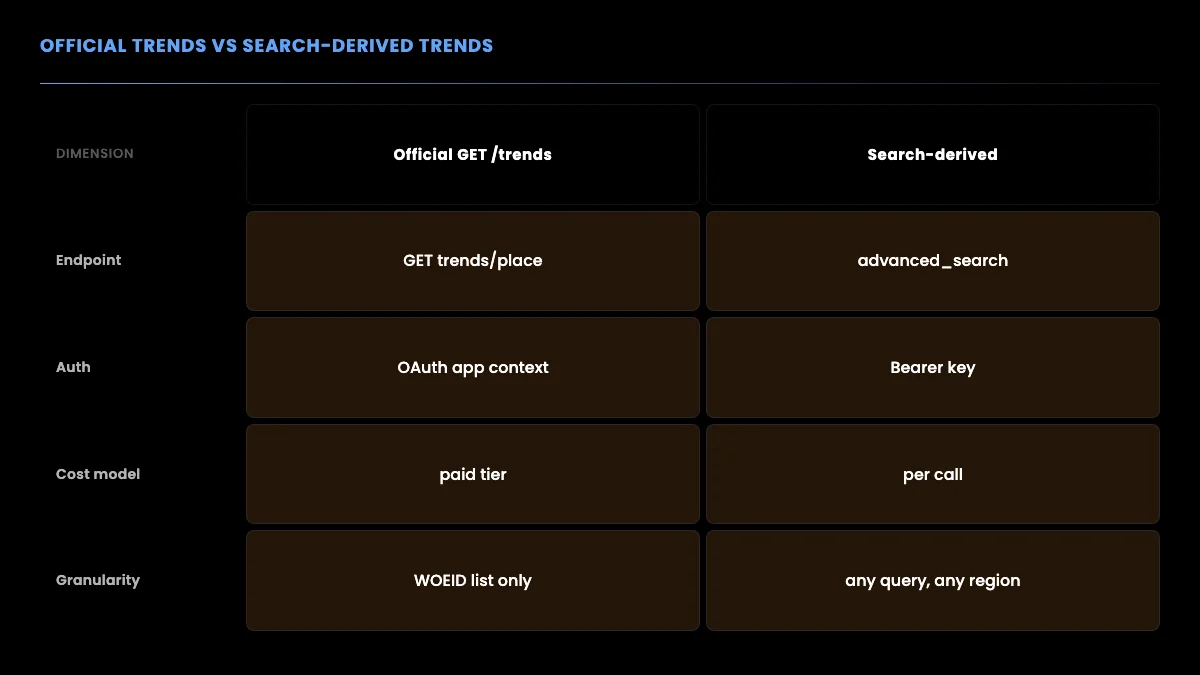
The official path is simpler to call but harder to access and less flexible. The search-derived path takes a few more lines of code but runs on a per-call key, works for any region, and lets you define what a trend means for your product. The rest of this guide builds the search-derived path step by step.
Step 1: Authenticate with a bearer token
The official X API requires a developer account, app registration, and OAuth before you can make a single read request. A per-call provider issues a bearer token at signup with no approval queue. Every request carries the token in an Authorization header.
curl "https://api.getxapi.com/twitter/tweet/advanced_search?q=AI%20lang%3Aen&queryType=Latest" \
  -H "Authorization: Bearer YOUR_API_KEY"
That single request returns recent tweets matching the query as JSON. No OAuth dance, no token-refresh logic, no app review. If you are migrating from the official API, the main change is swapping the base URL and the auth header; the data you get back is the same Twitter data. The Twitter API v2 vs GetXAPI guide covers the full translation table, and the migration guide walks through a real switch.
Step 2: Build the search query for a region
The trends-by-place endpoint uses WOEID codes to scope a location. The search approach scopes a location with query operators instead, which is more flexible because you are not limited to a fixed code table.
You combine a topic term, a language filter, and place keywords. For example, to approximate trends in London you might search for tweets in English that mention London-area terms, or you can lean on the place: and near: style operators where supported. The advanced search operators reference lists every operator you can combine.
def build_query(topic="", lang="en", place_terms=None):
    parts = []
    if topic:
        parts.append(topic)
    if place_terms:
        # OR the place keywords together so any one matches
        parts.append("(" + " OR ".join(place_terms) + ")")
    if lang:
        parts.append(f"lang:{lang}")
    return " ".join(parts)

query = build_query(topic="", lang="en", place_terms=["London", "#London", "LDN"])
print(query)
# -> (London OR #London OR LDN) lang:en
Because you control the query, you can target a neighborhood, a country, or a topic-plus-region combination that no WOEID exists for. That flexibility is the single biggest reason teams build trends from search.
A short word on WOEID, since it is the concept the fetch endpoints are built around. WOEID stands for Where On Earth ID, a numbering scheme originally from Yahoo's GeoPlanet service. Each city, region, and country a trends endpoint supports has a fixed numeric code, and the global trends list lives under WOEID 1. With GetXAPI you rarely touch WOEIDs directly, /twitter/trends takes a country name or ISO code, and /twitter/trends/locations hands you the full code list if you ever need to pin one exactly. The scheme still has two limits worth knowing. The list of supported locations is short relative to the world's cities, so if your audience sits in a mid-size town there may be no code for it. And the codes are a frozen artifact of a service that is no longer maintained, so they never grow to cover new places. The WOEID reference on Wikipedia documents the history. The search-derived approach sidesteps codes entirely: instead of a code, you describe a place with words, and words cover everywhere.
Tuning geo precision
Place keywords are a blunt instrument on their own, so combine them with a few refinements. Add the local language to the lang: filter when a region is not primarily English. Include both the place name and its common abbreviation or hashtag, because locals often tag with the short form. And when you care about a specific neighborhood or venue, add landmark names that rarely appear outside that area. The goal is a query precise enough that the tweets you pull genuinely come from or concern the place you targeted, because every off-topic tweet dilutes your trend ranking.
# A more precise regional query: language + place + landmarks
query = build_query(
    topic="",
    lang="en",
    place_terms=["Manchester", "#Manchester", "MCR", "Deansgate"],
)
print(query)
# -> (Manchester OR #Manchester OR MCR OR Deansgate) lang:en
The more specific the place terms, the cleaner the trend signal, at the cost of a smaller tweet sample. Tune the breadth of the place terms against how many tweets you get back; too narrow and you have no signal, too broad and the signal blurs into the national trend.
Start building with GetXAPI
$0.05 per 1,000 tweets. $0.10 free credits. No credit card required.
Step 3: Extract and rank the tags
This is where a trend actually gets computed. You pull a batch of recent tweets, pull out every hashtag and cashtag, and count how many distinct tweets each appears in. Counting distinct tweets rather than raw mentions matters, because a single spammy account posting the same tag fifty times should not crown a trend.
import requests
from collections import Counter

def fetch_tweets(query, api_key, query_type="Latest"):
    resp = requests.get(
        "https://api.getxapi.com/twitter/tweet/advanced_search",
        params={"q": query, "queryType": query_type},
        headers={"Authorization": f"Bearer {api_key}"},
    )
    resp.raise_for_status()
    return resp.json().get("tweets", [])

def rank_tags(tweets, top_n=10):
    counts = Counter()
    for t in tweets:
        text = t.get("text", "")
        # de-dupe tags within a single tweet so one tweet votes once per tag.
        # cashtags are alphabetic ($BTC, $NVDA): require a letter after $ so
        # price strings like $7,000 don't pollute the ranking
        tags = {w.lower().strip(".,!?") for w in text.split()
                if w.startswith("#") or (w.startswith("$") and w[1:2].isalpha())}
        for tag in tags:
            counts[tag] += 1
    return counts.most_common(top_n)

tweets = fetch_tweets("(London OR #London) lang:en", "YOUR_API_KEY")
for tag, count in rank_tags(tweets):
    print(f"{tag:<20} {count}")
The output is a ranked list of the hashtags and cashtags appearing most across distinct recent tweets for your region or topic. Notice the two design choices baked into rank_tags. The set comprehension de-duplicates tags within a single tweet, so a post that repeats the same hashtag three times still contributes one vote. And it captures both # hashtags and $ cashtags, because in finance-adjacent feeds the cashtags carry as much trend signal as the hashtags. If your domain has its own marker convention, this is the one function to adjust.
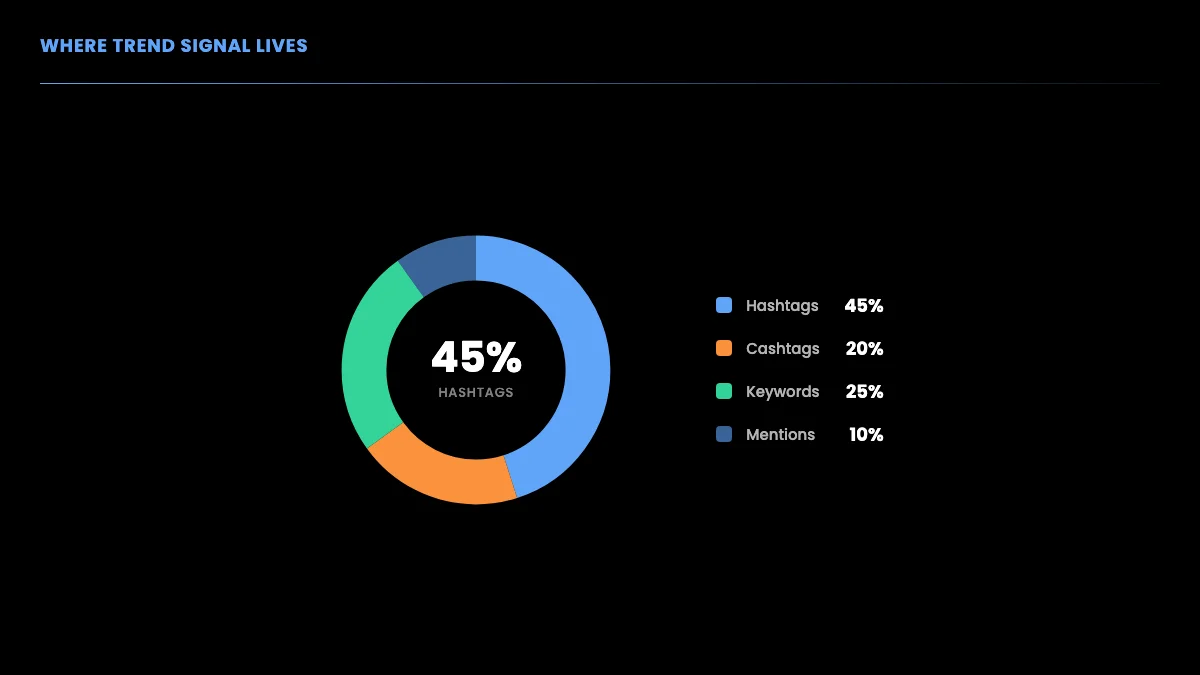
Where does the signal live? In practice hashtags carry most of it, with cashtags and plain keyword phrases filling in the rest.
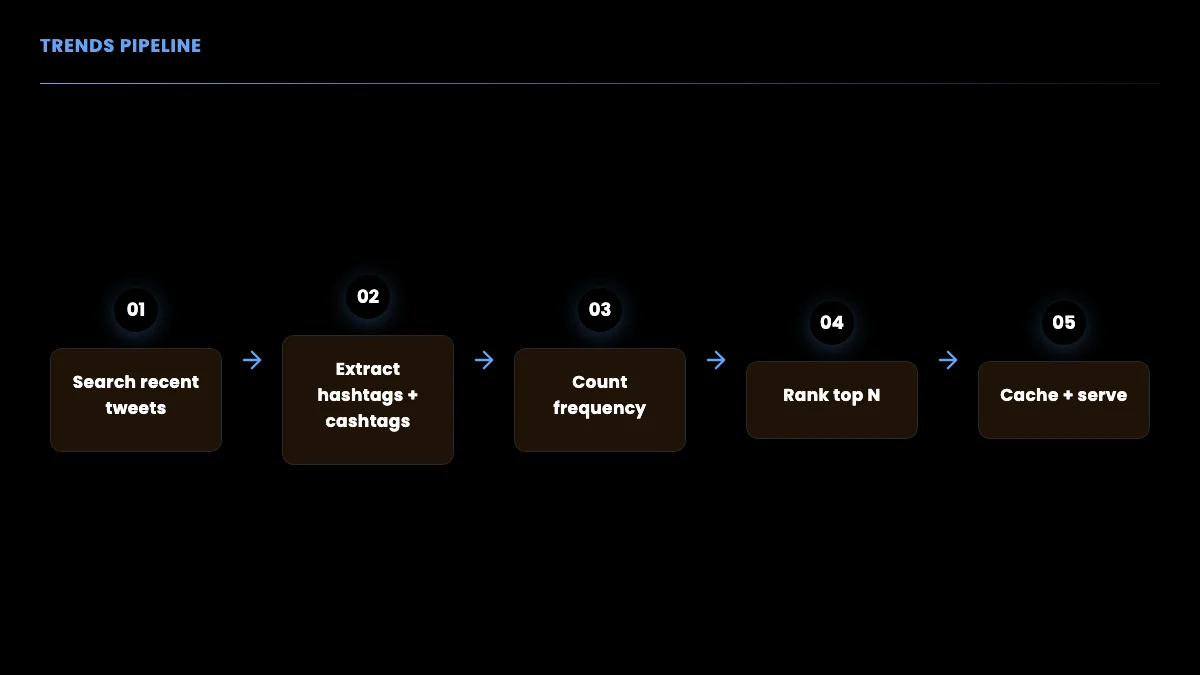
The pipeline from raw tweets to a ranked trend list is short and predictable, which makes it easy to schedule and cache.
Step 4: Surface what is accelerating, not just what is popular
Ranking by raw count surfaces tags that are always popular. A better trend signal compares each tag's current count against its count in a previous window and ranks by the rate of change. A tag that jumped from two mentions to forty in an hour is more interesting than one that sits at a steady hundred.
def trending_delta(current, previous, top_n=10):
    """Rank tags by how much faster they are appearing now vs a prior window."""
    deltas = {}
    for tag, now in current.items():
        before = previous.get(tag, 0)
        # add 1 to the denominator so brand-new tags do not divide by zero
        deltas[tag] = (now - before) / (before + 1)
    ranked = sorted(deltas.items(), key=lambda kv: kv[1], reverse=True)
    return ranked[:top_n]
Store the previous window's counts alongside the current ones and feed both into this function. The result is a list of tags that are accelerating, which is closer to what people mean when they say a topic is trending. This is the same intuition data teams use when they run sentiment and velocity analysis on Twitter data; the Twitter sentiment analysis tutorial shows how to layer sentiment on top of the same tweet batch.
There is one more refinement that separates a toy trends list from a useful one: a floor on the previous-window count. A tag that went from zero to three mentions has an enormous rate of change but is probably noise. Require a minimum current count, say five or ten distinct tweets, before a tag is eligible to rank at all. That single filter removes the long tail of one-off tags that would otherwise dominate a pure rate-of-change ranking.
def trending_filtered(current, previous, min_count=5, top_n=10):
    """Rate-of-change ranking with a noise floor on the current count."""
    eligible = {tag: now for tag, now in current.items() if now >= min_count}
    return trending_delta(eligible, previous, top_n=top_n)
Combine the noise floor with the rate-of-change score and you have a ranking that surfaces genuinely emerging topics rather than steady-state popularity or random one-off spikes. This is the heart of what a real trends product does, and none of it is possible if you only have the platform's pre-baked list.
Quality controls that matter at scale
Two more controls keep a production trends feed clean. The first is author de-duplication across tweets, not just within a tweet. A coordinated push, whether organic or a bot ring, can have many accounts repeat a tag. Counting distinct authors per tag instead of distinct tweets makes a tag earn its rank from a broad base rather than a loud few. The second is a stopword list for tags that are perennially present in your domain and carry no news value, the equivalent of filtering out "the" from a word-frequency count. Maintain a small set of tags to exclude and the genuinely new signal rises to the top.
def rank_by_authors(tweets, stop_tags=None, top_n=10):
    stop_tags = stop_tags or set()
    seen = {}  # tag -> set of author ids
    for t in tweets:
        author = t.get("author", {}).get("id") or t.get("authorId")
        for tag in {w.lower() for w in t.get("text", "").split() if w.startswith("#")}:
            if tag in stop_tags:
                continue
            seen.setdefault(tag, set()).add(author)
    ranked = sorted(seen.items(), key=lambda kv: len(kv[1]), reverse=True)
    return [(tag, len(authors)) for tag, authors in ranked[:top_n]]
Ranking by distinct authors is the single most effective spam-resistance measure available without a full bot-detection model, and it costs nothing extra in API calls because it operates on tweets you already fetched.
Step 5: Control cost with polling cadence
Every trends refresh is one or more search calls. Your monthly call volume is a direct function of how often you poll, so cadence is the main cost lever. Polling every minute for a single region is 43,200 calls per month; polling hourly for the same region is 720. The coverage difference is rarely worth the sixty-times cost difference unless you are tracking breaking news.
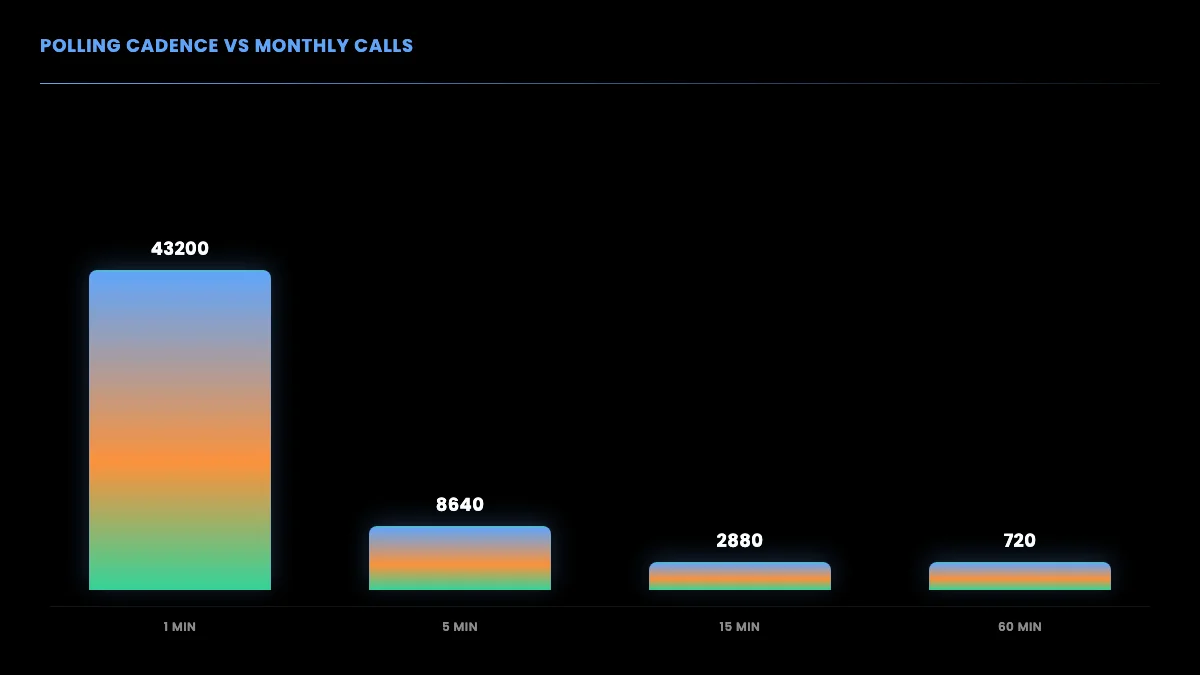
On a per-call model at $0.001 per standard read, a fifteen-minute cadence for one region runs about 2,880 calls, or roughly $2.88 per month per region before any caching. Add a cache layer and your application reads the ranked list from memory between polls, so your real API spend tracks the poll schedule rather than your traffic. You can model your exact bill with the cost calculator, and the Twitter API cost breakdown compares per-call pricing against the official tiers across realistic scenarios.
import time

def trend_loop(query, api_key, interval_seconds=900):
    """Poll every interval_seconds (default 15 min) and cache the ranked list."""
    cache = {"tags": [], "updated_at": 0}
    while True:
        tweets = fetch_tweets(query, api_key)
        cache["tags"] = rank_tags(tweets)
        cache["updated_at"] = time.time()
        # serve cache["tags"] to your app here; it stays fresh for one interval
        time.sleep(interval_seconds)
The loop refreshes the cache on your schedule, and your app reads cache["tags"] on every request without making a new API call. That separation is what keeps a trends product cheap at scale.
Storing windows for the delta ranking
The rate-of-change ranking needs the previous window's counts, so the cache has to hold a little history. Keep the last two snapshots: the current counts and the prior counts. Each poll, the current snapshot becomes the prior one before you overwrite it. A few key-value entries are enough; you do not need a database for a single region, though you will want one once you track many.
def trend_loop_with_history(query, api_key, interval_seconds=900):
    prior = {}
    while True:
        tweets = fetch_with_retry(query, api_key)
        current = {}
        for tag, count in rank_tags(tweets, top_n=1000):
            current[tag] = count
        ranked = trending_filtered(current, prior)
        # serve `ranked` to your app; then roll the window forward
        prior = current
        time.sleep(interval_seconds)
Rolling the window forward each poll is the whole trick. The prior snapshot is always exactly one interval old, so the delta you compute measures movement over that interval. If you want movement over a longer horizon, keep more snapshots and compare against an older one.
A worked example: a regional trends widget
To make this concrete, here is the shape of a small service that powers a "what is trending near you" widget. It accepts a region, returns the top accelerating tags, and serves from cache between polls. Everything below reuses the functions from earlier sections.
REGIONS = {
    "london": ["London", "#London", "LDN"],
    "nyc": ["NYC", "#NYC", "Manhattan", "Brooklyn"],
    "tokyo": ["Tokyo", "#Tokyo", "lang:ja"],
}

def trends_for_region(region, api_key, prior_by_region):
    place_terms = REGIONS.get(region, [region])
    query = build_query(lang="en", place_terms=place_terms)
    tweets = fetch_with_retry(query, api_key)
    current = dict(rank_tags(tweets, top_n=1000))
    ranked = trending_filtered(current, prior_by_region.get(region, {}))
    prior_by_region[region] = current
    return ranked
The widget calls trends_for_region on its poll schedule for each region it serves, caches the returned list, and renders from cache on every page view. A three-region widget polling every fifteen minutes is roughly 8,640 calls per month total, which at $0.001 per call is under nine dollars before caching savings. That is the entire infrastructure cost of a real-time, multi-region trends feature, and it scales linearly: double the regions, double the calls.
The cheapest Twitter API. Try it free.
$0.05 per 1,000 tweets. $0.10 free credits. No credit card required.
Deployment notes
Run the poll loop as a small background worker, not inside your web request path. A single long-lived process per region group, or a scheduled job that runs every interval and writes to a shared cache like Redis, both work. The web tier only ever reads the cached ranked list, so it stays fast and stateless regardless of how many users hit it.
Keep your API key in an environment variable, never in source. Log every poll's call count so you can watch spend drift if you add regions. And set the retry ceiling low enough that a sustained outage backs off rather than hammering the endpoint; the best practices guide covers backoff tuning. For the underlying request shapes and field names, the official X API reference on developer.x.com documents the canonical Twitter data model that per-call providers mirror.
Step 6: Handle errors and rate limits
Production trends pipelines run unattended, so they need retry logic. Wrap each call in a retry-with-backoff so a transient network blip or a momentary rate-limit response does not kill the loop. The Twitter scraping best practices guide covers retry, backoff, and pagination patterns in depth.
import time
import requests

def fetch_with_retry(query, api_key, max_retries=4):
    for attempt in range(max_retries):
        try:
            resp = requests.get(
                "https://api.getxapi.com/twitter/tweet/advanced_search",
                params={"q": query, "queryType": "Latest"},
                headers={"Authorization": f"Bearer {api_key}"},
                timeout=10,
            )
            if resp.status_code == 429:
                # rate limited: wait and retry with exponential backoff
                time.sleep(2 ** attempt)
                continue
            resp.raise_for_status()
            return resp.json().get("tweets", [])
        except requests.RequestException:
            time.sleep(2 ** attempt)
    return []
The same access frustration that pushes people away from the official trends endpoint shows up across the developer community. One widely-shared note captured the moment the free read tier disappeared:
https://x.com/cmcwain/status/2062052786838421622
And the broader sentiment about official API access has been a recurring thread among web developers:
Twitter API plans are a joke from r/webdev
The takeaway is the same either way: in 2026, a per-call API keeps your costs predictable and your product in your own control, whether you fetch the ready-made list from the dedicated /twitter/trends endpoint or compute a custom list from search.
How search-derived trends compare to the alternatives
It is worth placing the search-derived approach against the other ways people try to get Twitter trends, because each alternative has a failure mode that pushes serious projects back toward search.
The first alternative is the official trends-by-place endpoint, covered above. Its failure modes are access cost, the frozen WOEID location list, and zero control over ranking or freshness. It is the right choice only if you happen to need exactly the platform's definition of a trend, for exactly the regions it supports, and you are already paying for a developer tier for other reasons.
The second alternative is browser scraping. Some teams try to read the trends sidebar directly from the rendered web page. This breaks constantly. The page markup changes without notice, the trends panel personalizes based on the logged-in account so a scraper sees a skewed list, and anti-automation measures make headless browsing fragile and slow. You also inherit the legal and account-risk questions that come with automating a logged-in session. A read API sidesteps all of it by returning structured JSON from a documented endpoint.
The third alternative is a generic web-data marketplace, where you rent a pre-built scraper actor. These work but bill per run with proxy overhead, add latency from the actor startup, and give you a vendor-shaped output you then have to reshape. For a trends pipeline that polls on a tight schedule, the per-run model gets expensive fast, and the startup latency fights your freshness goal. The Apify comparison walks through where the actor model makes sense and where a direct REST call wins.
Against all three, the search-derived approach on a per-call API gives you the cleanest combination: structured data, a documented endpoint, a flexible query, your own ranking logic, and a cost that tracks your poll schedule rather than your traffic or a monthly minimum. The tradeoff is that you write the aggregation yourself, which is the few dozen lines this guide already gave you.
When the official endpoint still wins
If your product must show the exact same trends list users see in the app, you do not need to compute anything, and you also do not need the official endpoint's paid tier: GetXAPI's dedicated /twitter/trends endpoint returns that platform list for any covered location at $0.001, with one bearer token. The only time the official trends-by-place endpoint itself is the better pick is when you are already paying for a developer tier for other reasons and want to keep everything on one vendor. For every case where you want custom regions, custom ranking, or your own freshness window, the search-derived approach wins. Most products need either the one-call dedicated endpoint or the custom pipeline, which is why this guide leads with both.
Putting it together
A complete trends service is the five pieces above wired in sequence: authenticate once with a bearer token, build a region-scoped query, fetch and rank tags by distinct-tweet frequency, compute the rate-of-change delta to surface what is accelerating, and poll on a cadence that matches your freshness needs while caching between polls. None of it requires a developer-account approval queue, OAuth credential juggling, or a monthly subscription.
If you want to model the spend before you build, start with the cost calculator and the pricing page. When you are ready to run your first trends search, sign up, grab your key, and the ten-line snippet at the top of this guide will return live trending tags in under a minute. From there, layering on the geo targeting, the author-based ranking, the noise floor, and the cache turns that snippet into a production trends feed you fully own and can explain to anyone who asks.
Frequently Asked Questions
Yes. GetXAPI now ships a dedicated trends endpoint: a single GET call to /twitter/trends returns the top trending topics for any country or city (up to 50), and each trend comes back with a ready-made search query. It costs $0.001 per call with no developer account. The official X API also has a trends-by-place endpoint, but it sits behind a paid developer tier and a fixed WOEID location table. When you need a custom definition of a trend (your own ranking, freshness window, or a niche region the platform does not track), you can also build trends from the search endpoint, which this guide covers in full.
Both GetXAPI trends paths cost $0.001 per call. A single dedicated /twitter/trends call returns up to 50 trends for a location, so most products just poll that. If you build custom trends from search, you pay $0.001 per search request, so a pipeline polling every 15 minutes runs about 2,880 calls per month per region. Either way there is no mandatory subscription and no developer-account approval queue. The official X API instead requires a paid developer tier for trends access.
Yes. The official X API requires a developer account, app registration, and OAuth credentials before you can call its trends endpoint. GetXAPI issues a bearer token at signup with no approval step, so you can call /twitter/trends (or the search endpoint) within about thirty seconds. You send a GET request with an Authorization header and parse the JSON. No app review, no elevated-access form, and no monthly minimum.
Pull a batch of recent tweets for your topic or region, extract every hashtag and cashtag, and count how many distinct tweets each one appears in. Rank by that distinct-tweet count rather than raw mentions so a single spammy account cannot inflate a tag. For a sharper signal, compare each tag's current count against its count in a prior window and rank by the rate of change, which surfaces tags that are accelerating rather than ones that are simply always popular.
The quickest path is GetXAPI's dedicated trends endpoint: GET /twitter/trends?country=UK returns that country's top trends, and a companion endpoint, /twitter/trends/locations, lists every country and city you can query along with their WOEIDs. For full control you can instead run a recent-tweets search filtered by language and geo terms, then rank hashtags by frequency, which lets you target neighborhoods or topic-plus-region combinations no fixed location list covers. This guide shows both.
Match your refresh rate to how fast the topic moves. Breaking-news dashboards poll every one to five minutes, general social-listening tools poll every fifteen minutes, and daily-digest products poll hourly. Polling every minute costs roughly sixty times more than polling hourly for the same coverage, so pick the slowest cadence your product can tolerate. Cache the ranked trend list between polls so your application reads from cache rather than hitting the API on every page load.
WOEID stands for Where On Earth ID, a numeric code that identifies a location like a city or country. With GetXAPI you usually do not need to handle WOEIDs yourself: /twitter/trends accepts a country name or ISO code directly, and /twitter/trends/locations lists every available location with its WOEID if you want to pin one exactly. If you build custom trends from search instead, you skip location codes entirely and filter by language and place keywords, which also reaches regions no WOEID covers.
Check out similar blogs
More guides on the Twitter/X API, scraping, and pricing.

How to Scrape Twitter/X in 2026: Tweets, Profiles & Followers
How to scrape Twitter/X in 2026 without getting blocked: tweets, profiles, followers and media via a read API, the legal line on public data, and runnable scripts.

Twitter API Tutorial 2026: The Complete Developer Guide
A current 2026 Twitter API tutorial covering authentication, endpoints, code, rate limits, verified official prices, and a third-party public-data path.

Twitter Article API in 2026: Create, Publish, and Distribute Long-Form Notes
Complete 2026 tutorial for the Twitter Article API. All 7 endpoints, working Python and Node.js code, the Premium gate explained, draft vs published state machine.

How to Use the Twitter API with Python, 2026 Tutorial
Step-by-step Python tutorial for the Twitter API in 2026. Working code for search, users, DMs, pagination, retries, plus a tweepy migration guide.

Scrape Full Tweet History of Any Account in 2026 (Beyond the 3,200 Limit)
Why the X timeline stops at 3,200 tweets and how to pull an account's full history with date-window search, cursor pagination, and dedup. Live-tested code in Python and curl.

Twitter API 403 Forbidden and 401 Unauthorized: Every Cause and Fix
Why the X API returns 403 Forbidden or 401 Unauthorized, how to tell the two apart, and a fix for each cause. Covers tier gating, app permissions, OAuth, and X error codes.

The Best Twitter (X) API Alternatives in 2026, Compared
The best Twitter / X API alternatives in 2026, ranked and compared: managed pay-per-call APIs, web-data marketplaces, and open-source libraries, with real per-1,000-tweet costs.

How to Like a Tweet via API in 2026 (No Dev Account)
Like (favorite) tweets programmatically via API in 2026 without an X developer account. The auth_token model, working curl, Python, and Node code, and per-call cost.
Featured in
Where GetXAPI's data and pricing get cited.

The hidden line item in your AI side project: X data
Indie Hackers post on the often-overlooked cost of X data for AI side projects, citing GetXAPI as the usage-based way to pull live Twitter data without a five-figure X developer contract.

How Companies Are Learning to Read Market Mood in Real Time
Editorial feature on Big News Network examining how companies read market mood from X in real time, citing GetXAPI as the usage-based Twitter API that prices live social listening by the call instead of a five-figure annual contract.

How Companies Are Learning to Read Market Mood in Real Time
Syndicated feature on Business Newswire on how companies read market mood from X in real time, citing GetXAPI as the usage-based Twitter API that prices live social listening by the call.

Working with Twitter/X Data: A Practical Skill for IT Students and Professionals in 2026
Guide on SIIT (Scholars International Institute of Technology) on collecting live Twitter/X data as a practical developer skill, citing GetXAPI as the per-call Twitter data API that makes it affordable without an X developer account.

Adding Twitter/X Data to Your App in 2026: A Developer's Integration Guide
Developer integration guide on Programming Insider covering how to add live Twitter/X data to an app in 2026, comparing the official X API v2 with a key-based REST approach and citing GetXAPI as the low-cost per-call option with no developer-account approval.

6 Twitter/X Scraping Solutions for Every Budget
Roundup on TechBullion of the leading Twitter/X scraping solutions, ranking GetXAPI first as the cheapest option at $0.001 per call (about $0.05 per 1,000 tweets) with clean JSON output and no monthly minimum.

The Data Bill Behind Every Social Analytics Tool
Editorial piece on SpeakRJ examining the underlying data costs behind social analytics tools, citing GetXAPI as the usage-based way to source live X data by the call.

What Is AI Sentiment Analysis, and What Does Each Layer Cost?
Explainer in AI Journal breaking sentiment analysis into its data, model and reporting layers and what each costs to run, citing GetXAPI for pulling public X posts on pay-per-call pricing.

Why Enterprise AI Agents Still Cannot Read Social Data
Analysis piece in The Silicon Review on why enterprise agents reach internal systems easily but struggle with public social data, citing GetXAPI's MCP server and data-as-a-service model as one route to close the gap.