
Best Residential Proxies for Twitter Scraping in 2026
Verified June 2026 per-IP pricing for static residential and ISP proxies (Decodo, Webshare, Bright Data, IPRoyal, Oxylabs and more), the fake-ISP risk nobody warns you about, and the build-vs-buy math for scraping X data.

The best static residential and ISP proxies for Twitter scraping in 2026 are Decodo at $0.27 per IP and Webshare at $0.30 per IP based on verified June 2026 pricing, with Oxylabs at $2.10 as the premium pick and Bright Data at $0.90 for teams that can clear KYC. However, if your goal is X data specifically rather than general-web scraping, a per-call read API removes the proxy layer entirely and is usually cheaper once IP fees, bandwidth, and maintenance are counted.
TL;DR: Every price in this guide was read directly from the vendor's live pricing page in June 2026, not copied from a review site. On a per-IP basis for static and ISP proxies, Decodo ($0.27) and Webshare ($0.30) are cheapest, Oxylabs ($2.10) is the premium pick, and Bright Data ($0.90, KYC-gated) sits in between. But the two things that actually burn buyers are not on any pricing page: "fake ISP" datacenter IPs sold as residential, and heavily seeded reviews. And if your goal is X data specifically rather than general-web scraping, the cheapest and lowest-maintenance option is to skip the proxy pool entirely and read the data through an API.
If you are scraping X (formerly Twitter) at any real volume with your own code, you will eventually hit the same wall: a single IP address making thousands of requests gets rate-limited, then challenged, then banned. The standard fix is proxies, spreading those requests across many residential or ISP IP addresses so no single address looks abusive. So the question becomes which proxy provider to buy, and that is where most guides stop being useful, because most proxy guides are written by proxy vendors or by affiliate sites paid to rank them.
This one is different in two ways. First, the pricing is verified: read from live vendor pages in June 2026, so you are comparing real numbers, not a number a review site copied two years ago. Second, it does not assume you need proxies at all. For general-web scraping, you do. For X data specifically, there is a cheaper layer to buy, and we will do the actual math. If you only want the read path, our breakdown of the best ways to scrape and read tweets compares the approaches head to head, and the Twitter API cost guide carries the full spend model.
What static residential and ISP proxies actually are
A residential proxy routes your request through an IP address that belongs to a real consumer internet connection, so the target site sees traffic that looks like an ordinary home user rather than a server in a datacenter. An ISP proxy (sometimes called static residential) is a hybrid: it is hosted in a datacenter for speed and uptime, but the IP is registered to a consumer ISP, so it carries a residential-looking ASN while behaving like a stable server IP.
The distinction that matters for your budget is sticky versus rotating. Static residential and ISP proxies give you a fixed IP that persists across sessions, billed per IP per month. That is what you want for long logged-in sessions or anything that needs the same identity over time. Rotating residential proxies hand you a fresh IP per request from a large pool, usually billed per gigabyte of traffic. People scraping X tend to want the sticky kind for authenticated sessions and the rotating kind for high-volume anonymous reads, and the two are priced on completely different models, which is the first place comparisons go wrong.
The verified price ladder (June 2026, read from live vendor pages)
Here is every provider, with pricing read directly from the live vendor page in June 2026. Verify current pricing before purchase, because vendors change tiers often, but this is the real landscape as of writing.
| Provider | Static / ISP price | Bandwidth | Model | Notes |
|---|---|---|---|---|
| Decodo | from $0.27/IP shared (about $0.47 at 10 IPs); dedicated from $2/IP | Unlimited | per-IP | Best value at volume; 3-day trial. |
| Webshare | $0.30/IP (20 IPs = $6/mo), down to $0.24/IP at volume | 250 GB entry, up to unlimited higher | per-IP | Cheapest entry. Bandwidth-capped on cheap plan. |
| Proxy-Seller | from $0.75 to $0.90/IP (region-dependent) | Unlimited | per-IP | Cheap and unlimited; per-region stock, no rotation. |
| Bright Data | from $0.90 to $1.30/IP, or $2.5 to $5/GB | metered or per-IP | both | KYC and business verification; some targets gated. |
| IPRoyal | $1.80/IP per 30 days (longer commits about $2.40/IP) | Unlimited | per-IP | Static tier unlimited; long sticky sessions. |
| Oxylabs | from $2.10/IP | Unlimited (fair-use) | per-IP | Premium reliability, priced for scale. |
| ProxyWing | $3/IP down to $2.0/IP at volume | Unlimited | per-IP | Smaller provider; limited independent data. |
| Rayobyte | $5/IP down to $4.60/IP at volume | Unlimited | per-IP | Ethics-focused; support reportedly inconsistent. |
| NovaProxy | $6.99/IP per month (dedicated) | Unlimited (soft-throttled) | per-IP | Newer; testimonials only on own site. |
| NetNut | $99 / 7 GB ($14.4/GB) down to $4.5/GB | metered | per-GB | Enterprise-oriented, traffic-billed. |
| DataImpulse | $1/GB down to $0.80/GB ($5 min) | metered | per-GB | Rotating residential, not static. Socket-level billing. |
| ProxyEmpire | $2.85 to $5.71/GB (static resi) | metered | per-GB | Static product is GB-priced, not per-IP. |
| Proxy4U | PAYG packages from $9.9 (no expiry) | metered | per-GB | Rotating residential PAYG; no static-ISP per-IP product. |
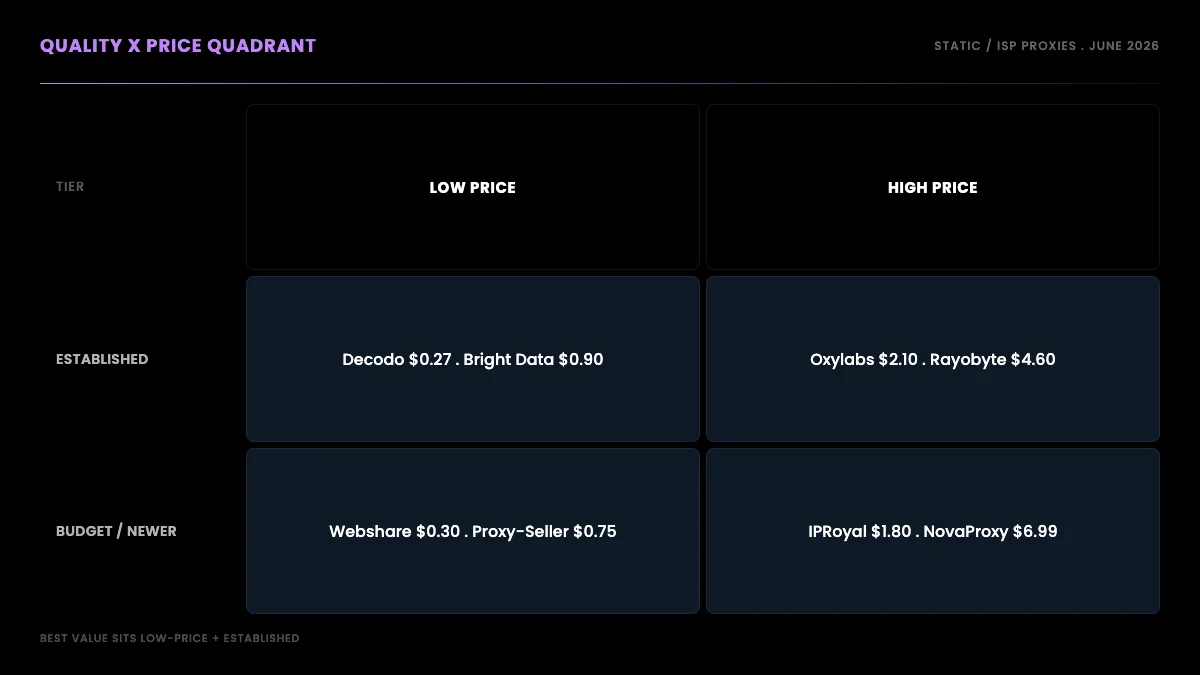
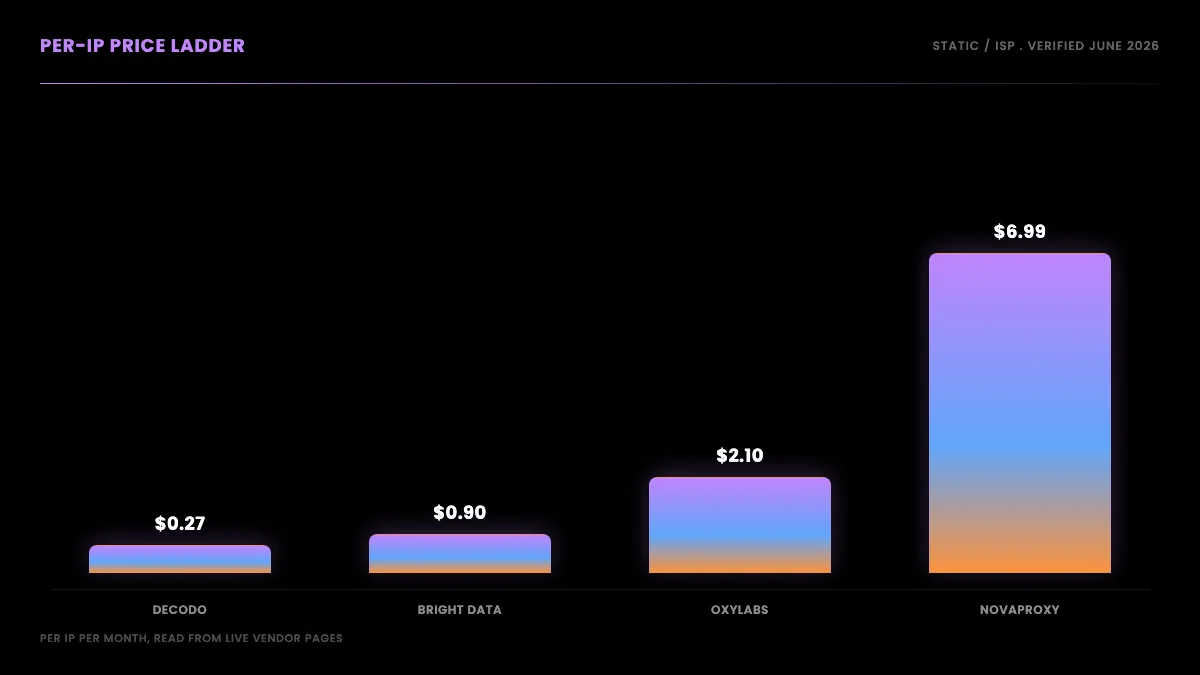
Read as a single per-IP ladder, cheapest to most expensive for static ISP: Decodo $0.27, Webshare $0.30, Proxy-Seller $0.75, Bright Data $0.90, IPRoyal $1.80, Oxylabs $2.10, ProxyWing $2 to $3, Rayobyte $4.60, NovaProxy $6.99. The last four providers (NetNut, DataImpulse, ProxyEmpire, Proxy4U) are GB-metered, a different model you cannot compare on a per-IP number at all.
Provider-by-provider: the honest verdicts
Decodo is the best price-to-quality on this list: shared ISP from $0.27 per IP with unlimited bandwidth, rising to about $0.47 per IP at 10 IPs and a dedicated tier from $2 per IP. It gets the most organically positive mentions for ISP pools on r/proxies, which matters more than it sounds given how seeded those threads usually are, and it offers a 3-day trial so you can run the ASN and fraud-score checks below before committing a cent.
Webshare has an unbeatable headline price at $0.30 per IP, but the cheap plan caps bandwidth at 250 GB and reliability is the trade-off. We cover the trust issue in the next section because it is the most-cited cautionary tale in the community.
Proxy-Seller is quietly one of the cheapest unlimited options at $0.75 to $0.90 per IP. Good as a secondary or independent provider; the caveats are no rotation and per-region stock.
Bright Data is cheaper per IP than its enterprise reputation suggests at $0.90 to $1.30, with serious scale and a compliance focus. The friction is onboarding: it requires KYC and business verification, and some targets are gated for new accounts until you clear it.
IPRoyal is mid-priced at $1.80 per IP with unlimited bandwidth on the static tier and long sticky sessions. Sentiment is mixed-to-negative lately, which we get into below, but the static product is the better-regarded half of its lineup.
Oxylabs is premium at $2.10 per IP with high success rates and unlimited fair-use bandwidth. Worth it mainly at scale.
ProxyWing, NovaProxy, and Proxy4U are smaller or newer providers. Pricing is verified ($2 to $3 per IP, $6.99 per IP, and PAYG from $9.9 respectively), but independent community data is thin, so most testimonials live on their own sites. Treat with caution.
Rayobyte is ethics-focused but pricey for ISP at $4.60 to $5 per IP. The community view is "solid budget brand, inconsistent support."
NetNut, DataImpulse, and ProxyEmpire are GB-metered. NetNut is enterprise ($99 / 7 GB minimum). DataImpulse is genuinely cheap rotating residential at $1/GB, but socket-level billing burns gigabytes fast. ProxyEmpire's static product is GB-priced at $2.85 to $5.71/GB.
The fake-ISP problem nobody selling you proxies will mention
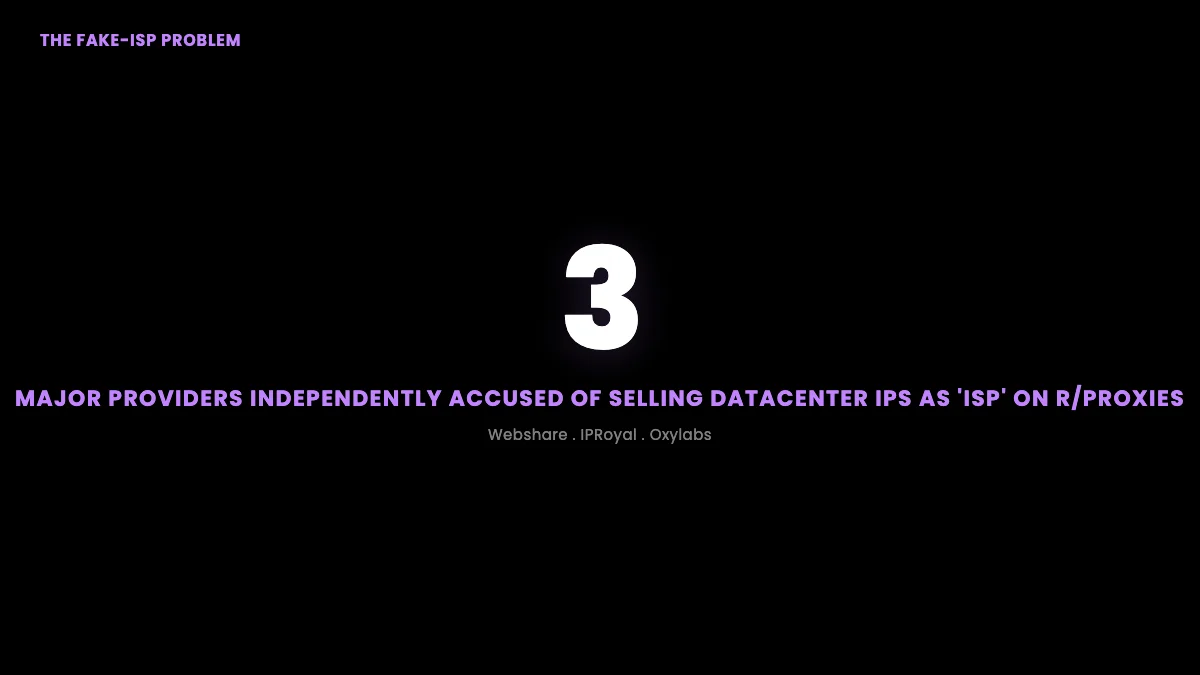
Here is the single most important thing in this guide, and it is on no pricing page: a large share of the loudest complaints on r/proxies are about "fake ISP" proxies, meaning datacenter IPs sold as residential or ISP. The accusation is not limited to one shady budget brand. It has been leveled publicly at cheap providers and premium ones alike.
The most-cited cautionary thread is blunt about Webshare:
webshare.io residential proxy is a scam! from r/proxies
The poster's claim is specific: "every single IP is a datacenter IP on a host that is known for fraud/abuse." But the same pattern shows up against providers at the other end of the price ladder. One r/proxies user bought supposedly dedicated ISP proxies from Oxylabs and found "most of them show up as datacenter or VPN/proxy on multiple IP checkers" (thread). Another, after two years on IPRoyal, wrote that "the proxies they sell under the name 'ISP proxies' are actually datacenter proxies, sold at a much higher price." These are not isolated grievances about one bad batch. They are the same structural accusation, made independently, against a budget brand, a mid-tier brand, and a premium brand, which tells you the problem is the supply chain, not any single vendor.
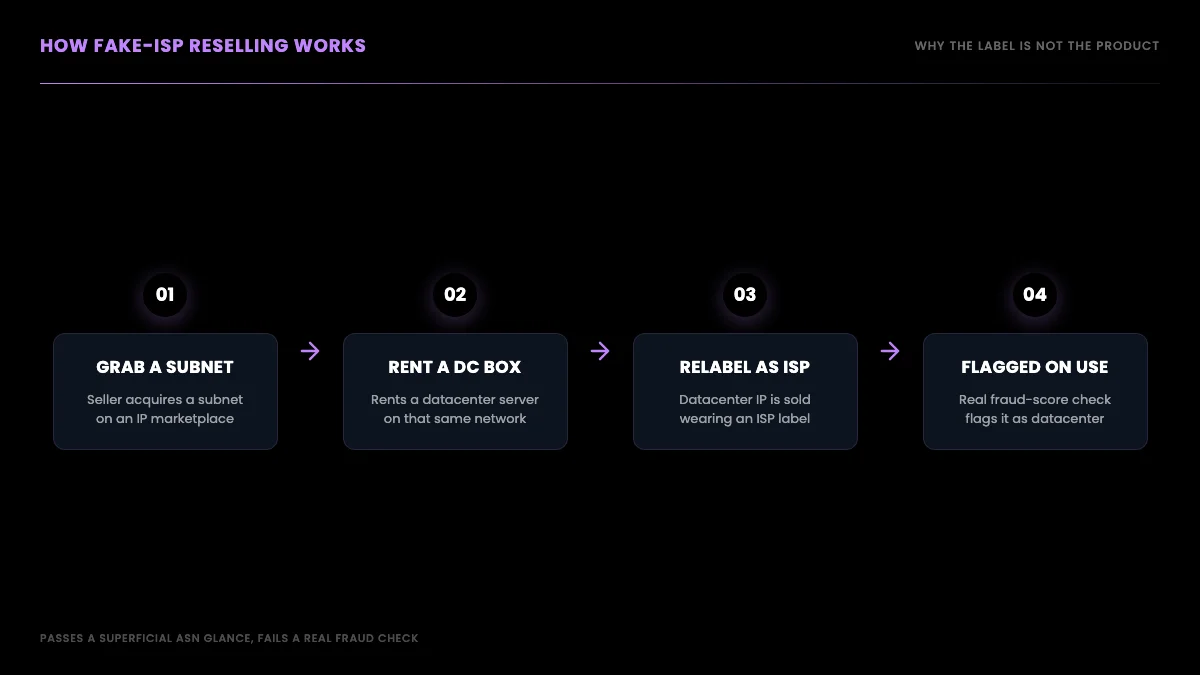
That same Oxylabs thread is also where the community explains the mechanism most clearly: a seller grabs a subnet on an IP marketplace, rents a datacenter box on that same network, and you receive a datacenter IP wearing an ISP label. The IP passes a superficial ASN check but gets flagged the moment a target site runs a real fraud score on it. The reason this works as a business is that most buyers never check. They read the product page, see the word "residential" or "ISP," and assume the label is the product. The seller is betting you will not run the IPs you receive through an independent checker, and most of the time that bet pays off.
What makes this hard to shop around is that the accusation does not track price. You might assume paying more buys you out of the problem, but the complaints land on the cheapest brands and the premium ones at roughly the same rate, because they can all draw from the same resold-subnet supply. Spending more is not a fix; checking the IP is.
The practical takeaway: the label on the box is not the product. Validate the ASN and fraud score of the actual IPs you receive, on a trial, before you trust any "residential" or "ISP" claim. We give you the exact check sequence later in this guide.
Start building with GetXAPI
$0.05 per 1,000 tweets. $0.10 free credits. No credit card required.
Why proxy reviews lie to you (the astroturfing tax)
The second buried cost is informational. The proxy review ecosystem, including Reddit, is heavily seeded. Threads asking for the best provider are full of removed comments and one-off accounts shilling obscure brands, and the same provider gets praised in one place and trashed in another.
IPRoyal is the cleanest example of the split. On X, a verified user posts a glowing two-and-a-half-year endorsement:
https://x.com/Ibrahkiprotich/status/2021021531875557641
On r/proxies, a different two-year customer reaches the opposite conclusion in public:
2 Years With IPRoyal and I Feel Completely Scammed. Looking for a New Proxy Provider from r/proxies
Same provider, same tenure, violently opposite verdicts. That is not a contradiction to resolve by picking a side. It is the signal: no single review source is trustworthy on its own, because both seeded praise and seeded outrage are cheap to manufacture. The only review that counts is the one you run yourself on a trial IP.

The per-IP versus per-GB trap
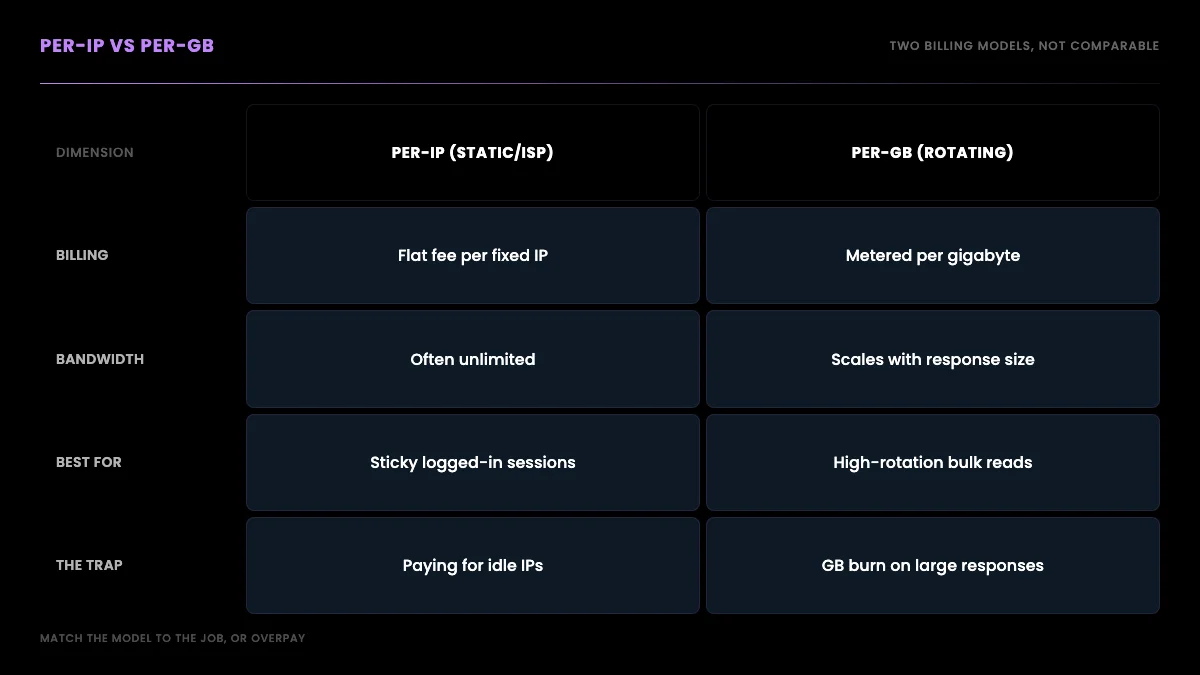
Notice that the price table has two billing models, and they are not comparable on a single number. Per-IP providers (Decodo, Webshare, IPRoyal, Oxylabs) sell you a fixed IP for a flat monthly fee, often with unlimited bandwidth. Per-GB providers (NetNut, DataImpulse, ProxyEmpire) sell you traffic, and you pay for every gigabyte that flows through.
For scraping, per-GB pricing is a trap if you do not model your traffic carefully. Socket-level billing, as DataImpulse uses, counts overhead you do not see, and a scraping workload that pulls images, full pages, or large JSON responses burns gigabytes far faster than the headline rate suggests. A "cheap" $1/GB plan can cost more per month than a flat per-IP plan once your real traffic lands.
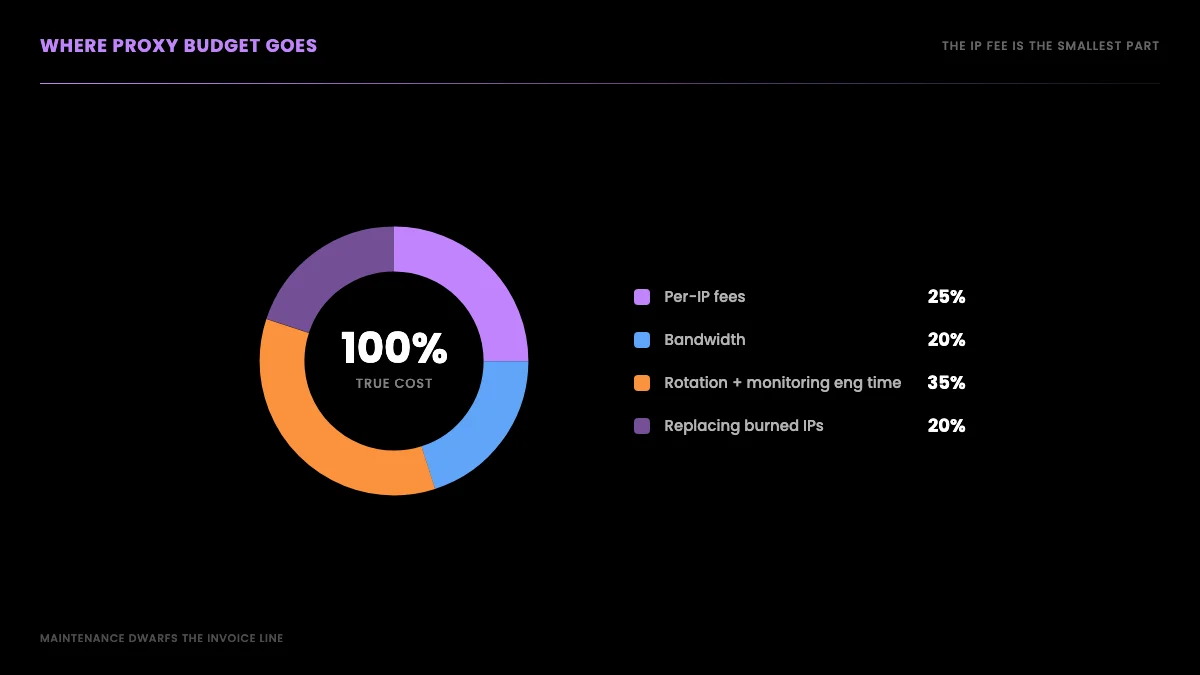
There is also the hidden line item nobody quotes: where your proxy budget actually goes once you are running a pool in production. It is not just the IP fee. It is bandwidth, the engineering time to rotate and monitor IPs, and the cost of replacing addresses that get burned on your target.
Sticky versus rotating: which model to buy for X scraping
Sticky proxies (static residential or ISP, billed per IP per month) hold the same address across sessions, which is what you need for logged-in workflows or any sequence of requests that must look like a single consistent user. Rotating residential proxies (billed per gigabyte) give you a fresh IP on every request, suited for high-volume anonymous reads. Buying the wrong model for the task is the most common budgeting mistake: rotating IPs mid-session trips identity detection, while exhausting a small sticky pool flags all those addresses together.
Sticky (static residential or ISP) is for anything that holds an identity over time: a logged-in session, a sequence of requests that should look like one consistent user, or a workflow where rotating the IP mid-task would itself look suspicious. You buy these per IP, you keep them for the month, and you treat each IP as a stable persona. Decodo, Webshare, IPRoyal, and Oxylabs all sell this tier, and it is the right model when you are reading from authenticated state or running Twitter advanced search operators against a session that needs to persist.
Rotating residential is for high-volume anonymous reads where you want a different IP on every request so no single address accumulates a request count worth banning. You buy these per gigabyte, and they suit bulk public-data pulls, like running a Twitter sentiment analysis pipeline over tens of thousands of tweets, where you never log in and each request is independent.
The mistake is buying the wrong model for the job: rotating IPs for a sticky session (your identity changes mid-task and trips detection) or sticky IPs for a high-rotation bulk pull (you exhaust a small set of addresses and they all get flagged together). Before you commit, use a no-card trial to validate on your actual target. A recurring r/proxies thread catalogues which providers offer free trials precisely because experienced buyers refuse to pay before testing, and the most upvoted buying-advice thread is full of people who learned that lesson the expensive way.
What scraping X data actually requires, and where proxies fit
Step back and look at why you wanted proxies in the first place. Proxies are not the goal. They are a workaround for one specific problem: a target site rate-limits or bans a single IP making too many requests. Proxies spread the load so no single address looks abusive.
If you are scraping the general web (many different sites, your own crawler), that workaround is genuinely necessary, and the provider comparison above is exactly what you need. But if your end goal is X data specifically, the access problem is already solved by a different layer. A read API gives you tweet text, author info, engagement counts, and timestamps through a single authenticated endpoint, and the provider runs the IP infrastructure so you never touch a pool.
Here is the read path with no proxy involved at all, using GetXAPI's search endpoint:
import requests

API_KEY = "YOUR_API_KEY"
BASE = "https://api.getxapi.com"

# Read public tweets matching a query. No proxy pool, no IP rotation.
resp = requests.get(
    f"{BASE}/twitter/tweet/advanced_search",
    params={"q": "residential proxies", "product": "Top"},
    headers={"Authorization": f"Bearer {API_KEY}"},
)
data = resp.json()
tweets = data.get("tweets", [])
print(f"Got {len(tweets)} tweets")
for t in tweets[:3]:
    print(t["author"]["userName"], "-", t["text"][:80])
That is the entire access layer. One bearer token, one REST call, results back as JSON. No residential IPs to buy, no ASN to validate, no ban rate to monitor. If you need user-level data instead of search, the shape is identical:
curl -s "https://api.getxapi.com/twitter/user/info?userName=getxapi" \
  -H "Authorization: Bearer YOUR_API_KEY"
When a query returns more results than one page, the response carries a next_cursor and a has_more flag. You page through by feeding the cursor back in, no IP rotation involved, because the access layer is not your problem to scale:
def search_all(query, max_pages=10):
    tweets, cursor, pages = [], None, 0
    while pages < max_pages:
        params = {"q": query, "product": "Latest"}
        if cursor:
            params["cursor"] = cursor
        r = requests.get(
            f"{BASE}/twitter/tweet/advanced_search",
            params=params,
            headers={"Authorization": f"Bearer {API_KEY}"},
        )
        data = r.json()
        tweets.extend(data.get("tweets", []))
        if not data.get("has_more"):
            break
        cursor, pages = data.get("next_cursor"), pages + 1
    return tweets
Pulling a single account's recent posts is the same shape on the user/tweets endpoint, again with cursor-based paging and no pool to manage:
resp = requests.get(
    f"{BASE}/twitter/user/tweets",
    params={"userName": "getxapi"},
    headers={"Authorization": f"Bearer {API_KEY}"},
)
user_tweets = resp.json().get("tweets", [])
Because paged results overlap at the boundaries, deduplicate on tweet id before you store anything, exactly as you would with any scraper, except here there is no proxy ban to engineer around if a page retries:
seen, unique = set(), []
for t in tweets:
    if t["id"] not in seen:
        seen.add(t["id"])
        unique.append(t)
Error handling is a single status-code check rather than a ban-recovery state machine, because there is no IP to burn and rotate:
r = requests.get(
    f"{BASE}/twitter/tweet/advanced_search",
    params={"q": "residential proxies", "product": "Top"},
    headers={"Authorization": f"Bearer {API_KEY}"},
)
if r.status_code == 200:
    tweets = r.json().get("tweets", [])
elif r.status_code == 429:
    time.sleep(2)  # transient rate limit, simple backoff
else:
    raise RuntimeError(f"GetXAPI error {r.status_code}: {r.text[:200]}")
The point is not that the code is clever. It is that the entire category of work proxies exist to support, rotating IPs, monitoring ban rates, validating that your "residential" IPs are not flagged datacenter addresses, simply does not appear. Even sophisticated practitioners spend real effort sourcing proxy supply for direct scraping, as security researcher Bill Demirkapi noted while hunting residential IPs for a high-WAF target:
https://x.com/BillDemirkapi/status/1944540134944145747
For the full endpoint set and the patterns that keep your call volume low, see our GetXAPI best practices guide and the Python Twitter API tutorial. If you are coming from the official API, the Twitter API v2 vs GetXAPI comparison covers the migration, how to get a Twitter API key walks the setup, and the complete Twitter API tutorial ties the endpoints together. For a deeper read on why direct scraping is harder than it looks, Cloudflare's own documentation on bot detection explains the fingerprinting that gets residential IPs flagged, and the IPXO IP marketplace is where much of the resold subnet supply originates.
The cheapest Twitter API. Try it free.
$0.05 per 1,000 tweets. $0.10 free credits. No credit card required.
The real cost: a proxy pool versus an API for X data
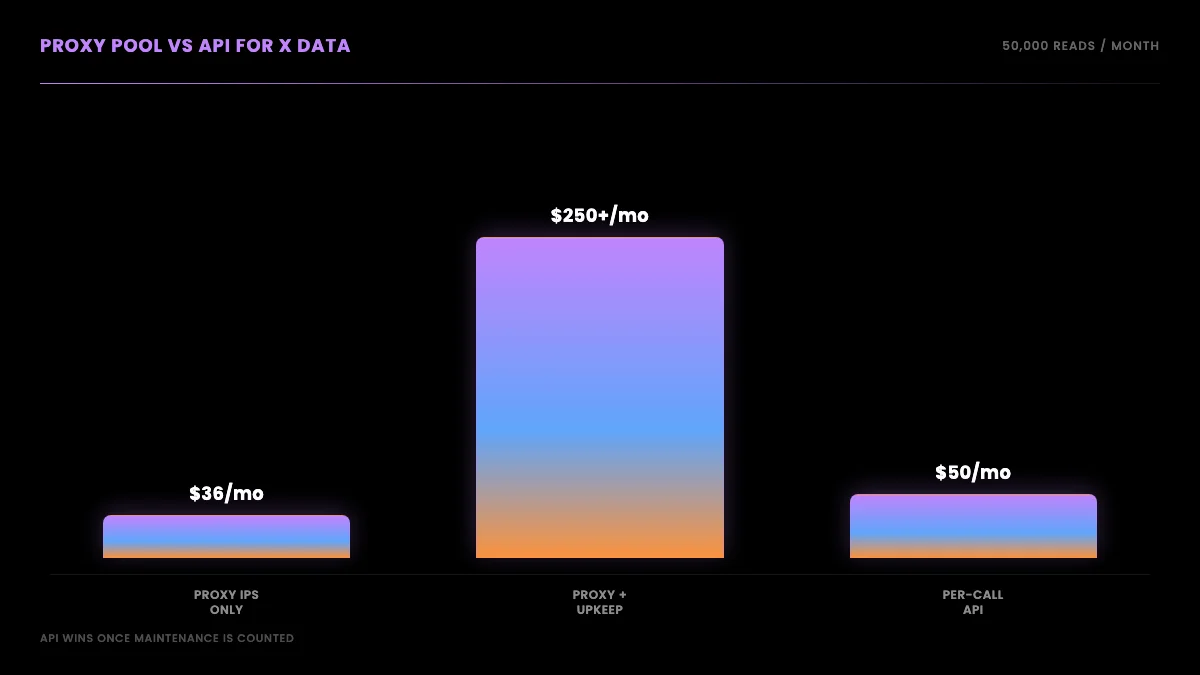
For a 50,000-tweet-per-month read workload, a 20-IP static residential pool at IPRoyal's $1.80 per IP costs $36 a month before bandwidth, plus engineering time to build the scraper, rotate IPs, monitor ban rates, and replace burned addresses. Reading the same volume through a per-call API at $0.001 per call costs about $50 per month with no IP fees, no bandwidth metering, and no pool maintenance. Once engineering and maintenance time is counted, the API is usually the cheaper path for a read-only X workload.
The proxy route: you buy a static-residential pool to run your own X scraper. Twenty IPs at $1.80 each (IPRoyal static tier) is $36 a month before bandwidth. Add the engineering time to build and maintain the scraper, rotate IPs, monitor ban rates, and replace burned addresses. Add the risk that some of those "ISP" IPs are datacenter IPs that get flagged on day one. The IP fee is the smallest part of the real cost.
The API route: at $0.001 per call, reading 50,000 tweets through GetXAPI is about $50 a month, with no IP fees, no bandwidth metering, no pool maintenance, and no fake-ISP exposure because you never touch an IP. Once you count the engineering and maintenance time the proxy route demands, the API is usually cheaper and always lower-maintenance for a read-only X workload. The Twitter API cost guide carries the full workload-by-workload model if you want to plug in your own volumes.
The headline IP fee makes the proxy route look cheaper than it is, because the fee is the part of the cost that shows up on an invoice. The parts that do not show up on an invoice are larger: the days of engineering to build a scraper that survives X's anti-bot defenses, the ongoing work to rotate IPs and watch ban rates, the dead time when a batch of "ISP" IPs turns out to be flagged datacenter addresses and you have to swap providers, and the opportunity cost of a senior engineer maintaining proxy plumbing instead of building product. A pool that looks like $36 a month on the pricing page is rarely $36 a month in practice once a person has to keep it alive.
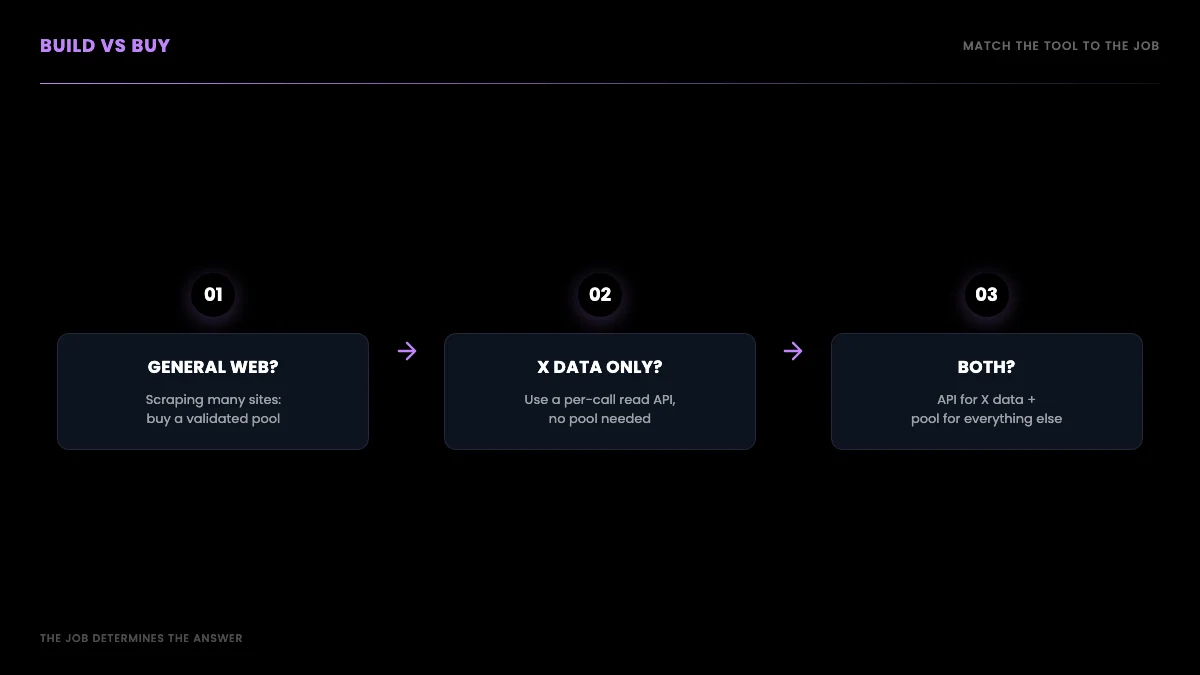
There is a second scenario where the proxy route wins, and it is worth being honest about: if you are scraping many different sites, not just X, then you are buying general-web access infrastructure that an X-specific API cannot replace, and a validated residential pool is the correct purchase. The decision is not "proxies bad, API good." It is "match the tool to the job," and the job determines the answer. For a single-platform X read workload, the API removes a whole category of work. For a sprawling multi-site crawl, the pool is the foundation. If your build straddles both, a common pattern is to run the API for X data and reserve the proxy pool for everything else, so you are not paying the X-scraping tax on top of an API that already solves it.
The community knows this intuitively. The buyer in the most upvoted "looking to buy" thread on r/proxies wants exactly what an API delivers: "high speeds, stable connections and IP pool large enough to never get the same IP again, and most importantly, the IP's should be clean." That is a description of solved access infrastructure, which is precisely what you are renting when you call an API instead of assembling a pool.
For a neutral third-party walkthrough of the provider landscape before you decide, this Cybernews review is a reasonable starting point:
https://www.youtube.com/watch?v=dDBOqQvzEt4
How to validate any provider before you pay
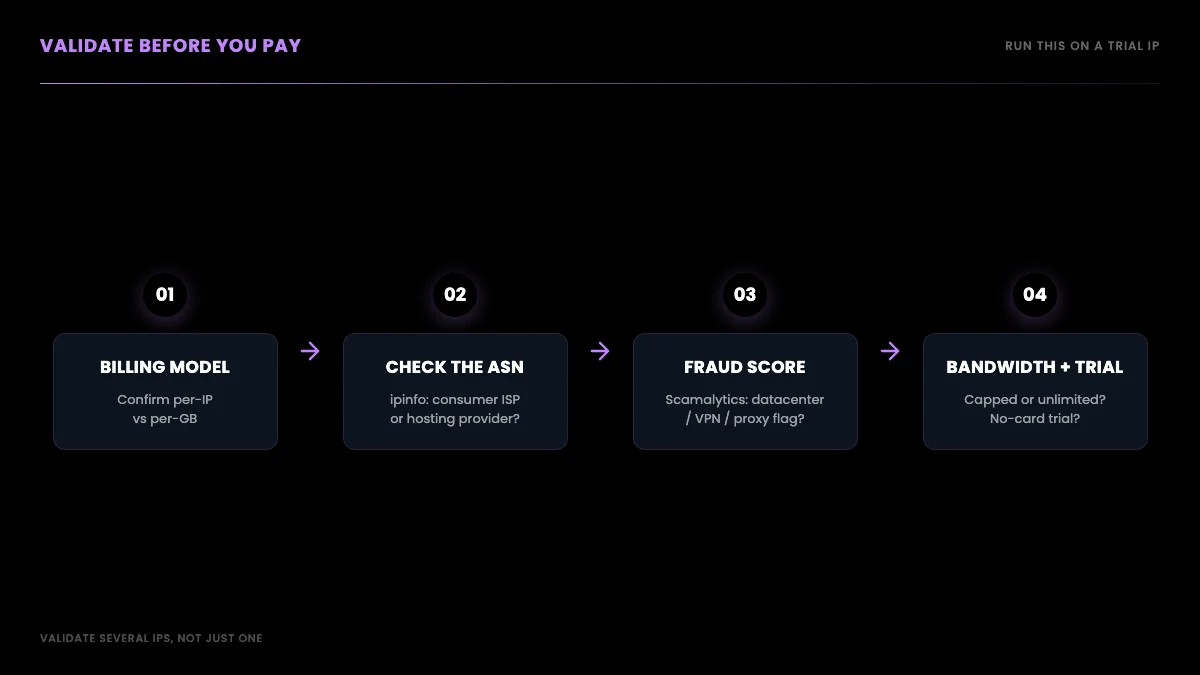
Before committing money to any proxy provider, run four checks on a trial IP: confirm the billing model (per IP versus per gigabyte, which are not comparable on a single number), look up the IP's ASN at ipinfo.io to verify it resolves to a consumer ISP rather than a datacenter hosting provider, run the IP through a fraud-score checker like Scamalytics to confirm it is not already flagged, and confirm whether bandwidth is unlimited or capped before scaling up.
First, confirm the billing model you are actually buying: per IP (static or ISP) or per gigabyte (rotating). They are not comparable on a single number, and vendors blur the line on purpose.
Second, take a trial IP and look up its ASN with a tool like ipinfo.io. A genuine ISP proxy resolves to a consumer ISP's ASN. A datacenter IP resolves to a hosting provider's ASN no matter what the product page calls it. This single check catches most fake-ISP reselling before you have paid a cent.
Third, run the same IP through a fraud-score or proxy-detection checker such as Scamalytics. If it shows up as datacenter, VPN, or proxy on multiple checkers, it will get flagged on a real target regardless of the label, and a high fraud score means the IP is already burned on the exact platforms you care about. Run a handful of trial IPs, not just one, because providers can serve clean IPs to a trial and dirtier ones to paying volume.
Fourth, confirm whether bandwidth is unlimited or capped, and whether there is a no-card trial so you can do all of the above before paying.
Build versus buy: a decision tree
The decision separates cleanly into two jobs: general-web scraping across many sites, where a validated residential proxy pool is the correct foundation, versus X data specifically, where a per-call read API eliminates the proxy layer entirely. For the general-web job, Decodo or Proxy-Seller offer the best value with unlimited bandwidth, Oxylabs for premium reliability, and Bright Data for enterprise compliance. For X data, an API at $0.001 per call removes IP fees, fake-ISP risk, and pool maintenance from the equation.
If you are scraping the general web across many sites with your own crawler, you need proxies, and the value picks are Decodo or Proxy-Seller for unlimited per-IP, Oxylabs if you need premium reliability at scale, and Bright Data if you need a vetted enterprise vendor and can clear KYC. Validate every IP before you commit.
If your goal is X data specifically, the proxy pool is undifferentiated infrastructure cost: per-IP fees, fake-ISP risk, ban-rate maintenance, and rotation logic, all to solve an access problem an API already solves. Read the data through a per-call API, pay $0.001 per call, and put your engineering time into your product instead of your proxy pool. The best ways to scrape and read tweets guide and how to scrape tweets walk the read path end to end, and if you are migrating off a marketplace scraper, the Apify Twitter scraper vs GetXAPI and RapidAPI Twitter alternative comparisons cover the switch. If you are coming off another vendor entirely, the migrate from twitterapi.io to GetXAPI guide is the step-by-step, and for specific jobs the Twitter trends API and export Twitter followers walkthroughs show the same proxy-free pattern applied to real workloads. For the broader context on why platforms are pushing scrapers toward proxies in the first place, the Electronic Frontier Foundation's writing on scraping and access is a useful neutral primer.
The verdict
On verified June 2026 pricing, the cheapest per-IP static and ISP proxies are Decodo ($0.27) and Webshare ($0.30), with Webshare trading reliability and bandwidth for the price. Decodo or Proxy-Seller give the best value with unlimited bandwidth, IPRoyal has the best static sticky sessions, and Oxylabs is the premium pick at scale. But two costs never appear on a pricing page: fake-ISP datacenter IPs sold as residential, and seeded reviews that make any single recommendation untrustworthy. Validate the ASN and fraud score of the IPs you actually receive, and treat every review as potentially planted.
And before you buy any pool at all, ask what you are really after. If it is X data, the proxy layer is the wrong thing to be buying. An API solves the access problem for $0.001 per call with no IPs to manage and no fake-ISP risk, which is why for read-only X workloads it is the cheaper and simpler answer once the maintenance is counted. The proxy market is real and useful, but it is also full of mislabeled inventory and seeded reviews, so the discipline is the same whichever route you choose: validate what you actually receive, price the full cost including maintenance, and match the tool to the job. Start with the pricing page and the cost calculator, then decide whether you are in the proxy business or the product business.
Frequently Asked Questions
On verified June 2026 per-IP pricing for static residential and ISP proxies, Decodo is the cheapest at the low end (from $0.27 per IP shared, around $0.47 at 10 IPs) with unlimited bandwidth, and Webshare is the cheapest headline entry at $0.30 per IP. Webshare trades reliability and bandwidth for that price: its cheap plan caps at 250 GB and has recurring reports of IPs flagged on sensitive targets. Decodo is the better value at volume because bandwidth is unlimited.
Only if you are hitting X directly with your own scraper. Proxies exist to spread requests across many IPs so the target does not rate-limit or ban a single address. If your end goal is X data specifically rather than general-web scraping, a read API removes the proxy layer entirely: the provider runs the access infrastructure and you call a REST endpoint. You pay per call instead of paying per IP plus bandwidth plus the maintenance of keeping the pool unbanned.
Threads asking for the best provider on r/proxies are heavily seeded. You see removed comments, one-off accounts pushing obscure brands, and the same provider praised in one thread and called a scam in another. The lesson is not to pick a winner from a recommendation thread. It is to validate the specific IPs you receive yourself and treat every review, including Reddit, as potentially vendor-seeded.
Bright Data is cheaper per IP than its enterprise reputation suggests, from around $0.90 to $1.30 per IP, with strong scale and compliance. The catch for new users is onboarding: it requires KYC and business verification, and some targets are gated for new accounts until you clear it. If you need a vetted enterprise vendor and can clear KYC, it is solid. If you just want X data without a verification queue, a per-call API is the faster path.
Static residential and ISP proxies give you a fixed IP that stays the same across sessions, billed per IP per month, which is what you want for long logged-in sessions. Rotating residential proxies hand you a new IP per request from a large pool and are usually billed per gigabyte of traffic. For scraping that needs sticky sessions you buy per-IP static or ISP; for high-rotation anonymous scraping you buy per-GB rotating. Mixing the two billing models up is the most common budgeting mistake.
A fake ISP proxy is a datacenter IP sold as a residential or ISP IP. On r/proxies, multiple users describe the pattern: a seller grabs a subnet on an IP marketplace, rents a datacenter box from that same network, and you receive a datacenter IP dressed up as ISP. The same accusation has been made publicly against budget and premium providers alike. Always run the IPs you actually receive through an ASN and fraud-score checker before you trust the label on the box.
A small static-residential pool of 20 IPs at roughly $1 to $2 per IP runs $20 to $40 a month before bandwidth, plus the engineering time to rotate, monitor ban rates, and replace burned IPs. A per-call read API like GetXAPI is $0.001 per call with no IP fees, no bandwidth metering, and no pool maintenance. For a read-only X workload the API is usually cheaper once you count the maintenance, and it removes the fake-ISP risk because you never touch an IP pool.
Check four things. First, the billing model: per IP (static or ISP) versus per gigabyte (rotating), because they are not comparable on a single number. Second, the ASN and fraud score of a trial IP, to confirm it is not a datacenter IP in disguise. Third, whether bandwidth is unlimited or capped. Fourth, whether the provider offers a no-card trial so you can validate before committing. If your real goal is X data, also price out an API call route before you buy any pool at all.
Check out similar blogs
More guides on the Twitter/X API, scraping, and pricing.

The Best Twitter (X) API Alternatives in 2026, Compared
The best Twitter / X API alternatives in 2026, ranked and compared: managed pay-per-call APIs, web-data marketplaces, and open-source libraries, with real per-1,000-tweet costs.

Twitter Scraping, Best Practices for Production in 2026
Production-grade Twitter scraping patterns, retry logic, pagination, proxy strategy, rate-limit handling, and cost optimization for any third-party API.

Scrape Full Tweet History of Any Account in 2026 (Beyond the 3,200 Limit)
Why the X timeline stops at 3,200 tweets and how to pull an account's full history with date-window search, cursor pagination, and dedup. Live-tested code in Python and curl.

Apify Twitter Scraper vs GetXAPI: Cost, Speed and Reliability in 2026
Head-to-head comparison of Apify Twitter Scraper and GetXAPI REST API. Cost per 1,000 tweets, response time benchmarks, rate limits, and when to pick each one.

Best Twitter Scraper 2026: API, Browser & Python Compared
Compare the best Twitter scrapers in 2026, official API, third-party APIs, browser scrapers, and Python libraries. What works, what gets you sued, what each costs.

How to See Comments on X (Twitter), Including Hidden Replies
How to see comments on X (Twitter): open the post, sort the replies, find hidden replies and quote posts, and read comments without an account. Checked on X.

How Many People Use X (Twitter)? User Statistics
How many people use X: about 550 million monthly users across X and Grok, 64.7 million in the EU, 21% of US adults. Every figure sourced, plus our own sample.

Classify 10,000 Tweets with Jev and the X API: Real Costs
We pulled 10,000 live tweets and classified every one with Jev, TypeSafe's new decision model. Real cost, latency, agreement rates, failure cases and the full script.
Featured in
Where GetXAPI's data and pricing get cited.

The hidden line item in your AI side project: X data
Indie Hackers post on the often-overlooked cost of X data for AI side projects, citing GetXAPI as the usage-based way to pull live Twitter data without a five-figure X developer contract.

How Companies Are Learning to Read Market Mood in Real Time
Editorial feature on Big News Network examining how companies read market mood from X in real time, citing GetXAPI as the usage-based Twitter API that prices live social listening by the call instead of a five-figure annual contract.

How Companies Are Learning to Read Market Mood in Real Time
Syndicated feature on Business Newswire on how companies read market mood from X in real time, citing GetXAPI as the usage-based Twitter API that prices live social listening by the call.

Working with Twitter/X Data: A Practical Skill for IT Students and Professionals in 2026
Guide on SIIT (Scholars International Institute of Technology) on collecting live Twitter/X data as a practical developer skill, citing GetXAPI as the per-call Twitter data API that makes it affordable without an X developer account.

Adding Twitter/X Data to Your App in 2026: A Developer's Integration Guide
Developer integration guide on Programming Insider covering how to add live Twitter/X data to an app in 2026, comparing the official X API v2 with a key-based REST approach and citing GetXAPI as the low-cost per-call option with no developer-account approval.

6 Twitter/X Scraping Solutions for Every Budget
Roundup on TechBullion of the leading Twitter/X scraping solutions, ranking GetXAPI first as the cheapest option at $0.001 per call (about $0.05 per 1,000 tweets) with clean JSON output and no monthly minimum.

The Data Bill Behind Every Social Analytics Tool
Editorial piece on SpeakRJ examining the underlying data costs behind social analytics tools, citing GetXAPI as the usage-based way to source live X data by the call.

What Is AI Sentiment Analysis, and What Does Each Layer Cost?
Explainer in AI Journal breaking sentiment analysis into its data, model and reporting layers and what each costs to run, citing GetXAPI for pulling public X posts on pay-per-call pricing.

Why Enterprise AI Agents Still Cannot Read Social Data
Analysis piece in The Silicon Review on why enterprise agents reach internal systems easily but struggle with public social data, citing GetXAPI's MCP server and data-as-a-service model as one route to close the gap.