X (Twitter) API Error Codes: Reference and Retry Rules
X API status codes, error type URIs and the numeric codes behind them, with the cause and the fix for each, plus the partial-error case that returns HTTP 200.

Every X API integration eventually returns something other than 200. This reference covers the responses you are most likely to hit and what each one means: the HTTP status codes, the error type URIs in the response envelope, the numeric codes X passes back from its older error vocabulary, and the partial-error case that hides failures inside a successful response.
Codes and messages here are taken from X's own Response Codes and Errors documentation and from the GetXAPI error reference, checked on 20 August 2026.
TL;DR: The status code tells you the class of failure, the
typeURI tells you the specific condition, and thedetailstring tells you which resource caused it. Read all three before writing a retry. A403from a protected account will keep failing until something changes about the access, the target or your credentials, so do not retry it automatically; a502on a read usually clears on the next attempt. And a200is not proof of success, because partial errors ship failures inside the success envelope.
What Is an X API Error Code?
An X API error code is the machine-readable identifier X returns when a request cannot be completed as asked. Modern v2 responses carry three of them at once: an HTTP status code for the class of failure, a type URI naming the specific condition, and, when the failure originates deep in X's stack, a numeric code from the older error vocabulary.
HTTP Status Codes
The status code is the coarsest signal. It tells you which family the failure belongs to, and therefore whether a retry has any chance of working.
Success codes
| Code | Meaning | Description |
|---|---|---|
200 |
OK | Request successful. May still contain a partial errors array, see below |
201 |
Created | Resource created, returned by POST requests |
204 |
No Content | Success with no response body, returned by DELETE requests |
Client error codes
These mean the request was wrong. Retrying an identical request produces an identical failure.
| Code | Meaning | Common causes |
|---|---|---|
400 |
Bad Request | Invalid JSON, malformed query, missing required parameters |
401 |
Unauthorized | Invalid or missing authentication credentials |
403 |
Forbidden | Valid auth but no permission for this resource or action |
404 |
Not Found | Resource does not exist or has been deleted |
409 |
Conflict | Stream has no rules, filtered stream only |
429 |
Too Many Requests | Rate limit or usage cap exceeded |
Server error codes
These mean X failed, not you. All four are worth retrying with backoff.
| Code | Meaning | What to do |
|---|---|---|
500 |
Internal Server Error | Wait and retry, check the X status page |
502 |
Bad Gateway | Wait and retry |
503 |
Service Unavailable | X is overloaded, wait and retry |
504 |
Gateway Timeout | Wait and retry |
The Error Response Envelope
X returns structured error bodies rather than bare strings. The shape is consistent enough to branch on directly.
{
  "title": "Invalid Request",
  "detail": "The 'query' parameter is required.",
  "type": "https://api.x.com/2/problems/invalid-request"
}
| Field | Description |
|---|---|
type |
URI identifying the error type. This is the field to branch on |
title |
Short error description |
detail |
Specific explanation, usually naming the offending parameter or resource |
The type, title and detail trio matches the shape defined by RFC 9457 Problem Details for HTTP APIs, which replaced RFC 7807 in 2023. X does not document the envelope as RFC 9457 and does not guarantee an application/problem+json content type, so treat the resemblance as convenient rather than contractual: an existing problem-details handler is a reasonable starting point, but validate the fields you depend on rather than assuming conformance.
Branch on type, not on title or detail. The URI is a stable identifier; the human-readable strings are not contractual and can be reworded without notice.
X Error Type URIs
Eleven type URIs cover the conditions you will meet in practice. The paths below are relative to https://api.x.com/2/problems/.
| Type | Description | Retry? |
|---|---|---|
about:blank |
Generic error, fall back to the HTTP status code | Depends on status |
invalid-request |
Malformed request or invalid parameters | No, fix the request |
resource-not-found |
Post, user or other resource does not exist | No |
not-authorized-for-resource |
No access to private or protected content | Not unchanged, only after access changes |
client-forbidden |
App not enrolled or lacks required access | No, fix app access |
usage-capped |
Usage cap exceeded | Not until the cap resets |
rate-limit-exceeded |
Rate limit exceeded | Yes, after the reset time |
streaming-connection |
Stream connection problem | Yes, reconnect |
rule-cap |
Too many filtered stream rules | No, delete rules first |
invalid-rules |
Rule syntax error | No, fix the rule |
duplicate-rules |
Rule already exists | No, already present |
Note that usage-capped and rate-limit-exceeded both surface as 429 but are entirely different conditions. A backoff loop clears the second and does nothing at all for the first.
Start building with GetXAPI
$0.05 per 1,000 tweets. $0.10 free credits. No credit card required.
Numeric Error Codes You Will Actually Hit
X also returns numeric codes from its older error vocabulary, particularly on write operations and account-level failures. These arrive as a separate field alongside the HTTP status, surfaced by GetXAPI as twitter_error_code, so the same number can mean something entirely different from the HTTP status that carries it. These are the ones that appear in real logs.
| Code | Meaning | What to do |
|---|---|---|
32 |
Could not authenticate you | The token is invalid or expired, re-mint it |
63 |
The target account is suspended | Nothing, the account is gone |
64 |
Your account is suspended | Use a different account |
131 |
Temporary X internal error | Retry |
139 |
Already liked | Already done, safe to ignore |
144 |
No post found with that ID | Deleted, or the ID is wrong |
187 |
Duplicate post | Change the text or wait about 15 minutes |
226 |
Request looked automated | Retry |
326 |
Account temporarily locked | Unlock the account, then retry |
327 |
Already reposted | Already done, safe to ignore |
344 |
Posting temporarily limited at the network level | Retry shortly, or route through a clean dedicated IP |
349 |
Cannot message this user | The recipient does not accept your DMs |
399 |
Wrong password or could not log in | Check credentials, or retry after a temporary login limit |
433 |
Reply restricted or Premium required | The post is reply-gated, or the action needs X Premium |
465 |
Cannot repost an outdated post | The post is too old to repost |
476 |
Not allowed to send message requests | The account cannot send DM requests |
502 |
Daily DM (message request) limit reached, arrives inside an HTTP 429, not to be confused with HTTP 502 |
Wait 24 hours, or use an account with higher limits |
Three of these are worth calling out because they are routinely mishandled. Codes 139 and 327 are not failures at all: the action you asked for is already true, and treating them as errors makes idempotent retries look broken. Code 344 is a network-level throttle rather than an account-level one, so switching accounts does not help and switching egress IP does.
Partial Errors: A 200 That Contains Failures
This is the single most commonly missed case in X API integrations, and it is worth handling before anything else on this page.
When you request several resources at once and some are unavailable, X returns 200 with both data and errors populated:
{
  "data": [
    {"id": "123", "text": "Hello"}
  ],
  "errors": [
    {
      "resource_id": "456",
      "resource_type": "tweet",
      "title": "Not Found Error",
      "detail": "Could not find tweet with id: [456].",
      "type": "https://api.x.com/2/problems/resource-not-found"
    }
  ]
}
Client code written as if response.ok: process(response.data) treats this as a clean success and silently drops the missing records. In a batch lookup of a thousand posts where forty were deleted, you get nine hundred and sixty results and no indication that anything went wrong. The bug surfaces weeks later as unexplained gaps in the dataset.
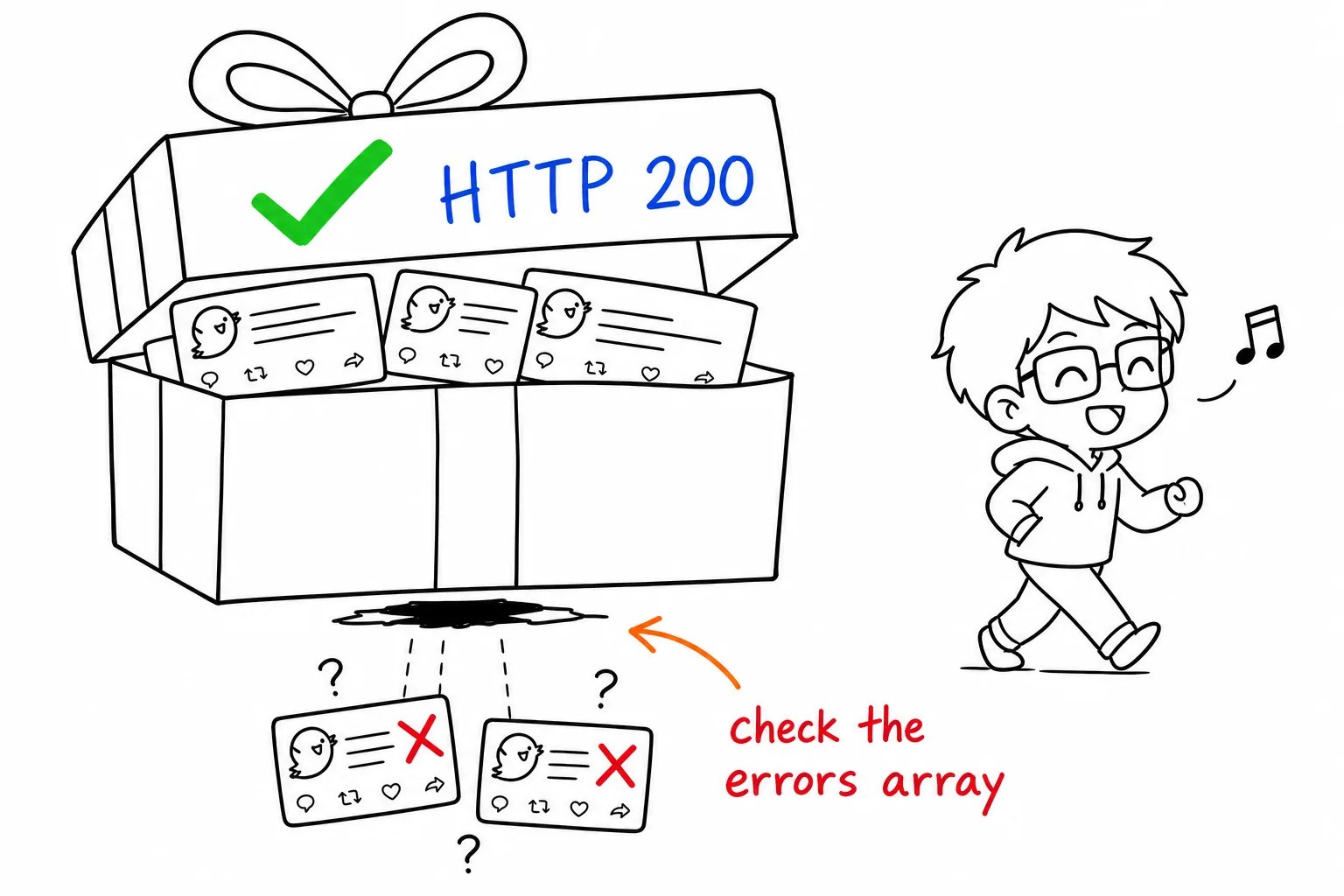
Always check for an errors key even on a 200. The resource_type values you will see there are the same object names used throughout X's data dictionary.
Rate Limit Headers
When you hit 429, the response headers tell you exactly when to try again. Reading them is strictly better than a fixed sleep, because a fixed sleep is either too short, which compounds the problem, or too long, which wastes throughput.
X documents rate limit headers on the same Response Codes and Errors page, and the per-endpoint windows on its rate limits reference. Read the reset value, wait until it, then retry once. Do not retry in a tight loop: X documents waiting for the reset and backing off, and a tight loop simply spends quota on requests that cannot succeed yet.
A 429 that says local_rate_limited and has no headers
There is one 429 that breaks the rule above. Developers report a 429 whose body reads local_rate_limited and which arrives without x-rate-limit-remaining or x-rate-limit-reset, so there is no reset time to wait for. The case is described in an X developer community thread, and X's rate limits reference does not list it, so treat what follows as field practice, not documented behaviour.
| Signal | Ordinary rate limit | local_rate_limited |
|---|---|---|
| HTTP status | 429 |
429 |
| Body | error code 88, "Rate limit exceeded" |
contains local_rate_limited |
x-rate-limit-reset header |
present | reported missing |
| What to do | wait until the reset time, retry once | back off exponentially and lower how many requests run in parallel |
Because there is no reset header, a client that sleeps "until reset" has nothing to read and either crashes or retries at once. Check for the header before using it, and fall back to exponential backoff when it is absent.
The status code itself dates to RFC 6585, which introduced 429 precisely so servers could distinguish "you are asking too often" from "you are not allowed", which is why treating 429 as an auth problem sends debugging in the wrong direction.
A Diagnostic Order That Converges
Most debugging time is lost checking things in the wrong order. This sequence eliminates the largest class of causes first.
- Read the response body, not just the status. The
detailfield usually names the exact parameter or resource at fault. Two403s with differentdetailstrings are different bugs. - Check for a partial error. If the status is
200, confirm there is noerrorsarray before assuming success. - Branch on the
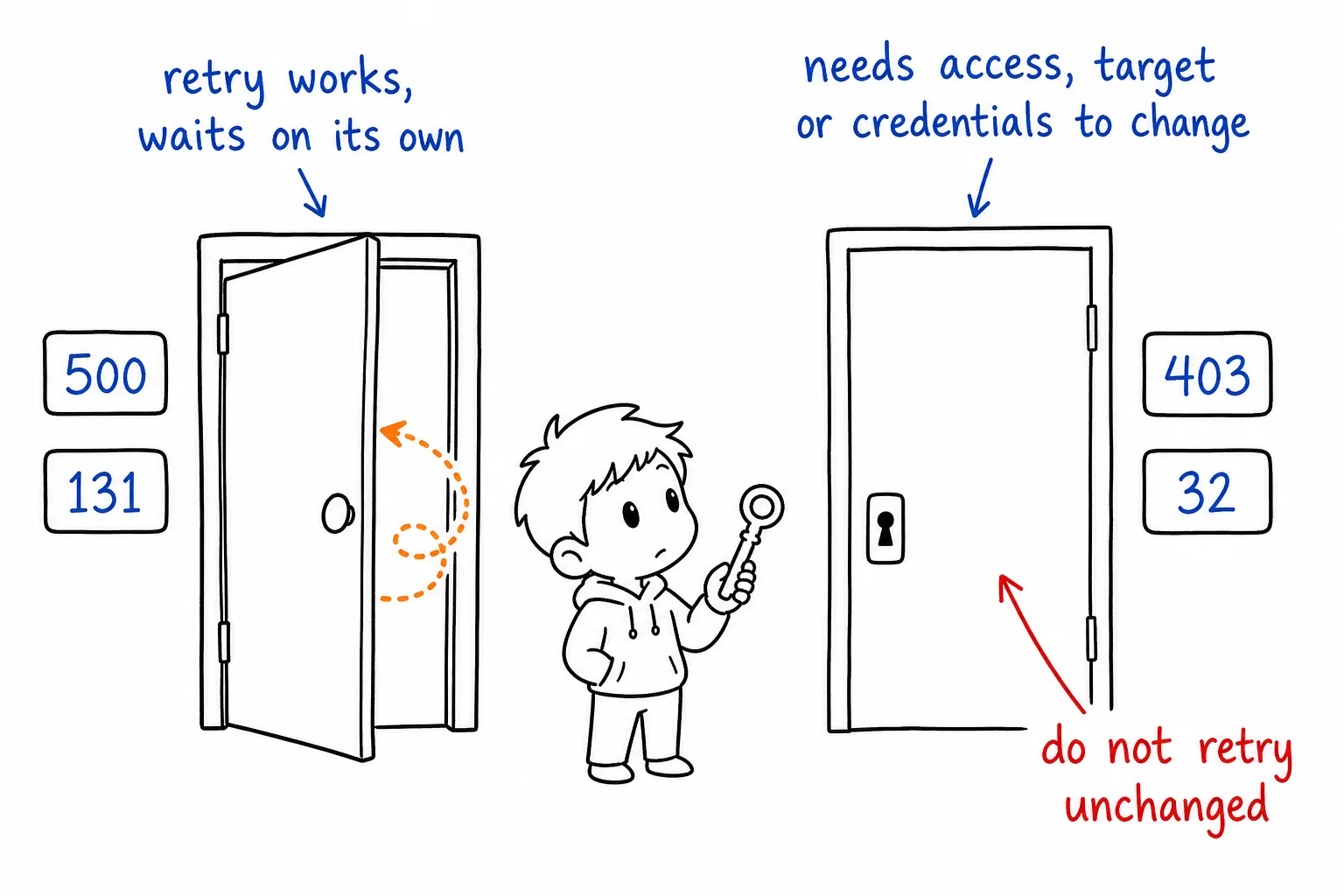
typeURI. This distinguishesusage-cappedfromrate-limit-exceeded, which the status code alone cannot. - Classify by what would have to change. Server errors and code
131clear on their own, so a retry is appropriate. A protected or suspended target will not clear on its own: only a change in the target's state, your access level, or your credentials makes that request succeed, so do not retry it unchanged. - Only then check your credentials. Auth is the most common first guess and one of the least common actual causes once you are past initial setup.
The cheapest Twitter API. Try it free.
$0.05 per 1,000 tweets. $0.10 free credits. No credit card required.
Test Your Error Handling in Three Languages
The pattern is the same everywhere: check the status, then check for partial errors, then branch on the type URI.
import requests

r = requests.get(url, headers=headers, timeout=30)

# 204 has no body, and a 5xx can arrive as HTML from a proxy, so never
# call .json() unconditionally.
body = {}
if r.status_code != 204 and "application/json" in r.headers.get("content-type", ""):
    try:
        body = r.json()
    except ValueError:
        body = {}

if r.status_code == 204:
    pass                                  # success, nothing to parse
elif r.ok:
    for e in body.get("errors", []):      # partial failure inside a 200
        print("partial failure:", e.get("type"), e.get("detail"))
    process(body.get("data", []))
elif r.status_code == 429:
    print("throttled, honour the reset header before retrying")
else:
    print(r.status_code, body.get("type"), body.get("detail") or r.text[:200])
const r = await fetch(url, { headers });

// 204 has no body and a proxy 5xx may be HTML, so guard the parse.
let body = {};
if (r.status !== 204 && r.headers.get("content-type")?.includes("application/json")) {
  body = await r.json().catch(() => ({}));
}

if (r.status === 204) {
  // success, nothing to parse
} else if (r.ok) {
  for (const e of body.errors ?? []) {
    console.warn("partial failure:", e.type, e.detail);
  }
  process(body.data ?? []);
} else if (r.status === 429) {
  console.warn("throttled, honour the reset header before retrying");
} else {
  console.error(r.status, body.type, body.detail);
}
curl -sS -w '\nHTTP %{http_code}\n' \
  -H "Authorization: Bearer $TOKEN" \
  "https://api.x.com/2/tweets?ids=123,456"
The cURL form is worth keeping in your notes: -w '\nHTTP %{http_code}\n' prints the status alongside the body, which is what you need when a 200 is hiding an errors array.
Errors by Operation
Some failures only appear on particular operations. These are the ones worth knowing in advance.
| Operation | HTTP | twitter_error_code |
Condition | Retry? |
|---|---|---|---|---|
| Read posts or search | 403 |
n/a | Target is protected, suspended, or inactive | Not unchanged |
| Read posts or search | 502 |
n/a | Transient upstream hiccup | Yes, usually clears immediately |
| Create post | 403 |
187 |
Duplicate text | No, change the text |
| Create post | 429 |
344 |
Network-level posting throttle | Yes, after a short wait |
| Like or repost | 403 |
139, 327 |
Action already performed | No, treat as success |
| Follow or unfollow | 403 |
326 |
Account temporarily locked | Only after unlocking |
| Send DM | 403 |
349, 476 |
Recipient does not accept DMs from you | Not unchanged |
| Send DM | 429 |
502 |
Daily message request limit reached | After 24 hours |
| Login | 401 |
399 |
Bad credentials or temporary login limit | Once, after a wait |
The two 502s are unrelated. HTTP 502 is a transient upstream failure and is worth retrying. twitter_error_code: 502, which arrives inside an HTTP 429, is the daily message-request limit and is not. Branching on the number alone without checking which field it came from will retry a quota limit as though it were a gateway blip.
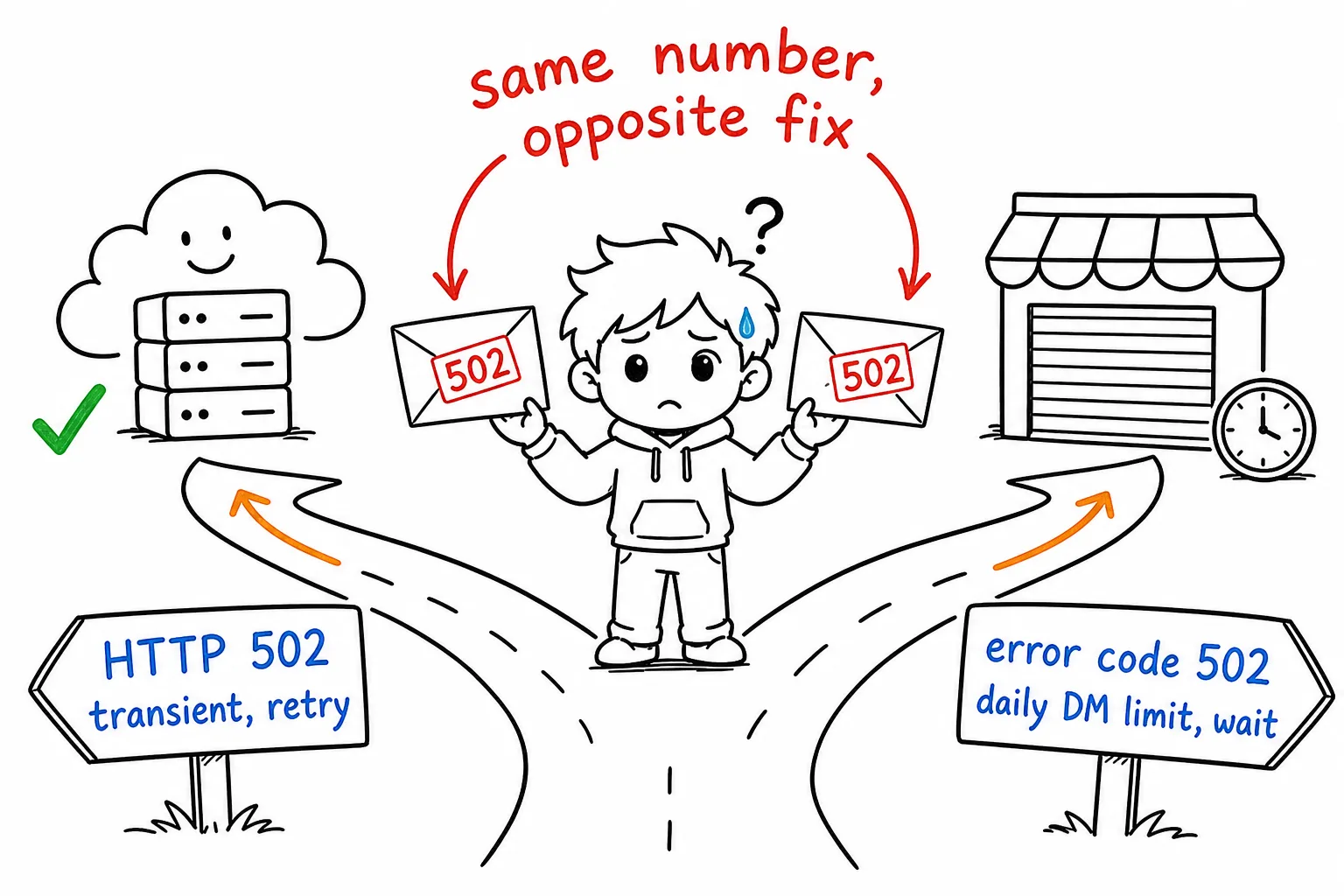
A protected target returning 403 and an upstream blip returning HTTP 502 both look like "no posts came back", but they call for opposite handling. The first will not succeed until something changes; the second usually clears on retry. Conflating them is why some crawlers hammer unavailable accounts indefinitely.
What Changes on a Managed API
Going through a managed provider does not remove X's error vocabulary, it wraps it. On GetXAPI, failures originating at X are passed through with X's own code in a twitter_error_code field, so the numeric table above still applies, and the provider adds its own codes for conditions X never sees:
401covers key problems: missing, malformed, or revoked402means the account is out of credits, and nothing is charged automatically403covers account-level restrictions and target-level or action-level denials429covers capacity throttling as well as X-side account limits, and carries aretry_aftervalue to honour
There is no endpoint-specific quota to plan around, though general service throttling still applies, so sustained concurrency can return 429 and long-running jobs should be wrapped in a retry with backoff. Transient upstream failures on reads and network-level throttles such as code 344 are not billed. The full behaviour is documented in the GetXAPI error reference.
Related Reading
- X webhooks and the CRC check, the webhook-specific failures, from a failed challenge response to a rejected signature
- X API object reference, every field on the Post and User objects a successful response returns
- 403 Forbidden and 401 Unauthorized on the Twitter API, the deep walkthrough for those two codes specifically
- X API rate limits, how the windows work, what the caps are, and how to read
x-rate-limit-reset - How to get an official X API key, if the errors started before you had credentials working
Frequently Asked Questions
Code 32 is "Could not authenticate you". The credential presented with the request is invalid, expired, or was minted for a different account. It is not a rate limit and not a permission problem, so retrying the same request with the same credential will fail identically. Re-mint the token and retry once.
A partial error is an HTTP 200 response that contains both a data array and an errors array. It happens when you request several resources and only some are available, for example looking up five posts where one was deleted. Code that only checks the status code will treat this as a clean success and silently drop the missing records.
It depends on the failure and the provider. On GetXAPI, transient upstream failures such as a 502 on a read, and network-level throttles such as code 344, are not billed. Check your provider's documented billing behaviour for errors rather than assuming, because a retry loop against a billed error class gets expensive quickly.
403 means authentication succeeded but the action is not permitted. The four common causes are a protected or suspended target account, an app that lacks the required access level, an action that needs X Premium, and a reply-gated post. Read the detail field: a 403 caused by a protected target will not resolve by retrying the same request, only by the target's state or your access changing.
Read the rate limit headers rather than guessing. X returns the reset time, and a well-behaved client waits until then instead of retrying immediately. A 429 can also mean a usage cap rather than a per-window rate limit, and those are different conditions with different fixes, so check the error type URI before assuming a backoff will clear it.
Check out similar blogs
More guides on the Twitter/X API, scraping, and pricing.

Twitter API 403 Forbidden and 401 Unauthorized: Every Cause and Fix
Why the X API returns 403 Forbidden or 401 Unauthorized, how to tell the two apart, and a fix for each cause. Covers tier gating, app permissions, OAuth, and X error codes.

Classify 10,000 Tweets with Jev and the X API: Real Costs
We pulled 10,000 live tweets and classified every one with Jev, TypeSafe's new decision model. Real cost, latency, agreement rates, failure cases and the full script.

How to Search Tweets by Hashtag with the X API
Tested X API hashtag queries: how the # operator differs from a plain keyword, combining hashtags, Top versus Latest, filters that work, and cursor pagination.

X (Twitter) API Object Reference: Tweet and User Fields
Every field on the X API v2 Post and User objects, plus Media, Poll and Place: type, what it holds, the auth it needs, nested keys and enum values.

X (Twitter) Webhooks: Setup, the CRC Check and Limits
How X delivers real-time events over webhooks, what the Challenge-Response Check actually asks for, the requirements that silently reject a URL, and the per-tier limits.

The Best Twitter (X) API Alternatives in 2026, Compared
The best Twitter / X API alternatives in 2026, ranked and compared: managed pay-per-call APIs, web-data marketplaces, and open-source libraries, with real per-1,000-tweet costs.

How to Like a Tweet via API in 2026 (No Dev Account)
Like (favorite) tweets programmatically via API in 2026 without an X developer account. The auth_token model, working curl, Python, and Node code, and per-call cost.

The Best Twitter/X Tools in 2026, by Category
The best Twitter/X tools of 2026 for creators, marketers, and developers, spanning scheduling, analytics, scraping, monitoring, AI writers, and data APIs.
Featured in
Where GetXAPI's data and pricing get cited.

The hidden line item in your AI side project: X data
Indie Hackers post on the often-overlooked cost of X data for AI side projects, citing GetXAPI as the usage-based way to pull live Twitter data without a five-figure X developer contract.

How Companies Are Learning to Read Market Mood in Real Time
Editorial feature on Big News Network examining how companies read market mood from X in real time, citing GetXAPI as the usage-based Twitter API that prices live social listening by the call instead of a five-figure annual contract.

How Companies Are Learning to Read Market Mood in Real Time
Syndicated feature on Business Newswire on how companies read market mood from X in real time, citing GetXAPI as the usage-based Twitter API that prices live social listening by the call.

Working with Twitter/X Data: A Practical Skill for IT Students and Professionals in 2026
Guide on SIIT (Scholars International Institute of Technology) on collecting live Twitter/X data as a practical developer skill, citing GetXAPI as the per-call Twitter data API that makes it affordable without an X developer account.

Adding Twitter/X Data to Your App in 2026: A Developer's Integration Guide
Developer integration guide on Programming Insider covering how to add live Twitter/X data to an app in 2026, comparing the official X API v2 with a key-based REST approach and citing GetXAPI as the low-cost per-call option with no developer-account approval.

6 Twitter/X Scraping Solutions for Every Budget
Roundup on TechBullion of the leading Twitter/X scraping solutions, ranking GetXAPI first as the cheapest option at $0.001 per call (about $0.05 per 1,000 tweets) with clean JSON output and no monthly minimum.

The Data Bill Behind Every Social Analytics Tool
Editorial piece on SpeakRJ examining the underlying data costs behind social analytics tools, citing GetXAPI as the usage-based way to source live X data by the call.

What Is AI Sentiment Analysis, and What Does Each Layer Cost?
Explainer in AI Journal breaking sentiment analysis into its data, model and reporting layers and what each costs to run, citing GetXAPI for pulling public X posts on pay-per-call pricing.

Why Enterprise AI Agents Still Cannot Read Social Data
Analysis piece in The Silicon Review on why enterprise agents reach internal systems easily but struggle with public social data, citing GetXAPI's MCP server and data-as-a-service model as one route to close the gap.