
How to Search Tweets by Hashtag with the X API
Tested X API hashtag queries: how the # operator differs from a plain keyword, combining hashtags, Top versus Latest, filters that work, and cursor pagination.

Hashtag search looks like the simplest query you can write, and it is the one most people get subtly wrong. The hash is not decoration on a keyword. It selects a different matching behaviour, and if you drop it you get a broader, noisier result set that quietly changes what your campaign report is counting.
The short answer. To search tweets by hashtag, send the tag with its leading hash as the query, q=#buildinpublic. The hash restricts matching to the hashtag entity rather than the word anywhere in the text. Add product=Top or product=Latest to pick the ranking, then follow next_cursor to page past the first 20 results.
One scope note before the queries. The search operators below are X's own syntax and behave the same wherever you send them. The endpoint, the parameter names and the response fields are GetXAPI's. If you are calling the official X API instead, keep the operators and expect a different request and response shape.
Everything below was run against the live GetXAPI search endpoint on 13 September 2026. Where a claim was checked post by post rather than simply observed to return results, the text says so and gives the count. Anything not tested is not asserted here.
What the hashtag operator actually matches
#api and api are not the same query. Run both and you get different posts back in a different order.
| Query | What it matches |
|---|---|
#api |
Posts where api is tagged as a hashtag entity |
api |
The word api anywhere in the post text |
#api #python |
Posts carrying both tags, space is an implicit AND |
(#nextjs OR #react) |
Posts carrying either tag |
python filter:hashtags |
Posts containing the word python that carry at least one hashtag, any hashtag |
X classifies # as a standalone operator, one that can carry a query by itself, as opposed to the conjunction-required operators that have to be paired with at least one standalone term (X API query reference). That is why #buildinpublic is a complete query on its own, while a filter with nothing to filter is not.
The practical consequence: if you are measuring a campaign tag, use the hash. A bare keyword will sweep in every post that merely mentions the word, and your numbers will be inflated in a way that is hard to notice and impossible to reconstruct later.
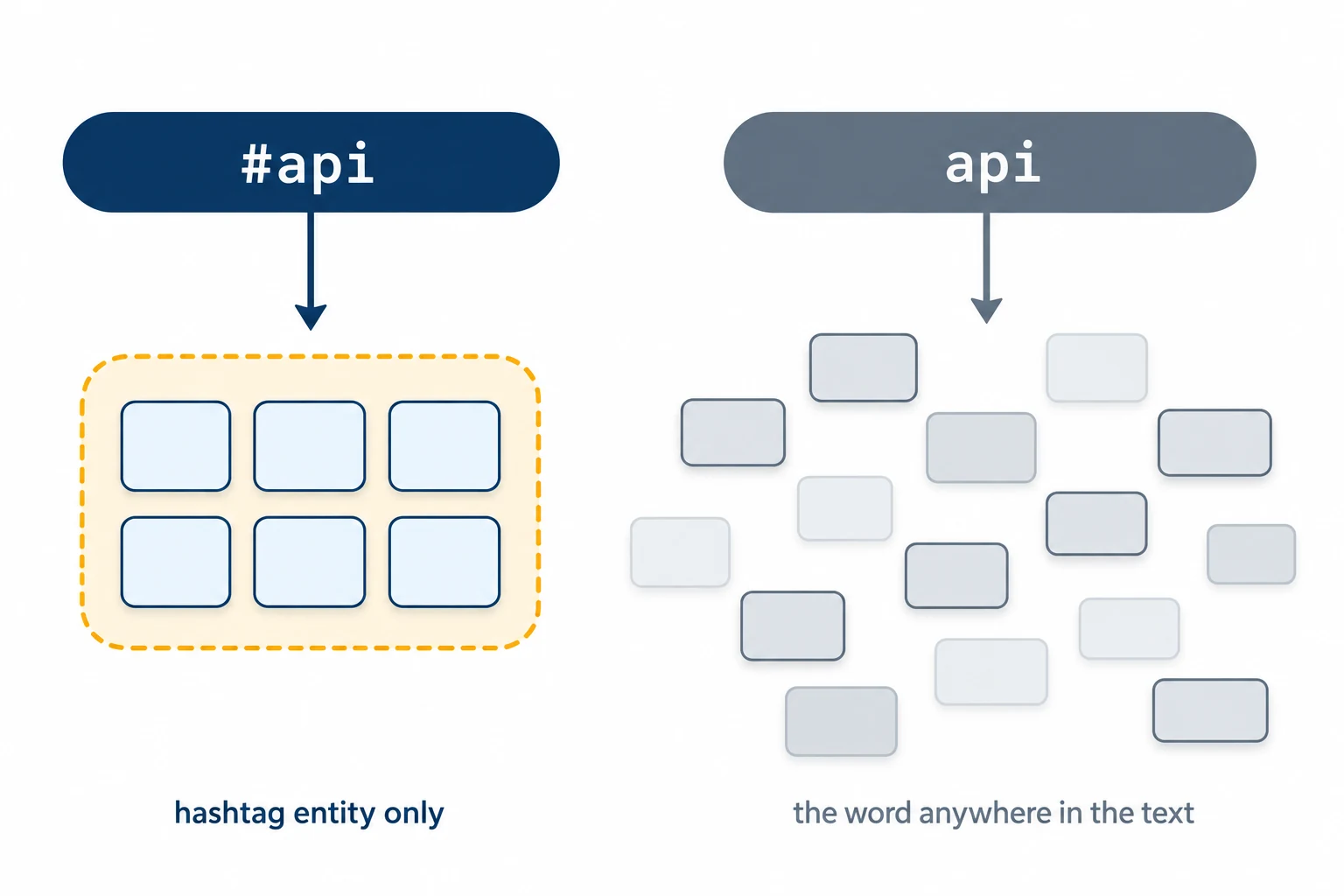
Left, #api matches the hashtag entity and returns a tight, bounded set. Right, bare api matches the word anywhere in the text and returns a wider, noisier one.
Hashtag matching is case-insensitive. #BuildInPublic and #buildinpublic returned an identical result set, all 20 posts in the same order. You do not need to generate casing variants. The original casing is preserved in the post text for display, but it plays no part in matching.
Query recipes that work
Each of these was run live, and for the combinations I checked every post that came back rather than only that something came back: #python #api returned 20 of 20 posts carrying both tags, (#nextjs OR #react) 20 of 20 carrying at least one, python filter:hashtags 20 of 20 carrying a hashtag, and #opensource -filter:retweets filter:links 20 of 20 carrying a link with no reposts among them.
You can try any of them without a key or a line of code in the free X viewer, which accepts the same operator syntax and the same Top and Latest modes.
| Goal | Query |
|---|---|
| Everything on a tag | #buildinpublic |
| Only posts with traction | #buildinpublic min_faves:50 |
| Two tags together | #python #api |
| Either of two tags, English only | (#nextjs OR #react) lang:en |
| Original posts with a link, no reposts | #opensource -filter:retweets filter:links |
| A tag inside a date window | #launch since:2026-09-01 until:2026-09-08 |
One caution on the date window, because this is the recipe that behaved least predictably. It is not a clean exclusive range. since:2026-09-05 until:2026-09-06 returned posts stamped the 7th, and since:2026-08-01 until:2026-08-03 returned posts from the 3rd. Treat the edges as approximate rather than exact, chunk a long pull into several short windows as the endpoint reference recommends, and de-duplicate by post id where the chunks meet.
Start building with GetXAPI
$0.05 per 1,000 tweets. $0.10 free credits. No credit card required.
Top versus Latest
The same hashtag query returns different posts depending on the ranking mode. Latest is reverse chronological. Top is ranked by engagement, so it surfaces the posts that actually travelled.
Pick deliberately. For monitoring a live campaign, Latest is the honest feed. For a report on what a hashtag did, Top gets you the posts that mattered with far fewer calls. Tested on the same query, the two modes returned entirely different first pages.
Paginating past the first 20
One call returns about 20 posts. The response looks like this:
| Field | What it holds |
|---|---|
query |
The query you sent, echoed back |
tweet_count |
Posts in this page, 20 in testing |
has_more |
Boolean, whether another page exists |
next_cursor |
Opaque string to pass into the next request |
tweets |
The array of posts |
The loop is: request, read next_cursor, pass it back, repeat while has_more is true. Tested on #buildinpublic lang:en, page one returned 20 posts with has_more: true and a 428-character cursor; passing that cursor back returned 20 different posts and has_more: true again.
import requests

BASE = "https://api.getxapi.com/twitter/tweet/advanced_search"
HEADERS = {"Authorization": "Bearer YOUR_API_KEY"}

def search_hashtag(tag, product="Latest", max_posts=200):
    """Collect posts for a hashtag, following the cursor until exhausted."""
    posts, cursor = [], None
    while len(posts) < max_posts:
        params = {"q": tag, "product": product}
        if cursor:
            params["cursor"] = cursor

        r = requests.get(BASE, headers=HEADERS, params=params, timeout=15)
        r.raise_for_status()   # 401, 429 and 5xx stop the loop loudly
        data = r.json()        # a non-JSON error page raises here, rather than
                               # looking like an ordinary empty page

        page = data.get("tweets") or []
        if not page:
            break
        posts.extend(page)

        if not data.get("has_more"):
            break
        cursor = data.get("next_cursor")
        if not cursor:
            break
    return posts[:max_posts]

for post in search_hashtag("#buildinpublic min_faves:50", product="Top"):
    print(post["likeCount"], post["author"]["userName"], post["text"][:80])
Three details that save a debugging session.
The ranking parameter is product, and a wrong name fails silently. This is the one that cost me the most time. Send queryType=Top and you do not get an error; you get Latest. Tested side by side, queryType=Top and queryType=Latest returned byte-identical result sets, both matching plain product=Latest, because the unrecognised parameter is simply dropped and the default applies. If you are porting code from another provider, this is the rename that will quietly skew your data rather than break your build.
Check the HTTP status before parsing. Calling .json() straight off the response is how an expired key turns into "the hashtag has no posts". A 401 or 429 body parses fine as JSON, carries no tweets key, and the loop breaks and returns a partial result that looks like a legitimate empty tail.
Keep post ids as strings. They are 64-bit integers that lose their low digits the moment a JSON parser turns them into floats. Break on an empty tweets array as well as on has_more, because a page can come back empty at the tail of a result set.
The cheapest Twitter API. Try it free.
$0.05 per 1,000 tweets. $0.10 free credits. No credit card required.
What a hashtag pull costs
A standard call is $0.001 and returns about 20 posts, so roughly $0.05 per 1,000 posts collected. Collecting 10,000 posts on a campaign tag is about 500 calls, or $0.50. New accounts get $0.10 in signup credit with no card, which is around 100 calls or 2,000 posts, enough to size a tag before spending anything.
What the response will not tell you is how big the tag is. tweet_count is the size of the page you just received, 20 in every test here, and 0 for a tag with no posts. It is not a total, and has_more is only a boolean. Neither one lets you distinguish a few hundred posts from a few hundred thousand. To size a tag before committing budget, page a narrow date window and extrapolate from that, rather than reading a total the API does not return.
Where hashtag search will disappoint you
- A hashtag is not a topic. People misspell tags, split them, and use several for one campaign. Track the variants explicitly rather than assuming one tag covers the conversation.
- Protected accounts never appear, in any search tool. If a tag is used inside a private account, it is not in the index and no API returns it.
- Deleted posts vanish from search. If you need an audit trail, store the post id, text and author at collection time. Re-running the query next week will quietly return fewer posts.
- Very wide queries return a selection rather than everything. Narrow the window and page properly instead of asking for a year in one query.
Related reading
- Classify 10,000 tweets with Jev and the X API, a measured run that labels every tweet in a result set for a few cents
- Twitter advanced search operators, the full syntax reference behind these queries
- X API object reference, every field on the post and user objects you get back
- Twitter API rate limits, how many of these pulls you can run per window
- Advanced search endpoint docs, the parameter reference
- X API query reference, X's own operator list and the standalone versus conjunction-required rule
- X search endpoints overview, how recent search and full-archive search differ on the official API
Frequently Asked Questions
Put the hashtag in the query string with its leading hash, for example q=#buildinpublic. The hash is part of the operator, not decoration: it restricts matching to the hashtag entity rather than the word anywhere in the text. Combine it with lang:, min_faves: or a date range to narrow the result set, then page with the cursor the response returns.
They return different result sets. #api matches only posts where api is tagged as a hashtag entity. The bare keyword api matches the word anywhere in the post text, including inside sentences and, in practice, inside hashtags too. The hashtag form is narrower and is the right one for tracking a campaign tag.
About 20 posts per call. The response carries a next_cursor and a has_more boolean, and passing that cursor back returns the next page. On GetXAPI a standard call costs $0.001, so roughly $0.05 per 1,000 posts collected.
No. Searching #BuildInPublic and #buildinpublic returns the same result set. Hashtags on X are matched case-insensitively, so you do not need to generate casing variants of a tag. Display casing is preserved in the tweet text, but it does not affect matching.
Yes. Space-separating two hashtags is an implicit AND, so #python #api returns only posts carrying both. For either-or, use an explicit OR inside brackets, for example (#nextjs OR #react). Both forms accept the usual filters alongside them.
Check out similar blogs
More guides on the Twitter/X API, scraping, and pricing.

Classify 10,000 Tweets with Jev and the X API: Real Costs
We pulled 10,000 live tweets and classified every one with Jev, TypeSafe's new decision model. Real cost, latency, agreement rates, failure cases and the full script.

Twitter API 403 Forbidden and 401 Unauthorized: Every Cause and Fix
Why the X API returns 403 Forbidden or 401 Unauthorized, how to tell the two apart, and a fix for each cause. Covers tier gating, app permissions, OAuth, and X error codes.

The Best Twitter (X) API Alternatives in 2026, Compared
The best Twitter / X API alternatives in 2026, ranked and compared: managed pay-per-call APIs, web-data marketplaces, and open-source libraries, with real per-1,000-tweet costs.

How to Like a Tweet via API in 2026 (No Dev Account)
Like (favorite) tweets programmatically via API in 2026 without an X developer account. The auth_token model, working curl, Python, and Node code, and per-call cost.

Post Tweets via API With Authentication in 2026 (No Developer Account)
Post tweets, threads, and media through an API without an X developer account. The auth_token model, working Python and Node code, rate-limit safety, and per-call costs.

How to Get Notified When Someone Tweets on X (2026 Guide)
Get notified when someone tweets, in real time. Webhooks push every new post to your server, Slack, or a Discord bot. Keyword alerts, code, scale math, and costs.

Twitter API Benchmark: Latency and Reliability, 600 Calls
A first-party Twitter/X API benchmark: 600 live calls across six read endpoints, per-endpoint p50 and p95 latency, a 100% success rate, and the script to reproduce it.

How to Detect X (Twitter) Bots: A Practical, Data-Backed Method
A practitioner method for Twitter bot detection: the real signals (views-to-likes ratio, account age, posting cadence, follower pattern, amplification), runnable API code to pull each one, and a scoring rubric you own.
Featured in
Where GetXAPI's data and pricing get cited.

The hidden line item in your AI side project: X data
Indie Hackers post on the often-overlooked cost of X data for AI side projects, citing GetXAPI as the usage-based way to pull live Twitter data without a five-figure X developer contract.

How Companies Are Learning to Read Market Mood in Real Time
Editorial feature on Big News Network examining how companies read market mood from X in real time, citing GetXAPI as the usage-based Twitter API that prices live social listening by the call instead of a five-figure annual contract.

How Companies Are Learning to Read Market Mood in Real Time
Syndicated feature on Business Newswire on how companies read market mood from X in real time, citing GetXAPI as the usage-based Twitter API that prices live social listening by the call.

Working with Twitter/X Data: A Practical Skill for IT Students and Professionals in 2026
Guide on SIIT (Scholars International Institute of Technology) on collecting live Twitter/X data as a practical developer skill, citing GetXAPI as the per-call Twitter data API that makes it affordable without an X developer account.

Adding Twitter/X Data to Your App in 2026: A Developer's Integration Guide
Developer integration guide on Programming Insider covering how to add live Twitter/X data to an app in 2026, comparing the official X API v2 with a key-based REST approach and citing GetXAPI as the low-cost per-call option with no developer-account approval.

6 Twitter/X Scraping Solutions for Every Budget
Roundup on TechBullion of the leading Twitter/X scraping solutions, ranking GetXAPI first as the cheapest option at $0.001 per call (about $0.05 per 1,000 tweets) with clean JSON output and no monthly minimum.

The Data Bill Behind Every Social Analytics Tool
Editorial piece on SpeakRJ examining the underlying data costs behind social analytics tools, citing GetXAPI as the usage-based way to source live X data by the call.

What Is AI Sentiment Analysis, and What Does Each Layer Cost?
Explainer in AI Journal breaking sentiment analysis into its data, model and reporting layers and what each costs to run, citing GetXAPI for pulling public X posts on pay-per-call pricing.

Why Enterprise AI Agents Still Cannot Read Social Data
Analysis piece in The Silicon Review on why enterprise agents reach internal systems easily but struggle with public social data, citing GetXAPI's MCP server and data-as-a-service model as one route to close the gap.