
Classify 10,000 Tweets with Jev and the X API: Real Costs
We pulled 10,000 live tweets and classified every one with Jev, TypeSafe's new decision model. Real cost, latency, agreement rates, failure cases and the full script.

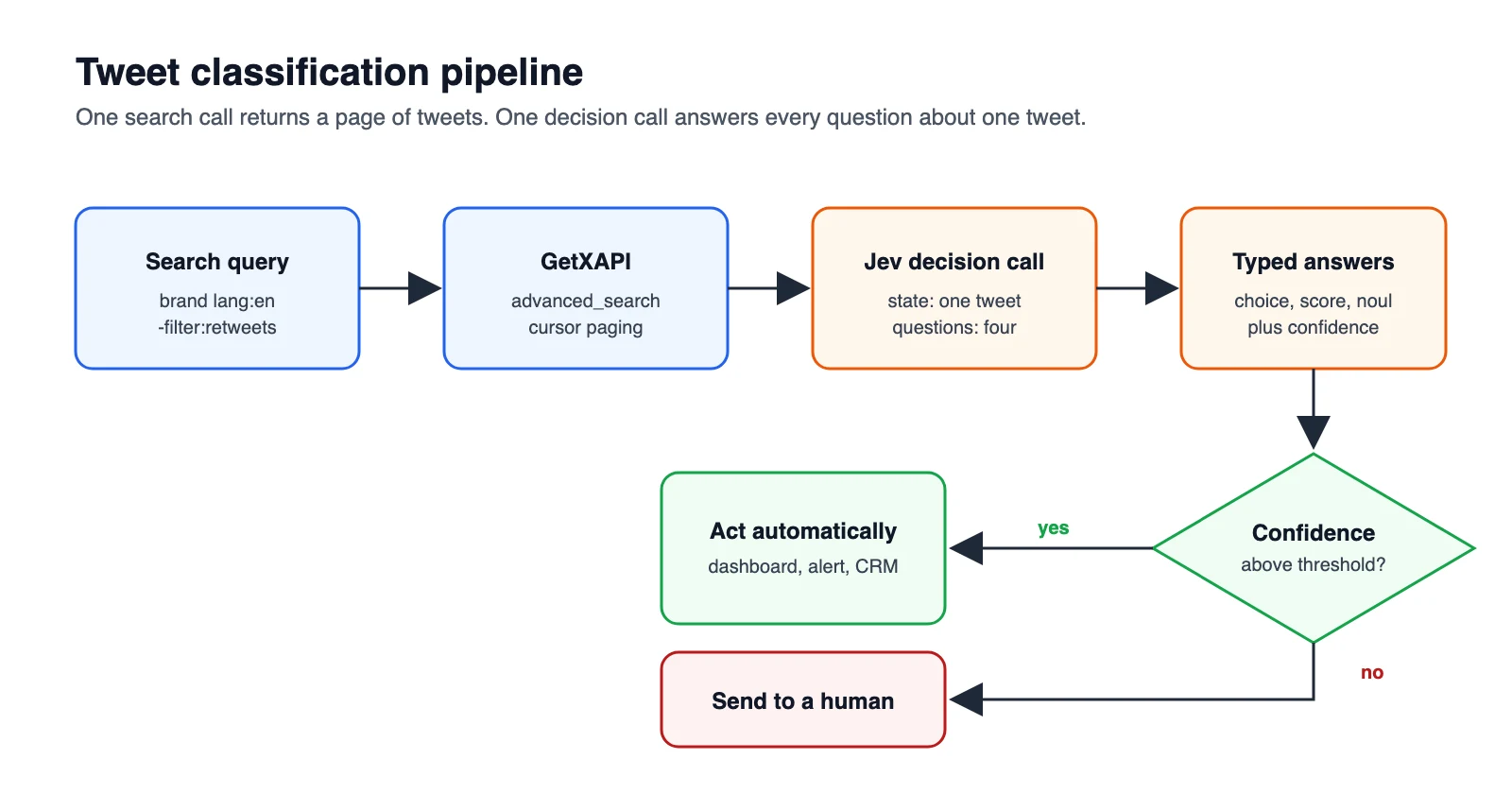
TL;DR: On 2026-09-20 we pulled 10,000 live tweets mentioning 12 brands with GetXAPI (512 calls, $0.512) and classified every one with Jev, TypeSafe's new decision model, through OpenRouter (10,000 of 10,000 succeeded, $0.2761, median 0.43s per call). Four questions per tweet: what kind of tweet it is, sentiment, spam, and buying intent. Against 200 blind reference labels Jev agreed on 83.5%, and on 93% when its own confidence was 0.9 or higher. The full script is below.
What is Jev?
Jev is a decision model from TypeSafe AI, released in September 2026. It does not write text. You send a state, such as one tweet, plus a set of typed questions, and it answers all of them in a single pass, each with a probability. That makes it a fit for classification work where an LLM is slow and expensive and a keyword filter is too blunt.
It has three question types, described in the TypeSafe docs:
| Type | What it answers | What comes back |
|---|---|---|
choice |
Which one of these options? | the chosen option, a probability per option, a confidence |
score |
Where on this ordered rubric? | a score, a probability per level, a confidence |
noul |
Is this statement true? | a number from 0 to 1 |
Everything about Jev's speed and cost outside this post is TypeSafe's own reporting. The numbers below are ours, from one run.
The run in numbers
| Stage | Result |
|---|---|
| Tweets collected | 10,000 unique, posted 2026-09-16 to 2026-09-20 |
| Search queries | 12 brand names, lang:en -filter:retweets, product=Latest |
| GetXAPI search calls | 512, all HTTP 200, median 1.72s |
| Fetch cost | $0.512 |
| Jev calls that succeeded | 10,000 of 10,000 |
| Retries needed | 1 (a single HTTP 503, fine on the second attempt) |
| Timeouts at a 15s limit | 0 |
| Wall time, 12 parallel workers | 383.7s, about 26 tweets per second |
| Jev latency | p50 0.43s, p95 0.59s, p99 1.10s, max 2.25s |
| Input tokens | 6,573,500 total, median 618 per call |
| Classification cost | $0.2761, about $0.028 per 1,000 tweets |
| Whole pipeline | $0.79 for 10,000 tweets, fetched and classified |
Two notes. Other developers have reported OpenRouter's Decisions endpoint hanging on a share of calls. We did not see that: zero timeouts in 10,001 requests. And we saw no 429 at about 26 calls per second, though that is one session and the endpoint is marked alpha.
The cost surprise: you pay for the questions, not the tweets
A tweet is 40 to 60 tokens. Our median call was 618. The shortest call in the whole run was 573 tokens, which is what the four questions and their criteria cost before any tweet text is added.
| Part of the call | Tokens, roughly | Share of a median call |
|---|---|---|
| Four questions with their criteria | 560 | 90% |
| The tweet itself | 40 to 60 | 10% |
So a back-of-envelope estimate based on tweet length alone is off by about ten times. Three things follow:
- Trim the schema first. One-line criteria and fewer options cut spend almost in proportion.
- Ask everything in one call. A second call repeats the state, so four questions in one request is far cheaper than four requests.
- Watch long posts. 231 of the 10,000 tweets ran past 1,000 tokens because they were long-form posts. The largest single call was 18,401 tokens.
Even with that overhead, 10,000 tweets cost 28 cents.
Start building with GetXAPI
$0.05 per 1,000 tweets. $0.10 free credits. No credit card required.
Step 1: fetch the tweets
GetXAPI's advanced search returns about 20 tweets per call and a cursor for the next page. Each call is $0.001, there is no X developer account to apply for, and the query syntax is the same one X's own search uses. The advanced search operators guide covers the syntax.
import os, requests

GETXAPI_KEY = os.environ["GETXAPI_KEY"]

def fetch_tweets(query, pages=50):
    """Yield tweets for one search query, newest first, following the cursor."""
    session, cursor = requests.Session(), None
    for _ in range(pages):
        params = {"q": query, "product": "Latest"}
        if cursor:
            params["cursor"] = cursor
        r = session.get(
            "https://api.getxapi.com/twitter/tweet/advanced_search",
            headers={"Authorization": f"Bearer {GETXAPI_KEY}"},
            params=params, timeout=40)
        r.raise_for_status()
        data = r.json()
        yield from data.get("tweets", [])
        cursor = data.get("next_cursor")
        if not data.get("has_more") or not cursor:
            break

tweets, seen = [], set()
for brand in ["notion", "figma", "vercel", "supabase", "stripe"]:
    for tw in fetch_tweets(f"{brand} lang:en -filter:retweets"):
        if tw["id"] not in seen and tw.get("text"):
            seen.add(tw["id"])
            tweets.append({"id": tw["id"], "brand": brand, "text": tw["text"]})
Fifty pages per brand gives close to 1,000 tweets each. Dedupe on id, because the same post can match two queries. There is no endpoint-specific quota to plan around, though general service throttling still applies, so wrap long jobs in a retry with backoff.
Step 2: define the questions
This is the whole "model": four typed questions. The criteria text is what Jev reads to decide, so write it the way you would brief a new teammate.
QUESTIONS = {
    "kind": {
        "type": "choice",
        "instructions": "What is the author mainly doing in this tweet, with respect to the brand?",
        "criteria": {
            "praise": "recommending, celebrating or saying something positive about the brand or product",
            "complaint": "reporting a problem, a bug, a bad experience, or criticising the brand or product",
            "question": "asking how to do something, asking for help or asking for a recommendation",
            "news": "neutrally sharing news, an announcement, a tutorial or a fact",
            "promo": "advertising, selling, a giveaway, a job post, affiliate or engagement bait",
            "unrelated": "the brand word appears but the tweet is not about the product at all",
        },
    },
    "sentiment": {
        "type": "score",
        "instructions": "How does the author feel in this tweet?",
        "criteria": ["Very negative", "Negative", "Neutral", "Positive", "Very positive"],
    },
    "spam": {
        "type": "noul",
        "instructions": "This tweet is spam, a scam, automated promotion or engagement bait.",
    },
    "buying_intent": {
        "type": "noul",
        "instructions": "The author is looking for a product, tool or service to buy, try or switch to.",
    },
}
The unrelated option matters more than it looks. Search for notion and most of what comes back is the English word, not the app.
Step 3: classify with Jev through OpenRouter
Jev does not use the chat completions endpoint. OpenRouter serves it at /api/alpha/decisions, listed as typesafe/jev-1.13. It does not show up in OpenRouter's public models list, because its output type is decisions, not text.
import os, time, requests
from concurrent.futures import ThreadPoolExecutor

OPENROUTER_KEY = os.environ["OPENROUTER_API_KEY"]
URL = "https://openrouter.ai/api/alpha/decisions"

def classify(tweet, tries=4):
    body = {
        "model": "typesafe/jev-1.13",
        "state": {"brand": tweet["brand"], "tweet": tweet["text"]},
        "questions": QUESTIONS,
    }
    for attempt in range(tries):
        try:
            r = requests.post(URL, json=body, timeout=15,
                              headers={"Authorization": f"Bearer {OPENROUTER_KEY}"})
            if r.status_code == 200 and "answers" in r.json():
                return {"id": tweet["id"], **r.json()}
        except requests.exceptions.RequestException:
            pass
        time.sleep(0.5 * 2 ** attempt)      # 0.5s, 1s, 2s, 4s
    return {"id": tweet["id"], "failed": True}

with ThreadPoolExecutor(max_workers=12) as pool:
    results = list(pool.map(classify, tweets))
One real response from the run, for a tweet complaining that a hosting bill had "gotten out of hand" and asking for an alternative (probabilities rounded to two places):
{
  "model": "typesafe/jev-1.13-20260917",
  "answers": {
    "kind": {
      "type": "choice",
      "choice": "complaint",
      "probabilities": {"complaint": 0.59, "unrelated": 0, "praise": 0, "promo": 0, "question": 0.41, "news": 0},
      "confidence": 0.51
    },
    "sentiment": {
      "type": "score",
      "score": 0.79,
      "legend": {"0": "Very negative", "1": "Negative", "2": "Neutral", "3": "Positive", "4": "Very positive"},
      "probabilities": {"0": 0.21, "1": 0.79, "2": 0, "3": 0, "4": 0},
      "confidence": 0.82
    },
    "spam": {"type": "noul", "noul": 0.11},
    "buying_intent": {"type": "noul", "noul": 0.96}
  },
  "usage": {"input_tokens": 629, "output_tokens": 114, "cost": 0.000026418}
}
usage.cost is returned per call, so you can total real spend instead of estimating it. Keep the timeout and the retry even though we needed only one: the endpoint is alpha.
What 10,000 tweets look like
| Kind | Tweets | Share |
|---|---|---|
| unrelated | 2,397 | 24.0% |
| promo | 2,235 | 22.4% |
| praise | 1,705 | 17.1% |
| complaint | 1,554 | 15.5% |
| news | 1,439 | 14.4% |
| question | 670 | 6.7% |
Nearly half of a raw brand search is noise: the word used in another sense, or promotion. Jev put 2,093 tweets at a spam score of 0.5 or higher, and 941 at a buying-intent score of 0.5 or higher.
By brand, the picture changes a lot:
| Brand query | Tweets | Unrelated | Complaint | Praise | Promo | Mean sentiment, on-topic (0 to 4) | Buying intent 0.5+ |
|---|---|---|---|---|---|---|---|
| notion | 1,000 | 77% | 6% | 6% | 5% | 2.36 | 22 |
| figma | 992 | 15% | 12% | 25% | 22% | 2.50 | 83 |
| vercel | 992 | 7% | 18% | 30% | 12% | 2.43 | 140 |
| stripe | 981 | 34% | 15% | 16% | 18% | 2.40 | 87 |
| spotify | 980 | 11% | 17% | 12% | 33% | 2.51 | 33 |
| shopify | 968 | 25% | 13% | 13% | 30% | 2.40 | 68 |
| chatgpt | 966 | 19% | 29% | 15% | 14% | 1.94 | 43 |
| supabase | 962 | 9% | 13% | 31% | 19% | 2.58 | 131 |
| canva | 952 | 23% | 11% | 14% | 33% | 2.33 | 279 |
| discord | 696 | 16% | 12% | 7% | 54% | 2.79 | 14 |
| airbnb | 472 | 27% | 32% | 14% | 10% | 1.82 | 39 |
| duolingo | 39 | 18% | 21% | 33% | 10% | 2.28 | 2 |
Things a keyword filter cannot give you:
- 77% of
notionresults are not about Notion. They are people using the word "notion". A sentiment average over the raw search would be measuring politics and sport.stripehas the same problem at 34%, from clothing and beer. - Developer tools draw praise, consumer brands draw promotion. Supabase and Vercel sit at 31% and 30% praise. Discord is 54% promotion, mostly "join my server" posts.
- Buying intent is sparse, which is why it is valuable. Filtering to buying intent of 0.8 or higher, spam under 0.3, and kind of
questionorcomplaintleft 68 tweets out of 10,000. They read like sales leads: someone saying their hosting bill has "gotten out of hand" and asking for the best alternative, someone asking for "the best replacement" for a free tier, someone whose card keeps getting declined on a checkout they "really want to use".
That last filter is three comparisons on fields Jev already returned. No second model call.
The cheapest Twitter API. Try it free.
$0.05 per 1,000 tweets. $0.10 free credits. No credit card required.
How often is it right?
We drew 200 tweets at random (fixed seed) and had a second reviewer label the kind of each one blind, before looking at Jev's answer. For 32 tweets that were honestly ambiguous, the reviewer also wrote down a second acceptable label.
| Measure | Result |
|---|---|
| Matches the reviewer's first label | 143 of 200, 71.5% |
| Matches the first or the accepted second label | 167 of 200, 83.5% |
Agreement follows Jev's own confidence closely, which is the practical finding:
Jev confidence on kind |
Tweets in sample | Agreement | Share of all 10,000 tweets |
|---|---|---|---|
| 0.9 or higher | 85 | 93% | 39.6% |
| 0.6 to 0.9 | 58 | 83% | 30.9% |
| below 0.6 | 57 | 70% | 29.6% |
So the confidence number is usable as a gate. Act automatically above 0.9, and queue the rest for a person or a slower model.
Read this table for what it is. The reference labels came from one LLM reviewer in a single pass, not from a panel of humans. It measures agreement between two labellers, and the categories overlap by nature (a tip that mentions a product can be news or praise). It is not ground-truth accuracy.
Where it went wrong
| Pattern | Example | Jev said | Confidence |
|---|---|---|---|
| Brand word in its ordinary sense, tone taken at face value | "I like the subtle gray stripe!" | praise | 0.92 |
| Marketplace slang | "wtb canva pro, drop price" (want to buy) | complaint | 0.96 |
| Advice mistaken for endorsement | "discord ticket is your best bet" | praise | 0.93 |
| Technical tip with a negative hook | a post opening "The #1 INP killer on Shopify" | complaint | 0.98 |
| No content to judge | "Update *" | news | 0.82 |
By category, Jev caught every tweet the reviewer called complaint (16 of 16) and promo (34 of 34). The misses were concentrated in unrelated (47 of 64) and news (44 of 56). The common thread is that when the brand word is incidental, Jev still reads the tone of the sentence and files it as praise or complaint. Two fixes worth testing: add a separate noul question, "This tweet is about the software product named in brand", and gate on it first; and add a line to the criteria for slang your audience uses.
When to use this, and when not to
| Use it for | Think twice for |
|---|---|
| Cleaning a brand search before you compute sentiment | Anything where one wrong label is costly and nobody reviews it |
| Finding the few buying-intent tweets in thousands | Long documents, since you pay per input token and context is 32,000 tokens |
| Routing mentions to support, sales or nobody | Tasks that need an explanation, because Jev returns labels, not reasons |
| Live pipelines where sub-second answers matter | Production dependence on an endpoint still marked alpha |
If you would rather stay with open-source models and no third-party classifier, the Python sentiment analysis tutorial runs TextBlob, VADER and a RoBERTa model on the same kind of data. For pulling tweets by tag instead of by brand, see searching tweets by hashtag.
Reproduce it
- A GetXAPI key: sign up, new accounts get free credits and no card is needed. 10,000 tweets is about 500 calls.
- An OpenRouter key with a dollar of credit. The classification costs cents.
- The three code blocks above, in order. Set
GETXAPI_KEYandOPENROUTER_API_KEYin your environment.
Swap the brand list for your own product and your competitors, and the question set for what your team actually needs to know. The cost scales with the length of your questions, not with how many tweets you read.
Related Reading
- Twitter advanced search operators, every operator you can put in the
qparameter - Twitter sentiment analysis in Python, the open-source route with TextBlob, VADER and RoBERTa
- Search tweets by hashtag with the X API, tested hashtag queries and the cursor loop
- Twitter API rate limits, how throttling works and how to back off
- GetXAPI pricing, the per-call price list
Frequently Asked Questions
Jev is a decision model from TypeSafe AI, released in September 2026. It does not generate text. You send it a state, such as a tweet, plus a set of typed questions, and it answers all of them in one pass with a probability for each. There are three question types: choice picks one option from a list, score rates the state on an ordered rubric, and noul returns a number from 0 to 1 for a true or false statement.
Because the question definitions are sent with every call. Our four questions and their criteria came to roughly 560 tokens, while a typical tweet is 40 to 60. The median call was 618 tokens, so about 90% of the spend was the schema, not the tweets. Shorter instructions and fewer options cut the cost almost in proportion.
On a random sample of 200 tweets labelled blind by a second reviewer, Jev matched the reference label on 167, which is 83.5%. Agreement tracked Jev's own confidence: 93% where confidence was 0.9 or higher, 83% between 0.6 and 0.9, and 70% below 0.6. The reference labels came from a single LLM reviewer, so read this as agreement, not ground-truth accuracy.
In our run on 2026-09-20 it cost $0.2761 to classify 10,000 tweets with four questions each, which is about $0.028 per 1,000 tweets. Jev is priced at $0.042 per million input tokens with free output. The run used 6,573,500 input tokens. Fetching the 10,000 tweets through GetXAPI took 512 search calls and cost $0.512, so the whole pipeline cost $0.79.
Median latency was 0.43 seconds per call and the 95th percentile was 0.59 seconds, measured from a client in India through OpenRouter. With 12 parallel workers, all 10,000 tweets were classified in 383.7 seconds, which is about 26 tweets per second. One call out of 10,001 failed with an HTTP 503 and succeeded on retry. We saw no timeouts and no 429 responses.
Yes. OpenRouter lists it as typesafe/jev-1.13, with ~typesafe/jev-latest as an alias. It does not use the chat completions endpoint. You POST to https://openrouter.ai/api/alpha/decisions with a model, a state and a questions object. The endpoint is marked alpha. The model does not appear in OpenRouter's public models list because its output type is decisions, not text.
Check out similar blogs
More guides on the Twitter/X API, scraping, and pricing.

How to Search Tweets by Hashtag with the X API
Tested X API hashtag queries: how the # operator differs from a plain keyword, combining hashtags, Top versus Latest, filters that work, and cursor pagination.

Twitter API 403 Forbidden and 401 Unauthorized: Every Cause and Fix
Why the X API returns 403 Forbidden or 401 Unauthorized, how to tell the two apart, and a fix for each cause. Covers tier gating, app permissions, OAuth, and X error codes.

The Best Twitter (X) API Alternatives in 2026, Compared
The best Twitter / X API alternatives in 2026, ranked and compared: managed pay-per-call APIs, web-data marketplaces, and open-source libraries, with real per-1,000-tweet costs.

How to Like a Tweet via API in 2026 (No Dev Account)
Like (favorite) tweets programmatically via API in 2026 without an X developer account. The auth_token model, working curl, Python, and Node code, and per-call cost.

Post Tweets via API With Authentication in 2026 (No Developer Account)
Post tweets, threads, and media through an API without an X developer account. The auth_token model, working Python and Node code, rate-limit safety, and per-call costs.

Twitter API Benchmark: Latency and Reliability, 600 Calls
A first-party Twitter/X API benchmark: 600 live calls across six read endpoints, per-endpoint p50 and p95 latency, a 100% success rate, and the script to reproduce it.

How to Detect X (Twitter) Bots: A Practical, Data-Backed Method
A practitioner method for Twitter bot detection: the real signals (views-to-likes ratio, account age, posting cadence, follower pattern, amplification), runnable API code to pull each one, and a scoring rubric you own.

Scrape Full Tweet History of Any Account in 2026 (Beyond the 3,200 Limit)
Why the X timeline stops at 3,200 tweets and how to pull an account's full history with date-window search, cursor pagination, and dedup. Live-tested code in Python and curl.
Featured in
Where GetXAPI's data and pricing get cited.

The hidden line item in your AI side project: X data
Indie Hackers post on the often-overlooked cost of X data for AI side projects, citing GetXAPI as the usage-based way to pull live Twitter data without a five-figure X developer contract.

How Companies Are Learning to Read Market Mood in Real Time
Editorial feature on Big News Network examining how companies read market mood from X in real time, citing GetXAPI as the usage-based Twitter API that prices live social listening by the call instead of a five-figure annual contract.

How Companies Are Learning to Read Market Mood in Real Time
Syndicated feature on Business Newswire on how companies read market mood from X in real time, citing GetXAPI as the usage-based Twitter API that prices live social listening by the call.

Working with Twitter/X Data: A Practical Skill for IT Students and Professionals in 2026
Guide on SIIT (Scholars International Institute of Technology) on collecting live Twitter/X data as a practical developer skill, citing GetXAPI as the per-call Twitter data API that makes it affordable without an X developer account.

Adding Twitter/X Data to Your App in 2026: A Developer's Integration Guide
Developer integration guide on Programming Insider covering how to add live Twitter/X data to an app in 2026, comparing the official X API v2 with a key-based REST approach and citing GetXAPI as the low-cost per-call option with no developer-account approval.

6 Twitter/X Scraping Solutions for Every Budget
Roundup on TechBullion of the leading Twitter/X scraping solutions, ranking GetXAPI first as the cheapest option at $0.001 per call (about $0.05 per 1,000 tweets) with clean JSON output and no monthly minimum.

The Data Bill Behind Every Social Analytics Tool
Editorial piece on SpeakRJ examining the underlying data costs behind social analytics tools, citing GetXAPI as the usage-based way to source live X data by the call.

What Is AI Sentiment Analysis, and What Does Each Layer Cost?
Explainer in AI Journal breaking sentiment analysis into its data, model and reporting layers and what each costs to run, citing GetXAPI for pulling public X posts on pay-per-call pricing.

Why Enterprise AI Agents Still Cannot Read Social Data
Analysis piece in The Silicon Review on why enterprise agents reach internal systems easily but struggle with public social data, citing GetXAPI's MCP server and data-as-a-service model as one route to close the gap.