X (Twitter) Webhooks: Setup, the CRC Check and Limits
How X delivers real-time events over webhooks, what the Challenge-Response Check actually asks for, the requirements that silently reject a URL, and the per-tier limits.

X can push account activity to your server as it happens instead of making you poll for it. Most guides point at the wrong API for this now, and the part that stops the integrations that do get started is not the subscription or the payload handling. It is a small cryptographic handshake called the Challenge-Response Check.
Everything below about X's behaviour comes from X's own X Activity API, V2 Webhooks API and Account Activity API documentation, checked on 21 August 2026.
TL;DR: Register an HTTPS URL with no port that answers in under 10 seconds. X immediately sends a GET with a
crc_token, and you must reply with{"response_token": "sha256=..."}where the hash is HMAC SHA-256 of that token keyed with your app's consumer secret, not your bearer token. X repeats that check periodically, so a webhook that works today can go silent after a deploy changes the secret. Build on the X Activity API: the Account Activity API that most tutorials describe is deprecated.
What Is a Twitter Webhook?
A Twitter webhook is an HTTPS endpoint you own that X sends event payloads to as activity happens on subscribed accounts. Instead of your code asking "anything new?" on a timer, X posts new Posts, likes, follows and direct messages to your server within seconds of the event.
Use the X Activity API, Not Account Activity
If you search for X webhooks you will land on the Account Activity API (AAA), and most tutorials still describe it. X's own AAA documentation now opens with a deprecation notice directing developers to the X Activity API (XAA) "for real-time user activity delivery going forward". Build on XAA.
XAA supports two delivery mechanisms: a persistent HTTP stream, and webhooks. The webhook path is the one this post covers, and it shares the same registration and CRC machinery described below.
The change that matters most is public events. XAA distinguishes public from private events, and for public events you subscribe by user ID with no OAuth authorisation from that user:
| Event class | Examples | Needs the user's OAuth consent? |
|---|---|---|
| Public | post.create, post.delete, profile updates (bio, picture, banner, location, URL, username) |
No, subscribe by user ID |
| Private | Likes, follows, blocks, mutes, DMs, Chat events | Yes, explicit per-user authorisation |
Posts from protected accounts are not delivered, even as public events. But "notify me when this public account posts" no longer requires that account to install your app, which is the constraint that made AAA unusable for competitor and keyword monitoring.
Management endpoints use OAuth2 App Only Bearer Token authentication, which is worth noting because the CRC response uses a different credential entirely. That mismatch is the single most common cause of a failed setup.
| Method | Endpoint | Purpose |
|---|---|---|
POST |
/2/webhooks |
Register a new webhook |
GET |
/2/webhooks |
List registered webhooks |
DELETE |
/2/webhooks/:webhook_id |
Delete a webhook |
PUT |
/2/webhooks/:webhook_id |
Trigger a CRC check and re-enable a webhook |
POST |
/2/webhooks/replay |
Create a replay job to recover missed events |
The replay job is the one people discover too late. If a webhook was invalid for a stretch, events during that window are not resent automatically, and a replay is how you recover them.
Webhook Requirements
X rejects URLs that fail any of these, and the rejection message does not always say which one.
| Requirement | Description |
|---|---|
| HTTPS | The webhook URL must use HTTPS |
| Publicly accessible | The URL must be reachable from the internet |
| No port specification | The URL cannot include a port, so https://mydomain.com:5000/webhook will not work |
| Fast response | Respond within 10 seconds |
| 200 OK | Return a 200 status to acknowledge receipt |
| CRC support | Must respond to Challenge-Response Check GET requests |
The no-port rule catches people out more than the others. Local tunnels and self-hosted services often expose something like :8443, and that URL will never register no matter how correct the CRC response is.
Start building with GetXAPI
$0.05 per 1,000 tweets. $0.10 free credits. No credit card required.
The CRC Check, Which Is Where Most Integrations Fail
The Challenge-Response Check is how X validates that the callback URL you provided is valid and that you control it. X documents the full procedure in its webhooks quickstart.
When it fires
| Trigger | Description |
|---|---|
| Immediately upon creation | When you call POST /2/webhooks |
| Explicit re-validation | When you call PUT /2/webhooks/:webhook_id |
| Periodically | See the cadence note below |
X's two pages disagree on the cadence, so do not hard-code an assumption. The webhooks introduction says checks run every 30 minutes, but only if the webhook has not been successfully validated in the past 24 hours. The quickstart says hourly. Treat revalidation as periodic and unscheduled from your side: your endpoint has to be able to answer a CRC at any time, which is the only assumption both pages support.
When a webhook is marked invalid
X documents two distinct paths to invalid, and they behave differently.
| Path | Trigger | Grace |
|---|---|---|
| Bad response | Invalid CRC response, a 3XX status, or an SSL exception | None, immediate |
| Persistent transient errors | 4XX, 5XX, request timeout, or channel closed, sustained | Marked invalid after more than 28 hours without a successful validation, which includes a 4-hour grace period |
Once marked invalid the webhook stops receiving events until it passes again. The transient path is the one that surprises people: a flaky endpoint is not killed on the first failure, it is killed after more than a day of failures, so the outage that eventually silences your webhook may have started long before you noticed. Nothing in your registration flow warns you, because you are not registering anything.
What X sends and what you must return
X makes a GET request to your webhook URL with a crc_token query parameter:
GET https://your-webhook-url.com/webhook?crc_token=challenge_string
Your application must respond with a JSON body containing a response_token:
{
  "response_token": "sha256=<base64_encoded_hmac_hash>"
}
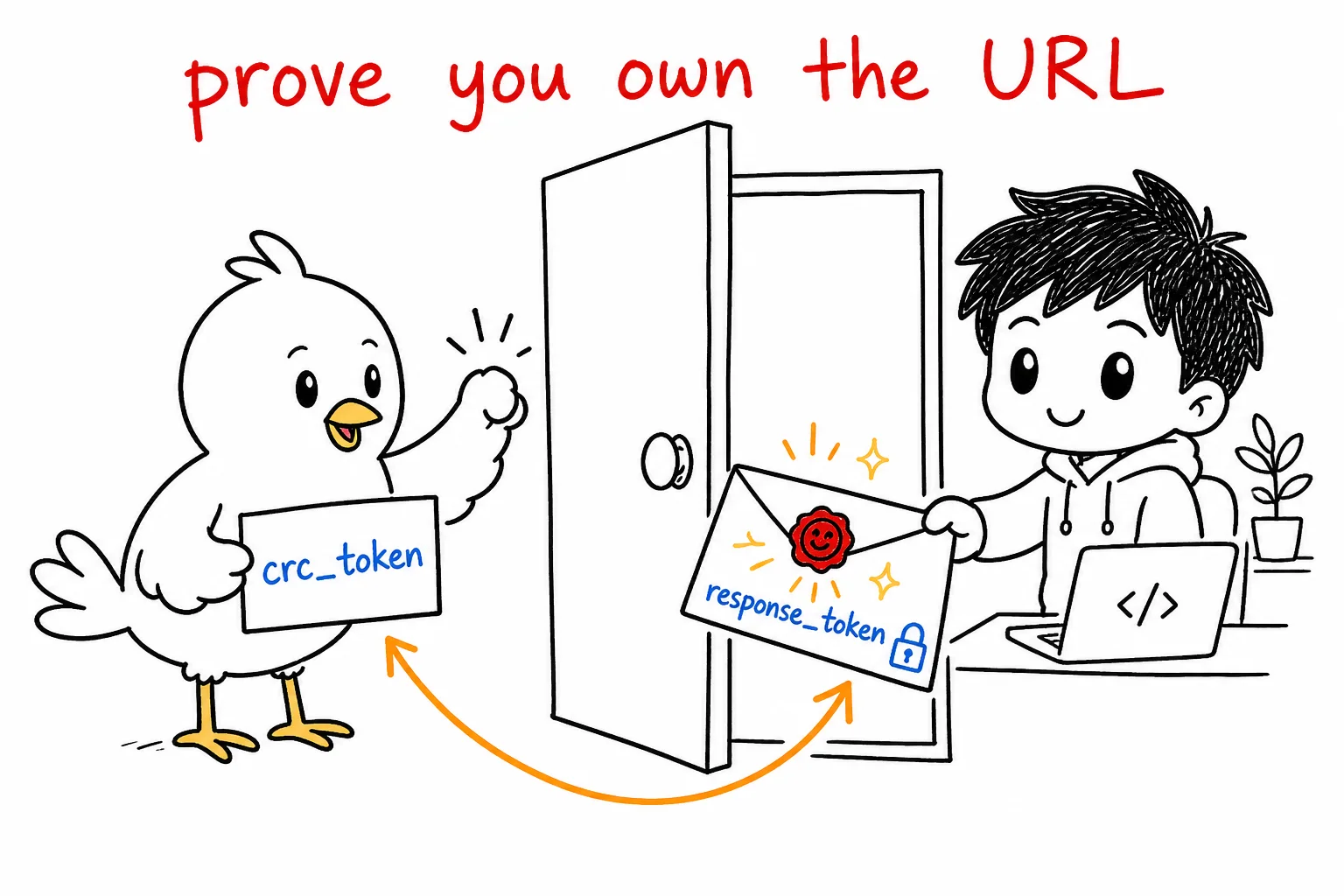
To build it, per X's documentation:
The construction is a standard keyed-hash message authentication code, RFC 2104, so any language's crypto library already implements it. The steps:
- Use the
crc_tokenvalue from the query parameter as the message - Use your app's consumer secret, the API secret key, as the key
- Create an HMAC SHA-256 hash
- Base64 encode the result
- Prepend
sha256=to the encoded string
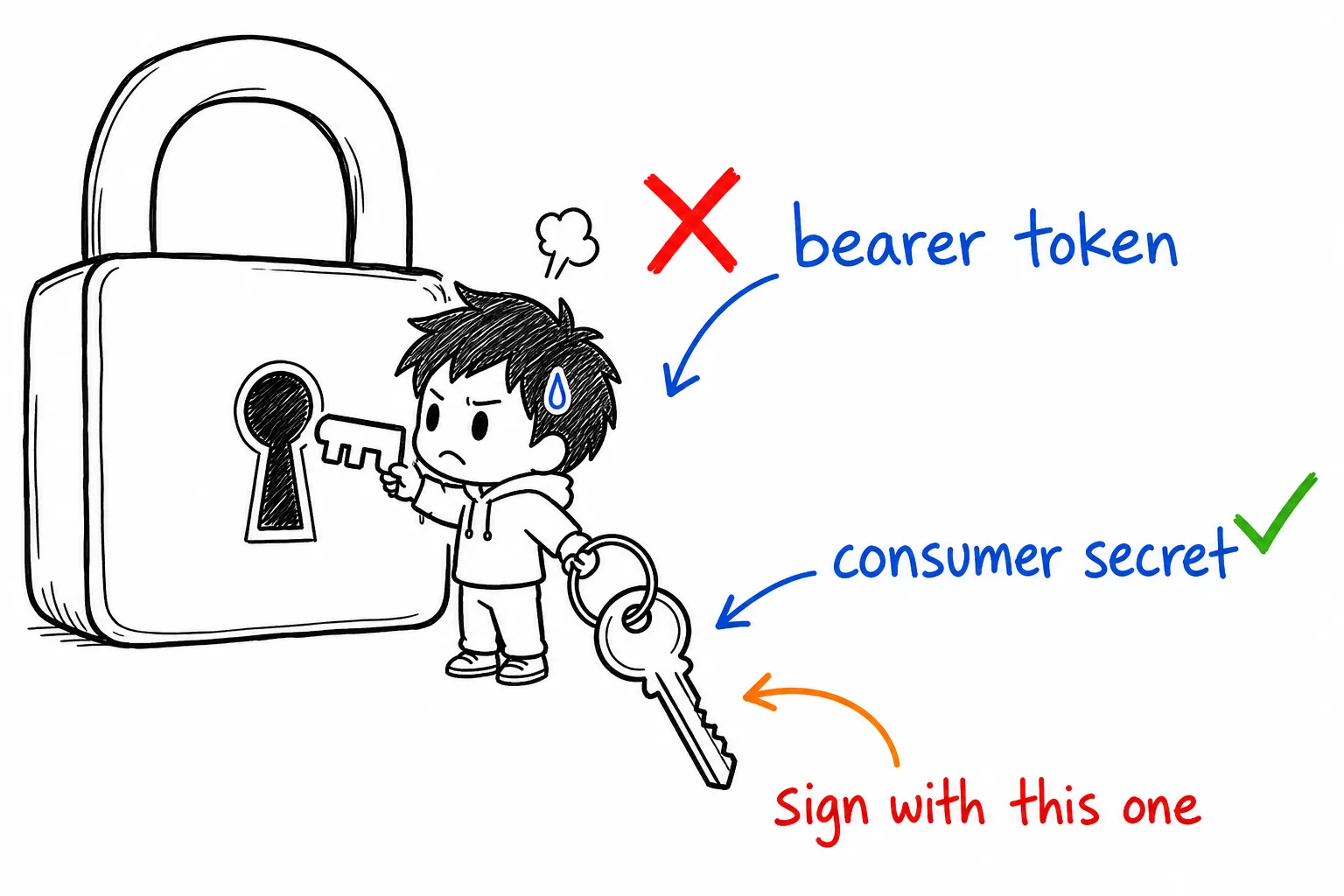
Step 2 is the one that breaks builds. X's docs carry an explicit warning that the CRC hash must use the app's consumer secret, not the bearer token or an access token. Since the management endpoints authenticate with a bearer token, it is easy to reach for the credential already in scope and get a rejection that reads like a formatting problem.
import hmac, hashlib, base64

def crc_response(crc_token: str, consumer_secret: str) -> dict:
    digest = hmac.new(
        consumer_secret.encode("utf-8"),
        msg=crc_token.encode("utf-8"),
        digestmod=hashlib.sha256,
    ).digest()
    return {"response_token": "sha256=" + base64.b64encode(digest).decode("utf-8")}
import crypto from "node:crypto";

function crcResponse(crcToken, consumerSecret) {
  const digest = crypto
    .createHmac("sha256", consumerSecret)
    .update(crcToken)
    .digest("base64");
  return { response_token: `sha256=${digest}` };
}
Both take the token as the message and the consumer secret as the key, which is the order people most often invert. Swapping them produces a valid-looking hash that X will always reject.
Verifying That Events Came From X
Registration proves you own the endpoint. It does not prove that an incoming POST came from X, and your webhook URL is public by definition.
Each POST from X includes an x-twitter-webhooks-signature header. Verify it before trusting a payload, and compare using a constant-time comparison such as crypto.timingSafeEqual rather than string equality, so the comparison itself does not leak information about the expected value.
What Events You Can Receive
One subscription delivers every activity type below for that account, so you filter on your side rather than subscribing per event.
| Activity | Scope |
|---|---|
| Posts | By the user |
| Post deletes | By the user |
| @mentions | Of the user |
| Replies | To or from the user |
| Reposts | By the user or of the user |
| Quote Posts | By the user or of the user |
| Reposts of Quote Posts | By the user or of the user |
| Likes | By the user or of the user |
| Follows and unfollows | By the user or of the user |
| Blocks and unblocks | By the user or of the user |
| Mutes and unmutes | By the user or of the user |
| Direct Messages sent and received | By the user |
| Typing indicators | To the user |
| Read receipts | To the user |
| Subscription revokes | By the user |
Two constraints sit underneath that list. Home timeline data is not delivered over these webhooks, so a timeline feed still needs a pull from the user Posts endpoint. And Posts returned through webhooks count towards the monthly Post cap, which means a push architecture does not exempt you from read accounting.
Subscription Limits
X Activity API limits, which are the ones to plan against:
| Package tier | Maximum subscriptions |
|---|---|
| Self-serve | 1,500 |
| Enterprise | 75,000 |
| Partner | 150,000 |
For comparison, the deprecated Account Activity API allowed 3 unique subscriptions and 1 webhook on Pay Per Use, and 5000 or more subscriptions with 5 or more webhooks on Enterprise. Those AAA numbers are the ones most tutorials still quote, and they are the reason people conclude that X webhooks cannot be used for monitoring at any scale. On XAA self-serve the ceiling is 1,500 subscriptions, which is a different proposition entirely.
The cheapest Twitter API. Try it free.
$0.05 per 1,000 tweets. $0.10 free credits. No credit card required.
What Breaks and What the Error Means
X documents these failure reasons for Account Activity operations. They still describe the shared webhook machinery, so they remain the reference for CRC failures.
| Reason | What it means |
|---|---|
CrcValidationFailed |
Incorrect response received from the webhook URL during CRC validation |
WebhookIdInvalid |
The webhook_id is invalid or not associated with the app |
ReplayConflictError |
A replay job is already in progress for that webhook |
QueryParamInvalid |
from_date older than 24 hours, in the future, later than to_date, or malformed |
Those reasons come from X's Account Activity quickstart.
CrcValidationFailed covers every CRC problem with one label, so it will not tell you which of these it was. Check them in this order.
| Cause | How to confirm | Fix |
|---|---|---|
| Signed with the wrong credential | You used the bearer token or an access token | Key the HMAC with the app's consumer secret |
| Message and key inverted | Hash looks valid but is always rejected | crc_token is the message, secret is the key |
| Wrong response shape | Reply is not JSON, or lacks response_token |
Return {"response_token": "sha256=..."} |
| Missing the prefix | Bare base64 without sha256= |
Prepend sha256= to the encoded digest |
| Too slow | Endpoint cold starts or blocks on work | Answer the GET in under 10 seconds, do work asynchronously |
| URL includes a port | Registration never succeeds at all | Serve on the default HTTPS port |
Webhooks Versus Polling
The trade is availability against latency. Polling works on any access tier and needs no public endpoint, but you pay per check and you find out about an event on your schedule rather than as it happens. Webhooks are near-instant and cheap per event, but they need a public HTTPS endpoint, a passing CRC, and access to a tier that offers them.
We covered the polling side and the cost mechanics of watching many accounts in monitoring Twitter accounts via API, so this post stays on the webhook path.
The Managed Alternative
If the goal is "tell my server when this account posts" rather than "operate X's webhook stack", a managed monitor removes the CRC handshake and the tier question from the problem. GetXAPI monitoring watches the accounts you choose and delivers each new Post to your endpoint as an HMAC-signed POST, so you still verify the signature, but there is no challenge-response to implement and no periodic revalidation that can quietly disable delivery.
You register a destination and the accounts to watch; the details are on the Twitter Webhook API page and in the monitoring documentation. General service throttling still applies, so treat delivery handling as you would any webhook consumer and make your endpoint idempotent.
Related Reading
- Monitoring Twitter accounts via API, for the polling side and the cost of watching many accounts
- Twitter Webhook API, the managed push option
- X API error codes, if the failure is not CRC-specific
Frequently Asked Questions
The Challenge-Response Check is how X confirms you control the URL you registered. X sends a GET request with a crc_token query parameter, and your endpoint must reply with a JSON body containing a response_token: an HMAC SHA-256 of that token, keyed with your app's consumer secret, base64 encoded and prefixed with sha256=. X runs it on creation, on an explicit re-validation call, and periodically thereafter. X's own pages disagree on that period, so treat it as unscheduled and make sure the endpoint can answer at any time.
No. X documents that the webhook URL cannot include a port, so a URL like https://mydomain.com:5000/webhook will not work. The URL must also be HTTPS and publicly reachable from the internet. This trips up local tunnels and self-hosted services that expose a non-standard port.
X revalidates registered webhooks periodically, not just at registration, so an endpoint that was working can go quiet later. A bad CRC response, a 3XX or an SSL exception marks it invalid immediately. Persistent transient errors such as 4XX, 5XX or timeouts mark it invalid only after more than 28 hours without a successful validation, which includes a four-hour grace period.
The three usual causes are signing with the wrong secret, returning the wrong response shape, and being too slow. X's documentation is explicit that the CRC hash must be keyed with your app's consumer secret, not the bearer token or an access token. The reply must be JSON containing a response_token field, and the endpoint has to answer within 10 seconds.
On the X Activity API, which is the path X now points to, the documented ceilings are 1,500 subscriptions on self-serve, 75,000 on Enterprise and 150,000 on Partner. The older Account Activity API allowed only 3 subscriptions and 1 webhook on Pay Per Use, and that deprecated figure is the one most tutorials still quote.
Check out similar blogs
More guides on the Twitter/X API, scraping, and pricing.

Classify 10,000 Tweets with Jev and the X API: Real Costs
We pulled 10,000 live tweets and classified every one with Jev, TypeSafe's new decision model. Real cost, latency, agreement rates, failure cases and the full script.

How to Search Tweets by Hashtag with the X API
Tested X API hashtag queries: how the # operator differs from a plain keyword, combining hashtags, Top versus Latest, filters that work, and cursor pagination.

X (Twitter) API Object Reference: Tweet and User Fields
Every field on the X API v2 Post and User objects, plus Media, Poll and Place: type, what it holds, the auth it needs, nested keys and enum values.

X (Twitter) API Error Codes: Reference and Retry Rules
X API status codes, error type URIs and the numeric codes behind them, with the cause and the fix for each, plus the partial-error case that returns HTTP 200.

Twitter API 403 Forbidden and 401 Unauthorized: Every Cause and Fix
Why the X API returns 403 Forbidden or 401 Unauthorized, how to tell the two apart, and a fix for each cause. Covers tier gating, app permissions, OAuth, and X error codes.

The Best Twitter (X) API Alternatives in 2026, Compared
The best Twitter / X API alternatives in 2026, ranked and compared: managed pay-per-call APIs, web-data marketplaces, and open-source libraries, with real per-1,000-tweet costs.

How to Like a Tweet via API in 2026 (No Dev Account)
Like (favorite) tweets programmatically via API in 2026 without an X developer account. The auth_token model, working curl, Python, and Node code, and per-call cost.

The Best Twitter/X Tools in 2026, by Category
The best Twitter/X tools of 2026 for creators, marketers, and developers, spanning scheduling, analytics, scraping, monitoring, AI writers, and data APIs.
Featured in
Where GetXAPI's data and pricing get cited.

The hidden line item in your AI side project: X data
Indie Hackers post on the often-overlooked cost of X data for AI side projects, citing GetXAPI as the usage-based way to pull live Twitter data without a five-figure X developer contract.

How Companies Are Learning to Read Market Mood in Real Time
Editorial feature on Big News Network examining how companies read market mood from X in real time, citing GetXAPI as the usage-based Twitter API that prices live social listening by the call instead of a five-figure annual contract.

How Companies Are Learning to Read Market Mood in Real Time
Syndicated feature on Business Newswire on how companies read market mood from X in real time, citing GetXAPI as the usage-based Twitter API that prices live social listening by the call.

Working with Twitter/X Data: A Practical Skill for IT Students and Professionals in 2026
Guide on SIIT (Scholars International Institute of Technology) on collecting live Twitter/X data as a practical developer skill, citing GetXAPI as the per-call Twitter data API that makes it affordable without an X developer account.

Adding Twitter/X Data to Your App in 2026: A Developer's Integration Guide
Developer integration guide on Programming Insider covering how to add live Twitter/X data to an app in 2026, comparing the official X API v2 with a key-based REST approach and citing GetXAPI as the low-cost per-call option with no developer-account approval.

6 Twitter/X Scraping Solutions for Every Budget
Roundup on TechBullion of the leading Twitter/X scraping solutions, ranking GetXAPI first as the cheapest option at $0.001 per call (about $0.05 per 1,000 tweets) with clean JSON output and no monthly minimum.

The Data Bill Behind Every Social Analytics Tool
Editorial piece on SpeakRJ examining the underlying data costs behind social analytics tools, citing GetXAPI as the usage-based way to source live X data by the call.

What Is AI Sentiment Analysis, and What Does Each Layer Cost?
Explainer in AI Journal breaking sentiment analysis into its data, model and reporting layers and what each costs to run, citing GetXAPI for pulling public X posts on pay-per-call pricing.
Why Enterprise AI Agents Still Cannot Read Social Data
Analysis piece in The Silicon Review on why enterprise agents reach internal systems easily but struggle with public social data, citing GetXAPI's MCP server and data-as-a-service model as one route to close the gap.