How to Scrape Twitter/X in 2026 (Tweets, Profiles, Followers)
How to scrape Twitter/X in 2026: the legal line, why libraries and browser scrapers break, and a runnable per-call API workflow for tweets, profiles, followers, search, and media.

TL;DR: You can collect public Twitter/X data, tweets, profiles, followers, search results, and media, without a headless browser or the official API's monthly tiers. The fragile routes (scraper libraries, browser extensions) break or get blocked; the durable route in 2026 is a per-call read API where you send an authenticated GET request and parse JSON. This guide walks the full workflow end to end, with runnable curl and Python, real cost math ($0.001 per call, about $0.05 per 1,000 tweets), and the legal line you should not cross.
What "scraping Twitter/X" means in 2026
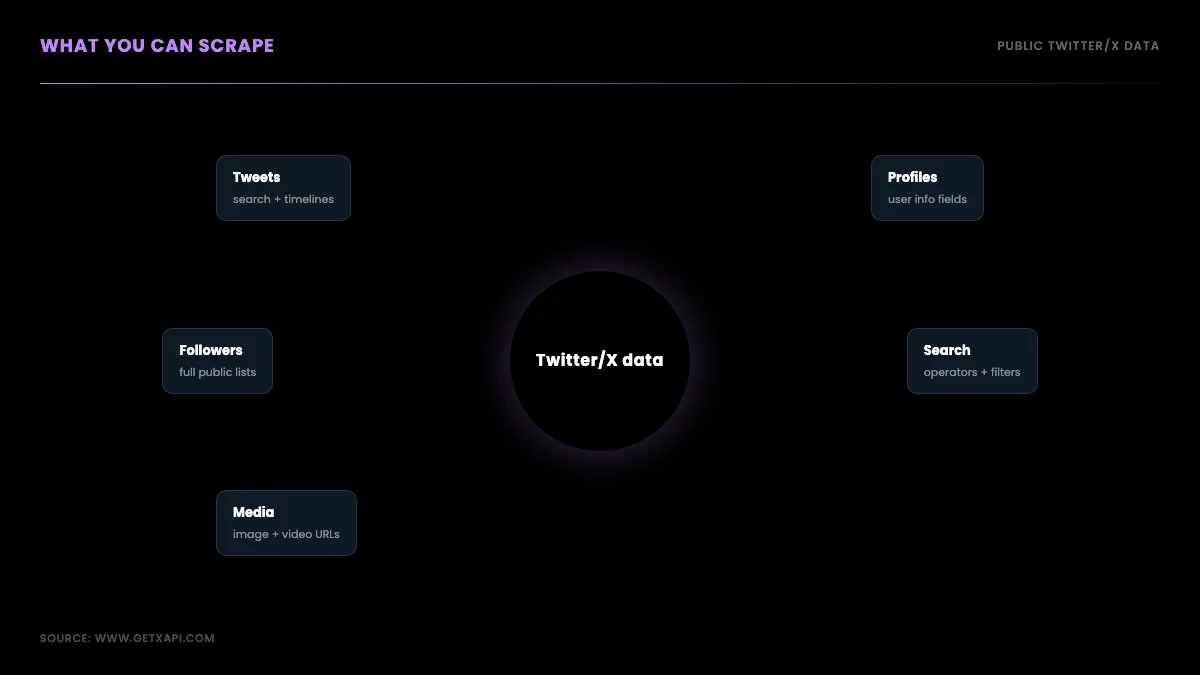
Scraping Twitter/X means programmatically collecting public data from the platform, the text of tweets, profile fields, follower lists, search results, and media URLs, into structured records you can store and analyze. In 2026 the word covers three very different methods that people lump together: running an open-source library that parses the site, driving a headless or extension-based browser session, and calling a read API that returns JSON. They are not equivalent. The method you pick decides whether your project keeps working next month or breaks the next time X ships a layout change.
The context that reshaped this whole topic is the 2023 lockdown. X retired the free API and priced the entry developer tier at a level that put casual and small-team access out of reach, and around the same time the most popular no-key scrapers stopped working. Search demand reflects the shift: queries like "scrape twitter without api" and "twitter scraper python" have fallen year over year as developers moved from "how do I scrape it" to "which API actually returns the data." This guide meets the scraping intent and then routes you to the method that survives.
If you only need a specific slice, the focused guides go deeper: the tweet-level fetch pattern lives in how to scrape tweets, historical backfill in scraping tweet history, and follower export in how to export Twitter followers. This page is the orchestration layer that ties them together.
Is scraping Twitter/X legal?
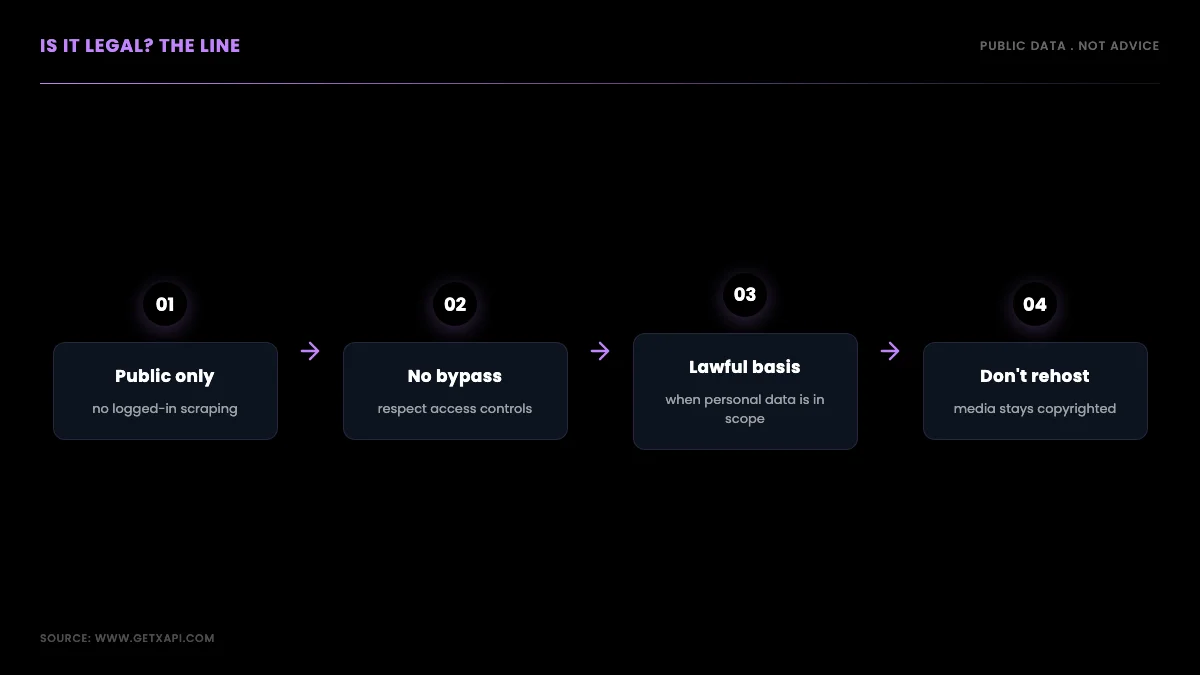
Collecting public Twitter/X data is broadly defensible in the United States when you read only what is visible without logging in, but legality depends on how you collect and what you do with it, not on the word "scraping" itself. The hiQ Labs v. LinkedIn line of cases established that accessing publicly available data does not by itself violate the Computer Fraud and Abuse Act, which is the statute most people worry about. That holding is about access, not a blanket license.
Three constraints still bind. Platform terms of service can prohibit automated collection, so breaching them is a contract problem even when it is not a criminal one. Copyright still attaches to the media inside a tweet, so redistributing images or video is a separate question from reading metadata. And privacy law, the GDPR in the EU, the CCPA in California, applies the instant a record identifies a real person, which a public tweet usually does. The practical line most production teams draw: public data only, no logged-in scraping, no circumventing access controls, and a documented lawful basis when personal data is in scope. None of this is legal advice; if your use is commercial or touches EU residents, confirm it with counsel. The official X developer terms are the primary source to read first.
It helps to separate the three risks because they have different owners and different fixes. The access-and-contract risk is about how you collect: reading a public read API under a documented data agreement is a far cleaner posture than driving a logged-in browser session that breaches the automation clause, which is why the method you choose is itself a compliance decision, not just an engineering one. The copyright risk is about what you do with media: storing a tweet's text and metadata for analysis is ordinary research use, while rehosting the attached photo or video on your own site is republication and needs the rights to match. The privacy risk is about whose data it is: a tweet from a public figure in their public capacity is low-sensitivity, but a tweet that exposes a private individual's location, health, or political affiliation is exactly the category the GDPR treats as sensitive, and aggregating many such records into a profile raises the stakes further. The teams that stay out of trouble write these three lines into their pipeline as explicit rules, collect only what each rule allows, and keep a short record of why each field is in scope. That record is cheap to keep and is the first thing a data-protection review will ask for.
The fastest reliable path: a per-call read API
The fastest path that does not break is a per-call read API, where you authenticate with a bearer token and send a GET request to a documented endpoint that returns tweets, profiles, or followers as JSON. There is no headless browser to maintain, no proxy pool to rotate, and no CSS selectors that shatter when X reorders its markup. You get the data shape in the docs, you call it, you parse it. That is the entire model, and it is why the rest of this guide is built on it.
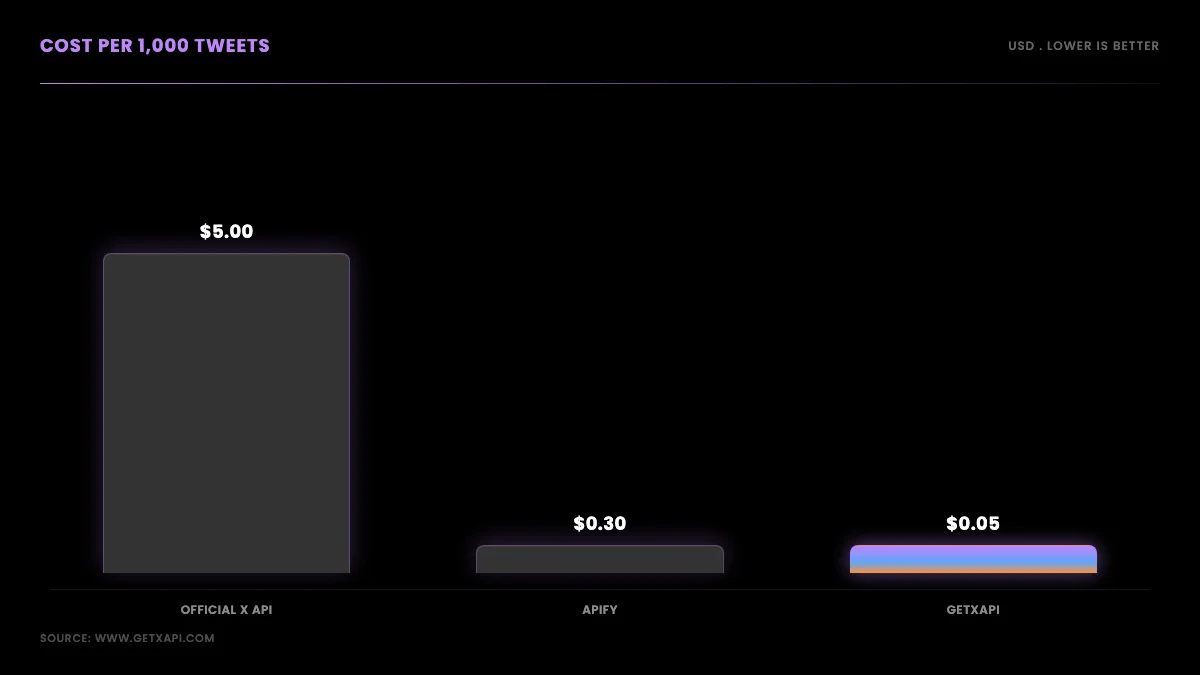
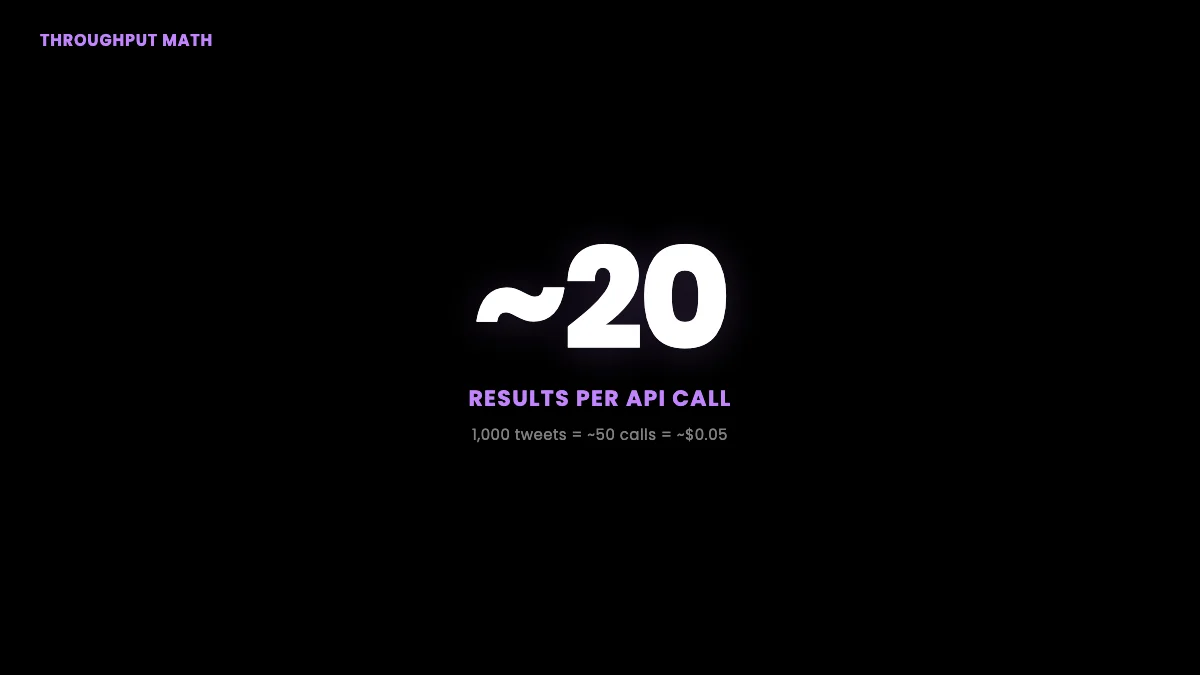
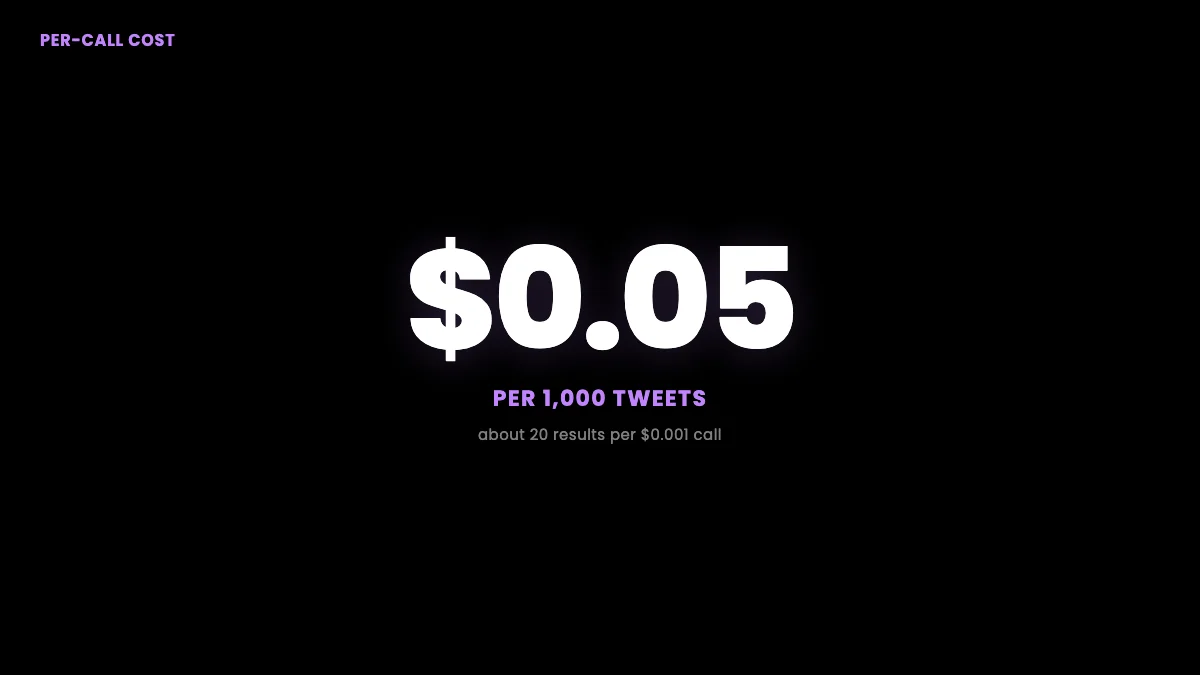
GetXAPI is the per-call provider used in the examples below. It issues a bearer token at signup with no developer-account approval step, bills $0.001 per call (about $0.05 per 1,000 tweets at roughly 20 results per call), and starts you with $0.10 in free credit, enough to run every snippet here before you spend real money. The endpoints map cleanly to scraping intent: advanced_search for keyword and operator queries, user/tweets for a timeline, user/followers for follower lists, user/info for profiles, and user/media for images and video. You can see the live surface on the Twitter scraper page and model spend on the cost calculator before you commit.
Why not the alternatives? The pain is loud and consistent. On r/webscraping, the recurring complaint is that the official tiers are simply too expensive for small projects:
Reliable way to scrape X (Twitter) Search? (r/webscraping): "The $100/mo plan for Twitter API v2 just isn't reasonable, so looking to see if there's any reliable workarounds."
The same sentiment shows up across X, where developers describe the official API as "crazy expensive" and look for a way to get tweets without paying for it:
https://x.com/avenor_crypto/status/2064441398007308477
It is the first question developers ask each other when a project needs Twitter data at all:
https://x.com/nickvanio/status/2063703009314640278
If you are coming from the official API, the Twitter API v2 comparison shows the cost gap in detail, the is the Twitter API free explainer covers what the free tier actually allows, and the full cost breakdown prices every provider side by side. Teams migrating off a more expensive vendor usually start with the twitterapi.io migration or the RapidAPI alternative guide.
Set up: authentication in under a minute
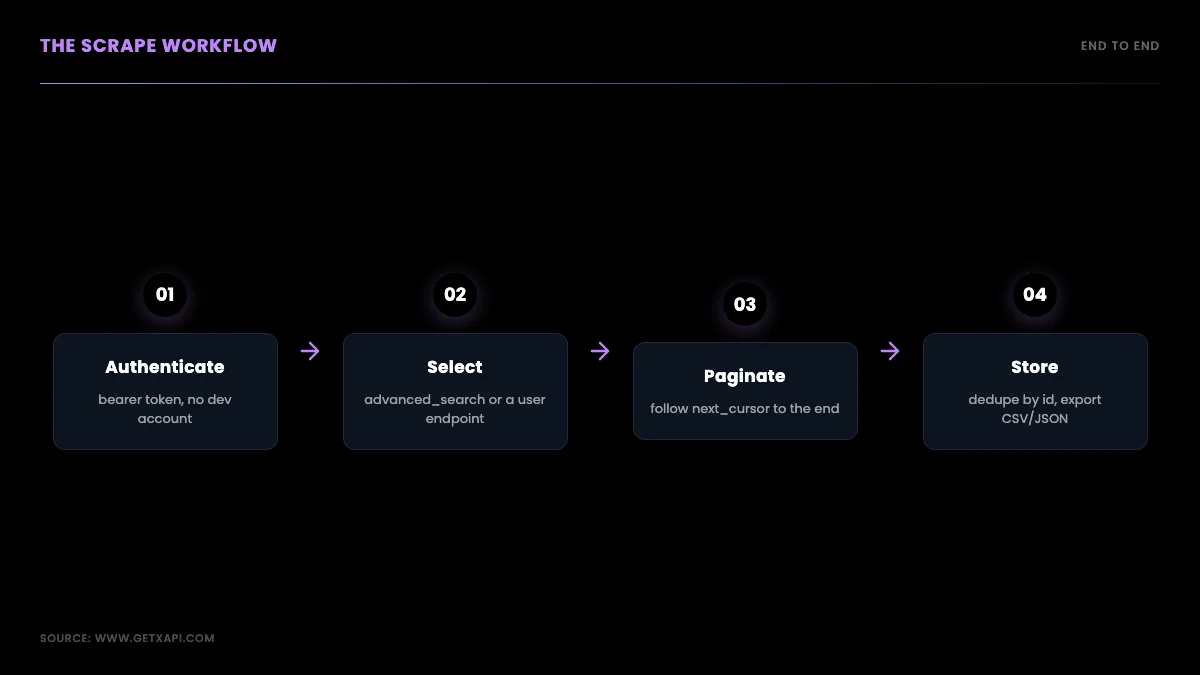
Authentication is a single bearer token sent in the Authorization header of every request, so setup is one signup and one environment variable, not an OAuth dance. Create an account, copy your key from the dashboard, and export it. There is no app registration, no elevated-access form, and no review queue between you and your first call. Compared with the official API's developer-account approval, this is the step that usually takes the longest elsewhere and takes seconds here.
export GETXAPI_KEY="your_api_key_here"

# Smoke test: one authenticated call
curl -s "https://api.getxapi.com/twitter/user/info?userName=getxapi" \
  -H "Authorization: Bearer $GETXAPI_KEY"
Keep the key in an environment variable or secret manager, never in committed source. If you have outgrown a free scraper and want the production patterns, the best practices guide covers retries, caching, and key hygiene.
Scrape tweets by keyword or search query
To scrape tweets matching a query, call the advanced_search endpoint with the same operators you already use in the X search box, then page through results with the returned cursor. The endpoint accepts operators like from:, to:, min_faves:, since:, and until:, so you can scope a pull to one account, a keyword in a date window, or a high-engagement filter without any client-side parsing. This is the workhorse for sentiment datasets, brand monitoring, and research samples.
import os, requests

BASE = "https://api.getxapi.com"
HEAD = {"Authorization": f"Bearer {os.environ['GETXAPI_KEY']}"}

def search_tweets(query, pages=3):
    out, cursor = [], None
    for _ in range(pages):
        params = {"q": query, "product": "Latest"}
        if cursor:
            params["cursor"] = cursor
        r = requests.get(f"{BASE}/twitter/tweet/advanced_search",
                         headers=HEAD, params=params, timeout=30)
        r.raise_for_status()
        data = r.json()
        out.extend(data.get("tweets", []))
        cursor = data.get("next_cursor")
        if not cursor:
            break
    return out

tweets = search_tweets("from:elonmusk min_faves:1000", pages=2)
print(len(tweets), "tweets")
The operator reference is worth bookmarking; the full list lives in the advanced search operators guide. For deeper tweet-field handling, the scrape tweets walkthrough covers parsing a single tweet object field by field, and the search API page documents the endpoint itself.
Search operators that do the heavy lifting
The operators that matter most for scraping are the ones that shrink your result set before it reaches your code, because every result you filter at the query level is a call you do not pay for downstream. Five carry most of the weight. from:handle limits results to one author, which is how you reconstruct an account's public history through search rather than the timeline endpoint. to:handle captures replies directed at an account, useful for support and reputation monitoring. min_faves:N and min_retweets:N filter for engagement, so a brand-monitoring pull can ignore low-signal noise and keep only tweets that actually traveled. since:YYYY-MM-DD and until:YYYY-MM-DD bound a date window, which is the operator that makes large historical pulls possible because it lets you walk a range in slices instead of hitting the depth limit of a single open-ended query. lang:en restricts to a language, which matters more than people expect when a keyword is ambiguous across languages.
You combine these the way you would in the X search box, and the API treats the combined string as one query. A pull like from:nasa min_faves:500 since:2026-01-01 until:2026-02-01 returns NASA's higher-engagement tweets for January, which is a tight, cheap, analysis-ready slice rather than a raw firehose you have to clean later. The discipline here is to push as much filtering into the query as the operators allow, then page through what remains, because that order, filter then paginate, is what keeps both your call count and your post-processing small. Teams that skip this step pull everything and filter in Python, which works but costs more calls and more compute for the same final dataset. The operator approach is also more honest about intent: you are collecting a defined, purposeful slice, which is exactly the posture the legal section recommends.
One caveat worth stating plainly: search reaches recent data well and older data unevenly, because the public search index does not extend indefinitely backward. For genuinely old tweets you combine date-windowed search with the timeline endpoint and accept that very deep history may be incomplete, a limit that applies to every method, not just this one. No public method gives you the complete archive of an account cheaply; anyone claiming otherwise is either using a costly enterprise firehose or overstating what they return.
Scrape a user's tweets (timeline)
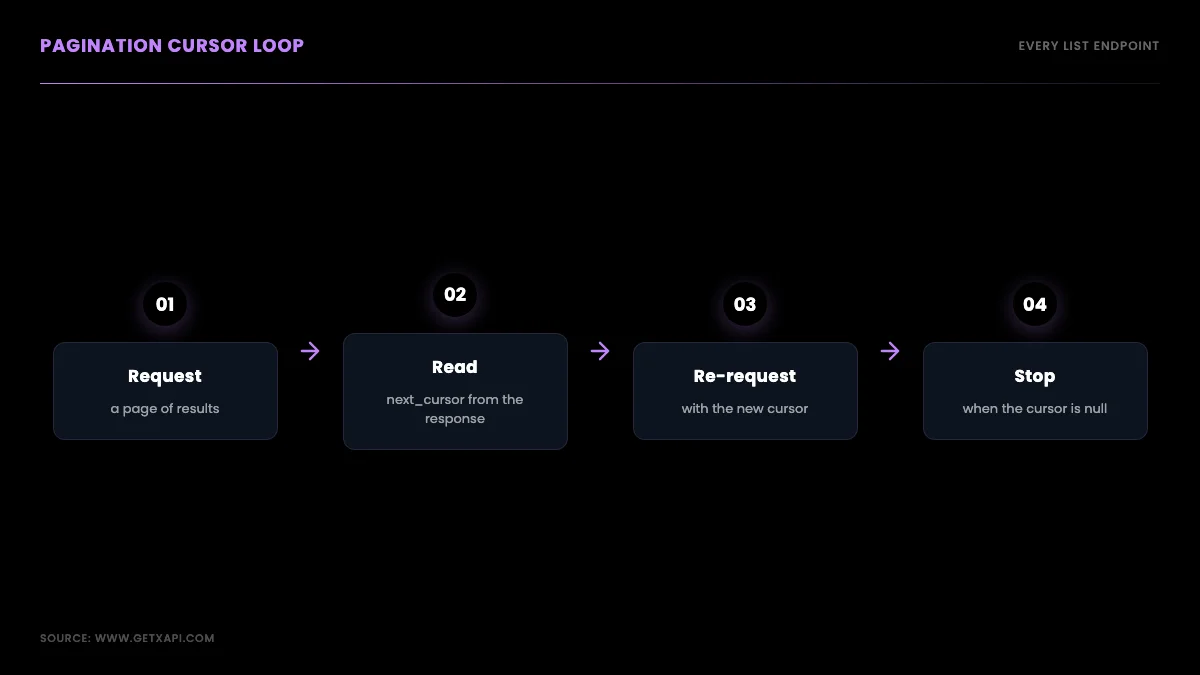
To pull a single account's tweets, call user/tweets with the username and follow the pagination cursor until it returns empty. Each page returns a batch of tweets plus a next_cursor token; you re-request with that token, append, and stop when it comes back null. The public timeline has historical depth limits, so for older tweets you combine timeline pulls with date-windowed advanced_search to reach further back, a pattern covered in the tweet history guide.
def user_tweets(username, max_pages=10):
    out, cursor = [], None
    for _ in range(max_pages):
        params = {"userName": username}
        if cursor:
            params["cursor"] = cursor
        r = requests.get(f"{BASE}/twitter/user/tweets",
                         headers=HEAD, params=params, timeout=30)
        r.raise_for_status()
        data = r.json()
        out.extend(data.get("tweets", []))
        cursor = data.get("next_cursor")
        if not cursor:
            break
    return out
Start building with GetXAPI
$0.05 per 1,000 tweets. $0.10 free credits. No credit card required.
Scrape followers
To collect a public account's followers, call user/followers and page through the cursor exactly as you do for a timeline, deduping by user id as you go. Large accounts take many paginated calls, so pace requests and persist each page so a long run can resume after an interruption. A verified-followers variant narrows the result to verified accounts when you only care about that segment. The end-to-end export pattern, including CSV output, is in the export Twitter followers guide and the followers API page.
def followers(username, max_pages=50):
    seen, cursor = {}, None
    for _ in range(max_pages):
        params = {"userName": username}
        if cursor:
            params["cursor"] = cursor
        r = requests.get(f"{BASE}/twitter/user/followers",
                         headers=HEAD, params=params, timeout=30)
        r.raise_for_status()
        data = r.json()
        for u in data.get("followers", []):
            seen[u["id"]] = u          # dedupe by id
        cursor = data.get("next_cursor")
        if not cursor:
            break
    return list(seen.values())
Scrape profile and user info
To get a profile, call user/info with the username; it returns the account's display name, bio, follower and following counts, verified status, and creation date in one object. This is the cheapest call in a scraping pipeline because a single request returns the whole profile with no pagination, which makes it ideal for enriching a list of handles or building a creator-ranking dataset.
curl -s "https://api.getxapi.com/twitter/user/info?userName=nasa" \
  -H "Authorization: Bearer $GETXAPI_KEY" | python -m json.tool
Scrape media (images and video)
To collect a user's posted media, call user/media, which returns the media URLs and metadata attached to an account's tweets, paginated by the same cursor pattern. Remember the copyright point from the legal section: reading media URLs and metadata is one thing, redistributing the files is a separate decision with its own rules. Store URLs and attribution, and only download what your lawful basis covers.
Pagination, rate pacing, and retries
Every list endpoint paginates with a cursor and every robust scraper needs pacing and retries, so build those once and reuse them across endpoints. The cursor pattern is identical for search, timeline, followers, and media: request, read next_cursor, re-request, stop on null. For pacing, space requests so you do not hammer the endpoint, and wrap calls in exponential-backoff retries so a transient error does not kill a long run. There is no websocket stream in this model; near-real-time monitoring is a short polling interval, not a firehose. The rate limits guide documents the headers to watch.
import time

def get_with_retry(url, params, tries=4):
    for i in range(tries):
        r = requests.get(url, headers=HEAD, params=params, timeout=30)
        if r.status_code == 429 or r.status_code >= 500:
            time.sleep(2 ** i)          # 1s, 2s, 4s, 8s
            continue
        r.raise_for_status()
        return r.json()
    r.raise_for_status()
If you are weighing this against the library route, the proxy layer is the hidden cost: open-source scrapers need a rotating residential pool to avoid blocks, which the residential proxies comparison breaks down. A managed API removes that line item entirely. Here is the workflow most people land on, well demonstrated in this walkthrough:
https://www.youtube.com/watch?v=D323ZbnnUlo
Handling protected, suspended, and deleted accounts
A robust scraper treats missing data as a normal case, not an error, because at any scale you will hit protected, suspended, and deleted accounts and your pipeline has to keep moving past them. A protected account returns no public timeline because the user has locked their tweets; the correct response is to record the account as protected and skip it, not to retry it. A suspended or deleted account returns an empty or error response because the account no longer exists publicly; again, the move is to log and skip. None of these are failures of your code, and a pipeline that treats them as failures will halt on the first one in a large pull.
The practical pattern is to wrap each per-account fetch in a classifier that maps the response to one of four states: data returned, account protected, account gone, or transient error. The first three are terminal for that account and you move on; only the fourth gets a retry. This is the difference between a scraper that completes a ten-thousand-account pull overnight and one that dies at account forty-three because someone locked their profile. Store the state alongside the account so a re-run does not re-attempt the terminal cases, which both saves calls and keeps your dataset honest about what was actually collectible versus what was private or removed.
There is also a data-integrity reason to record these states explicitly rather than silently dropping them. If you are studying a set of accounts over time, the transition of an account from active to suspended is itself a data point, and a pipeline that silently skips gone accounts loses that signal. Recording protected and gone states turns a gap in your data into a documented fact about the account, which matters for any analysis where the absence of data is meaningful. The best practices guide covers the state-machine pattern in more depth.
Scheduling incremental scrapes and deduping over time
Most real Twitter/X scraping is not a one-time pull but a recurring job, and the design that matters there is the incremental scrape: on each run you fetch only what is new since the last run rather than re-pulling everything. The mechanism is a high-water mark, the newest tweet id or timestamp you collected last time, which you pass into the next run so the search or timeline call returns only newer results. This is what turns a daily monitoring job from an expensive full re-pull into a cheap delta, and it is the single biggest cost lever in a recurring scrape.
Deduplication is the companion discipline, because incremental scrapes overlap at the boundary and you will fetch some tweets twice. Deduping on tweet id, ideally at write time with an upsert keyed on the id, keeps the dataset clean no matter how much the runs overlap. The combination of a high-water mark and id-deduping means you can run a job as often as you like without bloating storage or double-counting, which is exactly what a near-real-time monitor needs. Store each run's high-water mark and collected count so a job that is interrupted resumes from the right place rather than from the beginning.
Scheduling itself should live in a cron or a worker rather than on your laptop, with each run writing to durable storage and recording where it stopped. For monitoring use cases, the polling interval is the lever between freshness and cost: a tighter interval catches events sooner but makes more calls, and because the per-call price is fixed you can compute the monthly cost of any interval exactly before you commit to it. The rate limits guide covers the pacing side, and the cost calculator lets you model the spend of a given interval against your volume.
Export and store the data
To make a scrape useful, write each page to disk as you go and dedupe on a stable key so reruns do not bloat your dataset. Append-as-you-go means a long pull can resume after a crash, and deduping by tweet id or user id keeps a re-scrape idempotent. CSV is fine for spreadsheets and quick analysis; JSON or a database preserves the nested structure for pipelines that feed an LLM or a dashboard.
import csv, json

def save_csv(rows, path):
    if not rows:
        return
    keys = sorted({k for row in rows for k in row})
    with open(path, "w", newline="") as f:
        w = csv.DictWriter(f, fieldnames=keys)
        w.writeheader()
        for row in rows:
            w.writerow({k: json.dumps(row.get(k)) if isinstance(row.get(k), (dict, list)) else row.get(k) for k in keys})
The cheapest Twitter API. Try it free.
$0.05 per 1,000 tweets. $0.10 free credits. No credit card required.
Worked example: scrape 100,000 tweets for a dataset
To build a 100,000-tweet dataset, loop date-windowed searches across your date range, persist each page, and the cost lands around $5 at $0.001 per call and roughly 20 results per call. Date-windowing with since: and until: is what gets you past the depth limit of a single search, and persisting per page is what makes a multi-hour pull safe to resume. At 20 results per call, 100,000 tweets is about 5,000 calls, which is about $5 before caching; one million tweets is on the order of $50. Model your own numbers on the cost calculator.
For the head-to-head against the marketplace option, the Apify scraper comparison runs the breakeven math, and the best Twitter API for scraping guide ranks the methods on cost, reliability, and difficulty.
Two cost-control habits keep a large pull from surprising you. The first is to cache aggressively: if your dataset re-references the same accounts, fetch each profile once and reuse it, because a profile that does not change between runs is a call you should not pay for twice. The second is to checkpoint: write a small state file recording the last cursor and the count collected so far, so an interrupted run resumes from where it stopped instead of restarting and re-billing the calls it already made. Together these turn a one-million-tweet pull from a fragile all-or-nothing job into a resumable, predictable one whose cost you can forecast to within a few dollars. Because billing is per call, the cost is fully deterministic: total calls equals total results divided by the roughly twenty results each call returns, times $0.001, which you can compute before you run a single request. That predictability is the quiet advantage of the per-call model. A monthly tier charges you the same whether you read ten tweets or ten thousand, while a per-call model means a small experiment costs cents and a large production pull costs exactly what the arithmetic says, with no tier ceiling to slam into mid-project and no overage surprise at the end of the month.
What the data looks like: the tweet and user objects
Knowing the shape of what comes back saves you from guessing, so it is worth a paragraph on the two objects you will handle most. A tweet object carries the tweet id, the full text, the created-at timestamp, the public metrics (like, retweet, reply, and view counts), the language, and references to any attached media, plus the author's id so you can join to a profile. A user object carries the user id, the handle and display name, the bio, the follower and following counts, the verified flag, the account creation date, and the profile and banner image URLs. Both are plain JSON, so you parse them with the same data.json() call you already saw and pick the fields you need; there is no HTML to traverse and no selector that can drift. When you design your storage schema, store the ids as strings rather than integers, because tweet and user ids exceed the safe integer range in some languages and silently lose precision if you cast them to a number. That single mistake, casting an id to an int, is the most common data-integrity bug in scraping pipelines, and it is invisible until two records collide.
The metrics deserve a note because they are a snapshot, not a stream. The like and retweet counts in a tweet object reflect the moment you fetched it, so a tweet you scraped an hour after posting will show different numbers from the same tweet scraped a week later. If your analysis cares about engagement over time, you re-fetch the same tweet ids on a schedule and store each reading with its timestamp, which turns a static scrape into a time series. This is also why "scrape once and forget" rarely matches what teams actually need; most real pipelines re-poll a working set of ids rather than collecting each tweet exactly once.
Common errors and how to handle them
Most failures in a Twitter/X scraping pipeline are one of four predictable cases, and handling them up front is what separates a script that runs once from one that runs nightly for a year. A 401 means your bearer token is missing or wrong, so check the Authorization header and that the environment variable is actually set in the process. A 403 means you asked for something the endpoint will not return, often a protected account or a field outside your plan, and the fix is to skip and log that target rather than retry. A 429 means you are going too fast, and the correct response is to back off and retry with increasing delay, not to hammer the endpoint harder. A 5xx is a transient server-side issue, and the same exponential backoff handles it. The retry helper shown earlier already covers the 429 and 5xx cases; the 401 and 403 cases should fail loudly because retrying them just wastes calls.
Two non-HTTP errors trip people up. The first is an empty or null cursor that you treat as an error instead of a normal end-of-results signal; always stop the loop when the cursor is empty rather than raising. The second is a partial page near the end of a large pull, where the last page returns fewer results than the page size; that is expected, not a bug, so size your storage on the actual length returned, never on an assumed page size. Build for these from the first version and your scraper degrades gracefully instead of crashing on the long pulls that matter most.
Choosing what to scrape for your use case
The right endpoints depend on the job, so map your use case to the calls before you write code. For sentiment analysis or brand monitoring, the advanced_search endpoint with a keyword and a date window is the core call, and you re-poll it on a schedule to catch new mentions. For competitor or creator analysis, combine user/info for the profile baseline with user/tweets for the content history, then compute engagement rates client-side. For lead generation, advanced_search with bio-style operators surfaces accounts matching a profile, a pattern the lead-gen guide expands on. For dataset building or research, date-windowed advanced_search across a range is the workhorse, paired with user/media only when you actually need the attached files. Matching endpoints to the job keeps your call volume, and therefore your cost, proportional to the value you extract, which is the whole advantage of a per-call model over a flat monthly tier you pay whether you use it or not.
From prototype to production
A prototype becomes production when you add three things: caching, scheduling, and idempotency. Caching means you do not re-fetch a profile you already pulled this hour, which cuts both latency and cost; a small key-value store keyed by user id with a short time-to-live is enough. Scheduling means the pull runs on a cron or a worker rather than your laptop, with each run writing to durable storage and recording where it stopped so the next run resumes. Idempotency means a re-run does not duplicate data, which you get for free if you dedupe on tweet or user id as the worked examples do. Layer monitoring on top, a simple count of calls, errors, and new records per run, and you can see a scrape degrade before it fails silently. The best practices guide goes deeper on each, and the rate limits guide covers the headers that tell you how hard you can push.
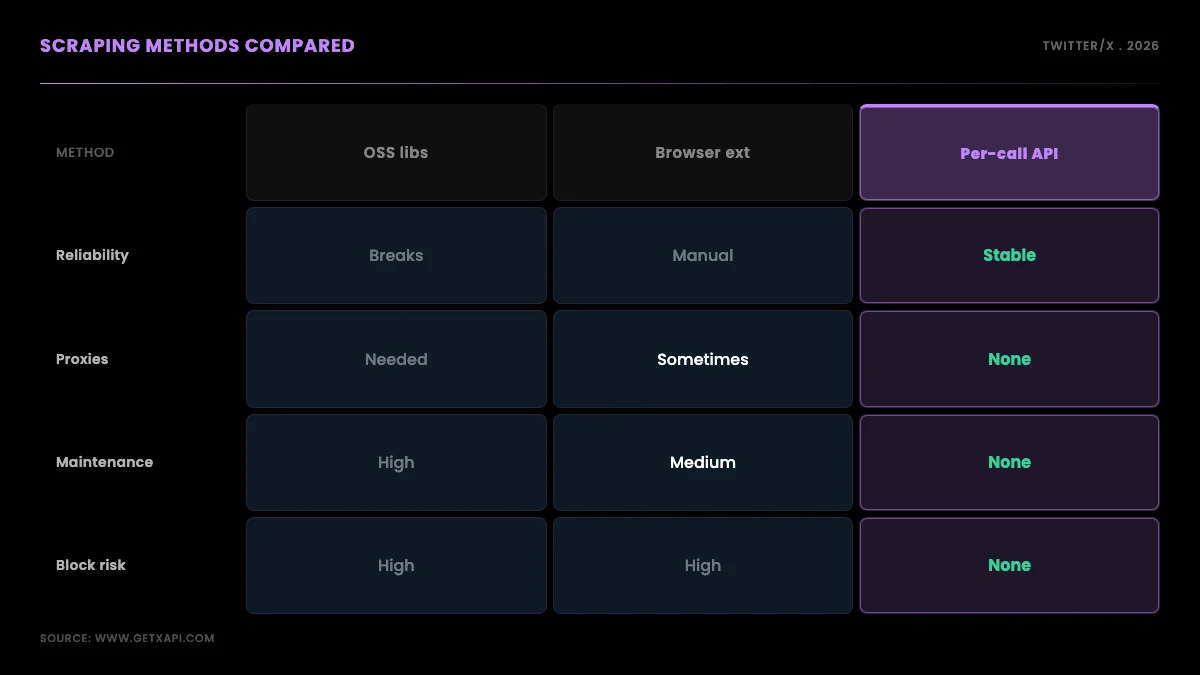
How the methods compare
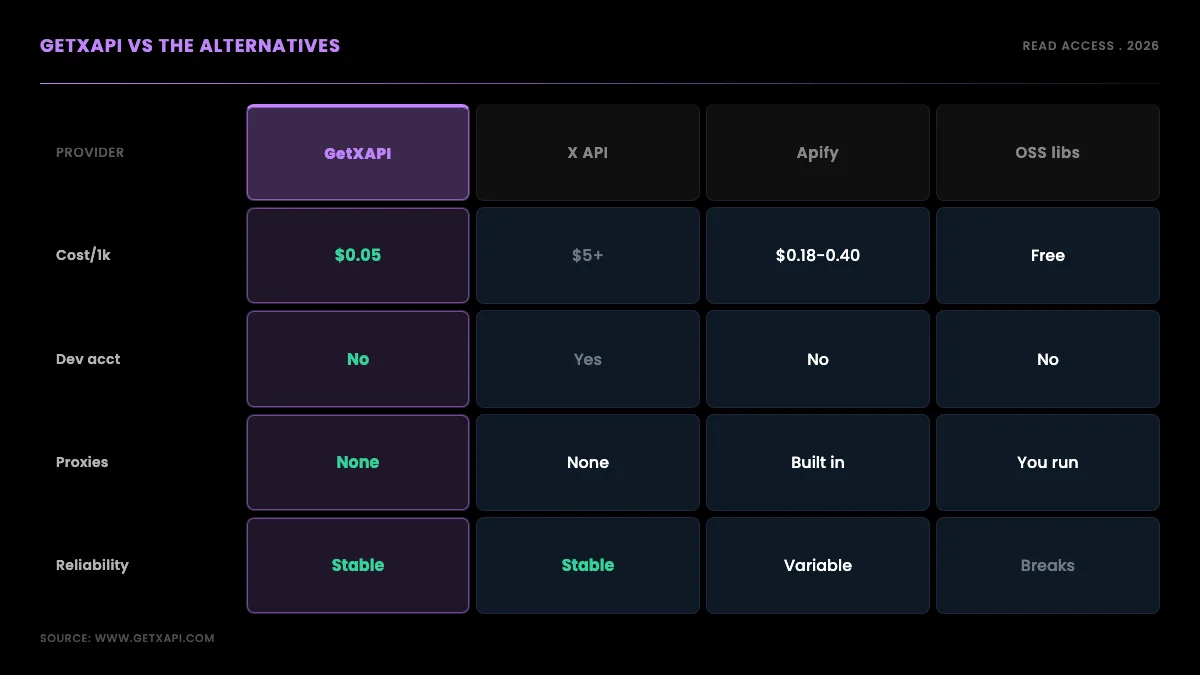
The honest ranking is that libraries are cheapest until they break, browser scrapers are flexible until they get blocked, and a per-call API is the most reliable for anything in production. Open-source libraries cost nothing up front but carry maintenance and proxy costs and stop working on layout changes. Browser extensions and headless scripts handle one-off visual scrapes but do not scale and risk account blocks. Marketplace actors like Apify and enterprise platforms like Bright Data work but bill more per 1,000 tweets and add per-run or contract overhead. A per-call read API trades a small per-call fee for stability and zero infrastructure, which is why production teams converge on it. If you want the full provider matrix, the API alternatives comparison lays it out.
This is exactly the request that shows up again and again in automation communities, where the ask is not "the cheapest possible" but "a reliable one that just works":
Looking for a reliable Twitter/X scraping API for a small automation project (r/automation)
For the language-specific path, the Python Twitter API tutorial and the complete API tutorial walk the setup step by step, the rate limit guide covers pacing in production, and the cost benchmark shows measured per-1,000 numbers across providers. If you are tracking a pricing change that pushed you here, the X API pricing change explainer has the timeline.
Verdict and next steps
If you need Twitter/X data to keep flowing in 2026, build on a per-call read API: it is the method that does not break on layout changes, does not get your account blocked, and costs cents for a small project. Start with $0.10 in free credit, run the search snippet above, and you will have live tweets in under ten lines. When you are ready, sign up and pull your first dataset, model spend on the cost calculator, or read the pricing breakdown. For the scraping cluster overall, the Twitter scraper hub is the map to every endpoint and guide referenced here.
The shortest honest summary is this: scraping Twitter/X in 2026 is no longer a question of finding a clever workaround, because the workarounds decayed when the platform locked down. It is a question of picking the method that keeps returning data after the next layout change, and for production work that method is a documented read API. Start small, filter at the query level, page through with the cursor, store as you go, and your pipeline will still be running long after the latest scraper library has stopped.
External references: X developer terms, X API rate limits, the hiQ v. LinkedIn decision, the now-unmaintained snscrape project, and method overviews from Scrapfly{rel="nofollow"}, Apify{rel="nofollow"}, Bright Data{rel="nofollow"}, and AIMultiple.
Frequently Asked Questions
Collecting public Twitter/X data sits in a contested but largely defensible space when you read only what is visible without logging in and you respect personal-data law. In the United States, the hiQ v. LinkedIn line held that scraping publicly available data does not by itself violate the Computer Fraud and Abuse Act. That is not blanket permission. Platform terms can still be breached, copyrighted media stays copyrighted, and the GDPR or CCPA applies the moment a record identifies a real person. The practical line most teams draw is public data only, no logged-in scraping, no circumventing access controls, and a documented lawful basis when personal data is involved. This is not legal advice; confirm your specific use with counsel.
On a per-call read API the cost tracks how many tweets you read, not a monthly plan. GetXAPI charges $0.001 per call and each call returns about 20 results, so 1,000 tweets costs roughly $0.05 and one million tweets is on the order of $50 before any caching. For comparison, Apify Twitter scrapers run about $0.18 to $0.40 per 1,000 tweets, and the official X API starts around $5 per 1,000 reads. Model your exact spend with the cost calculator; the per-call model means a small project pays cents rather than committing to a tier.
Both were casualties of the 2023 API lockdown. snscrape, the most popular no-key Python scraper, largely stopped working when X changed its endpoints and is effectively unmaintained for current data. Public Nitter instances, which mirrored Twitter without login, were almost all shut down or rate-limited into uselessness. Their disappearance is why search volume for terms like snscrape twitter has fallen and why a maintained, paid read API has become the durable replacement for projects that need data to keep flowing.
Free scraper libraries exist, and for a one-off pull of a few hundred tweets they are fine. The moment you need reliability in production, scheduled jobs, or volume, free tools cost more in broken runs, proxy fees, and engineering time than they save. A per-call API removes that hidden cost: stable endpoints, no proxy fleet, and roughly $0.05 per 1,000 tweets, with free starter credit so you can test before you spend.
Yes, and there are three common routes. Open-source libraries in the snscrape lineage parse the site directly, but they break when the markup changes and most are unmaintained after the 2023 lockdown. Browser extensions and headless-browser scripts drive a logged-in session, which is fragile and risks blocks. The third route is a per-call read API: you send an authenticated GET request to a documented endpoint and parse JSON, with no headless browser, no proxy pool, and no selectors to maintain. For anything beyond a one-off pull, the API route is the reliable option.
With open-source libraries or a headless browser, usually yes, because you are hitting the site directly and need to rotate residential IPs to avoid blocks, which adds cost and maintenance. With a managed per-call API the provider handles the fetch infrastructure, so you do not run or pay for a proxy pool yourself. If you are evaluating the library route, the proxy layer is the hidden cost most guides skip; this guide's residential-proxy comparison covers it.
Yes, for public accounts, by calling the followers endpoint and following its pagination cursor until it returns empty. Each call returns a page of follower objects plus a cursor token for the next page; you re-request with that cursor, append, dedupe by user id, and stop when the cursor is null. Very large accounts take many paginated calls, so pace your requests and store each page as you go so a long pull can resume. A verified-followers variant narrows the list to verified accounts.
No. The model is poll plus pagination, not a websocket firehose. You request a search or timeline endpoint on a schedule and page through new results since your last run, which covers near-real-time monitoring for most use cases without the cost and complexity of a streaming connection. If you need tighter latency, shorten the polling interval; there is no persistent stream to maintain or pay for.
Check out similar blogs
More guides on the Twitter/X API, scraping, and pricing.

How to Scrape Tweets in 2026 (Without Getting Blocked)
How to scrape tweets in 2026 without getting blocked: why browser scraping breaks, where the legal line on public data sits, and a runnable read-API fetch script.

Twitter Trends API: Pull Trending Topics by Location in 2026
A 2026 guide to building a Twitter trends API: pull trending topics and hashtags by location using a per-call search endpoint, with runnable Python and curl.

Twitter API Tutorial 2026: The Complete Developer Guide
The 2026 Twitter API tutorial built after the pricing collapse. Auth, endpoints, code, rate limits, real costs, and the alternative when official gets too expensive.

Twitter Article API in 2026: Create, Publish, and Distribute Long-Form Notes
Complete 2026 tutorial for the Twitter Article API. All 7 endpoints, working Python and Node.js code, the Premium gate explained, draft vs published state machine.

How to Use the Twitter API with Python, 2026 Tutorial
Step-by-step Python tutorial for the Twitter API in 2026. Working code for search, users, DMs, pagination, retries, plus a tweepy migration guide.

Scrape Full Tweet History of Any Account in 2026 (Beyond the 3,200 Limit)
Why the X timeline stops at 3,200 tweets and how to pull an account's full history with date-window search, cursor pagination, and dedup. Live-tested code in Python and curl.

Post Tweets via API With Authentication in 2026 (No Developer Account)
Post tweets, threads, and media through an API without an X developer account. The auth_token model, working Python and Node code, rate-limit safety, and per-call costs.

How to Monitor Twitter (X) Accounts with an API (2026 Guide)
Monitor X accounts for new tweets, mentions, and profile changes with a pay-per-call API. Polling patterns, code, alert wiring, scale math, and what it costs in 2026.