
How to Get a Twitter (X) RSS Feed Now That Nitter Is Down
X has no built-in RSS feed and the Nitter instances we tested are down. The options that still work, a tested script that builds your own feed, and an n8n setup.

X has no built-in RSS feed, and the free Nitter instances that used to provide one are down or blocking feed readers. To follow an X account in an RSS reader or n8n today, you either pay for a hosted feed generator or build the feed yourself from an API. This guide covers both, with a tested script.
Last updated October 24, 2026. Nitter instances and x.com tested that day; n8n node names checked against n8n's documentation the same day.
How do you get a Twitter RSS feed?
Build the feed from an API that returns an account's posts as JSON, then serve it as an RSS file your reader can subscribe to. The script below does this in about 45 lines of Python and costs $0.001 per refresh with GetXAPI's user tweets endpoint. If you would rather not run code, a hosted RSS generator does the same for a monthly fee. Public Nitter instances are no longer dependable: the ones we tested were down or blocked readers.
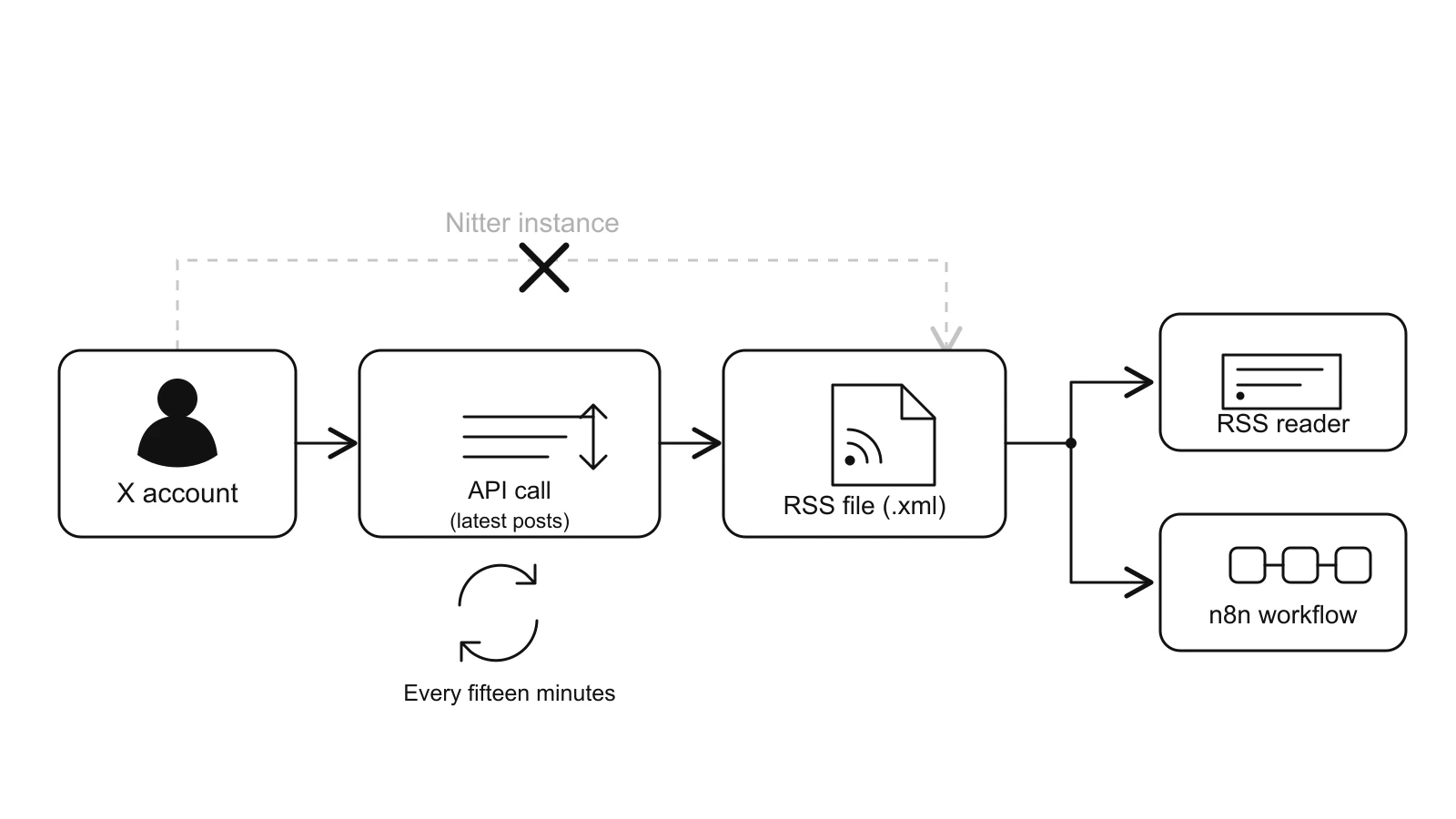
With Nitter down, the feed comes from an API call on a schedule, written out as an RSS file.
Does X have a built-in RSS feed?
No. Adding /rss to an x.com profile address returns X's normal web page. When we requested https://x.com/n8n_io/rss on October 24, 2026, the response was HTML, not a feed.
Does Nitter RSS still work?
Rarely. We requested the RSS feed of the same account from four instances on October 24, 2026: nitter.net returned 410 Gone, xcancel.com returned 451 with a notice that the service is suspended because of legal proceedings, nitter.jaydenha.uk returned a browser check page that an RSS reader cannot pass, and nitter.poast.org did not respond within 20 seconds.
Can n8n read an X account without Nitter?
Yes, through the HTTP Request node. n8n's built-in X node can post, search, like and look up a user, but its documentation lists no operation for reading an account's timeline, so the timeline has to come from an API.
Start building with GetXAPI
$0.05 per 1,000 tweets. $0.10 free credits. No credit card required.
Which Twitter RSS option should you use?
| Option | Cost | Setup | Reliability | Best for |
|---|---|---|---|---|
| Public Nitter instance | Free | Paste a URL | Low: instances go down without warning | Casual reading, accepting gaps |
| Hosted RSS generator | Monthly subscription | Paste a profile URL | Depends on the provider | Non-developers with a few feeds |
| Self-hosted RSSHub | Server plus X cookies or paid X API keys | Docker and config | Depends on the credentials you supply | People already running RSSHub |
| Build your own feed from an API | $0.001 per refresh | About 45 lines of code | As reliable as the API | Developers, n8n users, many feeds |
| n8n reading JSON directly | $0.001 per refresh | 4 nodes, no RSS needed | As reliable as the API | Automations that never needed RSS |
RSSHub is worth a note because Reddit threads often recommend it. Its X route now supports two working credential types: the auth_token cookies of logged-in X accounts, or pay-per-use X API keys. The username and password method is struck out in its source with the note that it stopped working in October 2025. So self-hosting RSSHub for X is not free either.
How to build your own Twitter RSS feed
- Get an API key and store it in an environment variable called
GETXAPI_KEY. - Fetch the account's newest posts with
GET /twitter/user/tweets?userName=<handle>. Each call returns about 20 posts. - Write each post as an RSS item: text as title and description, x.com link as link and guid,
createdAtaspubDate. - Save the XML and serve it from any static host or a small server.
- Re-run the script on a schedule, for example every 15 minutes with cron.
import os
import sys
import json
import urllib.request
import urllib.parse
from email.utils import format_datetime, parsedate_to_datetime
from xml.sax.saxutils import escape

API_KEY = os.environ["GETXAPI_KEY"]

def latest_posts(username):
    url = "https://api.getxapi.com/twitter/user/tweets?" + urllib.parse.urlencode({"userName": username})
    req = urllib.request.Request(url, headers={"Authorization": f"Bearer {API_KEY}"})
    with urllib.request.urlopen(req, timeout=30) as resp:
        return json.load(resp)["tweets"]

def to_rss(username, posts):
    items = []
    for p in posts:
        text = " ".join(p["text"].split())
        pub = format_datetime(parsedate_to_datetime(p["createdAt"]))
        items.append(
            "<item>"
            f"<title>{escape(text[:100])}</title>"
            f"<link>{escape(p['url'])}</link>"
            f"<guid isPermaLink=\"true\">{escape(p['url'])}</guid>"
            f"<pubDate>{pub}</pubDate>"
            f"<description>{escape(text)}</description>"
            "</item>"
        )
    return (
        '<?xml version="1.0" encoding="UTF-8"?>'
        '<rss version="2.0"><channel>'
        f"<title>@{escape(username)} on X</title>"
        f"<link>https://x.com/{escape(username)}</link>"
        f"<description>Latest posts from @{escape(username)}</description>"
        + "".join(items)
        + "</channel></rss>"
    )

if __name__ == "__main__":
    user = sys.argv[1]
    with open(f"{user}.xml", "w", encoding="utf-8") as f:
        f.write(to_rss(user, latest_posts(user)))
    print(f"wrote {user}.xml")
Run it with python x_to_rss.py n8n_io. It uses only the Python standard library, so there is nothing to install.
What we tested: on October 24, 2026 we ran this script for @n8n_io. It wrote a feed with 20 items, newest first, and the file parsed as valid XML with a correct pubDate and x.com link on every item. The API call took 3 to 5 seconds across our runs.
What it costs: one call per refresh per account. Every 15 minutes is 96 calls a day, about $0.10 a day or $3 a month for one account; hourly is about $0.72 a month. Store the IDs you have already published if you want to skip unchanged refreshes.
The cheapest Twitter API. Try it free.
$0.05 per 1,000 tweets. $0.10 free credits. No credit card required.
How to get an X account's posts into n8n without RSS
If the feed only exists to feed an n8n workflow, skip RSS and read the JSON directly. Four nodes:
- Schedule Trigger, set to the interval you want, for example every 15 minutes.
- HTTP Request, method GET, URL
https://api.getxapi.com/twitter/user/tweets, query parameteruserName, and a headerAuthorization: Bearer <your key>. n8n can also import a curl command and fill these fields for you. - Split Out, on the
tweetsfield, so each post becomes its own item. - Remove Duplicates, with the operation Remove Items Processed in Previous Executions, comparing on
id, so each post reaches the rest of your workflow once.
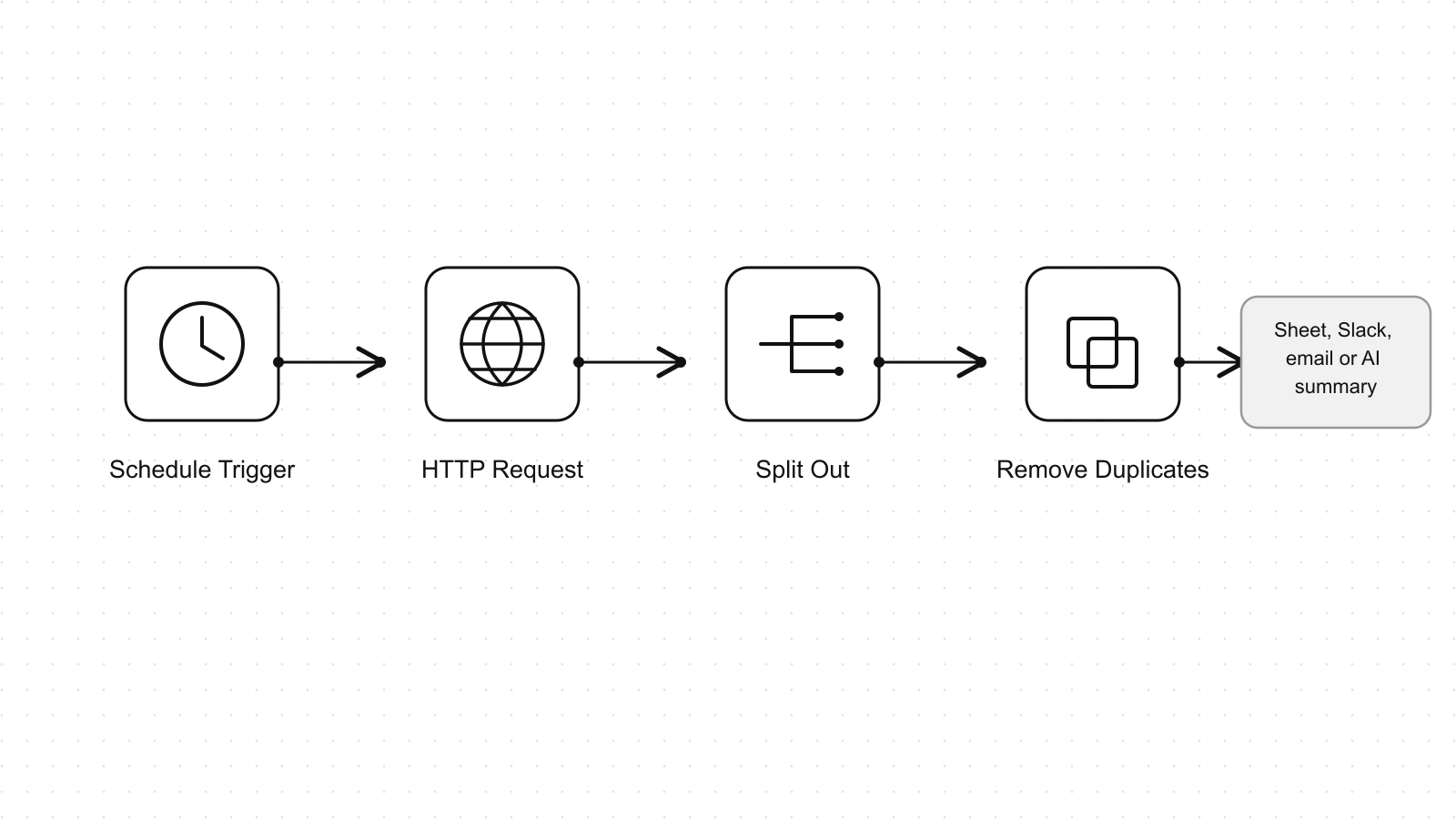
Four n8n nodes read an account's posts as JSON, no RSS needed.
From there, send the posts wherever the workflow needs them: a Google Sheet, Slack, an email digest or an AI summary. If you already have the RSS file from the script above, the RSS Read node reads it from its URL instead.
When a DIY feed is not the right choice
- You follow hundreds of accounts. Each account is one call per refresh, so 500 accounts every 15 minutes is 48,000 calls a day. Refresh less often, or batch accounts with a search query instead.
- You want a no-code reader for two or three accounts. A hosted generator is less work, and the subscription is the price of not running anything.
- The account is protected. Posts from private accounts are not visible to any feed tool.
- You need replies, not just posts. The user tweets endpoint returns the account's own posts; replies come from a separate endpoint.
Sources
- GetXAPI docs: User Tweets endpoint (GET /twitter/user/tweets)
- RSSHub source: X (Twitter) route authentication options
- n8n docs: X (Formerly Twitter) node operations
- n8n docs: RSS Read node
- n8n docs: HTTP Request node
- n8n docs: Remove Duplicates node (items processed in previous executions)
- Reddit r/rss: Nitter/XCancel is dead, alternatives to get X's RSS/feeds?
- Reddit r/n8n: How to get X account tweets for n8n? (Nitter RSS doesn't work)
Checked October 24, 2026.
Twitter RSS feed: FAQ
Three options still work. A hosted RSS generator turns a profile into a feed for a subscription fee. A self-hosted RSSHub needs either logged-in X cookies or paid X API keys. Or you build the feed yourself from an API that returns an account's posts as JSON, which is what the script in this guide does for $0.001 per refresh.
Not directly. The practical approach, also suggested on Reddit's n8n community, is to pull the list of accounts you follow once, then fetch each account's latest posts on a schedule and merge them. That costs one call per account per refresh, so it suits a few dozen accounts better than several hundred.
Yes. Use n8n's HTTP Request node to call an API that returns an account's posts as JSON, then split the list into items and drop posts you have already seen with the Remove Duplicates node. n8n's built-in X node has no operation for reading an account's timeline.
Not a reliable one. X does not publish RSS feeds, and the public Nitter instances that offered them free were down or blocking feed readers when we tested on October 24, 2026. The free routes that remain, such as a surviving Nitter instance, tend to go down without warning.
Every 15 to 60 minutes is enough for most uses. At $0.001 per call, refreshing one account every 15 minutes is 96 calls a day, about $0.10 a day or roughly $3 a month. Hourly refreshes cost about $0.72 a month per account.
Check out similar blogs
More guides on the Twitter/X API, scraping, and pricing.

How to See Comments on X (Twitter), Including Hidden Replies
How to see comments on X (Twitter): open the post, sort the replies, find hidden replies and quote posts, and read comments without an account. Checked on X.

How to Export Twitter Followers to CSV, Free and by API
How to export Twitter (X) followers: your own list from X's archive, any public account's followers by API at $0.001 per 200, and a tested CSV script.

How Many People Use X (Twitter)? User Statistics
How many people use X: about 550 million monthly users across X and Grok, 64.7 million in the EU, 21% of US adults. Every figure sourced, plus our own sample.

Classify 10,000 Tweets with Jev and the X API: Real Costs
We pulled 10,000 live tweets and classified every one with Jev, TypeSafe's new decision model. Real cost, latency, agreement rates, failure cases and the full script.

How to Search Tweets by Hashtag with the X API
Tested X API hashtag queries: how the # operator differs from a plain keyword, combining hashtags, Top versus Latest, filters that work, and cursor pagination.

X (Twitter) API Object Reference: Tweet and User Fields
Every field on the X API v2 Post and User objects, plus Media, Poll and Place: type, what it holds, the auth it needs, nested keys and enum values.

X (Twitter) Webhooks: Setup, the CRC Check and Limits
How X delivers real-time events over webhooks, what the Challenge-Response Check actually asks for, the requirements that silently reject a URL, and the per-tier limits.

X (Twitter) API Error Codes: Reference and Retry Rules
X API status codes, error type URIs and the numeric codes behind them, with the cause and the fix for each, plus the partial-error case that returns HTTP 200.
Featured in
Where GetXAPI's data and pricing get cited.

The hidden line item in your AI side project: X data
Indie Hackers post on the often-overlooked cost of X data for AI side projects, citing GetXAPI as the usage-based way to pull live Twitter data without a five-figure X developer contract.

How Companies Are Learning to Read Market Mood in Real Time
Editorial feature on Big News Network examining how companies read market mood from X in real time, citing GetXAPI as the usage-based Twitter API that prices live social listening by the call instead of a five-figure annual contract.

How Companies Are Learning to Read Market Mood in Real Time
Syndicated feature on Business Newswire on how companies read market mood from X in real time, citing GetXAPI as the usage-based Twitter API that prices live social listening by the call.

Working with Twitter/X Data: A Practical Skill for IT Students and Professionals in 2026
Guide on SIIT (Scholars International Institute of Technology) on collecting live Twitter/X data as a practical developer skill, citing GetXAPI as the per-call Twitter data API that makes it affordable without an X developer account.

Adding Twitter/X Data to Your App in 2026: A Developer's Integration Guide
Developer integration guide on Programming Insider covering how to add live Twitter/X data to an app in 2026, comparing the official X API v2 with a key-based REST approach and citing GetXAPI as the low-cost per-call option with no developer-account approval.

6 Twitter/X Scraping Solutions for Every Budget
Roundup on TechBullion of the leading Twitter/X scraping solutions, ranking GetXAPI first as the cheapest option at $0.001 per call (about $0.05 per 1,000 tweets) with clean JSON output and no monthly minimum.

The Data Bill Behind Every Social Analytics Tool
Editorial piece on SpeakRJ examining the underlying data costs behind social analytics tools, citing GetXAPI as the usage-based way to source live X data by the call.

What Is AI Sentiment Analysis, and What Does Each Layer Cost?
Explainer in AI Journal breaking sentiment analysis into its data, model and reporting layers and what each costs to run, citing GetXAPI for pulling public X posts on pay-per-call pricing.

Why Enterprise AI Agents Still Cannot Read Social Data
Analysis piece in The Silicon Review on why enterprise agents reach internal systems easily but struggle with public social data, citing GetXAPI's MCP server and data-as-a-service model as one route to close the gap.