
How to See Likes on X (Twitter), and Who Can See Yours
Your likes on X moved from your profile to History. Where to find them now, why the Likes tab disappeared, and who can still see what you liked.

To see likes on X, open History in the left sidebar and select the Likes tab. The Likes tab no longer sits on your profile, which is why it looks like it disappeared. Your likes are private: only you can see the list, although a post's author can still see who liked it.
Last updated November 20, 2026. We checked every step on x.com that day, and the privacy rules against X Engineering's announcement.
How do you see your likes on X?
You see your likes on X in History, not on your profile. On x.com, select History in the left sidebar, then the Likes tab next to Bookmarks; the posts you have liked are listed there. The direct link is x.com/i/history/likes, and the old x.com/yourname/likes link now redirects to it. Your profile itself shows only Posts, Replies, Reposts and Media. So if you are asking where are my likes on X after an update, they moved; none were deleted.
Where did the Likes tab go?
It moved into History, alongside Bookmarks. On November 20, 2026 our own profile on x.com showed four tabs, Posts, Replies, Reposts and Media, with no Likes. Nothing was deleted: the likes are all in History.
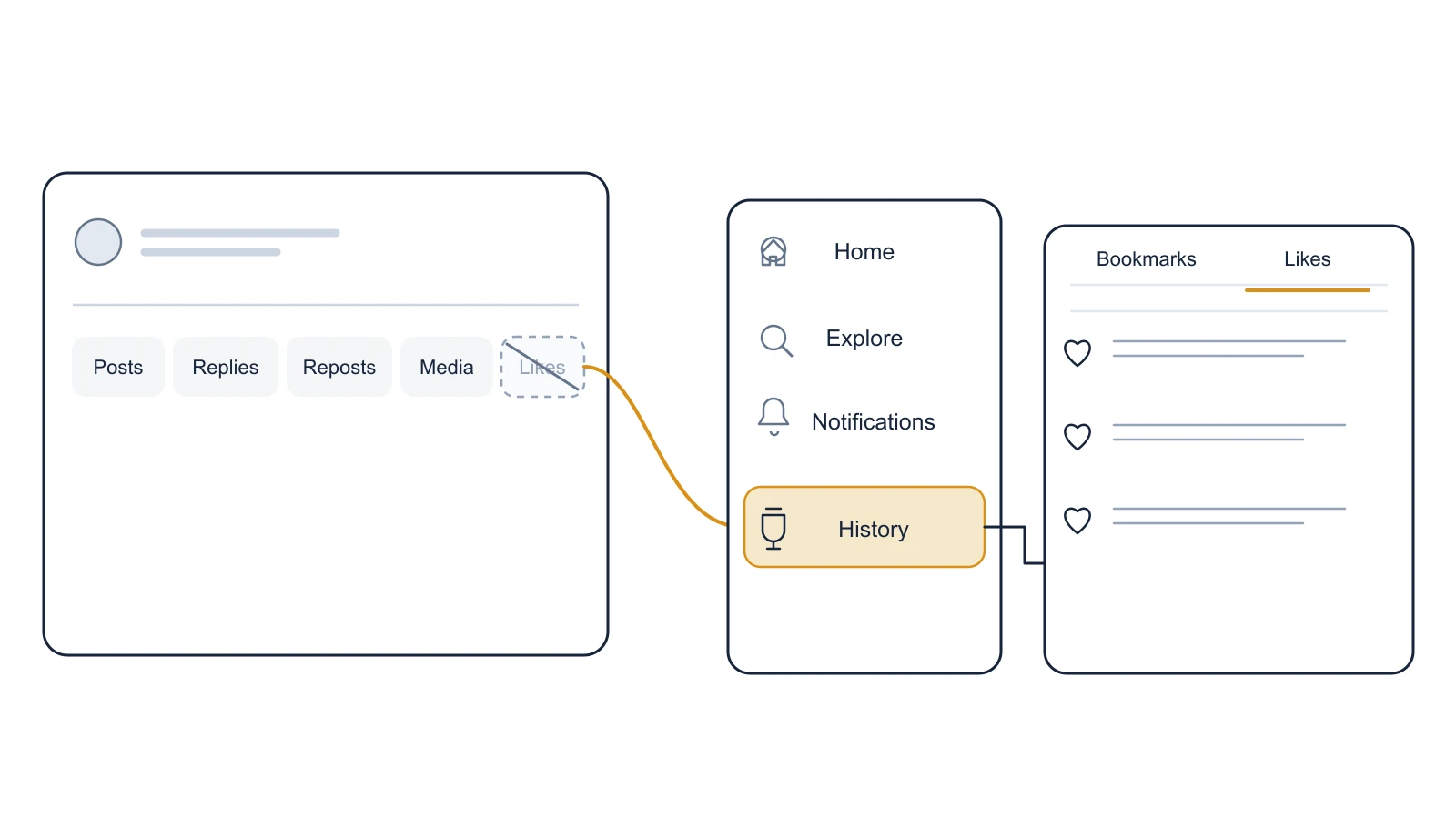
Likes moved off your profile. Open History, then the Likes tab.
Can you see what someone else liked on X?
No. X made likes private in June 2024, so nobody's likes list is visible to anyone else. Going to x.com/NASA/likes simply sends you back to NASA's profile, which has no Likes tab.
Can other people see your likes?
Not as a list. The only person who can see your like is the author of the post you liked, and like counts stay public.
How to see likes on X, step by step
- Open History. On x.com, select History in the left sidebar. In the X app, open the menu behind your profile picture and look for History; an app that has not updated yet may still show Likes on your profile.
- Switch to the Likes tab. History has two tabs, Bookmarks and Likes. Select Likes.
- Or use the link. Go straight to x.com/i/history/likes on the web. Old bookmarks to x.com/yourname/likes now land there too.
X's own help page still says your likes are on "the Likes tab" of your profile page, and so do most older guides on how to see likes on Twitter. That was true before the redesign; on x.com today the tab lives in History.
Start building with GetXAPI
$0.05 per 1,000 tweets. $0.10 free credits. No credit card required.
Are likes private on X?
Yes. X Engineering announced on June 11, 2024 that it was making Likes private for everyone, and listed what changed:
- You can still see the posts you have liked; others cannot.
- Like counts and other metrics for your own posts still show up under notifications.
- You no longer see who liked someone else's post.
- A post's author can see who liked their post.
Elon Musk confirmed it the next day: "your likes are now private". There is no setting to undo it, so there is also nothing to switch on if you want to hide your likes on X: they are hidden already.
Who can see what: likes on X at a glance
Only you can see the list of posts you liked, and only a post's author can see who liked it. Everyone else sees the like count and nothing more. That covers your likes and other people's alike, since X applies the same rule to every account and offers no setting to change it.
| What | Can you see it? | Notes |
|---|---|---|
| Your own likes list | Yes | History, then Likes |
| Someone else's likes list | No | Private since June 2024; their /likes link redirects to their profile |
| Who liked your post | Yes | You are the author; counts also appear in notifications |
| Who liked someone else's post | No | Only that post's author sees it |
| Like counts on any post | Yes | Counts stay public |
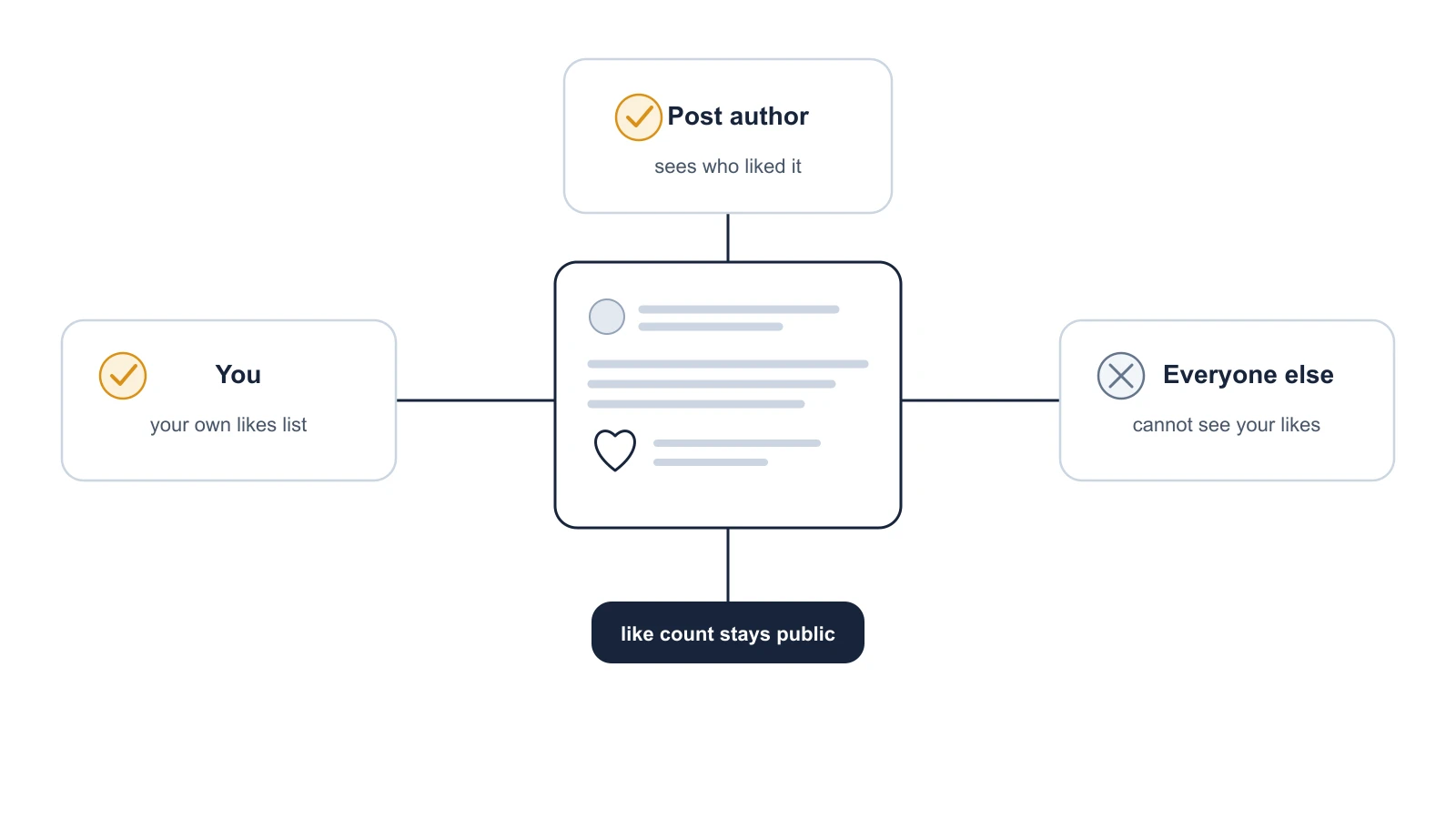
Since June 2024, likes are private. Only the post's author sees who liked it.
The cheapest Twitter API. Try it free.
$0.05 per 1,000 tweets. $0.10 free credits. No credit card required.
Why your likes look like they are missing
You are looking on your profile
The profile tab is gone; on x.com it now sits in History. Fix: open History, then Likes, or go to x.com/i/history/likes. The Reddit threads asking where the Likes tab went come down to this.
The post came from a protected account
X's help page on likes notes that a liked post from a protected account appears in your likes only if you follow that account. Fix: follow the account again, or open the post from its link if you still have it.
You opened someone else's likes
Their list is private, so x.com sends you to their profile instead. Fix: there is none by design; X made likes private for everyone in June 2024.
Can you export all your likes?
Not with a button on x.com, but you can with an API. GetXAPI's user likes endpoint returns your own account's liked posts as JSON, about 20 per call at $0.001 per call, paginated with a cursor. It needs your own account's auth token, because likes are private: it reads the list X shows you, and it cannot reveal anyone else's likes. The Twitter API key guide covers getting a key.
Comments work differently from likes: replies are still public. The guide on how to see comments on X, including hidden replies covers those, and the free Twitter viewer shows any public profile's posts without an account.
Sources
- X Engineering: making Likes private for everyone (June 11, 2024)
- Elon Musk: "your likes are now private" (June 12, 2024)
- X Help Center: How to like a post
- GetXAPI Docs: User Likes
Checked November 20, 2026.
How to see likes on X: FAQ
No. Since June 2024 likes on X are private for everyone. Nobody can open a list of the posts you liked. The one exception is the author of a post: they can see that you liked it.
No. You can still like posts and see your own likes. The Likes tab moved off your profile and into History, next to Bookmarks, which is why many people think likes were removed.
Usually because you are looking on your profile, where the tab no longer exists: open History, then Likes. A liked post can also be missing if it came from a protected account you do not follow.
You do not need to do anything. Likes are private for everyone by default, and X has no switch to make them public.
Private. X made likes private for every account in June 2024, and there is no setting to make them public again. Like counts on posts are still shown.
Open your post. As its author you can see who liked it, and like counts for your own posts also show up in your notifications. You cannot see who liked someone else's post.
Not for other people's likes. X stopped showing anyone's likes list to others in June 2024, so a tool that claims to reveal someone else's likes has no public data to read.
Check out similar blogs
More guides on the Twitter/X API, scraping, and pricing.

How to Download Twitter (X) Spaces as MP3 or a Transcript
Download any recorded Twitter (X) Space as an MP3 or a timestamped transcript: the host's data archive, yt-dlp, or an API, timed on a real one-hour Space.

How the X Algorithm Works: Ranking Weights From the Code
How the X (Twitter) algorithm ranks the For You feed, with every weight quoted from X's open-source code, what changed on October 27, and which viral claims are wrong.

How to Get a Twitter (X) RSS Feed Now That Nitter Is Down
X has no built-in RSS feed and the Nitter instances we tested are down. The options that still work, a tested script that builds your own feed, and an n8n setup.

How to See Comments on X (Twitter), Including Hidden Replies
How to see comments on X (Twitter): open the post, sort the replies, find hidden replies and quote posts, and read comments without an account. Checked on X.

How Many People Use X (Twitter)? User Statistics
How many people use X: about 550 million monthly users across X and Grok, 64.7 million in the EU, 21% of US adults. Every figure sourced, plus our own sample.

Classify 10,000 Tweets with Jev and the X API: Real Costs
We pulled 10,000 live tweets and classified every one with Jev, TypeSafe's new decision model. Real cost, latency, agreement rates, failure cases and the full script.

How to Search Tweets by Hashtag with the X API
Tested X API hashtag queries: how the # operator differs from a plain keyword, combining hashtags, Top versus Latest, filters that work, and cursor pagination.

X (Twitter) API Object Reference: Tweet and User Fields
Every field on the X API v2 Post and User objects, plus Media, Poll and Place: type, what it holds, the auth it needs, nested keys and enum values.
Featured in
Where GetXAPI's data and pricing get cited.

The hidden line item in your AI side project: X data
Indie Hackers post on the often-overlooked cost of X data for AI side projects, citing GetXAPI as the usage-based way to pull live Twitter data without a five-figure X developer contract.

How Companies Are Learning to Read Market Mood in Real Time
Editorial feature on Big News Network examining how companies read market mood from X in real time, citing GetXAPI as the usage-based Twitter API that prices live social listening by the call instead of a five-figure annual contract.

How Companies Are Learning to Read Market Mood in Real Time
Syndicated feature on Business Newswire on how companies read market mood from X in real time, citing GetXAPI as the usage-based Twitter API that prices live social listening by the call.

Working with Twitter/X Data: A Practical Skill for IT Students and Professionals in 2026
Guide on SIIT (Scholars International Institute of Technology) on collecting live Twitter/X data as a practical developer skill, citing GetXAPI as the per-call Twitter data API that makes it affordable without an X developer account.

Adding Twitter/X Data to Your App in 2026: A Developer's Integration Guide
Developer integration guide on Programming Insider covering how to add live Twitter/X data to an app in 2026, comparing the official X API v2 with a key-based REST approach and citing GetXAPI as the low-cost per-call option with no developer-account approval.

6 Twitter/X Scraping Solutions for Every Budget
Roundup on TechBullion of the leading Twitter/X scraping solutions, ranking GetXAPI first as the cheapest option at $0.001 per call (about $0.05 per 1,000 tweets) with clean JSON output and no monthly minimum.

The Data Bill Behind Every Social Analytics Tool
Editorial piece on SpeakRJ examining the underlying data costs behind social analytics tools, citing GetXAPI as the usage-based way to source live X data by the call.

What Is AI Sentiment Analysis, and What Does Each Layer Cost?
Explainer in AI Journal breaking sentiment analysis into its data, model and reporting layers and what each costs to run, citing GetXAPI for pulling public X posts on pay-per-call pricing.

Why Enterprise AI Agents Still Cannot Read Social Data
Analysis piece in The Silicon Review on why enterprise agents reach internal systems easily but struggle with public social data, citing GetXAPI's MCP server and data-as-a-service model as one route to close the gap.